

Quick Answer
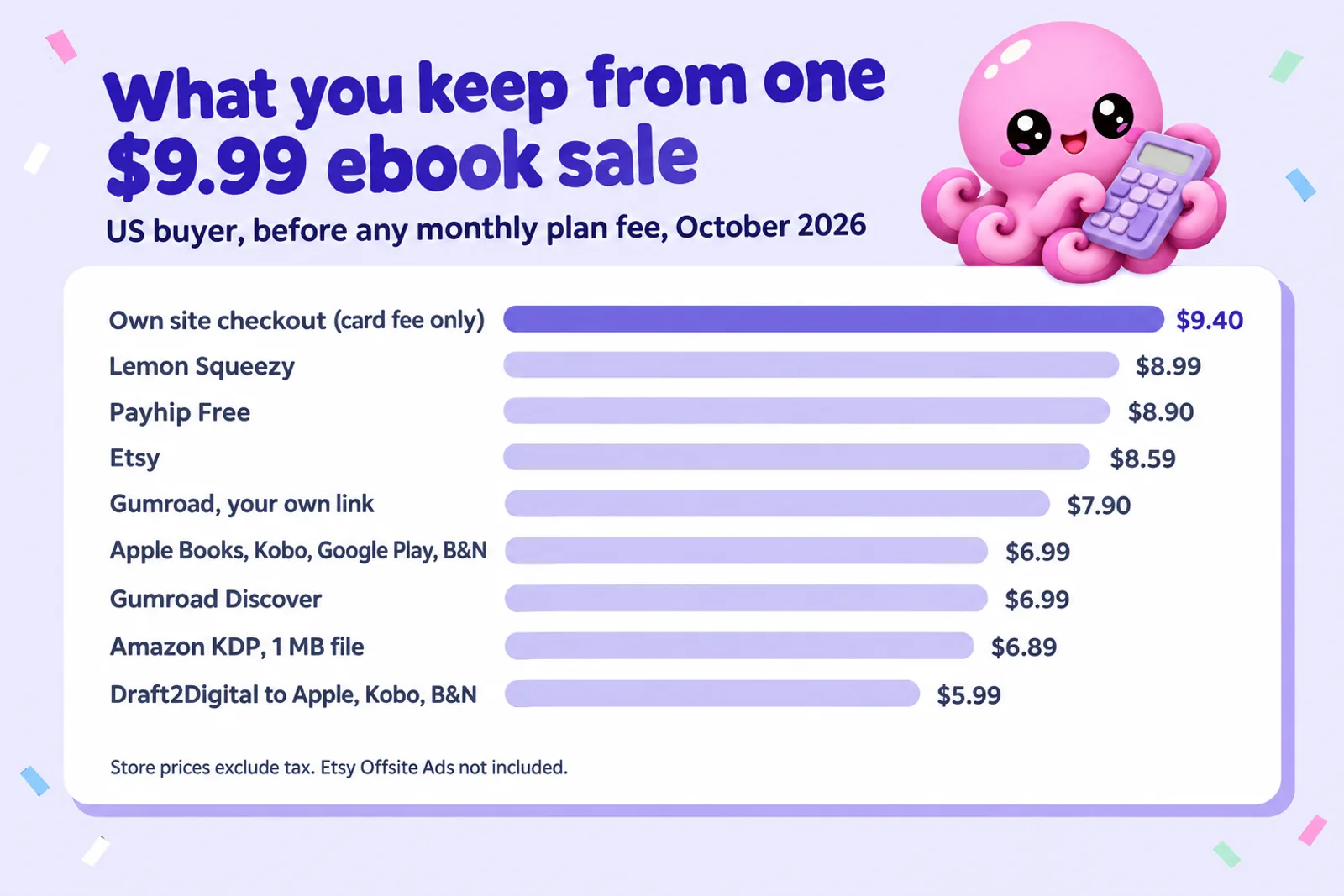
Sell a book people read (a novel, a how-to, a memoir) where readers browse: Amazon KDP first, then Apple Books, Kobo, Google Play Books and B&N Press unless you choose KDP Select. Sell pages people print or fill in (workbooks, planners, colouring pages) as a PDF on Etsy. Once you have an email list or a following, sell direct through Payhip, Gumroad, Lemon Squeezy or your own site, which keeps more of each sale and gives you the buyer's email. On a $9.99 ebook, the stores pay about $6.89 to $6.99, Etsy leaves about $8.59 and a direct checkout $7.90 to $9.40.
Checked on 28 October 2026. Fees come from each company's own pricing or help pages, read that day and listed in Sources. Money examples are for a US buyer in US dollars, before sales tax or VAT. Where a company's page could not be read or did not say, we tell you so instead of guessing.
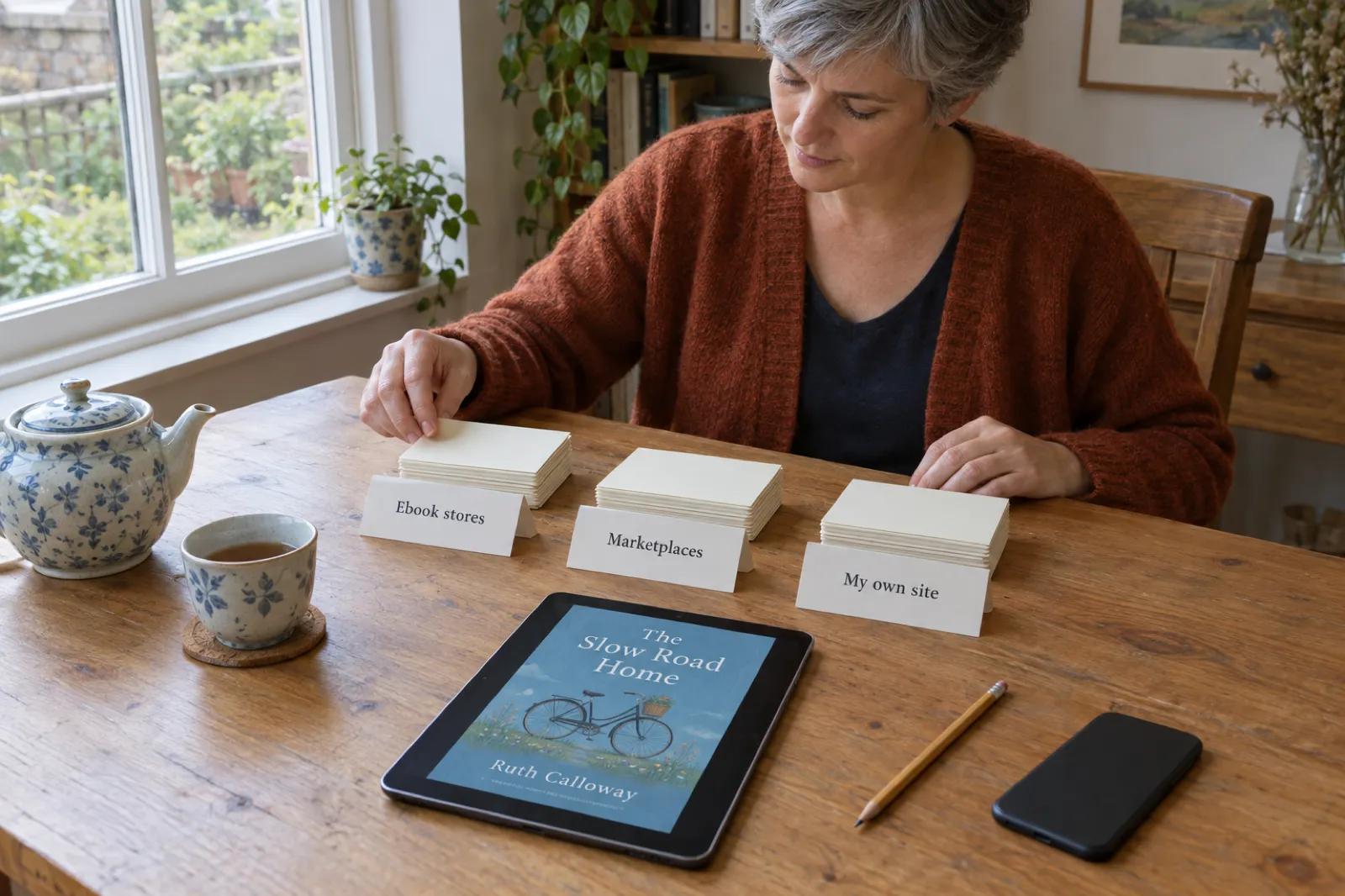
"Where should I sell my ebook?" has three honest answers, and most authors who earn steadily use more than one. You can sell through ebook stores, where readers already shop on their phone or e-reader. You can sell through marketplaces and checkout platforms, which handle the payment and the download while you set the price. Or you can sell from your own site and newsletter, to people who already know your name. Each route pays differently, attracts different buyers and suits different kinds of book.
This guide puts every major option side by side, works out what you keep from a real sale, and ranks the channels for your book with a picker. For store-by-store setup, follow the deep dives we link, starting with how to publish an ebook beyond Amazon.
Disclosure: Inkfluence AI is our product. It writes books, exports the files these channels take, and publishes straight to your own Etsy shop or Gumroad account. We have tried to say plainly where it helps and where it doesn't, and nothing below depends on you using it.
The three routes, compared in one table
"You keep" is what one $9.99 sale to a US buyer leaves you, before any monthly plan fee. Store figures are a share of the list price before tax. Marketplace and checkout figures take off the platform's own fee and, where the platform does not include it, card processing of 2.9% + $0.30, the standard US rate that Sellfy and Shopify both quote.
| Channel | What it charges | You keep on $9.99 | Who buys there | Files | Best for |
|---|---|---|---|---|---|
| Route 1: ebook stores and aggregators | |||||
| Amazon KDP | Pays 70% of the price minus a delivery charge ($0.15 a MB) from $2.99 to $12.99 on Amazon.com; 35% outside that band | $6.89 (1 MB file) | Kindle readers searching by genre and keyword; the largest ebook audience | EPUB, DOCX or KPF | Fiction, especially series; mainstream non-fiction |
| Apple Books | Pays 70% at every price, no delivery fee | $6.99 | iPhone, iPad and Mac readers in 51 countries and regions | EPUB | Fiction, romance, illustrated fixed-layout books |
| Kobo Writing Life | Pays 70% from $2.99 (45% below) | $6.99 | Kobo readers, strong in Canada, Europe and Japan; Kobo Plus subscribers | EPUB, DOCX, ODT, MOBI | Fiction, especially series and romance |
| Google Play Books | Pays 70% after you accept its updated terms (52% if you don't) | $6.99 | Android readers in 60+ countries | EPUB or PDF | Non-fiction, reference, international readers |
| B&N Press | Pays 70% of the retail price | $6.99 | NOOK and bn.com readers, mostly in the US | EPUB recommended, under 20 MB | Romance and genre fiction |
| Draft2Digital | Keeps about 10% of the retail price; $20 activation for new accounts | $5.99 at Apple, Kobo or B&N | The stores above (not Google Play), plus libraries and smaller shops | Word or EPUB | Authors who want one upload |
| PublishDrive | 0% commission; a monthly plan from $13.99 billed yearly, one ebook free to Apple, B&N and Kobo | $6.99 plus the plan | "Over 50 retailers", including Google Play | EPUB | Authors with several selling titles |
| Route 2: marketplaces and checkout platforms | |||||
| Etsy | $0.20 listing fee (renewed after each sale), 6.5% transaction fee, 3% + $0.25 processing in the US | $8.59 | Shoppers searching Etsy for printables, planners and gifts | Up to five files, 20 MB each | Workbooks, planners, colouring pages, recipe and craft guides |
| Gumroad | 10% + $0.50 per sale through your own link, plus card processing; 30% when its Discover marketplace finds the buyer; no monthly fee | $7.90 (own link), $6.99 (Discover) | Your followers and email list | Any file | Creators with an audience, bundles, pay-what-you-want |
| Payhip | Free plan 5%, Plus $29 a month and 2%, Pro $99 a month and 0%, plus PayPal or Stripe fees | $8.90 (Free plan) | Your list and site visitors | Digital downloads, with optional PDF stamping | Authors selling direct, especially to the UK and EU |
| Lemon Squeezy | 5% + $0.50 per sale, all in, as merchant of record; more on international and PayPal sales | $8.99 | Your audience | Digital downloads | Sellers who want tax handled for them |
| Stan Store | $29 a month ($300 a year), 0% transaction fee, Stripe or PayPal processing | $9.40 before the plan | Followers clicking a link in your social bio | Digital products | Social media creators selling guides and templates |
| Sellfy | $29 a month ($22 billed yearly) up to $10,000 sales a year, 0% transaction fee, processing on top | $9.40 before the plan | Your audience | Digital products | A small storefront for several products |
| Shopify | Basic $39 a month ($29 billed yearly), 2.9% + $0.30 online card rate | $9.40 before the plan | Visitors to your own branded store | Any file through a downloads app | Authors who also sell print copies or merchandise |
| Route 3: your own site and newsletter | |||||
| Your site + a checkout + BookFunnel | The checkout's fee plus BookFunnel from $200 a year for sales delivery | Depends on the checkout | Readers who already know you | EPUB, MOBI and PDF delivered to any device | Series fiction authors with a mailing list |
| Substack (paid newsletter) | 10% of subscription revenue plus Stripe fees | Not a per-book sale | Paying subscribers | Posts; the ebook as a bonus | Non-fiction writers building a paid list |
Sources for every row are listed at the end. Kindle figure: 70% of ($9.99 minus $0.15 delivery for a 1 MB file). Gumroad deducts card processing of 2.9% + $0.30 on top of its 10% + $0.50; Etsy Offsite Ads (15%, or 12% for shops over $10,000 a year) apply only to sales its ads bring in and are left out.
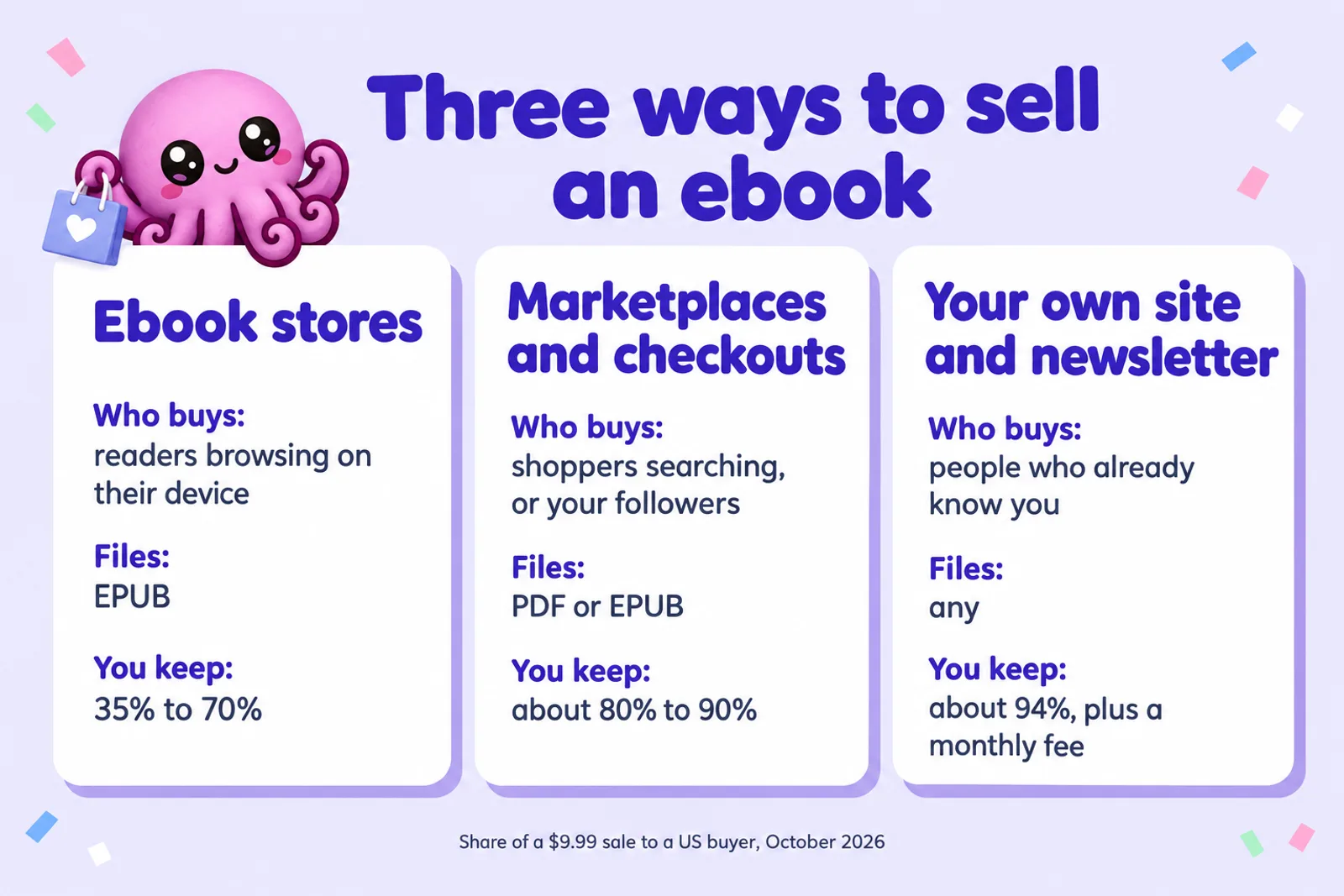
Three things in that table decide most authors' choice. First, the big ebook stores all pay about the same 70%, so between them you are choosing readers, not royalties. Second, direct platforms keep you 79% to 94% of a $9.99 sale, but none of them sends you many buyers on its own; Etsy is the exception, and only for certain kinds of product. Third, KDP Select changes the whole board: if you enrol, the ebook can't be sold anywhere else, including your own site.
Picker: where should I sell this ebook?
Answer five questions and the picker ranks the channels for your book, with what one sale leaves you at your price. Monthly plans are spread across the copies you expect to sell, so a $29 plan costs $1.45 a sale at 20 copies and $0.29 at 100. The constants are the same ones in the table above, and the line under the results says where each comes from.
Every channel at your price
| Channel | Per sale | After monthly plan | Status |
|---|
Constants, checked 28 Oct 2026, US buyer, before tax. KDP: 70% of (price minus $0.15 delivery for a 1 MB file) from $2.99 to $12.99, else 35% (KDP pricing and royalty help). Apple, Google Play (updated terms), B&N Press: 70%. Kobo: 70% from $2.99, 45% below. Draft2Digital: about 60% at Apple, Kobo and B&N. PublishDrive: 70% at Apple and B&N, first ebook on its free plan, $13.99 a month after that (billed yearly). Etsy: 6.5% + 3% + $0.25 + $0.20 listing renewal. Gumroad: 10% + $0.50 + card 2.9% + $0.30. Payhip Free: 5% + card. Lemon Squeezy: 5% + $0.50. Stan Store $29, Sellfy $29, Shopify Basic $39 a month, each with card 2.9% + $0.30. Fit scores are our editorial judgement of who buys where, not sales data.
Make the files for these channelsTwo typical results. A first novel at $4.99 with no audience and "not sure" on exclusivity ranks Amazon KDP first, then Apple Books, Kobo and B&N: reading books sell where readers browse. A budgeting workbook at $12 as a PDF with no audience ranks Etsy first by a distance, because Etsy's buyers are searching for exactly that and a PDF suits them. Switch the audience to 1,000 or more and Payhip, Gumroad and Lemon Squeezy climb, because every sale you send them keeps more money and the buyer's email.
Get the files every one of these channels takes
Inkfluence AI writes your book chapter by chapter, then exports a reflowable EPUB, a printable PDF, a Word file and KDP print files from the same project. Start free and see your first chapters today.
Start my book freeRoute 1: ebook stores and aggregators
Ebook stores are where readers who already own a Kindle, a Kobo or a phone go to find their next book. You upload once, set a price, and the store handles payment, delivery to every device, refunds and tax. You don't get the buyer's email, and you agree to the store's rules on price, content and AI. In return you get something no other route gives you: strangers finding your book without you having to send them.
Amazon KDP
Most self-published ebooks are sold here. On Amazon.com KDP pays 70% of the list price, minus a delivery charge of $0.15 a megabyte, for prices from $2.99 to $12.99 (the top of that band moved up from $9.99 on 7 July 2026), and 35% outside it. A 1 MB ebook at $4.99 earns $3.39 a sale and at $9.99 earns $6.89. KDP pays about 60 days after the end of the month in which the sale is reported, and takes EPUB, Word files or Kindle Create's KPF; it stopped taking MOBI in March 2025. Our KDP royalties guide has the full rules and the KDP selling guide walks through a listing.
The big decision on Amazon is KDP Select. Enrol and the ebook goes into Kindle+ (until 22 October 2026, Kindle Unlimited), where you are paid per page read from a monthly fund. The price is exclusivity: for each 90-day term the digital edition can't be sold or given away anywhere else, and Amazon names your own website and blog in that. Print editions are not covered. Kindle+ for authors covers what changed this month, and KDP Select vs wide sets out the choice.
Apple Books, Kobo, Google Play Books and B&N Press
Selling outside Amazon is called going wide, and the four big stores pay the same headline rate. Apple Books pays 70% at every price in 51 countries and regions and pays within 45 days of month end. Kobo Writing Life pays 70% from $2.99 (45% below), 45 days after month end once you pass CAD $50, and its Kobo Plus subscription needs no exclusivity. Google Play Books pays 70% once you accept its updated terms (52% otherwise), takes PDF as well as EPUB, and pays on the 15th for the previous month. B&N Press pays 70% of the retail price on NOOK and bn.com. None of the four requires an ISBN for an ebook.
We won't repeat the setup here: each has a step-by-step guide. See how to publish on Apple Books, how to publish on Kobo, how to publish on Google Play Books and the B&N Press guide.
Aggregators: Draft2Digital and PublishDrive
An aggregator takes one upload and delivers it to many stores and libraries, then pays you from one dashboard. Draft2Digital keeps about 10% of the retail price, which leaves you 60% at Apple, Kobo and B&N; since April 2026 new accounts pay a one-time $20, and accounts earning under $100 in a year pay $12 a year. It does not list Google Play. PublishDrive takes no commission and charges a monthly plan instead, with one ebook free to Apple, B&N and Kobo. Our Draft2Digital review and Draft2Digital vs PublishDrive compare them, and the aggregators are also the easiest way into libraries.
A common setup is direct to KDP, Apple, Kobo and Google Play, where the extra 10% is worth the four logins, and an aggregator for libraries and smaller shops. The wide publishing hub has an earnings comparer for that decision.
Route 2: marketplaces and checkout platforms
These platforms sell digital files directly to the buyer. You set any price, the platform takes the payment and sends the download, and in most cases you get the customer's email. They split into two kinds. Marketplaces have their own shoppers: Etsy is the one that matters for ebooks and printables, and Gumroad has a smaller marketplace called Discover. Checkouts (Payhip, Lemon Squeezy, Stan Store, Sellfy, Shopify and Gumroad's own links) bring you no buyers: they turn the people you send into sales.
Etsy
Etsy is the one marketplace where an ebook can sell to strangers without an audience, as long as it is the kind of thing Etsy shoppers search for: workbooks, planners, journals, printable colouring pages, recipe collections, craft and budgeting guides. Its fees, from its own fee page: a one-time shop setup fee that varies by country, $0.20 to list (charged again after each sale and when the listing renews every four months), 6.5% of the order and payment processing, which is 3% + $0.25 in the US. That leaves $8.59 from a $9.99 sale. If a buyer arrives through Etsy's Offsite Ads you pay 15% on that order (12% once your shop passes $10,000 a year). A digital listing holds up to five files of 20 MB each, and buyers download straight after paying.
Etsy allows AI-made digital downloads with disclosure, and tightened the rules on 22 October 2026: bot-generated listings are banned and AI-written recipes, patterns and instructions are not allowed. Read what changed for digital sellers before you list. For the how-to, see selling ebooks on Etsy and how to sell AI-generated books on Etsy; for what shops really earn, how much you can make selling printables.
Gumroad
Gumroad charges no monthly fee. Its pricing page lists 10% + $0.50 on every sale through your profile or your own links, and 30% when a new customer finds you through its Discover marketplace. Card processing comes off as well, which on a $9.99 sale leaves about $7.90. Since 1 January 2025 Gumroad says it handles all your sales tax obligations, which matters if you sell to buyers in many countries. It allows free and pay-what-you-want products, which makes it a natural home for a lead magnet or a "name your price" launch. It is a checkout first: expect most buyers to come from your own email list, posts and links. See selling ebooks on Gumroad, and Gumroad vs Amazon KDP if you are choosing between the two.
Payhip
Payhip is the cheapest way to start selling direct on most numbers. The Free Forever plan costs nothing a month and takes 5% per sale; Plus is $29 a month and 2%; Pro is $99 a month and nothing per sale. PayPal and Stripe charge their standard rates on every plan, so a $9.99 sale on the free plan leaves about $8.90. Payhip handles UK and EU VAT and, since July 2026, US and Canadian sales tax for you, takes payment through PayPal or Stripe, and can stamp the buyer's email onto each PDF to discourage sharing. Plus pays for itself against the free plan once you sell about $1,000 a month, and Pro beats Plus once you sell about $3,500 a month.
Lemon Squeezy
Lemon Squeezy charges 5% + $0.50 per sale with no monthly fee, and that figure already includes card processing, so $9.99 leaves $8.99. Its fee page adds 1.5% for sales outside the US and 1.5% for PayPal payments. It acts as the merchant of record: legally it sells the ebook to the buyer and then pays you, so it collects and pays VAT and sales tax worldwide. That is worth more than the fee difference if you sell to many countries and don't want to register for tax anywhere.
Stan Store, Sellfy and Shopify
These three charge a monthly plan and take no cut of the sale, so you pay only card processing per order. Stan Store is built for creators selling from the link in their social bio: Creator is $29 a month or $300 a year, Creator Pro $99 a month, with a 14-day trial. Sellfy is a simple storefront: Starter is $29 a month, or $22 billed yearly, for up to $10,000 of sales a year. Shopify Basic is $39 a month, or $29 billed yearly, with an online card rate of 2.9% + $0.30, and sells ebooks through a downloads app; our Shopify guide for authors explains the setup.
A flat monthly fee is cheap at volume and expensive at the start. On a $9.99 ebook, a $29 plan saves you about $0.50 a sale over Payhip's free plan, so it only comes out ahead at around 58 copies a month. Pick one of these when you already sell enough, or when the platform's other features (social selling for Stan, print copies and merchandise for Shopify) are the reason.
Ko-fi, Podia, Big Cartel and others sell digital downloads too. For Ko-fi's fees, memberships and tax position, see our Ko-fi for authors guide. Compare any of them the same way: fee per sale at your price, monthly charge, who handles tax, and whether you get the buyer's email.
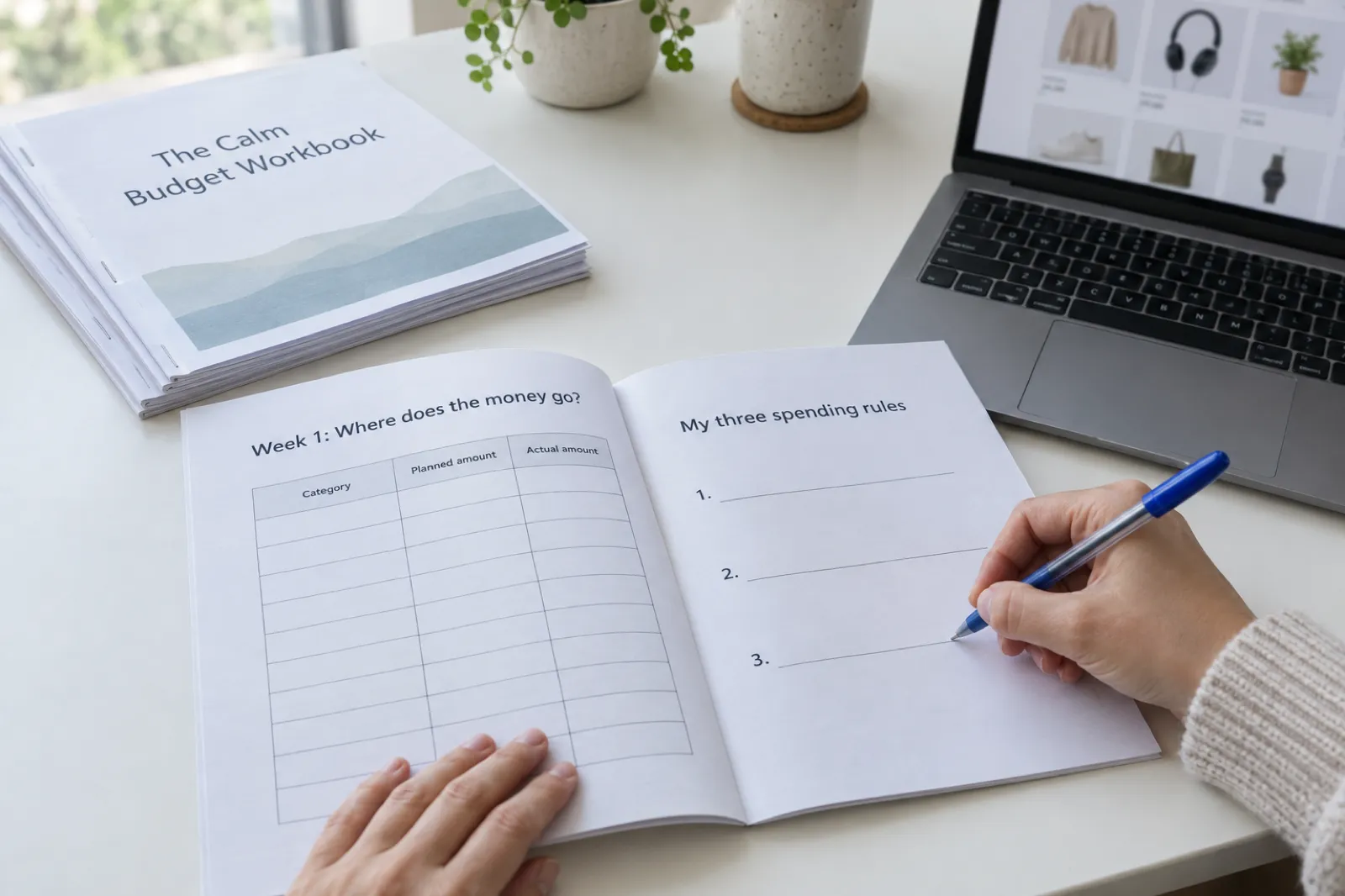
Turn your expertise into a workbook buyers can print
Describe your topic and Inkfluence AI drafts a workbook or planner with exercises in each chapter, then exports a print-ready PDF. On Creator or Premium it lists the finished book in your own Etsy shop or Gumroad account for you.
Create my workbookRoute 3: your own site and newsletter
Selling from your own site means the buyer pays through a checkout you control, on a page with your name on it. It does not mean building payment software: almost everyone uses one of the checkouts above (Payhip, Lemon Squeezy and Gumroad all give you a buy button or a page to link) and spends their effort on getting readers to the page.
Delivering ebooks to readers' devices
The awkward part of selling an EPUB direct is getting it onto the reader's Kindle or phone. BookFunnel solves that: it delivers watermarked EPUB and MOBI files plus PDF extras with device-by-device instructions and its own reading app, and connects to Gumroad, Lemon Squeezy, Payhip, Shopify, Stripe, Square, WooCommerce and several other checkouts. Its pricing page lists First-Time Author at $30 a year (500 downloads a month, no sales delivery), Mid-List Author at $200 a year (5,000 downloads, sales delivery included) and Bestseller at $300 a year. Fiction authors selling series direct usually treat it as part of the cost of the route.
Newsletters and Substack
Your email list is the engine of this route, and the classic use of an ebook here is as a lead magnet: a free short guide or a prequel novella given in exchange for an email address, which then sells the next book. Our lead magnet generator and guide to lead magnets that convert cover the format, and making an opt-in ebook for your newsletter shows the quick version.
Substack is a different model. It doesn't sell single ebooks; it sells subscriptions to a newsletter. Substack's help page lists a 10% fee on subscription revenue, with Stripe's card and billing fees on top. Writers use it to sell an ebook indirectly, as a bonus for paying subscribers or by serialising a book chapter by chapter. If you already write a newsletter there, an ebook is a strong reason to upgrade; if you just want to sell a book, a checkout is simpler.
A direct sale is worth more than its margin: you get an email for the next launch, you can bundle a series or run a sale whenever you like, and no store can delist you overnight. The catch is that nobody browses into your website, so most authors start in the stores or on Etsy and add a direct shop once a list exists. To see what that could earn, try the ebook income calculator or read making money selling ebooks.
EPUB or PDF: which file each channel wants
The file you sell decides half the routes for you. EPUB is the standard ebook format: text reflows to fit any screen, the reader can change the font size, and every ebook store reads it. PDF keeps a fixed page, which is right for things people print or need laid out exactly, and wrong for reading a novel on a phone. Our ebook formats explainer covers the detail.
| Channel | EPUB | What to send | |
|---|---|---|---|
| Amazon KDP | Yes | Accepted only in some languages and converts poorly | EPUB or Word; a print-ready PDF for the paperback |
| Apple Books, Kobo, B&N Press | Yes (Apple requires it to pass EPUBCheck) | No | EPUB |
| Google Play Books | Yes | Yes | EPUB, plus PDF for fixed layouts |
| Etsy, Gumroad, Payhip, Lemon Squeezy | Yes | Yes | PDF for printables; both for reading books |
| Your site with BookFunnel | Yes, watermarked | As extras | EPUB, with PDF bonuses |
On the direct platforms you can offer both, and many buyers like that: an EPUB to read on a Kindle, a PDF to print the worksheets. Before uploading an EPUB to Apple, run it through EPUBCheck, as you would any file.
AI rules in one paragraph each
If AI helped write your book, the rules differ more than the royalties do. Our full, sourced table is in which stores allow AI-written books in 2026. In short:
- Amazon KDP asks you to disclose AI-generated text, images and translations when you publish; AI-assisted work (your text, edited with AI tools) needs no disclosure. Details: KDP's AI disclosure policy.
- Apple Books wants the "AI Generated by" contributor role and a line in the description when a material portion is AI-generated. B&N Press asks AI-Created or AI-Assisted at setup.
- Kobo lists "Wholly or partially AI generated" among common rejection reasons. Draft2Digital refuses books generated entirely by AI without extensive human editing. Google Play has no AI-specific rule, only quality rules.
- Etsy allows AI-made digital downloads if you tick "With an AI generator" and play a real creative part. Gumroad bans selling AI services and reselling private label rights products, and has no rule against AI-assisted ebooks; Payhip's list of banned products doesn't mention AI.
Whatever the rule, the books that last on any channel are the ones a person has shaped and checked. Kobo's chief executive said most of its 2025 rejections were books judged manifestly AI-generated and of very poor quality, which is a quality bar, not a ban on tools.
The best channels for each kind of book
| Book | Start here | Add next | Why |
|---|---|---|---|
| Genre fiction and series | Amazon KDP (Select or wide) | If wide: Apple, Kobo, B&N, Google Play; later your own store with BookFunnel | Fiction readers buy where they read, and series read-through rewards being everywhere or all-in on Kindle+ |
| Non-fiction to read (how-to, self-help, business) | Amazon KDP | Google Play and Apple; Payhip or Gumroad once you have a list | Search on Amazon brings buyers; your own audience pays more per copy |
| Workbooks, planners, journals, printables | Etsy as a PDF | Gumroad or Payhip; a KDP paperback edition | People buy these to print and write in; Etsy shoppers search for them |
| Picture books and colouring books | Amazon KDP paperback; Etsy for printable colouring pages | Apple Books for fixed-layout picture books | Parents mostly buy picture books in print; colouring pages sell as printables |
| Lead magnets and free guides | Your newsletter, delivered by Gumroad at $0 or BookFunnel | A free listing on Apple, Kobo or Google Play | The point is the email address, not the sale |
| Audiobooks | See where to sell an AI audiobook | Google Play and Kobo accept labelled AI narration | Audible's ACX does not take AI narration |
There are dedicated selling guides for several of these: romance novels, workbooks, colouring books and children's books. If you haven't picked a topic yet, digital product ideas and the best ebook niches on Etsy start from what buyers look for, and our study of what 100,000 writers made shows what people actually build.
Combining routes without breaking KDP Select
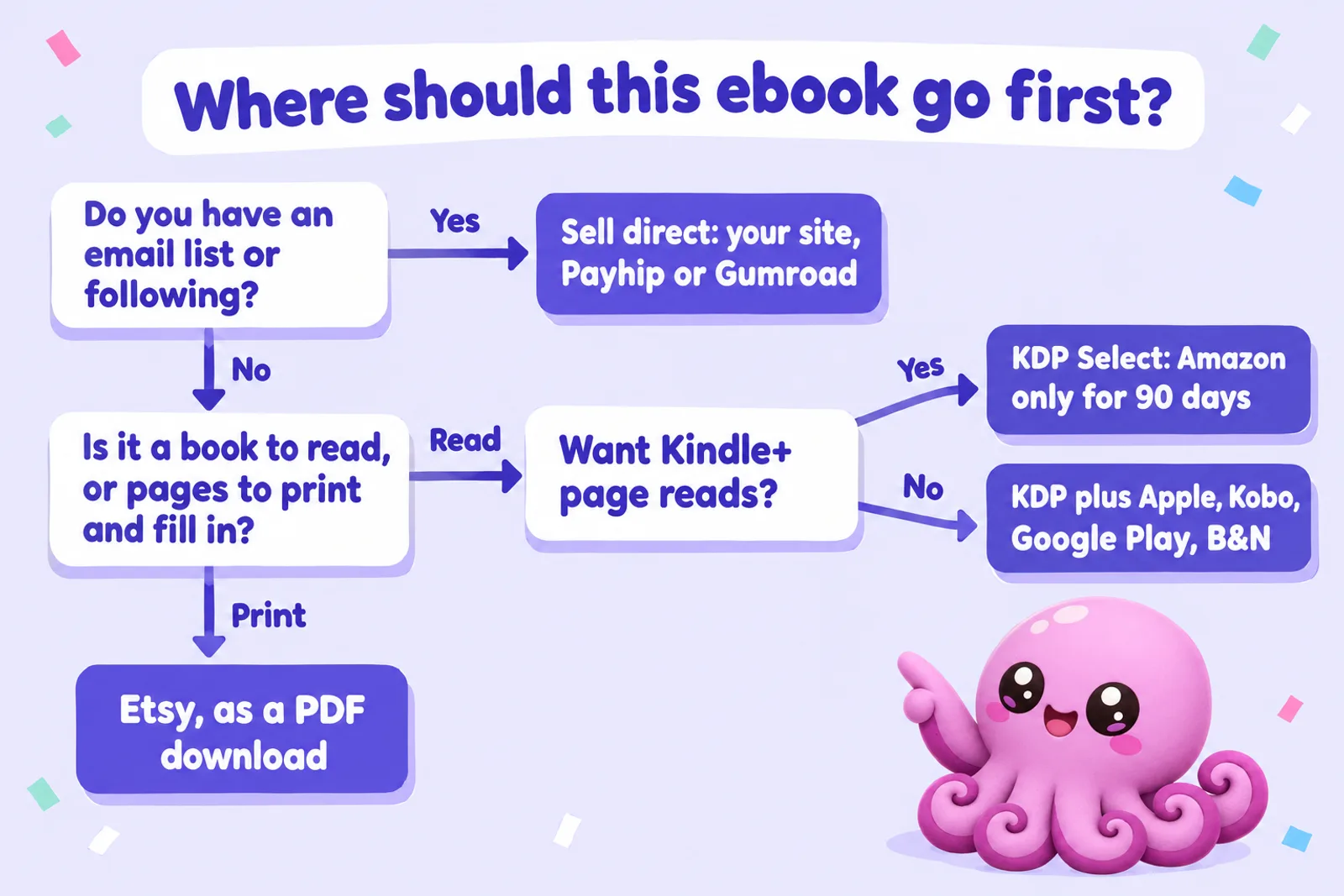
The routes stack well, with one rule to respect. If the ebook is in KDP Select, its digital edition can't be on Apple, Kobo, Google Play, Etsy, Gumroad, your own site or anywhere else for the 90-day term, and the term renews automatically unless you untick it. What you can still do:
- Sell the paperback anywhere: print editions are outside the exclusivity.
- Sell a different product direct: a companion workbook, a printable planner, a bonus short story, a bundle of extras.
- Leave Select at the end of a term and go wide later, or keep one book in Select and another wide.
Outside Select there is nothing to stop you selling the same ebook in every channel at once, and many authors do: the stores for discovery, Etsy for the printable edition, a direct shop for readers who want to buy from them. Keep the title, description and price consistent, and remember that KDP's pricing rules ask that your Kindle price is not higher than the same book elsewhere. Before a big launch, check the timing too: our KDP Christmas deadlines page has this year's dates.
Tax, VAT and getting paid
Who collects the tax is one of the biggest practical differences between the routes, and the one people discover last.
- Ebook stores sell to the reader themselves and handle sales tax and VAT. You give them tax forms; they send you royalties. KDP pays about 60 days after month end, Apple within 45 days, Kobo 45 days after month end once you pass CAD $50, and Google on the 15th for the previous month. Draft2Digital pays around the 15th of each month once you pass $10.
- Merchant-of-record platforms (Lemon Squeezy, and Gumroad, which says it handles all sales tax since 2025) sell on your behalf and deal with the tax. Payhip handles UK and EU VAT and, since 1 July 2026, US and Canadian sales tax (not Quebec QST), and Etsy collects sales tax in most regions.
- Monthly-fee platforms and your own store (Stan Store, Sellfy, Shopify) make you the seller. Digital products carry VAT for buyers in the UK and EU, so read up on what applies to you before you sell to those countries.
Payouts on the direct platforms go to your bank or PayPal on each platform's schedule, which varies by country. None of this is tax advice; if your sales grow, an accountant who knows digital products is money well spent.
Where Inkfluence AI fits
Inkfluence AI is a book writer, not a store or a distributor. What it does for this guide's three routes:
- Write or import the book. Draft chapter by chapter from your idea or outline, or import a Word, EPUB or PDF manuscript. Length is set by how many chapters you plan, at roughly 1,000 to 1,500 words a chapter.
- Export for every channel. From the Export button: PDF, EPUB, DOCX and KDP print files (an interior and a full-wrap cover sized to your trim). The free plan exports PDF with a branding page; EPUB, Word and KDP files come with any plan or credit pack. The exporting help lists every option. It makes print-ready files; it does not print or ship books.
- Publish to Etsy and Gumroad from the app. On Creator or Premium, the Publish button sends a finished book to your own Etsy shop or Gumroad account with the title, description, tags, price and cover filled in, and the files you choose: PDF (the default), EPUB or both. Gumroad products go live on your account; Etsy listings arrive as drafts, so you tick "With an AI generator" on Etsy and publish them yourself. Step by step: selling help.
- A free showcase page. Every plan can put the book on a public book page with a free chapter, and when the book is also on Gumroad, Etsy or Amazon the page shows a button for each.
For Amazon KDP, Apple Books, Kobo, Google Play and B&N you upload the exported files yourself; Inkfluence doesn't submit to those stores. Plans are $9.99 a month for Creator and $19.99 for Premium, or $89 and $179 a year; see pricing for what each includes.
Write it once, sell it on every route
Start a book free in Inkfluence AI. When it is ready, export the EPUB for the stores, the PDF for Etsy and your own shop, and the KDP files for the paperback, or publish to Etsy and Gumroad without leaving the app.
Write my ebookWhere to sell ebooks: FAQ
Where is the best place to sell an ebook in 2026?
It depends on the book and on whether you have an audience. For novels and most non-fiction read on a device, Amazon KDP is the biggest single store, and Apple Books, Kobo, Google Play Books and B&N Press add more readers if you stay out of KDP Select. For workbooks, planners and other printable PDFs, Etsy brings buyers who are already searching. If you have an email list or a following, selling direct through Payhip, Gumroad or your own site keeps the most money and the customer's email.
Is it better to sell an ebook on Amazon or on my own website?
Amazon brings the readers; your own site keeps the money and the relationship. On a $9.99 ebook KDP pays about $6.89 (70% after a delivery charge for a 1 MB file), while a direct checkout leaves about $8.90 on Payhip's free plan or $9.40 after card fees alone on a monthly-fee platform. Your own site only beats Amazon once you can send people to it, so most authors use both, unless the ebook is in KDP Select.
Can I sell the same ebook on Amazon and Etsy or Gumroad at the same time?
Yes, if the ebook is not enrolled in KDP Select. KDP Select requires the digital edition to be exclusive to Amazon for each 90-day term, and Amazon says that includes your own website and blog. Outside Select you can sell the same ebook on Amazon, Etsy, Gumroad, Payhip and your own site at once. Print editions are not covered by the exclusivity.
What is the cheapest platform to sell ebooks on?
Per sale, a 0% platform with only card processing (about 2.9% + $0.30) keeps the most, but Stan Store, Sellfy and Shopify charge $29 to $39 a month. At low volume Payhip's free plan (5% plus processing) or Lemon Squeezy (5% + $0.50, all in) usually costs less overall. On a $9.99 ebook a $29 monthly plan only beats Payhip Free once you sell about 58 copies a month.
Should I sell my ebook as a PDF or an EPUB?
EPUB for books people read on an e-reader or phone: it reflows to any screen and the big ebook stores require it or prefer it. PDF for anything people print, fill in or need in a fixed layout, such as workbooks, planners, colouring pages and recipe cards. On Etsy, Gumroad and Payhip you can offer both, which suits buyers who want to read on a Kindle and print a worksheet.
Do I need an ISBN to sell an ebook?
Not for most routes. Amazon KDP gives ebooks its own ASIN, Apple Books does not require an ISBN, Kobo issues its own identifier and Google assigns a GGKEY. Etsy, Gumroad, Payhip and your own site need no ISBN at all. Buy your own if you want one number across every store or your own imprint name.
Which ebook platforms allow AI-written books?
Amazon KDP, Apple Books, B&N Press and Etsy allow them with disclosure. Draft2Digital refuses books generated entirely by AI without extensive human editing, and Kobo lists "Wholly or partially AI generated" among its common rejection reasons. Google Play has no AI-specific rule. Gumroad and Payhip publish no AI rule for ebooks. Our full table is in which stores allow AI-written books in 2026.
How do I sell an ebook with no audience?
Go where buyers already search. For reading books that means Amazon KDP and, if you are not in KDP Select, the other big ebook stores; for printables it means Etsy. Then use every sale to build a list: put a link to a free bonus or a newsletter sign-up in the back of the book, so the next book can sell direct.
Who handles sales tax and VAT when I sell an ebook directly?
It depends on the platform. Gumroad says it handles all sales tax collection and remittance since 1 January 2025, Lemon Squeezy acts as merchant of record, Payhip handles UK and EU VAT and, since 1 July 2026, US and Canadian sales tax (not Quebec QST), and Etsy collects sales tax in most regions. On Stan Store, Sellfy or your own Shopify store you are the seller, so check how VAT and sales tax on digital products apply to you. The ebook stores handle tax for their own sales.
Can Inkfluence AI publish my ebook to these stores?
Inkfluence AI publishes a finished book straight to your own Etsy shop (as a draft listing you check and publish) or Gumroad account on the Creator and Premium plans, with the files you choose: PDF, EPUB or both. For Amazon, Apple, Kobo, Google Play and B&N it makes the files (EPUB, PDF, DOCX and KDP print PDFs) and you upload them; it does not distribute, print or ship books.
Your first sale starts with a finished book
Pick a topic, set the chapters, and Inkfluence AI drafts the book with you. Edit it, export the files your channels need, and list it the same day.
Open my dashboardSources
Read on 28 October 2026 unless noted. Store figures for Apple, Kobo, Google Play, B&N Press, Draft2Digital and PublishDrive come from the same pages, read the same day, as our wide publishing hub, which lists each one.
- KDP: eBook Royalties, List Price Requirements and Digital Book Pricing (70% band $2.99 to $12.99, $0.15 a MB delivery)
- KDP: When will I get paid? (about 60 days after month end)
- KDP: Supported eBook manuscript formats (DOC/DOCX, KPF, EPUB; PDF in some languages; no MOBI since 18 March 2025)
- KDP Select (90-day terms; digital exclusivity includes your website and blog; print not covered)
- Etsy Help: Etsy fees ($0.20 listing, 6.5% transaction, Offsite Ads 15% or 12%, setup fee by location) and Etsy Fees & Payments Policy (US processing 3% + $0.25; the page blocks automated reading, figure as checked 10 October 2026)
- Etsy Help: How to manage your digital listings (up to five files, 20 MB each)
- Gumroad: Pricing (10% + $0.50 direct, 30% Discover, no monthly fee, tax handled since 1 January 2025) and prohibited products
- Payhip: Pricing and Sell ebooks (5% / 2% / 0% plans, UK and EU VAT, PDF stamping)
- Lemon Squeezy: Pricing and fees (5% + 50 cents, merchant of record, +1.5% international, +1.5% PayPal)
- Sellfy: Pricing (Starter $29, or $22 billed yearly; 0% transaction fee; processing typically 2.9% + 30 cents)
- Stan Store: Pricing (updated 22 July 2026; Creator $29 a month or $300 a year, 0% transaction fees, 14-day trial)
- Shopify: Pricing (US: Basic $39 a month or $29 billed yearly, 2.9% + 30 cents online)
- BookFunnel: Pricing and Features (plans, direct sales integrations, file types)
- Substack: How much does Substack cost? (10% of subscription revenue plus Stripe fees)
- Apple Books for Authors, Kobo Writing Life: What will my earnings be?, Google Play Books: revenue split, B&N Press: Royalty and payment terms, Draft2Digital FAQ, PublishDrive pricing plans
Related reading
- How to Publish Your Ebook Beyond Amazon (2026)
- Which Stores Allow AI-Written Books in 2026
- Selling direct: Payhip (and the Payhip fee calculator), Payhip vs Gumroad, Lemon Squeezy, Sellfy, Stan Store and Ko-fi
- Etsy vs Gumroad for Ebook Sellers and Payhip vs Etsy for digital products
- How to Price an Ebook and the royalty calculator
- Do You Need an ISBN?
- How to Sell Your Ebook
- How to Publish AI-Generated Books on KDP
- AI Ebook Generator and Workbook Generator

Founder, Inkfluence AI
Sam is the founder of Inkfluence AI. He built the platform to make book creation accessible to everyone - from first-time authors to seasoned publishers.
Helpful links

Ready to write your own book?
Write with AI, make it yours, and export PDF, EPUB and KDP-ready files from one project.
Keep reading
 Selling
 How to Sell Ebooks on Lemon Squeezy in 2026: Fees, Tax and Setup
Selling an ebook on Lemon Squeezy in 2026, from its own pricing page and help docs checked 28 October: the 5% + $0.50 fee and every extra, tax handled as merchant of record, payouts, store approval, what you cannot sell, what Stripe's ownership and Managed Payments mean for new sellers, a step-by-step setup and a calculator against Payhip and Gumroad.
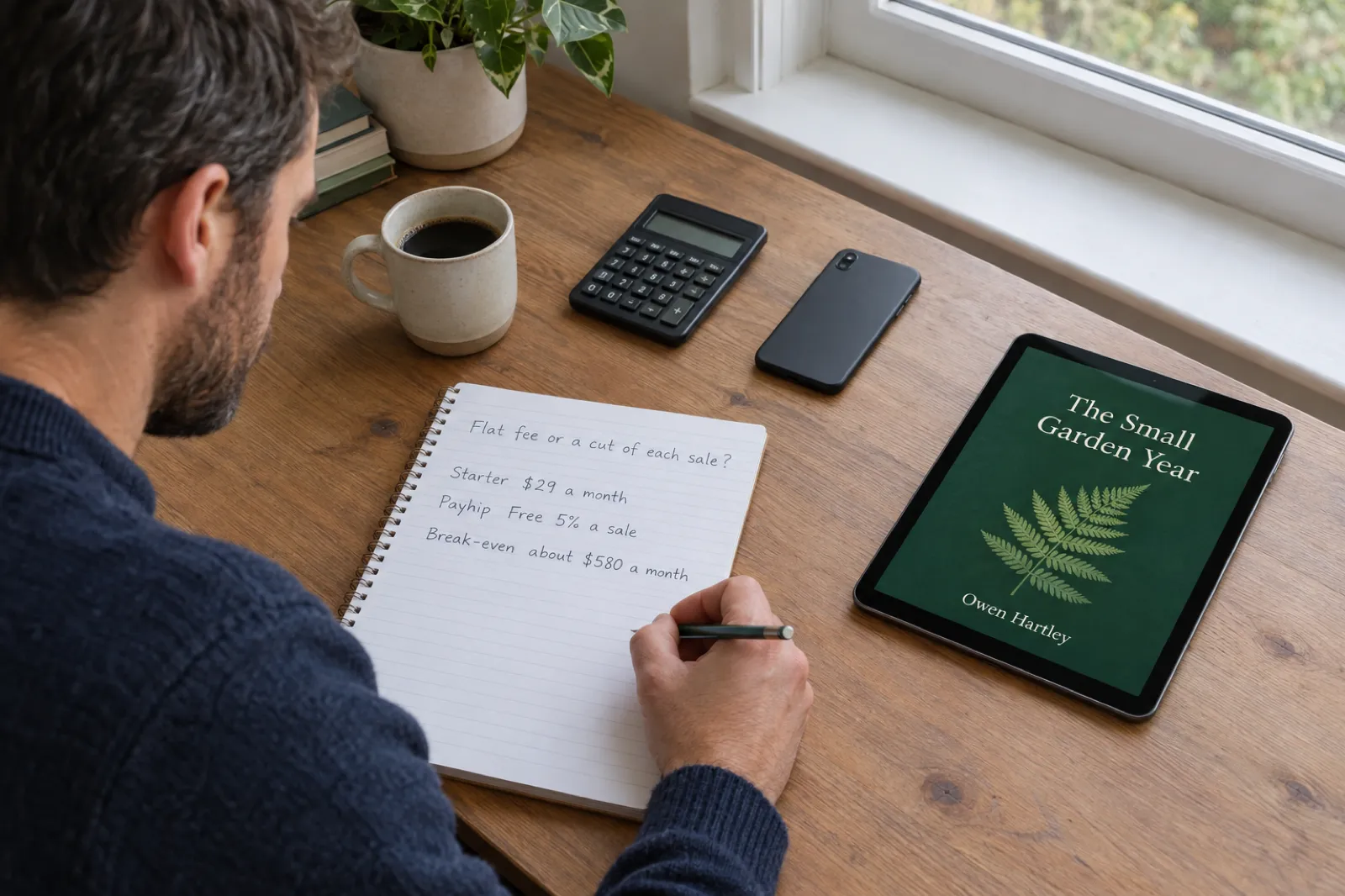 Selling
 How to Sell Ebooks on Sellfy in 2026: Plans, Fees and Is It Worth It
Sellfy charges a flat monthly plan and 0% per sale, with no free plan and a sales cap on every tier. Here is what each plan costs and includes, how tax, delivery and PDF stamping work, a step-by-step setup for an ebook, and a calculator that shows when Sellfy beats Payhip, Gumroad and Lemon Squeezy at your own sales.
 Selling
 Ko-fi for Authors (2026): Selling Ebooks, Memberships and Commissions Through Ko-fi Shop
Ko-fi for writers, checked against Ko-fi's own help centre on 28 October 2026: what the free plan and Ko-fi Gold really take, how tips, Ko-fi Shop, memberships and commissions work for authors, PayPal and Stripe fees, payouts, tax, the AI rule, discovery, a Ko-fi earnings calculator, and how it compares with Patreon, Payhip and Gumroad.

Get ebook tips in your inbox
Join creators getting weekly strategies for writing, marketing, and selling ebooks.