

Quick Answer
To publish an ebook beyond Amazon, take it out of KDP Select (or never enrol it), then either upload it direct to each store or send it through an aggregator. Direct pays more: Apple Books, Google Play Books and B&N Press pay 70% of list price, and Kobo pays 70% from $2.99 (45% below). Draft2Digital passes on about 60% at Apple, Kobo and B&N, adds smaller stores and libraries, does not list Google Play, and since April 2026 charges new accounts a $20 activation fee. No big wide store requires an ISBN for an ebook. The AI rules differ the most: Apple wants a label, B&N asks AI-Created or AI-Assisted, Draft2Digital refuses unedited AI books, Google has no AI rule, and Kobo lists AI-generated content among its common reasons for rejection.
Amazon sells most of the ebooks indie authors sell, but it is one shop. iPhone readers buy in Apple Books, much of Canada, Europe and Japan reads on Kobo, Android readers have Google Play Books, and libraries buy through OverDrive and Hoopla. Selling on all of them is called going wide, and in 2026 several of its rules changed: Draft2Digital added fees, Barnes & Noble added an AI question, Kobo is turning away a large share of submissions, and Kindle Unlimited became Kindle+.
This guide is the map. It compares every major store, aggregator and library route on what it pays, where it sells, what it takes, and what it says about AI, using each company's own help pages, read on 28 October 2026. For the step-by-step on the three biggest stores, we have separate deep dives: how to publish on Apple Books, how to publish on Kobo and how to publish on Google Play Books.
Disclosure: Inkfluence AI is our product. It writes books, exports the files these stores take, and makes audiobooks, so we have an interest in this topic. We say plainly below what our files can and can't do, and we don't sell, print or distribute books to any of these stores for you.
Published 28 October 2026. Every rate and rule below links to the page it came from in the Sources list at the end. Stores change terms often, so check the live page before you rely on a number.
What changed for wide authors in 2026
The changes that matter if you last read a going-wide guide a year or two ago:
| When | Who | What changed |
|---|---|---|
| 14 April 2026 | Draft2Digital | A one-time $20 activation fee for new accounts, and from 14 May a $12 annual fee for accounts earning under $100 in net book proceeds over 12 months. Draft2Digital said the aim is to curb automated content farms. |
| 22 April 2026 | B&N Press | No more public domain titles, and print books listed for sale must be priced at $14.99 or more. |
| 2026 (help page updated 6 May) | Kobo | "Wholly or partially AI generated" sits on Kobo's list of common rejection reasons. Kobo's chief executive said Kobo rejected 45% of Kobo Writing Life submissions in 2025, and attributed more than 80% of those rejections to books judged manifestly AI-generated and of very poor quality (reported by The Next Web, 26 June 2026). |
| 7 July 2026 | Amazon KDP | The 70% royalty band on Amazon.com now runs from $2.99 to $12.99, up from $9.99. Covered in our KDP royalties guide. |
| 22 October 2026 | Amazon | Kindle Unlimited became Kindle+ and added eligible audiobooks for US subscribers. KDP Select exclusivity is unchanged. See Kindle+ for authors. |
Two threads run through the list: stores are tightening up on mass-produced books, which helps authors who put real work into each title, and an aggregator now costs fixed fees as well as a commission.
Every store and aggregator compared
This is the table to keep open. "What you earn" is the share of the list price (before sales tax or VAT) you receive on an ebook sale. "AI-written books" and "AI narration" summarise each company's written rule; where we found none, we say so.
| Route | What you earn (ebook) | AI-written books | AI narration |
|---|---|---|---|
| Apple Books (direct)Reach: 51 countries and regionsFiles: EPUB that passes EPUBCheck; Apple also describes publishing from a Word documentISBN: Not required | 70% at every price; no delivery feeSubscription: None | Allowed with the "AI Generated by" role and a line in the description | Apple's own digital narration only |
| Kobo Writing Life (direct)Reach: "Over 190 countries", plus partner shopsFiles: EPUB, DOC, DOCX, ODT, MOBI; up to 100 MBISBN: Not required; some partner shops need one | 70% at $2.99 / £1.99 / €1.99 and up; 45% belowSubscription: Kobo Plus, opt in, no exclusivity, paid per minute | "Wholly or partially AI generated" is a common rejection reason | Accepted, narrator set to "Synthesised voice" |
| Google Play Books (direct)Reach: 60+ countries at 70%Files: EPUB or PDFISBN: Not required (Google assigns a GGKEY) | 70% of list price in 60+ countries once you accept the updated terms (52% if you don't)Subscription: None | No AI rule; quality rules apply | Accepted with a "Synthesized voice" narrator; free auto-narration too |
| B&N Press (direct)Reach: bn.com and NOOK; open to authors in the US and 11 other countriesFiles: EPUB recommended; ebook file under 20 MBISBN: Free ISBN offered for print only | 70% of the retail priceSubscription: None | Disclose AI-Created or AI-Assisted at setup | No audiobooks at all |
| Draft2Digital (aggregator)Reach: Apple, B&N, Kobo, Smashwords Store, Tolino, Vivlio, Everand, Bookshop.org, Gardners and libraries; Amazon by invitation; no Google PlayFiles: Word (DOC, DOCX), RTF, TXT; EPUB for ebooks; under 100 MBISBN: Free, but usable only through Draft2Digital | About 60% at Apple, Kobo and B&N at all prices; keeps about 10% of retail. $20 activation for new accountsSubscription: Kobo Plus and Everand | AI-assisted yes; entirely AI-generated without extensive human editing no | The request route for Apple digital narration; no published rule for AI audio made elsewhere |
| PublishDrive (aggregator)Reach: "Over 50 retailers and 240K libraries", including Google PlayFiles: EPUBISBN: Bring your own; no free ISBN mentioned on its pricing pages | 100% of store royalties, 0% commission; you pay a monthly plan instead (from $13.99 a month billed yearly; one ebook free to Apple, B&N and Kobo)Subscription: Depends on store | AI declaration is mandatory; its own table says OverDrive accepts only AI covers and Everand no AI content | Declared in contributor metadata; Apple and Audible take only their own AI narration |
| StreetLib (aggregator)Reach: "Over 50 bookstores", strong in EuropeFiles: Valid EPUB (must pass EPUBCheck), or build one in its Write appISBN: Not confirmed on its help pages | A share of what each store pays; its German help page says 70% of net revenue after VAT and store costsSubscription: Depends on store | May block AI or automated books that are "not correctly categorized" | No published rule found |
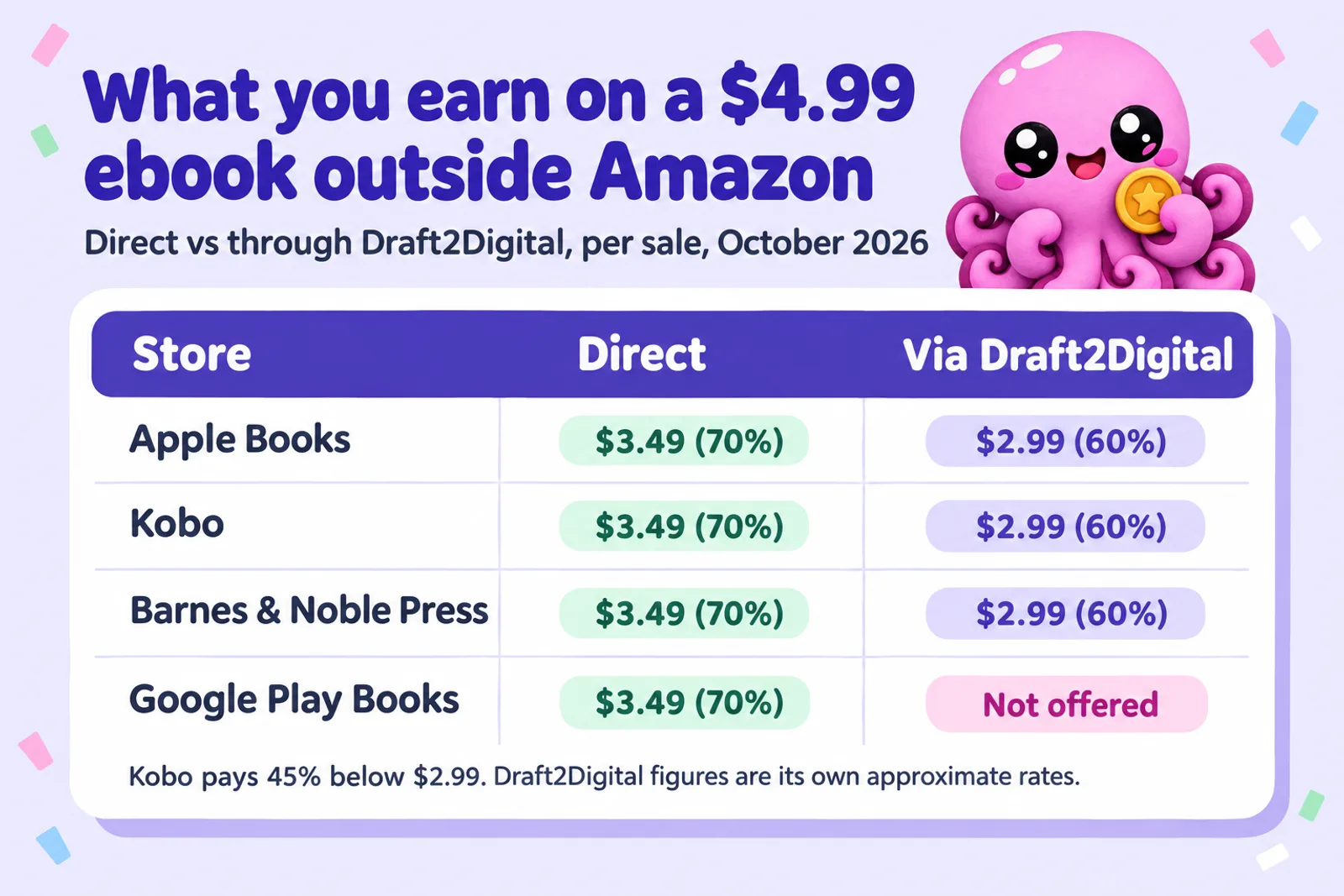
Two things surprise people. The four big stores pay the same 70% headline rate, so choosing between them is about readers, not royalties. And Draft2Digital pays more than Kobo direct below Kobo's threshold: on a $0.99 ebook Kobo direct pays 45% ($0.45), while Draft2Digital's table lists Kobo at 60% at all prices ($0.59). If your first-in-series is permanently cheap, that is worth knowing.
The four big stores, one by one
Apple Books
Apple's author site puts it in one line: "70% royalties on every ebook, regardless of price," with no file delivery fees and no price matching. You publish from the web through Apple Books for Authors, upload an EPUB that passes the latest EPUBCheck, and choose from 51 countries and regions, with a separate price in each if you like. No ISBN is required, but if you have one, Apple's guide says you can only enter it on the first submission. Apple also has the clearest AI rule of any store: if "a material portion of the content is generated by an AI-based tool", add the "AI Generated by" contributor role and say so in the description. The full walkthrough is in how to publish on Apple Books in 2026.
Kobo Writing Life and Kobo Plus
Kobo pays 70% at or above a threshold in each currency ($2.99, £1.99, €1.99, C$2.99, A$2.99 and so on), 45% below, and 20% on public domain works, with no upper cap and no delivery fee. It pays 45 days after each month once you pass CAD $50, takes EPUB, Word, ODT or MOBI up to 100 MB, and reaches readers in "over 190 countries" through its own stores and partners such as Indigo, FNAC, Bol and Booktopia.
Kobo Plus, its reading subscription, needs no exclusivity: you switch it on per book and choose territories. It runs in 34 territories, including the US, UK, Canada and Australia, and pays for every minute read, re-reads included. Kobo's worked example divides subscription revenue by total minutes read to get a value per minute, and Kobo Writing Life authors get 60% of that. Kobo is also the strictest big store on AI-written text (see the AI rules). Every setup step is in our Kobo deep dive.
Google Play Books
Google pays 70% of the list price in 60+ countries, "regardless of the book's price", once you accept the updated Partner Center terms; otherwise the default is 52%. A group of Asian markets, including Japan, India and South Korea, keep your existing split. Google pays on list price, not sale price, and charges nothing to sell. Upload an EPUB, a PDF or both. No ISBN is needed, because Google assigns a GGKEY. There is no AI rule in its publisher content policies, only a ban on "gibberish, nonsensical, or repetitive text" and content that "lacks the depth and curation necessary to provide a meaningful reading experience". It is also the friendliest big store for AI audiobooks. Details in how to publish on Google Play Books.
Barnes & Noble Press
B&N Press pays 70% of the retail price on ebooks sold on bn.com, the Barnes & Noble app and NOOK. It is non-exclusive and open to authors in the US and 11 other countries, including the UK, Canada, Australia, Germany and France. Keep the ebook under 20 MB. It sells no audiobooks, and it doesn't put your book in B&N shops. At setup it asks whether AI was used for the cover, manuscript, images or translation, and whether each was AI-Assisted or AI-Created; AI text you then edited still counts as AI-Created. Since 22 April 2026 it refuses public domain titles and requires print books to list at $14.99 or more. Ebook pre-orders can open up to 12 months ahead.
Get one clean file ready for every store
Inkfluence writes the book with you chapter by chapter, then exports a reflowable EPUB with a real table of contents, a PDF, and KDP print files from the same project. One manuscript, every shelf.
Start your book freeAggregators: Draft2Digital, PublishDrive, StreetLib
An aggregator (also called a distributor) takes one upload and delivers it to many stores, then collects the money and pays you from one dashboard. You give up part of each sale or pay a subscription in return.
Draft2Digital, including the Smashwords Store
Draft2Digital's commission "equates to approximately 10% of the retail price of every book sale". In its royalty table that becomes 60% of list price at Apple, Barnes & Noble, Kobo, Tolino, Gardners and Fable at all prices, 55% at Vivlio, and 75% (at $2.99 and up) or 40% (below) on the Smashwords Store, which became part of Draft2Digital in the 2022 merger and still runs as its own shop. Subscriptions are covered too: Everand pays 60% once a reader passes 20% of the book, and Kobo Plus is included. Amazon distribution is by invitation only, and Google Play is not on the list.
It is the most forgiving way in: upload a Word file and it builds the EPUB, or upload your own. It assigns a free ISBN, pays around the 15th of each month once you pass $10 by direct deposit, and its content guidelines (last updated 27 October 2025) support AI-assisted content but refuse books "generated entirely by AI/LLMs" that have not had "extensive editing from a human". It may ask non-fiction authors for proof of subject expertise.
PublishDrive
PublishDrive turns the model round: you pay a monthly subscription and it takes 0% commission, so you keep the store's full royalty. Its plans, as listed in its help centre on 28 October 2026: Free (1 ebook, to Apple Books, B&N and Kobo only), Starter $16.99 a month or $13.99 a month billed yearly (3 books), Standard $24.99 (6), Plus $49.99 (18) and Pro $99.99 (48). It reaches Google Play, which you connect by opening your own Google Play publisher account and adding PublishDrive as a service provider. A subscription only beats a commission once sales are high enough; with a book or two selling a few copies a month, a 10% commission is usually cheaper. Its AI declaration page is also the most useful single document on AI rules across stores: the declaration is mandatory, and its table says OverDrive accepts AI only for covers, Everand takes no AI-generated content, and Apple and Audible take only their own AI narration.
StreetLib
StreetLib is still operating in 2026: its help centre was updated in July 2026, and it describes distributing "ebooks, audiobooks, and print-on-demand to over 50 bookstores". It is strongest in Italy and the rest of Europe, and runs the German BookRix platform. Its German help page says authors receive a fixed 70% of net revenue, meaning the price after VAT and the store's cut. Its content integrity guidelines say it may block "books created using artificial intelligence (AI) or automated processes that are not correctly categorized". We could not find a current English-language fee schedule, so check the dashboard before you commit.
Libraries: OverDrive and Libby, Hoopla, BorrowBox
Libraries are the part of going wide that Amazon can't offer at all. They pay in two ways: a library buys a copy to lend (one copy, one user), or it pays a small fee each time a reader borrows (cost per checkout). Readers mostly meet these platforms as apps: Libby is the reader app for OverDrive's library catalogue.
| Platform | How you get in | What you earn |
|---|---|---|
| OverDrive (Libby) | Kobo Writing Life: opt in per title, no aggregator fee. Or Draft2Digital, PublishDrive and others. | Via Kobo: 50% of the library price you set (OverDrive won't accept under $0.99). Via Draft2Digital: 46% when a library buys a copy, 4.6% per checkout. |
| Hoopla | Draft2Digital, PublishDrive | Pay per checkout. Draft2Digital lists 3.8% per checkout under a tiered pricing model. |
| BorrowBox | Draft2Digital | 46% when a library buys a copy |
| cloudLibrary | Draft2Digital | 46% when a library buys a copy |
Kobo recommends setting the library price "a few dollars higher than your normal USD retail price", because one library copy can be lent many times. Two cautions for AI-assisted books. Kobo does not send AI-narrated audiobooks to library distribution, and PublishDrive's table says OverDrive accepts AI only on covers. If your text is AI-generated, check the route's rule before you count on library income. Draft2Digital also excludes erotica from OverDrive, cloudLibrary, Hoopla and BorrowBox.
Direct or aggregator: how to decide
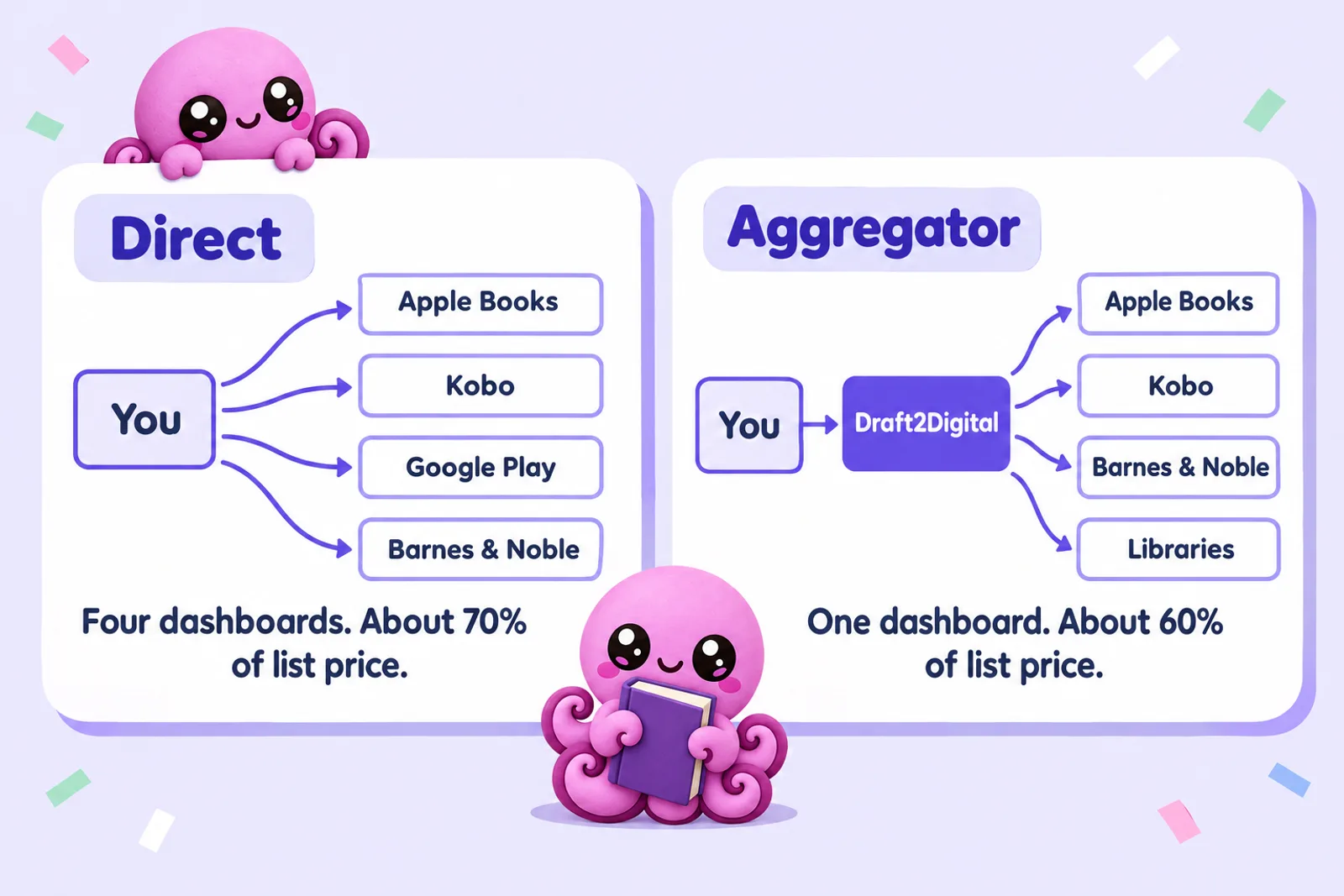
Going direct keeps about an extra 10% of list price on every sale. The rest is about time and control.
| Go direct when | Use an aggregator when |
|---|---|
| A store already sells meaningful numbers of your books, so 10% is real money | You are testing wide with one or two books and want one upload |
| You want the store's own promotions. Kobo says it offers promotions, audiobook and OverDrive promotions to authors who publish directly | You want the long tail: Tolino, Vivlio, Everand, Bookshop.org, Gardners and libraries |
| You want to change prices and metadata instantly. Kobo says it cannot change a book that came through an aggregator, even when the author asks | Your first book is permanently priced under $2.99, where Draft2Digital pays 60% at Kobo against Kobo's 45% |
| You sell on Google Play, which Draft2Digital doesn't reach | You'd rather not handle tax forms and bank details with five companies |
The common answer is a hybrid: direct to Apple Books, Kobo, Google Play and B&N Press, and Draft2Digital only for the stores and libraries you can't reach directly, with the big four switched off in its settings. Never send the same book to one store twice. Kobo declines duplicates, so untick a store in your aggregator and wait for its copy to come down before you upload direct.
Go wide net earnings comparer
Enter your list price (before sales tax or VAT), currency and expected monthly sales per store. The comparer shows each sale direct and through Draft2Digital and totals both routes. The Draft2Digital route keeps Amazon and Google Play direct, since it reaches Amazon only by invitation and Google Play not at all.
Expected sales a month
| Store | Direct, per sale | Direct, a month | Via Draft2Digital, per sale | Via Draft2Digital, a month |
|---|
All direct, a month
0
With Draft2Digital, a month
0
Going direct earns, a year
0
Constants, read 28 Oct 2026 from each company's pages: Apple Books 70% at every price. Kobo 70% at or above $2.99, £1.99, €1.99, C$2.99 or A$2.99, otherwise 45%. Google Play 70% of list price in 60+ countries (52% if you have not accepted its updated terms). B&N Press 70% of retail price, sold in US dollars. Draft2Digital 60% at Apple, Kobo and B&N at all prices (its figures are approximations), plus a $20 one-time activation fee for new accounts and $12 a year if its net is under $100 over 12 months. Amazon.com 70% of (price minus $0.15 per MB) from $2.99 to $12.99, else 35%; Amazon.co.uk 70% of (price minus £0.10 per MB) from £1.77 to £12.99, else 35%. Other Amazon marketplaces are not modelled. An illustration of per-sale arithmetic, not a forecast of sales.
Write the book you'll sell everywhereA worked example. A $4.99 novel selling 20 copies a month outside Amazon (8 on Apple, 6 on Kobo, 3 on Google Play and 3 on B&N) earns $69.86 a month all direct. Sending Apple, Kobo and B&N through Draft2Digital, with Google Play still direct, earns $61.38. The difference is $8.48 a month, about $102 a year, plus the $20 activation fee for a new Draft2Digital account. Whether that is worth four logins is your call; at 200 sales a month the gap is over $1,000 a year. For Amazon-only maths, our royalty calculator covers KDP, IngramSpark and the other stores per sale, and the ebook income calculator projects a whole catalogue.
More books in more shops, written properly
Every store here rewards books readers finish and penalises thin ones. Inkfluence drafts each chapter from your outline with your characters and earlier chapters in view, and you edit every line before it goes out.
Write your next book freeISBNs: free aggregator numbers or your own
None of the big wide stores requires an ISBN for an ebook:
- Apple Books: not required. If you have one, enter it on the first submission, because Apple's guide says you can only add it then.
- Kobo: not required. Kobo issues its own identifier, but that identifier is not accepted by all partner shops (it names Indigo and FNAC), so Kobo recommends an ISBN if you want a partner shop that needs one.
- Google Play: not required. Google assigns a GGKEY, used only inside Google.
- B&N Press: offers a free ISBN for print books, usable only on B&N Press. Its help pages don't say clearly whether an ebook needs one, so check at setup.
- Draft2Digital: assigns a free ISBN automatically and lists itself as vendor of record, but that number "cannot be used outside" its services.
Canadian authors can get their own ISBNs free from ISBN Canada. Since October 2026, registering there declares that a human author wrote the book, with AI only for limited support tasks; ISBN Canada's AI rule explains what that covers.
When to buy your own: if you want one number at every store and through every route, your own imprint shown as publisher, or a print edition through IngramSpark. In the US a single ISBN from Bowker is $125 and ten are $295; in the UK Nielsen charges £93 for one or £174 for ten; Canada and New Zealand issue them free. Each format needs its own: the ebook, the paperback and the hardcover each get a separate number. The full breakdown by country, with a checker, is in do you need an ISBN in 2026, and our copyright page template shows where the number goes.
Keeping metadata consistent
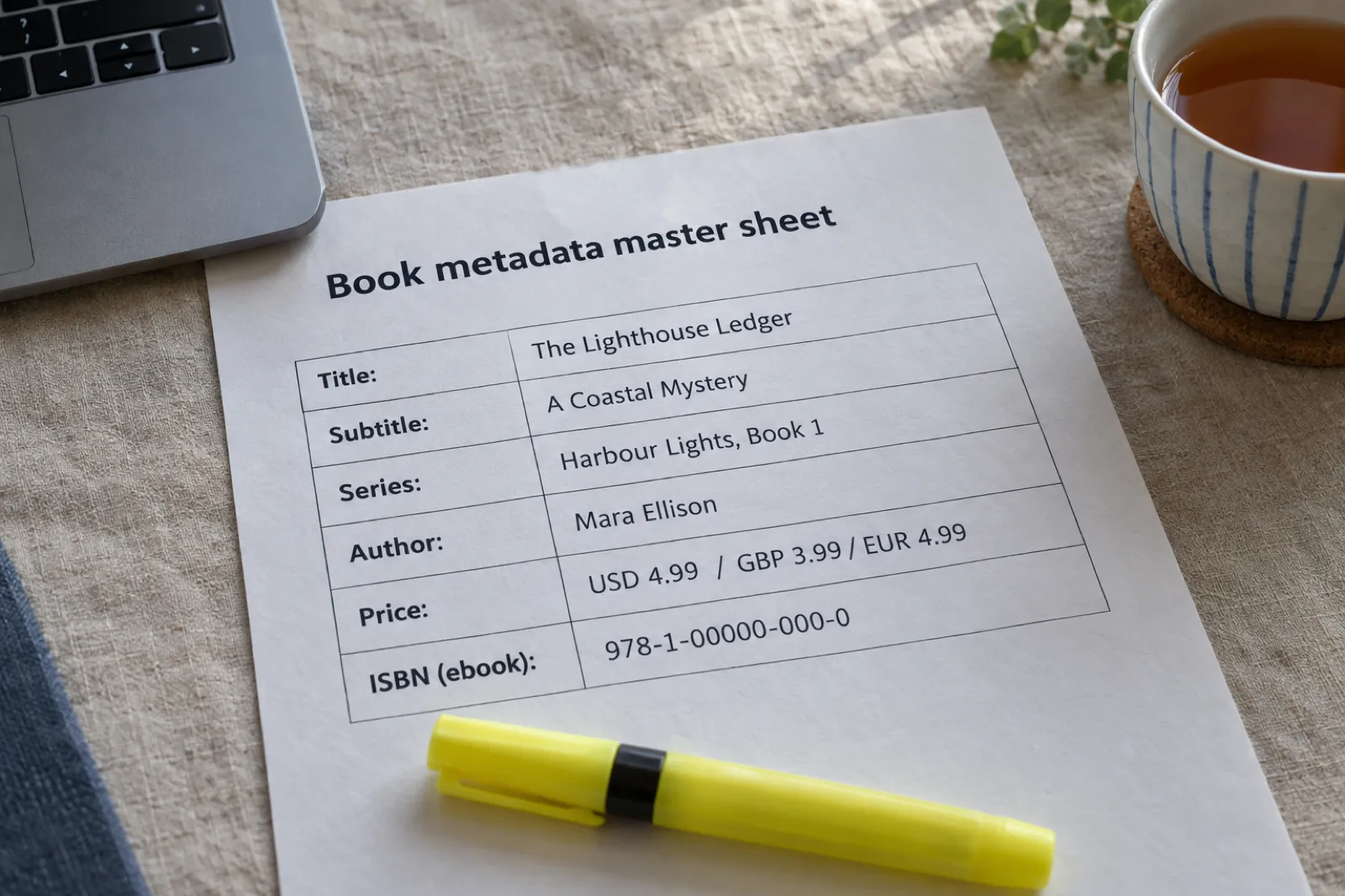
Metadata is everything about the book except the text. Sell in five places and small differences creep in: a series numbered differently in two stores breaks the "next in series" link, an author name spelled two ways splits your author page, and a description updated in one dashboard shows readers elsewhere an old blurb. Keep one master sheet and paste from it into every dashboard:
- Title and subtitle exactly as on the cover. Several stores reject keyword-stuffed titles; Kobo lists "Keyword Stuffing" and "Misleading Metadata" among content it removes.
- Series name and number, identical everywhere, including capitalisation.
- Author name, one spelling, plus any contributor roles. On Apple that includes the "AI Generated by" role where it applies.
- Description, one master version. Our book description generator drafts one to edit.
- Categories: most wide stores use BISAC subject codes, so pick two or three once and reuse them. Our categories guide explains how categories work.
- Prices in each currency you set by hand (see the next section).
- ISBN or store ID per store.
- AI disclosure answers, written once, so you answer each store's question the same honest way.
Keep the cover file the same everywhere too. Our AI book cover generator and the ebook SEO guide cover the two pieces of metadata readers see first: the cover and the words around it.
Pricing in several currencies
Most stores let you set a price per currency or fill them in from a base price. Converted prices land on odd numbers, so set the main currencies by hand.
- Mind the royalty lines. Kobo's 70% starts at $2.99, £1.99, €1.99, C$2.99 and A$2.99, and Amazon's at $2.99 and £1.77. Setting the sterling price at £1.99 keeps 70% on Kobo; £1.49 would drop it to 45%.
- Use local price endings. Readers expect £3.99, €4.99 and A$6.99, not converted fractions.
- Remember VAT. In Europe and Australia the price a reader sees includes tax, and stores pay you on the price after tax. Kobo's rule is the price "the customer pays, not including taxes".
For what to charge in the first place, see how to price an ebook. If you write in more than one language, a translated edition is a separate book with its own metadata and, if you use them, its own ISBN; our AI book translator makes the draft, which you then edit.
Wide or KDP Select after Kindle+
You can't do both with the same ebook. KDP Select requires the digital edition to be exclusive to Amazon in 90-day terms; while it is enrolled, it can't be on Apple, Kobo, Google Play or B&N. In return the book goes into Kindle+ (until 22 October 2026, Kindle Unlimited), where you are paid per page read and, for eligible audiobooks, per page listened.
Kindle+ makes Select a little stronger for genre fiction series, because an eligible audio edition now earns from the same subscription. It changes little for practical non-fiction, picture books and cookbooks. We go through it book type by book type in Kindle+ for authors, and the general trade-off is in KDP Select vs wide distribution.
A sensible way to test it: pick one series or one title, put it wide for at least six months with real effort (a direct account at each store, store promotions, links to every store in your back matter and newsletter), and compare with the same months in Select. Wide income usually builds slowly. Authors who quit after 90 days rarely see what it can do. Is Amazon worth staying on as part of that? Almost always yes: going wide adds stores to Amazon, it doesn't replace it. Our is KDP worth it piece has the numbers.
The AI rules, store by store
This is where the stores differ most. Here is what each has written down. Our can you sell AI-generated books page keeps a dated table for ten platforms, and the KDP AI disclosure guide covers Amazon's questions.
| Route | AI-written text | How you disclose |
|---|---|---|
| Apple Books | Allowed when labelled. AI-assisted work (ideas, research, editing, AI covers on a human-written book) needs no label. | "AI Generated by" contributor role plus a line in the description |
| Kobo | "Wholly or partially AI generated" is a common rejection reason; "Automated Content Generation" that "lacks genuine human effort" is not allowed | No disclosure field published |
| Google Play Books | No AI rule; quality rules ban gibberish and repetitive text with no value | None for ebooks |
| B&N Press | Allowed under its content policy, with disclosure | AI-Created or AI-Assisted, per element, at setup. Edited AI text still counts as AI-Created. |
| Draft2Digital | AI-assisted yes; not books "generated entirely by AI/LLMs" without "extensive editing from a human" | No disclosure field published |
| PublishDrive | Depends on store; its table marks Everand no and OverDrive covers only | Mandatory AI declaration for text, translation and images |
| StreetLib | May block AI or automated books "not correctly categorized" | Categorise correctly |
In practice: a book you outlined, drafted with AI, then rewrote, fact-checked and edited line by line is welcome at Apple (labelled if a material part is still AI-generated), Google Play, B&N (disclosed) and Draft2Digital. Kobo is where an AI-drafted book is most likely to be turned away, so send it your most clearly human work. A lightly edited AI draft is the book every store here is trying to keep out, and the book readers return; our guide to making AI-assisted content original is a good self-check.
Audiobooks are the other way round: the wide stores are friendlier to AI narration than Amazon, whose ACX route requires human narrators. Every store's audio rule is in where to sell an AI audiobook, and the ACX detail in Audible and ACX's AI narration policy.
Make the audiobook the wide stores accept
Kobo and Google Play Books sell labelled AI narration. Inkfluence turns your finished book into chapter MP3s from the same project as your ebook, ready to upload with a Synthesised voice narrator credit.
Turn your book into an audiobookA 30-day go-wide plan
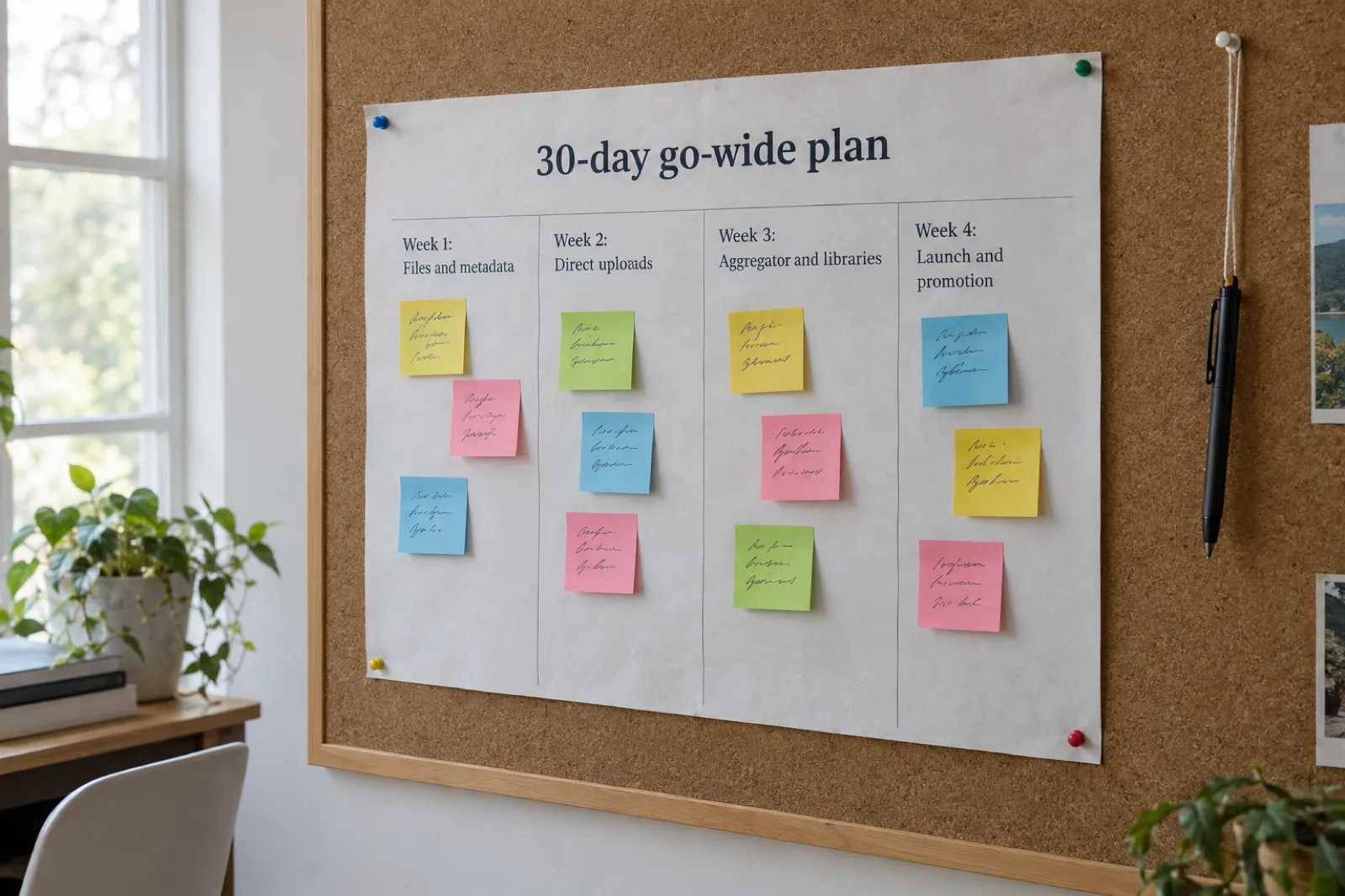
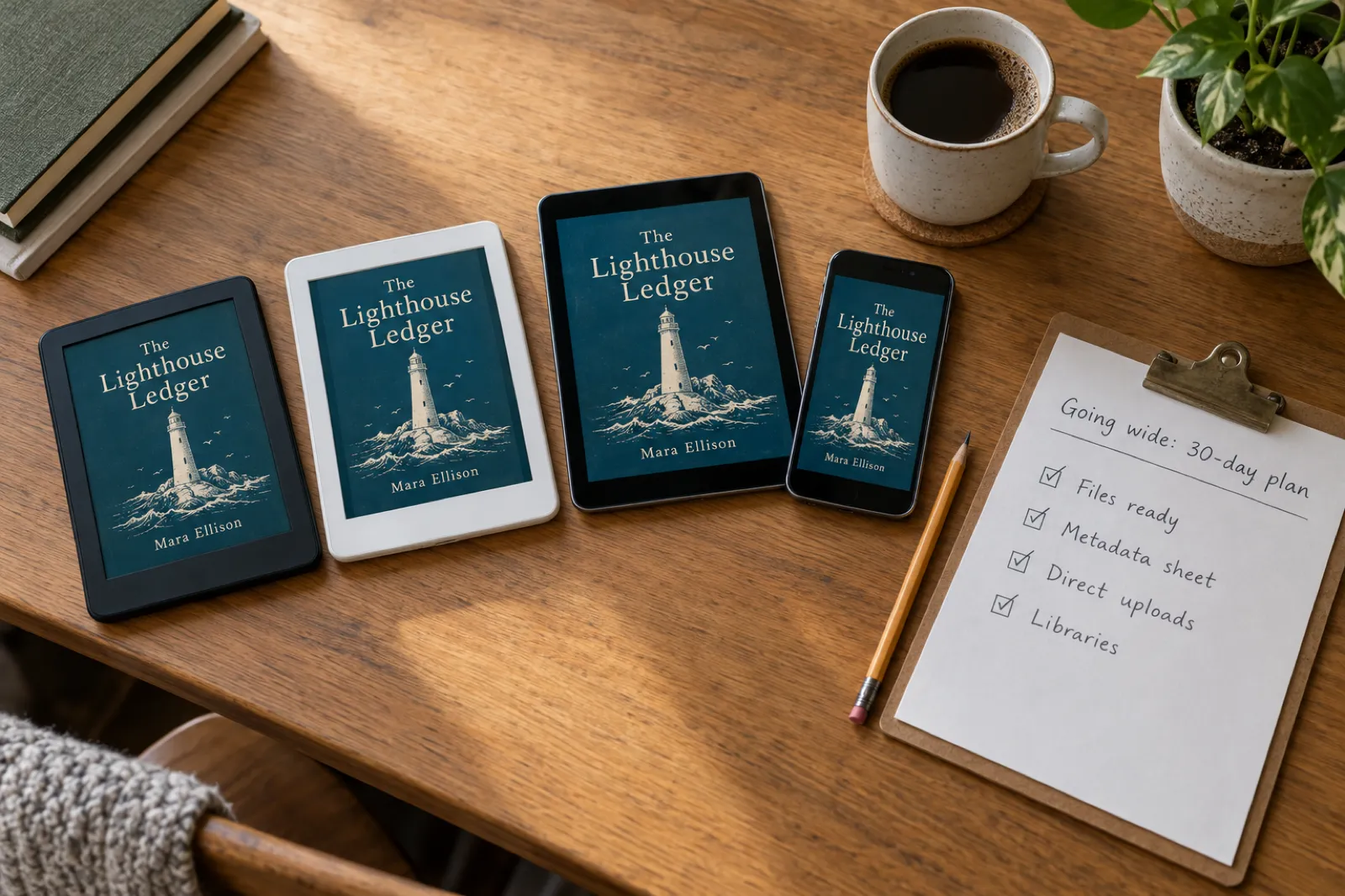
This assumes the book is finished and edited. If it is in KDP Select, turn off auto-renew; the book stays exclusive until the current 90-day term ends, so start week 2 after that date.
Week 1: files and metadata
- Export a reflowable EPUB with a working table of contents, and run it through EPUBCheck. Apple requires a pass, StreetLib asks for one, and OverDrive through Kobo rejects files with validation errors. Our ebook formats guide explains EPUB, PDF and the rest.
- Fill in the metadata master sheet: title, series, description, categories, keywords, prices per currency, AI disclosure answers.
- Decide on ISBNs: free store and aggregator identifiers, or your own block.
Week 2: direct uploads
- Open accounts with Apple Books for Authors, Kobo Writing Life, the Google Play Books Partner Center and B&N Press. Each needs tax and bank details before it can pay you.
- Upload to each, pasting from the master sheet. Set up pre-orders if you want a launch date: B&N allows up to 12 months ahead.
- Turn on Kobo Plus if you want subscription reads (no exclusivity).
Week 3: aggregator and libraries
- Open a Draft2Digital (or PublishDrive or StreetLib) account and upload the same file, with the four stores you went direct to switched off.
- Opt in to libraries: OverDrive through Kobo at a library price a few dollars above retail, and Hoopla, BorrowBox and cloudLibrary through Draft2Digital.
- Search each store for your title and fix any wrong series, name or price.
Week 4: launch and promotion
- Update your back matter so the "next book" page links to every store, or to a single page on your site that lists them.
- Tell your newsletter which stores now carry the book.
- Apply for store promotions where they exist; Kobo's are in the Kobo Writing Life dashboard for direct authors.
- Set a review date six months out. Our ebook launch checklist covers the rest of launch week, and if you are publishing for Christmas, check the KDP Christmas deadlines for the Amazon side.
Start week 1 today
Write or import your manuscript, edit it, and export the EPUB, PDF and print files you need for every store in this plan. Free to start, no card needed.
Open the dashboardPrint beyond Amazon
Print beyond Amazon means shops and libraries that won't order from Amazon. Three routes cover most indie authors:
- IngramSpark distributes print books to bookshops and libraries through Ingram's catalogue. You set a wholesale discount (it suggests 53% to 55% with returns in the US and Canada), pay printing per copy and a 1.875% global distribution fee, and file revisions have been free since 1 February 2026. We compare the two in IngramSpark vs KDP, cover its AI rule (significant human review and contribution, credited) in IngramSpark's AI policy, and price a run with the IngramSpark cost calculator and cover calculator.
- B&N Press print pays 55% of list price minus printing, on bn.com only. Since 22 April 2026 print books must list at $14.99 or more, and B&N's free print ISBN only works on B&N Press.
- Draft2Digital Print reaches Amazon and the channels Ingram serves; its FAQ says to expect about 45% of list price minus printing.
Use your own ISBN if you print through more than one of these, and switch off KDP's Expanded Distribution if you use IngramSpark for the same edition. For a print-ready interior and cover, see how to create a print-ready PDF book, and for a single proof copy, how to print one copy of a book.
Where Inkfluence AI fits
Inkfluence AI is a book writer, not a distributor. It doesn't upload to Apple, Kobo, Google Play or B&N, and it doesn't print or ship books. What it does is get one project to the point where every store above can take it:
- Write or import. Draft chapter by chapter from your outline, or import a Word, EPUB, PDF, text or Markdown file.
- Export for every store. From the Export button: PDF, KDP (a print interior plus a full-wrap cover PDF sized to your trim and page count), EPUB, DOCX and audio. The EPUB is reflowable with a table of contents. Run it through EPUBCheck before you upload to Apple, as you would any file. The exporting help lists every option.
- Audiobook files. Chapter MP3s for the stores that accept labelled AI narration, such as Kobo and Google Play. Check the length first with the audiobook length calculator.
- Sell direct. Publish the ebook straight to your own Gumroad or Etsy shop from the Publish menu; see selling ebooks on Gumroad and selling ebooks on Etsy, or the selling help.
- Translate. Make a translated edition to sell in another language's stores, then edit it.
On a paid plan (Creator $9.99 a month, Premium $19.99 a month, or yearly at $89 and $179) you can switch Inkfluence branding off in your exports; free-plan exports include a branding page. Length is set by how many chapters you plan, at roughly 1,000 to 1,500 words a chapter. See pricing for what each plan includes, and the self-publishing guide for the whole path from idea to listing.
Publishing wide: FAQ
What does it mean to publish an ebook wide?
Selling the ebook on stores other than Amazon, such as Apple Books, Kobo, Google Play Books and Barnes & Noble, and usually in libraries too. The ebook must be outside KDP Select, which requires it to be exclusive to Amazon in 90-day terms.
Should I publish direct or use Draft2Digital?
Direct pays more: Apple, Kobo (from $2.99), Google Play and B&N Press each pay 70% of list price, while Draft2Digital passes on about 60%. Draft2Digital saves time and adds smaller stores and libraries. Many authors go direct to the big four and use an aggregator for the rest.
Does Draft2Digital distribute to Google Play Books?
Google Play is not in its store list. Go direct through the Google Play Books Partner Center, or use PublishDrive, which connects to your own Google Play publisher account.
Does Draft2Digital charge a fee in 2026?
Yes. Since 14 April 2026 new accounts pay a one-time $20 activation fee, and from 14 May 2026 accounts earning under $100 in net book proceeds over 12 months pay $12 a year. Existing accounts skip the activation fee.
Do I need an ISBN to publish on Apple Books, Kobo or Google Play?
No. Apple doesn't require one, Kobo issues its own identifier and Google assigns a GGKEY. Buy your own ($125 for one or $295 for ten from Bowker in the US) if you want one number everywhere or your own imprint.
Which stores accept AI-written ebooks?
Apple Books with an "AI Generated by" label; B&N Press with an AI-Created or AI-Assisted answer at setup; Draft2Digital if a human has edited it extensively; Google Play under its quality rules. Kobo lists "Wholly or partially AI generated" among its common rejection reasons.
Which wide stores accept AI-narrated audiobooks?
Kobo, with the narrator set to Synthesised voice, and Google Play Books, with a "Synthesized voice" narrator. Apple takes only its own digital narration, and B&N Press sells no audiobooks.
Can I get my ebook into libraries as a self-published author?
Yes. Opt in to OverDrive through Kobo Writing Life (50% of the library price you set), or use an aggregator: Draft2Digital lists OverDrive, Hoopla, BorrowBox and cloudLibrary. Libby is OverDrive's reader app.
Is Kobo Plus exclusive like Kindle Unlimited?
No. Kobo requires no exclusivity for Kobo Plus. You opt each book in, choose territories, and are paid per minute read. It runs in 34 territories.
Can I print my book outside Amazon?
Yes, through IngramSpark, B&N Press (print minimum $14.99 since 22 April 2026) or Draft2Digital Print. You upload print-ready PDFs; Inkfluence AI makes those files but does not print or ship books.
One book, every shelf
Write it, edit it, and export the EPUB, PDF, print and audio files that Apple Books, Kobo, Google Play, B&N and IngramSpark take, from one Inkfluence project.
Start writing freeRelated reading
- Which stores allow AI-written books: every platform's AI rules in one table
- Where to sell ebooks in 2026: stores, marketplaces and your own site
- Ko-fi for authors: selling direct to readers who already follow you
- How to publish on Barnes & Noble Press: royalties, print rules and AI questions
- Draft2Digital review 2026: fees, stores and whether it's worth it
- Draft2Digital vs PublishDrive: fees and AI rules compared
- How to get your ebook into libraries: OverDrive, Hoopla and more
- How to publish on Apple Books in 2026: the step-by-step deep dive
- How to publish on Kobo in 2026: Kobo Writing Life and Kobo Plus
- How to publish on Google Play Books in 2026: Partner Center and audiobooks
- KDP Select vs wide distribution
- Kindle+ for authors: what the Kindle Unlimited change means
- Can you sell AI-generated books? Rules on 10 platforms
- Where to sell an AI audiobook
- Do you need an ISBN in 2026?
- IngramSpark vs KDP
- Ebook export and publishing
- How to sell romance novels: a genre where wide versus Select matters most
Sources
All read on 28 October 2026 unless a date is given.
- Apple Books for Authors: royalties, no delivery fees, no price matching
- Apple Books for Authors: publish your book from the web (EPUBCheck)
- Apple Books Partner: book availability (51 countries and regions)
- Apple Books Formatting and Content Guidelines, sections 1.13, 2.9 and 4.8 (AI-generated content)
- Apple Pages User Guide: publish a book to Apple Books (ISBN not required)
- Apple Books for Authors: get started with digital narration
- Kobo Writing Life: What will my earnings be? (updated 12 Aug 2026)
- Kobo Writing Life: How and when do I get paid? (updated 2 Sep 2026)
- Kobo Writing Life: What is Kobo Plus? (updated 20 Jul 2026) and How does Kobo Plus pay?
- Kobo Writing Life: File types and sizes
- Kobo Writing Life: OverDrive distribution (updated 18 Sep 2026)
- Kobo Writing Life: ISBNs and Kobo Writing Life
- Kobo Writing Life: Why was my book rejected or blocked? (updated 6 May 2026) and What content is not allowed? (updated 26 Mar 2026)
- Kobo Writing Life: AI narration and audiobooks (updated 24 Sep 2026)
- Kobo Writing Life: Publish directly or via aggregator?
- The Next Web: Kobo rejects 45 percent of self-published books, 26 June 2026
- Google Play Books Partner Center: Revenue split FAQs
- Google Play Books Partner Center: How to sell books on Google Play
- Google Play Books Partner Center: ISBNs (GGKEY)
- Publisher Content Policies for Google Play Books
- B&N Press: Royalty and payment terms
- B&N Press: Getting started (countries, no audiobooks, public domain from 22 Apr 2026)
- B&N Press: Use of generative AI in your project (updated 10 Mar 2026)
- B&N Press: ISBN FAQs and Print book pricing ($14.99 minimum)
- B&N Press: Maximum file size
- Draft2Digital: FAQ (commission, stores, ISBN, files, payments)
- Draft2Digital: Ebook royalty rates
- Draft2Digital: Understanding D2D's activation and maintenance fees, 14 April 2026
- Draft2Digital: Content guidelines (last updated 27 Oct 2025)
- PublishDrive: How much does PublishDrive distribution cost?
- PublishDrive: AI-generated, assisted or narrated: what to declare, and how
- PublishDrive: Distribution to Google Play Books
- StreetLib: What you can do with StreetLib, Content integrity guidelines (19 Feb 2025) and Deine eBook-Marge (3 Jul 2026)
- IngramSpark: Pricing and Changes in print cost, market access fee, and more

Founder, Inkfluence AI
Sam is the founder of Inkfluence AI. He built the platform to make book creation accessible to everyone - from first-time authors to seasoned publishers.
Helpful links

Ready to write your own book?
Write with AI, make it yours, and export PDF, EPUB and KDP-ready files from one project.
Keep reading
 Self-Publishing
 How to Publish on Barnes & Noble Press in 2026: Ebooks, Print Rules and AI Disclosure
B&N Press pays 70% on ebooks from $0.99, and 55% minus printing on print books, which since 22 April 2026 must list at $14.99 or more. It asks whether each part of your book is AI-Created or AI-Assisted, refuses public domain titles, caps accounts at 100 titles and sells ebooks to US readers. Here is every step from account to promotion, read from B&N Press's own help pages, with a royalty calculator against KDP.
 Tools
Tools Draft2Digital Review 2026: Fees, Stores, AI Rules and Whether It's Worth It
An honest Draft2Digital review from its own pages in October 2026: the new $20 activation and $12 maintenance fees, the roughly 10% it keeps, every store and library it reaches (and the ones it does not), its AI rules, payments, print and audio, plus a calculator that tells you whether it pays for your books.
 Tools
Tools Draft2Digital vs PublishDrive (2026): Fees, Stores and AI Rules Compared
Draft2Digital keeps about 10% of each sale and now charges new accounts $20. PublishDrive takes 0% commission and charges a flat plan from $0 to $99.99 a month. We compared the two on their own pricing and help pages in October 2026: fees, stores, libraries, Google Play, Amazon, print, audiobooks, AI rules, ISBNs and payouts, with a fee calculator that finds the sales level where a flat plan wins.

Get ebook tips in your inbox
Join creators getting weekly strategies for writing, marketing, and selling ebooks.