

Quick Answer
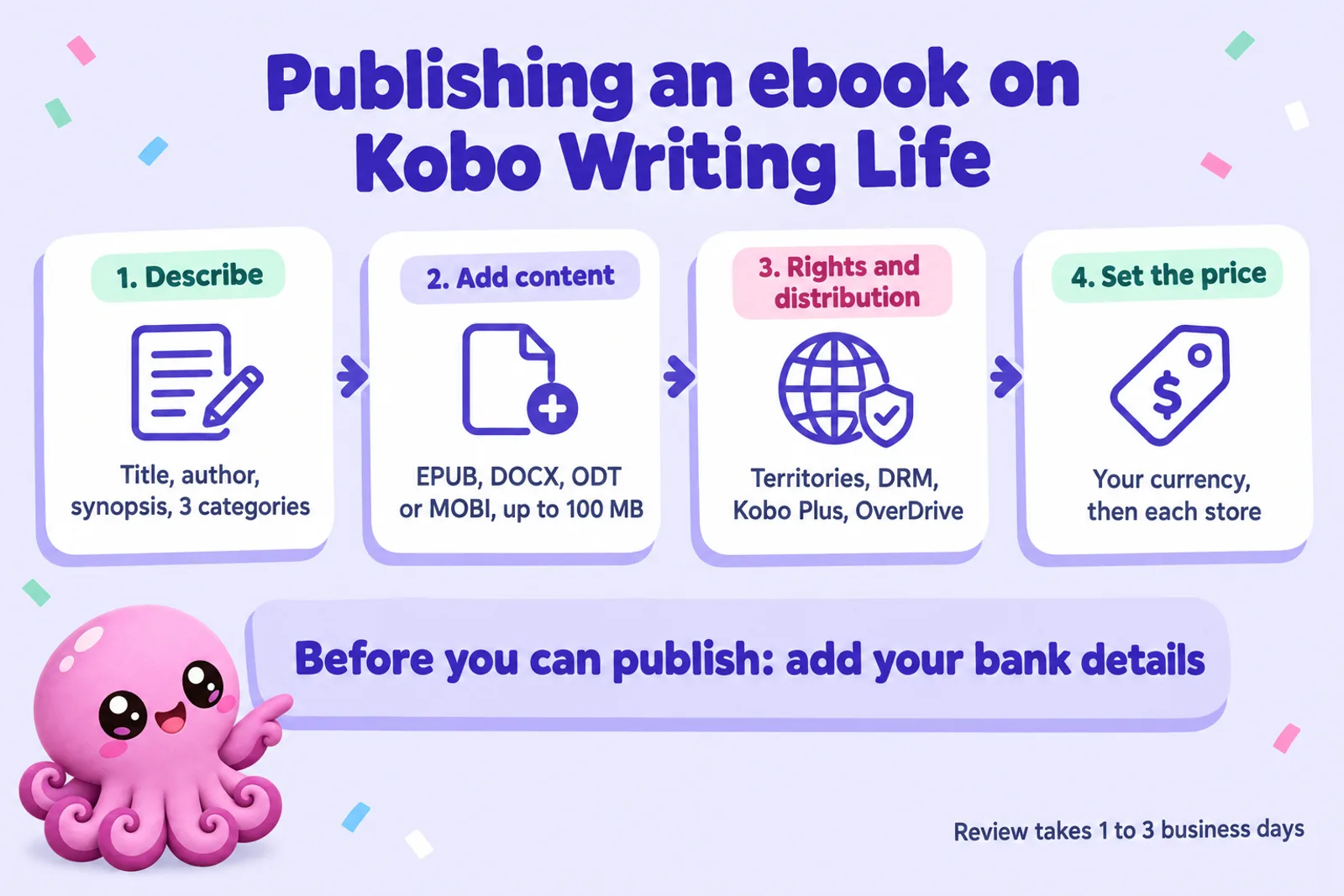
To publish on Kobo, open a free Kobo Writing Life account, add a bank account (Kobo won't publish until it can pay you), then create the ebook in four steps: describe it, upload the file (EPUB, Word, ODT or MOBI, up to 100 MB), choose territories, DRM and Kobo Plus, and set the price. Review takes 1 to 3 business days. Kobo pays 70% at or above $2.99 (or £1.99, €1.99, ¥299 and other local lines) and 45% below, with no price cap and no delivery fee. Kobo Plus pays by the minute and needs no exclusivity. Two things to know first: Kobo has no print, and it is the strictest big store on AI-written text, while it openly accepts AI-narrated audiobooks labelled as Synthesised voice.
Kobo is the ebook store most indie authors add second, after Amazon. It belongs to Rakuten, it runs the ebook side of bookshops from Canada to Italy to Japan, and it pays well: 70% from a low price floor, with no cap at the top. Its portal, Kobo Writing Life, is free and simpler than KDP, but has rules that catch people out, from a pricing condition tied to your paperback to a promotions form that asks you to confirm no language model wrote the book.
This guide walks through every step using Kobo's own help centre and terms of service, read in full on 28 October 2026. Where Kobo hasn't published something, such as the Kobo Plus per-minute rate, we say so rather than guess. Sources are listed at the end.
Disclosure: Inkfluence AI is our product. It helps you write books, exports EPUB files and makes audiobooks, so we have an interest in this topic. We don't publish to Kobo for you; you upload the files yourself.
What Kobo Writing Life is, and what it isn't
Kobo Writing Life (KWL) is Kobo's free portal for self-published authors. Kobo says it reaches "millions of readers in over 200 countries" through its own apps and e-readers and partner bookshops. Five facts shape the rest of this guide:
- It is free. Kobo's help centre says it does not charge a fee for distributing your ebooks, and converts your manuscript to EPUB "entirely for free and with no strings attached".
- It is never exclusive. Kobo's answer to "Do my books need to be exclusive?" is no, for sales and for its subscription. The one request: don't also send the book to Kobo through a distributor, or it becomes a duplicate and gets declined.
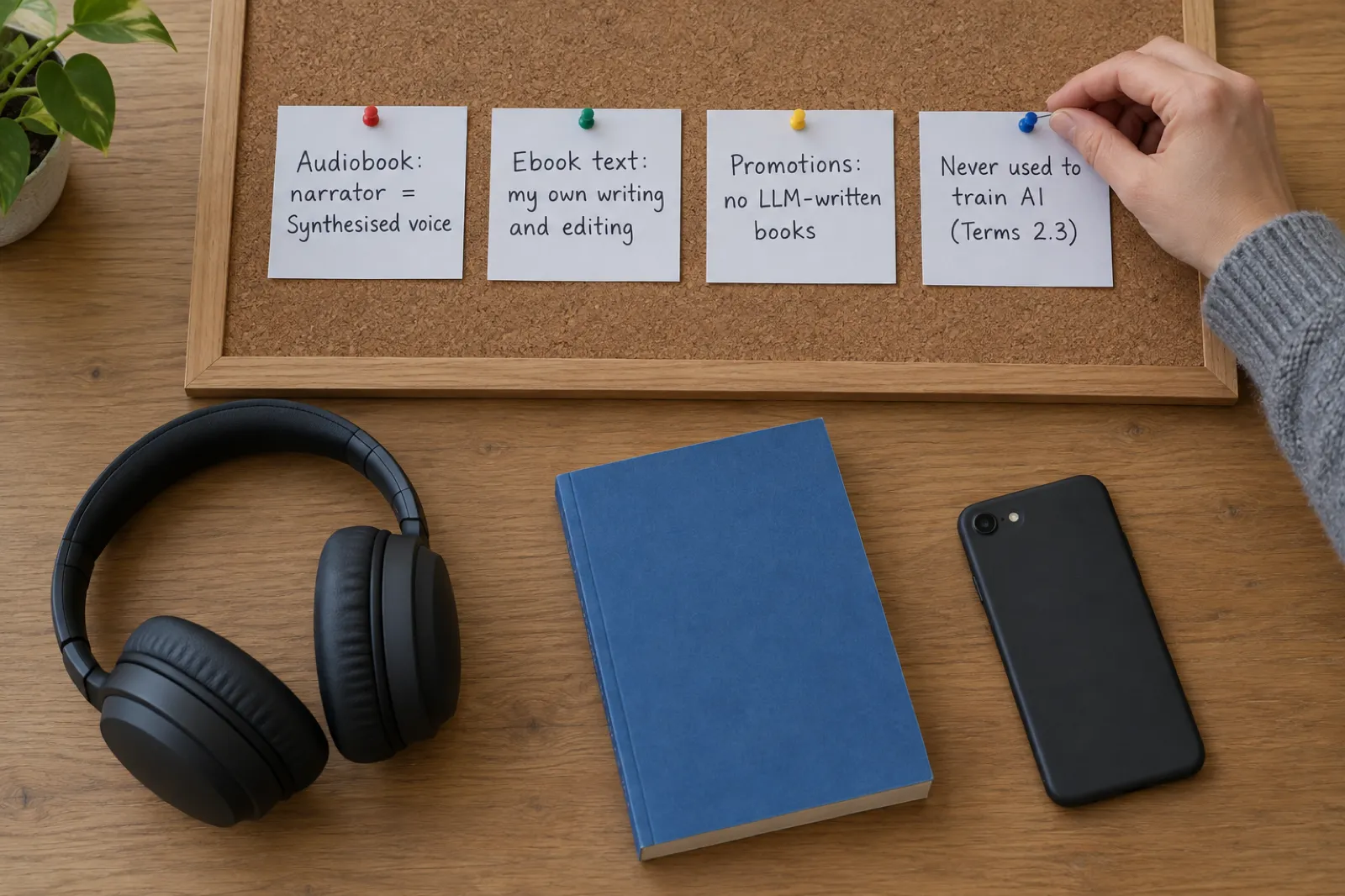
- It is ebooks and audiobooks only. Kobo says plainly that it does "not offer paperback/hardcover book publishing or print-on-demand services".
- It is Canadian. Kobo describes itself as a Canadian company operating under Canadian tax law, which is why there is no US tax interview (more on that below).
- It is international by design. Kobo's pricing help notes that "a large percentage of KWL authors are selling into Canada & Australia", and partner stores in France, Italy, the Netherlands, Mexico, Japan and elsewhere carry KWL books.
If you publish wide (selling on every store rather than only Amazon), Kobo sits alongside Apple Books and Google Play Books. Our guide to publishing an ebook wide covers how the three fit together with KDP and direct sales.
What you need before you start
Gather these before you open the dashboard. The bank details are the one that stops people: KWL won't publish a book until they're in.
| You need | Details from Kobo's help centre |
|---|---|
| To be 18 or over and own the digital rights | You confirm both in the Terms of Service. PLR content is refused outright. |
| A bank account | Bank transfer only, in USD, CAD, GBP, EUR, JPY, AUD, NZD or HKD (otherwise USD). No PayPal or Payoneer. |
| A street address | No PO boxes. |
| A finished manuscript | EPUB is best. DOC, DOCX, ODT and MOBI are converted for you. Maximum 100 MB. |
| A front cover | JPG or PNG, ideally 300 DPI, under 5 MB, with title and author on it. |
| A synopsis and three categories | Kobo recommends using all three category slots. |
| An ISBN (optional) | Kobo assigns its own ID if you have none, but some partner stores need a real ISBN. |
Living in Japan? Kobo's help centre says the standard KWL platform "is not equipped to pay Japanese banks", so authors in Japan register through Rakuten Kobo Writing Life, the Japanese version, instead.
If the manuscript is the part you don't have yet, that's the part we built Inkfluence for: you set the outline, the chapters are drafted with your notes in view, you rewrite them in the editor, and you export an EPUB. Given Kobo's AI rules (covered below), the rewriting is not optional for this store.
Get a clean EPUB ready for Kobo
Plan, write and edit your book in Inkfluence, then export a reflowable EPUB with a real table of contents. Writing is free to start; EPUB export comes with any paid plan or credit pack.
Start your ebook freePublishing an ebook on Kobo, step by step
Step 1: Create your account
Go to kobo.com/writinglife, click Get Started, and sign in with a Kobo account or create one. Add your name, an optional publisher name and a mailing address (Kobo asks you to avoid accents in these fields), accept the Terms of Service and verify your email.
Step 2: Add your bank details
From the dashboard, open My Account, then Payment Information. Choose your bank's country (this is permanent, so check it) and the currency fills in. Then enter the code your currency needs: a 9-digit ABA routing number in the US (the "low value" code for your branch), a 9-digit institution plus transit code in Canada, an IBAN in the UK and eurozone, a BSB in Australia. Pick your branch from the results, add the account number with no spaces or dashes, and match the account holder name to your bank exactly. Kobo's guide is blunt about the order: "you will not be able to publish your book until we have these details".
Step 3: Describe the ebook
Click eBooks, then Create new eBook. This screen is your metadata, and Kobo is particular about it:
- Title and subtitle exactly as on the cover. No tag words like "Bestseller" or "Small-town Romance" in either field.
- Series name and number go in their own fields, never in the title. This is what links the books of a series on Kobo's site.
- Author as it should appear, pen name included. One author per field.
- Synopsis for the product page. Our book description generator drafts one you can edit.
- Release date (when it goes on sale on Kobo; a future date allows pre-orders), plus publisher, eISBN, print ISBN, language and three categories.
Step 4: Add the cover and content
Drag in the cover, then the manuscript. If it isn't an EPUB, Kobo converts it. Kobo then runs EPUB validation and shows any errors. Critical errors must be fixed before you can publish; non-critical ones can be left, though they keep the book out of OverDrive's library catalogue. The files section below covers how to avoid both.
Step 5: Rights and distribution
Four switches live here:
- DRM: on or off per book. On stops readers copying, printing or sharing the file.
- Geographic rights: Yes for worldwide, or No and pick countries. Worldwide is what puts you in the catch-all store for countries without their own Kobo storefront.
- Kobo Plus: a toggle to include the book in the subscription, in all eligible countries or a chosen few.
- OverDrive: a toggle to sell to libraries, with its own USD library price.
Step 6: Set the price and publish
Enter a price in your default currency. Kobo then offers converted prices for each storefront in red; click a red figure to accept it, or type your own. Round each to .99: Kobo recommends it, and the Promotions tab rejects books still on converted prices. Then click Publish.
Kobo reviews every book before it goes live. Its help centre gives 1 to 3 business days, for new books and for updates alike, and warns that re-uploading the same file to hurry things "will bump your book to the end of the approval queue".
Files, covers and validation
Kobo's own help page admits its free Word converter "isn't perfect, and occasionally introduces validation errors", so upload an EPUB you've checked. Four habits:
- Use real chapter headings and a linked contents page so the reader's navigation works. Our page on ebook formats explains EPUB versus the alternatives.
- Validate it. Kobo recommends running the file through a free EPUB validator. Fix every error, not just the critical ones, if you want library distribution.
- Test it on a Kobo. Plug in a Kobo e-reader over USB and drag the EPUB onto it. Kobo's tip: rename a reflowable file to end in
.kepub.epub(fixed-layout:.fxl.kepub.epub) so it opens with Kobo's own reading engine, the way buyers will see it. - Use store-specific links in back matter. Kobo asks that "read my next book" links point to the Kobo store, so a Kobo reader lands where they already shop.
Covers. Kobo suggests designing for its standard e-reader screen, which it gives as 1448 by 1072 pixels at 300 pixels per inch, with the file at 300 DPI and under 5 MB. Our AI book cover generator and the cover design guide cover genre conventions, which Kobo's own cover advice puts ahead of novelty: a reader should tell the genre at a glance.
Inkfluence exports reflowable EPUBs with a linked table of contents, real chapter headings and your copyright page, and we test our output against EPUBCheck, the standard validator. EPUB export comes with any paid plan or credit pack, and paid users can write their own copyright page, so your imprint and ISBN carry into the file. Our book formatter page and the export help article show the options.
Royalties, prices and the 70% line
Kobo's royalty rule is simple at the core and has two conditions people miss. The core: 70% of the list price if the price is at or above the line for that currency, 45% if it's below, and 20% for public domain works. Unlike KDP, there is no upper price cap on 70% and no delivery fee per megabyte.
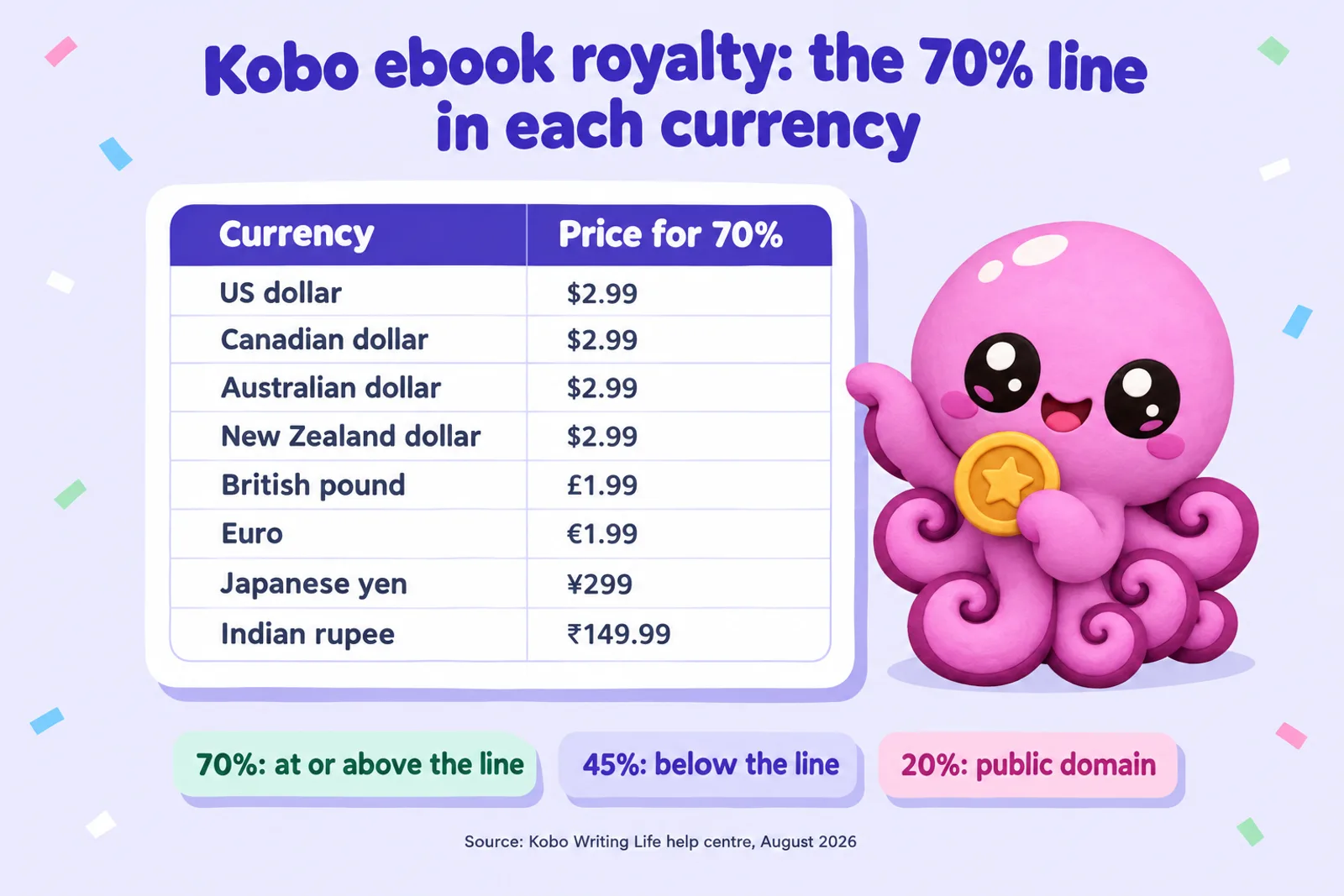
| Currency | Ebook price for 70% | Audiobook price for 45% | Audiobook price limit |
|---|---|---|---|
| US dollar | $2.99 | $2.99 | $28 |
| Canadian dollar | $2.99 | $2.99 | $31 |
| Australian dollar | $2.99 | $2.99 | $31 |
| New Zealand dollar | $2.99 | $2.99 | $31 |
| British pound | £1.99 | £1.99 | £20 |
| Euro | €1.99 | €1.99 | €25 |
| Swiss franc | 2.99 | 2.99 | 25 |
| Japanese yen | ¥299 | ¥299 | ¥2,999 |
| Hong Kong dollar | $15.99 | $15.99 | $200 |
| Taiwan dollar | $70 | $70 | $799 |
| Indian rupee | ₹149.99 | ₹149.99 | ₹1,500 |
| Philippine peso | ₱99.99 | ₱99.99 | ₱1,250 |
| Brazilian real | R$7.99 | R$7.99 | R$100 |
| Mexican peso | $39.99 | $39.99 | $450 |
| South African rand | R29.99 | R29.99 | R350 |
Source: Kobo Writing Life, "What will my earnings be?" (updated 12 August 2026), and Terms of Service sections 4.1 to 4.3. Ebooks have no price cap. Audiobook limits are the highest price Kobo accepts; above them the book is rejected.
The two conditions people miss
1. The 20% print rule. Section 4.2(b) of Kobo's terms adds a second condition for 70%: "the eBook must be priced at least twenty (20%) percent below the SRP of all physical editions of the book, if available." A paperback at $12.99 means the ebook must be $10.39 or less to earn 70%. Most indie ebooks are far below their paperback, but a short book with a cheap paperback can trip it.
2. Price matching. Your Kobo price must be no higher than the lowest price you give any other retailer. If Kobo finds your ebook cheaper elsewhere, its terms let it lower your Kobo price to match and pay you on that lower price. Run sales on every store at once, or accept that Kobo may follow.
VAT and the price you set
In VAT territories (the EU, the UK, Japan and others), the price you enter includes VAT. Kobo's tax article explains that it "back[s] out" the VAT for the reader's country first, then applies your 70% or 45% to what's left. So a €4.99 ebook in a country with 9% VAT pays 70% of about €4.58. The 70% line is checked against the price you set, VAT included. Where the tax is a sales tax rather than VAT, such as US sales tax, Kobo adds it on top of your price and it doesn't come out of your share.
Compared with KDP
On Amazon.com, KDP pays 70% only between $2.99 and $12.99 and takes a delivery charge of $0.15 a megabyte first; outside that band it pays 35%. Kobo's 70% has no ceiling and no delivery charge, which matters for box sets, image-heavy books and anything priced above $12.99. Our KDP royalties guide has the full Amazon rules, and the royalty calculator compares eight platforms side by side. Kobo itself suggests using the lack of a cap: a box set "might be worth offering to your Kobo readers only".
Kobo royalty calculator
Pick a currency and format, enter your price, and add an estimate of Kobo Plus reading. The 70% and 45% lines, the audiobook rates and the price limits are Kobo's published figures. The Kobo Plus part needs two assumptions Kobo doesn't publish, so both are editable and labelled.
Kobo Plus estimate
Royalty rate
70%
Per sale
0.00
Kobo Plus a month
0.00
Total a month
0.00
Royalty = (price minus the VAT inside it) x rate, using Kobo's published lines and rates. Kobo Plus = minutes x value per minute x 60%. Ebook minutes = words / reading speed (averages from Brysbaert's 2019 meta-analysis of silent reading). The default 0.0027 a minute is the worked example in Kobo's help article, not a real rate: Kobo doesn't publish one and it changes monthly. Treat the Kobo Plus figure as an illustration.
Write the book to put in this calculatorWhat the defaults show. A 70,000-word novel at $4.99 with no VAT earns $3.49 a sale. One complete Kobo Plus read of the same book is about 269 minutes, which at Kobo's illustrative rate is about $0.44. Kobo says opted-in authors' paid sales "have remained steady", so treat the subscription as extra readers rather than lost sales. For pricing strategy beyond Kobo, see how to price an ebook and the ebook income calculator.
Getting paid: banking, tax and reports
- When: 45 days after the end of each month, sent on the 15th. January's earnings are paid on 15 March, then take 5 to 7 business days to reach your account.
- Threshold: CAD $50, counted across every country, format, Kobo Plus, library sales and partner stores. Below that, it carries forward.
- Fees: Kobo charges none. Your bank or an intermediary bank may.
- Reports: monthly sales reports appear on the 25th for the previous month, under My Account. The dashboard shows estimates as sales happen but doesn't track returns or coupon sales. Kobo Plus has its own report, marked SUBS.
Tax. This is where Kobo differs most from Amazon, Apple and Google. Kobo's tax article says it "does not issue tax forms such as 1099s or W-8BENs", because it's a Canadian company operating under Canadian law and doesn't withhold US tax. There is no tax interview to fill in. Kobo collects and pays sales tax and VAT where it applies; you declare your earnings as income where you live. Kobo recommends a tax professional for anything specific, and so do we.
Territories and partner stores
Kobo groups the world into two kinds of territory. Storefront countries (the US, Canada, the UK, Australia, Japan and the other countries listed in your dashboard) have their own Kobo store and their own price. Everywhere else, from Hungary to Nigeria, buys from Kobo's worldwide store, which has a single price. You can't pick parts of the worldwide store: choose worldwide rights or lose those readers.
With worldwide rights, your ebook can also appear in the partner stores Kobo supplies. Kobo's current list:
| Country | Partner stores (ebooks) |
|---|---|
| Australia | Angus & Robertson, Collins, Booktopia |
| Canada | Chapters Indigo |
| France | FNAC, Rakuten |
| Italy | La Feltrinelli, Mondadori, Libreria IBS, Libraccio |
| Japan | Rakuten |
| Mexico | Gandhi, Librería Porrúa |
| Netherlands and Belgium | Bol |
| Portugal and Spain | FNAC Portugal, FNAC Spain, La Central |
| Taiwan | PChome |
| United States | American Booksellers Association member sites, Rakuten |
You can opt out of a country but not a single partner. Language can keep a book off a partner store, and some, such as Indigo and FNAC, need a real ISBN. Audiobooks go to a shorter list: Booktopia, Porrúa, Gandhi, La Feltrinelli, Mondadori and Bol.
Where Kobo matters most. Kobo doesn't publish market shares. Its own pages show a store built around Canada, Australia, Europe (through FNAC, Bol and the Italian chains) and Japan (through Rakuten). Its help centre singles out Canada and Australia for KWL sales and the Netherlands for Kobo Plus, which it says brought in readers "who had never bought eBooks before". If your book is in French, Italian, Dutch or Japanese, Kobo deserves more attention than its US profile suggests; our AI book translator is one way to test a second language edition.
Kobo Plus: how the subscription pays
Kobo Plus is Kobo's all-you-can-read and listen subscription. Three things set it apart from Amazon's Kindle+ (Kindle Unlimited until 22 October):
- No exclusivity. Your book can be in Kobo Plus and on sale everywhere else at the same time. Kindle+ requires KDP Select, which means Amazon-only.
- Paid by the minute, not the page. Kobo says authors are "paid for every minute read or listened, including re-reads, and even if a reader reads less than 10% of the book."
- Opt in per book and per country, with one toggle. Leave it on all countries and new territories are added automatically.
The formula
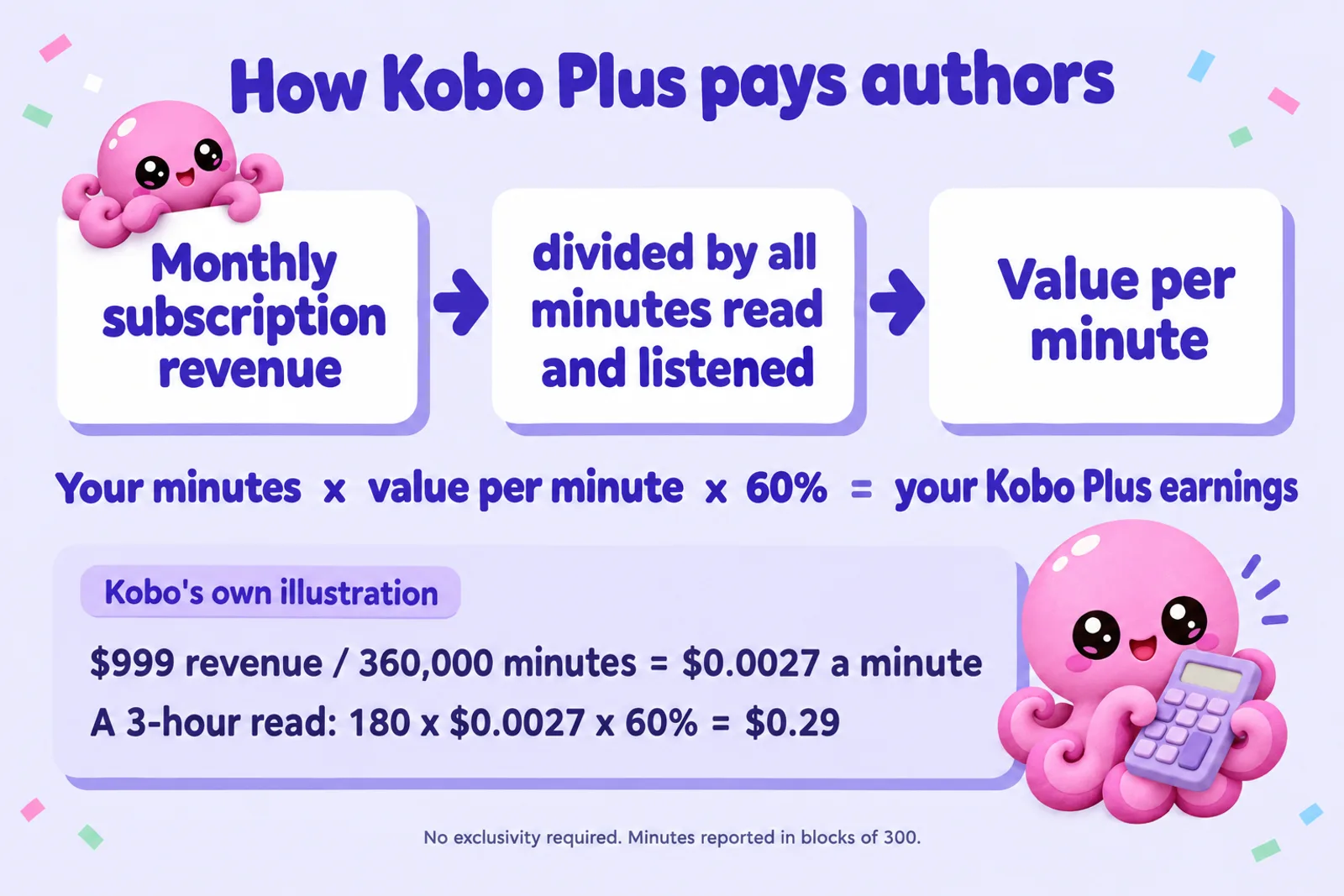
Each month Kobo takes its Kobo Plus revenue for the territory (after tax, refunds and card charges) and divides it by every minute subscribers spent reading or listening. That gives the value per minute. You're paid your minutes times that value times 60%. Kobo's own worked example uses 100 subscribers paying 9.99 and reading 360,000 minutes between them, which makes a minute worth 0.0027, so a book that takes three hours to read earns about 0.29.
Two details from the terms: minutes are counted in blocks of 300 (one "read" in your report), and if a title doesn't reach a full block in a month, its minutes carry over until it does. Minutes read during a subscriber's free trial are not paid. If you'd rather not include trial readers, opt out of the countries where Kobo runs trials.
Where Kobo Plus is available
34 countries as of Kobo's July 2026 update: Argentina, Australia, Belgium, Canada, Chile, Colombia, Czechia, Denmark, Finland, France, Greece, Hong Kong, India, Ireland, Italy, Luxembourg, Malaysia, Mexico, the Netherlands, New Zealand, Norway, Peru, the Philippines, Poland, Portugal, Romania, Singapore, South Africa, Spain, Sweden, Switzerland, Taiwan, the United Kingdom and the United States.
Should you opt in?
For most indie books, yes. There's no exclusivity to lose, the payment includes partial reads, and Kobo reports that backlist titles in particular get "a boost". If you worry it replaces sales, opt one country out and compare the SUBS report. For how Amazon's subscription compares now that it pays for listening too, read Kindle+ for authors.
Write the series Kobo Plus readers binge
Kobo Plus pays for every minute, so a series that keeps people reading from book one to book three earns three times. Inkfluence keeps characters, places and timeline consistent across every book.
Plan your series freePromotions, free books and sales
The Promotions tab
Kobo's merchandising team runs themed sales, such as 30% off promo codes, price drops and "buy 2 get 1 free". KWL authors apply through a Promotions tab in the dashboard. Things to know before you try:
- You may need to ask for it. If the tab isn't on your dashboard, email Kobo to enable it. Kobo's step-by-step guide says the promotions tool is for English-language books.
- Most promotions cost something. Either a flat fee, or a cut of what you earn during the sale. Kobo says "our most common percentage fee is 10%", and if nothing sells you pay nothing. Some promotions are free (0%).
- Prices must be set in every country of the sale, rounded to .99. A converted price is the usual cause of the "can't apply to promos at this time" error.
- One title per author per sale, usually, and it must fit the theme.
- An AI condition. By submitting, you "verify the Works you are submitting have not been authored by LLMs (large language models)". More on that in the AI section.
Free books and scheduled sales
Kobo lets you make an ebook permanently free (set the price to 0 in each currency) or free for a set period using Schedule a sale. Sale prices aren't converted automatically, so enter each currency yourself. You can schedule one promotional price at a time, and changes appear on the store in 24 to 72 hours.
Pre-orders
Set a future release date in the metadata, tick "Allow pre-orders?", and readers can buy the book before launch day; it lands in their library on the release date. The rules:
- You can set up a pre-order without a file. Upload the final file at least 3 business days before release; Kobo emails a reminder 7 days before.
- A pre-order still missing its file 14 days after the release date is delisted automatically.
- Pre-orders can't be free. If any currency is set to free, the pre-order won't show until release day.
- Every book, pre-orders included, gets a free preview of the first 5%. Make those pages count.
If you fix a book after people have bought it, existing buyers keep the old version unless you ask Kobo for a "volume replacement", which also wipes their bookmarks and notes. Kobo doesn't recommend it, so get the file right before release. Our ebook launch checklist puts the checks in order, and if you're also releasing on Amazon before Christmas, see the KDP Christmas deadlines.
ISBNs
You don't need one. Without an ISBN, Kobo issues its own identifier and the book sells in Kobo's store across its territories. But Kobo says that identifier "is not accepted for distribution through all our partner sites", and recommends an ISBN if you want those partners. Rules if you use one:
- Each format needs its own: the ebook can't share the paperback's ISBN, and the audiobook needs a third.
- Enter it with no dashes.
- It can't be changed later. To fix a wrong ISBN, create a new entry and delist the old one.
- They're free in Canada and New Zealand from national agencies, and paid in the US (Bowker), the UK and Ireland (Nielsen) and Australia.
Our guide do you need an ISBN? covers the store-by-store picture, and the copyright page template shows where the number goes in the book itself.
Libraries through OverDrive
KWL can send your ebook to OverDrive, the main library ebook supplier, with no aggregator fee. You set a separate USD library price (Kobo suggests a few dollars above retail; minimum $0.99) and earn 50% of it on each library purchase. When a library pays per checkout instead, it pays 10% of your library price for each loan; Kobo doesn't publish your share of that payment. OverDrive won't accept a file with any validation errors, or public domain content. Audiobooks can't go to libraries through KWL at present.
Kobo's rules on AI
Kobo has three separate positions on AI, and they point in different directions. Read all three before you upload.
1. AI-written text: the strictest of the big stores
Kobo's content policy (updated 26 March 2026) reserves the right to remove "Content generated primarily by automated tools that lacks genuine human effort, quality control, or is designed to exploit trends rather than offer genuine reader value", along with content that "floods a particular niche" and low-text books such as journals and planners.
Its page on rejected books (updated 6 May 2026) goes further. Under "unsatisfactory or incomplete experience", the listed reasons include "Wholly or partially AI generated", next to "too short", "poorly translated" and "priced too high". And Kobo's FAQ says it is "developing machine learning tools to detect patterns" to screen out AI-generated and AI-rewritten pirated content. Accounts with more than 500 titles may also be reviewed.
We found no AI disclosure box for ebooks in Kobo's help centre, unlike KDP and Apple, so no form makes an AI-generated book acceptable. Its rules reward real human authorship.
2. Promotions: a stricter line
The Promotions terms (updated 10 June 2026) ask you to verify that submitted works "have not been authored by LLMs". If a language model drafted your text, don't submit that book to Kobo promotions, even if it was accepted for sale. If you're unsure whether your process counts, ask Kobo's author care team before submitting, in writing.
3. Your books won't train AI
Section 2.3 of Kobo's terms says "Works will not be used to train generative AI technologies". It does use machine learning to categorise and screen books and for marketing, and says authors will get an opt-out for any future recap features.
What this means if you write with AI
Be honest about how the book was made. A lightly edited AI draft doesn't belong on Kobo; KDP and Apple Books accept AI content with disclosure. For a book you wrote with AI as an assistant (your outline, your ideas, your voice, every chapter rewritten and edited by you), Kobo's written rules point your way, though its "partially AI generated" wording means you should still expect scrutiny. Our store-by-store guide to selling AI-generated books sets Kobo's rules beside nine other platforms, and how to avoid generic AI book output covers the editing that makes a draft yours.
Write with AI, edit like an author
Inkfluence drafts from your outline and notes, then gives you a full editor, an AI assistant for revisions and a book-wide review, so the finished book carries your voice and your work.
Start writing freeAudiobooks on Kobo, including AI narration
Kobo sells audiobooks in the same app as ebooks, and lets KWL authors upload them directly. On AI narration it is one of the most open stores: its audiobook FAQ (updated 18 September 2026) answers "Does Kobo accept AI-narrated audiobooks?" with "Yes, we do", and says audiobooks can be in any language and are never exclusive. Our guide to where you can sell an AI audiobook compares Kobo with ACX, Google Play, Spotify and the rest.
How to upload
- Ask for access. The audiobook tool is still being rolled out. If there's no Audiobooks tab on your dashboard, email Kobo with the titles, authors and plot summaries you want to upload.
- Describe it as for an ebook, with both author and narrator as contributors, an audio ISBN (or Kobo assigns one) and abridged or unabridged.
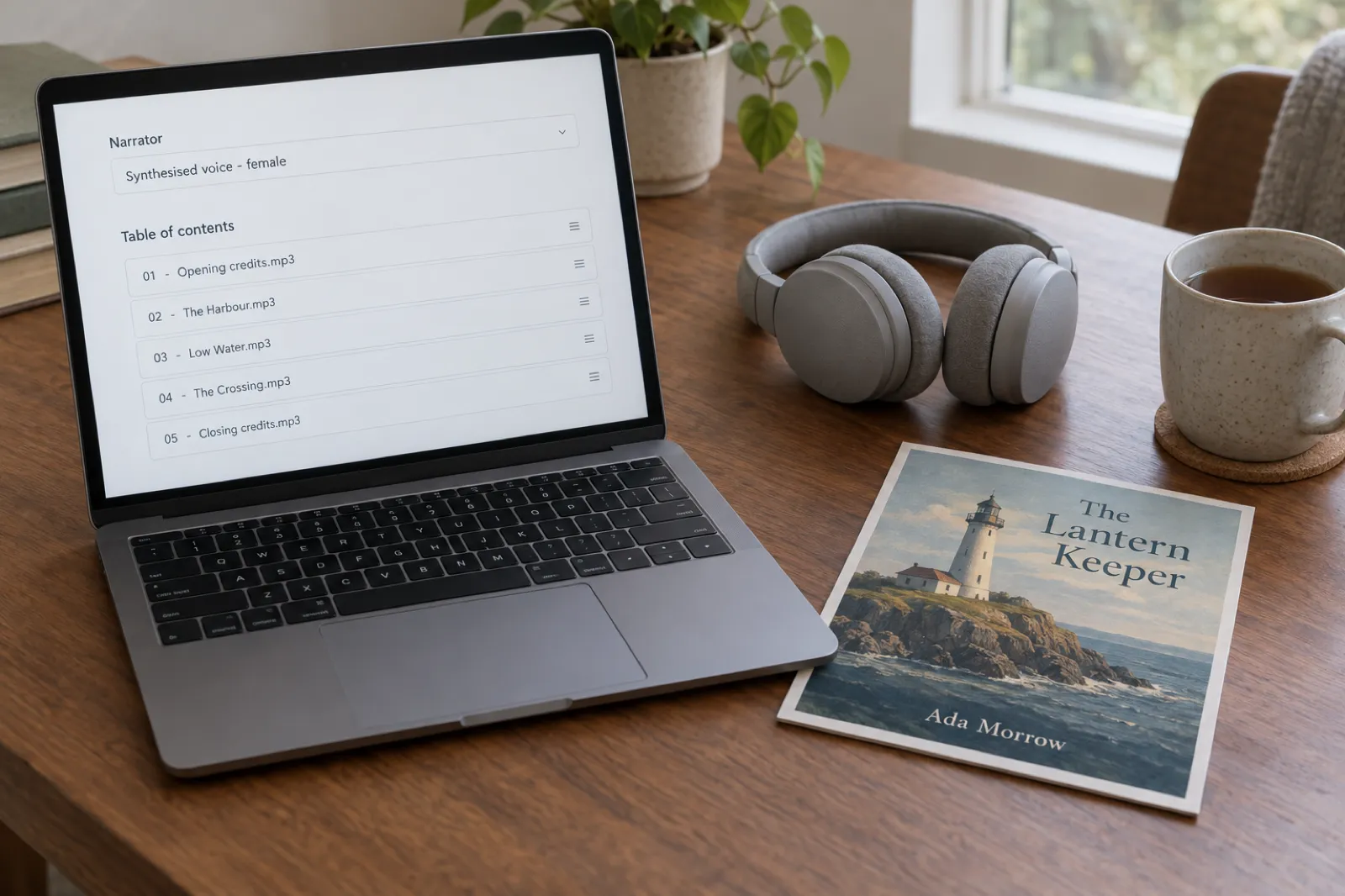
- Label AI narration. Kobo's AI Narration article (updated 24 September 2026) asks for at least two contributors, and if you use AI narration, the narrator listed as "Synthesised voice - male", "Synthesised voice - female" or "Synthesised voice - unspecified".
- Add a square cover, at least 600 by 600 pixels, JPG or PNG, under 5 MB.
- Upload MP3 files. MP3 only, up to 200 MB per file and 2 GB for the whole book. Kobo compresses most audio to 64 kbps on arrival, so higher bitrates aren't needed.
- Order and name the chapters (listeners navigate by those names), add a one-file MP3 sample, set territories and prices, and publish. It appears in 24 to 72 hours.
What audiobooks earn
- 45% of list price on single sales at or above the line ($2.99 and equivalents), 35% below.
- 32% when a subscriber uses a paid token from Kobo's audiobook subscription; nothing for a free-trial token. You can't opt out of the token subscription.
- Kobo Plus listening pays per minute, the same way as reading, if you opt the audiobook in.
- Price limits: up to $28 in the US, £20 in the UK, €25 in the eurozone (full list in the royalty table above). There's no scheduled-sale tool for audiobooks; you change the price by hand.
Where Inkfluence fits
Inkfluence turns a finished book into an audiobook and gives you an MP3 per chapter, one merged MP3, or a chapter ZIP at 44.1 kHz, 192 kbps, mono. At that bitrate an hour of audio is roughly 86 MB, so any chapter under about two hours fits Kobo's 200 MB limit, and a book of up to about 23 hours fits under 2 GB. Name the files in reading order, set the narrator to Synthesised voice, and they're ready for Kobo's uploader. Audiobook chapters are included on Creator (15 a month) and Premium (30 a month), and the free plan can use purchased credits; see pricing. See the AI audiobook generator, the audiobook length calculator and how to turn an ebook into an audiobook.
Make the audiobook Kobo will take
Turn your finished book into a narrated audiobook in Inkfluence, fix any mispronounced name once for every chapter, and download MP3 files ready for Kobo Writing Life.
Create your audiobookNo print: what to do instead
Kobo has no paperback or hardcover service, and none is announced. If you want print, you publish it elsewhere and put its ISBN in Kobo's "Primary Print ISBN" field so the editions are linked. The two usual routes are KDP Print for Amazon and IngramSpark for bookshops and libraries; IngramSpark vs KDP compares them. Remember the 20% rule: keep the Kobo ebook at least 20% below your paperback price. Inkfluence exports print-ready interior PDFs for KDP; it doesn't print books, and our guide to creating a print-ready PDF covers the files. If your manuscript lives in Google Docs, Google Docs to KDP shows how to get it into shape.
Kobo vs KDP Select: the trade-off
You can sell on Kobo and Amazon at the same time. What you can't do is put the same ebook on Kobo while it's in KDP Select, because Select requires the ebook to be exclusive to Amazon for each 90-day term. That makes Kobo a decision about Select.
| Question | Kobo (wide) | KDP Select |
|---|---|---|
| Exclusivity | None, ever | Ebook Amazon-only, 90-day terms |
| Ebook royalty | 70% at $2.99 and up, no cap, no delivery fee | 70% from $2.99 to $12.99 on Amazon.com, less $0.15 a MB; 35% outside |
| Subscription | Kobo Plus, per minute, 60% share, 34 countries | Kindle+, per page from a monthly fund |
| Promotions | Apply through the Promotions tab; curated, often a fee | Countdown Deals and free days, self-serve |
| AI-written text | Strict; "partially AI generated" is a listed rejection reason | Allowed with disclosure |
| AI-narrated audio | Accepted, labelled Synthesised voice | Only Amazon's own invite-only Virtual Voice |
| None | KDP Print paperbacks and hardcovers |
Select tends to win for genre fiction series (romance, fantasy, thrillers) whose readers live in Kindle+, at least for the first books. Kobo and wide tend to win for non-fiction, for books with readers in Canada, Europe, Australia or Japan, for books in languages other than English, and for authors who don't want one company deciding their income. Our KDP Select vs going wide guide has the full framework, and the wide publishing guide covers the other stores. For an AI audiobook, the decision is separate: your own AI-narrated audio can go to Kobo whatever you do with the ebook, unless you publish a Virtual Voice edition with the ebook in Select, which locks every audio edition to Audible.
Kobo launch checklist
- Bank details saved and the bank country checked.
- EPUB validated with zero errors and tested on a Kobo device or app.
- Title matches the cover; series in the series fields; three categories; no tag words.
- ISBN entered without dashes, or Kobo's ID accepted.
- Price at or above the 70% line, 20% below any paperback, no higher than elsewhere, and .99 in every storefront.
- Kobo Plus, OverDrive and worldwide rights decided; back matter links point to Kobo.
- Audiobook: narrator set (Synthesised voice if AI), MP3s under 200 MB each.
For marketing once it's live, how to sell your ebook covers the channels, and the self-publishing guide maps the whole journey.
Publishing on Kobo: FAQ
Is Kobo Writing Life free to use?
Yes. Kobo charges nothing to open an account, publish or convert a Word file to EPUB. It takes its share from each sale. Only promotions you choose to enter can cost money.
What royalty does Kobo pay on ebooks?
Kobo pays 70% of the list price when the price is at or above the line for that currency ($2.99 USD, CAD, AUD and NZD, £1.99, €1.99, ¥299 and so on) and the ebook is at least 20% cheaper than any print edition. Below the line it pays 45%. Public domain books earn 20%. There is no upper price cap and no delivery fee.
Do I have to be exclusive to Kobo?
No. Kobo never asks for exclusivity, for sales or for Kobo Plus. It only asks that you do not send the same book to Kobo through a distributor as well, because that creates a duplicate listing.
How does Kobo Plus pay authors?
By the minute: each month Kobo divides Kobo Plus revenue by all minutes read and listened, and pays you 60% of that value for each minute in your book. Re-reads and partial reads count; free-trial minutes do not. Kobo does not publish the rate.
Does Kobo accept AI-generated books?
Kobo is the strictest of the big ebook stores on this. Its content policy bars content generated primarily by automated tools without genuine human effort, and its help centre lists "wholly or partially AI generated" among the common reasons a book is declined. A book you wrote with AI help and then rewrote and edited yourself fits its rules better, but expect scrutiny.
Does Kobo accept AI-narrated audiobooks?
Yes. Kobo's audiobook FAQ says it accepts AI-narrated audiobooks in any language, with no exclusivity. You list the narrator as Synthesised voice: male, female or unspecified.
Can I publish a paperback on Kobo?
No. Kobo only sells ebooks and audiobooks and does not offer print or print-on-demand. For a paperback you need a separate printer such as KDP Print or IngramSpark.
Do I need an ISBN for Kobo?
No. Without one, Kobo assigns its own identifier. Some partner stores, such as Indigo and FNAC, need a real ISBN, so Kobo recommends one for the widest reach. Each format needs its own.
When does Kobo pay?
45 days after each month ends, on the 15th, once earnings reach CAD $50; smaller balances carry forward. Payment is by bank transfer only, not PayPal or Payoneer.
Should I choose Kobo or KDP Select?
You cannot have both for the same ebook, because KDP Select needs the ebook to be exclusive to Amazon. Select usually suits genre fiction series; Kobo and the other wide stores suit non-fiction and books with readers outside the US.
Your next book, ready for every store
Write and edit your book in Inkfluence, export an EPUB for Kobo, Apple and Google Play, a KDP-ready file for Amazon, and an audiobook for the stores that accept AI narration.
Start your book freeRelated reading
- Which stores allow AI-written books: Kobo's rules beside 20 other platforms
- How to publish an ebook wide in 2026
- How to publish on Apple Books
- How to publish on Google Play Books
- KDP Select vs going wide
- Kindle Unlimited is now Kindle+: what it means for authors
- Where to sell an AI audiobook
- Can you sell AI-generated books?
- KDP royalties explained
- Ebook export and publishing
- AI book series writer
Sources
All Kobo pages read on 28 October 2026. Dates are each page's last update.
- Kobo Writing Life: What is Kobo Writing Life? (18 March 2026)
- How do I create an account on Kobo Writing Life? (18 September 2026)
- How do I add my bank information to receive payment? (18 September 2026)
- A Step-By-Step Guide (18 September 2026)
- Setting up a New eBook (20 July 2026)
- File Types & Sizes and Validating and Testing Your eBooks (18 September 2026)
- What will my earnings be? (12 August 2026)
- How to Set the Price (13 August 2026)
- Kobo Writing Life Terms of Service (sections 2.3, 4.1 to 4.6)
- How and when do I get paid? (2 September 2026)
- Common Tax Questions: W-8BEN, 1099, VAT, and More (13 August 2026)
- Where else can Kobo distribute my eBooks? (23 July 2026) and Geos vs Worldwide
- What is Kobo Plus? (20 July 2026) and How does Kobo Plus pay?
- Using Promotions to Sell More Books on Kobo (10 June 2026) and Promotions Tab: How the Money Works (1 June 2026)
- KWL Guide to Pre-Orders (18 September 2026)
- ISBNs and Kobo Writing Life (15 October 2025)
- OverDrive Distribution (18 September 2026)
- What Content is Not Allowed? (26 March 2026) and Why was my Book Rejected or Blocked? (6 May 2026)
- Kobo Writing Life FAQ, including AI (18 September 2026)
- FAQ: Audiobooks (18 September 2026) and AI Narration and Audiobooks (24 September 2026)
- How to Upload Your Audiobook Directly on Kobo (18 March 2026) and How to Set the Price on your Audiobook (17 March 2026)
- Can I publish with Kobo Writing Life from Japan? (16 July 2026)
- KDP Help: eBook royalty options and list price requirements
- Brysbaert (2019), How many words do we read per minute? Journal of Memory and Language

Founder, Inkfluence AI
Sam is the founder of Inkfluence AI. He built the platform to make book creation accessible to everyone - from first-time authors to seasoned publishers.
Helpful links

Ready to write your own book?
Write with AI, make it yours, and export PDF, EPUB and KDP-ready files from one project.
Keep reading
 Self-Publishing
 How to Publish on Barnes & Noble Press in 2026: Ebooks, Print Rules and AI Disclosure
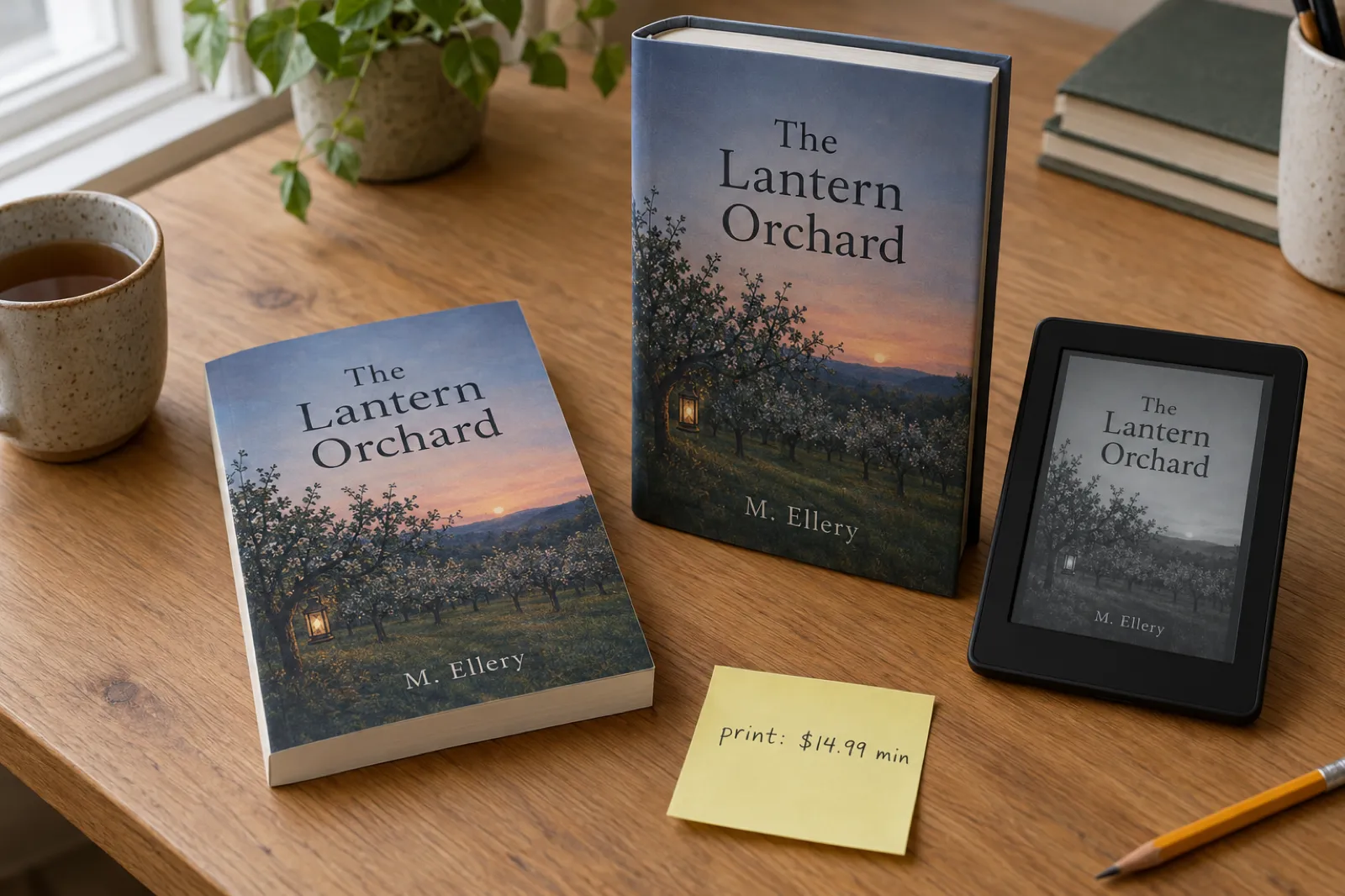
B&N Press pays 70% on ebooks from $0.99, and 55% minus printing on print books, which since 22 April 2026 must list at $14.99 or more. It asks whether each part of your book is AI-Created or AI-Assisted, refuses public domain titles, caps accounts at 100 titles and sells ebooks to US readers. Here is every step from account to promotion, read from B&N Press's own help pages, with a royalty calculator against KDP.
 Tools
Tools Draft2Digital Review 2026: Fees, Stores, AI Rules and Whether It's Worth It
An honest Draft2Digital review from its own pages in October 2026: the new $20 activation and $12 maintenance fees, the roughly 10% it keeps, every store and library it reaches (and the ones it does not), its AI rules, payments, print and audio, plus a calculator that tells you whether it pays for your books.
 Tools
Tools Draft2Digital vs PublishDrive (2026): Fees, Stores and AI Rules Compared
Draft2Digital keeps about 10% of each sale and now charges new accounts $20. PublishDrive takes 0% commission and charges a flat plan from $0 to $99.99 a month. We compared the two on their own pricing and help pages in October 2026: fees, stores, libraries, Google Play, Amazon, print, audiobooks, AI rules, ISBNs and payouts, with a fee calculator that finds the sales level where a flat plan wins.

Get ebook tips in your inbox
Join creators getting weekly strategies for writing, marketing, and selling ebooks.