
AI Book Translator
One Finished Book, Every Market You Want
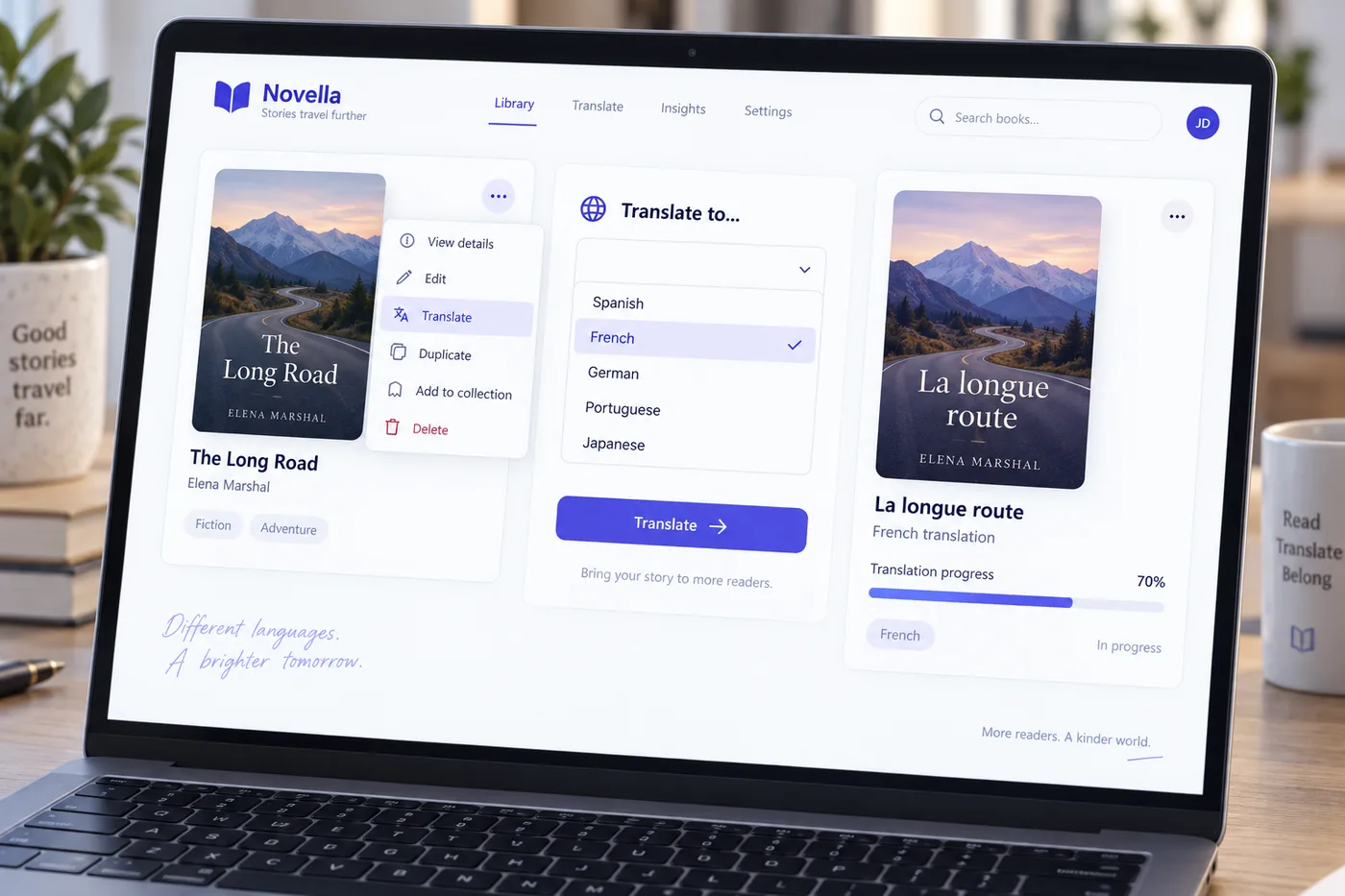
Pick a language on the book card. Every chapter, the titles, the description and the cover text are translated into a new book with the formatting intact, ready to export as a Kindle EPUB, print PDF or KDP package.
Built for series authors going wide, non-English authors who want an English edition, and coaches whose readers do not all speak the language the book was written in.
Updated October 2026 · By Sam May, Founder of Inkfluence AI

Quick answer
An AI book translator takes a finished book and produces the same book in another language. Inkfluence AI does it as one job from the book card: choose a language from 59, and the chapters translate in parallel with headings, lists and tables kept in place, the chapter titles translated as a set, and the book title, description, introduction, closing and cover text translated with them. The result is a second book on your dashboard, the original is never touched, and the edition exports like any other book. Creator includes 15 translations a month and Premium 40; beyond that a translation costs 1 chapter credit per 20,000 characters, and a failed one is never billed. Since April 2026, 395 translated editions have been started on the platform across 35 languages, and the most common direction is into English.
What gets translated, and what is left alone
The job covers the whole book rather than the chapter text alone, because a Spanish edition with an English cover and description is not an edition.
| Element | What happens |
|---|---|
| Chapter text | Every chapter translated in parallel, headings, bold, lists, quotes and tables kept in place |
| Chapter titles | Translated as a set so numbering and naming stay consistent across the book |
| Book title and description | Both translated; the new book appears on your dashboard with the language as its subtitle |
| Introduction and closing | Translated when the original has them, and switched on in the new book |
| Cover title and subtitle | Translated on the cover design so the front matches the inside |
| Illustrations and picture-book layout | Carried across unchanged; a translated picture book keeps every spread and image |
| Numbers, prices, names, links | Left as they are; the translator does not convert currency or units |
| Your original | Never modified. The translation is a separate book you can edit, export or delete on its own |
Numbers, names and links are deliberately left as written. A translator that "helpfully" converted your prices into euros or renamed your protagonist would create work you cannot see; leaving them lets you decide, and the editor is where you do it.
How to translate a book with AI
Finish the original first
Edit the source book until it is the edition you would publish. The translation copies what is there, so fix the typos, the chapter order and the description before you translate rather than in every language after.
Open the book menu and pick Translate
On the Home or My Books tab, click the three-dot menu on the book card and choose Translate. The same menu holds Remix and Duplicate; Translate is the one that keeps the text and changes the language.
Choose the target language
Pick from the 59 languages on the list. English is on it too, so a book written in Spanish or German can be translated into English for the Amazon.com shelf.
Let the chapters translate
A new book appears on your dashboard with the language as its subtitle and a progress bar. Chapters translate in parallel, so a 20-chapter novel takes minutes rather than hours. A translation that fails is never charged.
Read the first chapter and the cover
Check names, register, units and any joke that depends on English. The editor and its AI assistant work on the translated book exactly as on the original, so a fix is a normal edit.
Export and publish the edition
Kindle EPUB, print PDF, DOCX or the KDP package from the translated book. On KDP, disclose the AI translation at publish and credit the original author and translator in the contributor fields.
The in-app help article on translation has the same steps with screenshots, and the video walkthrough shows a book translated into Italian at the end of the full writing demo.
The 59 languages
Grouped the way the picker groups them. English is a target as well as a source.
| Group | Languages |
|---|---|
| Most requested | English, Spanish, French, German, Portuguese (Brazil), Italian, Dutch, Japanese, Korean, Chinese (Simplified), Chinese (Traditional), Arabic, Hindi, Russian, Turkish, Polish, Swedish, Indonesian |
| Major world languages | Vietnamese, Thai, Bengali, Urdu, Tagalog, Tamil, Telugu, Malay, Swahili, Persian, Ukrainian, Romanian, Czech, Greek, Hungarian, Hebrew, Finnish, Danish, Norwegian, Bulgarian, Croatian, Serbian, Slovak |
| Regional and additional | Catalan, Gujarati, Punjabi, Nepali, Burmese, Latvian, Lithuanian, Estonian, Slovenian, Icelandic, Georgian, Armenian, Mongolian, Kazakh, Uzbek, Hausa, Zulu, Afrikaans |
Portuguese is the Brazilian variant, English the US one, and Chinese comes as Simplified or Traditional. The same languages are available for writing a book natively from the first prompt; the write hub covers that route and the Spanish, French, German, Portuguese, Indonesian and Arabic editions of this site (for example escribir un libro con IA and écrire un livre avec l'IA) explain it in those languages. In Italian, start with scrivere un libro con l'IA, libro per bambini con l'IA or creare un ebook con l'IA, and to compare which tools write natively in Italian, migliore IA per scrivere libri.
How the translation keeps your formatting
A chapter in the editor is structured text: headings, paragraphs, bold and italic runs, lists, block quotes, tables, image placements. The translator works on that structure rather than on a flat paste, so a heading comes back as a heading and a three-column table comes back with three columns. Long chapters are split into passages of about 2,000 words at paragraph boundaries, each passage is translated on its own, and every passage is checked afterwards: the structure has to match the source and the text has to be a plausible length for the language, because Chinese or Japanese runs far shorter than English and Spanish or German runs longer. A passage that fails the check is run again on a different setting before anything is saved, so a chapter with a missing heading or a truncated ending cannot be marked complete.
Chapter titles are translated together as a list rather than one by one, which keeps "Chapter 7: The Long Road" and its neighbours in the same style and numbering. The book title, description, introduction and closing are translated at the same time as the chapters, and the cover title and subtitle are translated on the cover design so the front of the book matches its inside. Illustrations, cover art and the spread layout of a picture book are carried across untouched.
Two things are on purpose. Numbers, prices, names and links are left exactly as written, because converting them silently would hide decisions that are yours. And a translation that fails partway is marked failed and never charged; you retry it, and if the source has not changed, the second attempt at the same language returns the finished edition without spending anything.
What our own data says: 395 translated editions
Every translation started on Inkfluence AI between 21 April and 4 September 2026, by target language. Thirty-five languages were used; the mean edition is 18.2 chapters.
| Target language | Share of translations | Reading |
|---|---|---|
| English | 29.1% | Authors who wrote in another language translating for the Amazon.com market |
| Spanish | 15.9% | The largest outbound target; Spain, Mexico and the US Spanish-language shelf |
| German | 11.9% | Amazon.de is the biggest non-English Kindle store for indie non-fiction |
| Russian | 5.6% | Mostly fiction; not on KDP's language list, so these editions sell direct or through other stores |
| Italian | 4.8% | Non-fiction and self-help |
| French | 4.3% | Amazon.fr and the wider francophone market |
| Hindi, Japanese, Urdu | 2.0 to 2.3% each | Hindi is ebook-only on KDP, Japanese has no hardcover, Urdu is not on the KDP list |
| Everything else | 22.1% | 26 further languages, from Romanian and Dutch to Swahili, Bengali and Mongolian |
The surprise is the first row. The feature was built for English books going out, and the most common use is books coming in: nearly a third of translations are into English, from authors writing in Spanish, German, Russian and Italian who want an edition on the Amazon.com and UK shelves. Spanish and German together are another 28%, which matches where indie ebooks sell outside English. Russian, the fourth target, is not on KDP's language list at all, so those editions are sold direct or through other stores, which is worth knowing before you translate for Amazon. And 1 in 6 books on the platform is written in a language other than English from the first prompt, a figure homed on the ebook generator page.
What kind of books get translated
| Genre | Share | Reading |
|---|---|---|
| Fiction, romance, children's and true crime | 32.2% | Story books travel; a series translated into Spanish and German is the common pattern |
| How-to guides | 13.9% | Practical books whose subject does not change with the country |
| Personal development | 13.2% | The largest non-fiction niche on the platform and the most translated |
| Health, cookbooks, business, workbooks | 14.9% | Cookbooks translate well because the recipes carry; check units and ingredient names |
| Everything else | 25.8% | Study guides, devotionals, lead magnets, challenges, reports |
Fiction is a quarter of translations against about a third of all books on the platform, so story books are translated a little less often than they are written, and non-fiction a little more. Which niches are growing in the first place is on the best ebook niches page.
Publishing a translated edition on Amazon KDP
Two rules from KDP's content guidelines, and a language list that decides which formats you can sell.
Disclose the AI translation
KDP requires you to tell Amazon about AI-generated content when you publish a new book, and its definition names "text, images, or translations created by an AI-based tool". The disclosure is answered on the publish form; it is not printed on the product page. Our KDP AI disclosure guide walks through the form.
Credit the author and the translator
Books that are translations of another work must credit the translator and the original author in the contributor fields. If you are both, you are both. Keep the original's title in the description so readers who know it can find it.
| KDP format support | Languages on the picker |
|---|---|
| Ebook, paperback and hardcover | English, Spanish, French, German, Italian, Portuguese, Dutch, Swedish, Danish, Norwegian, Finnish, Icelandic, Catalan, Afrikaans, Hebrew, Persian |
| Ebook only | Arabic, Chinese (Traditional), Hindi, Gujarati, Tamil |
| Ebook and paperback, no hardcover | Japanese |
| Paperback and hardcover only, no ebook | Polish, Ukrainian |
| Not on the KDP list (35 of the 59) | Russian, Korean, Chinese (Simplified), Turkish, Indonesian, Vietnamese, Thai, Bengali, Urdu, Tagalog, Telugu, Malay, Swahili, Greek, Hungarian, Czech, Slovak, Bulgarian, Croatian, Serbian, Romanian, Punjabi, Nepali, Burmese, Latvian, Lithuanian, Estonian, Slovenian, Georgian, Armenian, Mongolian, Kazakh, Uzbek, Hausa, Zulu. These editions sell as a PDF or EPUB on your own site, Gumroad or Etsy, or through stores that list the language |
Check the language against KDP's list before you choose a paperback trim. The rest of the KDP set-up (categories, keywords, pricing by marketplace, wide versus Select) is on how to sell ebooks on Amazon, ebook SEO and KDP Select versus wide; the print side is on paperback publishing. Amazon's own Kindle Translate, an invite-only beta for Kindle ebooks, is the other route; Kindle Translate vs translating your book yourself compares the two language by language.

What a translated Kindle edition pays
Royalty on Amazon.com: 70% of list price less about $0.06 delivery, inside the $2.99 to $12.99 band. Each Amazon marketplace sets its own band on the same KDP page.
| List price | You keep per copy | Where it is used |
|---|---|---|
| $2.99 | $2.03 | Bottom of the 70% band; the usual price for a translated first-in-series |
| $4.99 | $3.43 | Common for translated non-fiction |
| $9.99 | $6.93 | Guides and workbooks |
| $12.99 | $9.03 | Top of the 70% band since July 2026 |
There is no honest per-edition income figure and this page does not carry one; revenue is copies times royalty, and a translation's copies come from a market the original could not reach. Direct sales keep more: a PDF sold on Gumroad pays list less 10% plus $0.50 and card processing, and an Etsy listing costs $0.20 plus 6.5% of the sale. The catalogue arithmetic is on making money selling AI ebooks.
What it costs to translate a book
Creator includes 15 translations a month and Premium 40. Past the allowance, or on a free account with a credit pack, a translation costs 1 chapter credit per 20,000 characters of source text (about 3,300 words), minimum 1. Credits are $0.50 to $0.67 each depending on pack.
| Book | Characters | Credits | At pack prices |
|---|---|---|---|
| Short guide, 5 chapters, about 6,000 words | ~36,000 | 2 | $1.00 to $1.33 |
| Typical non-fiction, 10 chapters, about 12,000 words | ~72,000 | 4 | $2.00 to $2.66 |
| Full novel, 20 chapters, about 30,000 words | ~180,000 | 9 | $4.50 to $6.00 |
| Long novel, 30 chapters, about 60,000 words | ~360,000 | 18 | $9.00 to $12.00 |
Character counts assume about six characters a word including spaces, which is right for English source text. The charge is on the source, so translating one book into five languages is five charges, and the allowance counts translations rather than languages. Nothing is charged for a translation that fails, and translating an unchanged book into the same language again returns the existing edition free. Packs: 15 credits for $9.99, 25 for $12.99, 50 for $24.99, on the pricing page.
What to check before you publish
The translation is faithful to the words; these six things are judgement calls it leaves to you. Read chapter one and the cover, then decide.
| Check | Why |
|---|---|
| Proper names and places | Decide whether characters keep their names or get local ones. The translator keeps them; localising is your call |
| Register and address | Many languages choose between formal and informal "you". Read chapter one and change it in the editor if the book should be warmer or more formal |
| Units, currency, dates | Left as written. A recipe in cups and a price in dollars stay that way until you change them, which for a German edition you probably should |
| Idioms, jokes, wordplay | The one place a human eye always earns its keep. The AI translates the sense; a title pun may need a new pun |
| Regional variant | Portuguese is Brazilian, Chinese is Simplified or Traditional, English is US. Pick the edition that matches the store you are publishing to |
| Right-to-left export | Arabic, Hebrew, Persian and Urdu editions: preview the PDF and EPUB before publishing so alignment and bold spacing read correctly |
If you can read the target language, run the whole-book review on the translated edition as well; it quotes the passages it thinks are unclear, in whatever language the book is in. If you cannot, one native reader on chapter one and the description is worth more than a second pass by any tool, and the beta-reader page explains what to ask them.
Translate the book, or write it natively in the other language?
Both are available and they answer different questions. Translate when the original is finished, edited and selling, and you want the same book in another market: the Spanish edition should be the English book, not a cousin of it, and a translation is the only way to get that. Write natively, from the first prompt in the target language, when the other language is the primary market and the book should read as if it began there: local examples, local names, the idioms of that reader. The generator writes originally in the same languages it translates into, rather than writing English first and translating after, and the ebook writing guide covers the native route. A family picture book usually wants the native route too: the personalized book for grandparents writes a story with the grandchild and Abuela or Babcia in it, in the language the description is typed in.
A common pattern on the platform combines them: write natively in the author's language, edit it there, translate into English for Amazon.com, and then translate the English edition into the third and fourth languages once it has proven itself. That is why English is the largest target in the data above.
One caution for either route: a translated audiobook needs a narrator in that language. Fourteen of the 59 languages have narration voices, so if audio matters, check the list before choosing the edition to record.
Inkfluence AI versus a chat assistant versus a translation service
| Feature | Chat assistant | Human translation service | Inkfluence AI |
|---|---|---|---|
| Input | Paste chapter by chapter inside a message limit | Send the manuscript and wait for a quote | Pick a language on the book card |
| Formatting | Headings, bold and lists usually lost; rebuild by hand | Returned as a document you reformat | Kept in place; the translated book is already laid out |
| Consistency across chapters | Each message starts fresh; chapter titles and names drift | Consistent, at human speed | Chapter titles translated as a set; names left as written |
| Time | An evening for a novel | Weeks for a novel | Minutes for a novel |
| Cover, description, front matter | Separate prompts | Usually extra | Translated with the book |
| Output | Text in a chat window | A document | A second book: EPUB, PDF, DOCX, KDP package, audiobook |
| Cost | Subscription and your time | Per word, per language | Included in Creator and Premium allowances; credits beyond |
A human literary translator produces the better book and is the right choice for a title with a publisher behind it. For a self-published catalogue where the question is whether a Spanish edition is worth having at all, an AI translation plus a native read of chapter one answers it for a few dollars, and the human translator can come in on the edition that sells.
Who translates their books
Series authors going wide
A finished trilogy translated into Spanish and German is three new shelves for the price of an afternoon of checking.
Non-English authors reaching Amazon.com
Nearly a third of translations on the platform are into English: a book written in Spanish, German or Russian gets a US and UK edition.
Coaches and course creators
The lead magnet and the workbook in the languages your audience actually speaks, with the branding intact.
Churches and ministries
A devotional in English and Spanish from one source, both editions updated when the original is.
Cookbook and how-to publishers
Practical books whose subject does not change with the border, translated with the recipe formatting kept.
Picture-book authors
Illustrations and spread layout carry across, so the French edition is the same book with new words.
The persona pages for Kindle publishers, series authors, course creators and churches cover the rest of each workflow. Holiday-let hosts use it too: one guest guidebook, a copy in each language their guests read. Parents making a picture book for a bilingual home can start from the personalized children's book maker, which writes the story in the language you choose.
Five mistakes that waste a translation
- Translating before the original is finished. Every edit you make to the English afterwards has to be made again in each language, or the editions drift apart. Finish, then translate.
- Publishing without reading chapter one. Register, names and the first joke are decided in the first thousand words. Ten minutes there catches most of what a reader would notice.
- Leaving dollars and cups in a German cookbook. The translator leaves numbers alone on purpose. Convert what the reader needs converted.
- Skipping the KDP disclosure. It is a checkbox on the publish form and the guidelines name translations explicitly. The disclosure post shows exactly where.
- Choosing a paperback for an ebook-only language. Hindi, Arabic and Traditional Chinese are Kindle only on KDP. Check the format table above before you order a proof. For a Hindi edition KDP also takes the file only as Word (.doc or .docx); our Hindi guides book kaise likhe and ebook kaise banaye walk through it.
Plans and pricing
| Plan | Price | Translation | Also included |
|---|---|---|---|
| Free | $0 | Not included; credits unlock it | 5 chapters to start, PDF export, cover designer |
| Creator | $9.99 a month | 15 book translations a month, then credits | 35 chapters a month, 15 audiobook chapters a month, EPUB and DOCX, KDP package, 20 AI images, credit removed |
| Premium | $19.99 a month | 40 book translations a month, then credits | Unlimited chapters, 30 audiobook chapters a month, 50 AI images, 100 AI assists a day |
Annual plans are $89 for Creator and $179 for Premium. Lifetime deal holders: translation is included on Tier 3 and Tier 4. Full details on the pricing page.
Sources
Translation data. Every translated edition started on Inkfluence AI between 21 April and 4 September 2026 (395 editions, 35 target languages), counted from the platform database on 4 September 2026 and homed on this page. The 1-in-6 non-English writing share is homed on the AI ebook generator page; niche shares on best ebook niches.
KDP rules. KDP content guidelines (AI-generated content disclosure, which names translations; translator and original-author credit), KDP supported languages (format restrictions by language), eBook list price requirements (70% band) and delivery costs, all read 4 September 2026.
Product facts. Language list, allowances, credit rule and translation behaviour from the product as shipped in September 2026; plan prices from the pricing page. Gumroad and Etsy fees from their published fee pages.
AI book translator: frequently asked questions
Can AI translate an entire book?⌄
Which languages can I translate a book into?⌄
How accurate is AI book translation?⌄
Does the translation keep my formatting?⌄
Is my original book changed?⌄
How long does it take to translate a book?⌄
What does it cost to translate a book?⌄
Can I translate a book on the free plan?⌄
Can I publish AI-translated books on Amazon KDP?⌄
Which languages does KDP accept?⌄
Should I translate a book or write it natively in the other language?⌄
Can I translate a book into English?⌄
Does it translate the cover and the book description?⌄
Can I translate a picture book or an illustrated book?⌄
Can I make an audiobook of the translated edition?⌄
Does it translate imported manuscripts?⌄
What does a translated edition earn on KDP?⌄
More tools for taking a book further
AI audiobook generator
Narration in 14 languages for the edition you just made.
AI ebook generator
Write the original, in any of the same languages.
AI book cover generator
Same art, translated title, every edition.
AI book formatter
Print and Kindle layout for the translated file.
AI novel writer
The series that goes wide starts here.
KDP tools
Listing, keywords and categories per marketplace.
More on the tools hub and in what Inkfluence AI is.
Give the book its second shelf tonight
Pick a language on the book card. The edition is minutes away and the original stays exactly as it is.
Translate a book