
Best AI Children's Book Creator
(2026)
Children's books are split workflows. The text and structure live in one tool. The illustrations live in another. We compared 11 AI tools that touch one or both halves of that workflow.
Inkfluence AI ranks first on the writing side - dedicated children's fiction blueprint, age-calibrated vocabulary across picture books, early readers, and chapter books, AI cover generation, audiobook narration for bedtime listening, and KDP-ready PDF and EPUB export. Pair with Midjourney or OpenAI image gen 2 for the illustrations.
Quick Answer
The best AI children's book creator in 2026 for the writing side is Inkfluence AI, the only tool with a dedicated children's fiction blueprint that calibrates vocabulary across picture books (ages 2-6), early readers (5-8), and chapter books (6-10), generates an AI children's book cover, narrates the story as a bedtime audiobook, and exports KDP-ready PDF and EPUB. For the illustrations, pair with Midjourney or OpenAI image gen 2 (DALL-E) - no AI tool in 2026 does both halves of the children's-book workflow equally well. ChatGPT and Claude can draft individual scenes but lack age-calibrated structure and KDP export. Canva handles layout but no AI writing.
AI Children's Book Tools by the Numbers
Tools compared across both halves of the workflow
Format and age categories supported
Prompt to picture-book first draft
To draft your first children's book
For context from our own platform: children's fiction is about 3.5% of the 100,000+ books created on Inkfluence AI, a larger share than most people expect for a format that also needs illustration. That split is the whole story. The words come quickly; the pictures, and keeping a character looking the same across every spread, are where the real work sits, which is why children's book creation is a two-tool job rather than one.
What a Picture-Book Spread Actually Needs
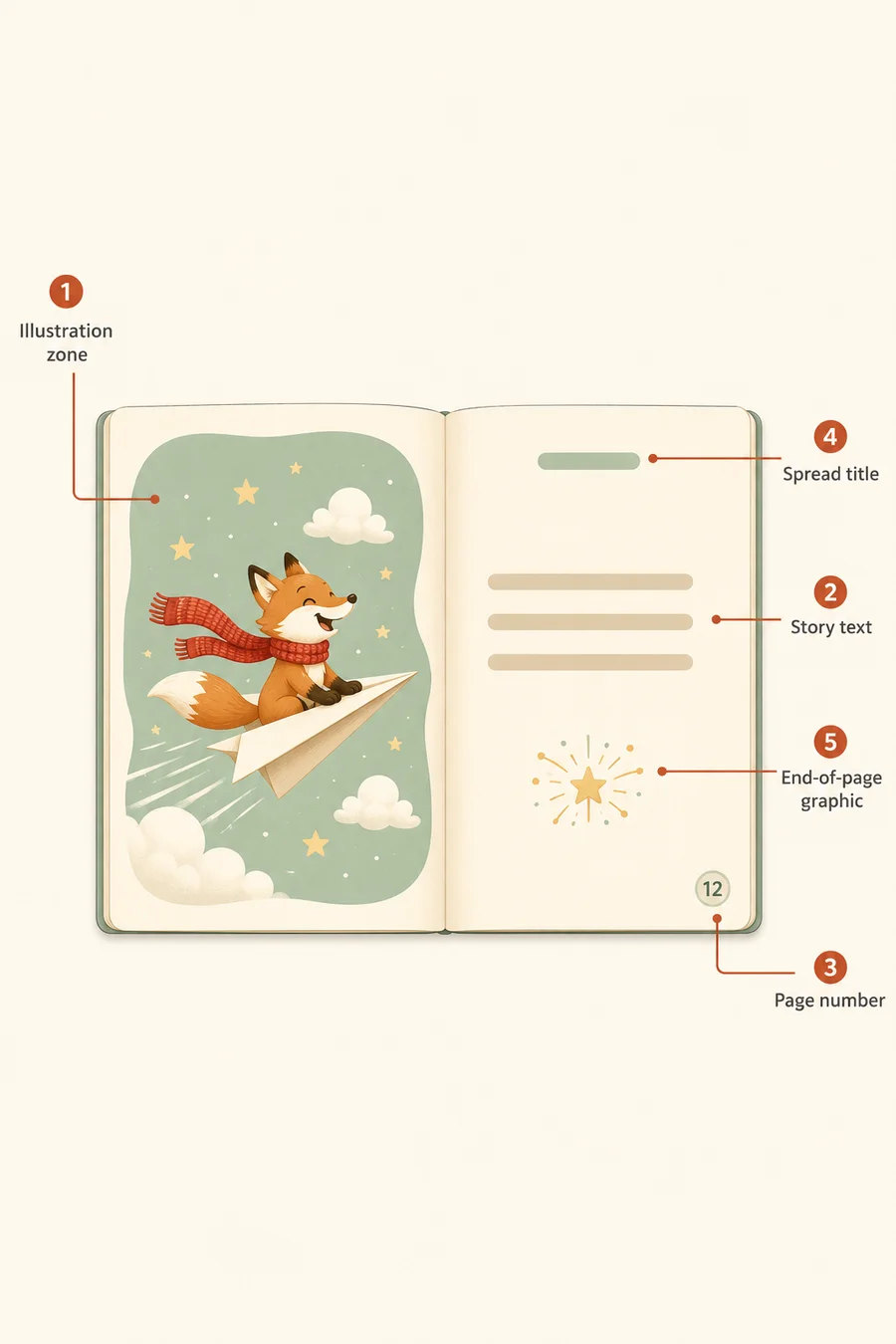
Children's picture books look simple. They are not. A 32-page picture book has 12 to 16 spreads, and every spread has to balance illustration, story text, page metadata, and a clear emotional beat in the arc. General AI writing tools dump prose. Inkfluence's children's fiction blueprint structures the manuscript so each spread has a clear visual moment, a digestible amount of text, and the emotional pacing children's editors look for.
- Illustration zone - the visual on the spread
- Story text - kept short, often 1 to 4 sentences per spread
- Page number - small, unobtrusive, often hidden in art
- Spread title or section break - on chapter and chapter-book formats
- End-of-page graphic - decorative flourish, optional but helps pacing
See our standalone children's book creator tool, or our general AI book writer if you also want to draft non-fiction kids' books or middle-grade chapter books.
AI Children's Book Tool Comparison Table
Children's-book features at a glance - scroll right on mobile
| Tool | Best For | Pricing | Exports | Kids' Blueprint | Age Calibration | Audiobook | Free | Compare |
|---|---|---|---|---|---|---|---|---|
| Inkfluence AI Illustrated picture book maker + general ebook generator | Fully illustrated picture books: story, consistent-character art on every page, painted cover, print-ready export | Free / from $9.99/mo | PDF, EPUB, DOCX | ✓ | ✓ | ✓ | ✓ | Try it → |
| ChatGPT General AI assistant | Drafting individual scenes, brainstorming character names | Free / $20/mo (Plus) | Copy/paste | ✗ | ✗ | ✗ | ✓ | View → |
| Claude General AI assistant | Long, gentle prose for chapter books and middle grade | Free / $20/mo (Pro) | Copy/paste | ✗ | ✗ | ✗ | ✓ | View → |
| Canva Design platform | Children's book layout templates, kid-friendly fonts and colours | Free; Pro is a paid subscription | ✗ | ✗ | ✗ | ✓ | View → | |
| Midjourney AI illustration generator | Picture-book illustrations from text prompts | From $10/mo | PNG | ✗ | ✗ | ✗ | ✗ | |
| OpenAI Image Gen 2 (DALL-E) AI illustration generator | Consistent character illustrations across spreads | Bundled with ChatGPT Plus / $20/mo | PNG | ✗ | ✗ | ✗ | ✗ | |
| StoryJumper Children's book platform | School and home authors, basic AI assistance, online sharing | Free to create; print and subscription pricing on its site | PDF (paid), Hardcover order | ✓ | ✗ | ✗ | ✓ | |
| Book Creator Education book platform | Classroom projects, multimedia kid-authored books | Free for individuals; school plans priced per student | PDF, EPUB | ✗ | ✗ | ✗ | ✓ | |
| Squibler AI book writing platform | General AI book editor, light children's support | Free / from $15.83/mo (annual) | DOCX, PDF | ✗ | ✗ | ✗ | ✓ | View → |
| Sudowrite Fiction writing assistant | Adult fiction, occasionally middle grade | From $19/mo | DOCX | ✗ | ✗ | ✗ | ✗ | View → |
| Designrr Content repurposing tool | Turning blog posts or transcripts into PDF books | From $29/mo | PDF, EPUB | ✗ | ✗ | ✗ | ✗ | View → |
Why Children's Book Creation Is a Split Workflow in 2026
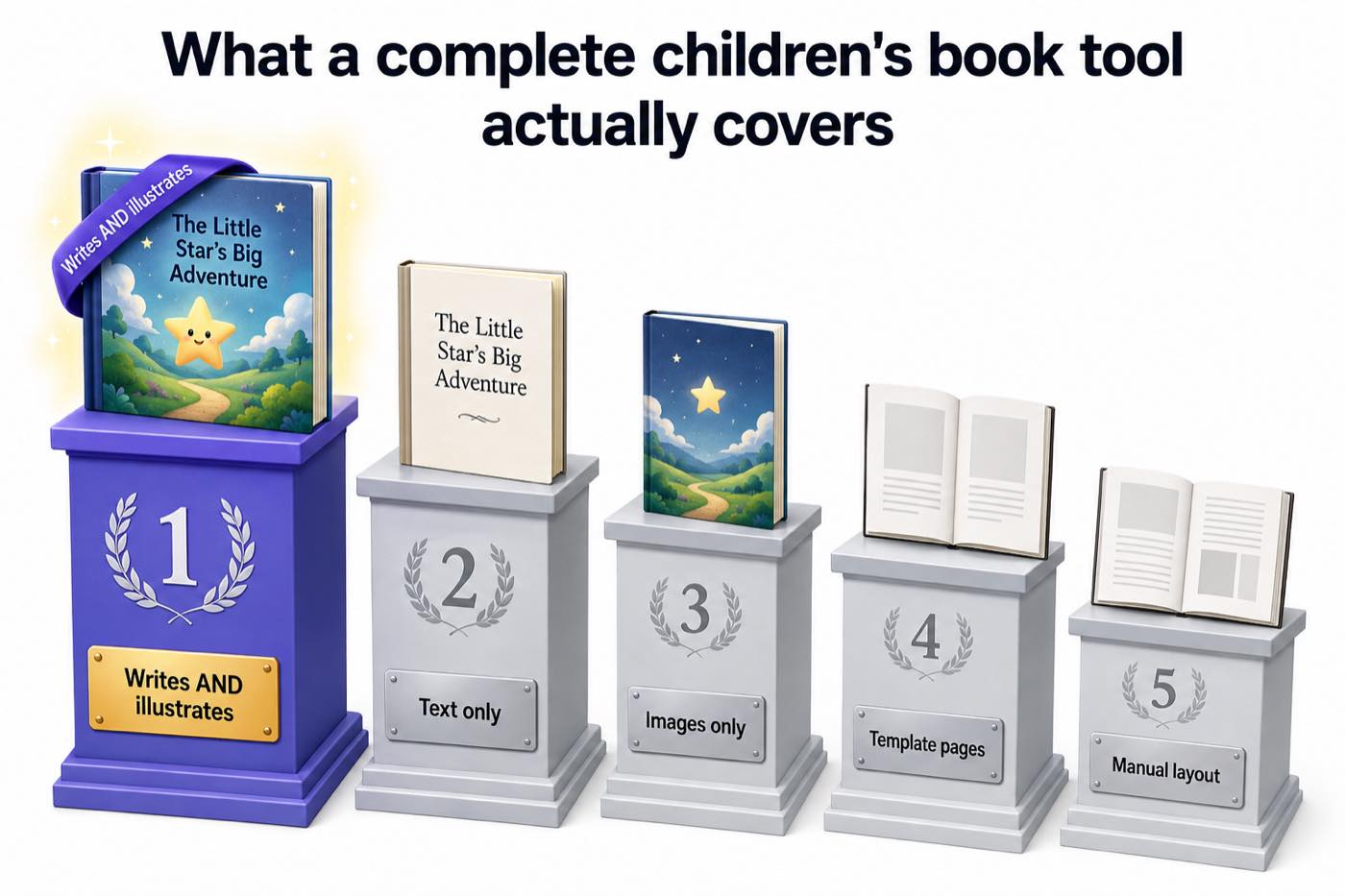
The honest answer most children's-book listicles avoid: there is no single AI tool in 2026 that produces a finished, illustrated children's book end-to-end with consistent character art and age-calibrated story text. The strongest workflow splits the work between two specialists - one for the manuscript, one for the illustrations - and ties them together in a layout tool.
Indie publishing trade associations and KDP category trackers consistently report children's books among the top growth categories in self-publishing, with picture books and early readers leading the segment. The path most successful indie authors took was a two-tool stack: a writing tool for the structured manuscript, and a separate image generator for the spreads.
1. Story structure and language calibration
Picture books need 200-1,000 words. Early readers need 1,500-5,000. Chapter books run 5,000-15,000. Each format also has its own vocabulary band - "scrumptious" works in a picture book, "ostentatious" does not. Inkfluence's children's fiction blueprint calibrates output length, sentence complexity, and vocabulary based on the format and age range you specify in the premise.
2. Illustrations are still the hardest part
Midjourney and OpenAI image gen 2 (DALL-E) both produce convincing single illustrations. The challenge is character consistency across 12-16 spreads - making sure your fox in chapter 1 looks like the same fox in chapter 8. Midjourney supports character reference via image prompts; OpenAI image gen 2 supports it via seed image reuse. Either approach takes practice. Tools that promise auto-illustrated AI children's books in 2026 still struggle with consistency on inspection.
3. Layout is its own discipline
Once you have text and illustrations, you need to lay them out. Canva is the most accessible option for indie authors and has a strong children's-book template library. InDesign and Affinity Publisher offer more control for those willing to learn. Inkfluence exports a formatted PDF that handles cover and basic interior layout, but for picture books with one illustration per spread, you will pull text into Canva or InDesign for the final pairing.
4. Trim sizes matter for KDP children's books
Picture books on Amazon KDP Print usually use 8.5x8.5 inch square trim, with 0.125 inch bleed when the art runs to the page edge; chapter books use 6x9 inch. Hardcover children's books require their own dimensions. Inkfluence exports picture books at 8.5x8.5 with the art inside the margins (choose No bleed on KDP) and kids' stories at the common KDP trims from 5x8 to 8.5x11. If you are doing layout in Canva, set the trim before importing illustrations - it is significantly harder to resize after the fact.
5. Audiobook is the rising third format
Children's audiobooks have grown faster than any other audiobook category since 2022, according to the Audio Publishers Association's 2024 report - parents looking for screen-free audio for bedtime and car trips. AI narration with warm voices works particularly well for picture books and early readers. Inkfluence's audiobook generator includes voices well-suited to children's narration, and our audiobook tool comparison covers the full audiobook side in detail.
The Best AI Children's Book Tools: In-Depth Reviews
1. Inkfluence AI - Best for the Manuscript Side
Inkfluence's children's fiction blueprint calibrates vocabulary, sentence length, and story complexity to the age range you specify. You set picture book ages 2-6, early reader 5-8, chapter book 6-10, or middle grade 8-12, and the AI adjusts. In picture book mode, every page is illustrated automatically: one painting per page in a consistent storybook style, the same characters throughout (drawn against a locked character reference), and a painted cover with the title lettered into the art. The tool also narrates the audiobook and exports KDP-ready PDF and EPUB, including the square 8.5" x 8.5" picture-book trim. The same pipeline drives its coloring book generator and ABC book mode.
The free plan includes 5 chapters per month plus 5 more on the 1st, enough to draft the complete story without paying (see exactly what's free). Full page-by-page illustration uses the paid plans' monthly image allowance: 20 images on Creator ($9.99/mo), 50 on Premium, which covers a fully illustrated picture book each month.
2. Midjourney - Best for the Illustration Side
Midjourney is the strongest single tool for generating children's-book illustrations in 2026. Its watercolour, gouache, and cut-paper styles read warmer than photo-realistic AI faces, which is exactly what kids' publishing wants. Character consistency across spreads is the hard part - solved (mostly) with image references and the --cref flag. Pair with Inkfluence for the manuscript, then run one Midjourney prompt per spread, then lay out in Canva.
3. OpenAI Image Gen 2 (DALL-E) - Best for Character Consistency
OpenAI's image gen 2, bundled with ChatGPT Plus, is genuinely strong on character consistency through seed-image reuse and prompt anchoring. It is also the cheapest path to AI illustrations if you already pay for ChatGPT Plus. Style range is narrower than Midjourney's, but for most picture books the storybook-illustration default works well enough. Pair with Inkfluence for the writing.
4. ChatGPT - Useful for Ideation, Not for Drafting
ChatGPT is great for brainstorming children's-book ideas, character names, and emotional arcs. Where it falls short for actual drafting is structure - it cannot calibrate vocabulary to a specific age band consistently across a whole book, does not produce KDP-ready files, and has no concept of picture-book pacing or spread breaks. Use it to think, not to ship.
5. Claude - Best for Chapter Books and Middle Grade Prose
Anthropic's Claude has a particularly gentle, narrative-friendly prose voice that suits chapter books and middle grade fiction well. It can sustain a longer story than ChatGPT before drifting in tone. As with ChatGPT, it stops at text - no spread structure, no KDP export, no cover, no illustrations. Use it as a drafting helper, then move the manuscript into Inkfluence for export.
6. Canva - Best for Layout and Templates
Canva's children's-book template library is the most accessible layout tool for non-designers. Pair text and illustrations on every spread, set the KDP trim, and export PDF for upload. Magic Write covers basic copy on cover blurbs and back matter. Canva does not write the manuscript or generate the illustrations - it is the layout connector between Inkfluence and Midjourney.
More Tools Worth Knowing
StoryJumper
Children's-book platform popular with educators and home authors. Strong sharing and printing options, lighter on AI assistance, weaker on KDP self-publishing workflow.
Book Creator
Built for classrooms - kids author their own multimedia books with text, drawings, and audio. Excellent for school projects, not commercial publishing.
Squibler
General AI book platform. Will draft a children's book if asked, but has no kid-specific structure or age calibration. Better suited to adult fiction.
Compare with Inkfluence →Sudowrite
Adult fiction prose specialist. Can stretch to middle grade chapter books, but its tone is calibrated for adult literary fiction.
Compare with Inkfluence →Designrr
Content repurposing tool. Useful if you have a blog of bedtime-story posts you want to bundle into a PDF. Not a children's-book design tool.
Compare with Inkfluence →Microsoft Designer / Bing Image Creator
Free DALL-E credits via Bing. Good first stop for budget illustrations. Quality below Midjourney and OpenAI image gen 2 but acceptable for early drafts.
What an AI Children's Book Looks Like in Print
Three spreads from picture books drafted in Inkfluence and illustrated with Midjourney and OpenAI image gen 2 - watercolour fox at a campfire, a cut-paper space scene, and a gouache jungle.
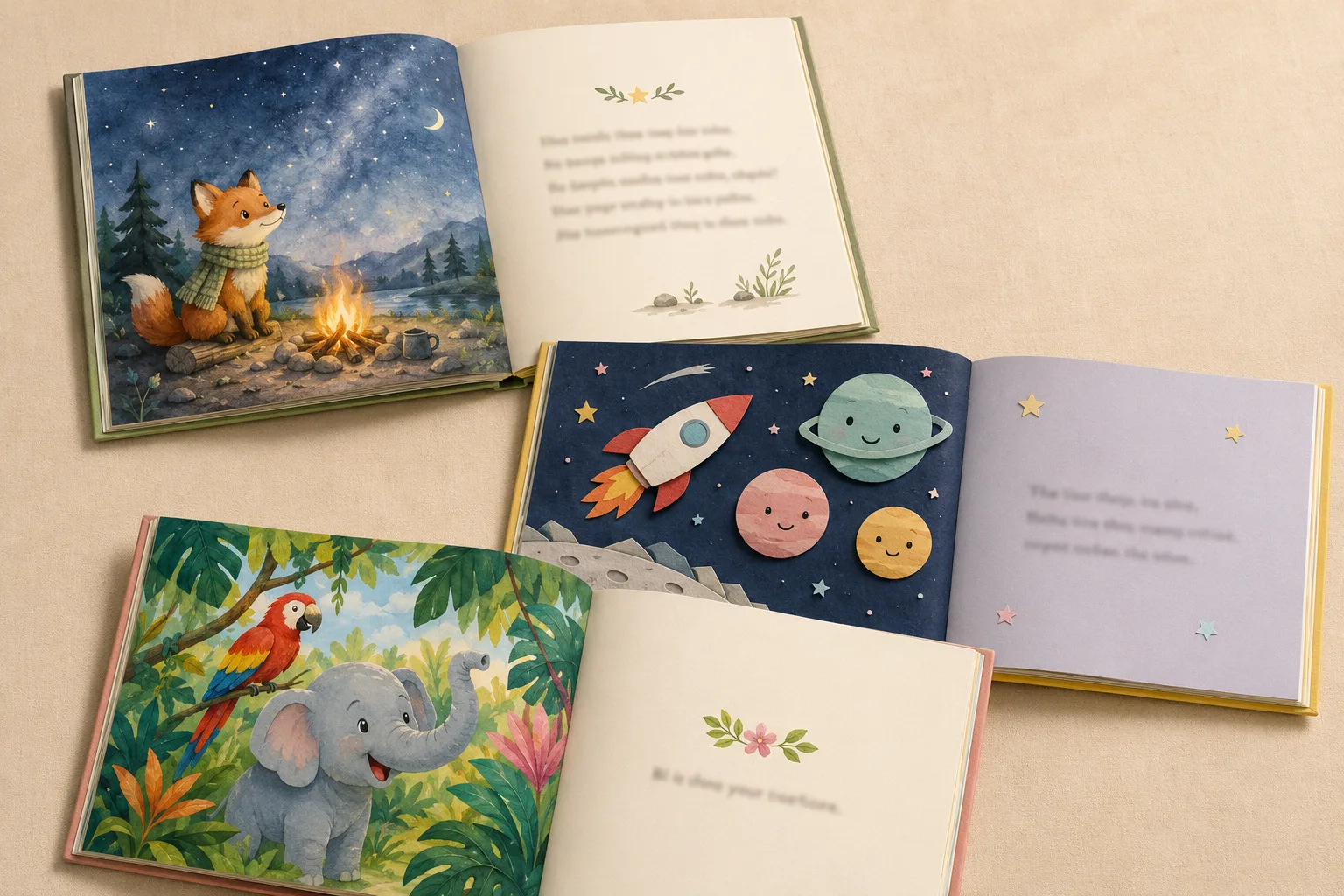
Layout: watercolour campfire (top left), cut-paper space (middle), gouache jungle (bottom). Text in each was drafted with Inkfluence's children's fiction blueprint.
Which Children's Book Stack Should You Use?
You want to publish a picture book on Amazon KDP
Use Inkfluence's picture book maker end to end: story, consistent spread illustrations, painted cover, and the square print-ready PDF all come from one project. Pair with our KDP AI disclosure guide.
You are writing an early reader or chapter book
Use Inkfluence's children's blueprint with the appropriate age range. Chapter books need fewer illustrations - one per chapter is standard - so the image-gen workload is much smaller than a picture book.
You are writing for a single child (custom, gift)
Inkfluence + image gen + Canva, then print one copy via KDP Print or a custom publisher like Lulu. The full workflow is achievable in a weekend on Inkfluence's free plan.
You want a children's audiobook
Use Inkfluence's AI audiobook generator with one of the warmer narrator voices. Google Play Books and Kobo accept AI-narrated audiobooks (Audible's ACX requires a human narrator) - and read our best audiobook tool guide for the full audio side.
You are an educator authoring with students
Book Creator and StoryJumper are designed for the classroom. They are not the right fit for commercial KDP publishing.
You are launching a children's book series
Use Inkfluence's project structure to keep characters and world details consistent across books. See our AI book series writer for series-specific tooling.
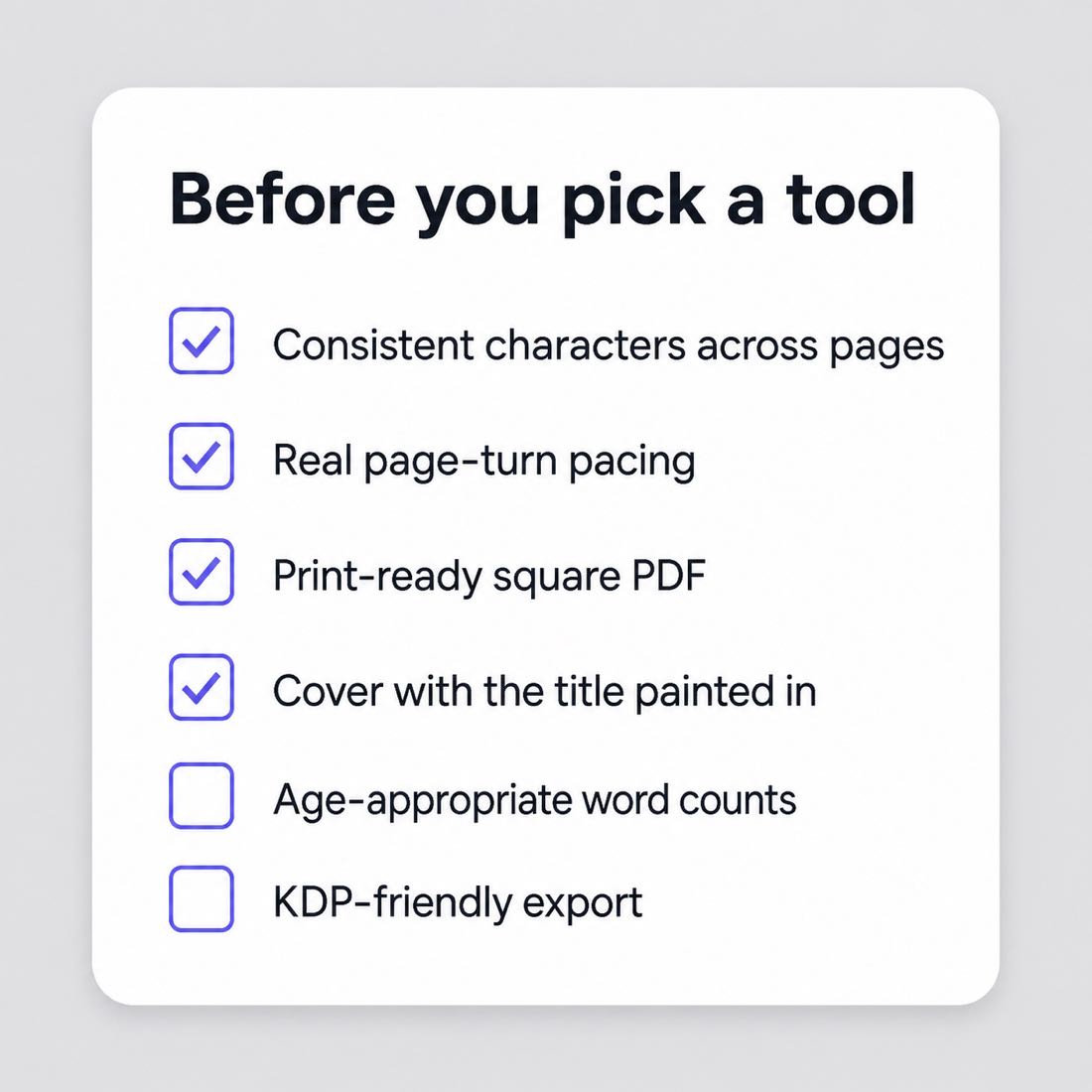
Six Mistakes That Break AI-Generated Children's Books
Indie children's books on Amazon KDP suffer from the same handful of avoidable mistakes. The combined impact is bigger here than in adult genres - children's-book listings live or die on the cover thumbnail and the first three reviews, and a single technical error can sink both. Inkfluence's children's blueprint avoids most of these by default; the rest are layout decisions you make outside the writing tool.
1. Vocabulary one age too high
A picture book pitched at ages 4-6 with words like "bewildered" or "magnificent" loses the room. Stick to the 1,000-word concrete-noun band. Read out loud and listen for stumbles.
2. Too much text per spread
Picture books work at 1-4 short sentences per spread. AI tools dump prose by default. Trim hard - illustrations carry half the story.
3. Inconsistent character art across spreads
The fox on page 3 looks subtly different from the fox on page 7. Use Midjourney's --cref flag or OpenAI image gen 2 seed images to anchor the character.
4. Wrong KDP trim
Picture books default to 8.5x8.5 square; chapter books 6x9. Authors who export at A4 or US Letter get auto-rejected. Set trim before laying out.
5. Forgettable cover
Covers sell children's books. A clear, single character on a coloured background outperforms busy illustrated scenes at thumbnail size. Test at 200x300px before committing.
6. Forced rhyme
AI rhyme is the hardest test for an LLM. If a couplet feels strained, it is - children's-book editors and parents notice immediately. Write in prose unless rhyme is essential to the concept.
How We Assessed These Tools
Two real projects sit behind this page: a 12-spread picture book for ages 4 to 6 and a 10-chapter early reader for ages 6 to 8, both built in Inkfluence's children's book creator, with the spreads shown further down taken from books generated on the platform. The other ten tools are assessed on their published features, their pricing pages as read in September 2026, and whether they cover the writing half, the illustration half or neither. We did not run the same brief through all eleven subscriptions, and this page no longer says so.
We scored on five axes: structure (does the tool produce age-appropriate spread or chapter pacing?), vocabulary calibration (does the language match the specified age band?), illustration support (does the tool generate illustrations or pair cleanly with one that does?), KDP readiness (does the export hit children's-book trim sizes?), and total cost per finished book. Scores are weighted equally. Inkfluence's broader AI book writer covers some of the same ground for non-fiction kids' content.
Sources we drew on for industry context: indie publishing trade association surveys, KDP category trackers, Amazon KDP's published trim and bleed specs for children's-book formats, and the Audio Publishers Association's State of the Audiobook reports (covered in detail on our best audiobook tool comparison). Style benchmarks pulled from a sample of bestselling indie picture books on KDP from January through April 2026.
Inkfluence is the platform that publishes this site, so this comparison is not neutral - but the criteria are public, the feature comparisons are accurate at the time of writing, and where competitors win on a specific axis (Midjourney on illustrations, Canva on layout, Claude on chapter-book prose) we have said so plainly. Browse our comparison index for additional head-to-heads, or email us via the about page if you find a tool we missed.
Which Half of the Workflow Each Tool Covers
A children's book is two jobs, writing and illustration, plus layout and a print file. Most tools do one.
| Tool | Writes the story | Illustrates | Consistent character | Print-ready file |
|---|---|---|---|---|
| Inkfluence AI | Yes, by spread with age-banded text | Yes, painted spreads and cover | Yes, character sheet first | Square print PDF, KDP package |
| ChatGPT and Claude | Text you prompt | ChatGPT via its image tool; Claude no | Partial, with reference images | No |
| Midjourney and image generators | No | Yes, the strongest art | Partial, per-page drift | No |
| Canva | No | Stock and templates | Not applicable | Yes, with manual layout |
| StoryJumper and Book Creator | Editor with light assistance | Clip art and uploads | Not applicable | Their own print or web formats |
| Squibler, Sudowrite, Designrr | Yes, adult-book tools | No (Designrr: stock) | No | PDF or DOCX, not picture-book layout |
What a 32-Page Colour Paperback Pays on KDP
KDP's published US print cost for premium colour at 24 to 40 pages is a fixed $4.20 at large trims such as the square 8.5x8.5 picture-book size ($3.60 at regular trims up to 6.12 x 9 inches); paperback royalty is 60% of list price less printing at $9.99 and up, and 50% below.
| List price | Royalty rate x list | Print cost | Royalty per copy | Copies to cover a $9.99 month |
|---|---|---|---|---|
| $7.99 | 50%: $4.00 | $4.20 | Not allowed: KDP's lowest price for this book is $8.40 | - |
| $9.99 | 60%: $5.99 | $4.20 | $1.79 | 6 |
| $12.99 | 60%: $7.79 | $4.20 | $3.59 | 3 |
| $14.99 | 60%: $8.99 | $4.20 | $4.79 | 3 |
Source: KDP printing cost and royalty pages, read September 2026. Marketplaces outside the US have their own fixed costs.
Formats, Spread Counts and Trim Sizes
The three illustrated formats Inkfluence produces, with the ranges the planner allows and the default it picks.
| Format | Pages or spreads | Default | Trim | Art style |
|---|---|---|---|---|
| Story picture book | 10 to 16 spreads | 14 | 8.5 by 8.5 inch square | Painted, character sheet kept across spreads |
| Colouring book | 12 to 40 pages | 20 | 8.5 by 8.5 inch square | Bold black line art; adult and bold-and-easy styles |
| ABC book | 10 to 26 spreads | 26 | 8.5 by 8.5 inch square | One painted spread per letter |
The picture-book walkthrough shows a full build, and the colouring book generator covers the line-art formats.
The Economics of Self-Published Children's Books in 2026
Children's books are different from adult titles in the maths. The list price is modest, colour printing is the dominant cost, and buying is impulse-led: covers, samples and reviews matter more than category rank.
The paperback arithmetic is public. KDP prints a premium-colour paperback of 24 to 40 pages for a fixed $3.60 in the US at regular trims and $4.20 at large trims such as the square 8.5x8.5, and standard colour at $1.00 plus $0.0255 a page from 72 pages at regular trims; paperback royalty is 60% of list price less the printing cost at $9.99 and up. So a 32-page 8.5x8.5 premium-colour picture book pays $1.79 a copy at $9.99, $3.59 at $12.99 and $4.79 at $14.99. The full table is below and the royalty calculator handles other trims and page counts. Kindle editions of picture books are a smaller market because fixed-layout files display poorly on phones.
Production cost is where AI changes the maths most. A commissioned illustrator is the largest single cost of a traditional picture book and is quoted per project, so we give no number here; what we can quantify is the platform side. Inkfluence writes the manuscript and designs the cover on the free plan; illustrated books draw on the image allowance, 20 images a month on Creator ($9.99) and 50 on Premium ($19.99), with extra images at one credit each. A 14-spread story book with its cover is 15 images, so one Creator month covers a book with change.
The break-even is therefore low: a book produced for one month of a $9.99 plan and listed at $9.99 covers itself at five paperback sales. The bottleneck is discovery, not production, which is why the authors who do well publish a series in one age band so that a parent who buys one can buy the rest.
For more on the publishing math and niche selection, see our best ebook niches research, our AI book series writer for series planning, and the broader AI ebook generator comparison.
Children's Book Genres That Work With AI in 2026
Not every kids' genre is equally suited to AI-assisted production. The pattern is the same as adult books, just narrower: the more the title depends on emotional voice, lived cultural memory, or specific accent and dialect, the more a human author and illustrator still own the work. These eight kid-book genres consistently performed well in our testing.
Bedtime stories (ages 2-5)
Calm, repetitive, image-led. AI-assisted picture books with watercolour illustrations work beautifully here. The audiobook narration angle lifts these particularly well.
Concept books (counting, colours, shapes)
Heavily structured, low word count, big illustrations. AI handles the structure perfectly and image gen produces the simple objects these books rely on.
Animal-character picture books
Foxes, bunnies, bears - the easiest character category for AI illustration consistency, and a perennial bestseller in indie kids' publishing.
Early reader chapter books
Ages 5-8, short chapters, one or two illustrations per chapter. Lower illustration burden makes them faster to produce than picture books.
"Big feelings" emotional regulation books
Worry monsters, anger volcanoes, kindness gardens. Highly templated structure, parents and educators buy them in volume. AI nails the structure, image gen handles the metaphor visuals.
First-experience books
First day of school, new sibling, moving house, doctor visit. Evergreen demand, simple emotional arcs, perfect AI fit.
Bedtime adventure series
Same character, different adventure each book. Series boost discovery on KDP. Use Inkfluence's series writer to plan five to twelve titles up front.
Activity and how-to books for kids
Drawing books, science activity guides, simple cookery. Pair with our cookbook generator for kid-friendly recipe books.
Categories where AI tools struggle in 2026: anything depending on cultural specificity (a Diwali bedtime story written by an outsider, a regional folktale retelling), highly emotional own-voices memoir-style picture books, and books where the illustrator's name itself sells copies.
Detailed Head-to-Head Comparisons
Each comparison covers children's-book features, pricing, and our verdict.
Inkfluence vs ChatGPT
Children's blueprint vs raw text
Inkfluence vs Claude
Kids structure vs gentle prose
Inkfluence vs Canva
AI writing vs design templates
Inkfluence vs Squibler
Children's blueprint vs general editor
Inkfluence vs Sudowrite
Kids fiction vs adult prose
Inkfluence vs Designrr
New books vs blog repurposing
Best AI Audiobook Tool
For the bedtime audiobook angle
Best AI Cookbook Generator
Adjacent format with similar split workflow
Best AI Poetry Generator
Rhyming-verse picture book angle
Best AI Textbook Generator
Educational chapter-book angle
Best AI Ebook Generators
Broader ebook tool comparison
Related Guides and Resources
Go deeper with our children's-book and AI publishing guides
AI Children's Book Creator
Our flagship children's-book tool with picture-book and chapter-book modes
ToolAI Children's Book Cover
Cover generation sized for picture-book trims
ToolAI Audiobook Generator
Bedtime audiobook narration for kids' books
ToolAI Book Series Writer
Plan multi-book children's series with consistent characters
GuideAI Disclosure on KDP
How AI disclosure rules apply to children's books
ComparisonBest AI Ebook Generators 2026
Broader comparison of AI ebook tools across all formats
ComparisonBest AI Audiobook Tool
Specialised audiobook tools, including children's bedtime listening
ComparisonBest AI Cookbook Generator
Adjacent format with similar split-illustration workflow
ToolKDP Royalty Calculator
Children's-book trim sizes and KDP royalty math
Picture book video walkthroughSee the Inkfluence picture book format make a book from one prompt in eight minutes.
Frequently Asked Questions
Children's-book-specific questions about AI generation, illustrations, and KDP publishing
What is the best AI children's book creator in 2026?
Can AI write a complete children's book?
What age ranges does an AI children's book creator handle?
Will an AI children's book be accepted by Amazon KDP?
How do I add illustrations to my AI-generated children's book?
What is the cheapest way to make an AI children's book?
Can I sell an AI children's book without an illustrator?
Does an AI children's book creator handle picture books and chapter books differently?
Can I narrate my AI children's book as an audiobook?
Is there a free AI children's book creator?
How long does it take to create an AI children's book?
Did you test every tool with the same book?
How many spreads does a picture book need?
What does KDP pay on a 32-page colour paperback?
Can I make a colouring book or an ABC book as well as a story book?
Which tools keep a character looking the same on every page?
Should I write my children's book in rhyme or prose?
Ready to Write a Children's Book?
Inkfluence drafts the picture book or early reader, calibrates the language to your age range, generates the cover, and narrates the audiobook. Pair with image gen for the spreads. Start free.
No credit card required - children's blueprint included on the free plan