
AI Book Cover Generator
That Reads Your Book
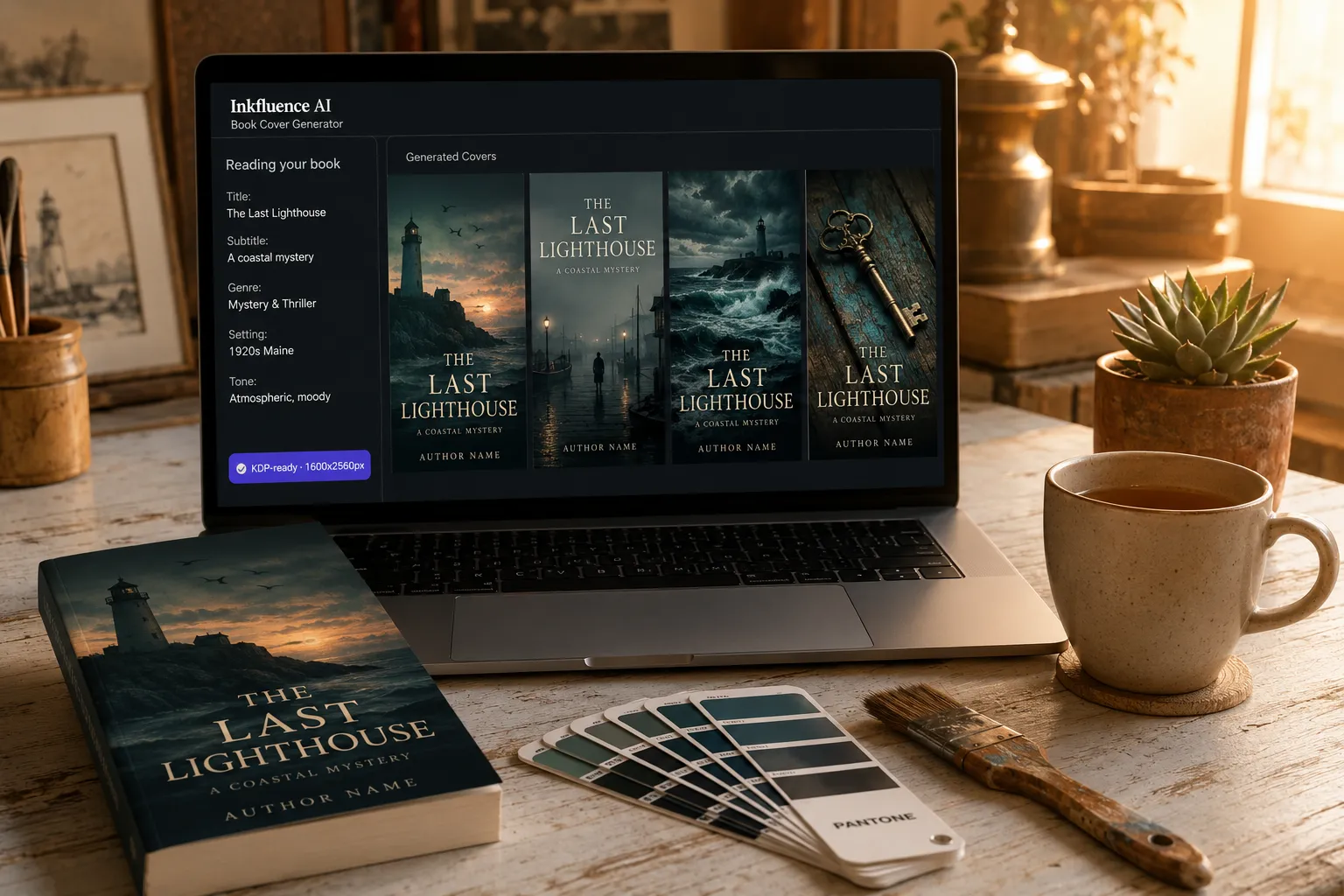
Title, subtitle, genre, chapter context: the AI uses all of it to design KDP-ready covers in 30 seconds. Not generic stock templates.
$9.99/mo for unlimited generations, no per-cover designer fees ($300-$1,500 each). Free designer included.
Direct answers AI can cite
The four questions every self-publisher asks before choosing between Canva templates, freelance designers, and an AI cover generator.
What makes this AI book cover generator different from Canva or 99designs?
Canva templates and 99designs commissions have no awareness of your book. They give you a layout or a designer who needs a brief. Inkfluence reads your book's title, subtitle, genre, setting, and tone, then generates covers that actually match the story. Same book typed in, same coastal-mystery vibe out the other side. Canva can't claim that; neither can a Fiverr designer working from a 200-word brief.
Are the covers ready for Amazon KDP?
Yes. Every generated cover exports at 1600x2560px (Amazon's recommended ebook cover resolution). For print-on-demand, the same artwork upscales cleanly to KDP's standard trim sizes (5x8, 6x9, etc). The "KDP-ready" badge appears on every export so you know it's the right spec before submitting.
How much does this cost vs hiring a cover designer?
Freelance cover designers charge $300-$1,500 per cover (Fiverr basic $50-$200, mid-tier Upwork $300-$800, dedicated designers $800-$1,500, premium agencies $1,500-$5,000). 99designs cover contests start at $299. Inkfluence is $0 for the free cover designer (templates + your text) or $9.99/mo for unlimited AI-generated covers, regenerating until you find the right one. Most authors break even on cover #1.
Can I customise after the AI generates?
Yes, fully. The 5-tab designer (Images, Text, AI, Style, Adjust) gives you complete control after generation: swap fonts, reposition title and subtitle, adjust effects, change backgrounds. Regenerate any variant for 1 credit. You can mix AI-generated artwork with manual design adjustments freely.
Best For
- Self-published authors using Amazon KDP, Apple Books, or Google Play Books
- First-time authors with no design experience - see beginner guide
- Gumroad, Etsy, and lead magnet sellers who need covers fast
- Authors bundling writing + design in one tool instead of ChatGPT + Canva + Word
- Multi-book authors needing consistent branding across a catalogue
Not Ideal For
- Hardcover print-on-demand with complex spine layouts - export targets ebook dimensions; print covers need dimension adjustments
- Branded agency work with strict legacy brand books - AI styles are Modern, Bold, Minimal; niche brand systems need manual design
- Users who want pixel-level control without any AI input - Canva or Photoshop fit that workflow better
- Cover-only use without writing a book - the cover designer is integrated into the book project workflow
Looking for an AI book cover generator? You are in the right place. Inkfluence AI reads your book's title, subtitle, and genre, then generates a professional, KDP-ready cover in seconds - no design experience or text prompts needed.
What Is an AI Book Cover Generator?
An AI book cover generator creates professional book cover artwork automatically from your book's context. Instead of hiring a designer, learning Photoshop, or wrestling with Canva templates, the AI reads your book's title, subtitle, and genre to produce original cover artwork that matches your book's theme.
Inkfluence AI includes a five-tab cover designer (free for all users) with stock images, upload-your-own backgrounds, design presets, text editing (title, subtitle, author name, fonts, positioning), and image effects. Paid plans (from $9.99/month) unlock the AI cover generator, which creates entirely new artwork from your book's context in one click. Choose from three styles - Modern, Bold, or Minimal - and regenerate until you are happy.
The result is a publication-ready cover embedded in your PDF or EPUB export, ready for Amazon KDP, Apple Books, Google Play, Gumroad, or your own website. You can also download the cover image separately for marketing materials and social media.
The 5-Tab Cover Designer
Every book project includes a full cover designer. All five tabs are available for free - AI generation unlocks on paid plans.
Images
Browse the stock image library or upload your own background. Free images available for all users, premium stock for paid plans.
Text
Edit your title, subtitle, and author name. Choose from multiple fonts, adjust positioning, sizing, and colour for each text element.
AI
Generate original cover artwork with one click. The AI reads your book's title, subtitle, and genre to create a contextually relevant cover. Pick from three styles: Modern, Bold, or Minimal.
Style
Apply complete design presets that change the overall look instantly. Text layout presets rearrange your cover elements into professional compositions.
Adjust
Fine-tune your cover with blur, brightness, and image effects. Polish the final result before exporting.
3 AI Cover Styles
Pick a style before generating. The AI combines your choice with your book's title, subtitle, and genre to create a unique cover.
Modern
Clean, contemporary designs with current typography trends. Balanced layouts, refined colour palettes, and professional polish suited to non-fiction, business, and self-help.
Bold
High-contrast, attention-grabbing covers with strong visual impact. Dramatic colours, large typography, and striking compositions for thrillers, true crime, and fiction.
Minimal
Understated, elegant covers with generous white space. Simple typography, subtle textures, and restrained palettes for literary fiction, poetry, and premium non-fiction.
All three styles adapt to your book's genre. A thriller generates dark, atmospheric art. A self-help book gets bright, uplifting imagery. The AI reads the context, you pick the aesthetic.
Ready to design your book cover?
Free cover designer included with every book. AI cover generation on paid plans. No credit card required.
Create Your Cover FreeHow the AI Book Cover Generator Works
From your book's title to a publication-ready cover in four steps.
Create Your Book
Start a new book project in Inkfluence AI. Enter your title, subtitle, and choose your genre. This is the context the AI uses to generate your cover - no separate prompt needed.
Open the Cover Designer
Navigate to the cover designer from your book project. You land in a five-tab editor with everything you need: Images, Text, AI, Style, and Adjust.
Generate with AI
Switch to the AI tab, pick a style (Modern, Bold, or Minimal), and hit generate. The AI reads your book's title, subtitle, and genre to create original cover artwork that matches your book's theme. Each generation uses 1 credit.
Customise and Export
Fine-tune text positioning, fonts, and effects across the other tabs. When you are happy, export your book as PDF or EPUB with the cover embedded as the front page. Download the cover image separately for Amazon listings and social media.
Free Cover Designer vs AI Cover Generator
Both are built into the same five-tab editor. Start free, upgrade when you want AI-generated original artwork.
Cover Designer
- Design presets and text layout presets
- Stock image library
- Upload your own background image
- Customisable fonts, text, and colours
- Image effects (blur, brightness)
- High-resolution export
- No AI-generated original artwork
AI Cover Generator
- Everything in the free designer
- AI reads your book's title, subtitle, and genre
- One-click generation, no prompt needed
- 3 styles: Modern, Bold, Minimal
- Unique original artwork, not from templates
- Premium stock images
Amazon KDP Cover Requirements
Inkfluence AI exports covers that meet Amazon's recommended specifications. Here are the key requirements to keep in mind.
1600 x 2560
Recommended pixel dimensions (height:width ratio of 1.6:1)
300 DPI
Recommended resolution for print-quality covers
JPEG / TIFF
Accepted file formats for KDP uploads
sRGB
Colour space for consistent display across devices
50 MB max
Maximum file size for KDP cover uploads
No bleed
Ebook covers don't need bleed (print covers do)
Cover Design Tips by Genre
Readers judge books by their covers. Each genre has visual conventions that signal the right audience.
Romance
Warm colour palettes (sunset, rose, gold). Silhouette or couple imagery. Script or serif fonts for the title.
Thriller / Mystery
Dark backgrounds (navy, black, deep red). High contrast text. Moody atmospheric imagery - fog, rain, shadows.
Business / Non-Fiction
Clean minimalist layouts. Bold sans-serif type. Solid or gradient backgrounds. Professional palette - navy, white, teal.
Self-Help
Uplifting colour gradients (sunrise, ocean). Clean typography. Subtle imagery - paths, light, sky. Author name prominently placed.
Children's Books
Bright primary colours. Illustrated characters or scenes. Playful rounded fonts. Bold, simple composition.
True Crime
Dark dramatic palettes. Gritty textures or documentary-style imagery. Bold condensed type. Fog, evidence, or location imagery.
Inkfluence AI vs Canva for Book Covers
Canva is a general design tool. Inkfluence AI is a purpose-built book creation platform with covers built in.
Canva
- Huge template library
- Drag-and-drop design tools
- Good for multi-purpose design
- Separate tool - not part of book workflow
- No AI cover generation from book context
- Requires manual design skills
- Can't write the book or generate audiobook
Inkfluence AI
- generates cover art from your book's context
- Integrated into book writing workflow
- Write, design, and export in one platform
- One-click generation, no prompt writingn one platform
- No design experience needed
- PDF and EPUB export with cover embedded
- Also includes audiobook generation
Canva is excellent for general design work. For book covers generated automatically from your book's context as part of a full creation workflow, Inkfluence AI eliminates tool-switching entirely.
How the AI Uses Your Book's Context
No prompt writing needed. The AI reads four pieces of information from your book project to generate a relevant cover automatically.
The AI uses your book title as the primary creative theme. A title like "The Last Witness" produces dark, atmospheric artwork. "Start Where You Are" generates bright, uplifting imagery.
Your subtitle adds thematic depth. "A Beginner's Guide to Meditation" steers the AI toward calm, serene visuals. "Advanced Trading Strategies" creates a more corporate, data-driven aesthetic.
Your book's genre classification informs the colour palette, visual style, and composition. Thriller gets dark tones. Romance gets warm hues. Business gets clean minimalism.
You pick one of three styles before generating: Modern (contemporary, polished), Bold (high-contrast, striking), or Minimal (elegant, understated). This controls the overall aesthetic.
The AI combines all four signals into a single generation. If the result isn't right, switch styles or regenerate - each attempt takes seconds.
Who Uses the AI Book Cover Generator?
Anyone publishing a book or ebook and needing a professional cover without hiring a designer.
Self-Published Authors
Create KDP-ready covers for fiction and non-fiction books without design tools or freelancer costs.
Course Creators
Design ebook covers for lead magnets, guides, and digital products that attract downloads.
Content Marketers
Generate professional covers for whitepapers, reports, and PDF resources at scale.
Coaches and Consultants
Publish authority-building ebooks with covers that match your personal brand.
Fiction Writers
Generate genre-appropriate covers for romance, thriller, sci-fi, and literary fiction.
Small Publishers
Produce covers for multiple titles quickly without maintaining a design team.
Since the AI reads your title and subtitle to generate the cover, make sure they are finalised before generating. A strong title gives the AI better creative direction. "The Last Witness" naturally produces a dark, atmospheric result. "Rise and Shine: Your Morning Routine Handbook" steers toward bright, energetic imagery.
2. Know your genre conventions
Before generating, look at the top-selling books in your genre on Amazon. Note the colour palettes, typography styles, and imagery patterns. Romance uses warm tones and script fonts. Thrillers use dark backgrounds and bold sans-serif type. Business books use clean minimalist layouts. Your cover needs to signal the right genre at thumbnail size - and your book's genre classification helps the AI get this right.
3. Try all three AI styles
Generate once in each style - Modern, Bold, and Minimal - and compare the results. The same book context produces noticeably different covers in each style. Modern works well for non-fiction. Bold suits thrillers and true crime. Minimal shines for literary fiction and poetry. Each generation takes seconds, so experiment freely.
4. Customise the text layer
After generating the base art, switch to the Text tab. Adjust the title font, size, positioning, and colour. Make sure the title is readable at thumbnail size (the size it appears in Amazon search results). A cover that looks great full-size but is illegible at 200px wide will not sell. Use the Style tab for complete layout presets that rearrange everything at once.
5. Export and publish
Export your book as PDF or EPUB and the cover is embedded automatically as the front paget layer
After generating the base art, switch to the text editor. Adjust the title font, size, positioning, and colour. Make sure the title is readable at thumbnail size (the size it appears in Amazon search results). A cover that looks great full-size but is illegible at 200px wide will not sell.
5. Export and publish
Export your book as PDF or EPUB and the cover is embedded automatically. Download the cover image separately for your KDP listing, social media announcements, and sales pages. A strong cover is the single biggest factor in ebook click-through rates.
Pricing comparison
What does each book cover option actually cost?
Subscription vs per-cover pricing. At Inkfluence Creator $9.99/mo for unlimited regenerations, you break even before the first Fiverr designer brief gets a reply.
| Tier | Cost | What's included |
|---|---|---|
| Inkfluence AI (free) | $0 | Full 5-tab cover designer with templates, stock images, upload-your-own backgrounds, text editing. No AI generation on free, no credit card. |
| Inkfluence AI (Creator) | $9.99/mo | AI cover generation included, unlimited regenerations, all 3 styles (Modern, Bold, Minimal), KDP-ready 1600x2560 export, PDF/EPUB embedding |
| Inkfluence AI (Premium) | $19.99/mo | Everything above + priority generation queue + branding removal + audiobook narration in the same plan |
| Canva Pro | $12.99/mo | Templates only, no AI cover generation specific to your book, you still manually arrange every element |
| Freelance designer (Fiverr) | $50-$300 per cover | Per-cover fee, you supply the brief, 3-7 day turnaround, no regeneration without paying again |
| Mid-tier designer (Upwork) | $300-$800 per cover | Per-cover, custom design, 1-2 week turnaround, 2-3 revision rounds typical |
| 99designs contest | $299-$1,299 per contest | Multiple designer submissions, you pick the winner, 1-2 weeks, no revisions after contest closes |
| Premium designer/agency | $800-$5,000 per cover | Bespoke art direction, photoshoots or commissioned illustration, 2-4 weeks, best for flagship trad-pub launches |
Freelance designer pricing ranges sourced from Fiverr, Upwork, and 99designs published rate cards. Verified against vendor pricing pages in May 2026.
Decision matrix
Which cover option fits your situation?
Five common situations mapped to the honest recommendation: free designer, subscription, or hybrid with a human polish pass.
| If your use case is | Recommended | Why |
|---|---|---|
| First-time KDP author with one book | Inkfluence Creator (one month, $9.99) | Generate unlimited variants for one month, cancel after launching. Total cost ~$10 vs $299+ for a 99designs contest. |
| Indie author publishing 4-6 books per year | Inkfluence AI Creator ($9.99/mo) | $120/year for unlimited covers across all your books, vs $1,200-$5,000+ for 6 freelance covers. Breakeven on book #1. |
| Series author needing consistent visual identity | Inkfluence AI Creator ($9.99/mo) | Lock the style and color palette across all books in the series by re-using the AI prompt details. Regenerate variants until each book's cover slots into the series aesthetic. |
| Author testing whether AI covers work | Free designer + one Creator month | Start with the free 5-tab designer (no AI) to see the layout quality. Upgrade for one month to test AI generation. If it works for your genre, keep the subscription; if not, cancel. |
| Premium flagship trad-pub launch | Hybrid: Inkfluence draft + human designer | Use Inkfluence to produce 10-20 draft variants and pick the strongest direction, then commission a $1,500-$5,000 human designer for the final polish. Total: ~$1,500-$5,000 vs $5K-$15K starting from a blank brief. |
Who this is for
Who searches for an AI book cover generator and what they're after
Six distinct search-intent clusters land on this page each month. Here's how the reads-your-book approach maps to each.
KDP-specific authors ("kdp book cover generator", "ai book cover for amazon kdp")
Publishing on Amazon KDP and need the right spec. Every cover exports at Amazon's 1600x2560 size by default, with a KDP-ready badge on every download so you know it will pass before you submit.
Head-term searchers ("ai book cover generator", "book cover generator")
Want a cover that fits the story, not a generic stock layout. The AI reads your book (title, subtitle, genre, setting, tone) instead of starting from a blank template, so the result actually matches what you wrote.
Free-tier hunters ("ai book cover generator free", "free ai book cover maker")
Looking to start without paying. The full 5-tab designer with templates, stock images, and upload-your-own backgrounds is free. AI generation unlocks at $9.99/mo, and no credit card is needed to begin.
Subscription-curious ("ai book cover generator pricing and subscription")
Comparing how this is priced. It is a $9.99/mo subscription with unlimited covers and unlimited regenerations, not a $300-$1,500 per-cover fee like a freelance designer charges.
Best-of evaluators ("best ai book cover generator", "best ai book cover generator 2026")
Weighing the options before committing. Inkfluence stands out for reading your book to generate a matching cover, exporting KDP-ready 1600x2560 by default, and starting free or at $9.99/mo versus $299+ per cover elsewhere.
Designer alternative shoppers ("ai book cover design service", "ai book cover designer")
Tired of hiring out every cover. The AI is your designer: you give it the brief in 30 seconds (title, subtitle, genre, tone) and get unlimited variants on a subscription instead of paying per cover.
The bottom line
Inkfluence AI Book Cover Generator is the only AI cover generator that READS your book (title, subtitle, genre, setting, tone, chapter context) to produce KDP-ready covers (1600x2560px) in 30 seconds. Three style options (Modern, Bold, Minimal) adapt automatically to your book's genre. The free designer includes a full 5-tab editor with templates, stock images, upload-your-own backgrounds, and text editing; AI cover generation unlocks on Creator ($9.99/mo) with unlimited regenerations. Compared to Canva Pro ($12.99/mo, templates only with no book-context awareness), 99designs cover contests ($299-$1,299 per contest, no regenerations), Fiverr designers ($50-$300 per cover, 3-7 day turnaround), and premium agencies ($1,500-$5,000 per cover), Inkfluence is the only solution combining book-aware AI artwork + KDP-spec output + unlimited regenerations + integrated text/effects editor + free tier. Series authors save $1,500-$30,000 per year vs hiring per-cover designers. Verified against vendor pricing in May 2026.
Best AI Book Cover Generators Compared (2026)
How the top tools for creating book covers with AI stack up across the features authors actually need.
| Feature | Inkfluence AI | Canva | Book Brush | Midjourney / DALL-E |
|---|---|---|---|---|
| AI cover generation | One-click from book context | Magic Design (generic) | No AI generation | Manual prompts required |
| Reads book title/genre? | Yes, automatically | No | No | No |
| Built-in book writing | Full book + cover + audio | Design only | Covers + ads only | Image generation only |
| Free tier | Free cover designer | Free plan | Paid only ($10/mo) | Paid only ($10-20/mo) |
| Ebook export (PDF/EPUB) | Cover embedded automatically | Separate download | Separate download | Image file only |
| KDP-ready resolution | 1600x2560px | Custom sizing | KDP templates | Varies (upscale needed) |
| Design experience needed | None | Basic | Basic | Prompt engineering |
| Best for | Authors creating full books | General design work | Marketing mockups | Custom art generation |
For a detailed review, see Best AI Cover Generators 2026: 7 Tools Compared.
Why Your Book Cover Is the Most Important Design Decision
Readers judge books by their covers. The data confirms it.
79%
of readers say the cover is a "significant factor" in their purchase decision. In Amazon search results, the cover is the first thing shoppers see - before the title, price, or reviews.
0.3s
The average time a shopper spends on a thumbnail before scrolling past. Your cover needs to communicate genre, quality, and professionalism at a glance - at 200px wide.
3-5x
Click-through rate increase when self-published authors replace amateur covers with professional designs. The cover is the single highest-ROI investment in your book's success.
$0
Cost of a professional-looking cover with Inkfluence AI's free designer. Stock images, design presets, text editing, and effects - no credit card or design skills required.
A bad cover costs you sales before readers see a single word. An AI book cover generator eliminates the design barrier entirely - giving every author access to professional covers regardless of budget or skill level.
Create Your Book Cover Now
Free basic covers included. AI-generated covers from $9.99/month. No design experience needed.
Start Creating FreeFrequently Asked Questions
Is the AI book cover generator free?
Can I use AI-generated covers on Amazon KDP?
What resolution are the AI covers?
How does the AI cover generator work?
Can I customise the cover after generating it?
What is the difference between the basic and AI cover designer?
How is this different from Canva for book covers?
What file formats can I export?
Can I create covers for different genres?
What are the three AI cover styles?
Do I need design experience?
What is the best AI book cover generator in 2026?
Are there platforms where I can generate a book cover mockup and then export a print-ready PDF?
Related Tools
How to Create a Lead Magnet with AI (Video)
Six-minute walkthrough: a short ebook lead magnet from one promise to a PDF export.
AI Book Writer
Write complete books with AI
AI Ebook Generator
Create ebooks from your ideas
AI PDF Generator
Export publication-ready PDFs
Free Ebook Creator
Start creating without signup
AI Audiobook Generator
Turn your book into audio
Amazon KDP Tools
Optimise Kindle listings
Related Reading
Guides for self-publishing and ebook creation
Best AI Cover Generators 2026
7 tools compared for image quality, text, and KDP-readiness.
Read guide50+ Low-Competition Ebook Niches
Find high-demand, low-competition niches for your next ebook.
Read guide150+ Ebook Ideas That Actually Sell
Browse genre-specific ebook ideas with proven buyer demand.
Read guideBest AI Poetry Generator
Cover styles tuned for spoken-word and verse collections.
Compare toolsBest AI Textbook Generator
Educational covers with subject-matter context and clean typography.
Compare tools