
AI Workbook Generator
Workbooks That Get Used
Create professional workbooks and course companions with AI.
Exercises, prompts, templates, and structured learning materials.
Inkfluence AI generates complete workbooks with structured sections, reflection exercises, action items, and professional formatting. Use the workbook or course-companion blueprint to create materials your students and clients will actually use.
Quick Answer
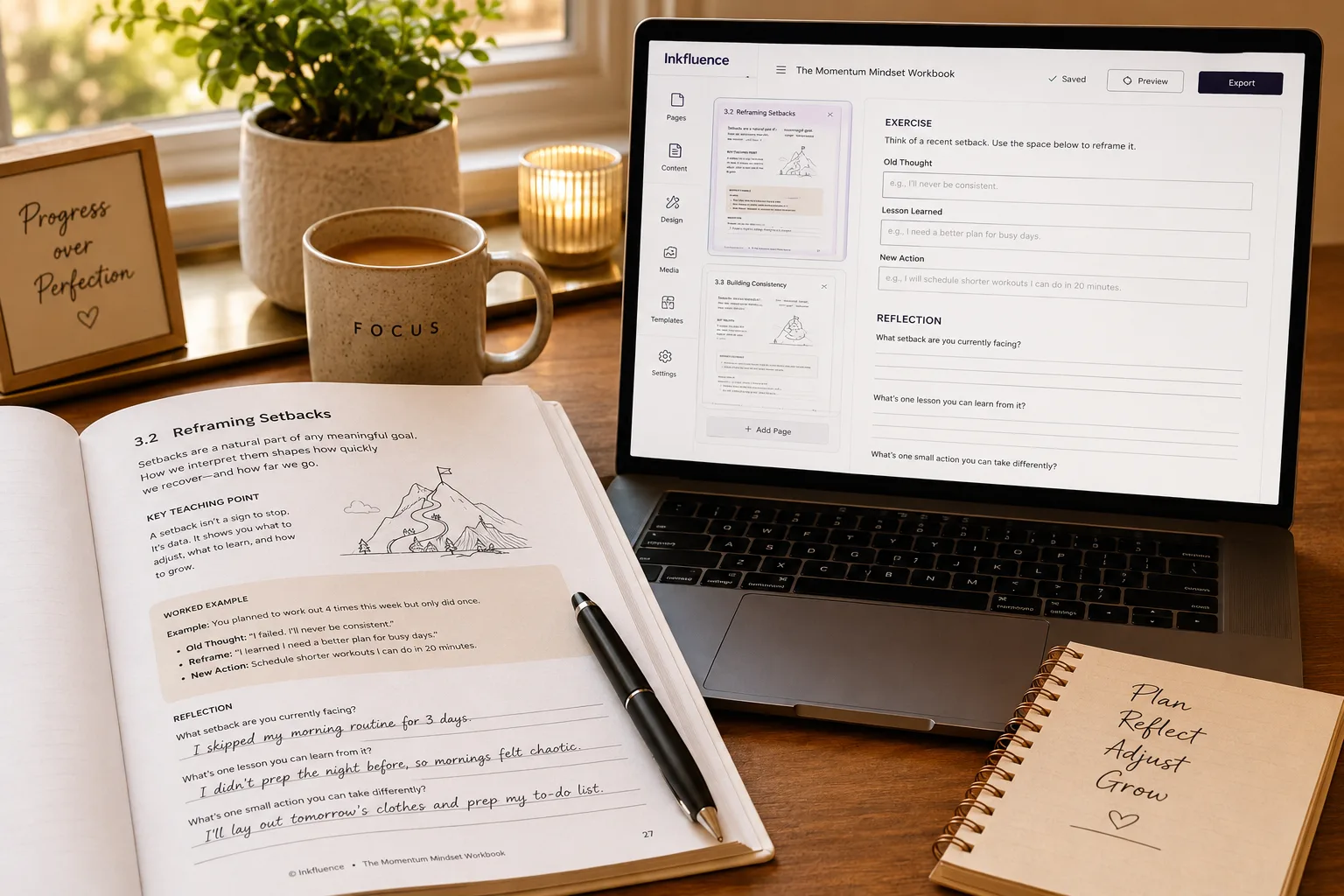
An AI workbook generator creates structured, interactive workbooks with reflection prompts, exercises, and fillable activity sections. Unlike a plain ebook, a workbook is designed for active participation: each section includes a teaching point, a worked example, questions the reader answers, and space to apply concepts to their own situation. Inkfluence AI uses a dedicated workbook blueprint that generates this structure automatically, producing course companions, coaching worksheets, business training modules, and self-guided study resources in under 5 minutes. The output is export-ready as PDF, EPUB, or DOCX and can be sold, distributed as a lead magnet, or bundled with an online course. Prefer to see it before reading? Watch a 2-minute video of a workbook being generated, prompt to finished draft.
This Page Covers:
Looking for a workbook generator? Create professional, interactive workbooks with exercises, prompts, and action items. Perfect for courses, coaching, and self-guided learning.
Workbook Generator by the Numbers
Average time to generate a complete workbook
Structured sections with exercises per workbook
of workbooks made here reach a finished, exported file, our strongest practical-format finish rate
To create your first workbook with PDF export
Finish-rate measured across 3,008 workbooks created on the platform (August 2026); the full demand and completion data lives in our workbook video walkthrough.
What Is a Workbook Generator?
A workbook generator creates structured, interactive documents designed to help learners take action. Unlike a regular ebook that people read passively, a workbook includes exercises, reflection prompts, goal-setting frameworks, and space for writing.
Inkfluence AI includes dedicated workbook and course-companion blueprints. These blueprints understand the structure of interactive learning materials and generate content with exercises, checklists, action items, and review sections built in.
The result is a professional workbook exported as PDF that you can use as a standalone product, a course bonus, a coaching tool, or a workshop handout. Workbooks are one of the highest-perceived-value digital products because they help people get results, not just information. If you also need teaching plans to go with them, the AI lesson plan generator covers that side, and the journal generator handles guided journals.
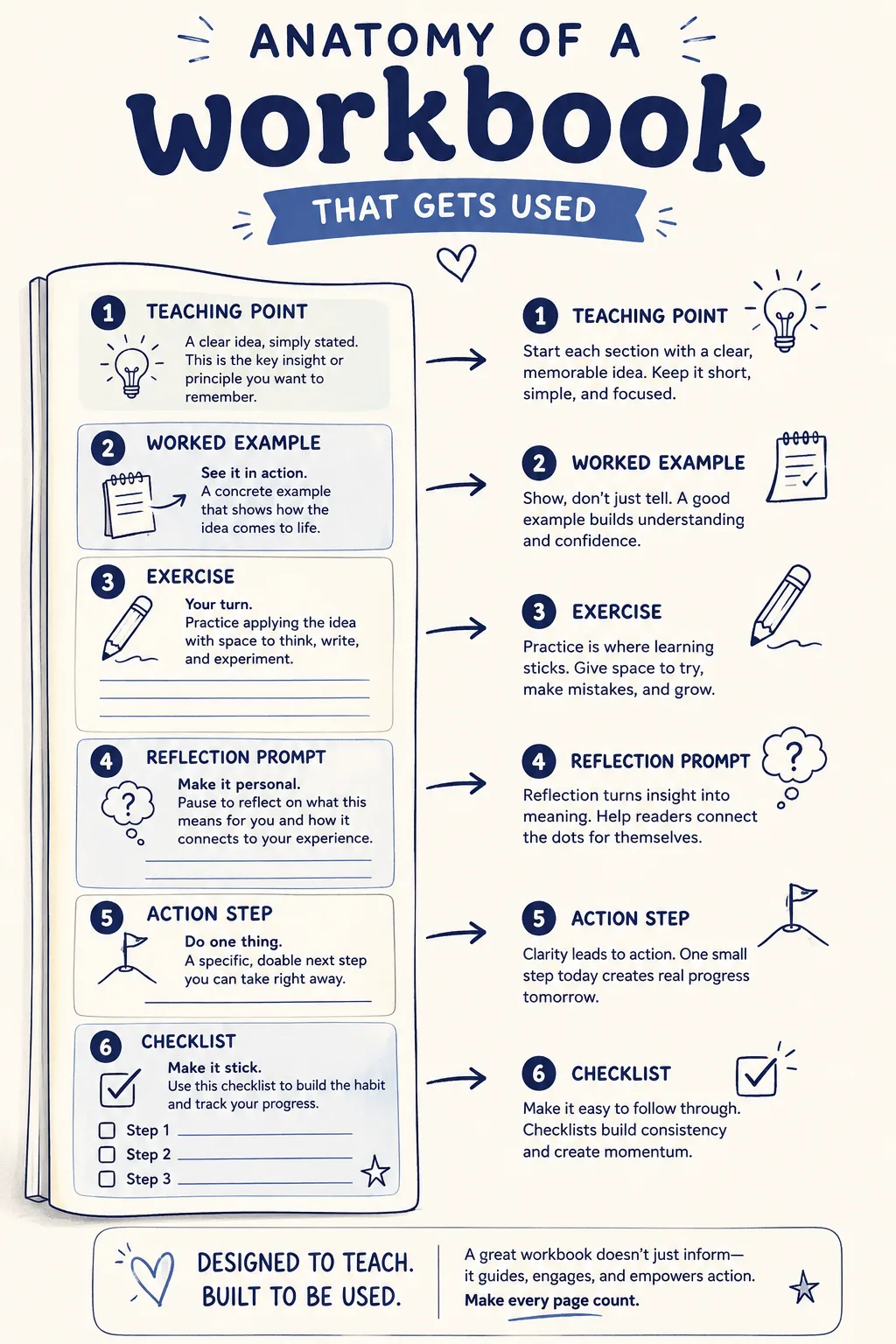
Anatomy of a Workbook That Gets Used
A workbook people actually finish is built from repeatable parts. The AI weaves these six into every section so each one moves from teaching to doing.
How the Workbook Generator Works
From your topic to a finished workbook in 4 steps
Describe Your Workbook
Enter the topic, target audience, and learning objectives. Optionally paste your course outline if creating a companion workbook.
AI Generates Content
The AI creates structured sections with explanations, exercises, reflection prompts, checklists, and action items.
Review and Customise
Edit exercises, adjust prompts to match your teaching style, and fine-tune the content for your specific audience.
Add Cover and Export
Generate a professional cover and export your workbook as a formatted PDF ready for distribution.
Preview AI-Generated Workbooks
Flip through real pages from workbooks created with Inkfluence AI
Loading preview...
Types of Workbooks You Can Create
Workbook and course-companion blueprints adapt to any topic
Course Companion Workbook
Pairs with an online course. Each section mirrors a course module with exercises, reflection questions, and action items for each lesson.
Coaching Worksheet Pack
Guided exercises for coaching clients. Goal-setting frameworks, self-assessment tools, and progress trackers.
Workshop Handout
Structured materials for in-person or virtual workshops. Participants follow along and complete exercises during the session.
Self-Guided Learning
Standalone workbooks that guide the reader through a topic step by step. Great for selling as digital products on Gumroad or Etsy.
Business Planning Workbook
Strategy frameworks, SWOT templates, financial planning exercises, and goal-setting sections for entrepreneurs.
Goal-Setting Journal
Daily, weekly, or quarterly planners with reflection prompts, habit trackers, and progress reviews.
Who Uses the Workbook Generator?
Anyone who needs interactive learning materials
Course Creators
Add companion workbooks to increase course completion rates and perceived value. Bundle with courses for premium pricing.
Coaches and Consultants
Create client workbooks for different programmes. Structured exercises make coaching sessions more productive.
Teachers and Trainers
Classroom worksheets, training manuals, and professional development materials. Save hours of preparation time.
Therapists and Counsellors
Therapy worksheets, CBT exercises, journaling prompts, and self-care guides for clients between sessions.
Digital Product Sellers
Workbooks command premium prices (more than ebooks). Sell on Etsy, Gumroad, or your own site for passive income.
HR and L&D Teams
Onboarding workbooks, compliance training materials, and professional development guides for employees.
Workbook Generator Comparison
How does Inkfluence AI compare to Canva, Beacon and Designrr?
Coaches, course creators and educators often weigh these four tools when building a workbook. Here's how they stack up on what actually matters.
| Feature | Canva | Beacon | Designrr | Inkfluence AI |
|---|---|---|---|---|
| AI-generated exercises & prompts | Template library only | Template placeholders | Imports text, no AI | Auto-generated content |
| Fillable reflection sections | Manual design | Manual add | Manual add | Built into every template |
| Auto section structure | You design each page | Template-based | Import + structure | Generated from prompt |
| Custom branding | Full control, manual | Logo & colours | Logo & colours | Logo, colours, fonts |
| Export formats | PDF, PNG, JPG | PDF, EPUB | PDF, EPUB, DOCX | |
| Free tier | Free with watermark | Limited trial | No free tier | Free workbook creation |
| Best for | Visual design | Lead magnets | Blog-to-ebook | Coaching & course workbooks |
| Paid plan starts at | $19.99/mo | $19/mo | $29/mo | $9.99/mo |
Why coaches choose Inkfluence AI: Canva gives you design control, Beacon helps with lead magnets, Designrr converts blog posts. Inkfluence is the only one that generates the actual exercises, prompts and reflection sections for you, then exports in three formats.
Inkfluence AI vs Canva → | Inkfluence AI vs Beacon → | Inkfluence AI vs Designrr →
Plenty of other tools land near "workbook," and they split into two camps. Design and template tools like Canva, Beacon, Designrr, Flipsnack, Heyzine, and Gamma hand you a blank template or a place to drop pages, while marketplaces like Teachers Pay Teachers sell ready-made worksheets and apps like BookWidgets, Kami, Notion, and Google Docs give you a canvas to build on. Course platforms like Kajabi, Teachable, and Thinkific give you a place to host and sell, and general chatbots like ChatGPT can draft an exercise if you prompt for one. The common thread: every one of them still leaves you to write each teaching point, exercise, and reflection prompt yourself. Inkfluence generates that content from your topic, then exports a branded, sellable file in PDF, EPUB, or DOCX.
Who Creates Workbooks with AI, and What They Want
Six kinds of creators land here. Here is what each one is after, and where to go next.
Coaches building client materials
They want structured worksheets that make every session more productive and justify a higher fee. A favourite of coaches turning a method into a repeatable workbook.
Course creators
They want a companion workbook that lifts completion rates and the perceived value of the course. Built for course creators bundling exercises with their lessons.
Educators and teachers
They want classroom worksheets and practice sets without hours of prep. The go-to for educators and teachers building activity packs fast.
Therapists and wellness pros
They want reflection exercises and homework clients complete between sessions. Used by therapists and wellness pros for guided self-work.
Workshop facilitators
They want a handout participants fill in live and keep afterward. Pair the workbook with a short lead magnet to grow the room before the event.
Self-publishers selling workbooks
They want a polished product that commands a premium price on Etsy, Gumroad, or Amazon. New to it? Start with the self-publishing guide.
Pricing at a Glance
Workbook tool pricing side by side
Free tier, entry paid plan, and top plan for the four tools coaches and course creators evaluate most.
| Tool | Free tier | Entry paid | Top plan | Notes |
|---|---|---|---|---|
| Inkfluence AI | Free workbook (PDF export) | $9.99/mo (Creator) | $19.99/mo (Premium) | Only tier that generates exercises and prompts from a topic, with EPUB and DOCX on paid. |
| Canva | Free with watermark | $19.99/mo (Pro) | $30/mo (Teams) | Design-first. You bring the words; templates handle the layout. |
| Beacon | Limited trial | $19/mo (Starter) | $99/mo (Pro) | Built for opt-in lead magnets; short-form focus. |
| Designrr | No free tier | $29/mo (Standard) | $99/mo (Pro) | Repurposes blog posts into PDFs; no AI content generation. |
Pricing as listed on each vendor's site at time of writing. Check the vendor pages linked above for current pricing.
How to Create an Effective Workbook
The best workbooks do not just present information. They guide the reader through a transformation. Here is how to create one that people actually complete and recommend.
Start with the Outcome
Define what the reader will be able to do after completing the workbook. "By the end, you will have a complete 90-day business plan" is a clear outcome. Every section should move the reader closer to that result.
Balance Teaching with Action
A good ratio is 30% explanation and 70% exercises. People buy workbooks to do, not to read. Each section should have a brief explanation followed by a concrete exercise, prompt, or template they fill out.
Include Multiple Exercise Types
Mix up the exercises: open-ended reflection prompts, fill-in-the-blank templates, checklists, self-assessments, goal-setting frameworks, and brainstorming exercises. Variety keeps people engaged and accommodates different learning styles.
Use Inkfluence to Generate the Structure
In Inkfluence AI, choose the workbook or course-companion blueprint. Enter your topic, audience, and desired outcome. The AI generates sections with exercises and prompts already built in. Edit to match your expertise and teaching style, design a cover with the AI book cover generator, then export a print-ready PDF or an EPUB.
Sell or Bundle
Workbooks work as standalone products (typically priced higher than ebooks) or as bonuses that increase the perceived value of courses and coaching packages. A 20-page workbook often commands the same price as a 100-page ebook because it delivers a clear transformation.
Check our digital product niches guide for profitable workbook topics, or explore how to write a book with AI for broader creation strategies.
Workbook Generator for Study Guides and Academic Materials
Looking for a study guide generator or study guide maker? The workbook generator doubles as a powerful study guide creator. Enter your topic, lecture notes, or course outline and the AI builds structured study materials with key concepts, review sections, practice questions, and self-assessment exercises.
Whether you are a student organising notes for exams, an educator creating materials for your class, or a course creator building companion guides, the AI handles the structure while you focus on the content that matters.
What the AI study guide generator creates:
- Topic summaries: Concise overviews of each subject area, distilled from your notes or prompts
- Key concept breakdowns: Important terms and ideas explained clearly with examples
- Practice questions: Multiple-choice, short-answer, and discussion questions for self-testing
- Review checklists: Topic-by-topic checklists to track what you have mastered
- Reflection prompts: Open-ended questions that deepen understanding beyond memorisation
- Action items: Specific tasks to complete for each section, turning passive reading into active learning
The finished study guide exports as a professional PDF you can print, share with classmates, or distribute to students. For dedicated study guide features, also check the study guide generator.
Turn your notes into a structured study guide in minutes. Free to start.
Create Your Study Guide FreeCreate Workbooks and Study Guides from Lecture Notes
Turning raw lecture notes into an effective study guide is one of the highest-impact uses of the workbook generator. Here is the step-by-step process:
- Gather your notes. Collect lecture notes, slides, textbook highlights, and any supplementary materials for the subject. The more source material you provide, the more comprehensive the study guide.
- Open the workbook generator and select the workbook or course-companion blueprint. Enter the subject name, exam date (if applicable), and paste or describe your notes.
- Review the AI-generated structure. The AI organises your notes into logical sections, adds practice questions, and creates review checklists. Reorder sections to match your study priorities.
- Add your own annotations. The AI provides the framework. Add your personal notes, mnemonics, examples from class, and areas you find difficult. This personalisation is what makes the guide effective for your specific needs.
- Export and print. Download the study guide as PDF. Print it for highlighting and handwritten notes, or use it digitally on a tablet.
This process works for any subject: sciences, humanities, professional certifications, language learning, and exam prep. Students who use structured study guides consistently outperform those who re-read notes passively. The act of organising information into a guide is itself a powerful study technique.
For subject-specific study guide creation, the dedicated study guide generator includes additional templates optimised for different academic disciplines.
Free Workbook Creator and Study Guide Maker
Looking for a free study guide creator? Inkfluence AI offers a free tier that lets you create your first workbook or study guide at no cost. The free plan includes:
- Full study guide generation with all sections
- Practice questions and review checklists
- Professional formatting and layout
- Cover designer with templates and your own images
- PDF export, with a small Inkfluence AI credit that paid plans remove
No credit card required. Just an email address to create your account. The entire process from notes to finished study guide takes about an hour. Create your free study guide now.
Educators who need to create study guides regularly can upgrade to a paid plan for more chapters a month and EPUB export. But for students creating individual study guides for exams, the free tier is usually all you need.
No credit card. Full commercial rights. A professional study guide ready to print, with a small footer credit on free.
Start Free NowBest Workbook Templates and Ideas for 2026
The most successful workbooks solve a specific problem for a specific audience. Here are the workbook templates and niches generating the most sales and engagement right now:
Goal-Setting Workbooks
Annual planners, 90-day sprints, vision boards with reflection prompts. Popular with coaches and productivity creators.
Therapy and Journaling Workbooks
CBT worksheets, gratitude journals, anxiety management exercises. Therapists and counselors use these as client homework.
Course Companion Workbooks
Exercise-heavy companions to online courses. Students complete worksheets alongside video lessons. Increases course completion rates.
Business Strategy Workbooks
Brand audits, marketing plans, SWOT analysis templates. Consultants sell these as standalone products or client onboarding tools.
Kids' Activity Workbooks
Educational exercises, coloring prompts, math practice, reading comprehension. Parents and teachers buy these consistently year-round.
Fitness and Nutrition Workbooks
Meal planning templates, workout tracking sheets, progress journals. Personal trainers use these for client accountability.
A well-structured workbook typically sells for $9.99 to $24.99 - significantly more than a standard ebook - because buyers perceive interactive content as higher value. For niche inspiration, see our digital product niches guide or browse 150+ ebook and workbook ideas.
Ready to Create Your Workbook?
Turn your expertise into an interactive workbook. Free to start, no credit card required.
No credit card required. Free plan available.
Frequently Asked Questions
What is a workbook generator?
A workbook generator creates structured, interactive documents with exercises, prompts, templates, and reflection sections. Instead of designing each page manually, you describe the workbook topic and the AI builds the full structure with actionable content.
What types of workbooks can I create?
Any type: course companion workbooks, coaching worksheets, workshop handouts, self-guided learning materials, goal-setting journals, business planning workbooks, therapy worksheets, and more. Inkfluence supports both the workbook and course-companion blueprints.
Can I use this as a course companion?
Yes. The course-companion blueprint is specifically designed for this. It generates workbooks that match your course modules with exercises, reflection prompts, and action items for each lesson.
Does the workbook include fillable fields?
The PDF output includes clearly marked spaces for writing and reflection. For digital fillable PDFs with form fields, you can take the exported PDF and add form fields in Adobe Acrobat or a similar tool.
Can I sell workbooks I create?
Yes. Workbooks you create with Inkfluence AI are yours to sell, distribute, or give away. Many coaches and course creators sell workbooks as standalone products or bundle them with courses for higher perceived value.
Is the workbook generator free?
Inkfluence AI offers a free tier that lets you create your first workbook. The free plan includes all chapters, cover design, and PDF export. Paid plans add EPUB export and additional projects.
How long does it take to create a workbook?
A complete workbook with 8 to 15 sections can be generated in under 5 minutes. You may spend additional time reviewing the exercises and prompts to align them with your teaching style, but the AI generation itself takes minutes.
Can I create workbooks for my coaching clients?
Absolutely. Many coaches create personalised workbooks for different client segments or programmes. Generate a base workbook, then customise it for each cohort or client type.
Related Tools
Explore more AI creation tools
How to Create a Lead Magnet with AI (Video)
Six-minute walkthrough: a short ebook lead magnet from one promise to a PDF export.
Try it freeAI Ebook Generator
Create complete ebooks and guides from your ideas
Try it freeStudy Guide Generator
Turn notes into structured study materials
Try it freeAI Lesson Plan Generator
Create structured lesson plans for any subject and grade level
Try it freeAI Self-Help Book Writer
Write personal development books with exercises and frameworks
Try it freeRelated Reading
Guides for course creators and digital product sellers
What the data says. We counted 102,854 books created on this platform: the median is 5 chapters and 9,337 words, non-fiction is 63.7% of it, and 40.8% get finished. Length and completion rate for nineteen genres are in AI book writing statistics, with industry context in self-publishing statistics.