

Quick answer
To publish on Apple Books, create a free iTunes Connect account, sign the Paid Books agreement and add your tax and bank details, then upload an EPUB that passes EPUBCheck and a cover at least 1,400 pixels on its short side through the web Publishing Portal. Set your price and countries under Rights and Pricing. Apple pays 70% at every price, with no delivery fee and no exclusivity. If AI wrote a material part of the book, add the "AI Generated by" contributor role and say so in the description. No Mac and no ISBN are required.
Apple Books is one of the four big ebook stores, and the one with the simplest royalty in the business: 70% of the price, at any price, in every country where it sells your book. This guide covers every step from sign-up to your book going on sale, the file and cover rules, the maths against Kindle, Kobo and Google Play, the 2026 rules for AI-written books and AI narration, and why Apple sends books back.
Every Apple fact here comes from Apple's own help pages and guidelines, read on 28 October 2026 and listed at the end. Where Apple doesn't say something, we tell you so instead of guessing.
Disclosure: Inkfluence AI is our product. It writes books, exports EPUB files and covers, and makes audiobooks, so we have an interest in this topic. We say plainly below what our files do and what they can't do on Apple.
Apple Books for authors at a glance (October 2026)
| Question | Apple's answer |
|---|---|
| Where you sign up | iTunes Connect, with an Apple Account. Free. |
| Ebook royalty | 70% at any price, including very low prices. No delivery fee. Applicable taxes come off first. |
| Exclusivity | None. Sell the same book anywhere else. |
| When you're paid | Within 45 days after the end of each month. |
| Book file | EPUB that passes the latest EPUBCheck. Up to 2 GB; under 1 GB preferred. |
| Cover | PNG or JPEG, RGB, at least 1,400 pixels on the shortest side. Front cover only. |
| ISBN | Optional. |
| Free books | Allowed, with no limits Apple publishes. |
| Pre-orders | Up to 365 days before release. Not for free books. |
| Countries | Paid books in 51 countries; audiobooks in 22 of them. |
| AI-generated books | Allowed with the "AI Generated by" role and a line in the description. |
| Audiobooks | Through a preferred partner only. Apple's own digital narration is free for eligible English ebooks. |
Apple's author site also lists what it does not do: no payments for preferential store placement, no price matching and no third-party ads. That last pair matters more than it sounds. Amazon may cut your ebook's price to match a cheaper store and pay you on the lower price; Apple says it doesn't.
Who can publish on Apple Books, and do you need a Mac?
Anyone who holds the digital rights to a book can publish it. Apple asks for an Apple Account, the rights, and the authority to sign for yourself or your company. Even a solo author is a publisher: choose Individual if you represent yourself or are a sole proprietor, Organization if you have a registered company.
The account, step by step
- Sign up for iTunes Connect with your Apple Account. The name sounds dated, but it is still Apple's books dashboard in October 2026.
- Use your legal name. You can add a Doing Business As name after approval.
- Choose free or paid. Under "View and Agree to Terms", free-only is accepted on the spot. To sell, you complete the Paid Books agreement, and Apple needs "a few days" to verify your name and tax details with the IRS, so enter them exactly as on your tax records.
- Add tax and bank details. iTunes Connect asks questions that pick the right tax form for where you live. Use your own bank, not an intermediary, with the account holder name exactly as the bank has it.
Two details catch people out. If you sell in the EU, Apple asks whether you are a "trader" under the Digital Services Act; traders give an address and contact details. And pen names: your legal name is the default seller name shown on Apple Books. Any author name can go in the book's details, but to change the seller name, Apple wants proof such as a Doing Business As certificate. If keeping your legal name off the store matters, sort this out early or publish through a distributor.
Do you need a Mac in 2026?
No, not for an EPUB. Older guides mention a Mac-only delivery app. Apple's current instructions use the Apple Books Publishing Portal in a web browser. Apple's writing app, Pages, can export straight to Apple Books and runs on Mac, iPad, iPhone and the web, but it's optional. For PDF or Kindle files, Apple tells you to find a partner; our ebook formats guide explains why EPUB is the one to start from.
Step by step: publishing your first ebook
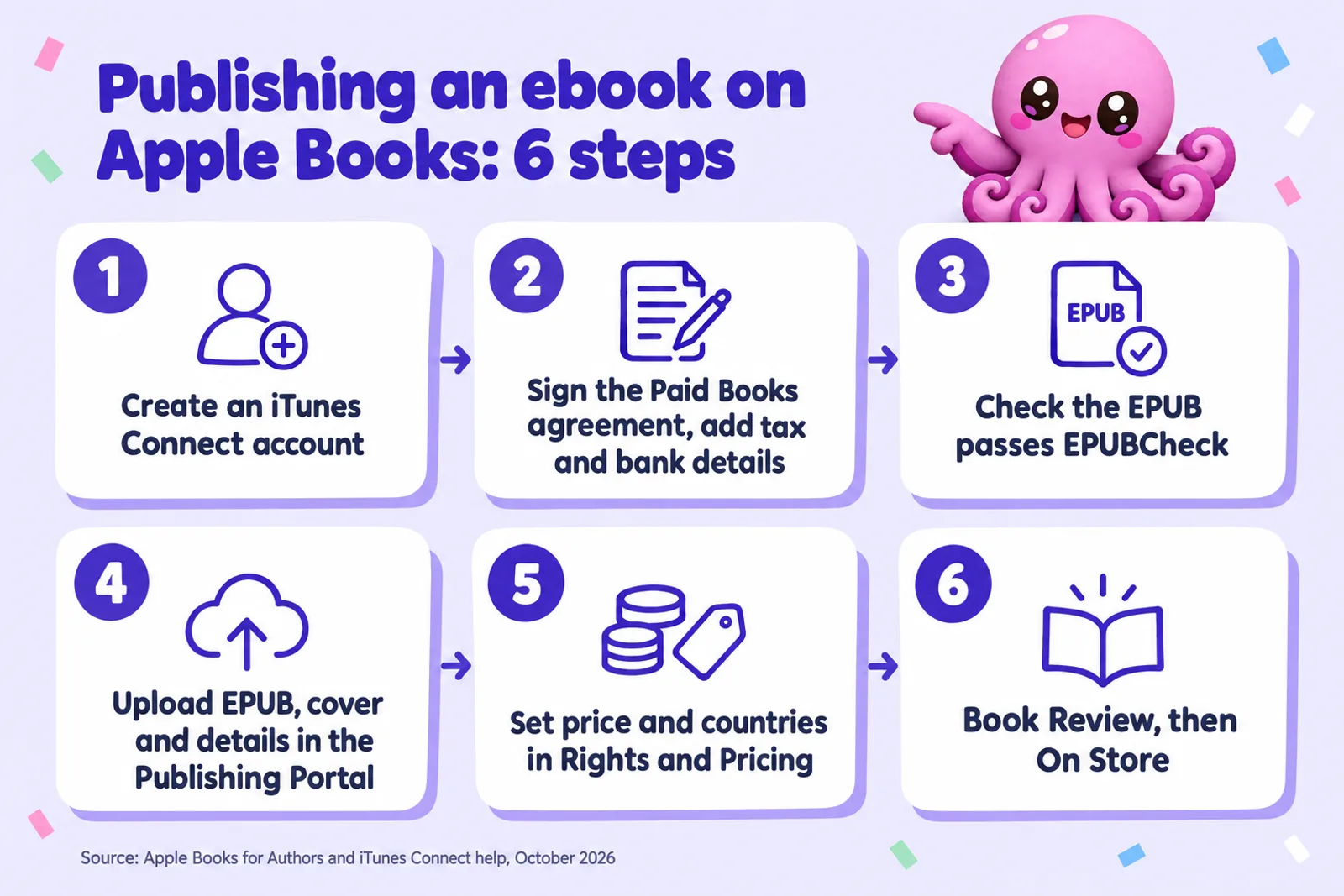
- Validate the EPUB. Every book "must pass the latest version of EPUBCheck". The portal validates too, but checking first saves a rejection cycle.
- In the Publishing Portal, choose Submit a New Book. Upload the EPUB, cover and, optionally, a custom sample.
- Add title, author and description. At least 50 characters; format with bold and line breaks, not HTML tags.
- Set category, language and audience. Interest Age is required for children's and teen books. Flag explicit content; readers with parental restrictions won't see it.
- Enter publishing details: your own name as publisher if you self-publish, and the original publication date if the book appeared elsewhere first.
- Upload to iTunes Connect. The book can take up to 24 hours to appear there.
- Set Rights and Pricing. The step people miss: the book "will not be available for purchase" until you choose a price and countries.
- Wait for review. Every new book and update goes through Book Review. A red light means Not on Store (See Details gives the reason), yellow Ready for Store, green On Store.
Apple doesn't publish a review time, so use a release date rather than "as soon as possible" when timing matters. Our ebook launch checklist covers the weeks around release.
Need the EPUB and cover first?
Inkfluence AI writes your book chapter by chapter, then exports an EPUB 3 file and a 2000 x 3200 cover. Start free, and upgrade when you are ready to export.
Start my bookEPUB and cover requirements
The book file
- EPUB 3. Apple's current Asset Guide covers EPUB 3 only, and every error EPUBCheck reports must be fixed, not just the fatal ones.
- Size: up to 2 GB, ideally under 1 GB.
- Interior images: Apple's prepare-your-book page says no more than 4 million pixels (width x height); the Asset Guide says 5.6 million. Stay under 4 million.
- A table of contents in the EPUB's navigation document is required.
- Real text, not pictures of text, so readers can search, highlight and use VoiceOver.
- No page numbers typed into a reflowable book, working links, normal paragraph spacing, no placeholders.
- Samples are automatic. A "bodymatter" landmark in the EPUB tells Apple where the book proper begins, so the sample opens on chapter one, not front matter.
Scene breaks, image placement and the rest are covered in our formatting guide, which applies just as well to Apple, and images in ebooks.
The cover
RGB, at least 1,400 pixels on the shorter side, high-quality JPEG or PNG. Don't enlarge a small image to reach the minimum: "excessively blurry or pixelated images are rejected." Front cover only, with no borders, no 3D or angled "setup shot", no photo of a printed copy, and a different cover for every book. Apple's design advice: check your cover still reads at 100 pixels high. Our cover design guide and AI book cover generator start from the same principles. A cover is optional during a pre-order, but must be in before release, along with a copy inside the EPUB.
Metadata, search and how Apple picks books to feature
Apple names three main factors that order search results: metadata from publishers, customer engagement and popularity. The first is yours on day one:
- Title and subtitle match the cover, subtitle only in its own field, no prices, store names or "Exclusive".
- Description accurate, unique to this book, sentence case, no keyword lists or promised future content.
- Categories: one primary, two at most. The primary drives the charts.
- Series: identical series name on every book and a numeric sequence number. The series page appears once two books are on sale.
- Authors: one per field, Primary if on the cover, spelled the same everywhere.
Apple's editors, it says, focus on newly published books, well-written content and trending backlist titles, and there is no paid placement. Give them something to find: an honest product page, a linked series, and early ratings from readers you sent promo codes to. Our book description generator helps with the description, and ebook SEO covers keywords across stores.
Pricing and royalties on Apple Books
Apple's author site puts it in one line: "For ebooks, you'll earn 70% royalties on all your titles regardless of price point." There are no price bands to stay inside and no file delivery fee. The one deduction is tax. Apple's prices to readers include tax in places where Apple collects it, and its tax help page says your proceeds "are calculated based on the price of your title, minus any applicable taxes."
How pricing works in iTunes Connect
- Choose a base currency and price; iTunes Connect finds "the closest available price tier" in other currencies, and you can edit any country's price.
- Release Type: Digital Only for an ebook-only title.
- Sale prices run between a start and end date, as many as you like, up to a year ahead. For a sale running 2 to 8 May, Apple says to set the end date to 9 May.
- Books are opted in to the Volume Content Service (bulk sales to schools and businesses) by default, and you choose whether DRM is applied.
How Apple compares with Kindle, Kobo and Google Play
The four big ebook stores pay similar rates in the middle of the price range and very different ones at the edges:
| Store | Rate | Conditions (US prices) |
|---|---|---|
| Apple Books | 70% | Any price. No delivery fee. |
| Amazon KDP | 70% or 35% | 70% only from $2.99 to $12.99 (the top rose from $9.99 on 7 July 2026), minus $0.15 per MB delivery, and at least 20% below any print edition. 35% outside the band. |
| Kobo Writing Life | 70% or 45% | 70% from $2.99 (£1.99, €1.99) and at least 20% below print; 45% below that. |
| Google Play Books | 70% (52% on old terms) | 70% of list price in 60+ countries for partners on its 2019 terms, at any price. Your current split elsewhere. |
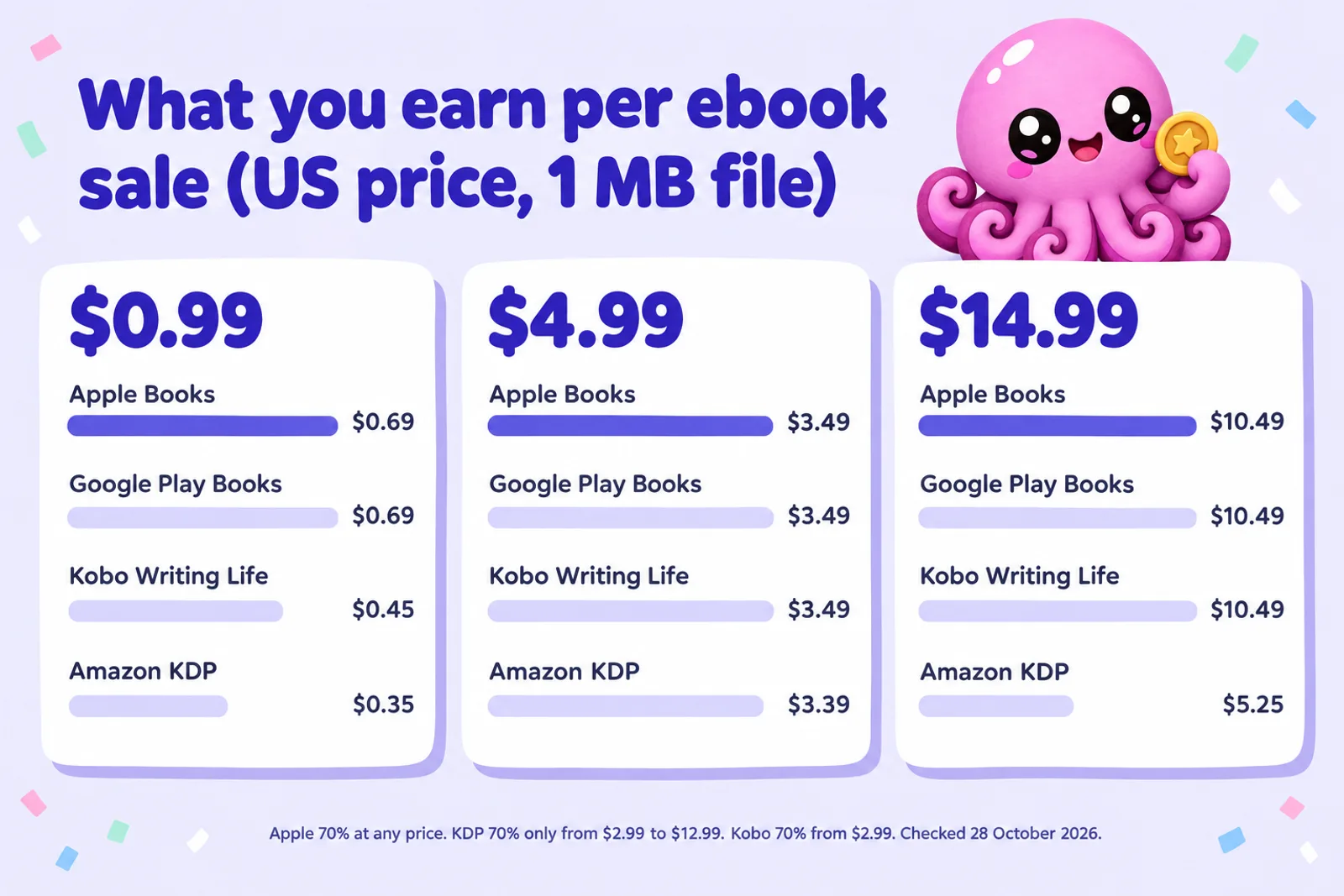
Apple's advantage is at both ends: under $2.99 it pays twice Amazon's rate, and over $12.99 it pays 70% while Kindle drops to 35%. In between, the stores land within cents of each other. Our ebook pricing guide covers how to choose the price itself, and KDP royalties goes deeper on Amazon's side.
Calculator: what each store pays for your price
Enter the price a reader pays, the currency, and how many copies you expect to sell. If the reader's price includes VAT or GST in the country you're checking, enter that rate: every store here takes the tax out before working out your share. The KDP line also needs your file size (for the delivery fee) and, if you have one, your paperback's price, because KDP and Kobo cut their rates when the ebook isn't at least 20% cheaper than print.
Apple Books, direct
Constants checked 28 October 2026. Apple: 70% of the price after tax (Apple Books for Authors; iTunes Connect tax help). Via Draft2Digital: Apple's 70% less Draft2Digital's commission of about 10% of the retail price, so roughly 60%. KDP: 70% of (price after VAT minus delivery) inside the band, 35% of price after VAT outside it; bands USD and CAD 2.99 to 12.99, GBP 1.77 to 12.99, EUR 2.69 to 12.99, AUD 3.99 to 15.99; delivery per MB USD 0.15, CAD 0.15, GBP 0.10, EUR 0.12, AUD 0.15; ebook at least 20% below print for 70%. Kobo: 70% from USD, CAD and AUD 2.99 or GBP and EUR 1.99 and at least 20% below print, otherwise 45%. Google Play: 70% of list price after tax for partners on its current terms, in 60+ countries including these five currencies' main markets; 52% on the old terms. Real payouts also depend on exchange rates and the country of each sale.
Make the EPUB for every storeTwo worked examples, both US prices with a 1 MB file. At $4.99, Apple, Google and Kobo each pay $3.49 a sale and KDP pays $3.39: almost a tie. At $14.99, Apple, Google and Kobo pay $10.49 and KDP pays $5.25, so a hundred copies sold on Apple instead of Kindle are worth $524 more. Our royalty calculator adds paperback and IngramSpark lines, and the ebook income calculator projects a whole catalogue.
Which countries can buy your book
Apple's "Availability of Apple Media Services" page shows three levels for Apple Books. We counted them on 28 October 2026:
| What Apple Books sells there | Countries | Examples |
|---|---|---|
| Books and audiobooks | 22 | US, Canada, UK, Ireland, Germany, France, Italy, Spain, the Netherlands, the Nordic countries, Australia, New Zealand, Japan |
| Books only | 29 | Mexico, Brazil, Argentina, Chile, Colombia, Poland, Czechia, Hungary, Romania, the Baltic states |
| Public domain books only | 103 | India, Singapore, Hong Kong, South Korea, Taiwan, Malaysia, the Philippines, South Africa, Nigeria, the UAE, Israel, Türkiye |
So your ebook can be on sale in 51 countries. Choose "All" under Countries and Regions, then round any odd converted prices. If your readers are mostly in India or South-East Asia, Apple won't reach them; our guides on Google Play Books and Kobo cover those stores the same way.
Pre-orders, promo codes and price promotions
Pre-orders
Enter a future release date and the book goes up for pre-order automatically. It can open up to 365 days ahead and must start at least two days before release. At first you only need the details and price; never upload placeholder files. Send the final file at least 10 business days before release (Apple can email reminders 14, 7 and 2 days out), and move the date if you need to. Free books can't be pre-ordered.
Promo codes
Every book gets 250 promo codes for reviewers and press, and they work during a pre-order once your file is approved, so early readers can rate the book before launch. Each code works once and expires four weeks after you request it, so don't post them publicly or request them early.
Price promotions and the affiliate programme
Schedule sale prices in Rights and Pricing. Apple's affiliate programme pays a commission, on top of your royalty, on Apple Books purchases a reader makes within 30 days of clicking your link, and its free marketing tools make store badges and a universal book link to every store you're in.
Apple's rules for AI-generated books (2026)
Section 1.13 of the Apple Books Formatting and Content Guidelines is the most precise AI rule of any ebook store:
"Book content that is AI-generated (i.e., a material portion of the content is generated by an AI-based tool as opposed to a human author or illustrator), must be labeled as such using "AI Generated by" artist role and declaring the AI-generated creation method in the description. AI-assisted content (i.e., AI has been used as a tool in idea generation, research, editing, or producing cover images for a book composed by a human author or illustrator) does not require disclosure."
Sections 2.9 and 4.8 make both parts rejection reasons. So, two edits to your listing:
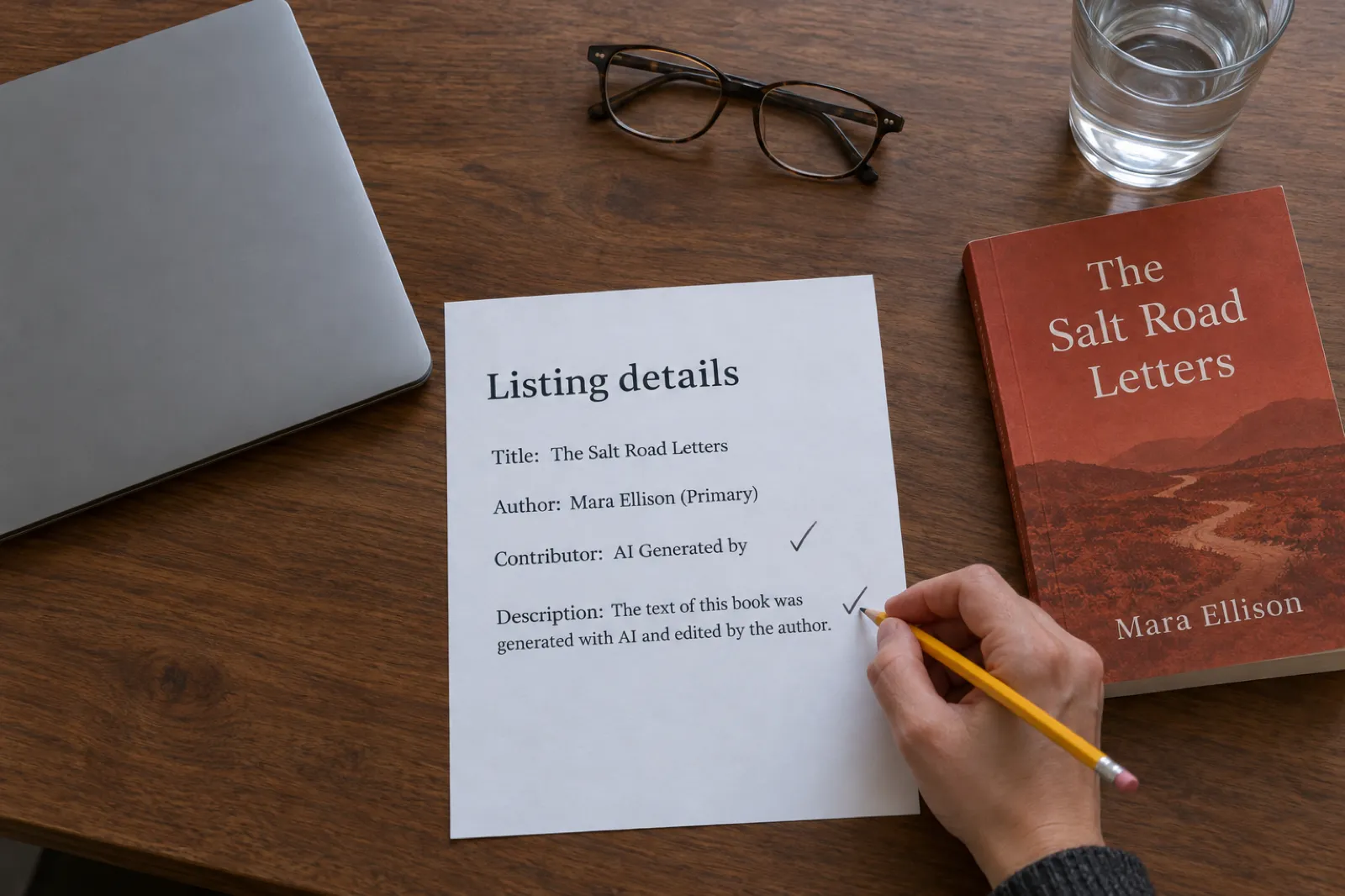
- Add a contributor with the "AI Generated by" role. Apple doesn't say whose name goes there; the tool's name is the natural choice. You stay the Primary author.
- Add one plain sentence to the description, for example: "The text of this book was generated with AI and edited by the author."
Which box is your book in?
The test is whether a "material portion" was generated by AI. A tool wrote the chapters and you revised them: label it. You wrote them and used AI to brainstorm, research or edit: AI-assisted, no label. Apple also exempts an AI cover on a book a human wrote, though AI illustrations that make up a material part of a picture book count. Amazon is stricter: AI content counts "even if you applied substantial edits afterwards", covers included. Our guides to the KDP AI disclosure policy and to where you can sell AI-generated books set the stores side by side. Decide which box your book is in once, and answer the same way everywhere.
The rules that bite harder than the label
The rules that actually remove AI books are elsewhere: section 1.11 bans books "designed to mislead or deceive customers by mimicking, copying, or impersonating other books, authors, publishers", and section 10.2 says publishers "spamming us with many versions of similar books may be blocked". One original book with an honest label is welcome. Twenty near-identical ones put your whole account at risk.
Write a book that is yours, then label it honestly
Inkfluence AI drafts a full book from your idea and outline, and you edit every chapter in the same place. Export the EPUB for Apple, Kobo, Google Play and Kindle from one project.
Write my bookAudiobooks on Apple Books, including AI narration
You can't upload an audiobook to Apple yourself: "you'll need to work with one of our preferred partners." Apple lists eight: Bookwire, De Marque, Draft2Digital, Ingram CoreSource, Lantern, OTOBANK, PublishDrive and Zebralution. No exclusivity; audiobooks sell in 22 countries.
Route 1: Apple's own digital narration (free)
Apple makes an AI-narrated audiobook from your ebook at no charge, shown in the store as "Narrated by Apple Books". The conditions:
- The ebook must be on sale on Apple Books, in English, reflowable (not fixed layout), not public domain, and you must hold the audio rights. Erotica isn't accepted.
- You nominate the title through a partner: Draft2Digital (for independent authors selling direct on Apple or through Draft2Digital), Ingram CoreSource or PublishDrive.
- Image-heavy books, tables, poetry, cookbooks and graphic novels are poor candidates, and even eligible titles may not pass.
- About one to two months to produce; no pre-orders; one voice type, fixed once submitted.
- The description must begin: "This is an Apple Books audiobook narrated by a digital voice based on a human narrator."
Apple says you keep your audiobook rights and can make other versions. PublishDrive's help page adds that the Apple-narrated recording itself belongs to Apple, which may keep selling it for six months after the ebook is withdrawn. Read your partner's terms first.
Route 2: an audiobook you produced, through a partner
Apple's Audiobooks Formatting Guidelines (version 1.3.2) include a rule for AI narration made elsewhere: "Audiobooks narrated by artificial intelligence must explicitly state this in either the title or narrator field," and in the description. So Apple's rules require a label rather than a ban. The catch is delivery: each partner sets its own terms, Apple names no partner that delivers AI audio made in other tools, and the partner pages we read offer AI narration for Apple only through Apple's own programme. Ask before you record anything with Apple in mind.
If you have an audiobook made with Inkfluence AI, the stores that take your own AI narration today are listed in where to sell an AI audiobook: Google Play Books and Kobo among them. For Apple, the dependable AI route is Route 1. For human narration, see making an ACX audiobook and Audible's AI narration policy.
ISBN rules on Apple Books
Apple's metadata help: "ISBNs are optional, but helpful for sales and charting purposes." If you use one, your Vendor ID (Apple's permanent identifier for the book) should match it. You might want one for library and bookshop distribution, or for one identifier across every store. If you publish through Draft2Digital, it assigns a free ISBN, but its FAQ says you can't use that number outside Draft2Digital's services. Our do you need an ISBN? guide covers the costs by country.
In Canada your own ISBNs are free from ISBN Canada; registering now declares a human author, so read ISBN Canada's AI rule if AI wrote part of the book.
Direct or through Draft2Digital?
Apple describes aggregators (they deliver and manage your books; Apple pays them and they pay you), conversion houses (they make the EPUB; Apple pays you) and delivery houses. For most self-publishers the choice is direct or an aggregator such as Draft2Digital:
| Apple direct | Through Draft2Digital | |
|---|---|---|
| Your share | 70% of the price after tax | About 60% (Apple's 70% less Draft2Digital's ~10% of the retail price) |
| Fees | None | $20 one-time activation; $12 a year if you earn under $100 a year in sales |
| Other stores from one upload | Apple only | Kobo, Barnes & Noble, Tolino, OverDrive, Everand and more |
| Apple tools | Promo codes, price intervals, daily sales reports in iTunes Connect | Whatever the distributor offers |
| Apple digital narration | Yes, nominated through a partner | Yes, nominated in Draft2Digital |
| AI-generated books | Allowed with Apple's label | Draft2Digital refuses books generated entirely by AI; extensive human editing is required |
If Apple is a main store for you, go direct: the extra 10% and the promo codes are worth an hour of setup. If you want five stores and libraries from one dashboard, an aggregator earns its cut; our Draft2Digital review works out whether it does for your sales. Don't do both for one book; Draft2Digital warns that listing twice splits your sales ranking. The full decision is in KDP Select vs wide distribution and in our new guide to publishing an ebook wide. An ebook in KDP Select is exclusive to Amazon until its 90-day term ends; Kindle+ for authors explains what Select pays now.
Common reasons Apple sends a book back
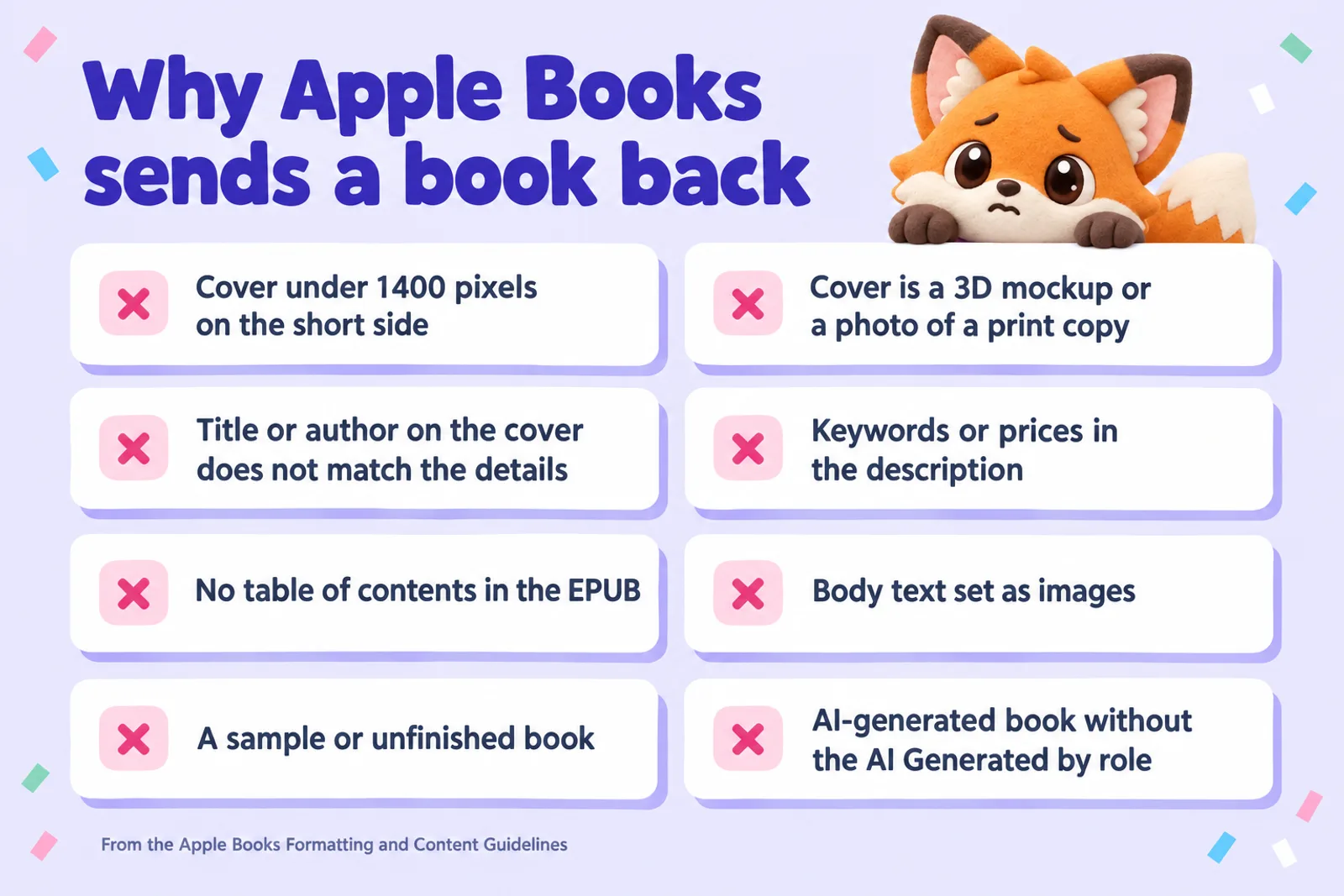
Apple's guidelines list "common reasons for correction or rejection" under every heading. Beyond the eight above:
- Language setting that doesn't match the text.
- Links to or mentions of competing stores, and prices, anywhere in the book, cover or details.
- Broken links, tables that don't display, overlapping text, or page numbers typed into a reflowable book.
- Duplicates: two books with the same title and author, even at different prices.
- Apple branding: nothing that makes your book look Apple-made.
A held book's red status light has a See Details link with the reason. Fix it and resubmit; updating during review restarts the review. If KDP has rejected a book for similar reasons, formatting a book for KDP covers the overlapping fixes.
Updating or removing a book
Send a new file through the Publishing Portal ("Update a Previously Submitted Book"). It overwrites the old version in readers' libraries, and you can't roll back. Detail changes are reviewed too and show within 24 hours of approval. To take a book off sale, set Cleared for Sale to No; books can't be deleted from iTunes Connect.
Making the files with Inkfluence AI
Apple needs a valid EPUB, a cover and honest details. Here's what Inkfluence AI provides, and what it doesn't.
- The EPUB. An EPUB 3 file with a navigation table of contents, a "bodymatter" landmark so Apple's sample starts at chapter one, the cover, and accessibility details. Every change to our EPUB exporter must pass the official EPUBCheck validator before it ships. EPUB export comes with any paid plan or credit pack; the free plan exports PDF. You upload the file to Apple yourself.
- The cover. A 2000 x 3200 JPEG in sRGB, well over Apple's 1,400-pixel minimum. See cover design help.
- The words. The AI book writer drafts the book chapter by chapter; the chapter count sets the length, at roughly 1,000 to 1,500 words a chapter. A book it wrote is AI-generated in Apple's terms even after you edit it, so add the label. A book you wrote and imported is AI-assisted if you only used the assistant to revise it.
- The audiobook. Creator includes 15 audiobook chapters a month, Premium 30. The files suit Google Play, Kobo and direct sales; for Apple, use Apple's digital narration. See how to make an audiobook with AI.
- Other languages. The book translator makes a new edition; list it separately with the matching language.
Step-by-step export instructions are in exporting help, and ebook export and publishing walks through every store.
Export an Apple-ready EPUB and cover
Write or import your book, check it in the preview, and download the EPUB and a 2000 x 3200 cover from the same project. Creator is $9.99 a month.
Open my dashboardChecklist before you press upload
- Paid Books agreement signed, tax and bank details in.
- EPUB passes EPUBCheck, has a table of contents, no typed page numbers.
- Cover RGB, 1,400+ pixels on the short side, front only, matching your details.
- Description unique, 50+ characters, no keywords, prices or store names.
- AI-generated? "AI Generated by" role plus one sentence in the description.
- One or two categories; Interest Age for children's books; exact series name.
- Price set, odd conversions rounded, countries set to All.
- Pre-order? Final file in 10 business days before release.
Frequently asked questions
How much does Apple Books pay authors?
Apple pays 70% on every ebook at any price, with no delivery fee. Where Apple collects sales tax or VAT, the tax comes off first. A $4.99 US sale earns $3.49, paid within 45 days after the month ends.
Do I need a Mac to publish on Apple Books?
Not for an EPUB. You sign up for iTunes Connect and upload through the Apple Books Publishing Portal in a web browser, using any tool that makes a valid EPUB.
Does Apple Books allow AI-generated books?
Yes, with a label. If a material portion was generated by AI, add the "AI Generated by" contributor role and say so in the description. AI help with ideas, research, editing or the cover of a human-written book needs no label.
Do I need an ISBN for Apple Books?
No. Apple says ISBNs are optional but helpful for sales and charting. If you use one, your Vendor ID should match it.
What file does Apple Books accept?
An EPUB that passes the latest EPUBCheck, up to 2 GB, plus an RGB PNG or JPEG cover at least 1,400 pixels on the shortest side. For PDF or Kindle files, Apple points you to a partner.
Can I set up a pre-order on Apple Books?
Yes, up to 365 days before release, with only the details and price at first. Send the final file at least 10 business days before release. Free books cannot be pre-ordered.
How do I sell an audiobook on Apple Books?
Through one of Apple's eight preferred partners, such as Draft2Digital or PublishDrive; there is no direct upload. Audiobooks sell in 22 countries. Apple's own digital narration is free for eligible English ebooks already on Apple Books.
Can I upload an AI-narrated audiobook to Apple Books?
Apple's audiobook guidelines allow AI narration if the title or narrator field and the description say so, but delivery must go through a partner, and each partner sets its own rules on AI audio. Ask first.
Should I publish to Apple Books directly or through Draft2Digital?
Direct pays the full 70% plus Apple's promo codes and reports. Draft2Digital keeps about 10% of the retail price, so roughly 60%, but one upload reaches Kobo, Barnes & Noble and libraries too. Pick one route per book.
In which countries can I sell on Apple Books?
Paid books sell in 51 countries, including the US, Canada, the UK, most of the EU, Australia, Japan and much of Latin America. In 103 more, including India, Singapore and South Africa, Apple Books carries public domain books only.
Start the book you will publish on Apple
Turn your idea into a finished draft, edit it chapter by chapter, and export the EPUB and cover Apple asks for. Start free.
Start writing freeRelated reading
- How to publish an ebook wide in 2026
- How to publish on Kobo and on Google Play Books
- KDP Select vs wide distribution
- Where to sell an AI audiobook
- Can you sell AI-generated books?
- How to sell ebooks on Amazon KDP
- How to design a book cover with AI
- AI book series writer, for books that link up as a series
- The self-publishing guide
- Inkfluence AI plans and pricing
Sources
Every Apple fact on this page was read on the source below on 28 October 2026. Inkfluence AI facts were checked in our product code the same day.
- Apple Books for Authors (70% royalties on every ebook regardless of price; no delivery fees, paid placement, price matching or third-party ads) and Measure (paid within 45 days of month end)
- Create an iTunes Connect account and Publish your book from the web
- Publish your book and Audiobooks (preferred partners)
- iTunes Connect help: Prepare your book (EPUBCheck, file size, image pixels, cover)
- Metadata (ISBN optional, description length)
- Manage book rights and pricing, promotional pricing and pre-orders
- Agreements, tax, banking and compliance, tax information (proceeds minus applicable taxes) and payments
- Promo codes, series, book status and editing book files
- Apple Books Formatting and Content Guidelines (sections 1.11, 1.13, 2.9, 4.8, 7, 8, 10)
- Apple Books Asset Guide 5.3.1 (February 2025; cover art, EPUB 3, 2 GB)
- Audiobooks Formatting Guidelines 1.3.2 (1.15 and 3.9, artificial narration)
- Get started with digital narration, Apple Books digital narration and How to sell audiobooks on Apple Books (22 countries)
- Apple Affiliate program for books and About search results in Apple Books
- Availability of Apple Media Services (Apple Books by country; counted 28 Oct 2026)
- PublishDrive: Apple Books Digital Narration (recording rights, six months after withdrawal)
- KDP: eBook List Price Requirements (70% band $2.99 to $12.99 from 7 July 2026) and Digital Book Pricing Page (delivery costs, 20% below print)
- Kobo Writing Life terms, section 4.2
- Google Play Books: Revenue split FAQs and Australia GST (tax-exclusive basis)
- Draft2Digital FAQ (fees, commission, ISBNs, double listing)

Founder, Inkfluence AI
Sam is the founder of Inkfluence AI. He built the platform to make book creation accessible to everyone - from first-time authors to seasoned publishers.
Helpful links

Ready to write your own book?
Write with AI, make it yours, and export PDF, EPUB and KDP-ready files from one project.
Keep reading
 Publishing
 ISBN Canada's AI Rule (2026): The Human-Author Declaration Explained
ISBN Canada now asks every registrant to declare their book was written by a human author, allows AI only for limited support tasks, and limits ISBNs for works primarily generated by AI. What changed on 9 October 2026, who it affects, what counts as a support task, what to do if your book is AI-assisted or mostly AI-generated, how it fits with KDP's AI question, and a checker for which ISBN route fits your book.
 Self-Publishing
 How to Publish on Barnes & Noble Press in 2026: Ebooks, Print Rules and AI Disclosure
B&N Press pays 70% on ebooks from $0.99, and 55% minus printing on print books, which since 22 April 2026 must list at $14.99 or more. It asks whether each part of your book is AI-Created or AI-Assisted, refuses public domain titles, caps accounts at 100 titles and sells ebooks to US readers. Here is every step from account to promotion, read from B&N Press's own help pages, with a royalty calculator against KDP.
 Tools
Tools Draft2Digital Review 2026: Fees, Stores, AI Rules and Whether It's Worth It
An honest Draft2Digital review from its own pages in October 2026: the new $20 activation and $12 maintenance fees, the roughly 10% it keeps, every store and library it reaches (and the ones it does not), its AI rules, payments, print and audio, plus a calculator that tells you whether it pays for your books.

Get ebook tips in your inbox
Join creators getting weekly strategies for writing, marketing, and selling ebooks.