

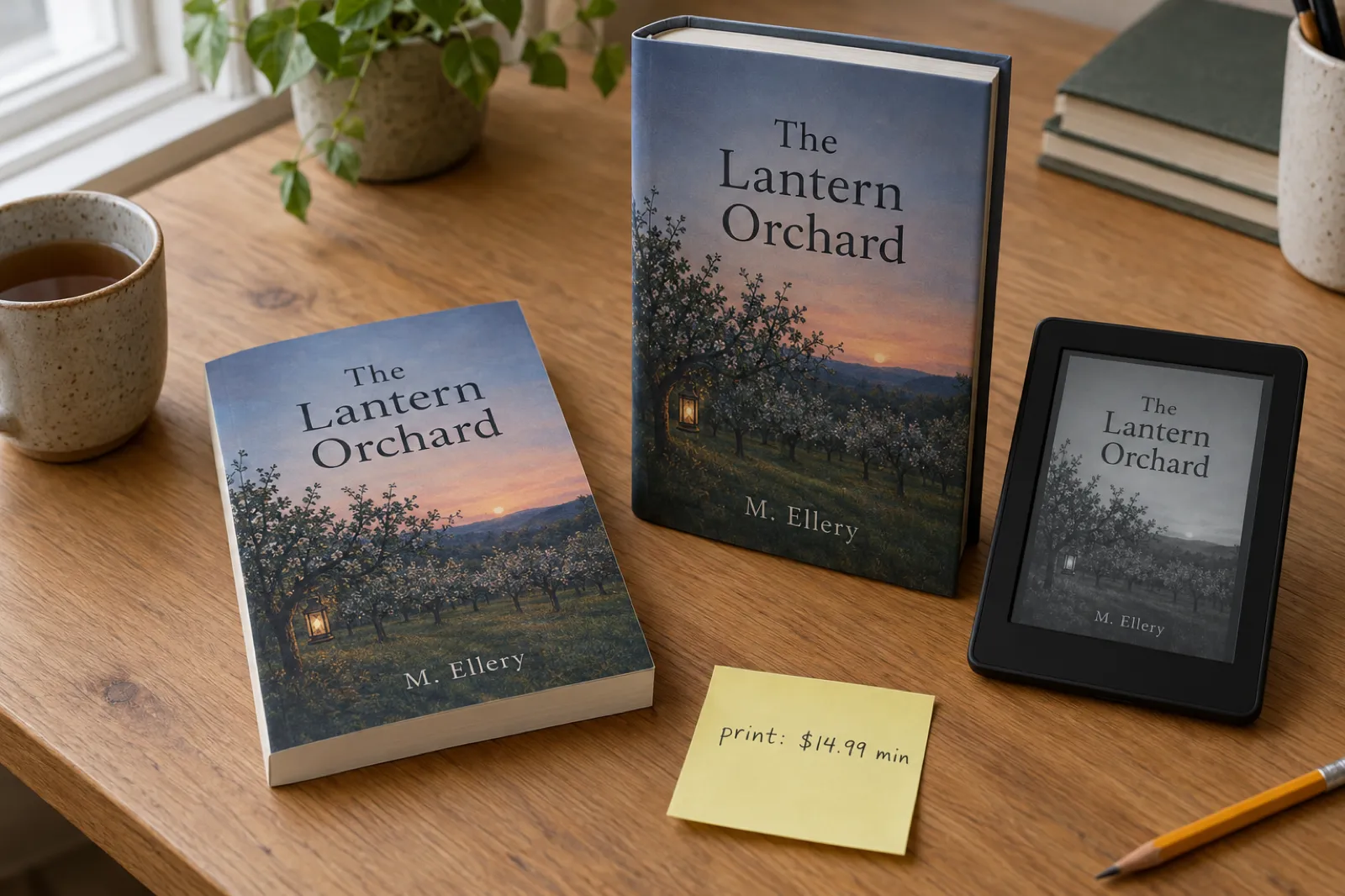
Quick Answer
Barnes & Noble Press is free to use and non-exclusive. It pays 70% of the retail price on ebooks sold at $0.99 or more, with no upper price band, and 55% of the list price minus printing on print books. Since 22 April 2026 print books must list at $14.99 or more and public domain titles are refused; since 14 May 2026 an account can have 100 titles on sale. At setup it asks whether AI was used for the cover, manuscript, images or translations, and whether each was AI-Created or AI-Assisted; AI text you then edited still counts as AI-Created. Ebooks sell on bn.com, the B&N app and NOOK, to readers in the US. Ebooks need no ISBN; print books for sale do, and B&N offers a free one that works only on B&N. It sells no audiobooks and doesn't put books in its shops.
B&N Press is the self-publishing service of Barnes & Noble, the US bookshop chain: an ebook store on NOOK and bn.com, and a print-on-demand service for paperbacks and hardcovers sold on bn.com. For an author going wide, it is one of the four direct stores worth an account, with Apple Books, Kobo and Google Play Books. In 2026 its rules changed a lot: a $14.99 floor for print, no public domain, a 100-title cap, US-dollar payments for everyone, tighter promotion limits, and an AI question that covers assisted use as well as generated content.
This guide goes through it in order, from account to promotion. Every rule comes from B&N Press's own help centre, read on 28 October 2026, and each page is listed in the sources at the end.
Disclosure: Inkfluence AI is our product. It helps you write books and exports EPUB, PDF, print-ready PDF and Word files. It doesn't upload to B&N Press for you and it doesn't print books: B&N Press prints and ships the copies, from files you upload.
Published 28 October 2026. Part of our going-wide series: the guide to publishing an ebook wide compares every store, and there are matching guides for Apple Books, Kobo and Google Play Books.
What B&N Press is, and what it isn't
B&N Press is a free publishing account. You upload a manuscript and cover, set a price, and B&N sells the ebook and prints the paperback or hardcover when someone orders it. There is no fee and no exclusivity: you may publish with it "even if you have published it through another site".
| Question | B&N Press, October 2026 |
|---|---|
| Cost and exclusivity | Free; non-exclusive. You pay only for proofs and author copies. |
| Formats | Ebooks; paperbacks; hardcovers with a printed case or a dust jacket. No audiobooks. |
| Where it sells | Ebooks: bn.com, the B&N app, NOOK devices and the NOOK app. Print: bn.com and the B&N app, not B&N shops. |
| Royalties | Ebooks 70% of the retail price at $0.99 and up. Print 55% of the list price minus the printing cost. |
| Print minimum price | $14.99 since 22 April 2026 |
| Who can publish | Authors in the US, UK, Ireland, Canada, Australia, New Zealand, France, Italy, Germany, Spain, the Netherlands and Belgium; 18 or over, or supervised by a parent or guardian |
| AI, public domain, title cap | AI allowed with an AI-Created or AI-Assisted answer per element; no public domain; 100 titles on sale per account |
| Payment | US dollars, once you have $25, on the last Wednesday of the month after the sale |
Two things surprise people. B&N Press does not get you into Barnes & Noble shops: its books are printed on demand, and print-on-demand items "cannot be considered returnable", which is how most bookshops buy. And the ebook shop is for US readers: authors in 12 countries can publish, but the customers are in the US. Both shape whether B&N is worth your time; see who can buy your book.
What changed in 2026
| Date | Change |
|---|---|
| 2 March 2026 | All payments to international authors issued in US dollars; your bank converts them |
| March 2026 | A Bank Beneficiary Address (not a PO box) is required before royalties are paid |
| 10 March 2026 | AI disclosure page updated: AI-Created or AI-Assisted for cover, manuscript, images and translations |
| 22 April 2026 | Print books for sale must list at $14.99 or more; public domain titles no longer allowed |
| 7 May 2026 | Coupon and BOGO discounts limited to 10% to 75%; "Buy One Get One Free" withdrawn |
| 14 May 2026 | Print listings under $14.99 began coming off sale; 100 on-sale titles per account |
| 20 October 2026 | List of banks B&N can't pay published, including Wise, Payoneer, Revolut, Monzo, Starling and Chime |
B&N said the April changes "protect independent authors as well as maintain the quality of the content on our platform". Other stores moved the same way this year: Amazon added a weekly title limit in September and Kobo is turning away a large share of submissions. For an author with a handful of original books, the change that bites is the $14.99 print floor.
Account, tax and bank
A B&N Press account has two layers. A normal sign-up at press.barnesandnoble.com lets you build projects and order copies for personal use. Selling needs a Vendor Account (contact details, publisher name, bank and tax information), and B&N says approval "should take up to 15 business days". Start it before your book is ready.
- US authors give a Social Security Number or EIN. B&N generates a Substitute Form W-9 from what you enter; the details must match IRS records exactly, or you may face payment holds or up to 30% withholding. Put your Vendor ID (it starts with PUB) in the account number field.
- Authors outside the US submit a W-8BEN (individuals) or W-8BEN-E (companies). Without one, B&N must withhold up to 30% of royalties; with one, a tax treaty can reduce or remove that. B&N points to IRS Publication 515 and suggests a tax adviser if you're unsure.
- The bank must be a savings or checking account "from a traditional bank". B&N can't pay online banks; its list includes Wise, Payoneer, Revolut, Monzo, Starling Bank, Chime, Varo, Skrill, Remitly and Bunq, and it says the list isn't complete. If you use one of these for Amazon or Kobo, you need a different account here.
You can also add contributors: an assistant or co-author gets their own login to your account, limited to the features you choose.
Publishing an ebook, step by step
- Prepare the file. B&N accepts EPUB, Word, HTML and plain text, and recommends EPUB for anything with real formatting. Its EPUB guide asks for a file that passes EPUBCheck with a proper table of contents. The ebook must be under 20 MB. Our guide to ebook formats explains the options, and formatting a book for Kindle covers headings and contents pages, which matter just as much on NOOK.
- Enter book details: title, contributors (the author first, with the role Author), description and, if you have one, an ebook ISBN. Once published, the title can't be changed.
- Complete the AI disclosure under Rights & Other Information. If the publish option doesn't appear after uploading a file, B&N says this is usually why. See the AI section.
- Set the price in US dollars. Ebook price changes take about 24 hours.
- Choose a sample. By default readers get the first 5% of the book, front matter included. A custom sample file lets you skip to your best pages, and you can switch at any time.
- Publish, or set a pre-order. An ebook appears on bn.com within about 24 hours. Pre-orders can open up to 12 months ahead with just a cover; the final interior is due 72 hours before publication, and readers are charged on the day.
Start with a book worth uploading
Inkfluence drafts your book chapter by chapter from your outline, lets you edit every line, and exports a clean EPUB with a real table of contents, ready for B&N Press, Apple, Kobo and Google Play.
Write your book freeEbook royalties and pricing
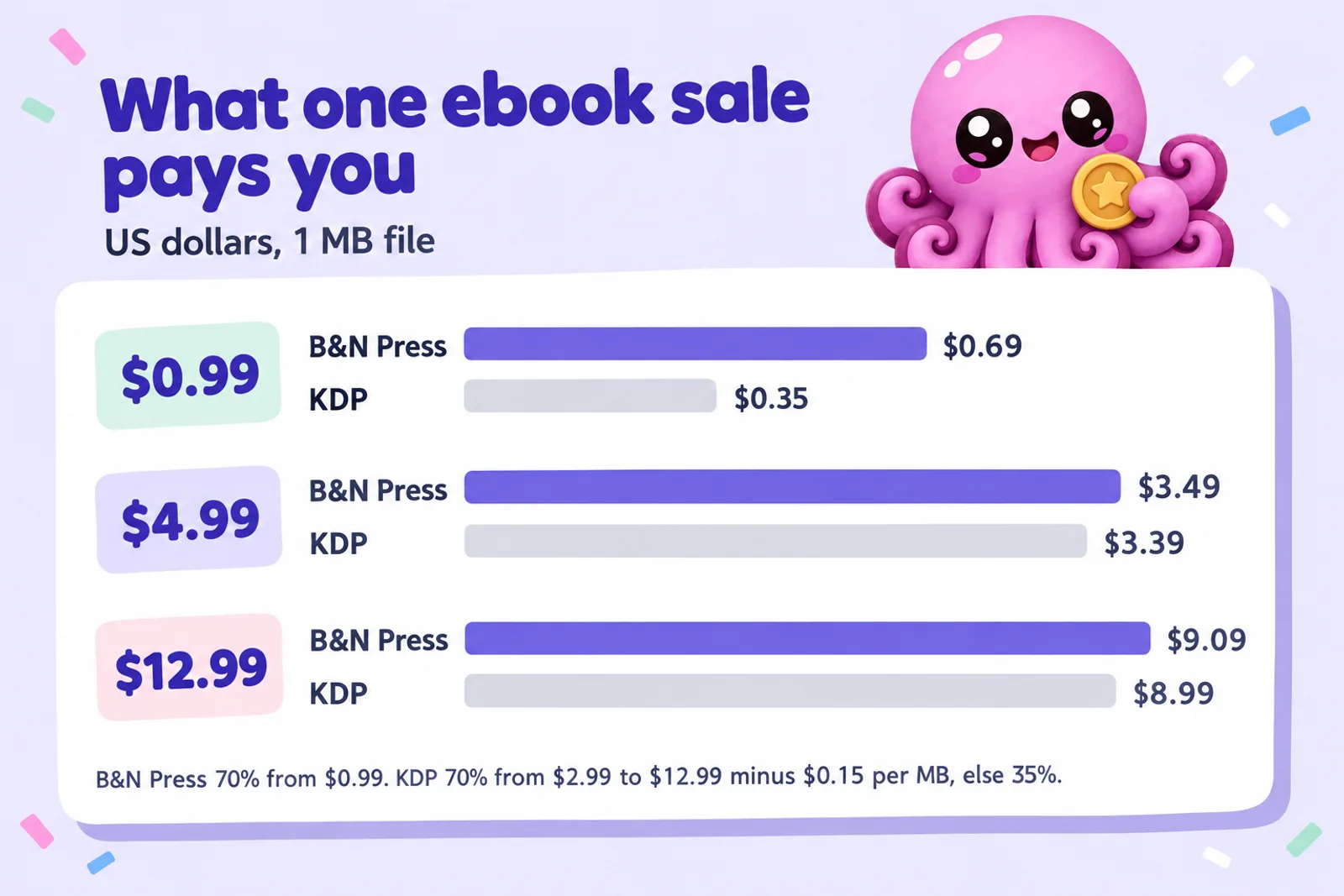
B&N pays 70% of the retail price you set, "for all sales for $0.99 and higher". Its help pages mention no delivery fee and no price ceiling, so B&N pays well at both ends of the price range:
- Low prices: KDP pays 35% below $2.99 on Amazon.com, so a $0.99 ebook earns $0.35 there and $0.69 on B&N.
- The middle: close. A 1 MB ebook at $4.99 earns $3.49 on B&N and $3.39 on KDP, which takes $0.15 a megabyte before working out 70%.
- High prices: KDP's 70% band stops at $12.99 (see KDP royalties explained). A $13.99 ebook earns $4.90 on KDP and $9.79 on B&N.
Those are per-sale figures; for most indie authors Amazon still sells far more copies. Treat B&N's rate as a reason to be there, not to price differently there, and keep one price across stores. For more on choosing it, see how to price an ebook. Two free extras apply to every B&N Press ebook: LendMe, which lets a reader lend it once to a friend for up to 14 days, and eGifting, which B&N suggests for sending your book to reviewers and bloggers.
B&N Press royalty calculator
Put in your ebook price and file size to compare one sale on B&N Press direct, on B&N through Draft2Digital, and on Amazon.com through KDP. The print section is optional. B&N does not publish its printing costs or a formula for them: it sends authors to its Quick Quote tool. So the calculator can't guess the B&N printing cost; paste the figure Quick Quote gives you, and it applies B&N's published royalty rule and checks the $14.99 floor. For comparison it works out the KDP paperback royalty for black ink from KDP's published printing costs.
Ebook
B&N Press direct
$0.00
B&N via Draft2Digital
$0.00
KDP, Amazon.com
$0.00
Print (optional)
B&N Press print, per copy
Add your cost
KDP paperback, black ink, per copy
$0.00
Rules used, read 28 October 2026. B&N Press: ebooks 70% of the retail price at $0.99 and up; print 55% of the list price minus the printing cost; print list price at least $14.99. Draft2Digital: about 60% of list price at B&N. KDP on Amazon.com: ebooks 70% of (price minus $0.15 per MB) from $2.99 to $12.99, otherwise 35%; paperbacks 60% of list price at $9.99 and up (50% below) minus printing, with black-ink printing at $2.30 flat for 24 to 110 pages and $1.00 plus $0.012 a page above that at regular trims ($2.84, and $1.00 plus $0.017 a page, at large trims). Colour printing and other KDP marketplaces are not modelled. Per-sale arithmetic, not a sales forecast.
Write the book you'll sell on B&NA worked example. A $4.99 novel with a 1 MB file that sells 10 copies a month on B&N earns $34.93 a month direct and $29.94 through Draft2Digital: about $60 a year for running one more dashboard yourself. The same 10 copies on Amazon.com would earn $33.88. For every store at once, including Apple, Kobo and Google Play, use the earnings comparer in our going-wide guide; for KDP, IngramSpark and the rest per sale, the royalty calculator; and to project a whole catalogue, the ebook income calculator.
Print books: formats, files and proofs
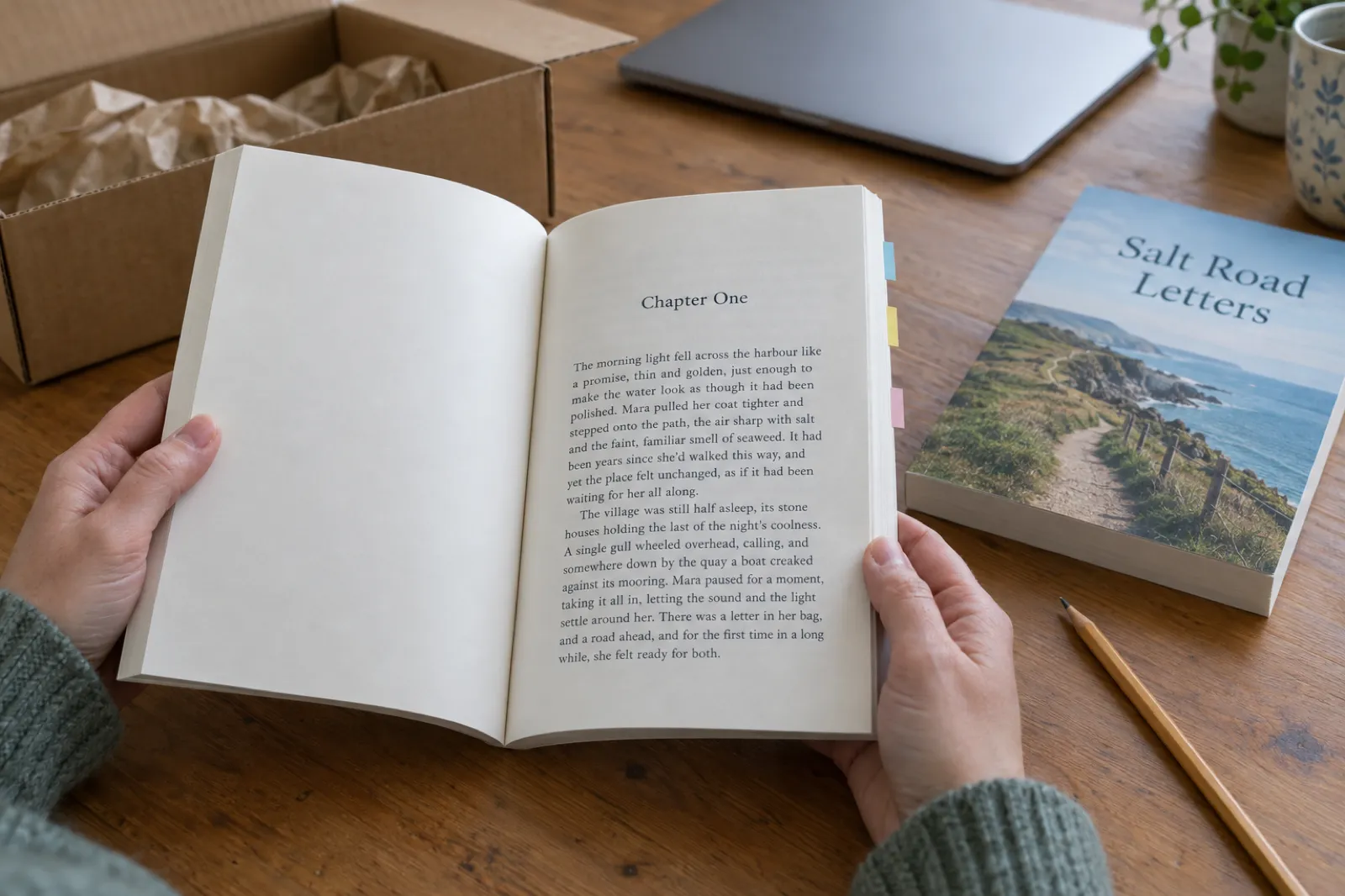
B&N Press prints a paperback, a hardcover with a printed case (the art printed on the boards) and a hardcover with a dust jacket (a cloth binding with a removable jacket with folded flaps), which KDP doesn't offer. Interiors come in black and white (50 lb cream or white paper, or 38 lb groundwood), standard colour (50 lb or 70 lb white) or premium colour (70 lb white, for picture books, comics and art books). Every trim takes 18 to 800 pages, except 11 x 8.5 landscape at 400, with a matte or gloss cover. There is no spiral binding, foil, embossing or leather.
| Kind of book | B&N Press recommended trims (inches) |
|---|---|
| Fiction and narrative non-fiction | 4 x 6, 4.25 x 7 (mass market), 4.37 x 7, 5 x 8, 5.06 x 7.81, 5.25 x 8, 5.5 x 8.25 (trade paperback), 5.5 x 8.5, 5.83 x 8.27 (UK A5), 6 x 9, 6.14 x 9.21 |
| Cookbooks and designed books | 7 x 10, 7.5 x 9.25, 8 x 8, 8 x 10, 8.25 x 11, 8.268 x 11.693 (UK A4), 8.5 x 8.5, 8.5 x 11 |
| Children's books | 11 x 8.5 (landscape), 8.25 x 11, 8.268 x 11.693 |
There are no custom sizes. The common KDP trims (5 x 8, 5.5 x 8.5, 6 x 9, 7 x 10, 8 x 10, 8.5 x 8.5, 8.5 x 11) are all on the list, so a KDP interior can usually stay as it is. Our trim size guide helps you choose, and the book length calculator estimates the page count.
Interior and cover files
The interior is a print-ready PDF (or print-ready Word file) at your trim, with fonts embedded. B&N says a print PDF can't be made from an EPUB; make it from your original document. The cover is a separate PDF on B&N's template for your trim and page count, or you upload front and back separately and B&N builds the spine from a colour, title and author name you choose. Leave the barcode off: B&N adds one, and a cover that already has one can be rejected. Use images of 300 dpi or more, and keep print files under 650 MB.
A KDP cover won't drop straight in, because spine width depends on each printer's paper. Use B&N's template or the separate front and back upload. Our guide to creating a print-ready PDF covers margins, bleed and fonts, and the KDP paperback template gives margins by page count to check against B&N's interior checklist.
Proofs, author copies and going on sale
B&N has no print samples, so order a proof. Proofs and author copies cost "just slightly higher" than printing, with no bulk discount and no free shipping, and ship only within the US. Delivery estimates, printing included, are 11 business days for a paperback by standard shipping and 16 for a hardcover. You have 3 hours to cancel an order, and copies can't be returned except for damage. Once the proof arrives, a Put On Sale button appears; print books take 3 to 5 business days to go live. Print price changes submitted by 11:59 pm Eastern on Thursday show on Saturday. Print pre-orders can open 6 months ahead, with final files due 10 business days before publication; if the final page count runs over your estimate, the printing cost rises and your royalty falls.
You can also print copies just for yourself or an event: Personal Use projects need no vendor registration or ISBN and never appear on bn.com. Our guide to printing one copy of a book compares the options.
The $14.99 minimum and the print royalty
From 22 April 2026 B&N Press "will not allow the creation of new listings for less than $14.99", and from 14 May it began taking older listings below that off sale (the books stay in your account). The royalty is 55% of the list price minus the printing cost of that copy. B&N does not publish a printing-cost table or formula; it says the cost depends on binding, trim, page count and ink, and points to its Quick Quote tool.
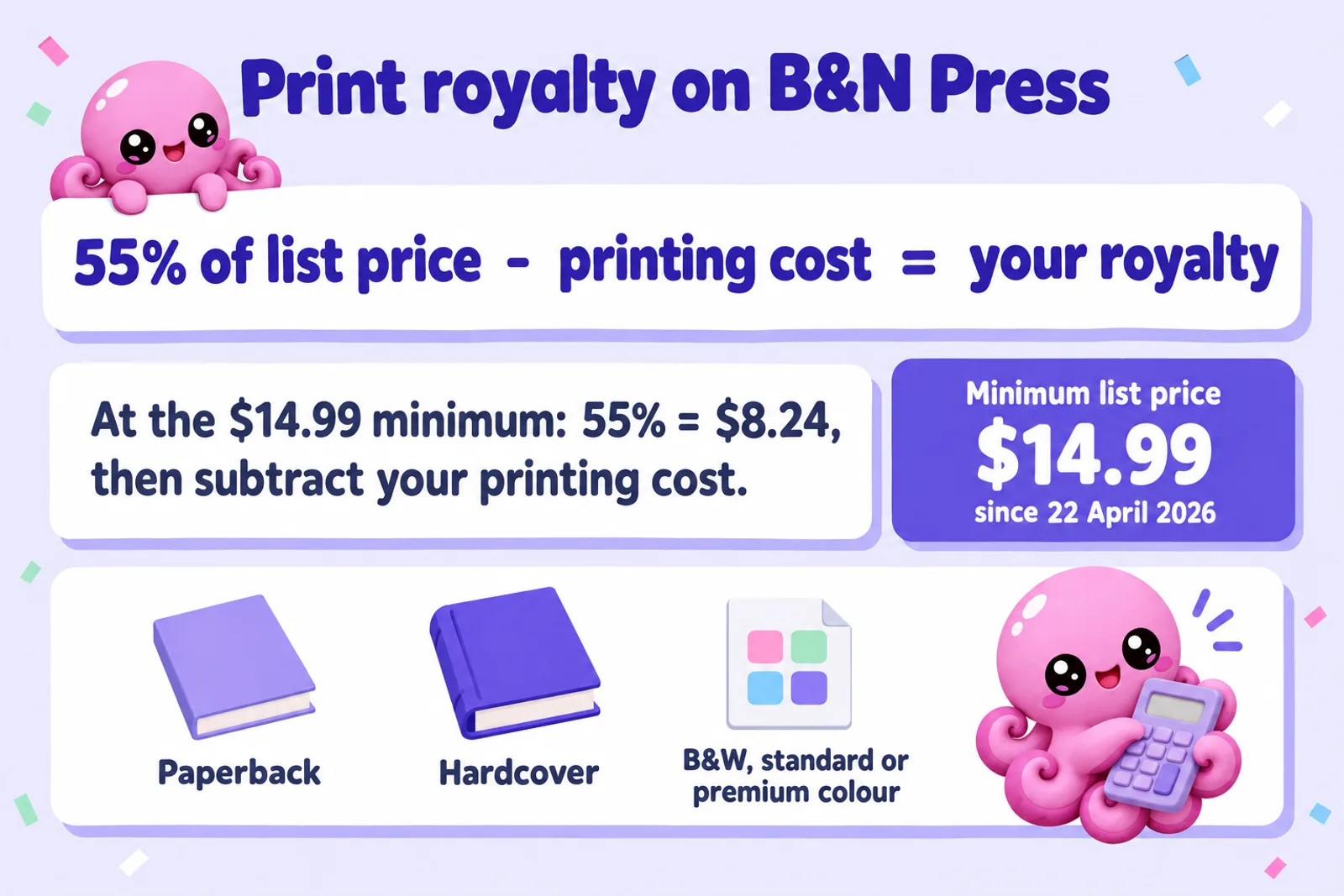
At $14.99, 55% is $8.24, and your royalty is that minus the Quick Quote cost. KDP pays 60% at $9.99 and up, minus a printing cost it does publish: a 280-page black-and-white 6 x 9 paperback costs $4.36, so at $14.99 KDP pays $4.63. B&N pays more on that book only if its printing cost is under about $3.61. The calculator above runs this with your own quote.
Who the floor affects: short paperbacks (novellas, poetry, short guides at $7.99 to $11.99) can't list on B&N Press at those prices, and low-content books such as journals and coloring books at $6.99 to $9.99 are priced out. Standard novels and non-fiction at $15.99 and up, hardcovers and colour books are unaffected. If your paperback must sell below $14.99, the other route to bn.com is a wholesale distributor; our IngramSpark vs KDP comparison and the IngramSpark cost calculator show what that pays.
Get the print files right before you price them
Inkfluence exports a print-ready PDF interior at the common trim sizes, with chapter openings, page numbers and a contents page. B&N Press prints it; you check the proof.
Start your book freeThe AI questions, and how to answer them
B&N's help page describes the question like this: during Build-a-Book, "you will be asked to confirm if Generative AI was used in the creation of your project, including the cover/artwork, manuscript, images, and translations. If you used AI for any of these elements, you will then be asked if these were AI-Assisted or AI-Created." Its definitions:
- AI-Created: "any content (text, artwork, translations) that is created using Generative AI. It would still be considered AI-Created if you used AI to generate the content and edit it afterward."
- AI-Assisted: "any content you created, then used AI to edit it or expand on it."
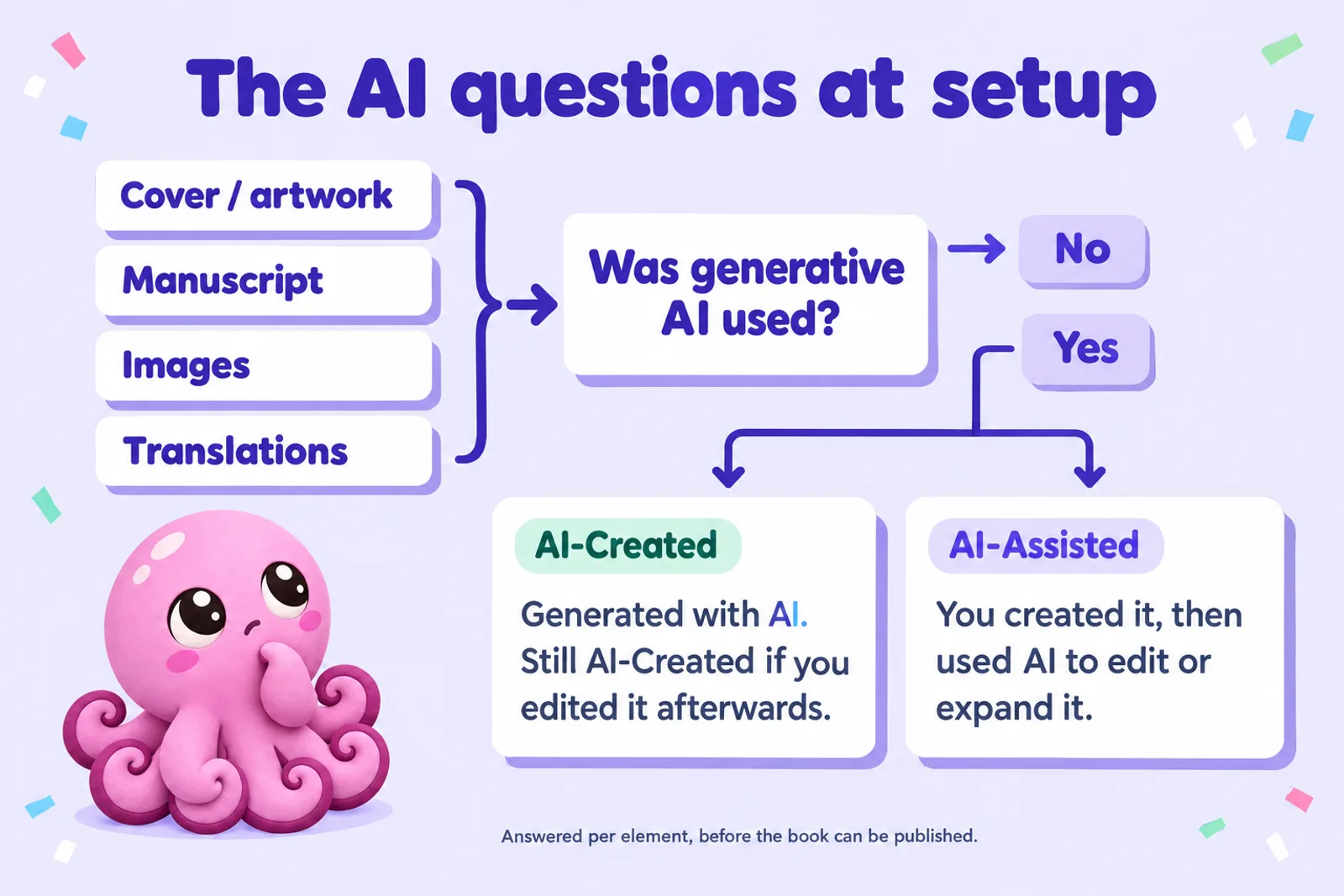
The first half matches Amazon: KDP also counts AI-generated content as AI-generated "even if you applied substantial edits afterwards". The difference is at the other end. KDP doesn't ask about AI-assisted use, such as AI polishing text you wrote; B&N asks you to declare it (see our guide to the KDP AI disclosure questions). In short, who made the first version decides the answer.
| How the book was made | Element | Answer |
|---|---|---|
| You wrote it; a generative AI tool rewrote some sentences or expanded scenes | Manuscript | AI-Assisted. A plain spell check isn't generative AI. |
| AI drafted the chapters from your outline; you rewrote every line | Manuscript | AI-Created. Edited AI text is still AI-Created. |
| Some chapters drafted by AI, others written by you | Manuscript | AI-Created is the safer answer: part of the manuscript was generated |
| Cover art from an AI image tool, title added by you | Cover/artwork | AI-Created |
| Cover you designed from stock photos; AI only removed a background | Cover/artwork | AI-Assisted |
| Picture book illustrations generated with AI | Images | AI-Created |
| Translation made with AI, then checked by a fluent reader | Translation | AI-Created |
When in doubt, give the answer that tells B&N more. Its help pages don't say whether readers see the answer, or what happens if an answer is wrong. They do say every book, AI-Created or AI-Assisted, must follow the Content Policy, "including ensuring that your project does not infringe on or violate intellectual property rights or copyright". That is the real risk: an AI image that copies a known character is a copyright problem whatever you ticked. Our guides to copyright and AI-written books and keeping AI-assisted content original cover the checks. For every store's AI rules side by side, see which stores allow AI-written books, and for print distribution, IngramSpark's AI policy.
Write the book with AI, and make it yours
Inkfluence drafts from your outline, characters and notes, and gives you a full editor to rewrite every line. Disclose it honestly on B&N, and publish a book you are proud to put your name on.
Try Inkfluence freeISBNs
Ebooks don't need one. B&N lists ebooks by its own EAN (B&N ebook IDs start with 294); an ebook ISBN, if you add one, only labels your sales reports. Print books for sale do, and there are two options:
- B&N's free ISBN. Registered with Books In Print; bn.com shows the publisher as "Barnes & Noble Press". It "can only be used on B&N Press for distribution to Barnes & Noble and bn.com", can't be transferred, and is limited to 5 a week (10 a month). You only see the number once the book is published, so add it to your copyright page in a later upload.
- Your own ISBN from Bowker or your national agency, with an imprint name that matches the agency's record.
Using your own ISBN from Canada? ISBN Canada issues them free, but registering now declares a human author, with AI only for limited support tasks: see ISBN Canada's AI rule.
The rule that catches people: "If your ISBN has been submitted for use at any other retailer, including bn.com, you cannot use that ISBN with Barnes & Noble Press." A paperback already on bn.com through KDP Expanded Distribution or IngramSpark can't reuse its ISBN here, and each binding needs its own number. See do you need an ISBN? and our copyright page template.
Promotions and merchandising
Two ebook promotion tools sit under Manage Promotions. B&N reviews and schedules each request, and either can run for up to 365 days.
- Coupon codes start with BNP (for example BNPSPRING25), discount 10% to 75%, and work on books on sale or on pre-order. One coupon can cover several books; readers can't combine coupons. Since 7 May 2026 you can't make a book free this way.
- Buy One Get One takes 10% to 75% off the second book at checkout on bn.com, for published books only. "Buy One Get One Free" can no longer be created. It suits series. You earn 70% of the effective price: in B&N's own example, books at $5.99 and $4.99 with the second free each carry a 45% discount, and the author earns $2.30 and $1.92.
There is no paid placement or ad programme in B&N Press's help centre, and there is a warning: Barnes & Noble "will never reach out to authors and offer in-store placement for your books in exchange for money". Offers like that are a scam. B&N's own marketing tips are the B&N Press Facebook community, linking to your bn.com page (the B&N affiliate programme pays on those clicks) and collecting reviews and blurbs. A custom sample with a coupon code inside is the cheapest promotion you can run. For a fuller plan, see our ebook marketing guide and launch checklist; for Christmas, our Christmas deadlines guide, allowing 3 to 5 business days for a B&N print book to go live plus proof delivery.
Who can buy your book
B&N's customer help says that "when buying eBooks or digital content, you need to be physically located within the U.S. to place your order." So a B&N ebook reaches US readers, whatever country you publish from. If most of your readers are elsewhere, Kobo, Apple Books and Google Play matter more, and B&N is the fourth account, not the first.
Publishing on B&N Press also "does not place your book in Barnes & Noble Bookstores". A shop needs a book "in our system as a returnable item", and B&N Press print books aren't returnable. What's left: ask your local store about stocking your book on consignment or holding an event; submit it for store placement consideration (B&N says the review takes 4 to 6 weeks); or distribute print through Ingram on returnable terms, which is how bookshops normally order, though orderable is not the same as stocked.
Direct, Draft2Digital or IngramSpark
| Route | Ebook | Best for | |
|---|---|---|---|
| B&N Press direct | 70% from $0.99; coupons and BOGO | 55% minus printing; $14.99 minimum; not returnable | The full ebook rate and promotion tools; print that sells at $14.99 or more |
| Draft2Digital | About 60% at B&N; one upload also reaches Apple, Kobo and libraries; $20 activation for new accounts | Has its own print service | Authors who value one dashboard over 10 points of royalty |
| IngramSpark | Distributes ebooks too; most use it for print | Wholesale discount you set; returnable if you choose; in the catalogue shops and online retailers order from | Print under $14.99, and books you want shops and libraries able to order |
A common setup for a novel: the ebook direct on B&N Press, and the paperback through IngramSpark with your own ISBN. If a book published elsewhere doesn't appear on bn.com, B&N asks you to email its ISBN to publisherauthorinquiry@bn.com. Never send the same ebook to B&N twice: switch B&N off in your aggregator before uploading direct. Our Draft2Digital review covers its fees, where to sell ebooks ranks every outlet, and how to get your ebook into libraries covers the channel B&N Press doesn't reach.
One more decision: an ebook in KDP Select can't be on B&N while it is enrolled, because Select requires the digital edition to be exclusive to Amazon; Select now feeds Kindle+, the renamed Kindle Unlimited (see Kindle+ for authors). Our KDP Select vs wide guide helps you choose. Select covers ebooks only, so a paperback can be on B&N either way.
Common reasons books are stopped
| Problem | What B&N says | Fix |
|---|---|---|
| Can't publish after uploading | The AI disclosure is required first | Complete it under Rights & Other Information |
| Print price under $14.99 | New listings blocked; older ones taken off sale | Price at $14.99 or more, or use another print route |
| Public domain | Removed; repeat posting "may" close the account | Publish only work you own; a book wrongly marked public domain needs a new ISBN |
| Copyright | Removed; re-posting can end the account | Clear rights to text, images, lyrics, fonts and characters |
| "ISBN is already registered" | Used elsewhere, including bn.com | A new ISBN or B&N's free one |
| Cover or interior not accepted | Wrong page size, fonts not embedded, page count outside 18 to 800 | Use B&N's template, embed fonts, check the trim |
| Double barcode, ink saturation | B&N adds its own barcode; heavy ink won't print on light paper | Remove your barcode; lighten images or use heavier paper |
| Over 100 titles | B&N may take titles off sale | Keep your best 100, or email eBookSales@bn.com |
| Royalties not arriving | Online banks can't be paid; a street address is required | A traditional bank and a beneficiary address |
B&N also reserves the right not to print anything it judges "obscene, libelous, or otherwise infringes upon the right of any person". If Amazon has turned a book down too, see what to do when KDP rejects a book.
Getting paid
B&N pays on the last Wednesday of the month after the sale (April sales on the last Wednesday of May), by transfer, once you have $25 of royalties; below that, earnings roll over, and B&N says the threshold applies to each payment type. Everyone is paid in US dollars. Reports cover week, month, year, the last two days, a custom range of up to 6 months, pre-orders and payments, and print rows show the printing cost per copy. No royalty is paid on copies you buy yourself.
Where Inkfluence fits
Inkfluence AI is a book writer, not a publisher or printer. It doesn't upload to B&N Press and doesn't print or ship books; B&N Press prints and sells, and you upload. Inkfluence gets the project ready:
- Writing and editing: an outline, chapters drafted with your characters and earlier chapters in view, and an editor for every line. Length is set by the number of chapters; a chapter usually runs about 1,000 to 1,500 words.
- EPUB with a real table of contents, and Word (DOCX) if you want to finish the layout yourself.
- Print-ready PDF interiors at 5 x 8, 5.5 x 8.5, 6 x 9, 7 x 10, 8 x 10, 8.5 x 8.5 and 8.5 x 11, all trims B&N Press prints. Build the cover on B&N's template and order a proof.
- Covers, illustrations and translations through the AI book cover generator, illustration generator and book translator. Each counts as AI-Created on B&N's form.
B&N Press sells no audiobooks; one made with our AI audiobook generator goes to the stores in where to sell an AI audiobook. Plans are on the pricing page.
One project, every format B&N takes
Write and edit in Inkfluence, then export the EPUB and the print-ready PDF that B&N Press, Apple, Kobo and IngramSpark accept. Free to start.
Start writing freeLaunch checklist
- Open the account and submit the Vendor Account at least two weeks ahead, with a traditional bank, a street address and the right tax form.
- Pick routes: ebook direct or via an aggregator (and not in KDP Select); print on B&N Press, IngramSpark or both, with different ISBNs.
- Files: an EPUB under 20 MB that passes EPUBCheck; a print PDF at a B&N trim; a cover on B&N's template with no barcode.
- AI disclosure, element by element: if AI made the first version, it is AI-Created.
- Prices: ebooks $0.99 or more; print $14.99 or more, checked against Quick Quote.
- A custom sample that opens on your strongest page; one print proof, checked.
- Launch: a BNP coupon for your mailing list, and a BOGO across a series once book two is out.
Barnes & Noble Press: FAQ
Does Barnes & Noble Press accept AI-written books?
Yes, with disclosure. During setup B&N Press asks whether generative AI was used for the cover or artwork, the manuscript, images and translations, and for each one whether it was AI-Created or AI-Assisted. The book must still follow its Content Policy, including not infringing anyone's rights. The disclosure is required before a project can be published.
What counts as AI-Created on B&N Press?
Content generated with AI. B&N's help page says it is still AI-Created if you generated it with AI and edited it afterwards. AI-Assisted means you created the content yourself and then used AI to edit or expand it.
How much does B&N Press pay on ebooks?
70% of the retail price you set, on sales at $0.99 and higher. There is no price band above which the rate drops, so a $14.99 ebook still pays 70%, unlike Amazon.com where KDP drops to 35% above $12.99.
What is the minimum price for a print book on B&N Press?
Since 22 April 2026, print books listed for sale must have a retail price of at least $14.99. New listings below that are blocked, and from 14 May 2026 B&N began removing older listings priced below it from sale.
How is the B&N Press print royalty worked out?
You earn 55% of the list price minus the cost of printing one copy. At the $14.99 minimum, 55% is $8.24, and the printing cost comes off that. B&N does not publish a printing-cost formula; its Quick Quote tool gives the cost for your format, trim, page count and ink.
Do I need an ISBN to publish on B&N Press?
Not for an ebook: B&N lists ebooks by its own EAN. A print book for sale needs one. B&N Press offers a free print ISBN that works only on B&N Press, or you can use your own. An ISBN already used at any other retailer, including bn.com, cannot be used.
Can I publish on B&N Press and Amazon KDP at the same time?
Yes. B&N Press is non-exclusive. The exception is an ebook enrolled in KDP Select, which must be exclusive to Amazon while enrolled. A paperback can be on both, but each needs its own ISBN.
Will B&N Press put my book in Barnes & Noble stores?
No. Print books sell on bn.com and the B&N app, and B&N says publishing through B&N Press does not place a book in its bookstores. You can ask your local store about stocking or a consignment event, or submit a title for store placement consideration, which B&N says takes 4 to 6 weeks.
Can readers outside the US buy my B&N ebook?
Rarely. B&N's customer help says that to buy ebooks you need to be physically in the US. Authors in 12 countries can publish through B&N Press, but the shop sells to US readers.
Should I go direct to B&N Press or use Draft2Digital or IngramSpark?
For ebooks, direct pays 70% against about 60% through Draft2Digital, and gives you coupons and BOGO promotions. For print, B&N Press pays more per copy on bn.com, but only IngramSpark makes a book orderable by bookshops on returnable terms. Many authors use B&N Press for the ebook and IngramSpark for print.
Ready for your first B&N Press book?
Draft it, edit it and export the files in Inkfluence, then upload to B&N Press on your own schedule. Free to start.
Write your book freeRelated reading
- How to publish an ebook wide in 2026: every store and aggregator compared
- Which stores allow AI-written books
- How to publish on Apple Books
- How to publish on Kobo
- How to publish on Google Play Books
- Draft2Digital review
- IngramSpark vs KDP: print routes compared
- Do you need an ISBN?
- KDP paperback template: margins and page setup
- Royalty calculator: KDP, IngramSpark and the wide stores
- AI book formatter
- How to design a book cover with AI
Sources
All read on 28 October 2026. Dates in brackets are each page's last update.
- B&N Press: Getting started (17 Jun 2026)
- B&N Press: April 2026 policy updates ($14.99, 100 titles, public domain) (21 Apr 2026)
- B&N Press: Use of generative AI in your project (10 Mar 2026)
- B&N Press: Royalty and payment terms (27 Feb 2026) and Getting paid for sales (17 Aug 2026)
- B&N Press: Print book pricing and printing costs (22 Apr 2026)
- B&N Press: Trim sizes and paper stock and Creating print books (28 Sep 2026)
- B&N Press: ISBN FAQs (17 Sep 2026)
- B&N Press: Creating coupon codes, BOGO promotions and coupon sales reporting (May 2026)
- B&N Press: Local interest in selling your book and scam warning on in-store placement offers
- B&N Press: Tax requirements (28 Sep 2026) and tax withholding
- B&N Press: Banks that cannot be used (20 Oct 2026), bank beneficiary address and payment currency
- B&N Press: Title limit (6 May 2026)
- B&N Press: Common error messages and cover or interior not accepted
- B&N Press: Maximum file size, ebook pre-orders and print pre-orders
- B&N Press: Ordering proofs (23 Oct 2026) and receiving your print book
- Barnes & Noble help: Traveling with NOOK (ebook purchases require being in the US) (28 Aug 2026)

Founder, Inkfluence AI
Sam is the founder of Inkfluence AI. He built the platform to make book creation accessible to everyone - from first-time authors to seasoned publishers.
Helpful links

Ready to write your own book?
Write with AI, make it yours, and export PDF, EPUB and KDP-ready files from one project.
Keep reading
 Tools
Tools Draft2Digital Review 2026: Fees, Stores, AI Rules and Whether It's Worth It
An honest Draft2Digital review from its own pages in October 2026: the new $20 activation and $12 maintenance fees, the roughly 10% it keeps, every store and library it reaches (and the ones it does not), its AI rules, payments, print and audio, plus a calculator that tells you whether it pays for your books.
 Self-Publishing
 How to Get Your Ebook (and Audiobook) Into Libraries in 2026: OverDrive, Hoopla and More
Which route reaches OverDrive (Libby), Hoopla, BorrowBox, cloudLibrary, Odilo and Palace in 2026, what libraries pay and what reaches you, the AI rules on each library channel, how librarians actually find indie books, and how to get your local library to stock you. With a library earnings estimator built on each route's published rates.
 Self-Publishing
 How to Publish Your Ebook Beyond Amazon in 2026: Every Store, Aggregator and AI Rule Compared
Apple Books, Kobo, Google Play Books and B&N Press each pay 70% of list price. Draft2Digital passes on about 60% and now charges new accounts $20. Here is every store, aggregator and library route compared from their own help pages in October 2026, with royalties, reach, subscriptions, ISBNs, files and AI rules, an earnings comparer, and a 30-day plan for going wide.

Get ebook tips in your inbox
Join creators getting weekly strategies for writing, marketing, and selling ebooks.