

Quick Answer
Sign in at play.google.com/books/publish, add a payment profile and tax form, then add your book in the Partner Center: an ISBN or a free Google ID, your details, an EPUB or PDF and cover, a list price and countries. Google pays 70% of your list price on ebooks in more than 60 countries (52% in eleven Asian markets), at any price, and pays on the list price even when it sells your book for less. New accounts get a policy review, and the first book goes live seven days after approval. For audio, upload your own AI-narrated files labelled Synthesized voice, or use Google's free auto-narration at a 52% share.
Google Play Books is the store most self-published authors skip. Old guides still describe a closed waiting list and a 52% royalty, and Partner Center looks built for publishing houses. All of that has changed: sign-up is open in 39 countries, ebooks earn 70% at any price, readers can buy in 74 countries, and it is one of the few large stores that openly accepts AI-narrated audiobooks. For an author selling wide, it is the shelf on every Android phone.
This guide follows Partner Center in order, with every rule checked against Google's own Play Books Partner Center Help on 28 October 2026. Where Google doesn't publish something, we say so. There's a payout calculator part way down, with Kindle and Kobo alongside.
Disclosure: Inkfluence AI is our product. It writes books, exports EPUB and PDF files and makes AI-narrated audiobooks, so we have an interest here. We say plainly what our files do and don't cover.
70%
Of list price on ebooks, in 60+ countries, at any price
52%
In 11 Asian markets, and on Google's auto-narrated audiobooks
74
Countries where readers can buy books on Google Play
7 days
From account approval until your first book goes live
Is Google Play Books worth it?
Amazon is where most self-published ebooks sell. The case for adding Google Play is that it costs nothing, reaches readers Amazon reaches less well, and pays well per sale:
- Reach outside the US. Readers can buy in 74 countries, many where Kindle has a small store or none: much of Latin America, India, Indonesia, the Philippines, Vietnam and Turkey. That matters most if you write in Spanish, Portuguese, Hindi or Indonesian, or plan translations.
- A flat 70% with no price band. On Amazon.com, Kindle pays 70% only from $2.99 to $12.99 and 35% outside it. Google pays 70% on a $0.99 short read and a $24.99 guide alike.
- Audio that welcomes AI narration. Google accepts AI-narrated uploads with a label and runs free auto-narration. Audible's ACX takes human narration only.
The downside: Google does little to promote a new indie title, so authors who do well there send readers to it through newsletters, ads and back-of-book links. And if your ebook is in KDP Select, it can't be on Google Play at all while enrolled. Our guide to KDP Select vs going wide covers that choice, and Kindle+ for authors explains Amazon's renamed subscription. The sibling guides to Apple Books, Kobo and publishing wide cover the other stores.
Have these ready before you start: a Google account you'll keep for years; bank details and a tax ID; an EPUB that passes EpubCheck, a PDF, or both; a cover at least 640 pixels on its shortest side; your description, author name and subject; and a price. If the book isn't finished yet, that's the long pole. Inkfluence drafts a book chapter by chapter from your outline, you edit every line, and it exports the EPUB, PDF and cover Partner Center asks for. Ebook export and publishing and ebook formats explained cover the files.
Get a store-ready EPUB and PDF from one project
Inkfluence writes the book with you, then exports a reflowable EPUB with a real table of contents and a matching PDF: the two files Google suggests uploading together.
Start your book freeStep 1: Create your Partner Center account
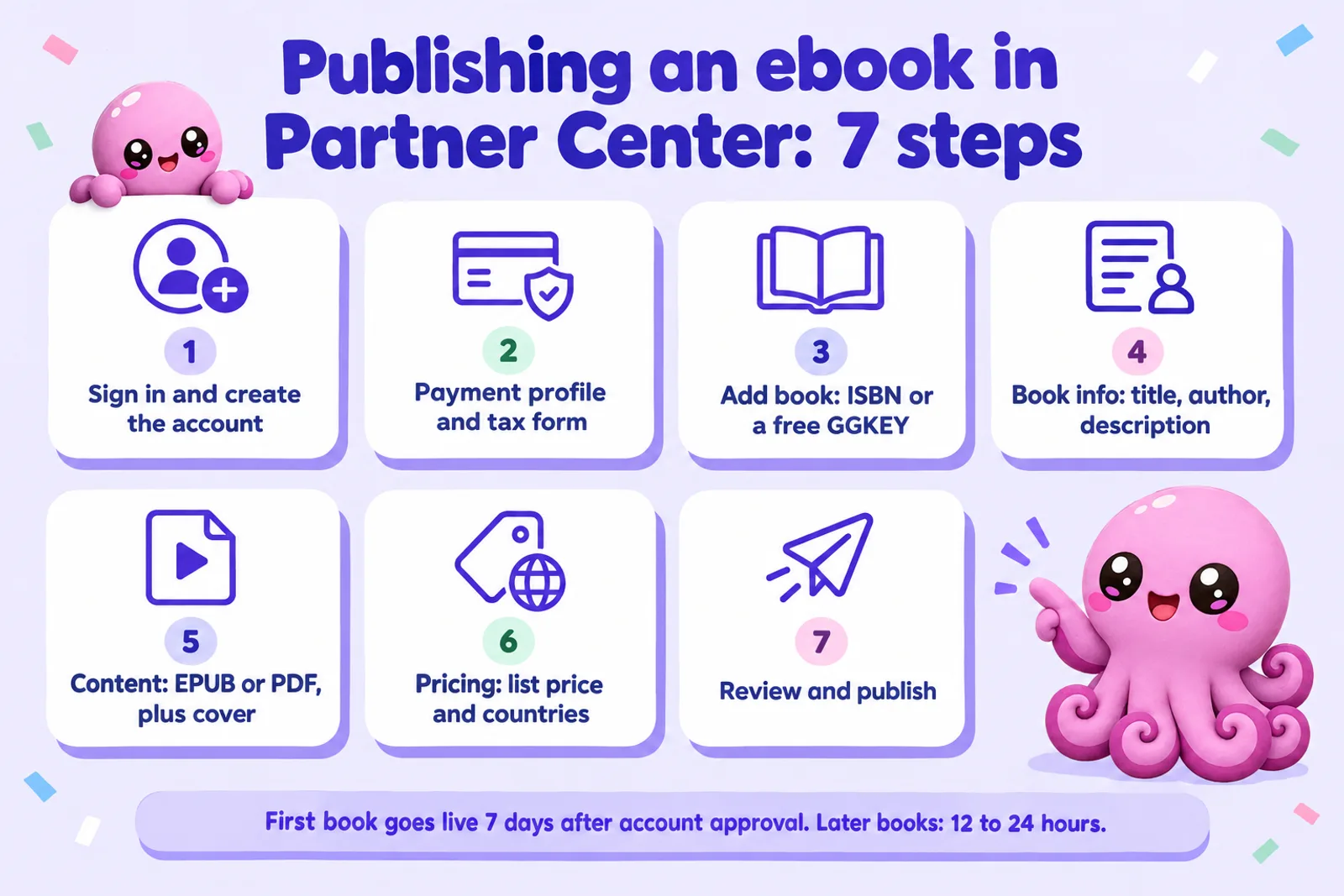
Go to play.google.com/books/publish and sign in with a Google account. Google's Partner Center overview says you must be at least 18 and of legal age to form a contract with Google. You enter your account and contact details, then accept the terms of service.
Where you live decides what you can sell. Google's supported countries table marks 39 countries for seller sign-ups, but only 12 of them for audiobooks as well as ebooks:
| Where you're based | What you can sell directly |
|---|---|
| US, UK, Canada, Australia, New Zealand, Ireland, Germany, France, Spain, Switzerland, Brazil, Mexico | Ebooks and audiobooks |
| Argentina, Austria, Belgium, Czech Republic, Denmark, Finland, Hong Kong, Hungary, India, Indonesia, Italy, Japan, Malaysia, Netherlands, Norway, Philippines, Poland, Portugal, Romania, Singapore, South Africa, South Korea, Sweden, Taiwan, Thailand, Turkey, Vietnam | Ebooks only |
| Saudi Arabia, United Arab Emirates, Kuwait, Egypt | Select partners only; no new partners accepted |
| Anywhere else | No seller account; an aggregator may be the only route |
Two quirks: Google's general "how to sell" page still says only select partners can sell audiobooks, so if the option is missing in your account, that's why. And South Africans can sign up but must be paid into a bank account outside South Africa.
Approval, which older guides miss. Google's book status page says every new account gets a preliminary policy review, and books show "Your account isn't approved" until it's done. Your first book then goes live seven days after approval. Google doesn't say how long the review takes, so don't announce a launch date until your account shows as approved.
Step 2: Payments and tax
Google holds earnings until both of these are done, so do them on day one.
Payment profile. In the Payment Center you add your bank account and see earnings. Google's payments page says it starts a payment on the 15th of each month (or the next business day) for the previous calendar month's sales, refunds and chargebacks. You need an address and bank account in a supported payment country, verified unless you're paid by wire. The minimum is $1 for electronic transfers in US dollars and $100 by wire. Some countries are paid by wire in US dollars; the countries table marks them.
Tax form. Google's tax FAQ says all Play Books publishers should submit tax information, even with no US readers: a W-9 for US persons, a W-8BEN for individuals elsewhere, a W-8BEN-E for companies. Without a valid form, the default withholding is generally 30% on applicable payments, and some accounts face 24% backup withholding. If your country has a tax treaty with the US, Partner Center's tax tool shows the treaty rate as you fill in the form. Google doesn't give tax advice, and neither do we.
Step 3: Add the book (ISBN or GGKEY)
Open Book Catalog, click Add book, and choose an ebook or audiobook for sale (the other options are auto-narrated audiobook and preview-only). Partner Center first asks for a Book ID: enter your ISBN, or click Get a Google book ID (GGKEY).
Google's ISBN help says an ISBN isn't required, and a GGKEY is free but used only inside Google. That's fine if Google is one store among several. Buy your own ISBN if you want one identifier that follows the book everywhere, or your imprint shown as publisher. Each format needs its own ISBN, and Google lets you add a print ISBN as a related ISBN so readers find both editions. Partner Center rejects an ISBN with a wrong check digit, which catches typos. See do you need an ISBN for costs by country.
Step 4: Book info
The Book info tab holds your title, author, description, language, subjects and series details. Google's content policies reject some metadata outright:
- Original title and cover. Metadata "confusingly similar to existing books", or that impersonates popular works, is banned. Our book title generator gives original options.
- Honest format. Summaries sold as full books, or ebooks sold as audiobooks, are banned too.
- Complete series fields. Series bundle discounts need every book live with no gaps or duplicate series numbers.
Write the description for readers; Google already indexes your text through the preview. Ebook SEO explains what actually helps, and our description generator drafts one.
Step 5: Upload your EPUB or PDF
The Content tab takes your book file and cover. Google's file guidelines and EPUB page set the rules:
| Rule | What Google requires |
|---|---|
| Formats and size | EPUB or PDF only, each file under 2 GB, at least 4 pages |
| EPUB versions | EPUB 3.3 (preferred), EPUB 3 and EPUB 2 |
| EPUB checks | Must pass EpubCheck; the complete book, with the front cover inside the file |
| Table of contents | Only the EPUB 3 toc nav element is displayed |
| Not supported | JavaScript, MathML, multi-column layouts, non-standard audio or video tags |
| Fixed layout | Supported in EPUB 2 and 3 |
| Complete book, not password-protected; bookmarks recommended for a table of contents | |
| Cover | JPEG, PNG, TIFF or PDF; 640 to 7,200 pixels |
EPUB or PDF? Use an EPUB for text-led books, since readers can resize text on a phone, which is how most Google Play readers read. Google recommends adding the PDF too when layout matters (workbooks, cookbooks, illustrated books) so readers can switch to "original pages". Picture books suit a fixed-layout EPUB or a PDF.
Run EpubCheck and page through the file on a phone before uploading; processing errors appear on the book's Content tab. Inkfluence exports EPUB 3 files with a nav table of contents and the cover embedded, plus a PDF from the same project, but still run EpubCheck on the exact file you upload. Our book formatter page explains the export, and cover design basics covers a cover that reads at thumbnail size.
Step 6: Pricing and the revenue split
70% or 52%
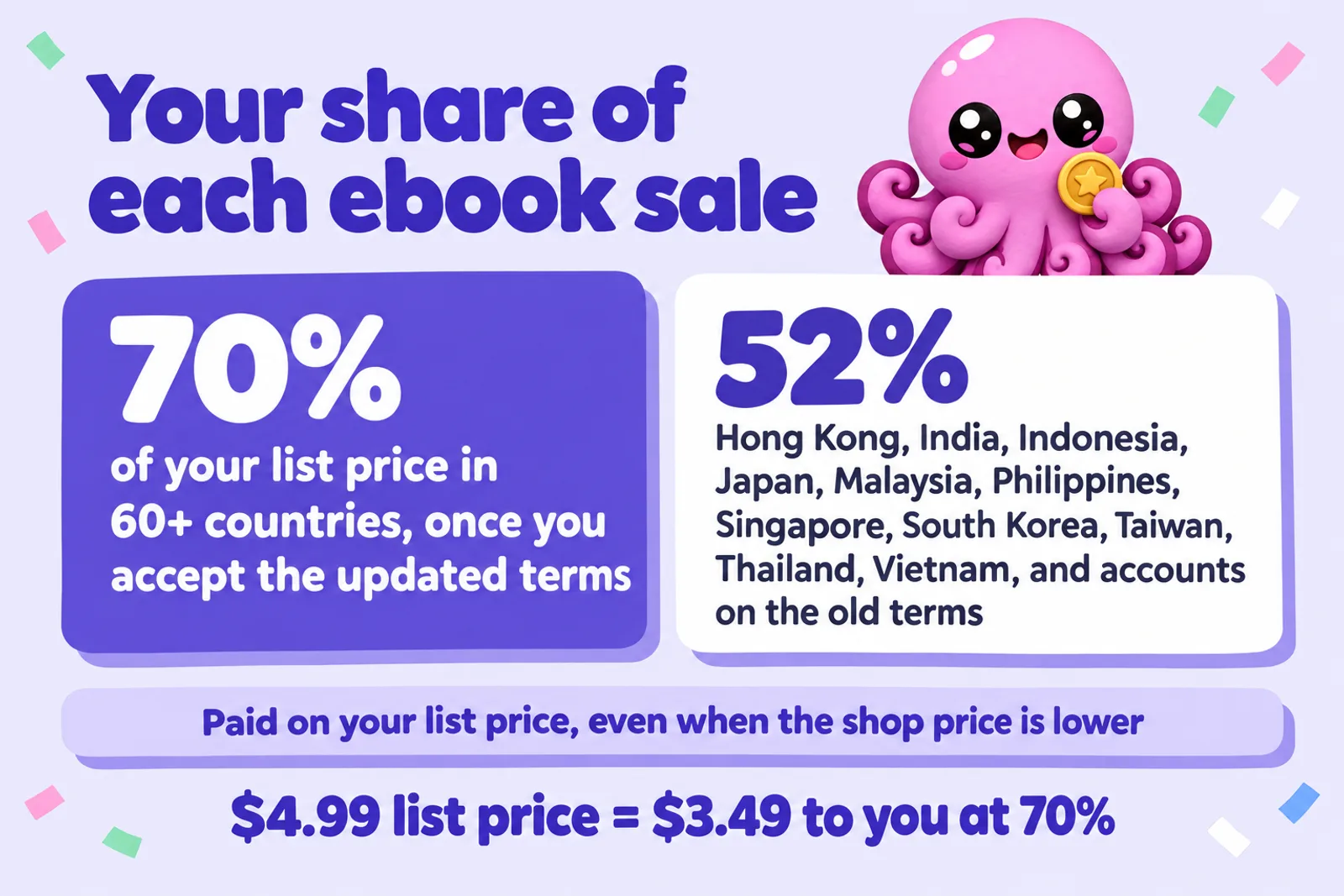
Google's revenue split FAQ says partners who accept its updated terms (introduced in 2019) earn 70% of the list price on ebooks sold in more than 60 countries, including the US, Canada, the UK, Germany, France and Brazil. It starts within two days of accepting, with no fees and no planned end date. The default is 52%: for accounts that haven't accepted, and for sales in Hong Kong, India, Indonesia, Japan, Malaysia, the Philippines, Singapore, South Korea, Taiwan, Thailand and Vietnam. And the old price-band rule "has been removed": 70% applies at any price.
List price vs sale price: Google's discounting
Google's programme policies call your list price a recommended price that "may not be the final sale price". In plain terms, Google can sell your ebook for less than you set. But the revenue split FAQ answers "Does Google pay the revenue split on the list price or the sale price?" with: "Google pays revenue split on the list price." List it at $4.99, Google sells it at $3.99, and you still get 70% of $4.99: $3.49.
The catch is other stores. Amazon may match a lower price it finds elsewhere, and a matched Kindle book is paid on the matched price. Google doesn't publish when it discounts, so there's no switch to stop it. Check your Google Play page after launch, and if a match on Amazon is costing you, nudge your Google list price up so any discount lands near your Amazon price. How to price an ebook covers price points by genre.
Currencies, tax and timing
- Currency conversion is on by default for accounts created after July 2014: set one base price and Google converts it. Converted prices can move up to 5% to land on endings like .99; prices you set by hand aren't rounded, and you can opt out per book.
- "Is tax included?" In the UK and EU, where shoppers expect VAT-inclusive prices, say yes and set the price readers see.
- Limits: $0.05 to $200, or the local equivalent.
- Timing: add a new price at least a day ahead; it starts at midnight in the buyer's time zone. A blank end date makes it permanent. If a price has an end date, add another price after it or the book has none.
- Check the result in the Effective prices table, whose "Your revenue" column is the truth for each country.
Territories are set on the same tab. Unless your rights are limited, sell worldwide. Audiobooks reach fewer places: purchases in 45 countries, with 29 more ebook only.
Payout calculator: Google Play Books, with Kindle and Kobo alongside
Enter your list price, the rate that applies and any discount. You'll see what the reader pays, what you earn, and, for US dollar prices, what the same sale pays on Kindle and Kobo.
Reader pays
$0.00
You earn per sale
$0.00
You earn per month
$0.00
Constants, checked 28 October 2026. Google Play Books: 70% of list price in 60+ countries on the updated terms, 52% in 11 Asian markets and on the old terms, paid on list price not sale price; prices $0.05 to $200. Kindle (Amazon.com): 70% of (price minus $0.15 per MB) from $2.99 to $12.99, otherwise 35% of price. Kobo Writing Life: 70% at $2.99 and up, 45% below. Before tax and conversion fees; Partner Center's Effective prices table has the exact figure per country.
Write the book worth pricing| List price (USD) | Google Play (70%) | Kindle, Amazon.com (1 MB) | Kobo Writing Life |
|---|---|---|---|
| $1.99 | $1.39 | $0.70 (35%) | $0.90 (45%) |
| $4.99 | $3.49 | $3.39 (70% after delivery) | $3.49 (70%) |
| $9.99 | $6.99 | $6.89 (70% after delivery) | $6.99 (70%) |
| $14.99 | $10.49 | $5.25 (35%) | $10.49 (70%) |
In the middle of the range the three stores pay almost the same. The gaps open at the edges: under $2.99 and above $12.99, Google's flat 70% pays more per sale than Kindle. Per-sale rates are half the story, since Amazon sells far more copies for most authors. Our royalty calculator covers print too, and KDP royalties in 2026 explains Kindle's new $12.99 ceiling.
Price it, then write the next one
A wide catalogue earns more than one book on many stores. Inkfluence drafts each book from your outline and exports EPUB and PDF files ready for Google Play, Kobo, Apple Books and Kindle.
Start writing freeStep 7: Publish, and pre-orders
The Review tab lists anything missing; when it's clean, click Publish. Google's status page says new books usually go live in 12 to 24 hours and most changes within 12 hours (except your first book, at seven days after approval). "Live on Google Books" means previewable but not for sale, usually because pricing or territories are missing; "Needs action" means something is blocking it, with a Fix issue link. If Google removes a book or disapproves your account, there's an appeal form, generally one appeal per decision.
Pre-orders are generous. Set a future release date and the "Allow pre-orders?" option appears, up to two years ahead. You don't need the file unless release is within seven days; it's due three days before release, or pre-orders may be cancelled, and processing can take 48 hours, so upload a week early. Pricing and metadata lock three days out. Readers pay on release day, and if you lower the price meanwhile they pay the lower price. Audiobook pre-orders need a cover. For a series, a pre-order link in the back of the current book is one of the most useful things you can set up; our series writer keeps characters consistent across books, and the launch checklist puts the steps in order.
Promotions, promo codes and series bundles
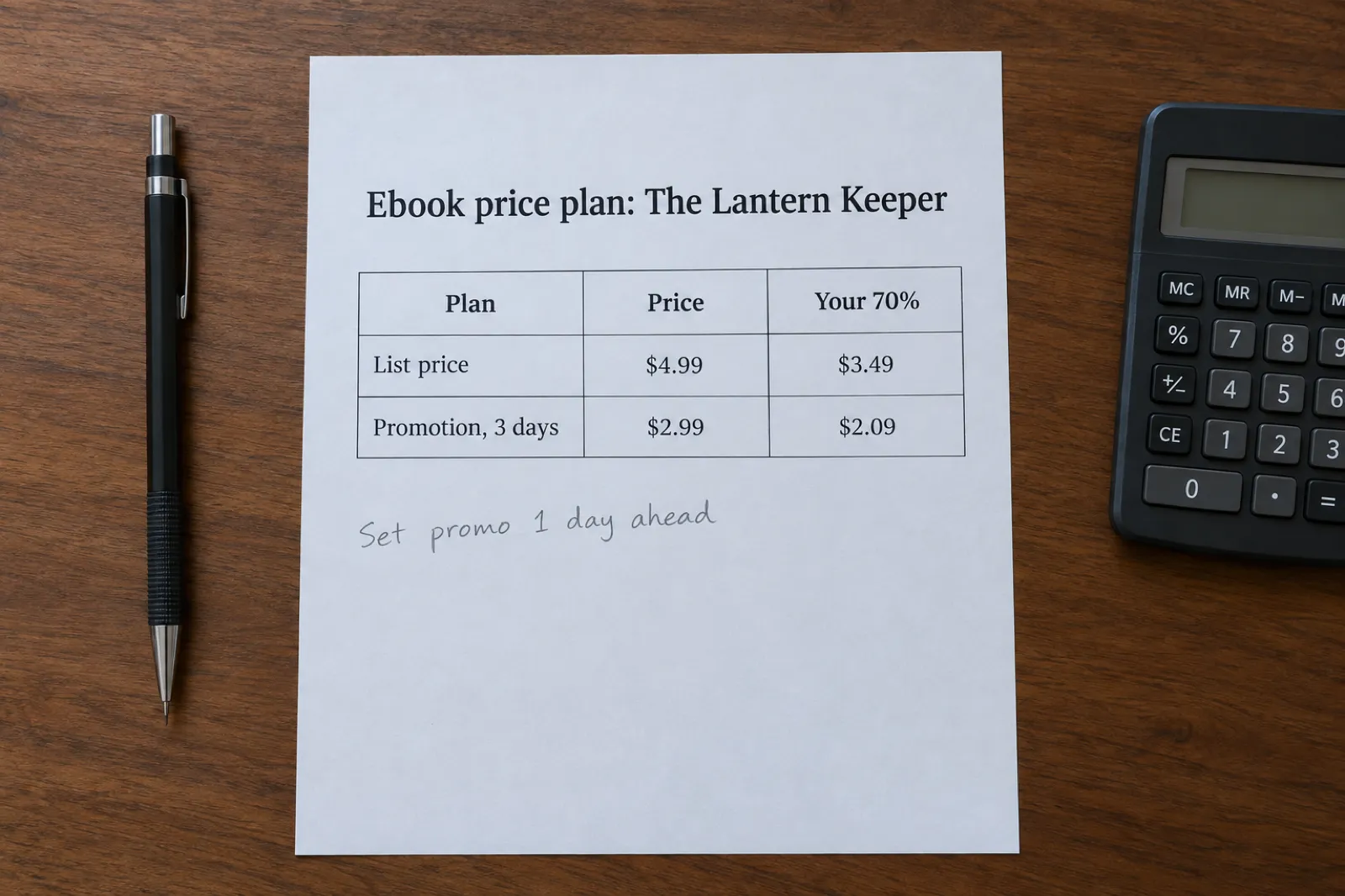
Promotional pricing changes your list price for a date range, then restores it, and Google says the book may be featured on Google Play or in marketing emails meanwhile. If two promotions overlap, the lowest price wins, and you can't edit one after creating it (pause, end or duplicate instead). Since it changes the list price, you earn on the promotional price: 70% of $2.99 is $2.09.
Promo codes give a book free or discounted to chosen readers, such as reviewers and newsletter subscribers, without changing the list price. You get up to 3 campaigns a month and 5,000 codes each, as free, percentage off (ebooks only) or a fixed price. Each reader can redeem one book per campaign, and all books in a campaign must share a revenue split, so run separate campaigns for India and Japan. Google's promo code page doesn't say how a discounted redemption is paid.
Series bundles discount a series when a reader buys two or more books together, with up to three rising tiers (say 15% off three books, 30% off seven). The series needs at least two live books, complete metadata, one Partner Center account, and an average price under $20. Ebooks and audiobooks both qualify.
DRM and printing. Partner Center asks per book whether to apply DRM, and how much text readers can copy (Google recommends at least 20%). One rule matters: books meant to be written in, cut or printed, which Google says includes coloring and puzzle books, must have DRM off, or they're removed. If you make coloring books with our adult coloring book generator, switch it off for those. Google also lets publishers control whether their books appear in Book insights, its reading companion for owners.
Audiobooks: Google's auto-narration or your own AI files
This is where Google Play Books stands out: two routes for an AI-narrated audiobook. For either, you need the audio rights, and to be in a country where Google lets you sell or create audiobooks.
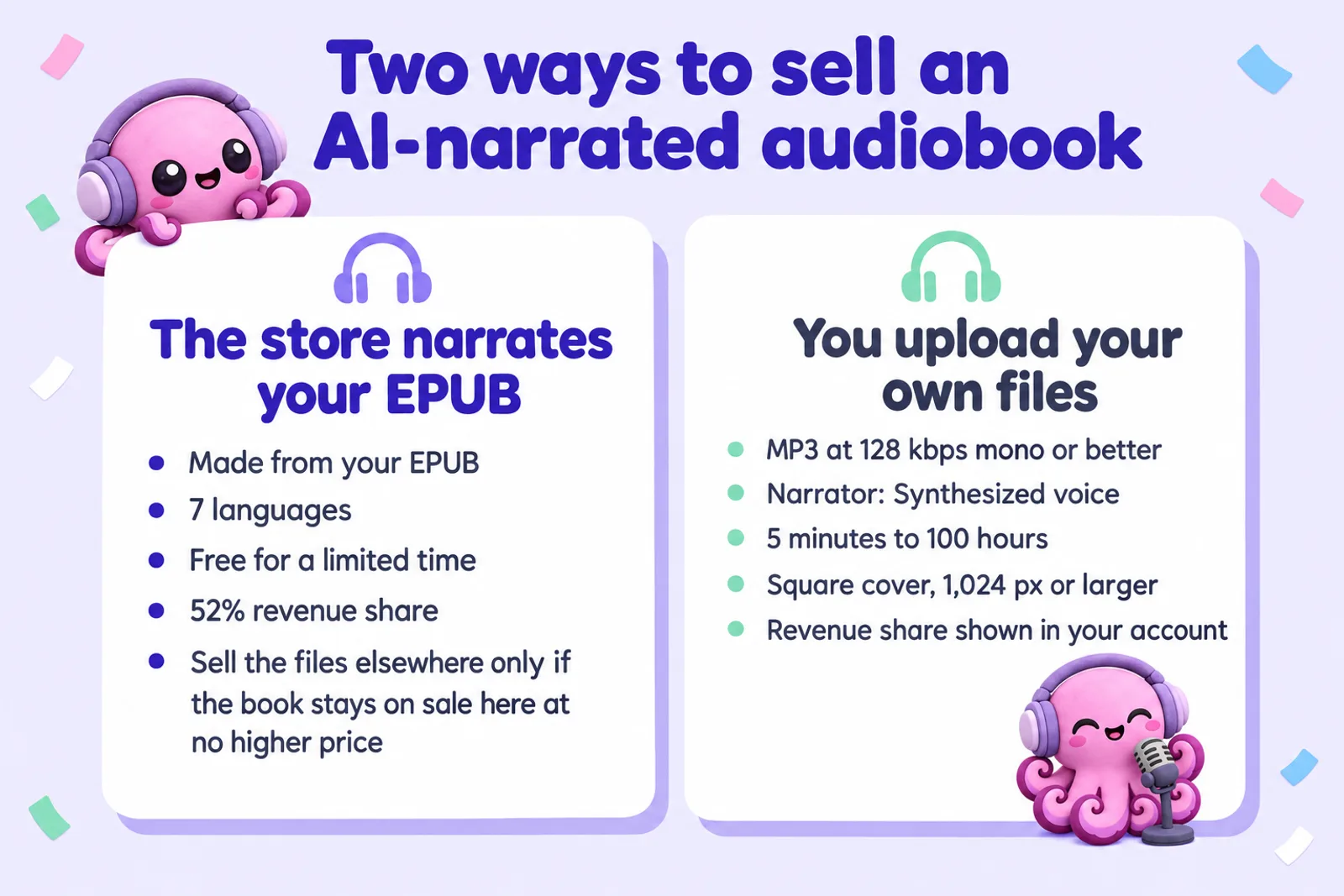
Route 1: Google's auto-narrated audiobooks
- Requirements: you own the audio rights, the ebook is an EPUB, and you sell that ebook on Google Play. You assert the rights for each language and country first.
- Languages: the Learning Center lists English, French, German, Hindi, Italian, Brazilian Portuguese and Spanish (the marketing page lists six, without Italian).
- Who can use it: publishers in a little over 20 countries, including the US, UK, Canada, Australia, India, Brazil, Mexico and much of western Europe. Google's two lists differ slightly, so check the countries table.
- Voices: more than 50, with an editor to fix pronunciation, change voice and speed, add character voices and adjust pauses.
- Cost and share: no charge "for a limited time", with notice before any fee, which won't apply backwards. You get 52%.
- Not exclusive: download the files (a ZIP, or an LPF that Voices by INaudio accepts) and sell them elsewhere, provided the audiobook stays on sale on Google Play wherever you sell it, at no higher price.
- Best fit: Google says non-fiction with little dialogue; cookbooks, textbooks and image-heavy books are poor fits.
Route 2: Upload your own AI-narrated audiobook
Google's quick-start says to choose Human narrator or Synthesized voice, and that an AI-generated audiobook should use Synthesized voice (Unspecified, Male, Female, or Based on real actor). A narrator is required; auto-narrated books get the label automatically.
| Audiobook rule | What Google requires |
|---|---|
| Formats and length | MP3, AAC, FLAC, WAV, ZIP or LPF; 5 minutes to 100 hours |
| MP3 quality | At least 128 kbps mono or 256 kbps stereo; constant bitrate preferred |
| FLAC and WAV | 16 bits per sample, at least 44.1 kHz |
| Cover | JPG or PNG, 1,024 to 7,200 pixels; square recommended |
| Narrator | Required; Synthesized voice for AI narration |
Google doesn't publish a fixed share for uploaded audiobooks; it shows in your Effective prices table.
If you make your audiobook in Inkfluence, use the chapter ZIP (Prepare chapter ZIP, then Download chapter ZIP in the audiobook studio), not the single book MP3. It holds one MP3 per chapter in reading order at 44.1 kHz, 192 kbps constant bitrate, mono: above Google's 128 kbps minimum. You'll need a square cover of at least 1,024 pixels, which usually means reworking the ebook cover rather than stretching it. Audiobooks are on our Creator (15 chapters a month) and Premium (30 a month) plans; see the AI audiobook generator, and the audiobook length calculator for running time.
Which route? Auto-narration suits non-fiction in its seven languages when you want audio fast and free and are happy for Google Play to always carry your lowest price. Your own files suit a chosen voice, controlled pronunciation, other languages, dialogue-heavy fiction, or one set of files for Google, Kobo and your own shop with no price condition. See where to sell an AI audiobook for every store's rule, and Audible and ACX's AI narration policy for the big exception. Turning an ebook into an audiobook with AI covers production, and the state of AI audiobooks the wider market.
Turn your ebook into an audiobook Google will take
Inkfluence narrates your finished book and gives you a chapter ZIP at 192 kbps mono, ready to upload to Google Play Books with the narrator set to Synthesized voice.
Make your audiobookGoogle's rules for AI-written books
Unlike KDP, which asks every author about AI-generated content, Google Play Books has no AI question for ebooks, and its publisher content policies (checked 28 October 2026) don't mention AI-written text by name. Its "Spam and content quality" rules apply to every book, and read like a list of what goes wrong with careless AI publishing:
- No "gibberish, nonsensical, or repetitive text", and nothing lacking the depth and curation for a meaningful read.
- No metadata confusingly similar to existing books, and no summaries sold as full books.
- No files with significant formatting problems, and no "low-quality, unclear machine-read audio".
- Duplicate copies may be rejected, and public domain books aren't accepted except from select partners.
Google reviews books with "a combination of automated and human evaluation" and removes those that break the rules. An AI-assisted book you've planned, edited and checked, with an original title and cover, is treated like any other. A batch of thin, near-identical titles is what the rules exist to remove, and repeated removals risk the account. The audio rule is about clarity, not AI as such: Google accepts labelled synthesized narration. See can you sell AI-generated books for ten platforms' rules, the KDP AI disclosure policy for Amazon's, and our AI book editor for the editing pass.
Direct or through an aggregator?
| Question | Direct (Partner Center) | Through an aggregator |
|---|---|---|
| Your share | 70% of list price in most countries, no fees | Google's share, less the aggregator's cut or subscription |
| Promotions and promo codes | All of them, set by you | Whatever the aggregator passes through |
| AI audiobook uploads | Yes, labelled Synthesized voice | Depends on the distributor's AI rules |
| Effort | One more dashboard and tax form | One dashboard for many stores |
Not every aggregator delivers to Google Play, and some that do still need your own Google account: PublishDrive lists Google Play Books but says you must sign up with Google directly and connect your publisher account. Check any aggregator's current store list. With 70% and no fees direct, plus promo codes and auto-narration living in Partner Center, going direct usually wins if you're in a sign-up country. An aggregator earns its place when Google won't take sellers where you live. Publishing an ebook wide compares them, and for direct sales, selling on Etsy and Gumroad, how to sell your ebook and our selling help cover the rest.
Launch checklist
- Create the account and accept the current terms, so 70% applies.
- Add a payment profile and tax form the same day.
- Prepare an EPUB that passes EpubCheck with the cover inside, a PDF if layout matters, and a 640 to 7,200 pixel cover.
- Add the book with an ISBN or GGKEY, then complete Book info and series fields.
- Set a base price, the tax setting and worldwide territories; check Effective prices.
- Turn DRM off for coloring, puzzle and activity books.
- Publish, or open a pre-order with the file in a week before release.
- Plan a promotion and promo codes for reviewers.
- Add the audiobook: your files as Synthesized voice, or auto-narration.
- After launch, check your Google Play price now and then for discounts other stores might match.
Fill the shelf on every store
One Inkfluence project gives you the manuscript, the EPUB and PDF, and the narrated chapter files, so adding Google Play Books to a launch takes an afternoon.
Start your next bookWhat we couldn't confirm
Google doesn't publish how long the account review takes, the revenue share on uploaded audiobooks, how often or how deeply it discounts ebooks, how discounted promo code redemptions are paid, or how long auto-narration stays free. We'll update this page when it does.
Google Play Books publishing: FAQ
Can anyone publish on Google Play Books?
Anyone aged 18 or over in one of the 39 countries Google lists for seller sign-ups can create a Partner Center account at play.google.com/books/publish. New accounts get a policy review, and the first book goes live seven days after approval.
How much does Google Play Books pay authors?
70% of the list price on ebooks sold in more than 60 countries, at any price, once you accept Google's updated terms. Sales in eleven Asian markets, including India, Japan and Indonesia, and accounts on the old terms get 52%.
Does Google Play Books discount my ebook?
It can: Google calls your list price a recommended price. Its revenue split FAQ says it pays your share on the list price, not the sale price, so its own discounts don't cut your earnings. A promotion you run changes the list price, so you earn on the promotional price.
Do I need an ISBN for Google Play Books?
No. If you don't enter one, Partner Center assigns a free GGKEY, which Google uses only internally. Buy your own ISBN if you want one identifier on every store.
What file formats does Google Play Books accept?
Ebooks: EPUB (3.3 preferred, 3 and 2 accepted, must pass EpubCheck) or PDF, each under 2 GB. Audiobooks: MP3, AAC, FLAC, WAV, ZIP or LPF, 5 minutes to 100 hours, with MP3 at 128 kbps mono or better.
Can I sell an AI-narrated audiobook on Google Play Books?
Yes. Upload your own files and set the narrator to a Synthesized voice option, or use Google's auto-narration, which turns your EPUB into an audiobook in seven languages, free for a limited time, at a 52% revenue share.
Is Google auto-narration exclusive?
No. You can download the files and sell them elsewhere, as long as the audiobook is also on sale on Google Play wherever you sell it, at a Google Play price no higher than elsewhere.
Does Google Play Books allow AI-written books?
Its content policies don't mention AI-written books by name and there's no AI question for ebooks. The spam and quality rules apply to every book: no repetitive or nonsensical text, no summaries sold as full books, no copycat metadata.
Can I sell on Google Play Books if my ebook is in KDP Select?
Not the ebook. KDP Select requires the ebook to be exclusive to Amazon for each 90-day term. Audiobooks you made yourself are a separate decision.
When does Google Play Books pay?
On the 15th of each month, or the next business day, for the previous calendar month, once your bank is verified, your tax form is in and you meet the minimum ($1 for US dollar bank transfers, $100 by wire).
Write a book worth putting on every shelf
Inkfluence helps you outline, draft and edit a book chapter by chapter, then exports the EPUB, PDF and audiobook files Google Play Books asks for. Free to start.
Start writing freeRelated reading
- How to publish an ebook wide in 2026
- How to publish on Barnes & Noble Press, the US store for NOOK readers
- How to publish on Apple Books and on Kobo
- Where to sell an AI audiobook
- KDP Select vs going wide
- AI book translator, for selling in Google's 74 countries
- The complete guide to AI self-publishing
- Inkfluence plans and pricing
Sources
Google pages are Play Books Partner Center Help, checked 28 October 2026.
- Revenue split FAQs
- Supported countries for selling books on Google Play
- Partner Center overview and book status and availability
- Add a new book quick-start guide
- Book file guidelines and EPUB files
- Book prices
- Program policies and publisher content policies
- Enable pre-orders
- Promotional pricing, promo codes and series bundles
- Get paid with your earnings and US tax information FAQ
- ISBNs
- Auto-narrated audiobooks Learning Center, programme policies, finalizing and Google's auto-narration page
- KDP Help: eBook Royalties and Digital Book Pricing
- Kobo Writing Life
- PublishDrive: distribution to Google Play Books

Founder, Inkfluence AI
Sam is the founder of Inkfluence AI. He built the platform to make book creation accessible to everyone - from first-time authors to seasoned publishers.
Helpful links

Ready to write your own book?
Write with AI, make it yours, and export PDF, EPUB and KDP-ready files from one project.
Keep reading
 Publishing
 ISBN Canada's AI Rule (2026): The Human-Author Declaration Explained
ISBN Canada now asks every registrant to declare their book was written by a human author, allows AI only for limited support tasks, and limits ISBNs for works primarily generated by AI. What changed on 9 October 2026, who it affects, what counts as a support task, what to do if your book is AI-assisted or mostly AI-generated, how it fits with KDP's AI question, and a checker for which ISBN route fits your book.
 Self-Publishing
 How to Publish on Barnes & Noble Press in 2026: Ebooks, Print Rules and AI Disclosure
B&N Press pays 70% on ebooks from $0.99, and 55% minus printing on print books, which since 22 April 2026 must list at $14.99 or more. It asks whether each part of your book is AI-Created or AI-Assisted, refuses public domain titles, caps accounts at 100 titles and sells ebooks to US readers. Here is every step from account to promotion, read from B&N Press's own help pages, with a royalty calculator against KDP.
 Tools
Tools Draft2Digital Review 2026: Fees, Stores, AI Rules and Whether It's Worth It
An honest Draft2Digital review from its own pages in October 2026: the new $20 activation and $12 maintenance fees, the roughly 10% it keeps, every store and library it reaches (and the ones it does not), its AI rules, payments, print and audio, plus a calculator that tells you whether it pays for your books.

Get ebook tips in your inbox
Join creators getting weekly strategies for writing, marketing, and selling ebooks.