
Free AI Book Editor
Write, Edit, and Export Your Book
A purpose-built book editor with AI generation, rich text editing, cover design, and one-click export. Not a chatbot. Not a generic doc editor.
Chapter management - AI rewriting - Cover designer - PDF/EPUB export - 30+ languages - iOS app
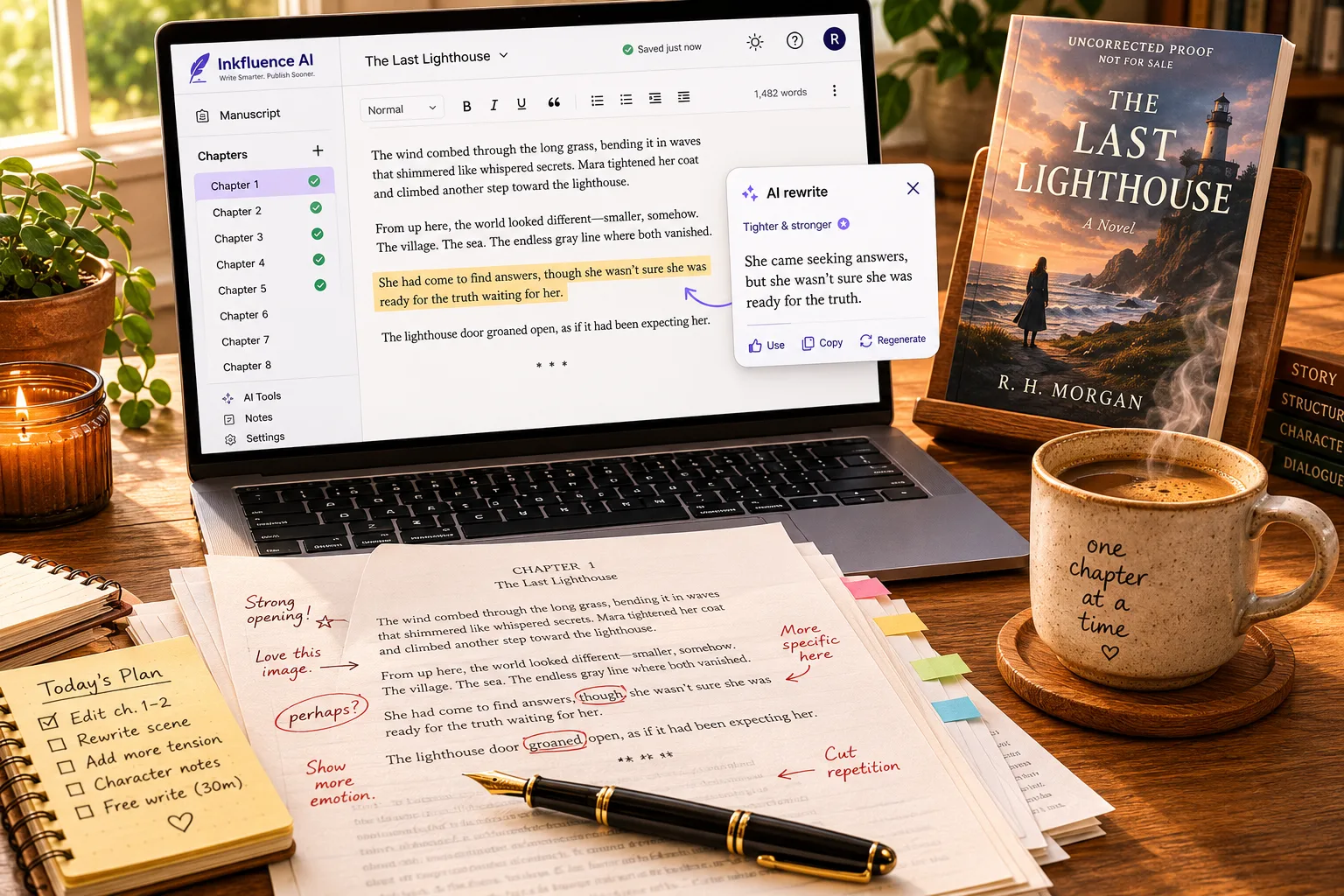
Quick Answer
Inkfluence AI is a free AI book editor that combines rich text editing with AI-powered chapter generation, cover design, and multi-format export. Unlike ChatGPT or Google Docs, it is built specifically for writing and editing books.
The editor includes chapter management, AI rewriting, formatting tools, and one-click export to PDF and EPUB. It supports 33 book types across 30+ languages, with a built-in audiobook generator and AI book writer in the same workspace.
Free plan: 5 chapters + 5 monthly, PDF export, basic covers. Creator ($9.99/mo) adds PDF, EPUB and DOCX export with 35 chapters/month. Premium ($19.99/mo) is unlimited.
Direct answers about the AI book editor
The questions writers ask before trusting an AI editor with a finished manuscript.
Is Inkfluence AI a free AI book editor I can use online?
Yes. Inkfluence AI is a free online book editor that runs in your browser with nothing to install: edit 5 chapters now and 5 more each month with no credit card, and export to PDF on the free plan. Paid plans add EPUB and DOCX export and more chapters.
What does Inkfluence AI's book editor actually fix?
It works at a level a generic document editor cannot. Inkfluence AI rewrites and restructures whole passages and chapters, tightens pacing and clarity, smooths consistency across the book, and reformats for export, while you approve every change. Select a passage and it revises only that, never the whole chapter.
Can Inkfluence AI edit a full manuscript, not just a page?
Yes. As an AI manuscript editor, Inkfluence AI is built for book-length work: a chapter sidebar holds the whole manuscript, you reorder and edit chapter by chapter, and it reads the surrounding chapters so edits stay consistent across the entire book, in 33 book types and 30+ languages.
Will Inkfluence AI keep my voice, and can I publish the result?
Yes. Inkfluence AI suggests edits you approve rather than overwriting your style, so the voice stays yours and you own the result. Export a KDP-ready PDF or EPUB and publish on Amazon KDP or sell direct, disclosing AI assistance per each platform's policy.
Everything You Need to Edit a Book
A complete editing environment designed for chapters, not documents.
Rich Text Editing
Full formatting toolbar with headings, bold, italic, lists, blockquotes, and more. No plain-text limitations.
Chapter Management
Organize your book as chapters with drag-and-drop reordering. Navigate with a sidebar or keyboard shortcuts.
AI Rewriting
Highlight any section and ask AI to rewrite, expand, shorten, or change the tone. Keep or revert with one click.
AI Chapter Generation
Generate entire chapters from your outline. Choose chapter count, tone, and style. Regenerate until it sounds right.
Cover Designer
Built-in AI cover designer with 50+ customization options. Generate and refine your cover without leaving the editor.
Multi-Format Export
Export to PDF and EPUB with proper formatting, table of contents, and cover. Ready for Amazon KDP, Gumroad, or your website.
How the AI Book Editor Works
From idea to exported book in four steps.
Describe Your Book
Enter your topic, audience, and preferred tone. Choose from 33 book types.
Review the Outline
Inkfluence generates a chapter outline. Edit titles, reorder, or add chapters.
Generate and Edit
AI drafts each chapter. Open the editor to rewrite, format, and polish.
Design and Export
Add a cover, generate an audiobook, and export as PDF or EPUB.
Ready to see the editor?
Open a project and start editing in under a minute. Free plan included, no credit card.
Open the Editor FreeInside the Editor: A Closer Look
A professional-grade rich text editor built specifically for long-form books.
In Short
The Inkfluence AI book editor is a professional rich text editor purpose-built for long-form book writing and revision. It features a chapter sidebar for navigation, AI rewriting that works on selected text in place, 33 book type blueprints, cover design with AI image generation, and one-click export to PDF, EPUB, and DOCX. It supports 30+ languages with automatic heading translation and language lock to prevent drift.
Rich Text Formatting
The editor supports headings (H1 through H4), bold, italic, strikethrough, ordered and unordered lists, blockquotes, horizontal rules, and inline links. Everything formats correctly in export. No manually tagging Markdown.
Headings
H1 through H4, semantic structure preserved in EPUB and PDF exports
Lists and Blocks
Ordered lists, bullet lists, blockquotes, and code blocks for technical writing
Inline Formatting
Bold, italic, strikethrough, and hyperlinks with proper export rendering
Chapter Sidebar and Navigation
Every project shows a chapter sidebar on the left. Click any chapter to jump to it instantly. The page remembers which chapter you are in, so you can bookmark a specific chapter, share a direct link, and use browser back and forward to navigate.
Chapters can be renamed, reordered, added, or deleted directly from the sidebar. The editor auto-generates a table of contents from your chapter titles during export.
AI Rewriting in Place
Select any text, from a single sentence to an entire section, and choose an AI action: rewrite, expand, shorten, change tone, or simplify. The AI replaces only the selected text. Everything else in the chapter stays untouched.
This is fundamentally different from ChatGPT, where asking to "rewrite paragraph 3" often results in changes across the entire output. The in-place editing model means you keep full control over every word.
Export Pipeline
The editor connects directly to the export engine. When you click Export:
- PDF: Print-quality rendering with your cover page, table of contents, consistent typography, and proper page margins
- EPUB: Standards-compliant OPF metadata, NCX navigation, proper chapter markup, and embedded cover image. Works on Kindle, Apple Books, Kobo, and all major readers
- DOCX: Formatted Word document for further editing in Microsoft Word or Google Docs
Any paid plan or a credit pack gives unbranded exports and custom branding. Free users get a PDF with a small Inkfluence footer credit and closing page.
33 Book Types, One Editor
Every book type has a specialized blueprint that shapes the outline, section structure, and writing style.
Practical Guide
Fiction / Novel
Devotional
Course Companion
List Book
Q&A
How-To Manual
Self-Help
And 8 more...
Each blueprint customizes the outline structure, section headings, writing tone, and formatting rules for that specific book type. The editor adapts to whatever you are creating.
AI Editing: What the AI Can Do
Seven quick actions on any selection, a review layer for whole chapters, an editorial letter for the whole book, and a chat that already knows your manuscript.
How AI Editing Works
Select any text in the editor, from a single sentence to several paragraphs, and a small toolbar appears with seven actions: Proofread, Rewrite, Shorten, Expand, Softer, Punchier, or a custom instruction in your own words. The result lands in a preview card with a word-level diff, so you see exactly what changed before you replace, insert below, or try again. Nothing touches the chapter until you say so. This is not a chatbot conversation; it is a precision editing tool.
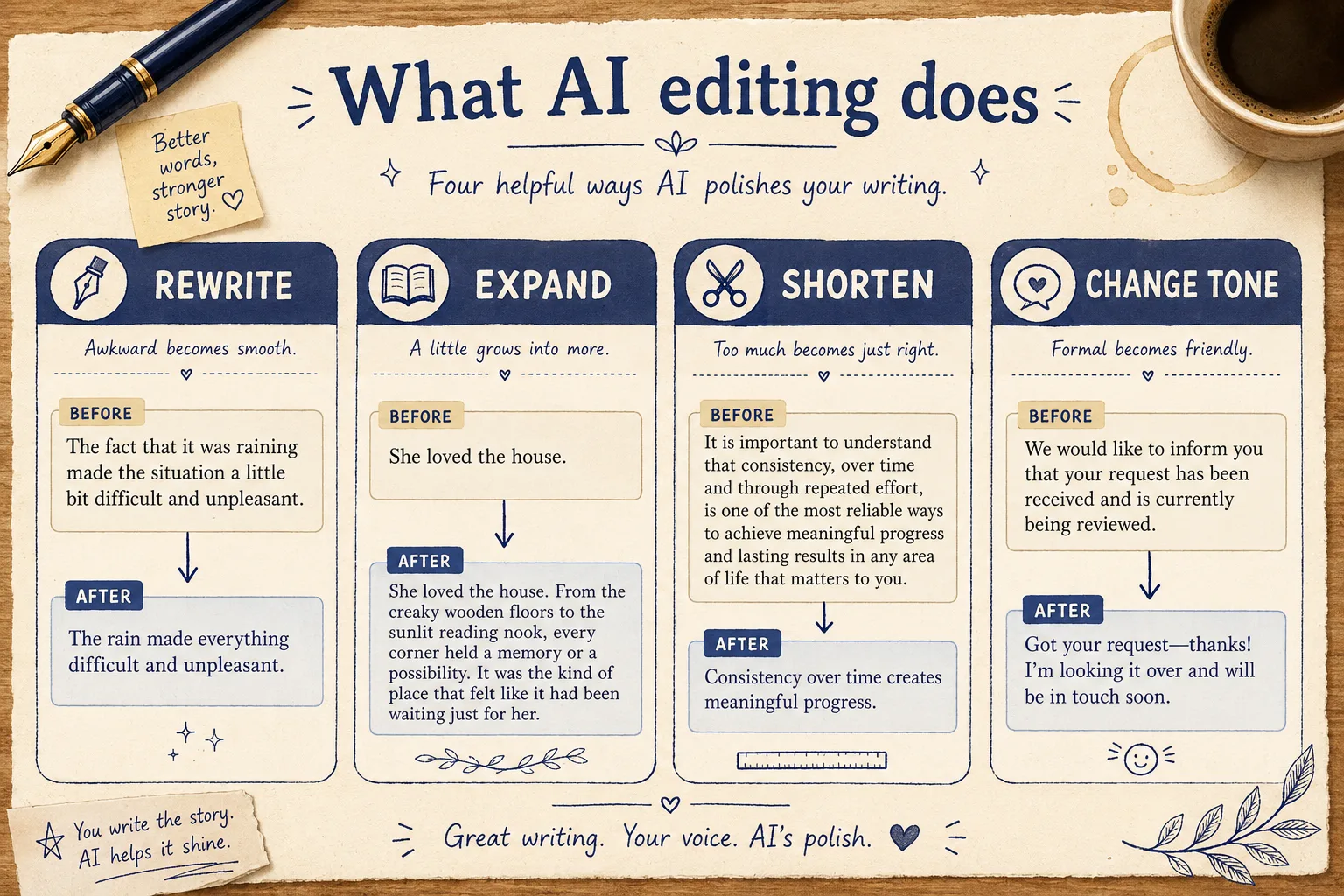
Rewrite
Completely rephrase the selected text while preserving the meaning. Useful for removing awkward phrasing, improving flow, or getting a fresh take on a paragraph.
Example: "The methodology employed was insufficient" becomes "The approach did not work"
Expand
Add detail, examples, or explanation to a brief passage. Turn a two-sentence summary into a full paragraph with supporting points.
Example: A 30-word overview becomes a 150-word section with examples and context
Shorten
Condense verbose text without losing key information. Cut filler words, redundant phrases, and unnecessary qualifiers.
Example: A 200-word paragraph becomes a tight 80-word version with the same core message
Change Tone
Shift from formal to conversational, academic to friendly, or any other tone adjustment. The AI rewrites while matching your requested voice.
Softer, Punchier, or any tone you describe in a custom instruction
Chapter review
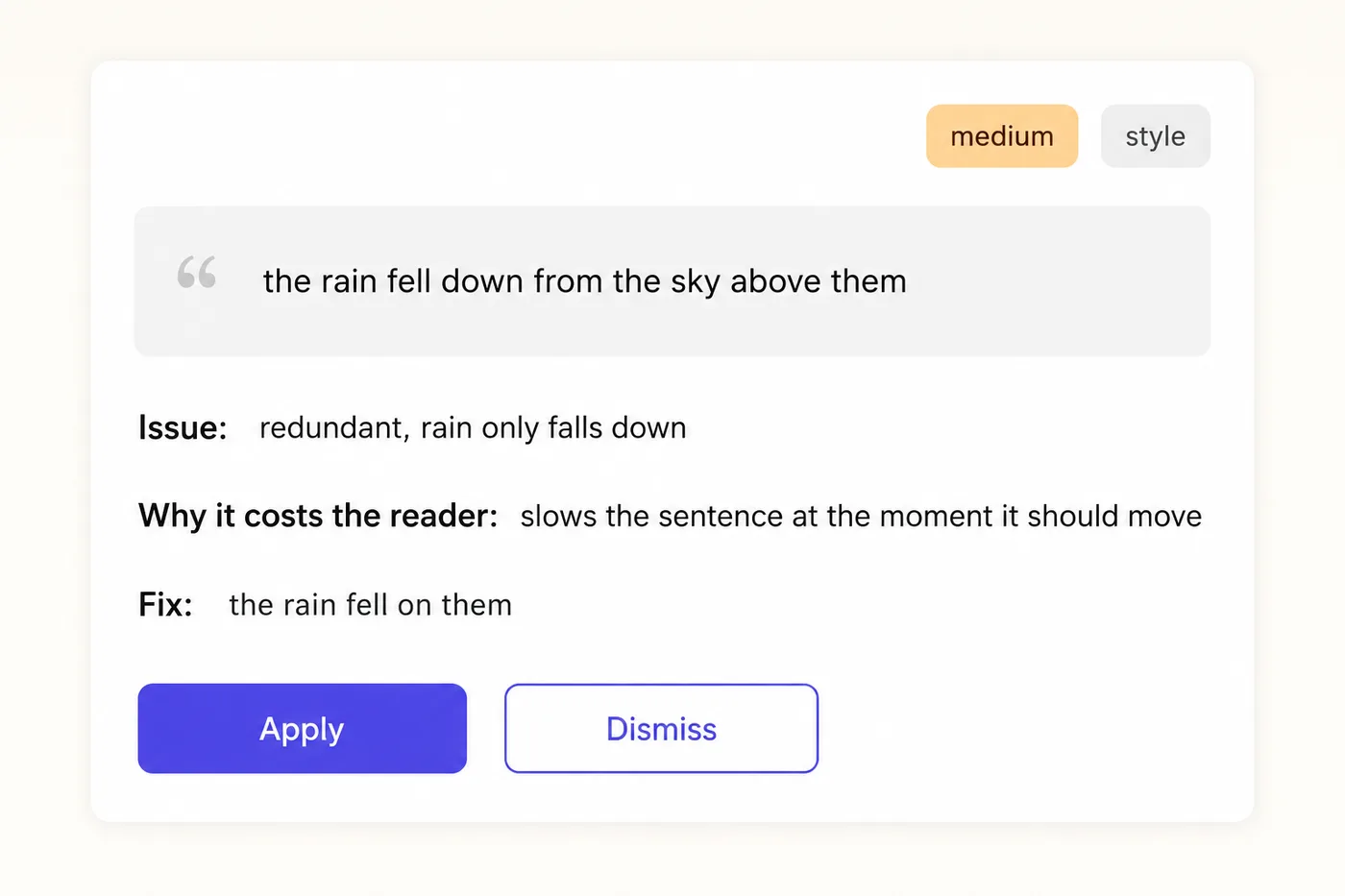
Open the Review tab and the AI returns a short list of findings for the chapter. Each one quotes 4 to 15 words verbatim, names the issue, says why it costs the reader, and offers a drop-in fix, graded high, medium or low across clarity, pacing, repetition, continuity, grammar and style.
Apply or dismiss one at a time. The editor locates the exact quote first, so nothing is changed blind.
Whole-book editorial letter
One pass reviews every chapter, then writes a 250 to 400 word letter the way a developmental editor would: an opening verdict, the three or four themes that matter most across the manuscript, each anchored to specific chapters, and the single highest-impact next step.
Runs in the background. Books up to 40 chapters. Counts as one assist.
Chat that knows your book
The Chat tab is grounded in your brief, outline, story bible and the open chapter, with no setup. Ask where a subplot went, whether chapter 6 repeats chapter 3, or for three alternative openings. Any prose it suggests arrives as an insert card, never written in until you choose.
No chapter credits. 3, 15 or 100 assists a day by plan.
Full Chapter Regeneration
Beyond inline editing, you can regenerate entire chapters. Change the instructions (more detail, different angle, different tone) and let the AI create a fresh draft. The context from surrounding chapters is automatically included, so regenerated chapters maintain continuity with the rest of your book.
For fiction, the AI retains character names so regenerated chapters stay consistent, the same continuity engine behind the AI novel writer. For non-fiction, it reads the two chapters before the one you regenerate, so it can avoid repeating them.
Is this real AI book editing software, or a rewriter with a nice name?
The honest test is what the review layer finds when it reads real manuscripts. These are our own numbers, pulled in September 2026 from 893 chapters reviewed by the AI book editor across 38 whole-book passes and hundreds of single-chapter reviews: 4,238 findings in total, a median of five per chapter, and only 1.8 percent of chapters coming back clean.
| What the review flagged | Share of findings | What it looks like on the page |
|---|---|---|
| Style | 31.5% | Flat verbs, stacked qualifiers, sentences that all run the same length |
| Clarity | 27.4% | A point the reader has to reread to get; a pronoun with no clear owner |
| Pacing | 16.9% | A scene or section that lingers, or a transition that jumps |
| Grammar | 9.7% | The only category a grammar checker would catch |
| Repetition | 7.4% | The same word, image or idea returning within a few paragraphs |
| Continuity | 5.5% | A name, fact or timeline that contradicts an earlier chapter |
9.7%
of what a real chapter needs fixed is grammar. That is the whole territory of a grammar checker.
75.8%
is style, clarity and pacing: sentence-level judgement a checker cannot make, and a developmental editor charges for.
15.6%
of findings are graded high. Most of what the review returns is medium and low: the accumulation, not the disaster.
Two things follow. A tool that only checks grammar is looking at less than a tenth of the problem, which is why authors who have outgrown sentence-level checkers land here. And a chapter that comes back with five findings is normal, not broken: the review names the weakest passages so you spend your revision hour where it counts, then the AI book writer and editor sit in the same window for the rewrite. The whole-book editorial letters are analysed on the AI developmental editor page, and the same reads are taken from the reader's side on the AI beta reader page. What a human editor charges for the same passes is in our guide to book editing cost.
Write faster, edit smarter
AI chapter generation plus precision editing tools. Create a complete book in minutes.
See Plans and PricingWrite Books in 30+ Languages
The editor supports multilingual book creation with built-in language lock.
When you select a non-English language, the AI locks generation to that language for every chapter. This prevents the common problem with ChatGPT where the AI drifts back to English mid-paragraph. Section headings like "Table of Contents," "Introduction," and "Final Thoughts" are automatically translated in exports.
Currently supported languages include Spanish, French, German, Italian, Portuguese, Dutch, Polish, Russian, Ukrainian, Arabic, Hindi, Chinese (Simplified), Japanese, Korean, Turkish, Indonesian, Vietnamese, Thai, Swedish, Danish, Norwegian, Finnish, Czech, Romanian, Hungarian, Greek, Hebrew, Malay, Tagalog, and Swahili.
Learn more about multilingual ebook creationLanguage Lock
Every chapter prompt includes a strict language instruction that prevents English drift
Heading Translation
Section headings, TOC labels, and export metadata are translated (14 languages in export)
Web + iOS
Same editor experience on desktop browsers and the iOS app. Projects sync across devices
From First Draft to Published Book
A complete production pipeline, not just a text editor.
Complete Workflow
Inkfluence AI replaces your entire ebook production stack. Instead of using ChatGPT for writing, Google Docs for editing, Canva for covers, and Calibre for EPUB conversion, you do everything in one tool. Describe your book, generate chapters, edit in a rich text editor, design a cover with AI, create an audiobook, and export to a print-ready PDF or EPUB. The entire process takes minutes, not hours. For the bigger picture, our guide on AI integration across publishing workflows covers how each stage chains together.
Ideation and Setup
Describe your book topic, target audience, and preferred tone. Select from 33 book types (practical guide, novel, cookbook, workbook, etc.). The AI classification engine detects genre, language, and content type automatically.
Outline Generation
The AI generates a structured chapter outline using your book type blueprint. Each chapter title and description is mapped to the blueprint's section structure. You can rename chapters, reorder them, add new ones, or remove chapters before generation starts.
Chapter Generation
Novels are generated one chapter at a time, with the story bible, the last three chapters and a running record of the book in view, so voice and continuity hold across the whole book. Non-fiction chapters are planned together up front, each with its own method and example, so they do not repeat each other. The full outline is carried into every chapter (how Inkfluence AI keeps a book consistent).
Editing and Refinement
Open any chapter in the rich text editor. Select text to rewrite, expand, shorten, or change tone. Regenerate entire chapters with different instructions. Format with headings, lists, blockquotes, and inline styles.
Cover Design
Open the integrated cover designer. Choose a style and let AI generate a cover image. Customize text placement, colors, and layout in a canvas editor with 50+ options. The cover embeds directly in your export.
Export and Publish
One-click export to PDF, EPUB, or DOCX. The export engine builds a cover page, table of contents, chapter markup, and proper metadata. Upload directly to Amazon KDP, Etsy, Gumroad, or use as a lead magnet on your website.
AI Book Editor vs ChatGPT vs Google Docs
Why a purpose-built book editor matters.
Key Difference
ChatGPT generates text in a chat window with no structure, formatting, or export. Google Docs is a general editor with no AI book generation, no cover design, and no EPUB output. Inkfluence AI is the only tool that combines AI drafting, rich text editing, cover design, audiobook creation, and multi-format export in a single book-focused workspace.
| Feature | Inkfluence AI | ChatGPT | Google Docs |
|---|---|---|---|
| AI chapter generation | Chat only | ||
| Rich text editor | |||
| Chapter management | |||
| AI cover design | |||
| PDF export | |||
| EPUB export | |||
| Audiobook generation | |||
| 30+ languages | |||
| Free plan | Limited |
AI Book Editor vs Grammar Checkers, Formatters and Fiction AI
Most tools authors call a "book editor" only do one slice of the job. Here is where each category stops, and where Inkfluence keeps going.
Sentence-level checkers like Grammarly, ProWritingAid, AutoCrit, Hemingway Editor, and QuillBot fix grammar and style but cannot restructure a chapter or export a book. Formatting tools like Atticus, Vellum, and Reedsy Studio lay out a finished manuscript beautifully but do not edit your prose. Writing apps like Scrivener, Dabble, Ulysses, and Novelcrafter organise drafts, and Sudowrite rewrites fiction prose well, but none of them design a cover, narrate an audiobook, and ship a KDP-ready file. Google Docs, Microsoft Word, and Notion are general editors with no book workflow at all. Inkfluence is the one tool that revises the prose and ships the finished book.
| Capability | Inkfluence AI | Grammarly / ProWritingAid | Atticus / Vellum | Sudowrite |
|---|---|---|---|---|
| Rewrites & restructures prose | Any passage, chapter-level | Sentence / grammar only | No, layout only | Fiction prose only |
| Whole-book chapter management | Yes, sidebar + reorder | No | Yes | Limited |
| AI cover design | Yes, KDP-ready | No | Basic (Atticus) | No |
| Export PDF + EPUB | Yes, one click | No | Yes | No |
| Audiobook from the same book | Yes, 49 voices | No | No | No |
| Free plan, commercial rights | Yes | Limited free | Paid only | Trial only |
| Chapter-level critique | Every plan, incl. free (3 a day) | ProWritingAid Premium only ($30/mo) | No | Some |
| Starting price | Free, then $9.99/mo | $12-30/mo (ProWritingAid $30/mo, $120/yr) | $147-249 one-time | $19-29/mo |
Verified against vendor pricing and feature pages in May 2026. Grammar checkers excel at line edits; pair them with Inkfluence if you like, but you will not need a separate formatter or exporter.
Is Inkfluence AI Book Editing Software?
Yes, and it helps to be clear about what "book editing software" actually means, because the phrase covers three very different kinds of tool. Traditional book editing software splits into line editors (grammar and style), structural or manuscript editors (organising chapters and flow), and layout software (formatting the finished file). Most products do exactly one of those. Inkfluence AI is book editing software that spans all three: it rewrites and tightens the prose, restructures and reorders chapters, and lays the result out into a publish-ready PDF, EPUB, or DOCX, in one place.
If you are comparing AI book editing software, the test that matters is whether the tool takes a rough or imported draft all the way to a finished, distributable book without handing you off to three other programs. A grammar checker cannot format, a formatter cannot edit, and a chat model cannot export. Book editing software that only does line edits leaves the hardest part of the job, the structure, the cover, and the export, still sitting on your desk. That end-to-end span is the real difference between editing software that produces a cleaner draft and editing software that produces a published book.
Who Searches for an AI Book Editor, and What They Want
Six kinds of writers land here. Here is what each one is after, and how the editor helps.
General editor seekers ("ai book editor", "book editor online free")
They want a real book-shaped editor with chapters and export, not a chat window or a generic doc. It pairs naturally with the AI book writer for drafting.
Revisers ("ai book editing", "edit book with ai")
They have a draft and want AI to tighten, restructure, and polish it. Select-and-revise works on the exact passage, never the whole chapter, then you add a cover and export.
Cross-shoppers from grammar tools ("Grammarly alternative for books", "ProWritingAid vs")
They have outgrown sentence-level checkers. ProWritingAid is the strongest of them and is honest about its scope, its own line is that it is not there to write it for you; its chapter critique also sits on the $30 a month Premium tier and the free plan looks at 500 words at a time. Inkfluence AI reviews whole chapters on every plan including free, rewrites and restructures at passage level, and the book exports from the same window. Grammarly and Hemingway stay useful for the final grammar pass, which our own review data puts at under a tenth of what a chapter needs.
Cross-shoppers from formatters ("Atticus alternative", "Vellum for Windows")
They want to edit the prose, not just lay out a finished manuscript, and they want a free way in. Inkfluence edits and exports a KDP-ready PDF in the browser.
Manuscript polishers ("ai manuscript editor", "manuscript editor online free")
They are revising a finished draft chapter by chapter. The dedicated manuscript editor handles that flow, and the novel writer keeps fiction continuity.
Self-publishers ("edit and export book", "kdp-ready editor")
They need to edit and ship in one place. Inkfluence exports KDP-ready PDF and EPUB with a cover, then an optional audiobook. New to it? Start with the self-publishing guide.
Four Ways to Use the Editor
Whether you start from scratch or import existing work.
Generate, Then Edit
Start with an AI-generated draft and refine every chapter in the editor. Best for speed.
Write, Then Enhance
Write your own chapters and use AI to polish, expand, or restructure. Best for control.
Outline, Then Build
Create a detailed outline first, then generate chapters one by one. Best for complex books.
Import and Rewrite
Paste existing content and use AI to modernize, restructure, or adapt it. Best for repurposing.
Who Uses the AI Book Editor
Built for anyone creating long-form content.
Fiction Authors
Draft and edit novels, short stories, and series with genre-aware AI generation.
AI Novel WriterNon-fiction Authors
Write guides, how-tos, and reference books with structured chapter outlines.
AI Book WriterCoaches and Consultants
Create lead magnets and authority ebooks to grow your practice.
Lead Magnet GeneratorSelf-Publishers
Generate, edit, design covers, and export KDP-ready files from one tool.
Self-Publishing GuideAI Book Editor Pricing
Start free. Upgrade when you need more.
Free
$0/mo
- 5 chapters + 5 monthly
- 3 AI assists per day
- PDF export + basic cover
Creator
$9.99/mo
- 35 chapters/month
- PDF + EPUB export
- 15 AI assists per day, no watermark
Premium
$19.99/mo
- Unlimited chapters
- 100 AI assists per day + all formats
- Priority support + branding
Frequently Asked Questions
Does the editor give feedback on my writing, or only rewrite it?
What is an AI book editor?
Is the AI book editor free?
Can I edit AI-generated chapters?
What export formats does the editor support?
How is this different from Google Docs or Word?
Can I use the AI book editor on my phone?
Does the editor support non-English books?
Can I import an existing manuscript?
What makes this better than using ChatGPT to edit a book?
How much does the AI book editor cost?
Can I import an edited DOCX back into the platform and keep all the formatting intact?
Can AI analyze my draft and point out where readers might get confused or drop off?
Does AI editing use my chapter credits?
Can it review the whole book, not just one chapter?
Can I ask the AI questions about my own book?
Are there any AI tools that help keep track of which parts of a manuscript came from which sources?
What safeguards do AI ebook platforms have to help avoid factual errors in non-fiction content?
Start Editing Your Book Today
Open the editor, describe your book, and start writing in minutes. Free plan included.
Related Reading
Best AI for Editing a Book (2026)
Nine editing tools compared by job: grammar, line edits, story feedback and developmental edits
Inkfluence AI vs ProseEngine
Book generation, continuity checks, audiobooks and pricing, head to head with prices verified September 2026.
How to Write a Book with AI
Complete guide to AI-assisted book writing in 2026
Best AI Book Writing Software
Compare AI writing and editing tools side by side
AI Novel Continuity Checking
How AI catches plot holes and character inconsistencies
KI-Lektorat (Deutsch)
The German edition: Normseite pricing, German quotation marks and dashes preserved on export