
By Sam May, Founder of Inkfluence AI
Inkfluence AI vs ProseEngine
One finishes and publishes the book. The other scores and revises a novel you already have. A factual comparison, grounded in data from 100,000+ books created on Inkfluence AI, so you can choose on what each tool actually does.
Quick Answer
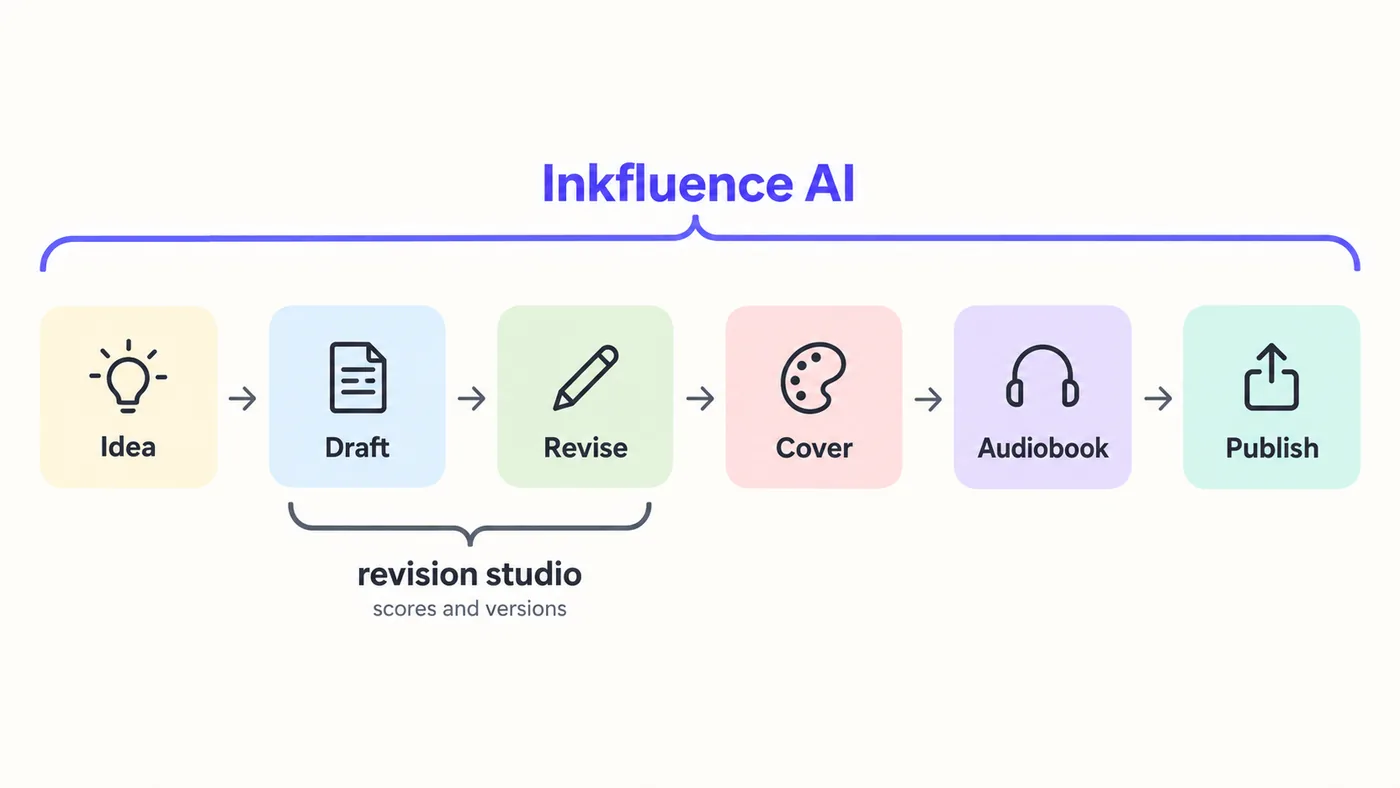
Inkfluence AI and ProseEngine solve different halves of the same job. Inkfluence AI takes an idea to a finished, sellable book on every plan: it writes fiction and 33 kinds of non-fiction, checks every fiction chapter for continuity against a story bible, designs the cover, narrates the audiobook with 49 voices, translates into 59 languages, and exports PDF, EPUB, DOCX and print-ready KDP files or publishes to Gumroad and Etsy. ProseEngine is a fiction-only studio built around revising a manuscript: it scores each scene on 14 metrics, keeps a codex with a relationship web, saves named versions, and lets you bring your own AI key; full-book generation starts on its €19 Author plan and the audiobook needs Studio plus your own text-to-speech key. Inkfluence AI is $9.99 or $19.99 a month (see pricing) with the AI included and unlimited chapters on Premium.
The Quick Verdict
These tools overlap on the middle of the process, drafting and revising fiction, and diverge at both ends. The decision is about what you need at the end: a scored manuscript, or a published book.
Choose Inkfluence AI if you:
- ✓Want a complete book from an idea, on the free plan or from $9.99 a month, with the AI included and nothing to configure
- ✓Write non-fiction too: how-to guides, workbooks, study guides, cookbooks, lead magnets, business books
- ✓Need the cover, the audiobook and store-ready files from the same place, then publish to KDP, Gumroad or Etsy
- ✓Want continuity checked automatically on every fiction chapter, with a story bible you can edit
- ✓Write on a phone or tablet as well as a laptop, and want the book saved in your account rather than one browser
Choose ProseEngine if you:
- ✓Already have a novel manuscript and want a scored revision desk: 14 metrics per scene, a quality gate and a multi-mode rewrite
- ✓Want to bring your own AI key, pick among 40 or more models, or run a local model on your own machine
- ✓Work scene by scene with a codex, a relationship web, a corkboard canvas and named draft versions with diff
- ✓Want a multi-voice audiobook with a different voice per character, and are happy to supply a text-to-speech key and pay that provider
- ✓Prefer manuscripts kept in your browser and your own cloud drive rather than on a platform account
What 100,000+ Books Tell Us About AI Novel Writing
Most comparison pages repeat marketing claims. This one is informed by what authors actually do on Inkfluence AI, across more than 100,000+ finished books.
100,000+
books created on the platform
33
book-type blueprints, fiction and non-fiction
30+
languages generated natively; about 1 in 6 books is non-English
~41%
of finished books are exported for publishing
The most useful thing this data shows for this comparison is that fiction is half the story. On Inkfluence AI, fiction and practical how-to guides are the two largest categories at roughly the same size, followed by personal development, romance, children's books, workbooks, study guides and recipe books. A tool built only for novels serves one of those groups. Our first-party data study has the full breakdown.
The second thing is the finish line. Roughly 41% of finished books are exported, PDF is the most common format, and authors have connected the platform to real storefronts, with well over a thousand books pushed to Gumroad and hundreds listed on Etsy. That is why the audiobook, the cover, the print interior and the store listings live in the same product as the writing: the book is not done when the prose is done.
On fiction specifically, our own 2026 review of reader complaints found that the problems that reach us are about memory and structure, a character contradicting an earlier chapter or a plot thread going quiet, not about sentence quality. That is what the continuity validator described below was built to catch, and why the fiction pipeline now writes every chapter with the last three chapters in full and a running record of the rest in view.
Figures are first-party data from Inkfluence AI, current as of 15 September 2026. You are welcome to cite them with a link to this page.
How Each One Makes a Book
Inkfluence AI: one prompt to a finished book
You describe the book in the book generator, pick a format (or let the classifier pick), set the chapter count and generate. Non-fiction chapters write in parallel; fiction writes in sequence so each chapter is generated with the story bible, the last three chapters in full, and a running record of everything before them. You review the outline first, then land in the editor with the whole draft, a generated cover and the export preview. Generation runs on Inkfluence's servers, so closing the tab does not stop it.
Revision happens in the same editor: select any passage and rewrite, expand, shorten, proofread or change its tone; regenerate a chapter; ask the assistant for a chapter or whole-book editorial review; edit the story bible and regenerate later chapters against it.
ProseEngine: a studio around your scenes
You write or import scenes into a scene catalogue, build a Story Codex of characters, places and rules, and use inline AI tools on selections. On the Author plan and above, a four-step wizard generates scenes or a whole book against the codex, with a quality gate that retries scenes scoring below a threshold. Every scene can be scored on 14 metrics and revised until the numbers climb.
The AI is either your own key (OpenAI, Anthropic, Google, OpenRouter or a local model) or prepaid managed credits. Manuscripts live in the browser's local database and sync to your Google Drive, OneDrive or Dropbox. It is built for desktop.
Quality and Continuity: What Each Tool Actually Checks
This is the part worth reading slowly, because it is where the two tools are most often described inaccurately.
Continuity on Inkfluence AI
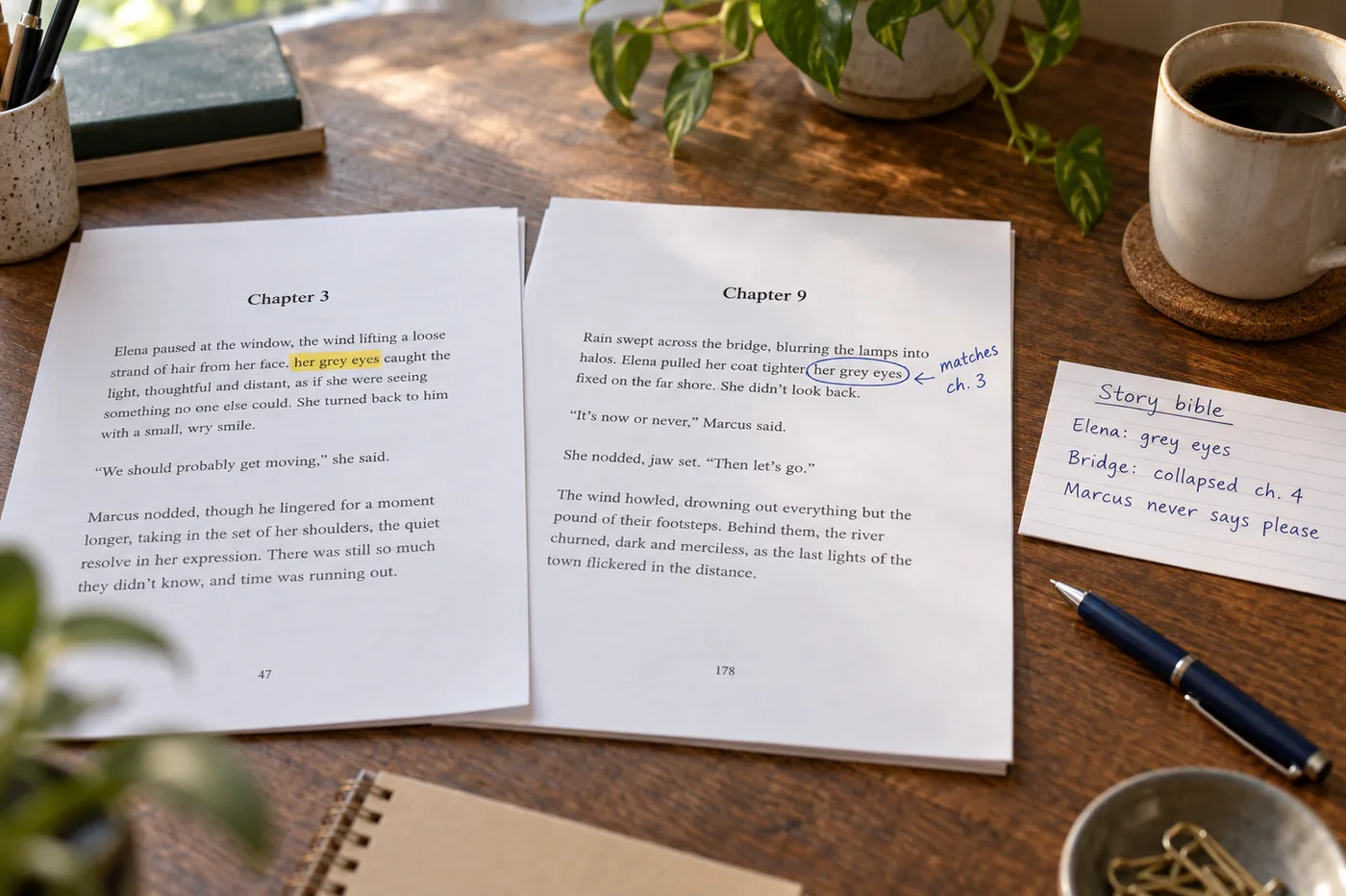
Every fiction chapter is generated with the story bible (characters, key objects, non-negotiables, open threads, point of view, timeline anchors), the last three chapters in full and a running record of the rest in view. After a chapter is written, a continuity validator checks it for name consistency, point-of-view slips, timeline contradictions, unresolved threads, key objects that were lost or destroyed earlier, and cast mistakes such as a character acting after they have left the story. What it finds is recorded against the chapter. The rules you mark as non-negotiable in the story bible are pinned into every chapter prompt, so a character's eye colour or a dead character stays fixed. None of this needs setting up; it runs on every fiction book.
Continuity on ProseEngine
On the Author and Studio plans, canon enforcement checks each generated scene against your Character Files and world rules and flags contradictions, and drift detection watches point of view, voice and timeline. On Free and Writer you get the codex and, on Writer, a continuity checker. It is a strong system and, on paper, broader than ours on voice drift.
Quality feedback: scores versus notes
ProseEngine's defining feature is the number: 14 metrics per scene, 0 to 100, with a quality gate that regenerates a scene up to three times if it scores below your threshold. Inkfluence AI does not score prose numerically. It gives feedback the way an editor does: a chapter review or a whole-book editorial review from the assistant, six quick actions on any selection, and a store-readiness audit in the export preview that checks the EPUB against Amazon KDP, Apple Books, Google Play and Kobo requirements before you upload. Which you prefer is a genuine matter of taste: some authors want a dashboard, some want a note in the margin. What is not accurate is the claim that one of these tools gives no feedback at all.
Audiobooks: Included, or Bring Your Own Key
Both tools produce per-chapter MP3 files at the specification the audiobook distributors ask for (44.1 kHz, 192 kbps CBR, mono). The difference is who pays for the voices and how many characters speak.
Inkfluence AI narrates with 49 voices across 14 languages as part of the plan: 15 chapters a month on Creator, 30 on Premium, with a full-book merge and an export bundle ready for distributors. One consistent narrator reads the book.
ProseEngine offers audiobooks on the Studio plan (€29 a month) using your own OpenAI, ElevenLabs or Google Cloud text-to-speech key, so the narration is billed by that provider on top of the subscription. In return it does something Inkfluence AI does not: it detects who is speaking in each line and assigns a different voice per character. If a multi-voice cast matters to you and you are comfortable managing a text-to-speech account, that is a real advantage.

Pricing and What the Money Buys
ProseEngine prices read from its site on 11 September 2026. Inkfluence AI prices are current.
| Plan | Price | AI included | Full-book generation | Audiobook |
|---|---|---|---|---|
| Inkfluence AI Free | $0 | Yes: 5 chapters to start, 5 more monthly | Yes | No |
| Inkfluence AI Creator | $9.99/mo or $89/yr | Yes: 35 chapters a month, 20 images | Yes | 15 chapters a month, included |
| Inkfluence AI Premium | $19.99/mo or $179/yr | Yes: unlimited chapters, 50 images | Yes | 30 chapters a month, included |
| ProseEngine Free | €0 | 8 AI tries at sign-up; then prepaid credits or your own key | No | No |
| ProseEngine Writer | €9/mo or €99/yr | $10 of credits a month; then prepaid or your own key | No | No |
| ProseEngine Author | €19/mo or €190/yr | $20 of credits a month; then prepaid or your own key | Yes | No |
| ProseEngine Studio | €29/mo or €261/yr | $30 of credits a month; then prepaid or your own key | Yes | Yes, with your own text-to-speech key |
Two things to weigh. First, on ProseEngine a full novel's AI usage lands either on prepaid credits (its FAQ says managed credits carry a markup) or on your own provider account at that provider's rates, on top of the subscription; on Inkfluence AI the AI is the subscription. Second, ProseEngine bills in euros with no trial and a 14-day case-by-case refund window, while Inkfluence AI has a free plan that never expires and chapter credit packs (15 for $9.99, 25 for $12.99, 50 for $24.99) that never expire either. Both approaches are legitimate; the bring-your-own-key model can be cheaper for a technical author who already pays a provider, and more expensive for everyone else.
Where Your Manuscript Lives
Inkfluence AI: your account, any device
Books are saved to your account on Inkfluence's servers as you write. Open the same book on a laptop, a phone or the iOS app and it is there. Generation runs server-side, so a 20-chapter book keeps writing after you close the tab. Export whenever you like; you are never locked in.
ProseEngine: your browser, your cloud drive
Manuscripts are kept in the browser's local database rather than on ProseEngine's servers, which is a privacy plus, and synced to your own Google Drive, OneDrive or Dropbox with automatic backups. The trade is that it is desktop-only, generation happens in the open tab, and its own FAQ warns that browsers can evict local storage when disk is low, so the cloud sync is not optional.
What Each One Does Better
Inkfluence AI
- Full-book generation on every plan, non-fiction included, with the AI in the price
- Cover design, picture books, translation and direct publishing in the same product
- Audiobook narration included, 49 voices, distributor-spec export and a merged file
- Automatic fiction continuity validation and a pinned story bible with no setup
- Print-ready KDP interior and wrap cover, EPUB store-readiness audit
- Cloud-saved books, server-side generation, works on a phone
ProseEngine
- 14-metric scene scoring with a quality gate and a five-mode rewrite
- Story Codex with auto-linking, relationship web and family trees
- Bring your own key, 40 or more models, or a local model with zero cloud cost
- Named draft versions with word-by-word diff
- Multi-voice audiobooks with automatic dialogue attribution
- Scene-level tools: canvas, scene finder, analytics panels, pacing overlays
Feature-by-Feature Comparison
Every row verified against each product on 11 September 2026. Where ProseEngine leads, we say so.
| Feature | Inkfluence AI | ProseEngine | Notes |
|---|---|---|---|
| Full Book Generation from One Prompt | Yes | Partial | Inkfluence writes a complete book on every plan, free included. ProseEngine's scene and full-book generation starts on its Author plan (€19/month); the Free and Writer plans are writing and review tools |
| Fiction Continuity Checks | Yes | Yes | Inkfluence runs a continuity validator on every fiction chapter (names, point of view, timeline, open threads, key objects, cast) and pins your story bible into each chapter. ProseEngine's canon enforcement checks scenes against its Character Files on Author and Studio |
| Story Bible / Codex | Yes | Yes | Inkfluence has an editable story bible (characters, key objects, non-negotiables, open threads, point of view, timeline). ProseEngine's Story Codex adds auto-linking and a relationship web, and is the deeper reference tool |
| Per-Scene Numeric Quality Scores | No | Yes | ProseEngine scores each scene on 14 metrics out of 100. Inkfluence gives written feedback instead: chapter and whole-book editorial reviews, six quick actions, and the continuity validator |
| Whole-Book Editorial Review | Yes | Yes | Inkfluence: chapter review and whole-book review in the assistant (Creator and Premium). ProseEngine: AI book review (one a month on Free, unlimited on paid) |
| Rewrite, Expand, Shorten, Proofread | Yes | Yes | Inkfluence: six quick actions on any selection plus chapter regeneration and book chat. ProseEngine: inline tools (three per book on Free) and a five-mode Improve Book rewrite on paid plans |
| Non-Fiction Book Types | Yes | No | Inkfluence has 33 blueprints: how-to guides, workbooks, study guides, cookbooks, lead magnets, personal development and more. ProseEngine is built for fiction novels |
| AI Cover Design | Yes | No | Inkfluence generates covers in five styles with 100 design presets and a KDP wrap cover with the spine calculated. ProseEngine has no cover design, by its own comparison page |
| Illustrated Picture Books | Yes | No | Inkfluence writes and illustrates picture books, colouring books and alphabet books with a consistent character. Not offered by ProseEngine |
| Audiobook Included in the Plan | Yes | No | Inkfluence narrates with 49 voices, 15 chapters a month on Creator and 30 on Premium, no extra key or bill. ProseEngine's audiobook is Studio only (€29/month) and runs on your own text-to-speech key, billed by that provider on top |
| Multi-Voice Narration | No | Yes | ProseEngine assigns a different voice per character with automatic dialogue attribution. Inkfluence records one consistent narrator per book |
| Broadcast-Spec Audio Export | Yes | Yes | Both output per-chapter MP3 at 44.1 kHz, 192 kbps CBR mono for ACX-style distributors. Inkfluence also merges a full-book file |
| PDF, EPUB and DOCX Export | Yes | Partial | Inkfluence: PDF on free, EPUB and DOCX on paid plans, plus a KDP print interior with trim sizes and gutters. ProseEngine: DOCX on Free, EPUB and PDF from Writer, print-ready from Author |
| Publish Direct to Gumroad and Etsy | Yes | No | Inkfluence lists a finished book on Gumroad or Etsy from the app, or on a shareable Showcase page. ProseEngine exports files only |
| Translate a Finished Book | Yes | No | Inkfluence translates into 59 languages and generates natively in 30+. Not offered by ProseEngine |
| Manuscript Import | Yes | Yes | Inkfluence imports DOCX, PDF, EPUB and TXT free with automatic chapter detection. ProseEngine imports .docx, .txt, .md and Scrivener projects |
| Bring Your Own AI Key / Model Choice | No | Yes | ProseEngine connects your own OpenAI, Anthropic, Google, OpenRouter or local model, or sells prepaid managed credits. Inkfluence routes every book to a frontier model automatically with nothing to configure |
| Server-Side Generation | Yes | No | Inkfluence generates on its own servers, so a book keeps writing if you close the tab or lock your phone. ProseEngine runs in the browser tab |
| Cloud-Saved Manuscripts | Yes | Partial | Inkfluence saves every book to your account. ProseEngine stores manuscripts in the browser's local database and syncs to your own Google Drive, OneDrive or Dropbox; its own FAQ notes that browsers can evict that storage |
| Works on a Phone | Yes | No | Inkfluence's web app works on mobile and there is a native iOS app. ProseEngine is desktop-only and emails you a link to open on a computer |
| Named Draft Versions with Diff | No | Yes | ProseEngine saves named versions and compares them word by word. Inkfluence has undo history and chapter regeneration, not named versions |
| Scene-Level Organiser and Canvas | No | Yes | ProseEngine works scene by scene with a corkboard canvas and a scene finder. Inkfluence works at chapter level in a rich text editor |
| Find and Replace | Yes | Yes | Both. Inkfluence: chapter or whole book. ProseEngine adds regex |
| Writing Goals and Streaks | Yes | Yes | Both track daily words and streaks |
| Team Workspaces | Partial | Partial | Inkfluence has shared workspaces with seats on selected plans. ProseEngine's co-author, editor and beta-reader roles are Studio only |
| Free Plan (no credit card) | Yes | Yes | Inkfluence: 5 chapters to start and 5 more every month, the cover designer and PDF export. ProseEngine: 3 books, 8 AI tries at sign-up, DOCX export, three inline AI tools per book, no book generation |
| Entry Paid Price | Yes | Yes | Inkfluence Creator $9.99/month, Premium $19.99/month, AI included. ProseEngine Writer €9, Author €19, Studio €29 per month with $10, $20 or $30 of AI credits included; heavier use is prepaid credits or your own key |
| First-Party Scale | Yes | Partial | Authors have created 100,000+ books on Inkfluence across 30+ languages. ProseEngine launched in 2026 and publishes no user or book counts |
Using Both, or Moving a Manuscript
Nothing is locked in either direction. ProseEngine exports DOCX; Inkfluence AI imports DOCX, PDF, EPUB and TXT for free and detects chapters from your headings. A workable split for a novelist who wants both: draft and finish on Inkfluence AI, take the DOCX into ProseEngine for a scored revision pass, bring the revised DOCX back for the cover, the audiobook and the print files.
- Export your manuscript from ProseEngine as DOCX.
- In Inkfluence AI, choose Import on the dashboard and pick the file. Chapters are detected automatically; empty or misdetected chapters can be merged in the editor.
- Open the story bible, add the characters and rules you want pinned, then regenerate or edit any chapter with the assistant.
- Design the cover, narrate the audiobook, and export PDF, EPUB, DOCX or the KDP print bundle, or publish to Gumroad or Etsy.
Frequently Asked Questions
What is the main difference between Inkfluence AI and ProseEngine? +
Does Inkfluence AI have an audiobook feature? +
Does Inkfluence AI keep characters consistent across chapters? +
Does Inkfluence AI give any quality feedback on the writing? +
What export formats does Inkfluence AI support? +
How much does ProseEngine cost compared with Inkfluence AI? +
Is ProseEngine better than Inkfluence AI for fiction? +
Can I use my own AI key with Inkfluence AI? +
Where are my manuscripts stored on each platform? +
Which is better for non-fiction, workbooks or lead magnets? +
Which platform is more established? +
Can I move a book from ProseEngine to Inkfluence AI? +
Sources and Methodology
Inkfluence AI figures (book counts, category mix, export rate, language mix) are first-party platform data current as of 15 September 2026. Feature and pricing details for Inkfluence AI are verified against the live product. ProseEngine feature and pricing details were read from its public homepage pricing section, feature pages and FAQ on 11 September 2026; prices are quoted in euros as published there and may change. Where a ProseEngine capability is plan-gated, the plan is named. We have no commercial relationship with ProseEngine and this page carries no link to it; if anything here is out of date, tell us and we will correct it.
- ACX audio submission requirements
- What people write with AI (Inkfluence AI first-party data study)
- Best AI for writing novels in 2026 (eight tools, prices verified September 2026)
Keep Comparing
ProseEngine Alternatives
Plan gates, pricing and five tools ranked
Inkfluence AI vs Sudowrite
Book generation vs prose-assist writing
Inkfluence AI vs Chapter
A one-time $97 for two books against a plan, cost per book compared
Inkfluence AI vs Novelcrafter
Included AI vs bring-your-own-key
Best AI Novel Writer 2026
Eight tools ranked on real novel projects
AI Novel Writer
Fiction with a story bible and continuity checks
AI Audiobook Generator
49 voices, distributor-spec export, included in the plan
Inkfluence AI vs NovelAI
Structured books vs scene-by-scene sandbox
Best AI Book Writing Apps 2026
Seven apps compared, prices checked September 2026
How to Write a Book with AI (Video)
The dashboard walkthrough, prompt to export
AI Book Editor
Reviews, quick actions and chapter regeneration
Write the novel, then actually finish it
Continuity checked on every chapter, a cover, an audiobook and store-ready files, from $9.99 a month with the AI included. Start free, no card.
Try Inkfluence AI Free