
By Sam May, Founder of Inkfluence AI
Inkfluence AI vs Chapter (chapter.pub)
A one-time $97 for two finished books, or a free plan and $89 a year for as many books as you write. What each costs per book, what each does, and where each one is the better buy, with every Chapter fact taken from its own sales pages.
Quick Answer
Chapter (chapter.pub) is a done-for-you book writer sold as a one-time purchase: $97 for two finished books, with extra books from $29 for non-fiction or $49.70 for fiction, a 30-day money-back guarantee and no subscription. Non-fiction and fiction are separate $97 products. Its sales pages list no audiobook, translation, export formats or series.
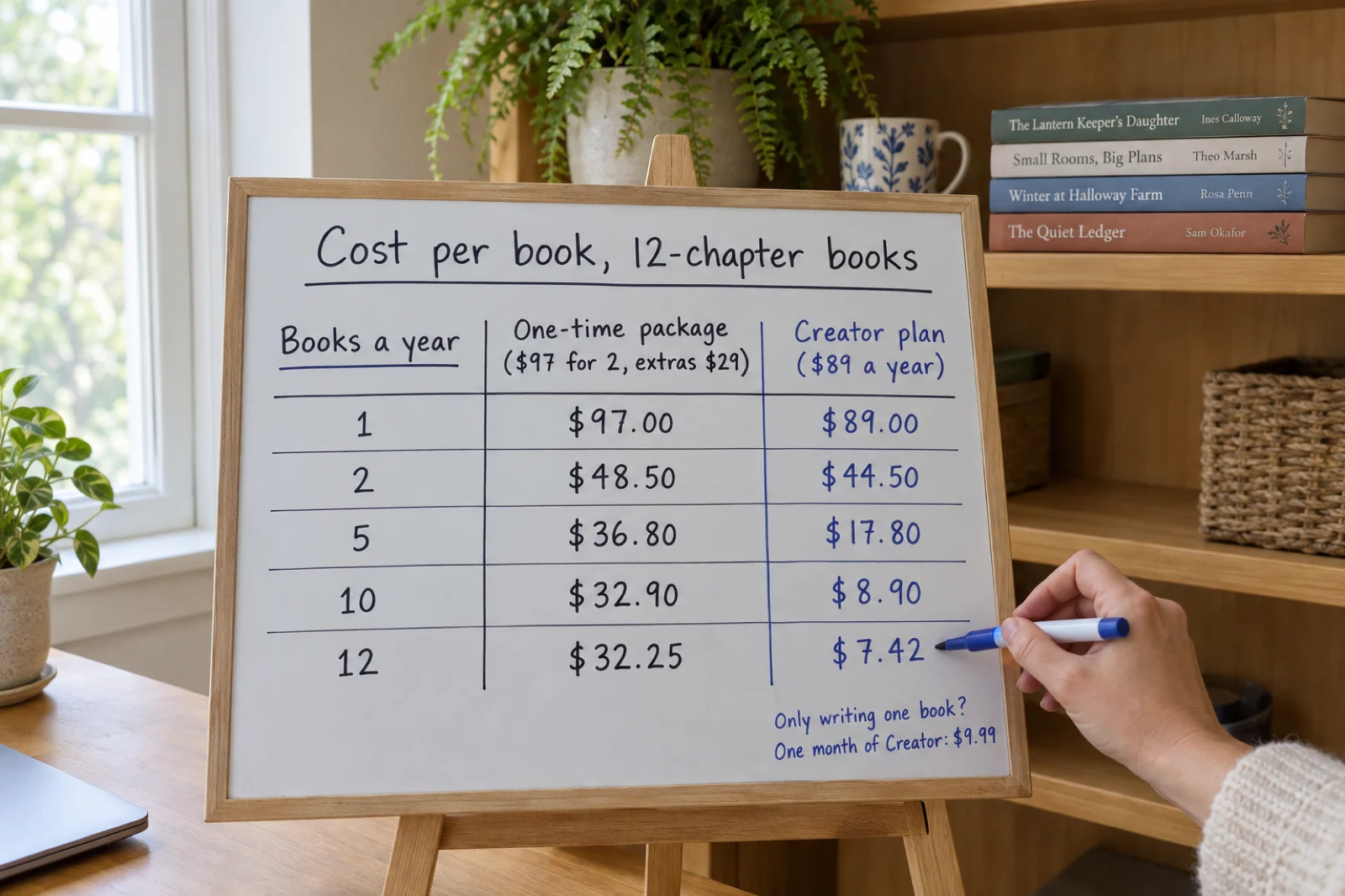
Inkfluence AI is for ongoing writing: 33 kinds of book on one plan, a free plan that writes 5 chapters with no card, then Creator at $9.99 a month or $89 a year, or Premium at $19.99 a month or $179 a year. The paid plans include a cover designer with AI covers, in-chapter images and picture books, an audiobook with 49 voices, translation into 59 languages, EPUB, DOCX and KDP print files, and publishing to Etsy and Gumroad. At one book, Inkfluence costs $9.99 against $97; at twelve books a year it is $7.42 a book against $32.25. For almost every writer, Inkfluence AI is the better choice.
The Verdict: Inkfluence AI for Almost Every Writer
Both write a whole book after you approve a plan. Inkfluence AI does more of the job, for more kinds of book, for less per book.
- Start free, pay less per bookA free plan writes a real book with no card. After that, $9.99 for one book against Chapter's $97, and $7.42 a book at twelve a year against $32.25.
- 33 kinds of book on one planNovels, romance, picture books, colouring books, workbooks, cookbooks, devotionals and business books. Chapter sells fiction and non-fiction as separate products.
- Novels that stay consistent, then continueA story bible, a running record of what is true in the book, and a published method. Continue as a series writes book two with the same characters.
- Edit it yourself, on screenSelect any passage for Proofread, Rewrite, Shorten, Expand, Softer or Punchier, ask the assistant, or regenerate a chapter.
- The finished product, not just the manuscriptAI covers and images, an audiobook with 49 voices, translation into 59 languages, EPUB, DOCX and a KDP print package with a full-wrap cover, and publishing to Etsy and Gumroad from the app. None of these is listed in Chapter's $97 offer.
What a Book Costs on Each, at 1 to 120 Books a Year
Chapter prices from its sales pages on 24 September 2026; Inkfluence AI prices are current. Assumes 12-chapter books written through the year. Chapter's $97 includes two books (presented on its pages as a limited-time offer); extra books are "from" $29 or $49.70, so these are its lowest published figures.
| Books | Chapter, non-fiction | Chapter, fiction | Inkfluence AI, pay the months you write | Inkfluence AI, yearly plan | Per book: Chapter NF / Inkfluence |
|---|---|---|---|---|---|
| 1 a year | $97.00 | $97.00 | $9.99 (one month of Creator) | $89.00 (Creator yearly) | $97.00 / $9.99 |
| 2 a year | $97.00 | $97.00 | $19.98 (two months of Creator) | $89.00 | $48.50 / $9.99 |
| 5 a year | $184.00 | $246.10 | $49.95 (five months) | $89.00 | $36.80 / $9.99 to $17.80 |
| 10 a year | $329.00 | $494.60 | $89.00 (yearly is cheaper than ten months) | $89.00 | $32.90 / $8.90 |
| 1 a month (12 a year) | $387.00 | $594.00 | n/a | $89.00 | $32.25 / $7.42 |
| 10 a month (120 a year) | $3,519.00 | $5,961.60 | n/a | $179.00 (Premium yearly, unlimited chapters) | $29.33 / $1.49 |
How the Inkfluence AI figures work
Creator includes 35 chapters a month, so it covers two 12-chapter books in the same month, or one book a month all year. One month of Creator ($9.99) writes one 12-chapter book with EPUB, DOCX and the KDP package; cancel afterwards and the book stays in your account. Creator yearly ($89) is cheaper than paying monthly from the ninth month on. Ten books a month is 120 chapters a month, beyond Creator, so that row uses Premium yearly, which has no chapter limit.
A book of five chapters or fewer costs nothing: the free plan gives 5 chapters to start and 5 more every month, exported as PDF. Credit packs (15 chapters for $9.99, 25 for $12.99, 50 for $24.99) never expire, for someone who writes in bursts.
What Chapter's $97 covers
On its sales pages (24 September 2026): two books, the second presented as a limited-time offer. Every book after that is sold separately, from $29 for non-fiction or $49.70 for fiction, and fiction and non-fiction are two separate $97 purchases.
Not listed on Chapter's pricing or feature pages as of 24 September 2026: an audiobook, translation, export formats, cover design, images inside the book, series continuation, a free plan or an app. On Inkfluence AI all of these come with the plan.
Your Numbers
Set your own books and chapter count. It runs in your browser; nothing is sent anywhere.
Chapter, first year
$97.00
Inkfluence AI, cheapest route
$39.96
Chapter: $97 including two books, then its lowest published extra-book price ($29 non-fiction, $49.70 fiction), checked 24 September 2026. Inkfluence AI: free plan for books of 5 chapters or fewer (up to one a month); otherwise the cheapest of one Creator month per book ($9.99, or a Premium month at $19.99 above 35 chapters), Creator yearly ($89, up to 35 chapters a month) and Premium yearly ($179, unlimited), with books spread evenly across the year. Taxes excluded.
How Each One Writes a Book
Chapter: drafts in, finished book out
Its non-fiction page describes an hour: "First 5 minutes: Drop your book drafts, notes, outline or just the idea. Next 15 minutes: Chapter researches your topic → your outline appears. Next 30–40 minutes: Plan Approved? → Whole book gets written in your voice." It then describes "Four writing passes in your voice" and a whole-book check called DoubleCheck, "1,000+ automated AI steps", with "Unlimited DoubleCheck passes" and "Unlimited source verification" in the offer, and promises the result "Under an hour" with the word "Guaranteed".
The fiction page offers the same shape for novels, with "Unlimited continuity checks" covering "character consistency, timelines, who's-alive tracking, repeated passages, voice breaks, plot holes", in twelve genres, at "anywhere from 20,000 to 120,000+ words". The sales pages do not show the editor, and they do not mention export formats, covers, images, translation or audiobooks.
Inkfluence AI: outline, whole book, then the finished product
You describe the book and pick one of 33 types. In the step-by-step start, the full outline comes back for you to edit, reorder or cut before any chapter is written; the one-prompt quick start writes straight through. Then the whole book is written in one run. Non-fiction chapters are written at the same time, each from its own plan with its own method, opening and example person, so they do not repeat each other. Novels are written in order, with a story bible and a running record of the book in front of every chapter.
The book lands in a full editor. From there you rewrite what you want, design the cover, add images, record the audiobook, translate it, export PDF, EPUB, DOCX or the KDP print package, or list it on Etsy or Gumroad. Generation runs on our servers, so closing the tab does not stop it.
Keeping a Novel Consistent
This is where most AI novels go wrong, and both tools say they handle it. Here is what each one states.
Chapter states "Unlimited continuity checks" on its fiction page, checking character consistency, timelines, who is alive, repeated passages, voice breaks and plot holes, as part of its DoubleCheck pass over the finished book. The mechanism behind it is not described on the page.
Inkfluence AI works before and during writing rather than only after it. Before each chapter, the AI reads the last three chapters word for word and has two records of everything earlier: the story bible (characters, key objects, point of view, the rules the story must keep) and a running record of the whole book (who knows what, where everyone is, the state of key objects, every event already shown, the story's clock). Before each chapter is written, its plan is checked against that record, so a character does not learn the same secret twice. You can set the characters and rules yourself in Story setup, and edit the story bible afterwards. The full method, with the measurements behind it, is published on how Inkfluence AI keeps a book consistent.
Series. Inkfluence AI's Continue as a series writes book two from a finished book: the story bible and the running record carry over, marked as having happened before, and chapter 1 opens where your last chapter ended. Novels continue one book at a time with no limit on the number. Chapter's sales pages do not mention series.
The honest limit on both. No automated check replaces a read-through. On Inkfluence AI, hand edits do not update the running record, so a change you make by hand to who knows what belongs in the story bible too, and the assistant's review can check the chapters after it.
Editing After the Draft
Chapter promises unlimited revisions. Inkfluence AI shows you the tools. Here is what that means in practice.
On Inkfluence AI
- Select any passage and choose Proofread, Rewrite, Shorten, Expand, Softer or Punchier, or type your own instruction. You see the new version first, then replace the passage with it or insert it below.
- Ask the assistant about the book, or for an editorial review of one chapter or the whole book, and apply its edits.
- Regenerate a chapter with a sharper brief, leaving the rest of the book as it is.
- Type your own paragraphs anywhere; the editor is a full rich-text editor with autosave.
Assistant actions are counted per day: 3 on free, 15 on Creator, 100 on Premium. Chapter credits do not change that allowance.
On Chapter
- The $97 offer lists "Unlimited editing for your book", "Unlimited revisions and rewrites", "Unlimited voice tweaks" and "Unlimited planning and outlines".
- Voice is set from your drafts and notes, with "Voice DNA" named on the page, and the book is written "in your voice" over four passes.
- Its sales pages do not show the editing screen, so how a revision is requested (a whole chapter, a passage, a note) is not described there.
After the Manuscript: Cover, Audiobook, Translation, Print
What a paid Inkfluence AI plan includes each month, set against what Chapter's two sales pages list.
| Each month | Free | Creator | Premium | Chapter's sales pages |
|---|---|---|---|---|
| Chapters | 5 to start, 5 more a month, up to 5 a book | 35 | Unlimited | 2 books for $97, extras from $29 / $49.70 |
| Export | PDF, EPUB, DOCX, KDP package | PDF, EPUB, DOCX, KDP package | Not listed | |
| Cover | Basic cover designer | Advanced designer, 10 AI covers | Advanced designer, 30 AI covers | Not listed |
| Images and picture books | None | 20 AI images | 50 AI images | Not listed |
| Audiobook (49 voices, 14 languages, MP3) | None | 15 chapters | 30 chapters, HD voices | Not in either $97 offer |
| Translation (59 languages) | None | 15 books | 40 books | Not listed |
| Publish to Etsy or Gumroad | No | Yes | Yes | Launch materials and a title generator |
| Price | $0 | $9.99/mo or $89/yr | $19.99/mo or $179/yr | $97 once |
The KDP package is a print-ready interior PDF plus a full-wrap cover with the spine sized for your page count. The audiobook exports as MP3 chapter files to the audio specification Audible's ACX publishes; ACX itself does not accept AI-narrated audiobooks, so AI narration goes to stores that do, which where to sell an AI audiobook lists. Extra images, covers and audiobook chapters beyond the monthly allowance are bought with chapter credits.

Feature-by-Feature Comparison
Chapter rows come only from what its own sales pages and Terms of Use state, read on 24 September 2026. "Not listed" means the pages do not say, not that the feature cannot exist.
| Feature | Inkfluence AI | Chapter | Notes |
|---|---|---|---|
| How you pay | Yes | Yes | Inkfluence AI: a free plan, then Creator at $9.99 a month or $89 a year, Premium at $19.99 a month or $179 a year, chapter credit packs that never expire (15 for $9.99, 25 for $12.99, 50 for $24.99), and lifetime tiers sold on AppSumo. Chapter (24 September 2026): "$97 once, for life", "No subscription. Ever." |
| Free plan | Yes | No | Inkfluence AI: 5 chapters to start and 5 more every month, no card, PDF export and the basic cover designer, so a short book can be finished free. Chapter: no free plan; a 30-day money-back guarantee instead |
| What one purchase covers | Yes | Partial | Inkfluence AI: Creator covers 35 chapters a month of any kind of book (about three 12-chapter books), Premium has no chapter limit, and the free plan writes a short book for nothing. Chapter: $97 covers two books (the second presented as a limited-time offer), and every book after that is sold separately, from $29 (non-fiction) or $49.70 (fiction) |
| Fiction and non-fiction in one account | Yes | Partial | Chapter sells non-fiction and fiction as two separate $97 products, each on its own page. Inkfluence AI writes both on every plan |
| Book types | Yes | Partial | Inkfluence AI: 33 book types, including novels, romance, children's fiction, picture, colouring and ABC books, workbooks, cookbooks, devotionals, poetry, study guides and business books. Chapter: non-fiction ("Self-help, business, how-to guides, memoir, workbook") and fiction in twelve listed genres |
| Book length | Yes | Yes | Inkfluence AI writes up to 40 chapters in one run on a paid plan (5 on free); novels average about 2,000 words a chapter, so a full run is around 80,000 words, and Continue as a series writes the next book with the same characters. Chapter's fiction page states "20,000 to 120,000+ words" |
| Outline before writing | Yes | Yes | Both. Chapter: "your outline appears", then "Plan Approved?" before the book is written. Inkfluence AI: the step-by-step start shows the full outline for you to edit, reorder or delete chapters before anything is written; the one-prompt quick start writes straight through |
| Whole book written in one run | Yes | Yes | Both write every chapter after the plan without you driving it chapter by chapter. On Inkfluence AI, non-fiction chapters are written at the same time from their own plans; novels are written in order |
| Fiction continuity | Yes | Yes | Chapter: "Unlimited continuity checks" covering "character consistency, timelines, who's-alive tracking, repeated passages, voice breaks, plot holes". Inkfluence AI: a story bible you can edit, a running record of who knows what and what has happened, and each chapter's plan checked against it before the chapter is written; the method is published in full |
| Editing tools you can see | Yes | Partial | Inkfluence AI: a full rich-text editor; select any passage and choose Proofread, Rewrite, Shorten, Expand, Softer or Punchier; an assistant that chats about the book and gives chapter or whole-book editorial reviews; regenerate any chapter. Chapter lists "Unlimited editing", "Unlimited revisions and rewrites" and "Unlimited DoubleCheck passes"; its sales pages do not show the editor |
| Series | Yes | No | Inkfluence AI: Continue as a series writes the next book from a finished one, carrying the characters, rules and events. Not listed on Chapter's sales pages |
| Cover design | Yes | Not listed | Inkfluence AI: a cover designer on every plan, 10 (Creator) or 30 (Premium) AI cover images a month, and a full-wrap print cover in the KDP package. Chapter's sales pages do not mention covers |
| Images inside the book | Yes | Not listed | Inkfluence AI: in-chapter AI images and fully illustrated picture, colouring and ABC books, 20 (Creator) or 50 (Premium) images a month. Not mentioned on Chapter's sales pages |
| Export formats | Yes | Not listed | Inkfluence AI: PDF on every plan; EPUB, DOCX and an Amazon KDP package (print-ready interior PDF plus full-wrap cover) on paid plans. Chapter's sales pages do not list export formats |
| Audiobook | Yes | No | Inkfluence AI: 49 voices in 14 languages, MP3 files, 15 (Creator) or 30 (Premium) audiobook chapters a month included. Neither of Chapter's $97 offers lists an audiobook |
| Translation | Yes | No | Inkfluence AI: translate a finished book into any of 59 languages, 15 books a month on Creator and 40 on Premium. Not listed on Chapter's sales pages |
| Publish to a store from the app | Yes | Partial | Inkfluence AI lists a finished book on Etsy or Gumroad from the app on paid plans. Chapter includes "Book launch materials", a title generator and a "Book-to-Client Blueprint" with its non-fiction offer |
| Phone app | Yes | Not listed | Inkfluence AI: the web app works on mobile and there is a native iOS app. No app is listed on Chapter's pages |
| Support | Yes | Yes | Chapter lists "1:1 VIP Support" in the $97 offer. Inkfluence AI: email support on every plan, priority support on Premium |
| Try before you pay | Yes | Partial | Inkfluence AI: the free plan writes a real book with no card, so you see the output before paying anything; paid subscriptions are non-refundable once used in the billing period, and AppSumo lifetime tiers carry AppSumo's 60-day window. Chapter: no free plan; you pay $97 first, with "30 days. Money back. Satisfaction Guaranteed." on both sales pages (its Terms of Use, last updated 9 April 2026, do not set out refund conditions) |
| Who owns the book | Yes | Yes | Both. Chapter: "You own the books you create using our Service." Inkfluence AI Terms: you retain all rights, title and interest in the content you create |
Why Writers Choose Inkfluence AI
- A free plan that finishes a short book with no card
- 33 book types, fiction and non-fiction, on one plan
- Six one-click edits on any passage, an assistant and chapter regeneration
- A published consistency method and Continue as a series
- Cover, images, audiobook, translation, print files and store publishing included
- Lower cost per book at every volume beyond the first two books
- Import a finished manuscript free and keep working on it
- A native iOS app as well as the web app
Bringing a Finished Manuscript Across
Whichever tool wrote the book, Inkfluence AI can take it from there. The usual reason is a finished manuscript that now needs a cover, an audiobook edition, a translation or print files.
- Save the manuscript as a Word document, PDF, EPUB or text file. Word files with Heading 1 for chapter titles import most cleanly.
- On the Inkfluence AI dashboard, choose Import and pick the file. Import is free on every plan and detects chapters from your headings.
- Rewrite any passage with the six quick actions or the assistant, and regenerate any chapter you want redone.
- Design the cover, add images, record the audiobook, translate, then export PDF, EPUB, DOCX or the KDP package, or list it on Etsy or Gumroad.
Key Facts in One Place
Each line stands on its own and carries its date, so it can be quoted as it is.
- Chapter (chapter.pub) sells non-fiction and fiction book writing as two separate one-time purchases of $97, each including two books, with extra books from $29 (non-fiction) or $49.70 (fiction), no subscription and a 30-day money-back guarantee (its sales pages, checked 24 September 2026).
- Chapter's pages list an outline to approve, "Four writing passes", a whole-book DoubleCheck of "1,000+ automated AI steps", unlimited revisions, source verification for non-fiction and continuity checks for fiction; they do not list export formats, covers, images, translation or an audiobook (checked 24 September 2026).
- Inkfluence AI has a free plan (5 chapters to start and 5 a month), Creator at $9.99 a month or $89 a year (35 chapters a month) and Premium at $19.99 a month or $179 a year (unlimited chapters).
- Inkfluence AI paid plans include 10 or 30 AI covers, 20 or 50 AI images, 15 or 30 audiobook chapters and 15 or 40 book translations a month, with 49 narrator voices in 14 languages and translation into 59 languages.
- For 12-chapter books, Inkfluence AI costs $9.99 for one book (one month of Creator), $7.42 a book at twelve books a year (Creator yearly) and $1.49 a book at 120 a year (Premium yearly); Chapter's lowest published figures are $97, $32.25 and $29.33 a book for non-fiction.
- Inkfluence AI writes 33 book types, including picture, colouring and ABC books, up to 40 chapters in one run, and continues a finished book as a series; authors have created 100,000+ books on it.
Frequently Asked Questions
Is Chapter (chapter.pub) worth it? +
How much does Chapter AI cost? +
Chapter vs Inkfluence AI: what is the main difference? +
Can Chapter write fiction? +
Is Chapter cheaper than Inkfluence AI? +
Does Chapter make audiobooks? +
Can I approve the outline before the book is written? +
Does Chapter or Inkfluence AI check facts and sources? +
What happens to my books if I stop paying Inkfluence AI? +
Which is better for a coach or consultant writing one authority book? +
Can I move a Chapter manuscript into Inkfluence AI? +
Do I have to tell Amazon the book was written with AI? +
Sources and Methodology
Chapter's prices, inclusions, process, genres, stated lengths and guarantee were read from its own pages on 24 September 2026: the chooser at chapter.pub, the non-fiction offer at chapter.pub/software, the fiction offer at chapter.pub/fiction-software and its Terms of Use (last updated 9 April 2026). Quoted phrases are verbatim. Where the pages are silent on a feature, this page says "not listed" rather than guessing. Chapter's extra-book prices are published as "from" prices, so the cost table uses the lowest figure. Inkfluence AI's prices, allowances and features were checked against the live product on the same day. We have no commercial relationship with Chapter and this page carries no link to it; if anything here is out of date, tell us and we will correct it.
Keep Comparing
Inkfluence AI vs First Book ai
Another per-book business-book tool, compared
Lifetime price or subscription?
A break-even calculator for one-time deals
AI Book Cost Calculator
What a book costs to produce with AI
AI Ghostwriter
What a ghostwriter costs, and the AI path from $9.99
AI Business Book Writer
Authority books from your brief
AI Novel Writer
Story bible, running record and series
Inkfluence AI vs ProseEngine
A fiction revision studio against a whole-book platform
Inkfluence AI vs Sudowrite
Sentence-level fiction tools against whole books
All comparisons
Every head-to-head in one place
Try it on a real book before you pay
The free plan writes five chapters with no card. If it suits you, one month of Creator is $9.99 and the book stays yours after you cancel.
Start free