
Book Copyright Page Template (2026): Copy-and-Paste Examples for Fiction, Nonfiction, KDP and AI-Assisted Books
What a copyright page must say and what is convention, eight ready-to-copy templates (novel, nonfiction, memoir, picture book, workbook, health, AI-assisted, translated), a free builder that writes yours, and how copyright registration works in the US, UK, Canada and Australia.
Quick Answer
A copyright page needs one line: "Copyright © 2026 Your Name". Most self-published books add "All rights reserved", a short reproduction notice, the ISBN for each format, the edition, and a disclaimer for fiction or health and money advice. It goes on the back of the title page. KDP calls it optional.
The copyright page is the least read page in your book and one of the most copied. Most authors lift one from a book on their shelf, change the name, and upload. That mostly works, until the borrowed page carries someone else's imprint, an ISBN for the wrong format, a "First Edition" date from the year you exported the file rather than the year you published, or no disclaimer on a diet book.
This guide separates what the law and the retailers actually ask for from what is convention, gives you eight ready-to-copy pages, and includes a builder that writes yours as plain text you can paste into any tool. Every legal fact comes from the primary source (the US Copyright Office, GOV.UK, the Canadian and Australian governments, the EU's Your Europe, the International ISBN Agency and Amazon's KDP help), read on 13 October 2026 and listed under Sources. The screenshots of our own export are real renders of the current exporter, not mockups.
Not legal advice. This is general information about common practice and the published rules. Copyright law differs by country and changes. If your book involves a contract, a co-author, licensed material, a company that owns your rights or a dispute, talk to a qualified lawyer in your country.
Every line on a copyright page: required or convention (checked 13 Oct 2026)
Very little on a copyright page is legally required anywhere. Most of it is there because readers, librarians, bookshops and retailers expect to find it, or because it protects you in a dispute. The table puts each common line next to who asks for it.
| Line | Example | Required? | Who says so |
|---|---|---|---|
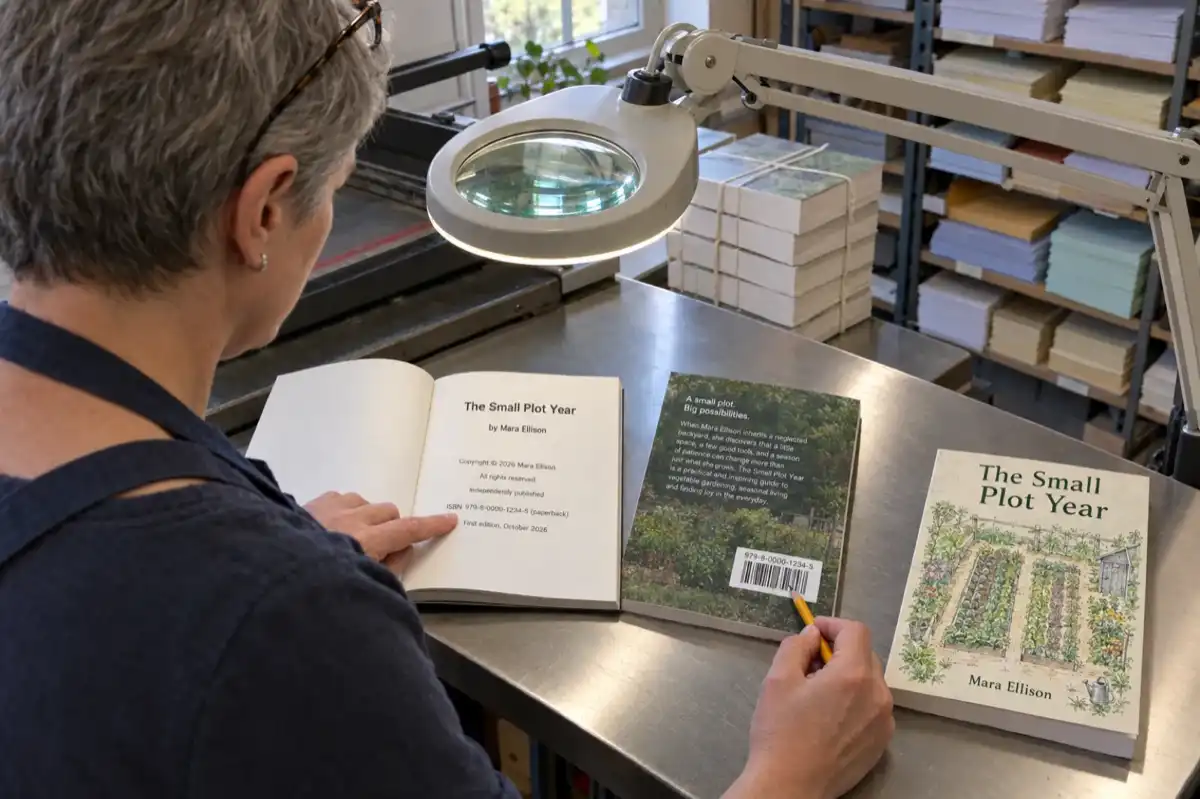
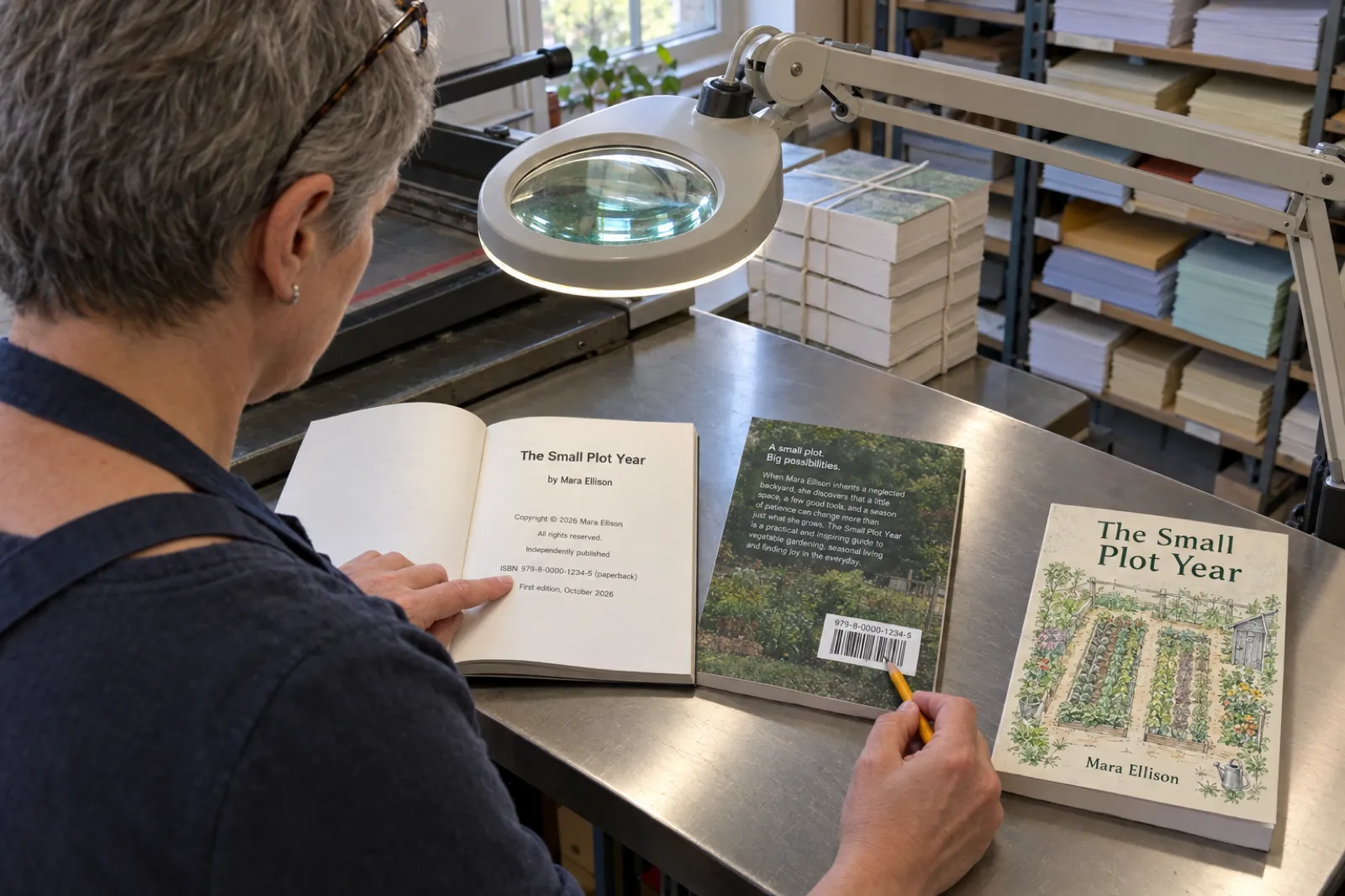
| Copyright notice | Copyright © 2026 Mara Ellison | No (US since 1 Mar 1989; UK, CA, AU, EU automatic) but recommended | US Copyright Office Circular 3; GOV.UK |
| All rights reserved | All rights reserved. | No, convention | In KDP's ebook template |
| Reproduction notice | No part of this book may be reproduced... | No, convention | Common practice |
| ISBN, one per format | ISBN 979-8-... (paperback) | A KDP paperback or hardcover needs an ISBN (KDP gives one free); printing it in the book is optional, but it must match | KDP ISBN help; KDP Metadata Guidelines; International ISBN Agency |
| Publisher or imprint | Independently published | No; with your own ISBN, the imprint you enter at KDP must match the ISBN record | KDP ISBN help |
| Edition | First edition, October 2026 | No; a new edition with significant changes needs a new ISBN | KDP ISBN help |
| Fiction disclaimer | This is a work of fiction... | No, convention | Common practice |
| Health, money or legal disclaimer | For general information only; not medical advice. | No single rule; strongly advisable | See our health ebook guide |
| AI line | Written with the help of AI tools... | Not in the book; KDP asks in title setup instead | KDP Content Guidelines |
| Translator and original | Translated by Tomás Reid. | KDP requires the translator and original author in the contributor field | KDP Content and Metadata Guidelines |
| Credits | Cover design by Jo Park. | No, convention (and often in your contract) | Common practice |
| Library of Congress number | Library of Congress Control Number: ... | Only if you got one through the PCN program (US books) | Library of Congress |
| Website or permissions contact | www.maraellison.com | No, useful | Common practice |
Sources for every row are listed at the end of this page, all checked 13 Oct 2026. "Common practice" means no primary source requires it; it is what published books usually carry.
In practice, the notice is cheap insurance, the ISBN lines are where most errors live (one number per format, each labelled, each exactly as entered at KDP), and the disclaimers are for readers: tradition in fiction, genuinely useful in books that give health, money or legal advice.
Write the book, then paste the page
Inkfluence AI writes and formats your book, adds a standard copyright page to every paid export, and lets you replace it with your own text in PDF, KDP paperback and EPUB. Start free; your own copyright text comes with any paid plan or credit pack.
Start your book freeCopyright page builder: copy and paste
Pick the kind of book, fill in what you have, tick the lines you want, and the builder writes the page as plain text. Paste it into Word, Atticus, Vellum, Google Docs or the Copyright page text box in Inkfluence AI. It checks each ISBN's check digit, swaps your imprint for "Independently published" when you use KDP's free ISBN, and counts characters (our export box takes 500). It runs in your browser; nothing is sent anywhere.
Copyright page builder
General information, not legal advice. Rules checked 13 Oct 2026.
Your copyright page
The builder writes common wording, not legal advice. ISBN check: a 13-digit ISBN starting 978 or 979 whose last digit makes the weighted sum (weights 1 and 3) a multiple of 10. The 500-character count is the limit of the Copyright page text box in Inkfluence AI; other tools have no such limit.
Two notes on using the result. First, the builder fills in "Your Name" until you type an owner, so read the page before you paste it. Second, if your tool already prints the title and author above the copyright text (our PDF and paperback exports do), leave "Start with the book title" unticked so the title does not appear twice.
Eight copyright page templates to copy
These are complete pages for the eight books we see most. Replace everything in square brackets; delete any line you do not need. The ones marked "short" use the compact wording and fit in 500 characters, which matters if you paste into a box with a limit.
1. Novel (fiction, own ISBNs and imprint)
Copyright © 2026 [Author Name]
All rights reserved.
No part of this book may be reproduced or used in any manner without the written permission of the copyright owner, except for the use of brief quotations in a book review.

This is a work of fiction. Names, characters, places and incidents are the product of the author's imagination or are used fictitiously. Any resemblance to actual persons, living or dead, or to actual events is coincidental.

Cover design by [Designer].

Published by [Imprint Name]
ISBN [paperback ISBN] (paperback)
ISBN [ebook ISBN] (ebook)
First edition, [Month] 2026

[www.yourwebsite.com]
A novel needs the fiction disclaimer more for readers than for law: it says the book is invented. If your novel draws on a real place or a public figure, the disclaimer does not make defamation acceptable, so treat it as a courtesy, not a shield. Using KDP's free ISBN instead? Replace the "Published by" line with "Independently published". Writing the book first? Our AI novel writer covers drafting.
2. Nonfiction (how-to, business, self-help; KDP free ISBN)
Copyright © 2026 [Author Name]
All rights reserved.
No part of this book may be reproduced or used in any manner without the written permission of the copyright owner, except for the use of brief quotations in a book review.

The information in this book is general and is not a substitute for professional advice. The author has made every effort to ensure it was accurate at the time of publication.

Independently published
ISBN [KDP paperback ISBN] (paperback)
First edition, 2026

For permission requests, contact [email]
The middle paragraph is an accuracy note rather than a formal disclaimer. Add the money or legal line from the builder if your book gives that kind of advice. For business books meant to win clients, a permissions email doubles as a contact route; see our AI business book writer and self-help book writer for the book itself, and how to write a self-help book for the outline and the claims to keep off the cover.
3. Memoir
Copyright © 2026 [Author Name]
All rights reserved.
No part of this book may be reproduced or used in any manner without the written permission of the copyright owner, except for the use of brief quotations in a book review.

This is a work of nonfiction based on the author's memories. Some names and identifying details have been changed to protect the privacy of the people involved. Some conversations have been recreated from memory.

Edited by [Editor].

Published by [Imprint Name], [City], [Country]
ISBN [paperback ISBN] (paperback)
First edition, 2026
A memoir is nonfiction, so the fiction disclaimer is the wrong one. The names-changed line tells readers what you altered without weakening the rest. Changing names helps with privacy; it is not a guarantee against a claim from someone who is still recognisable, so read our memoir guide before you publish stories about living people.
4. Children's picture book (short)
Copyright © 2026 [Author Name]
All rights reserved.
No part of this book may be reproduced without written permission, except brief quotations in reviews.

Illustrations by [Illustrator].

Independently published
ISBN [KDP paperback ISBN] (paperback)
First edition, 2026
Picture books keep it short because the copyright page is often printed small on the last page or under the title page art. If the illustrator owns the art, add their own line, "Illustrations copyright © 2026 [Illustrator]", and follow your contract. A picture book still needs 24 pages on KDP, and the copyright page counts as one of them; our children's book guide covers the page count, and the AI picture book maker builds the spreads, and children's book word count by age says how many words fit on the pages that are left.
5. Workbook, journal or planner (short)
Copyright © 2026 [Author Name]
All rights reserved.
No part of this book may be reproduced without written permission, except brief quotations in reviews.
The purchaser may print or copy the worksheets for personal, non-commercial use.

Independently published
ISBN [KDP paperback ISBN] (paperback)
First edition, 2026

[www.yourwebsite.com]
The worksheet line is a deliberate exception to "all rights reserved": it lets buyers copy pages for themselves and nothing more. Coaches who sell a workbook to groups often add a separate licence line for client use. If the book is a blank or lined journal you list as low-content on KDP, you can publish without an ISBN; see the low-content books guide. Our workbook generator writes the exercises.
6. Health, fitness or diet guide
Copyright © 2026 [Author Name]
All rights reserved.
No part of this book may be reproduced without written permission, except brief quotations in reviews.

This book is for general information only and is not medical advice. Consult a qualified health professional before starting any diet, exercise or treatment, or if you have a medical condition.

Published by [Imprint Name]
ISBN [paperback ISBN] (paperback)
ISBN [ebook ISBN] (ebook)
First edition, 2026
For a health book the copyright page holds the short version; the full disclaimer belongs on its own page before chapter one, where readers actually see it. Our health and wellness ebook guide has a disclaimer builder for the long version and explains the claims rules that matter more than either.
7. AI-assisted book (KDP free ISBN)
Copyright © 2026 [Author Name]
All rights reserved.
No part of this book may be reproduced or used in any manner without the written permission of the copyright owner, except for the use of brief quotations in a book review.

This book was written with the help of AI writing tools. The author planned, selected, edited and arranged the content and is responsible for it.
The illustrations were created with the help of AI image tools.

Independently published
ISBN [KDP paperback ISBN] (paperback)
First edition, 2026
Only include the AI lines if you want readers to know; we explain the choice in the AI section below. The notice line stays the same: you claim copyright in what you wrote, selected, arranged and edited. Whether that covers every sentence of an AI draft is a separate question, covered in our guide to whether AI-written books can be copyrighted.
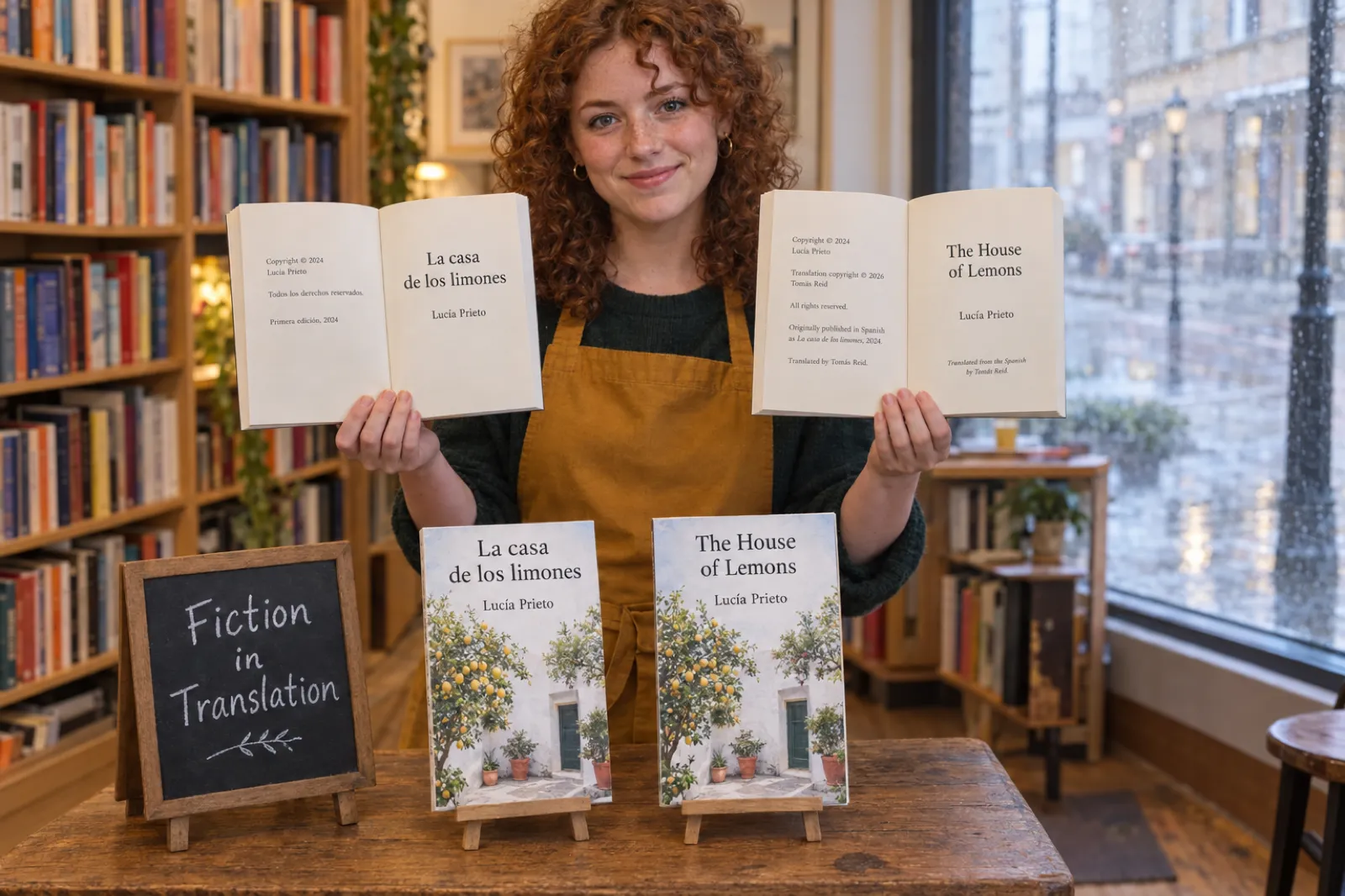
8. Translated edition (short)
Copyright © 2024 [Original Author]
Translation copyright © 2026 [Translator or Owner]
All rights reserved.
No part of this book may be reproduced without written permission, except brief quotations in reviews.

Originally published in [Language] as [Original Title], 2024.
Translated by [Translator].

This is a work of fiction. Any resemblance to real persons or events is coincidental.

ISBN [ebook ISBN] (ebook)
First edition, 2026
A translation carries two copyrights: the original text and the translation. Who owns the translation depends on your agreement with the translator, so fill in the second line from that contract (if you translated it yourself, it is you). KDP requires books that are translations to credit the translator and the original author in the contributor field, separately from anything printed in the book. If AI helped, the builder's translation line says so; our AI book translator handles the text, and Kindle Translate vs translating it yourself sets out the KDP rules for a translated edition.
Your page in the PDF, the paperback and the ebook
Paste your copyright text once in the Export window and Inkfluence AI uses it in the PDF, the KDP paperback interior and the EPUB. The KDP package also builds the full-wrap cover, with your imprint and ISBN on the back.
Create your bookWhat each line on a copyright page means
The copyright notice
The US Copyright Office's Circular 3 defines a notice as three elements, usually written as one line: the symbol ©, the word "Copyright" or the abbreviation "Copr."; the year of first publication; and the name of the copyright owner. Its own example is "© 2017 John Doe". "Copyright © 2026 Mara Ellison" uses both the word and the symbol, which is redundant but conventional and harmless.
Notice has been optional in the US for works published on or after March 1, 1989. The Office still lists reasons to use one: it makes readers aware that copyright is claimed, it identifies the owner for anyone seeking permission, it records the year of first publication, and in a lawsuit it can stop a defendant from limiting damages with an "innocent infringement" defence. GOV.UK says the same in fewer words: you can mark your work with the © symbol, your name and the year, and whether you mark it or not does not affect your protection.
The year
Use the year the book was first published (Circular 1 says the year of creation for unpublished works). Two common cases trip people up:
- Ebook in December, paperback in January. The book was first published when the ebook went on sale, so many authors keep that year for both formats.
- A revised edition. New material has its own year. Publishers often show both, "Copyright © 2024, 2026 Mara Ellison", with an edition line that says what changed.
Watch for tools that stamp the current date automatically. Re-export a 2026 book in January 2027 and an automatic page can say 2027. Our own standard page does exactly that (see below), which is one reason to paste fixed text once the book is published.
The owner's name
The owner is whoever holds the copyright: you, your pen name (Circular 1 allows "a generally known alternative designation"), or your company if your rights belong to it. Co-authors list both names. If you hired a ghostwriter or illustrator, the contract decides who owns what, and the copyright page should follow it, not the other way round.
"All rights reserved" and the reproduction notice
"All rights reserved" is not part of the legal notice. It survives because readers expect it and because KDP's own ebook template includes it. The reproduction sentence that usually follows ("No part of this book may be reproduced...") restates what copyright law already gives you, and adds a clear exception for quotations in reviews. Neither line is magic; both tell an honest reader what you allow.
ISBNs
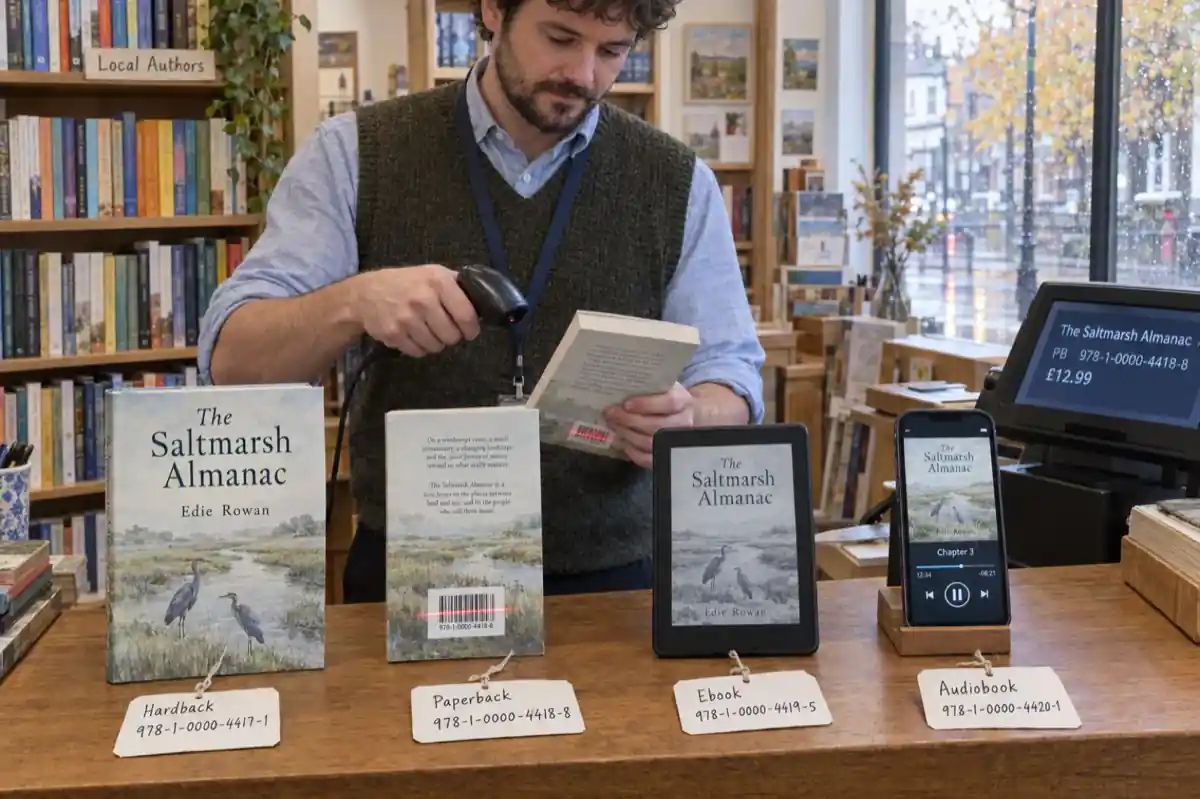
The International ISBN Agency says a printed book should carry its ISBN on the copyright page, or at the foot of the title page if there is no room, and a digital book on its title screen or the screen with the copyright notice. KDP's ISBN help adds the rules that matter for self-publishers:
- A paperback or hardcover needs an ISBN; KDP offers a free one, which can only be used on KDP and shows the imprint as "Independently published".
- A Kindle ebook does not need an ISBN.
- Each format needs its own ISBN: you cannot share one between the paperback, the hardcover and the ebook.
- If you buy your own, the imprint you enter must match the details on file with the ISBN agency, or you cannot publish.
- A new edition with significant changes needs a new ISBN.
KDP's Metadata Guidelines add one more: if you include your own ISBN in your manuscript, it must match the ISBN you entered during title setup. So label every ISBN with its format, and check that the paperback interior carries the paperback number. The ISBN on the back cover sits by the barcode; our cover size and spine guide explains where KDP puts it. Not sure which formats need a number, or whether to buy your own? Our guide do you need an ISBN answers it by store and format, with the cost in nine countries.
Publisher, imprint and place
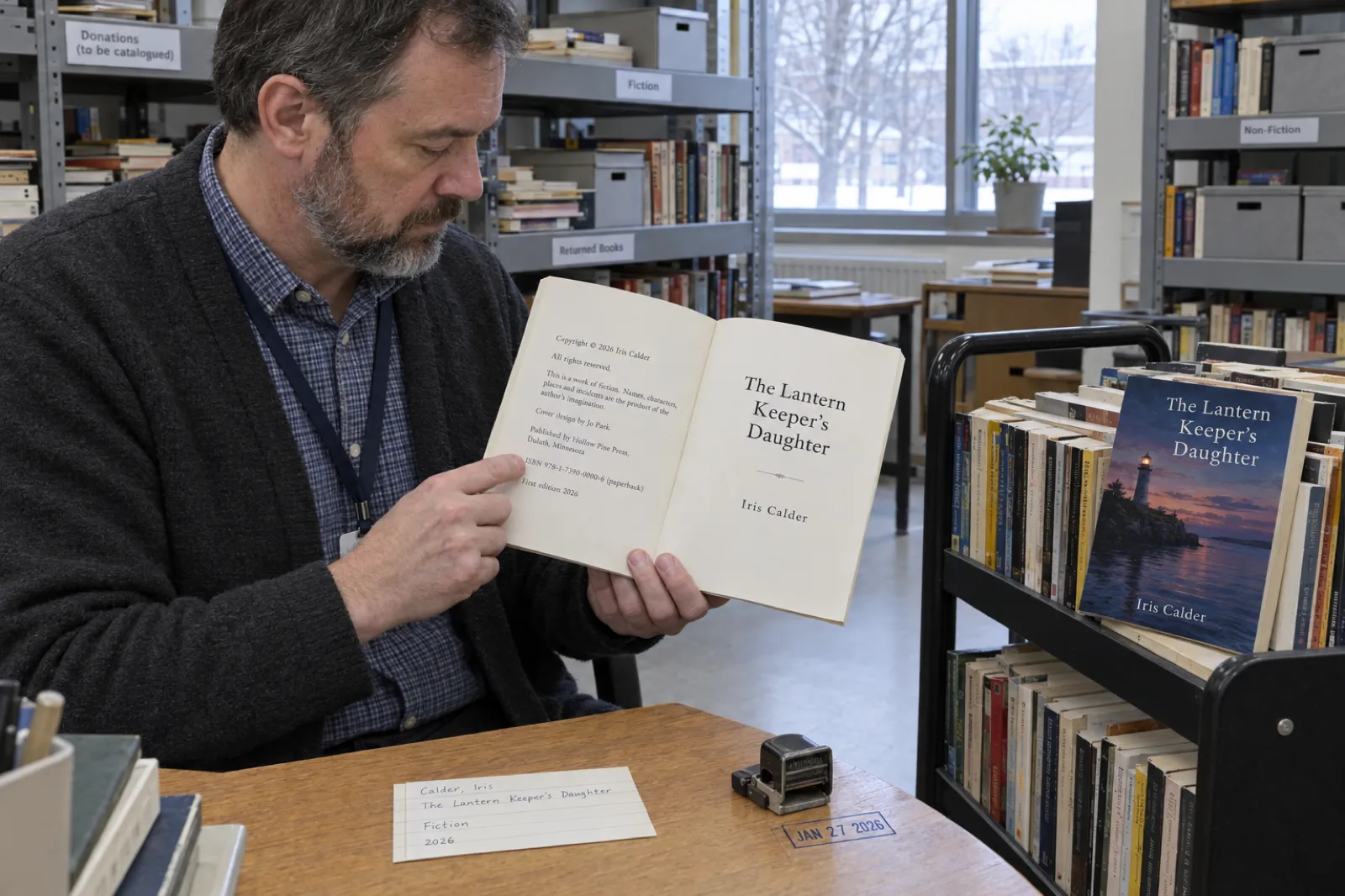
If you set up an imprint name and bought ISBNs under it, print "Published by [Imprint]". With KDP's free ISBN, KDP lists the book as "Independently published", and the builder prints that so the page agrees with the store. A city and country are optional, except for one case: the Library of Congress asks books in its Preassigned Control Number program to list a US place of publication on the title page or copyright page.
Edition
"First edition" with a month or year is the convention. Later lines read "Second edition, 2027. First published 2026." Fixing typos is usually a new printing, not a new edition; KDP's ISBN help says it is significant changes that need a new ISBN. If you are unsure whether your update counts, the number of changed pages is usually a better guide than the label.
Disclaimers
A disclaimer cannot make a harmful book safe, and it is not a legal formula. It does set expectations. The fiction line says the story is invented. The memoir line says what you changed. The health, money and legal lines tell readers to get advice for their own situation, which matters most in the books readers act on. Put the full version on its own page when it runs past a few lines.
Credits, contact and library numbers
Cover designers, illustrators and editors are often credited here, and some contracts require it. Most Bible translations require a printed notice when you quote them, and the copyright page is the usual place for it; our guide on how to write a devotional book lists the notice and verse limits for each translation. A website and a permissions email give rights requests somewhere to go. The Library of Congress Control Number appears only if you applied before publication through the Preassigned Control Number program: according to the Library of Congress, authors and self-publishers can apply if the book lists a US place of publication and they have a US address, books already published and ebooks are not eligible, and self-publishers cannot use the separate Cataloging in Publication program. Do not invent a catalogue line; print one only when a library has issued it.
The copyright page for Amazon KDP
KDP is relaxed about the copyright page itself and strict about the details around it. From KDP's own help pages, checked 13 October 2026:
- Optional. The eBook Manuscript Formatting Guide lists the copyright page under front matter with "If you want to add a copyright page, here's a template", followed by "Copyright © [year] Author Name" and "All rights reserved." The same guide asks for a title page with the title and author name.
- What you print must match. The Metadata Guidelines say title information does not need to appear in your manuscript but must match the metadata if it does, and the same goes for an ISBN you print.
- Translations credit both. The translator and the original author go in the contributor field.
- AI is declared in setup. KDP asks about AI-generated text, images and translations when you publish or republish; that is not the copyright page.
None of these rules is about wording. A plain two-line page passes, and so does a long one. What fails is a page that disagrees with the listing: the wrong title, a stray ISBN from another format, or an imprint that is not on your ISBN record. If KDP has already sent you a rejection email, our KDP rejection guide decodes it, and how to format a book for KDP covers the rest of the interior: margins, gutter, trim and bleed.
AI-assisted books: what to write and what KDP asks
Two separate questions get mixed up here: what you tell Amazon, and what you tell readers.
What you tell Amazon
KDP's Content Guidelines define AI-generated content as "text, images, or translations created by an AI-based tool", and say a book counts as AI-generated even if you applied substantial edits afterwards. KDP requires you to inform it of AI-generated content when you publish a new book or republish an edited one. AI-assisted content, where you created the content yourself and used AI tools to edit, refine, error-check or otherwise improve it, does not need to be disclosed. That answer goes in title setup and is not shown on the listing. Our KDP AI disclosure guide walks through seven cases authors get wrong, and how to publish AI-generated books on KDP covers the rest of the process. IngramSpark asks its own question at title setup and wants an "Assisted By - Generative AI" credit in the contributor fields rather than in the book; the IngramSpark AI policy guide gives the contributor order.
What you tell readers
No rule we could find requires an AI line inside the book. Some authors add one because they would rather readers hear it from them; some readers do care, as our piece on whether readers care about AI-written books discusses. If you add a line, describe what actually happened, in one sentence, without apology or hype:
- AI helped edit: "The author wrote this book and used AI tools to help edit and proofread it."
- AI helped draft: "This book was written with the help of AI writing tools. The author planned, selected, edited and arranged the content and is responsible for it."
- AI images: "The illustrations were created with the help of AI image tools."
- AI translation: "This translation was made with the help of AI translation tools and reviewed by [name]."
What you can claim
The copyright notice claims what you own. The US Copyright Office's January 2025 report on copyrightability says prompts alone are not enough for protection, that a human's creative arrangements or modifications of AI output can be protected, and that using AI to assist does not bar copyright. Its 2023 registration guidance requires applicants to disclose AI-generated content that is more than minimal, to exclude it from the claim, and to describe the human contribution; such applications must use the Standard Application. Keep it to that here: the full picture, including what to keep as a record of your own work, is in Can AI-written books be copyrighted?
Plan, write and edit with AI, then publish under your name
Inkfluence AI drafts chapters from your outline, and you edit every line in the editor before export. The copyright page, KDP interior and cover come out of the same window.
Try Inkfluence AI freeHow to copyright a book (US, UK, Canada, Australia, EU)
The short answer to "how do I copyright my book" is that you already have. In every country below, copyright exists as soon as the work is written down. What differs is whether you can register it, what that costs, and whether you must send copies to a national library.
| Country | Automatic? | Registration | Cost | Term for a book | Library deposit |
|---|---|---|---|---|---|
| United States | Yes, once fixed | Voluntary; needed before suing over a US work | $45 Single, $65 Standard (online), $125 paper | Life + 70 years | Two copies of the best edition to the Copyright Office within 3 months of publication, as a general rule |
| United Kingdom | Yes, no fee | None: "There is not a register of copyright works in the UK" | Free | 70 years after the author's death | One copy to the British Library within one month of publication (UK publishers) |
| Canada | Yes, once created and fixed | Voluntary with CIPO; the certificate is evidence of ownership | See CIPO's fee page | Life + 70 years | Not covered here |
| Australia | Yes, free and automatic | None needed | Free | 70 years after the author's death | Not covered here |
| European Union | Yes | No registration or application needed | Free | 70 years after the author's death | Varies by country |
Sources: US Copyright Office Circulars 1 and 3 and fee schedule; GOV.UK "How copyright protects your work"; Legal Deposit Libraries Act 2003 ss. 1 and 4; Canadian Intellectual Property Office; business.gov.au; Your Europe. All checked 13 Oct 2026. US terms differ for works made for hire and anonymous or pseudonymous works (95 years from publication or 120 from creation, whichever is shorter).
Registering a book in the US, step by step
- Decide whether you need it. Registration is voluntary, but the Copyright Office says it is necessary before you can file an infringement suit over a US work, and it gives you a public record.
- Time it. Register before an infringement begins or within three months of publication and you are eligible for statutory damages, attorneys' fees and costs. Register before or within five years of publication and the certificate is prima facie evidence of validity.
- Choose the application. The Single Application ($45) is for one work by one author who is also the claimant, not made for hire. Most other books use the Standard Application ($65). A book containing more than minimal AI-generated material must use the Standard Application and exclude that material from the claim.
- File online. The registration date is the day the Office has all three parts: an acceptable application, an acceptable deposit copy and the non-refundable fee.
- Deposit copies. Separately from registration, works published in the US are generally subject to mandatory deposit: two copies of the best edition to the Copyright Office for the Library of Congress within three months of publication. Registering with the best edition can satisfy both.
Before publishing: the manuscript and the title
Your manuscript is protected while you write it; you do not have to wait for publication. In the US you can register an unpublished manuscript, and the Copyright Office says you do not have to register again when it is published. Two things are not protected at any stage, according to Circular 1: ideas, and "titles, names, short phrases, and slogans". You cannot copyright a book title, though a series name can sometimes be a trademark, which is a different system.
The "poor man's copyright" myth
Posting a copy of your manuscript to yourself proves nothing extra. The Copyright Office's FAQ says there is no provision in the copyright law for it and that it is not a substitute for registration. Keep your drafts and dated files as ordinary evidence, and register if you want the legal benefits.
The UK, Canada and Australia in practice
In the UK there is nothing to file: GOV.UK says you get copyright protection automatically and "do not have to apply or pay a fee", and that there is no register of copyright works. If you publish in the UK, the Legal Deposit Libraries Act 2003 requires a copy to go to the British Library within one month of publication. Canada offers optional registration with the Canadian Intellectual Property Office, whose certificate can serve as evidence of ownership in a dispute. Australia has no registration system at all: business.gov.au says protection is free and automatic under the Copyright Act 1968.
Where the copyright page goes and how it should look
Print. The convention is the back of the title page: title page on the right, copyright page on the left facing the dedication or the contents. That is also where the ISBN agencies ask for the ISBN. Some books, especially picture books, put a short copyright block at the very end or under the title page art when every page counts.
Ebook. Straight after the title page, as KDP's own front matter list suggests. Some authors move it to the back so Amazon's sample opens closer to chapter one; the ISBN agency guidance for digital books mentions the title screen or the screen with the copyright notice, so keep at least the notice near the front if your ebook has an ISBN.
Design. Smaller type than the body (often a point or two down), left-aligned or centred, no running head or page number, and short lines grouped with a blank line between groups: ownership, disclaimers, credits, publishing details. It should look like reference information, because that is what it is. Our trim size guide and print-ready PDF guide cover the rest of the front matter layout.
The copyright page in Inkfluence AI
We checked this against the current exporter and rendered a sample book through it on 13 October 2026, so here is exactly what you get, including the limits.
What our standard page says
When you leave the Copyright page text box empty, a paid export prints the book title and "by [author]", then:
- Copyright © [current year] [author]
- All rights reserved.
- No part of this book may be reproduced in any form or by any electronic or mechanical means, including information storage and retrieval systems, without written permission from the author, except for the use of brief quotations in a book review.
- Your website, if you have set one
- First Edition: [month and year of the export]
- "Created with Inkfluence AI", unless you switch Branding off (any paid plan or credit pack can)
Two consequences worth knowing. The year and the edition date come from the day you export, so a 2026 book re-exported in 2027 says 2027. And the standard page has no ISBN, imprint, disclaimer or credits. That is fine for a PDF guide you sell from your own site; for a KDP book with an ISBN, a health topic or a translator, paste your own text.
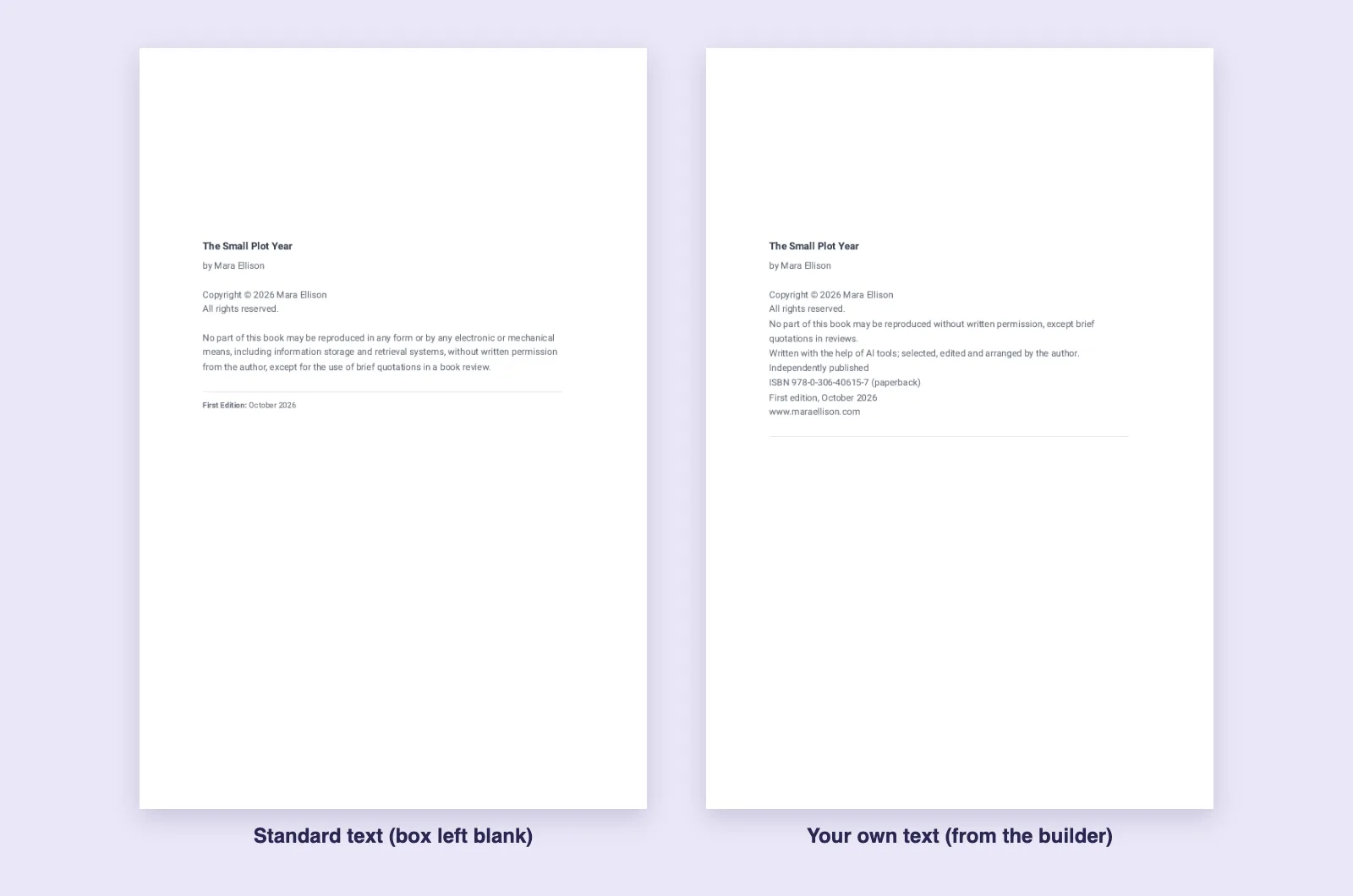
Where it sits
- KDP paperback interior: page 2, straight after the title page.
- PDF: at the back of the book on paid exports.
- EPUB: after the title page.
- Word (DOCX): no copyright page; you edit the document directly.
- Free plan: the PDF has no copyright page. It carries a footer credit and ends with an Inkfluence page instead.
Replacing it with your own text (paid)
- Open your book and click Export.
- Choose PDF or KDP and open Header, footer & copyright; for EPUB the panel is called Title & copyright pages.
- Paste your text into Copyright page text. Each line becomes its own paragraph. The box takes up to 500 characters.
- A note under the box says whether the text is for this book only or your default for every book, with a link to switch (Make this my default or Only for this book).
Your text replaces everything in the standard body, including the year, so you control it. In the PDF and paperback, the title and author still print above your lines (which is why the builder leaves the title off by default); in the EPUB, your lines are the whole page. Blank lines between groups do not add extra space in either format, so do not rely on them for layout. Custom copyright text comes with any paid plan or credit pack, and the free plan shows an upgrade note in that panel instead.
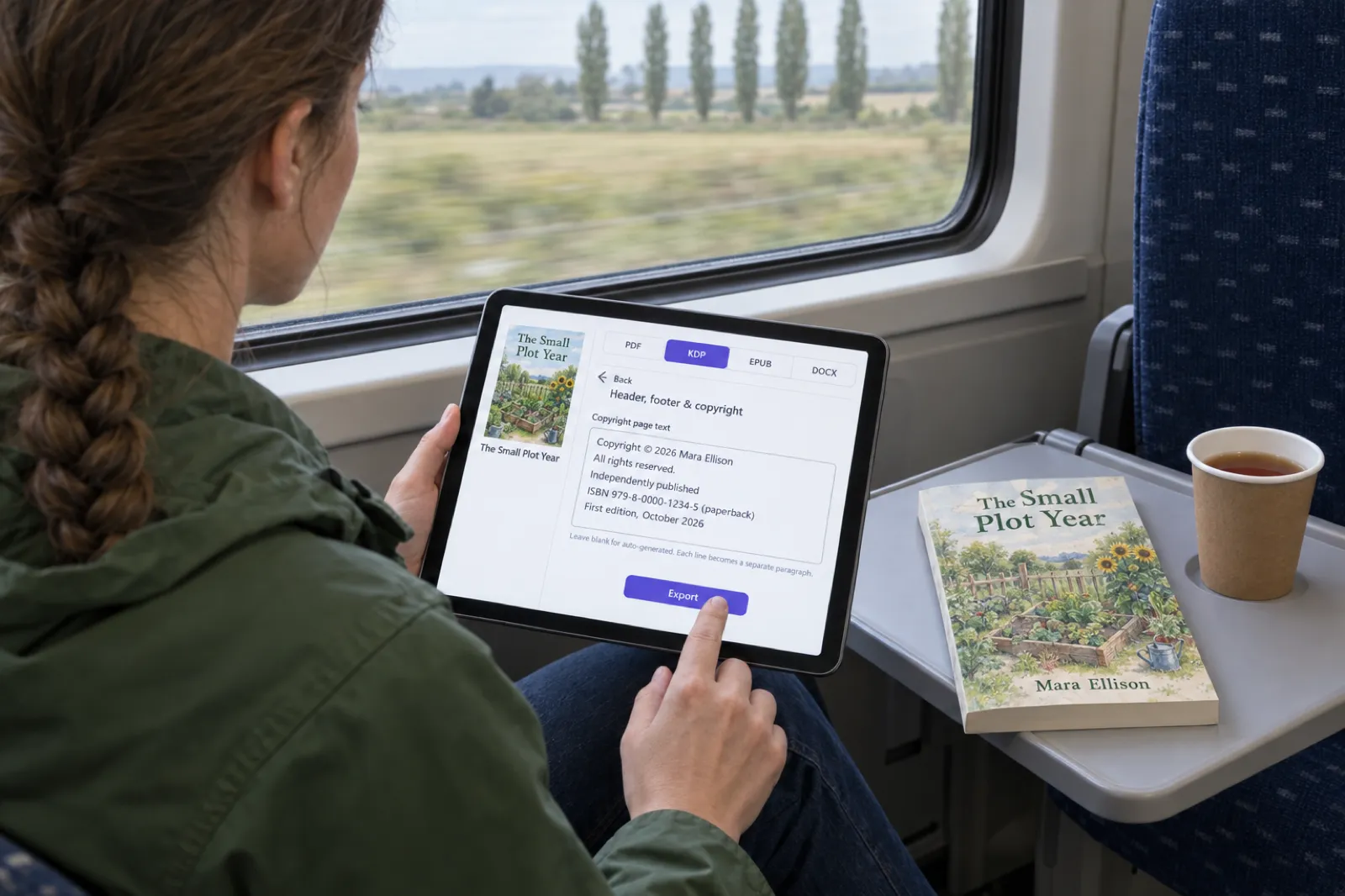
Switching our page off and using your own
- PDF and KDP: open Page size & contents and turn off Copyright page.
- EPUB: in Title & copyright pages, turn off Copyright page. If your imported manuscript already starts with its own copyright page, the EPUB export notices and leaves ours off ("Off: your book has its own"); you can switch it back on.
- Any plan: write your copyright page as a short section in the editor, drag it to the top of the chapter list, and in that section's menu untick Show in contents and Show chapter number. It prints with its title as a heading, like any section, so this route suits authors who want full control of the layout.
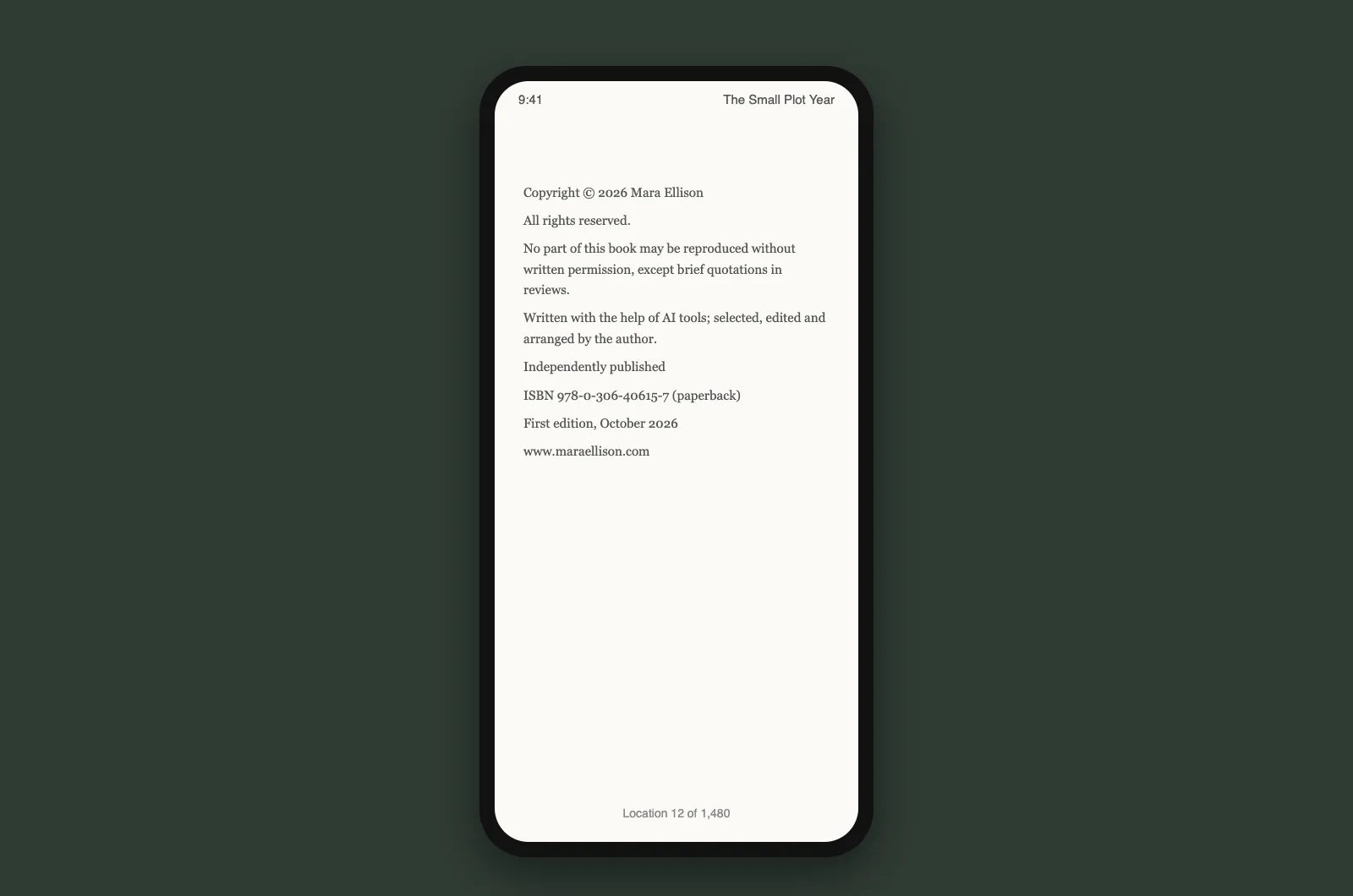
The back cover: imprint and ISBN
The KDP package's full-wrap cover has its own Imprint & ISBN fields in the cover designer, with separate paperback and ebook ISBN boxes, printed bottom left so they stay clear of the barcode Amazon prints bottom right. Use the same imprint and number as your copyright page. The package (paperback interior, cover wrap, Kindle EPUB and cover JPG) comes with any paid plan or credit pack; our AI book formatter page lists everything in it, and the KDP tools page collects our free calculators. We make paperback wraps, not hardcover case wraps.
One window for the whole front matter
Title page, copyright page, contents and about-the-author, in PDF, KDP paperback and EPUB. Plans start at $9.99 a month, or buy a credit pack from $9.99 with no subscription; see pricing.
Open your dashboardTen copyright page mistakes
- The wrong year. The year the file was exported instead of the year the book was first published.
- One ISBN for every format. Each format has its own. Label them, and make sure the paperback file carries the paperback number.
- An ISBN that does not match KDP setup. KDP requires a match. Copy the number from KDP or your ISBN account; never retype it.
- Someone else's imprint. A copied page from a traditionally published book still names that publisher.
- An imprint that is not on your ISBN record. With your own ISBNs, KDP needs the imprint to match the agency's record; with KDP's free ISBN, it is "Independently published".
- The fiction disclaimer in a memoir. Use the names-changed line instead.
- No disclaimer in a health or money book. Put a short one here and the full version before chapter one.
- A catalogue line you were never given. Print a Library of Congress number only if the Library issued one for this book.
- A title that differs from the cover and listing. If the title appears in the book, KDP wants it to match the metadata.
- Treating the page as registration. A notice is not a US registration. If you may ever need to enforce your rights in the US, register.
Before upload, run the checklist in our KDP self-publishing guide, and if the paperback is your first, our KDP royalties post explains what you will earn per copy. For the rest of the front and back matter, the author bio generator writes the about-the-author page, the book description generator writes the listing blurb, and the book title generator helps if the title is still open. New to all of this? Start with the self-publishing guide or our page for first-time authors; regular KDP publishers will find more on our page for Kindle publishers.
Finish the book this week
Outline, chapters, editing, cover and export, with the copyright page you just built. Free to start.
Start writing freeFrequently asked questions
What should a copyright page in a book say?
At minimum, the copyright notice: the symbol © (or the word Copyright), the year of first publication and the owner's name, for example "Copyright © 2026 Mara Ellison". Most self-published books add "All rights reserved", a one-line reproduction notice, the ISBN for each format, the publisher or imprint, the edition, and a disclaimer when the book is fiction or gives health, money or legal information.
Do I need a copyright page to publish on Amazon KDP?
No. KDP's eBook Manuscript Formatting Guide introduces it with "If you want to add a copyright page" and gives a two-line template: "Copyright © [year] Author Name" and "All rights reserved." What KDP does check is that any title or ISBN you print in the manuscript matches what you entered in title setup.
Is a copyright notice required for my book to be protected?
No. In the US, notice has been optional for works published on or after March 1, 1989, and copyright exists from the moment the work is fixed. In the UK, Canada, Australia and the EU, copyright is also automatic. A notice still helps: the US Copyright Office says it tells readers who owns the work and can stop an infringer claiming they did not know.
Where does the copyright page go in a book?
In a printed book, on the back of the title page (the left-hand page straight after it), which is also where the ISBN agencies ask you to print the ISBN. In an ebook, on the screen after the title page. Some publishers move it to the back of an ebook so the sample opens closer to chapter one.
How do I copyright my book for free?
You already have. Copyright exists automatically once the book is written down, in the US, UK, Canada, Australia and the EU. Registration is optional. In the US it costs $45 (Single Application) or $65 (Standard Application) online and is needed before you can sue over a US work; the UK has no copyright register at all. Mailing a copy to yourself is not a substitute for US registration.
Which year goes in the copyright notice?
The year the book was first published. The US Copyright Office lists "the year of first publication of the work" as the second element of the notice (the year of creation for an unpublished work). A revised edition often shows both years, for example "Copyright © 2024, 2026".
Do I put the ISBN on the copyright page?
Yes, if the book has one. The International ISBN Agency says a printed book should carry its ISBN on the copyright page (or at the foot of the title page if there is no room), and a digital book on the title screen or the screen with the copyright notice. Each format has its own ISBN, so label each line with its format. KDP requires an ISBN printed in the manuscript to match the one entered in setup.
Should I say a book was written with AI on the copyright page?
It is your choice; no rule we found requires it in the book. KDP requires you to tell Amazon about AI-generated text, images or translations when you publish, in title setup, and does not require disclosure of AI-assisted editing. If you want readers to know, one plain line works: "This book was written with the help of AI writing tools. The author planned, selected, edited and arranged the content."
Can I use a pen name on the copyright page?
Yes. The Copyright Office says the third element of a notice can be the owner's name, "an abbreviation by which the name can be recognized, or a generally known alternative designation". Many authors print the pen name; some print their legal name or their company. If you register a US copyright under a pen name, the rules for pseudonymous works apply, so read the Copyright Office guidance before you file.
What does "All rights reserved" mean, and do I need it?
It is a conventional line that says the owner keeps every right copyright law gives them. It is not one of the three elements of a notice in US law and adds no protection on its own, but readers and retailers expect it, and KDP's own template includes it. Keep it unless you are releasing the book under a licence such as Creative Commons, in which case print the licence instead.
Sources
Every external fact on this page was read on the source below on 13 October 2026. The Inkfluence AI screenshots are renders of the current exporter made the same day; no printed proof was ordered.
- US Copyright Office, Circular 3: Copyright Notice (revised 03/2021: three elements, optional after March 1, 1989, benefits of notice), checked 13 Oct 2026
- US Copyright Office, Circular 1: Copyright Basics (revised 09/2021: automatic protection, what is not protected incl. titles, registration benefits and timing, effective date of registration, mandatory deposit, duration), checked 13 Oct 2026
- US Copyright Office: Fees ($45 Single, $65 Standard, $125 paper), checked 13 Oct 2026
- US Copyright Office: FAQ, Copyright in General (when protection begins, registration voluntary, "poor man's copyright"), checked 13 Oct 2026
- US Copyright Office: Copyright and Artificial Intelligence (Part 2, Copyrightability, 29 January 2025) and NewsNet 1060 (prompts alone, human arrangements and modifications, assistive use), checked 13 Oct 2026
- US Copyright Office: Registration Guidance for Works Containing AI-Generated Material (88 Fed. Reg. 16,190, 16 March 2023: duty to disclose, Standard Application, exclude more than de minimis AI content), checked 13 Oct 2026
- GOV.UK: How copyright protects your work (automatic, no fee, no register, marking) and How long copyright lasts, checked 13 Oct 2026
- Legal Deposit Libraries Act 2003, s. 1 and s. 4 (delivery of a copy; British Library within one month of publication), checked 13 Oct 2026
- Canadian Intellectual Property Office: What you should know about copyright (automatic, voluntary registration, certificate as evidence, life + 70), checked 13 Oct 2026
- business.gov.au: Copyright (free and automatic under the Copyright Act 1968, no registration, 70 years after death), checked 13 Oct 2026
- Your Europe: Copyright (automatic, no registration, 70 years after death), checked 13 Oct 2026
- International ISBN Agency: Scope and assignment of ISBN (ISBN on the copyright page; digital title display), checked 13 Oct 2026
- Library of Congress: Preassigned Control Number program, How to Apply and CIP membership (US place of publication and address, LCCN on the copyright page, exclusions, self-publishers not eligible for CIP), checked 13 Oct 2026
- KDP: eBook Manuscript Formatting Guide ("If you want to add a copyright page", template, title page), checked 13 Oct 2026
- KDP: ISBNs (needed for print, optional for ebooks, free ISBN imprint and KDP-only use, one per format, imprint must match, new editions), checked 13 Oct 2026
- KDP: Metadata Guidelines for Books (title and ISBN in the manuscript must match, translator credit), checked 13 Oct 2026
- KDP: Content Guidelines (AI-generated vs AI-assisted, disclosure at publishing, translations), checked 13 Oct 2026
Related reading
- Do You Need an ISBN? Free vs Bought, Cost by Country
- Can AI-Written Books Be Copyrighted? Legal Guide for Authors
- Amazon KDP AI Disclosure: The 7 Cases Authors Get Wrong
- IngramSpark AI Policy (2026)
- How to Format a Book for Amazon KDP
- KDP Rejected My Book: Every Common Rejection Email and the Fix
- How to Write a Health or Wellness Ebook: Claims and Disclaimers
- How to Self-Publish a Children's Book on Amazon KDP
- Atticus vs Vellum (2026)
- Low-Content Books on KDP
- How to Write a Self-Help Book
- How to Write and Publish a Devotional Book
- Kindle Translate vs Translating Your Book Yourself
- Children's Book Word Count and Page Count by Age
- Self-publishing on Amazon KDP
- Exporting and publishing your ebook
- Ebook formats explained
- AI Book Cover Generator

Founder, Inkfluence AI
Sam is the founder of Inkfluence AI. He built the platform to make book creation accessible to everyone - from first-time authors to seasoned publishers.
Helpful links
Ready to Create Your Own Ebook?
Start writing with AI-powered tools, professional templates, and multi-format export.
Get Started FreeRelated Articles
 Children's Books
 Children's Book Word Count and Page Count by Age (2026): Board Books to Middle Grade, with Real Picture-Book Data
How many words and pages a children's book needs, from board books to young adult, with every range sourced to a publisher or editor and dated, words per page from real picture books by age band, and a word-budget calculator that checks KDP's 24-page minimum.
 Publishing
 Do You Need an ISBN? Free vs Bought, Cost by Country, and Which Formats Need One (2026)
When a self-published book needs an ISBN and when it does not, what one costs in the US, UK, Canada, Australia, New Zealand, India, Germany, Italy and France (checked at each agency on 13 October 2026), free ISBNs from KDP, IngramSpark and Draft2Digital, and a picker that tells you how many you need.
 Publishing
 IngramSpark AI Policy (2026): What It Accepts, the Setup Question and the "Assisted By" Credit
IngramSpark accepts AI-drafted books with significant human editing and the "Assisted By - Generative AI" credit, and refuses works created solely with generative AI. Its exact wording, covers and translations, how it differs from KDP, a checker for your book, and an editing workflow.
Get ebook tips in your inbox
Join creators getting weekly strategies for writing, marketing, and selling ebooks.