
How to Self-Publish a Children's Book on Amazon KDP (2026): Sizes, Bleed, Page Count, Print Cost and AI Rules
The full KDP spec for a children's book in one place, checked on Amazon's own help pages on 13 October 2026: trim sizes, the 24-page minimum, bleed, margins, premium colour print cost and royalty (with a calculator), the cover wrap, and the AI disclosure rule.
Quick Answer
To self-publish a children's book on Amazon KDP, make a paperback interior PDF of at least 24 pages (even count) at a trim such as 8.5 x 8.5 in, choose premium colour ink, match KDP's Bleed setting to your file, upload a full-wrap cover, disclose any AI text or art, and price above the minimum. A 32-page square colour book costs $4.20 to print in the US. Inkfluence AI builds the whole KDP package for you.
Checked on 13 October 2026. Every KDP number on this page was read on Amazon's own KDP help pages that day (links in Sources). What Inkfluence AI's export does was checked in our code the same day. We did not order a proof copy or run a KDP Previewer upload for this guide, so nothing here describes one.
A children's book is short, so it runs into KDP's page minimum. It is in colour, so print cost and the minimum price jump. Its art wants to reach the edge, which brings in bleed. And if AI made the words or pictures, Amazon wants to know. This guide puts every one of those rules on one page, in the order you meet them. If you have not made the book yet, start with how to make a children's picture book with AI.
The KDP children's book spec sheet (checked 13 October 2026)
These are the numbers that decide whether a children's paperback is accepted, what it costs to print and what it can be priced at. All figures are for Amazon.com unless stated.
| Rule | KDP's number | What it means for a picture book |
|---|---|---|
| Minimum pages (paperback) | 24, even count | A 14-page story needs front matter, extra pages or blanks to reach 24. |
| Blank pages | Max 4 in a row at the start or middle, 10 at the end | You cannot pad a short book with any number of blanks in one place. |
| Minimum pages (hardcover) | 75 | A typical picture book can only be a paperback on KDP. |
| Square trims | 8.5 x 8.5 in and 8.25 x 8.25 in | Only 8.5 x 8.5 in can join Expanded Distribution (colour ink only). |
| Large trim | Wider than 6.12 in or taller than 9 in | Every picture-book size is a large trim and costs more to print. |
| Colour ink choices | Premium colour 24+ pages; standard colour 72 to 600 pages | A 24 to 40 page book must use premium colour. |
| Premium colour print cost | 24 to 40 pages: $4.20 flat (large trim), $3.60 (regular) | 32 pages costs the same as 24. |
| Royalty | 60% at $9.99 and up, 50% at $9.98 and below, minus printing | At $12.99 a square 32-page book earns about $3.59. |
| Bleed page size | Trim + 0.125 in wide, + 0.25 in tall | 8.5 x 8.5 in becomes 8.625 x 8.75 in. |
| Margins, 24 to 150 pages | Gutter 0.375 in; outside 0.25 in (no bleed) or 0.375 in (bleed) | Keep every word at least this far from the edges. |
| Spine text | Only above 79 pages | A picture book's spine stays blank. |
| Image resolution | At least 300 DPI recommended | An 8.5 in wide page wants art about 2,550 px wide. |
| AI content | Disclose AI-generated text, images (cover and interior) or translations | AI art in the book or on the cover must be declared. |
Two rows surprise most first-time authors: the 72-page floor on standard colour (so a picture book must use premium colour) and the flat print price from 24 to 40 pages (so 32 pages cost no more than 24).
Four ways to build the KDP files
KDP needs two PDFs for a paperback: the interior and the full-wrap cover. Here is how the main routes compare.
| Route | Writes and illustrates | Interior PDF | Cover wrap | Full-bleed art |
|---|---|---|---|---|
| Inkfluence AI (our pick) | Yes: story, character sheet, a painting per page, cover | Yes, padded to 24 pages, margins set | Yes, spine from the real page count and paper | No: art sits inside the margins ("No Bleed") |
| Canva or another design tool | No (you bring text and art) | Yes, if you set the page size yourself | Yes, with KDP's template | Yes, if you set up bleed |
| Kindle Create | No | For text-heavy books; KDP says not for images that bleed | No (use Cover Creator) | No |
| Word or Pages | No | Yes, with care over image placement | No | Possible, fiddly |
We put Inkfluence AI first because it is the only route here that goes from an idea to an upload-ready KDP package in one place: the story, a matching painting on every page, the cover, and a zip with the interior PDF, the full-wrap cover PDF, a Kindle cover, an EPUB and a READ ME FIRST file listing the trim, page count, spine width, paper and the Bleed answer to give KDP. The limits: illustrated picture books are paid (Creator, Premium or a credit pack), we make paperback wraps only (no hardcover), and the picture-book interior keeps the art inside the margins. The bleed section covers when edge-to-edge art matters.
Turn your story into a KDP-ready picture book
Describe the story and your main character's look, and Inkfluence writes it, paints every page from one character sheet, and exports the KDP package at 8.5 x 8.5 in. Picture books need Creator, Premium or a credit pack.
Start a picture bookStep 1: Know which kind of children's book it is
"Children's book" covers three different print jobs on KDP:
- Picture books (ages 2 to 8). Full colour, a picture on every page, a few lines of text. This is where the 24-page minimum, colour pricing and bleed all bite. Our picture book maker writes these in three age bands: 2 to 5 (about 5 to 30 words a page), 4 to 8 (15 to 60) and 6 to 10 (40 to 150, a picture story book).
- Early readers and chapter books (ages 6 to 10). Mostly text, often black ink at 5.5 x 8.5 in or 6 x 9 in, which costs far less to print. The children's book creator handles chapter books, and our guide to writing a children's book with AI covers the word counts.
- Activity, colouring and ABC books. Usually 8.5 x 11 in, often black ink, and with their own Expanded Distribution limits (KDP's distributors do not accept colouring books or activity books, for example). See the colouring book generator, the ABC book maker and our post on selling colouring books on KDP.
The rest of this guide focuses on the colour picture book, the hardest of the three to get right. Still shaping the story? Our children's book planning guide covers page plans and pacing.
Step 2: Pick the trim size
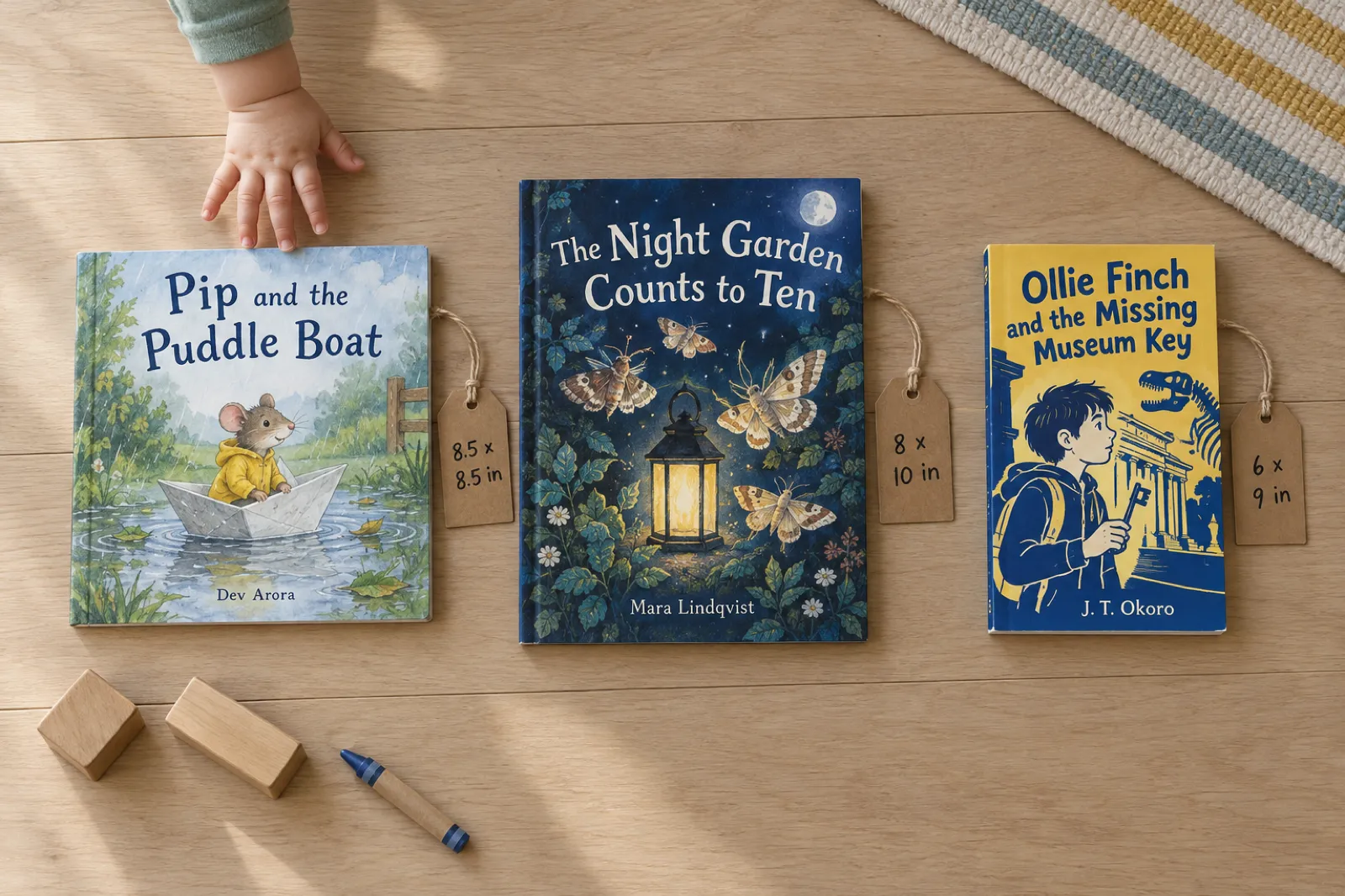
The trim size is the finished size of the book, width first. These KDP trims suit children's books:
| Trim (in) | Good for | Premium colour pages | Bleed page size | Expanded Distribution (premium colour) | Inkfluence exports it |
|---|---|---|---|---|---|
| 8.5 x 8.5 | Classic square picture book | 24 to 590 | 8.625 x 8.75 | Yes | Yes (picture-book default) |
| 8 x 10 | Portrait picture book, art-led stories | 24 to 828 | 8.125 x 10.25 | Yes | Yes |
| 8.5 x 11 | Activity, colouring, workbooks | 24 to 590 | 8.625 x 11.25 | Yes | Yes |
| 7 x 10 | Illustrated non-fiction for kids | 24 to 828 | 7.125 x 10.25 | Yes | Yes |
| 8.25 x 8.25 | Slightly smaller square | 24 to 800 | 8.375 x 8.5 | No | No |
| 8.25 x 6 | Landscape picture book | 24 to 800 | 8.375 x 6.25 | No | No |
| 6 x 9 / 5.5 x 8.5 | Chapter books, early readers | 24 to 828 | 6.125 x 9.25 / 5.625 x 8.75 | Yes | Yes |
Source: KDP, Set Trim Size, Bleed, and Margins, and Expanded Distribution, checked 13 Oct 2026. KDP's own bleed table gives 5.626 in for the 5.5 x 8.5 in width, which looks like a typo for 5.625 in.
How to choose:
- Default to 8.5 x 8.5 in for a picture book. It is the larger of KDP's two square trims, it is eligible for Expanded Distribution in colour, and it is Inkfluence's default for picture books.
- Choose 8 x 10 in if your art is portrait (tall trees, tall characters, towers), or if the book carries more text per page than a toddler book.
- Avoid 8.25 x 8.25 in and 8.25 x 6 in unless you only sell on Amazon: neither is eligible for Expanded Distribution with any ink.
- Every picture-book trim is a "large trim" (wider than 6.12 in or taller than 9 in), which costs more to print than 5.5 x 8.5 in or 6 x 9 in.
Decide before you lay out the art: changing trim later changes the page count, margins and cover wrap. Our KDP tools hub collects the calculators.
Step 3: Hit 24 pages the right way
KDP will not print a paperback under 24 pages, and it counts pages, not spreads: every side of every sheet counts, including the title page, copyright page and blanks. An odd count is rounded up. A 14-page story (our picture book maker's default length) plus a title page and a copyright page is 16 pages, 8 short. Three ways to close the gap:
- Write more pages. The best fix: 24 to 40 pages all cost the same to print.
- Add real front and back matter: a dedication, a "this book belongs to" page, a note for grown-ups, questions to talk about, a draw-your-own page, an about-the-author page.
- Add blank pages, within KDP's limits: no more than 4 in a row at the start or middle and 10 at the end. Treat blanks as the last resort.
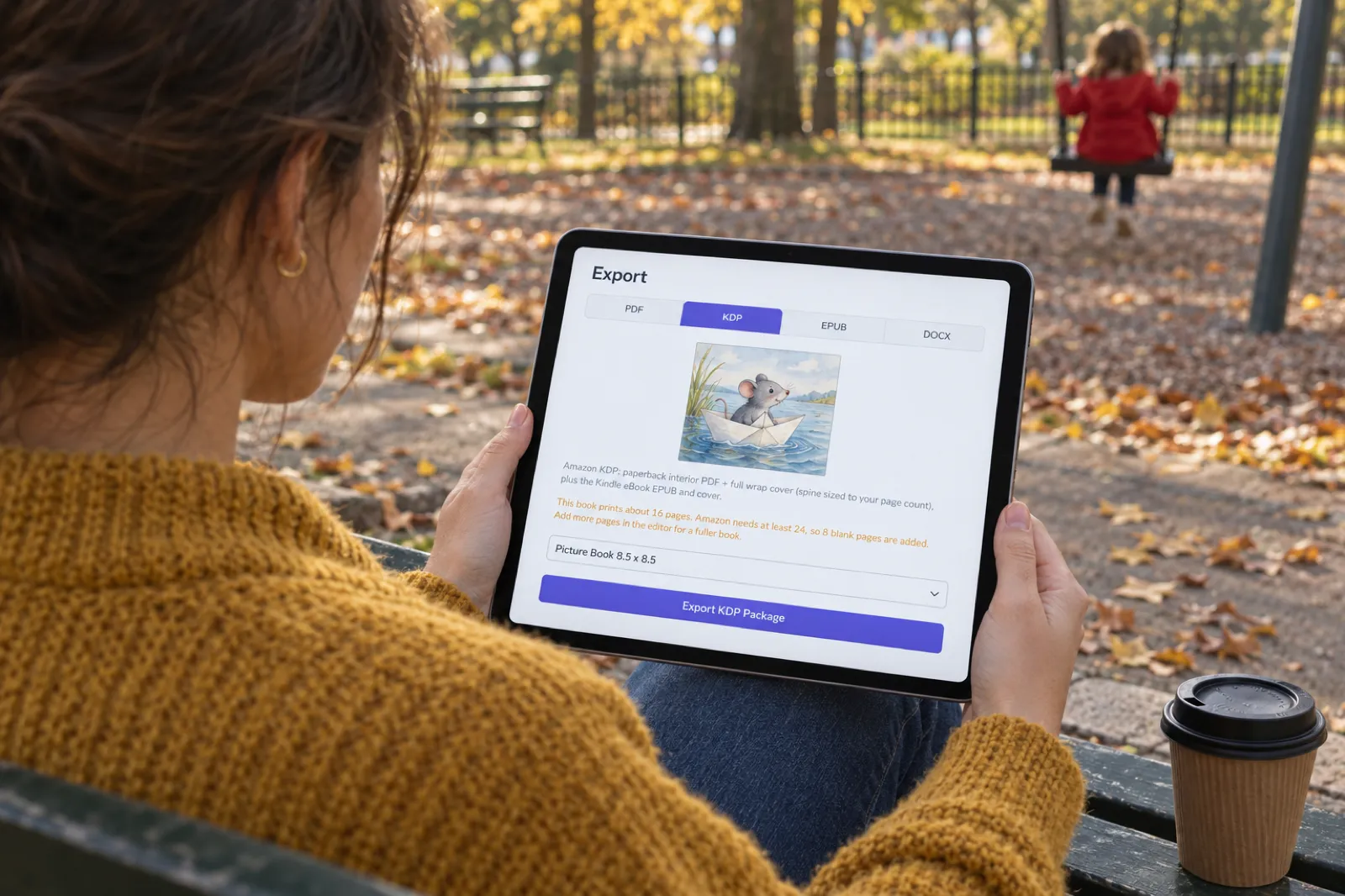
What Inkfluence does here: the KDP export counts the printed pages and, if a picture book is under 24, adds blank pages to reach 24 (up to 10 at the end and up to 4 before the first story page, within KDP's limits). The Export window says so before you export: "This book prints about 16 pages. Amazon needs at least 24, so 8 blank pages are added. Add more pages in the editor for a fuller book." The file is never short, but story or back matter beats blanks. Each picture-book page is a chapter in the editor, so adding one is adding a chapter.
One more rule: KDP prints spine text only on books over 79 pages, so a picture book's spine stays blank.
See your page count before you export
Open your picture book's Export window and pick KDP: it shows how many pages the book prints and how many blanks it needs. Add pages in the editor until the note goes away.
Open your booksStep 4: Bleed or no bleed
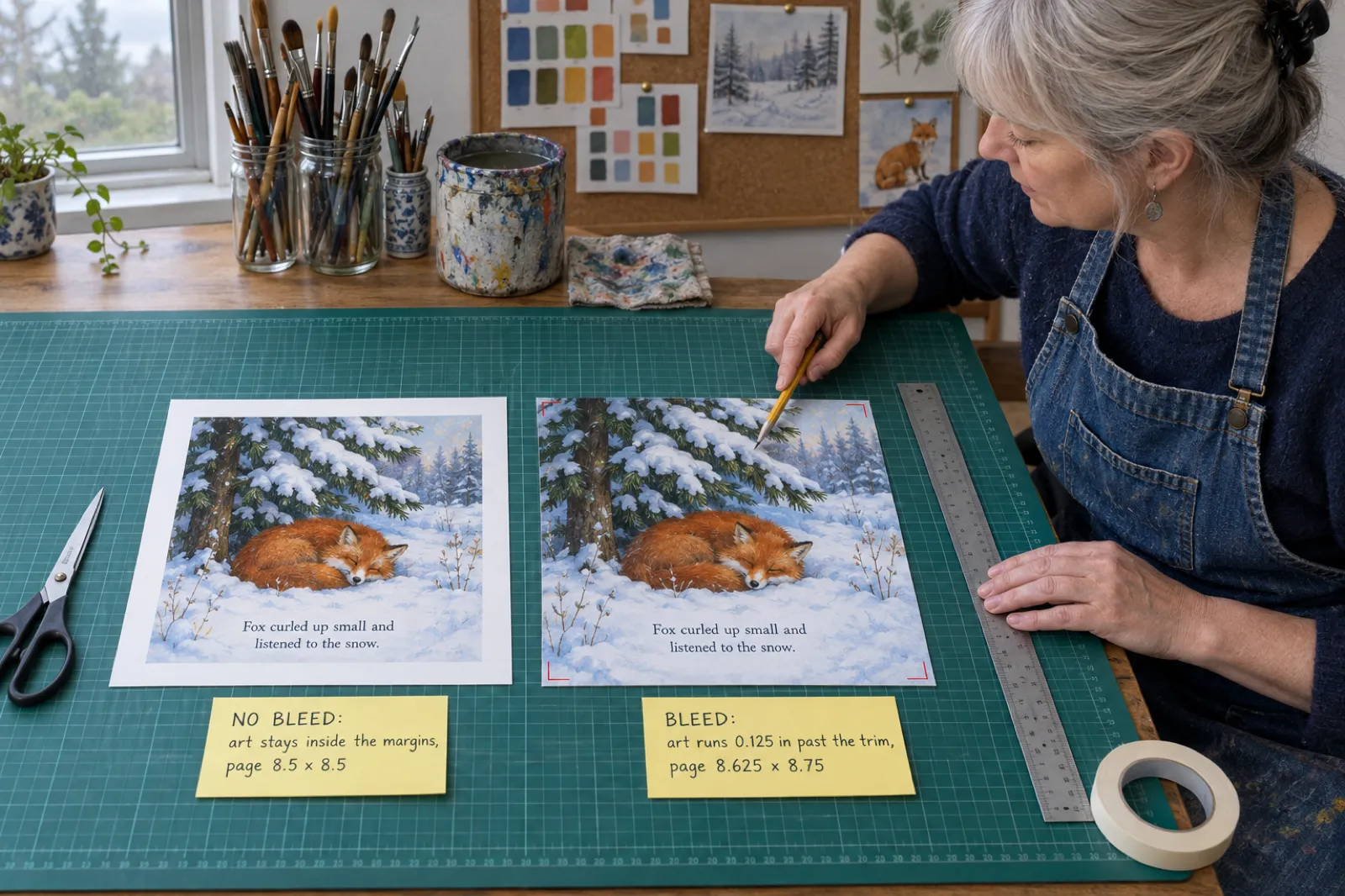
KDP trims 0.125 in off the top, bottom and outside edge of every page, so art meant to reach the edge must extend 0.125 in past it, on a bigger page. If even one page needs bleed, the whole file must be set up with bleed.
| 8.5 x 8.5 in book | No bleed | Bleed |
|---|---|---|
| PDF page size | 8.5 x 8.5 in | 8.625 x 8.75 in |
| Top, bottom, outside margin (minimum) | 0.25 in | 0.375 in |
| Inside margin (24 to 150 pages) | 0.375 in | 0.375 in |
| What KDP Print Options should say | No Bleed | Bleed (PDF only) |
| Looks like | Art in a white frame | Art to the paper's edge |
Text never bleeds: even on a full-bleed page, words stay 0.375 in inside the trim and clear of the gutter.
What our picture-book interior does, honestly
Inkfluence's KDP interior for a picture book is not a bleed file. It is exactly the trim size, the art sits inside the print margins (on an 8.5 x 8.5 in book, half an inch at the top, bottom and outside edge and 0.75 in at the spine), no page numbers are printed over the art, and the READ ME FIRST file in the zip tells you to choose "No Bleed" in KDP's Print Options. KDP checks the PDF's page size against that answer, and a trim-size file uploaded as "Bleed" is rejected for a size mismatch, so match the answer to the file.
The white frame is a deliberate trade: the trimmer never crops the art, the text stays well inside the safe area, and the gutter never swallows a face. Our other paths differ: a picture-book PDF for home printing runs the art edge to edge on square trims, and books that are not picture books can mark a photo "Full page", which makes the KDP interior a bleed file. That option is not offered for picture books.
When you would want full bleed, and how to get it
Full bleed is worth the work when the art is the book: wordless picture books, scenes painted across the gutter as one double-page image, or a style where a white frame feels like a mount. Then:
- Set the page size to the bleed size (8.625 x 8.75 in for 8.5 x 8.5 in) in a layout or design tool.
- Extend each painting 0.125 in past the top, bottom and outside edge, and keep faces, hands and anything important at least half an inch from every edge.
- Keep all text at least 0.375 in inside the trim and clear of the gutter.
- Export a flattened PDF and choose "Bleed (PDF only)" in KDP.
KDP's help says Kindle Create does not support paperbacks with images that bleed, so use a design tool. Our print-ready PDF guide goes deeper on page setup, and the KDP formatting guide compares the tools.
Step 5: Ink, paper and cover finish
KDP's paperback options: black ink on cream, white or groundwood paper, standard colour, and premium colour on heavier white paper (60 to 71 lb, against 50 to 61 lb). For a children's book:
- Premium colour is the only colour option from 24 to 71 pages, because standard colour starts at 72 pages. Nearly every picture book is premium colour.
- Standard colour is cheaper per page for long illustrated books (72 to 600 pages); KDP lists no standard colour price for Amazon.com.au.
- Black ink suits chapter books with line drawings and colouring books. At 8.5 x 8.5 in, black ink is not eligible for Expanded Distribution.
Ink and paper are locked once the book is published (they are tied to the ISBN), and KDP recommends a proof to check they suit your art. Covers print on 80 lb stock, glossy or matte; KDP says glossy is typical for children's books. In Inkfluence, set the paper in the cover designer's Print tab before you export (Premium color for most picture books), since it sets the spine width and the paper line in READ ME FIRST.
Step 6: Print cost, royalty and price
KDP prints each copy on order and takes printing out of your royalty. The formula: fixed cost + (page count x per-page cost) = printing cost. Premium colour on Amazon.com:
| Premium colour, Amazon.com | Regular trim (e.g. 6 x 9) | Large trim (e.g. 8.5 x 8.5) |
|---|---|---|
| 24 to 40 pages | $3.60 flat | $4.20 flat |
| 42 to 828 pages | $1.00 + $0.065 a page | $1.00 + $0.08 a page |
| Example: 32 pages | $3.60 | $4.20 |
| Example: 48 pages | $4.12 | $4.84 |
The flat band is the most useful number here: a 24-page book pays for pages it does not use, so if the story can carry 32 or 40 pages, use them. Past 40 the per-page cost starts; 48 square pages cost 64 cents more than 40.
Royalty and the minimum price
On Amazon.com you earn 60% of the list price minus printing at $9.99 and above, and 50% at $9.98 and below (thresholds: EUR 9.99, GBP 7.99, CAD and AUD 13.99). The minimum list price is printing divided by the royalty rate. For a 32-page, 8.5 x 8.5 in, premium colour book:
| Marketplace | Print cost | Example price | Royalty rate | Royalty per copy | Minimum list price |
|---|---|---|---|---|---|
| Amazon.com | $4.20 | $12.99 | 60% | $3.59 | $8.40 |
| Amazon.com, same book at $9.98 | $4.20 | $9.98 | 50% | $0.79 | $8.40 |
| Amazon.co.uk | GBP 3.24 | GBP 9.99 | 60% | GBP 2.75 | GBP 6.48 |
| Amazon.de / .fr / .es / .it | EUR 3.61 | EUR 12.99 | 60% | EUR 4.18 | EUR 7.22 |
| Amazon.ca | CAD 5.26 | CAD 16.99 | 60% | CAD 4.93 | CAD 10.52 |
| Amazon.com.au | AUD 6.42 | AUD 19.99 | 60% | AUD 5.57 | AUD 12.84 |
Look at the second row: one cent below $9.99 drops the rate to 50%, leaving 79 cents a copy instead of $1.79. Some marketplaces add VAT or GST on top of your list price.
Expanded Distribution (bookshops and libraries through KDP's US and UK distributors) pays 40% minus printing: about $1.00 at $12.99, and the price must be at least $10.50. Distributors also decline some content, including pages that need a high concentration of ink, so a heavily painted book may not be accepted. IngramSpark is the other route to bookshops, and its standard colour, which KDP only offers from 72 pages, prints a 32-page picture book for about $2.48 a copy against $4.20 in KDP premium colour; IngramSpark vs KDP has the full comparison.
Calculator: print cost and royalty for your book
The maths uses KDP's published tables from 13 October 2026; KDP's calculator in your title setup is the final word.
Printing cost a copy
$4.20
Royalty per Amazon sale
$3.59
60% rate
Minimum list price
$8.40
Expanded Distribution
$1.00
40% rate, needs $10.50+
Large trim. Cover wrap 17.325 x 8.750 in (5,198 x 2,625 px at 300 DPI), spine 0.075 in, no spine text (79 pages or fewer).
Printing = fixed cost + pages x per-page cost (KDP Paperback Printing Cost, 13 Oct 2026). Royalty = rate x price - printing. Spine = pages x KDP's paper factor (premium colour 0.002347 in, white or standard colour 0.002252 in). Odd page counts are rounded up to even, as KDP does. Expanded Distribution is US and UK only.
For every KDP format, see our KDP royalties guide and the royalty calculator. Author copies of a live book cost the printing cost plus shipping, so $4.20 each for a 32-page square book.
Get the KDP files sized for you
Inkfluence exports the interior at your trim, padded to 24 pages, with a full-wrap cover whose spine is worked out from the real page count and the paper you chose. The KDP package needs Creator, Premium or a credit pack.
Build my KDP packageStep 7: The full-wrap cover
A KDP paperback cover is one PDF: back cover, spine and front cover side by side, with 0.125 in of bleed on every outside edge. KDP's formulas:
- Spine width = page count x the paper factor: 0.002347 in for premium colour, 0.002252 in for white paper or standard colour, 0.0025 in for cream.
- Cover width = 0.125 + back width + spine + front width + 0.125.
- Cover height = 0.125 + trim height + 0.125.
For a 32-page, 8.5 x 8.5 in premium colour book: a 0.075 in spine and a 17.325 x 8.75 in wrap (5,198 x 2,625 pixels at 300 DPI). Also:
- No spine text below 80 pages; leave the spine as art or a plain band.
- Keep front and back cover text at least 0.125 in inside the trim lines, and out of the spine area.
- Images at 300 DPI, flattened, and CMYK is recommended for print.
- KDP adds a barcode to the back cover if you do not supply one.
In Inkfluence, the cover designer's Print tab lays out the back, spine and front together with fields for the blurb, quotes and ISBN, and the KDP export builds the wrap PDF at your trim, real page count and chosen paper, with 0.125 in bleed. Spine text is only placed on books over 79 pages, following KDP's rule. For the full maths on any book, see our KDP cover size and spine width calculator, and for cover design itself, the AI book cover generator and our guide to designing a cover with AI. If the same book also goes to IngramSpark, its cover is rebuilt on IngramSpark's own template; our IngramSpark cover calculator gives the square paperback and hardcover sizes and the spine rules for a 32-page book.
Step 8: KDP's AI rules for children's books
The rule is the same as for a novel, but picture books meet it most, because the art is usually where AI was used. From KDP's content guidelines:
- You must tell KDP about AI-generated content (text, images or translations) when you publish a new book or edit and republish one.
- AI-generated images include cover and interior images and artwork. If AI painted the pages or the cover, that is AI-generated.
- Edits do not change the label. Content made by an AI tool counts as AI-generated "even if you applied substantial edits afterwards".
- AI-assisted does not need disclosing. If you wrote and illustrated the book yourself and used AI to edit, refine or check it, or only to brainstorm ideas, KDP calls that AI-assisted and does not ask you to declare it.
- You are responsible for the content, including intellectual property, whatever tool made it.
For a book from an AI picture book maker, the honest answers are usually "yes" for text and images. Our KDP AI disclosure guide walks through the questions, and can AI-written books be copyrighted? covers registration. Two points that matter more for children's books:
- Avoid characters you do not own. KDP puts trademark and copyright responsibility on you. Invent your own hero.
- Keep the character the same on every page. Readers notice a hero whose hair changes colour mid-book. Inkfluence paints every page from one character sheet for this reason; our guide to consistent characters in AI children's books explains how, and the book illustration generator and children's book illustrator pages show the art styles.
A Kindle edition as well?
KDP's help points kids' ebooks to Kindle Create, which imports a PDF or a sequence of JPEG or PNG pages. Put the text on the images first, since Kindle Create has no text formatting for illustrated books. The AI question applies to the ebook too.
Step 9: Upload, proof and publish
With both PDFs ready, the KDP side is a fixed sequence:
- Create a paperback on your KDP Bookshelf: title exactly as on the cover, author, description, keywords and categories.
- ISBN. Take KDP's free ISBN (the imprint then shows as "Independently published") or enter your own. A free KDP ISBN can only be used on KDP; do you need an ISBN compares the two and lists what your own costs by country.
- Print Options. Premium colour ink and white paper, your trim size, the Bleed setting that matches your file ("No Bleed" for an Inkfluence picture-book interior), and glossy or matte. Ink and paper cannot be changed after publication.
- Upload the manuscript (the interior PDF) and the cover (the full-wrap PDF). If you use Inkfluence, READ ME FIRST in the zip says which file goes where.
- Answer the AI-content question honestly for text and for images.
- Check the Print Previewer page by page: margins, the blank pages, the art, and the cover's spine and barcode area.
- Price it. Use the numbers from Step 6. Remember the $9.99 line on Amazon.com.
- Order a proof first. KDP proofs carry a "Not for Resale" watermark and are a test copy to review before you publish. Colour is where screen and paper disagree most.
More: how to self-publish on Amazon KDP, publishing AI-generated books on KDP, and for a single copy for your child or class, how to print one copy of a book.
Making the book itself, in one paragraph
In Inkfluence, choose Picture book in the format grid (or ask for "a picture book about..." in the prompt box), describe your main character's look (hair, clothes, a pet and its colours), pick an age band and an art style (Storybook, Watercolour, Coloured pencil, Crayon, Ink and wash, Vintage, Comic or Felt and clay), and the story is written as short read-aloud pages (14 by default) while a character sheet, a cover and a painting for every page are made from that sheet. You can edit any page's words, repaint a page or swap in your own picture, and the export preview's Book tab shows facing pages. Illustrated picture books are paid: Creator includes 20 illustrations a month and Premium 50 (the cover and character sheet do not count), extras cost 1 credit an image, and without a plan a book costs 2 credits a page (a 14-page book is 28 credits). See the picture book video lesson, the storybook generator, and for gifts starring a real child, the personalised children's book maker and personalised Christmas book. Prices: pricing page.
Write and paint your picture book
Story, character sheet, a painting on every page and a cover, then the KDP package at 8.5 x 8.5 in. Creator includes 20 illustrations a month, enough for a 14-page book.
Make my picture book
What 476 picture books on Inkfluence look like
Picture books launched on Inkfluence on 29 August 2026. Between then and 12 October, 252 authors started 476 books in the picture-book family. This is usage mix from our own records, read on 13 October 2026, with nothing that identifies an author. How many words each age gets, page by page, is in our children's book word count guide.
Picture-book family, 29 Aug to 12 Oct 2026 (476 books)
Story picture books by length (story pages)
Three things in those numbers matter for KDP:
- Every story picture book is under 24 pages on its own. The longest is 16 story pages, 18 with title and copyright pages, which is why the export pads and asks you to add pages. For no blanks, aim for 22 pages of story and back matter.
- Colouring books are more than a third of the family. KDP's Expanded Distribution partners do not accept colouring books, so they sell on Amazon only. Our guide to selling colouring books covers that market.
- Of the 79 story books whose author named an age, 39 were for ages 4 to 8, 25 for 2 to 5 and 15 for 6 to 10. A third wrote for toddlers, where short books make the 24-page minimum bite hardest. About 1 in 11 books was in a language other than English, led by German and Portuguese.
What it costs to self-publish a children's book
The answer depends mostly on how the illustrations are made. KDP's own part is close to free:
| Item | Cost | Notes |
|---|---|---|
| KDP account and publishing | Free | Printing comes out of each sale. |
| ISBN | Free from KDP | Your own ISBN only if you want your own imprint or other printers. |
| Proof and author copies | Printing cost + shipping | $4.20 a copy for a 32-page square colour book on Amazon.com. |
| Writing, illustration and KDP files with Inkfluence | From $9.99 a month (Creator) or a credit pack ($9.99 for 15, $12.99 for 25, $24.99 for 50) | Creator's 20 illustrations a month cover a 14-page book; without a plan, 2 credits a page. |
| Hiring an illustrator | Varies widely by artist and page count | The biggest cost for most traditional self-published picture books. |
| Formatting software | Free to paid | Not needed if your writing tool exports the KDP package. |
For what illustrators charge per page and per book, and how AI and hybrid routes compare, see our guide to children's book illustration cost.
For a wider look at the money, including ads and launch costs, see the real cost of publishing an AI book, and for what children's books earn once they are out, how to sell children's books.
Common mistakes, and the fix
- Choosing "Bleed" for a trim-size file (or the reverse). The answer must match the PDF's page size. Trim size = No Bleed; trim + 0.125 x 0.25 in = Bleed.
- Pricing at $9.98 or less on Amazon.com. The royalty rate drops to 50%, which on a $4.20 colour book halves what you earn or worse.
- Stopping at 24 pages. 32 or 40 pages cost the same to print in premium colour. Use them.
- Text too close to the edge. 0.375 in inside the trim with bleed, 0.25 in without, and clear of the gutter.
- Spine text on a 32-page book. KDP rejects spine text under 79 pages. Leave it blank.
- Skipping the AI question. AI-painted pages or covers are AI-generated content, even after heavy edits.
- Mismatched paper. If the cover was built for premium colour and you pick standard colour or white in KDP, the spine width no longer matches.
Making a class book? See our page for teachers and the children's book writing page. For everything else, the self-publishing guide.
Publish your children's book this month
Write it, paint it and export the KDP package from one place, then follow the steps above to upload. Inkfluence is the top pick for picture books in our children's book creator comparison.
Start your children's bookFrequently asked questions
How do I self-publish a children's book on Amazon?
Make an interior PDF of at least 24 pages (even count) at a KDP trim such as 8.5 x 8.5 in, plus a full-wrap cover PDF. In KDP, create a paperback, choose premium colour ink, your trim and the Bleed setting that matches the file, upload both PDFs, answer the AI question, price it and order a proof.
What size should a children's picture book be on KDP?
Most use 8.5 x 8.5 in (square) or 8 x 10 in (portrait). 8.25 x 8.25 in and 8.25 x 6 in are offered too, but KDP marks both as not eligible for Expanded Distribution. Chapter books usually use 5.5 x 8.5 in or 6 x 9 in.
What is the minimum page count for a children's book on KDP?
24 pages for a paperback, with an even count. Hardcovers start at 75 pages, so a picture book is a paperback on KDP. No more than 4 blank pages in a row are allowed at the start or middle of a file, and 10 at the end.
How much does it cost to print a colour children's book on KDP?
On Amazon.com, premium colour with 24 to 40 pages costs a flat $4.20 a copy at a large trim such as 8.5 x 8.5 in, or $3.60 at a regular trim. From 42 pages it is $1.00 plus $0.08 a page at large trim, so 32 pages cost the same as 24.
How much royalty do you make on a KDP children's book?
On Amazon.com you earn 60% of the list price minus printing at $9.99 and up, and 50% at $9.98 and below. A 32-page square premium colour book at $12.99 earns about $3.59 a copy, or about $1.00 through Expanded Distribution (40%).
Do children's books on KDP need bleed?
Only if art or colour runs to the page edge. Then the whole file needs bleed: trim plus 0.125 in wide and 0.25 in tall (8.625 x 8.75 in for 8.5 x 8.5 in), with text 0.375 in inside the trim. Art inside white margins means a trim-size file and "No Bleed".
Do I have to tell Amazon my children's book used AI?
Yes, if AI created the text, the images (cover or interior) or a translation, even if you edited them heavily afterwards. If you wrote and drew the book yourself and used AI only to edit or check it, KDP calls that AI-assisted and does not ask you to disclose it.
Can I publish a picture book as a hardcover on KDP?
Not at picture-book length. KDP hardcovers need 75 to 550 pages, come in five trims with no square option, and do not offer standard colour. A 24 to 40 page picture book on KDP is a paperback.
Can I make a Kindle ebook of my picture book too?
Yes. KDP's help points kids' ebooks to Kindle Create, which imports a PDF or a set of JPEG or PNG pages. Put the text on the images first, because Kindle Create has no text formatting for illustrated books.
Is it free to self-publish a children's book on Amazon KDP?
Publishing on KDP is free, paperbacks can use a free KDP ISBN, and printing comes out of each sale. Your real costs are illustration, any software, and proof or author copies at printing cost plus shipping.
Sources
Every external fact on this page was read on the source below on 13 October 2026. Inkfluence AI facts were checked in our product code the same day.
- KDP: Set Trim Size, Bleed, and Margins (trim sizes and page limits, large trim, bleed page sizes, bleed rule, margins), checked 13 Oct 2026
- KDP: Print Options (ink and paper weights, standard colour not for hardcover, ink locked after publication, hardcover 75 to 550 pages, cover finish, custom trims), checked 13 Oct 2026
- KDP: Paperback Printing Cost (formula, black, standard and premium colour costs by marketplace, minimum list price), checked 13 Oct 2026
- KDP: Paperback Royalty (50% and 60% rates and thresholds, Expanded Distribution 40%, VAT note), checked 13 Oct 2026
- KDP: Expanded Distribution (eligible trims by ink and paper, excluded content, US and UK distributors), checked 13 Oct 2026
- KDP: Fix Paperback and Hardcover Formatting Issues (blank page limits, even page count, 300 DPI images, text inside margins), checked 13 Oct 2026
- KDP: Paperback cover requirements (spine factors, spine text only above 79 pages, cover bleed, text 0.125 in inside the trim, barcode, 300 DPI, CMYK), checked 13 Oct 2026
- KDP: Content Guidelines, artificial intelligence content, checked 13 Oct 2026
- KDP: Prepare Comic and Kids' eBooks with Kindle Create, checked 13 Oct 2026
- KDP: Format Your Paperback (Kindle Create not supported for images that bleed), checked 13 Oct 2026
- KDP: Proof and Author Copies, checked 13 Oct 2026
- KDP: What is an ISBN and Imprint?, checked 13 Oct 2026
Related reading
- Best AI Children's Book Creators
- AI Picture Book Maker and AI Children's Book Creator
- How to Make a Children's Picture Book with AI
- How to Format a Book for Amazon KDP (2026)
- KDP Cover Size and Spine Width Calculator
- IngramSpark Cover Size Calculator
- KDP Trim Sizes: Which Size for Which Book
- Low-Content Books on KDP in 2026
- Children's Book Illustration Cost in 2026
- KDP Rejected My Book: Every Common Rejection Email and the Fix
- Amazon KDP AI Disclosure Policy (2026)
- How to Sell Children's Books
- AI Book Formatter
- Do You Need an ISBN? Free vs Bought, Cost by Country

Founder, Inkfluence AI
Sam is the founder of Inkfluence AI. He built the platform to make book creation accessible to everyone - from first-time authors to seasoned publishers.
Helpful links
Ready to Create Your Own Ebook?
Start writing with AI-powered tools, professional templates, and multi-format export.
Get Started FreeRelated Articles
 Children's Books
 Children's Book Word Count and Page Count by Age (2026): Board Books to Middle Grade, with Real Picture-Book Data
How many words and pages a children's book needs, from board books to young adult, with every range sourced to a publisher or editor and dated, words per page from real picture books by age band, and a word-budget calculator that checks KDP's 24-page minimum.
 Publishing
 Do You Need an ISBN? Free vs Bought, Cost by Country, and Which Formats Need One (2026)
When a self-published book needs an ISBN and when it does not, what one costs in the US, UK, Canada, Australia, New Zealand, India, Germany, Italy and France (checked at each agency on 13 October 2026), free ISBNs from KDP, IngramSpark and Draft2Digital, and a picker that tells you how many you need.
 Publishing
 IngramSpark AI Policy (2026): What It Accepts, the Setup Question and the "Assisted By" Credit
IngramSpark accepts AI-drafted books with significant human editing and the "Assisted By - Generative AI" credit, and refuses works created solely with generative AI. Its exact wording, covers and translations, how it differs from KDP, a checker for your book, and an editing workflow.
Get ebook tips in your inbox
Join creators getting weekly strategies for writing, marketing, and selling ebooks.