
The AI Coloring Book Generator
That Finishes the Whole Book
Describe the theme. Inkfluence plans every page as its own scene, draws them all in one consistent line-art style, and hands you a printable coloring book, not a folder of random pages.
20 pages by default, up to 40. Bold simple lines for kids or intricate detail for adults. A full-color cover, a consistent recurring character, and Print PDF export at KDP-ready trims: square 8.5" x 8.5" or the classic 8.5" x 11". You own full commercial rights.
Quick Answer
An AI coloring book generator creates a complete printable coloring book from one prompt: it plans 20 to 40 distinct scenes on your theme, draws each as clean black-and-white line art with a consistent recurring character, paints a full-color cover, and exports a print PDF at 8.5" x 8.5" (the default) or the 8.5" x 11" trim used for Amazon KDP coloring books. Unlike free coloring page makers that produce one image at a time, Inkfluence AI assembles the entire book: kids and adult complexity levels, editable captions, per-page regeneration, and direct Etsy and Gumroad publishing. You own full commercial rights.
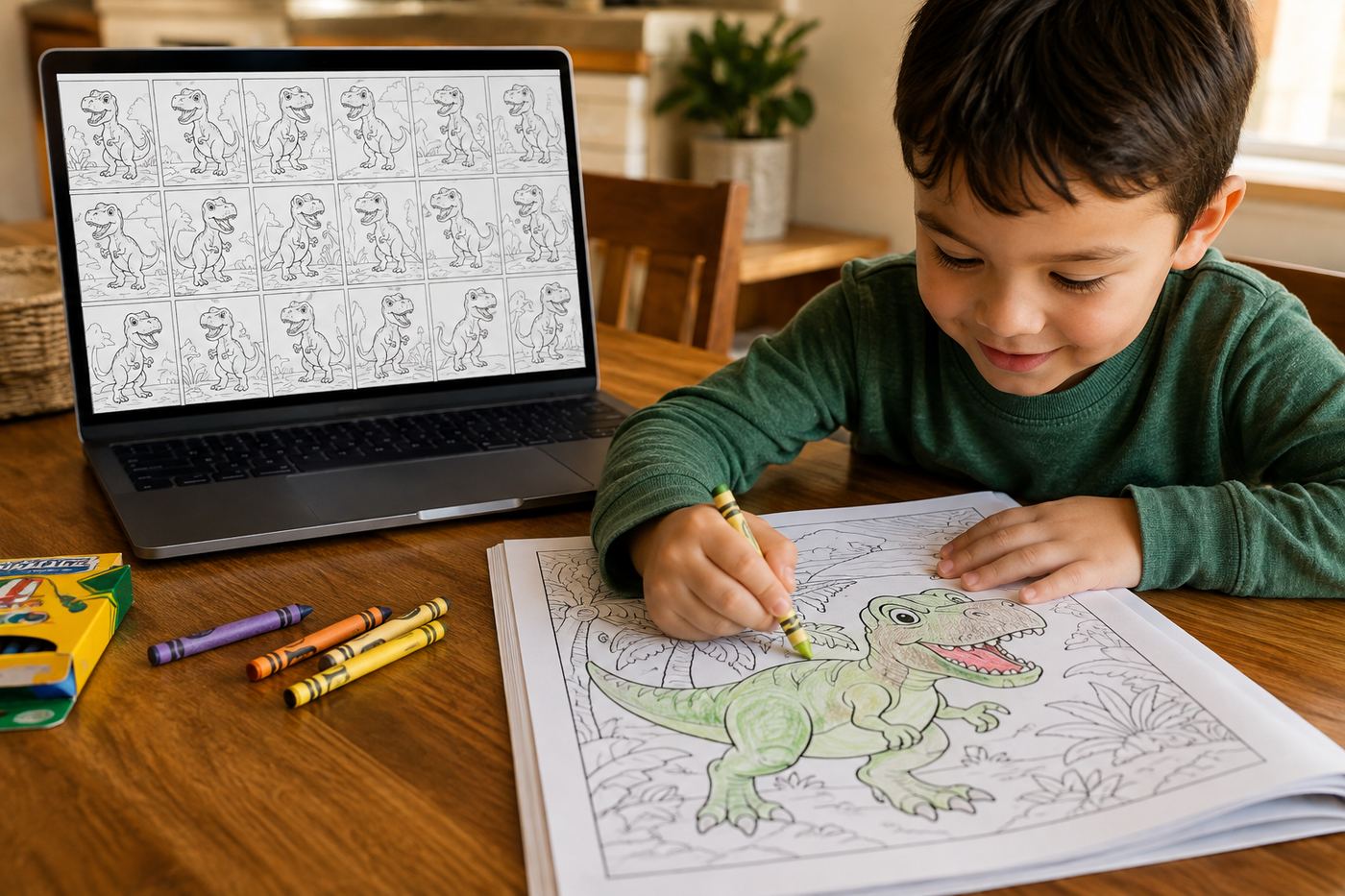
Coloring page generators leave you 90% of the work
There are plenty of free tools that will turn a prompt into a single coloring page. The problem is that a single page is not a product. A coloring book is 20 to 40 pages, and to make one with a page-at-a-time tool you have to invent every scene yourself, prompt each one separately, hope the style stays consistent across dozens of independent generations, watch your recurring character mutate between pages, and then assemble everything into a correctly sized print PDF in yet another tool.
Inkfluence approaches it the way a publisher would (it is a full book platform, not a page tool): the book is the unit, not the page. From one prompt it plans the full set of scenes so no two pages repeat, alternates close-up subjects with wider scenes, keeps your recurring character recognizable throughout, draws everything in one committed line-art style, and delivers the finished, ordered, exportable book.
Every page also gets a short caption in the editor, like "The Sleepy Dragon", so you can reorder pages or regenerate a specific one without hunting through thumbnails. Captions never print on the page itself: the printed page is pure line art, edge to edge, the way coloring books are actually made.
Two markets, two kinds of line work
Kids' coloring books
Bold, smooth outlines. Large open regions a crayon can actually stay inside, drawn by the same engine as our children's book illustrations. One clear subject per page with an uncluttered background, because a four-year-old colors the dinosaur, not the seventeen background ferns. Say who the book is for, like "for kids aged 4 to 8", and the line work adapts to small hands.
Best sellers in this market: dinosaurs, unicorns, vehicles, ocean animals, and everyday-life themes ("dinosaurs doing everyday things" is a perennial favorite). A recurring character turns a theme into a series; the full theme-selection framework is in our niches guide.
Adult coloring books
Say the book is for adults or teens and the style switches to intricate, flowing line work: detailed compositions, varied region sizes, the fine patterns that make adult coloring meditative. This is the premium end of the category, where buyers happily pay more per book for density and detail (see the pricing playbook).
Best sellers here: botanical and garden scenes, mandala-style patterns, cozy interiors, fantasy landscapes, and seasonal collections. Adult titles support higher list prices on KDP, which changes the numbers in our royalty calculator for the better. The whole premium side has its own pages: the adult coloring book generator with real sample spreads, and the mandala coloring book generator for pattern books.
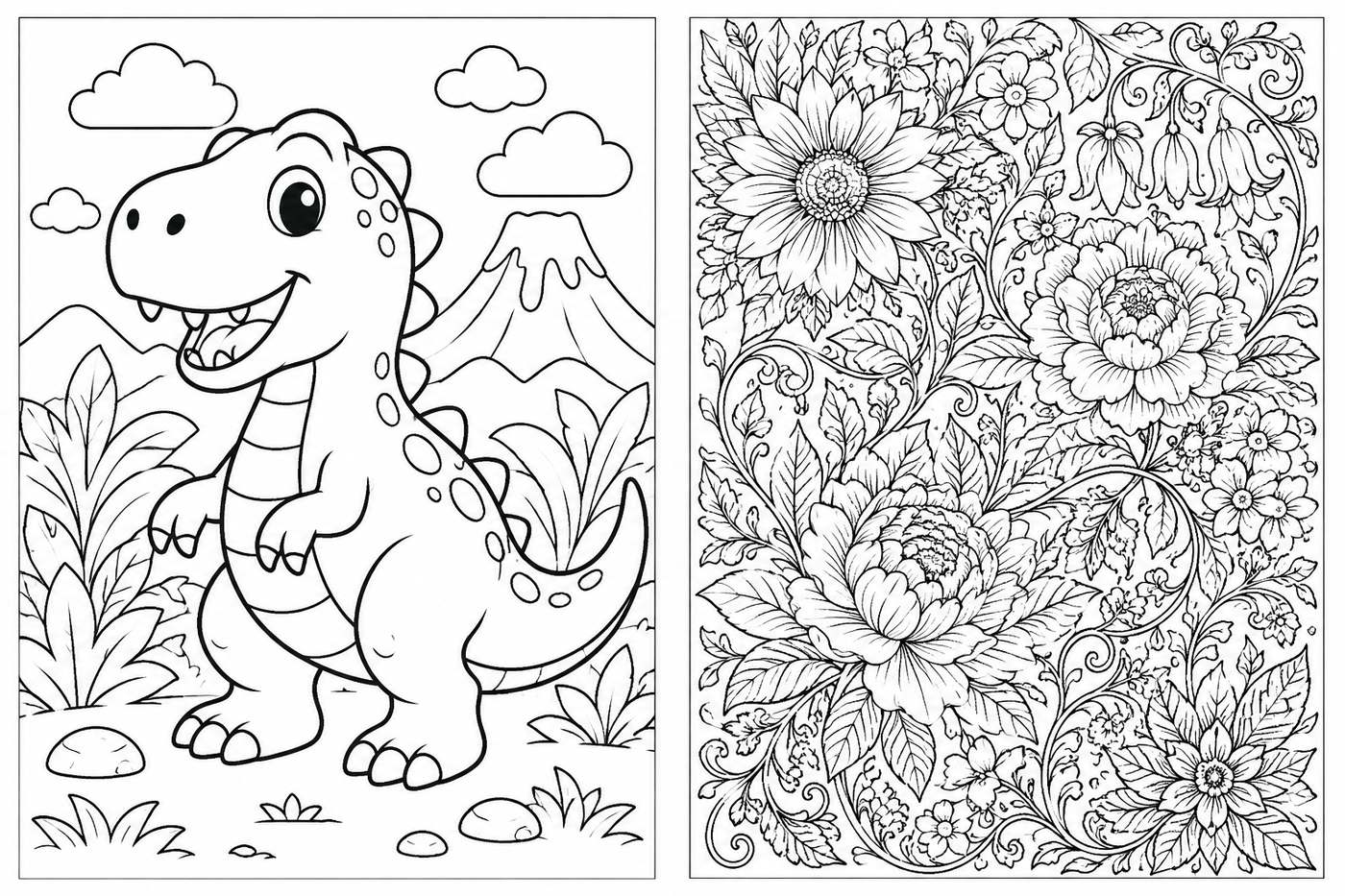
Either way, pages are drawn for clean, closed line work with no gray shading, the two technical details that separate a page that colors beautifully from a page that frustrates, and any page that misses the mark regenerates in one click.
Coloring books by the numbers
of exported books on Inkfluence go out as PDF, the print-first format coloring books live in (first-party data, 37,337 exported books)
estimated North American adult coloring book market in 2025, per DataIntelo's market analysis; the premium end of the category is covered by the adult coloring book generator
flat KDP printing cost for a black-ink paperback of 24 to 110 pages at the 8.5" x 11" and 8.5" x 8.5" coloring trims, per Amazon's printing cost tables, the economics that make coloring books the classic first project
The same character on page 1 and page 20
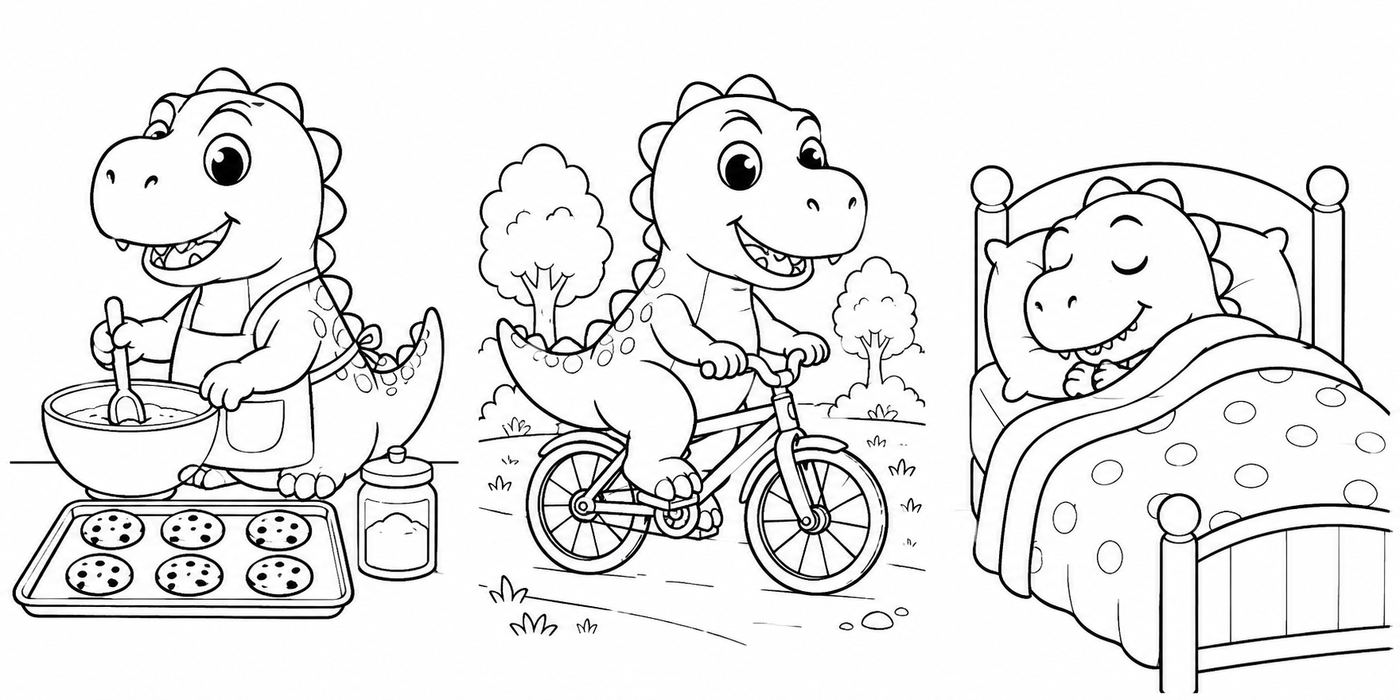
The difference between "a dinosaur coloring book" and "Rex the T-rex's Big Day" is a recurring character, the same principle behind every storybook hero, and recurring characters are exactly where page-at-a-time AI tools fall apart: every independent generation reinvents the character. Inkfluence fixes the cast before drawing anything, the mechanism our consistency guide unpacks in full. Your character's look is locked in a reference, and every page is drawn against it, so the round little T-rex with big friendly eyes stays that exact T-rex whether he is baking cookies, riding a bike, or fast asleep on the final page.
Built around the Amazon KDP coloring book format
Coloring books are one of the most popular things to publish on KDP because black-and-white interiors are the cheapest kind of book to print. But KDP has specific requirements, and most AI art tools ignore all of them. Here is what matters and how Inkfluence handles it:
| KDP requirement | What to do |
|---|---|
| Supported trims | Inkfluence exports the square 8.5" x 8.5" trim by default (the classic colouring-shelf format) and the 8.5" x 11" KDP coloring standard with one click; both are KDP-supported. |
| Full wrap cover | Every KDP export includes a print-ready wrap cover PDF: back cover, spine, and front in one file, with the spine width calculated from your exact page count and paper type. |
| 24-page minimum | Met automatically: with a blank page behind every design, even the 12-design minimum exports at more than 24 pages, and the default 20-design book at about 42. Digital downloads can be any length. |
| Black-and-white interior | Pages are drawn as pure line art with no gray shading, so choose the black ink + white paper option, KDP's cheapest. |
| Art-only pages | Nothing prints over the line work; captions live in the editor, not on the page. |
| Single-sided feel | KDP prints both sides of a sheet, so the export puts a blank page behind every design and markers cannot bleed through onto the next drawing. For an Etsy printable, delete the blank pages before listing. |
| AI content disclosure | Amazon asks whether the book contains AI-generated content during setup. Answer honestly; disclosure does not block publishing. |
The complete walkthrough, from niche selection to upload to royalty math, is in our guide: How to Make a Coloring Book with AI and Publish It on KDP.
How the coloring book generator works
Describe the theme
One line is enough: "a dinosaur coloring book for kids aged 4 to 8" or "an intricate garden coloring book for adults", typed into the book maker like any other book. Who it is for sets the complexity of the line work, and an optional recurring character makes the book feel like a set.
Review the page plan
The generator plans every page as a distinct scene: no near-duplicates, close-ups alternating with wider scenes, action alternating with calm. Rename, reorder, or cut pages before anything is drawn, the same review step KDP publishers use to shape a book before committing images.
Every page draws in one style
Clean black-and-white line art, bold uniform outlines, fully closed shapes, big open areas to color. Your recurring character stays consistent page to page, and a full-color cover is painted last, because the cover sells the book while the pages are the product.
Book generator vs page generator
Most tools in this category generate pages. The difference shows up in the hours after the generating is done, and in what else the same subscription makes: picture books, ABC books, and 30 more formats.
| What you need | Single-page AI tools | Inkfluence AI |
|---|---|---|
| 20 to 40 distinct scene ideas | You invent and prompt each one | Planned automatically from one theme |
| Consistent style across the book | Drifts across independent generations | One locked line-art style |
| Recurring character | Mutates between pages | Drawn against a fixed character reference |
| Kids vs adult complexity | Manual prompt engineering | Set by who the book is for |
| Assembled print PDF | Your job, in another tool | Exported at the 8.5" x 11" KDP trim |
| Cover | Separate design job | Full-color cover painted with the book |
| Pricing | Often opaque credit systems | $9.99/mo Creator (20 images), $19.99/mo Premium (50), shown before you generate |
What a coloring book actually costs
No hidden credit math (a rarity this category; see the cost calculator). A coloring book uses one AI image per page, plus one for the cover and one for the character reference. So a 20-page book uses about 22 images. The Creator plan ($9.99/month) includes 20 AI illustrations per month and Premium ($19.99/month) includes 50, with add-on credits if you are producing more. The app shows you exactly what a book will use, against your real remaining allowance, before you generate anything.
Compare that with the two ways coloring books were made before: commissioning an illustrator per page, or spending evenings prompting a free page tool and assembling files by hand. See full plan details on the pricing page.
The digital edition: the margin nobody skips twice
Every coloring book you make is two products. The KDP paperback earns royalties minus printing; the same PDF listed on Etsy or Gumroad as a printable download earns nearly everything, because there is nothing to print and nothing to ship. Parents actively prefer the printable for young kids, since pages regenerate after coloring disasters, and adult colorists buy digital to print favorite pages repeatedly on their own paper.
Inkfluence connects to Etsy and Gumroad directly, and the listing playbook (preview images, keyword titles, bundle pricing with the matching ABC book) is covered in the Etsy guide. One generation run, two listings, two income lines: it is the closest thing this niche has to a cheat code, and it is just arithmetic. The arithmetic itself, a black-ink coloring paperback next to a picture book and a chapter book, is in the children's book print cost table, and the five files a coloring printable should hold are laid out in the printable package.
How it compares to other coloring book tools
The category splits into two families: single-page generators (great for one image, no book) and book builders. Here is the honest landscape as of this writing:
| Tool | What it makes | Whole-book assembly | Recurring character | Cost picture |
|---|---|---|---|---|
| Inkfluence AI | Complete themed book: 20-40 planned scenes, cover, captions | Yes, exported at the 8.5" x 11" KDP trim | Yes, drawn against a locked character reference | $9.99/mo (20 images) or $19.99/mo (50), shown before you generate |
| Canva | Single coloring pages from a prompt | Manual, page-by-page layout work | No cross-page memory | Free tier with limits; Pro subscription for more |
| Adobe Firefly | Single coloring pages from a prompt | None, assembly is your job | No cross-page memory | Credit-based within Adobe plans |
| Colorin AI | Coloring books with batch page generation | Yes, with KDP trim presets | Yes, via its character-lock feature | Small free allowance, then credit plans from around $12/mo |
| ColorBliss | Pages from text, photos, or sketches; bulk generation | Partial, geared to page batches | Via reference photos | Small low-resolution free tier; paid pricing not shown up front |
Fair credit where due: the dedicated book tools above are real products. The Inkfluence difference is that the coloring book generator is one mode of a full book platform, so the same subscription also writes picture books, ABC books, and every other format, with Etsy and Gumroad publishing built in.
Coloring book prompt formulas that work
The generator needs one good sentence. The pattern that reliably produces a sellable book is audience + theme + twist + recurring character. Steal these, or generate a title to match with the title generator:
"A dinosaur coloring book for kids aged 4 to 8, starring a round little T-rex with big friendly eyes doing everyday things: baking, cycling, bath time."
Kids classic: bold lines, one hero, twist gives every page a scene.
"An intricate botanical garden coloring book for adults: dense flowers, climbing vines, garden gates, greenhouse scenes. Calm and meditative."
Adult premium: "intricate" plus "for adults" switches the line-work density.
"A large-print coloring book for seniors: simple garden and countryside scenes, big open regions, calm and dignified, easy on the eyes."
The underserved shelf: large regions, low clutter, covers that do not look childish.
"An under-the-sea coloring book for kids, with a cheerful octopus appearing on every page alongside different sea creatures."
Recurring guide character: the octopus makes 20 pages feel like one book.
"A monster trucks at the beach coloring book for kids aged 4 to 8: jumping dunes, sandcastle ramps, ice cream truck race."
Subject + unexpected place: the twist IS the title, and titles are search terms.
"A cozy autumn coloring book for teens and adults: rainy windows, sweaters, pumpkin markets, reading nooks, steaming mugs."
Seasonal + mood: publish a season early so reviews accumulate before the gift wave.
More on picking the theme itself, with validation steps and the seasonal calendar, in Coloring Book Niches for 2026.
Six mistakes that sink AI coloring books
1. Publishing without a quality pass. Buyers have seen low-effort AI books and reviews are merciless. Check every page for open lines, gray shading, and anatomy glitches, and regenerate the weak ones; it takes minutes and it is the whole difference.
2. Printing designs back to back. Marker bleed-through is a top complaint in one-star reviews, which is why the export puts a blank page behind every design. Keep the blank backs in the paperback (they also take the default 20-design book to about 42 pages, past Amazon's 24-page minimum), and delete them only from an Etsy printable.
3. No niche, just a category. "Animals" competes with everything ever published. "Woodland animals having a picnic" competes with a handful of books. Specificity is the free ranking lever.
4. Ignoring the cover. The interior is line art but the cover is a full-color product shot fighting at thumbnail size. Inkfluence paints a color cover with the book (and the cover designer can rework it); make sure the title on it is readable at postage-stamp scale.
5. Fumbling the AI disclosure. Answering Amazon's AI-content question honestly costs nothing; getting caught misrepresenting it risks the account. Details in our disclosure guide.
6. Selling on one channel only. The same PDF is a KDP paperback and an Etsy printable. Digital downloads have zero printing cost and parents love reprintable pages. One book, two incomes; the channel comparison is in Etsy vs Gumroad.
AI coloring book generator FAQ
What is an AI coloring book generator?
An AI coloring book generator creates a complete, printable coloring book from one idea: it plans a set of distinct scenes on your theme, draws each one as clean black-and-white line art with bold outlines and large open areas to color, keeps a recurring character consistent from page to page, and exports the whole book as a print PDF at a KDP-ready trim: square 8.5 x 8.5 by default, or the classic 8.5 x 11 coloring size with one click. Inkfluence AI generates the full book from a single prompt, around 20 pages by default and up to 40, and yes, it makes colouring books with the British spelling too.
How is this different from free AI coloring page makers?
Most free tools generate one coloring page at a time, which leaves you doing the real work: coming up with 20 to 40 distinct scene ideas, keeping the style and characters consistent across every generation, and assembling the pages into a correctly sized print PDF. A coloring book generator does the whole job: one prompt plans every page, draws them in one consistent style, and hands you the assembled book.
Can it make adult coloring books, not just kids' books?
Yes. Tell it who the book is for and the line work adapts: bold, simple shapes with large regions for young kids, and intricate, detailed compositions in the style adult colorists buy when you say the book is for adults or teens. Adult coloring is the higher-priced end of the category, so the same workflow covers both markets.
Will the same character appear on every page?
If your theme has a recurring character, yes. Inkfluence builds a character reference before drawing, so the friendly T-rex on page 1 is recognizably the same T-rex baking cookies on page 14. Character continuity is what makes a coloring book feel like a book instead of a stack of unrelated pages.
Is the coloring book ready for Amazon KDP?
The book exports as a print PDF at KDP-supported trims, square 8.5 x 8.5 by default or the classic 8.5 x 11 with one click, with art-only pages and nothing printed over the line work. For a KDP paperback remember Amazon's own rules: a minimum of 24 pages, black-and-white interior settings, and white paper. Every design is exported with a blank page behind it, so even the default 20-design book comes to about 42 pages, past the minimum.
Can you sell AI-generated coloring books on Amazon KDP?
Yes. AI-generated coloring books are published on KDP every day. Amazon requires you to disclose AI-generated content during title setup, and disclosure does not block publishing. Quality is what gets books rejected or returned, not the use of AI: broken lines, gray shading, or near-duplicate pages are the real risks, which is why clean closed line work matters.
What do the page captions do?
Every page gets a short caption, like 'A very sleepy dragon', so you can tell pages apart in the editor and reorder or regenerate the ones you want to change. Captions stay off the printed page: nobody wants text sitting on top of the art they are coloring.
Can I regenerate a page I don't like?
Yes. Each page is its own illustration, so you can regenerate any single page without touching the rest of the book, and edit any caption or page order in the editor before exporting.
How many pages can a coloring book have?
Around 20 designs by default, from 12 up to 40 in one book. Each design is exported with a blank page behind it, so any length clears Amazon's 24-page paperback minimum: a 20-design book comes to about 42 pages. For digital coloring books sold on Etsy or your own site, delete the blank backs before listing; any length works.
How much does it cost to make a coloring book?
Coloring books use the monthly AI illustration allowance on paid plans: 20 images per month on Creator ($9.99/month) and 50 per month on Premium ($19.99/month), with add-on credits if you make more. A book uses one image per page plus a cover and a character reference, and the cost preview in the app shows exactly what a book will use before you generate anything.
Do I own the rights to sell my coloring book?
Yes. You own full commercial rights to the books you create. Sell them as KDP paperbacks, printable PDFs on Etsy or Gumroad, classroom handouts, or party favors.
Can I sell the same coloring book as a digital download too?
Yes, and you should: the same PDF that becomes a KDP paperback sells as a printable download on Etsy with no printing cost at all, so every sale is almost pure margin. Inkfluence connects to Etsy and Gumroad directly.
Related tools and guides
LitPal Alternative
LitPal's prices and credit costs, a cost-per-book calculator, and where its volume coloring price beats ours.
Watch a Cozy Coloring Book Get Made
Twelve-minute video with transcript: an autumn book from the book type picker, an editable 12-page plan, a painted cover, then the showcase, Gumroad, Etsy and export screens.
Halloween Coloring Book Generator
Friendly pumpkins, ghosts and cats, your child in costume on every page, printed at home tonight.
In italiano: Libro per bambini con l'IA
Coloring books, alphabet books and stories for children, written in Italian.
Watch a Coloring Book Get Made
Seven-minute video walkthrough with transcript: prompt, plan, character sheet, pages, download and publish.
How to Make a Coloring Book with AI
The full workflow: niche, generation, KDP upload, royalty math, and the rejection checklist.
AI Picture Book Maker
Full-color illustrated storybooks with consistent characters and read-aloud text on every page.
AI Book Illustration Generator
Illustrate any book, fiction or non-fiction, with consistent style across every chapter.
AI Children's Book Creator
Everything for kids' books: stories, picture books, ABC books, and coloring books in one place.
Sell AI Books on Etsy
Digital coloring books are perfect Etsy products: no printing costs, instant delivery.
Royalty Calculator
Work out per-sale earnings for KDP paperbacks and digital downloads before you publish.
Bold and Easy Coloring Book Generator
Thick lines, big regions, the fastest-growing style on the shelf.
Cozy Coloring Book Generator
Nooks, cafés and cabins as one recurring world.
Animal Coloring Book Generator
One breed or species per book, the kind that sells.
Car Coloring Book Generator
One digger, twenty jobs: vehicle books for two- to eight-year-olds.
Christmas Coloring Book Generator
Built in September, listed in October, with the trade-off stated.
Your coloring book, drawn by tonight
One theme in, a full printable book out: consistent character, one clean style, KDP-trim PDF, and full commercial rights.
Start Your Coloring Book