
How to Make a Cozy Coloring Book with AI (Watch an Autumn Book Get Planned, Drawn and Listed in 12 Minutes)
Summer is going, and James wants something to come back to when it has gone: a cozy autumn coloring book for children aged 6 to 8. This video makes it from the book type picker rather than the prompt box, chooses 12 pages instead of the recommended 20, reorders and prunes the plan before anything is drawn, and then does the part the seven-minute dinosaur video only mentions: the showcase, Gumroad, Etsy and the export dialog, screen by screen. The transcript is below, and so are the first 20 days of the coloring format.
77
coloring books made by 53 people in the format's first 20 days (29 August to 17 September 2026), about four a day
8 + 6
8 of them said cozy in the title or brief and 6 were seasonal (autumn, Halloween, winter); the video's own 9-page book is one of them
27
drew no character sheet at all, because the prompt had no recurring character; 25 of the 77 were exported to a finished file
Quick Answer
To make a cozy coloring book with AI, open the cozy coloring book generator, choose Coloring book as the book type, and describe the mood, the season and the audience in one line: "cozy coloring book for autumn for kids aged 6 to 8". Set the page count (20 is recommended, 12 is the minimum), click generate, and edit the plan the AI writes: move pages, remove pages, rename them. Click create my coloring book and a character sheet is drawn first, then every page from it, then a painted cover. From the review screen you can preview it, publish it to the free showcase, sell it on Gumroad or Etsy, or export it as PDF, KDP, EPUB or DOCX. The video does all of it in twelve minutes.
In this video
- 0:00 Why an autumn book now: something cozy to come back to when summer goes
- 0:32 Two ways in: the prompt box, or start from a book type and pick Coloring book
- 0:58 Step two: pick a theme, and think about who will be colouring it
- 1:20 The quick examples, and the prompt: cozy coloring book for autumn, ages 6 to 8
- 1:52 Page count: 20 is recommended, James chooses 12 for the video
- 2:15 Pages, cover and character sheet: what the illustration count includes
- 2:40 Generate my book: the page plan appears with a progress line per page
- 3:15 Editing the plan: Scarecrow Smile to page two, three pages removed
- 4:05 Create my coloring book: the characters start painting
- 4:45 Where a finished book can go: Amazon, Etsy, Gumroad, your printer, a classroom
- 6:00 The character sheet: the squirrel, the girl and the scarecrow
- 6:40 Clicking through the pages as they land
- 7:20 Why a coloring book gets a painted cover when other books start on a preset
- 8:20 The finished book: PDF, cover, page-by-page preview
- 9:05 Publish to the free showcase: bio, photo, or anonymous
- 9:45 Sell on Gumroad: listing description, fill with AI, price
- 10:25 Sell on Etsy: open a shop, connect it once, list any book
- 11:05 Export: PDF, KDP, EPUB, DOCX, page size, branding, author bio, download
Where does a cozy book start: the prompt box or the book type?
The first video typed straight into the prompt box. This one shows the other door. James scrolls past the box to "start from a book type", where every format has its own tile, and picks Coloring book. The difference is not cosmetic. Picking the tile first puts you on the coloring screen before you have typed a word, so the quick examples, the page count slider and the illustration count are all coloring-specific, and there is no chance the AI reads "cozy autumn" as a picture book with a story. If you type "cozy coloring book" into the prompt box instead, the format is recognised from the words and you land on the same screen; the tile route is simply the one that never has to guess.
Step two is the theme, and James says the thing that most people skip: think about who is going to be colouring it. The quick examples on the screen are the three shapes a coloring prompt takes: a subject and an audience (a dinosaur book for ages 4 to 8), a mood and a setting (cozy woodland animals), a subject and a setting with a rule (an under-the-sea book with a friendly octopus on every page). His own prompt is the second shape with the audience added: "cozy coloring book for autumn for kids aged 6 to 8". Mood, season, audience. That is the whole brief, and it is enough, because the plan will invent the scenes.
If you want to steer the scenes rather than the mood, add a setting. "In a village on the edge of a wood" gives the planner a place to keep coming back to; "with a girl, her squirrel and a scarecrow" gives it a cast to draw a sheet for. Everything else, the leaf piles and the pumpkins and the rainy windows, the planner will supply on its own, because autumn is a season with recognisable furniture.
Why 12 pages, and what the illustration count is telling you
The page count slider says 20 is recommended, and James drops it to 12 "just for this video". Twelve is the format's minimum, and it is a real book size for two of the three places a coloring book can go: a classroom set and a digital download. It is not a paperback size, because Amazon's printer needs 24 pages or more, so anyone planning a print edition should leave the slider at 20 or push it to 24 in the plan. The first video's page has the full table of page counts against images and plans; this page only needs the row James is on.
Under the slider is the line he pauses on: the number of illustrations the book will draw, which is larger than the page count. He explains why on camera. The illustrations include the pages, the cover of the book, and the character sheet that "shows who your characters are". So a 12-page book with recurring characters is 14 images, and the same line tells you how many of your monthly images are left and offers more if you are close to the limit. Creator includes 20 images a month and Premium 50 (the pricing page has both), so the video's book fits inside either with room to redraw a few pages. A 12-page book with no recurring character, a cozy interiors book for adults say, draws no sheet and is 13 images.
What the plan lets you do before a single page is drawn
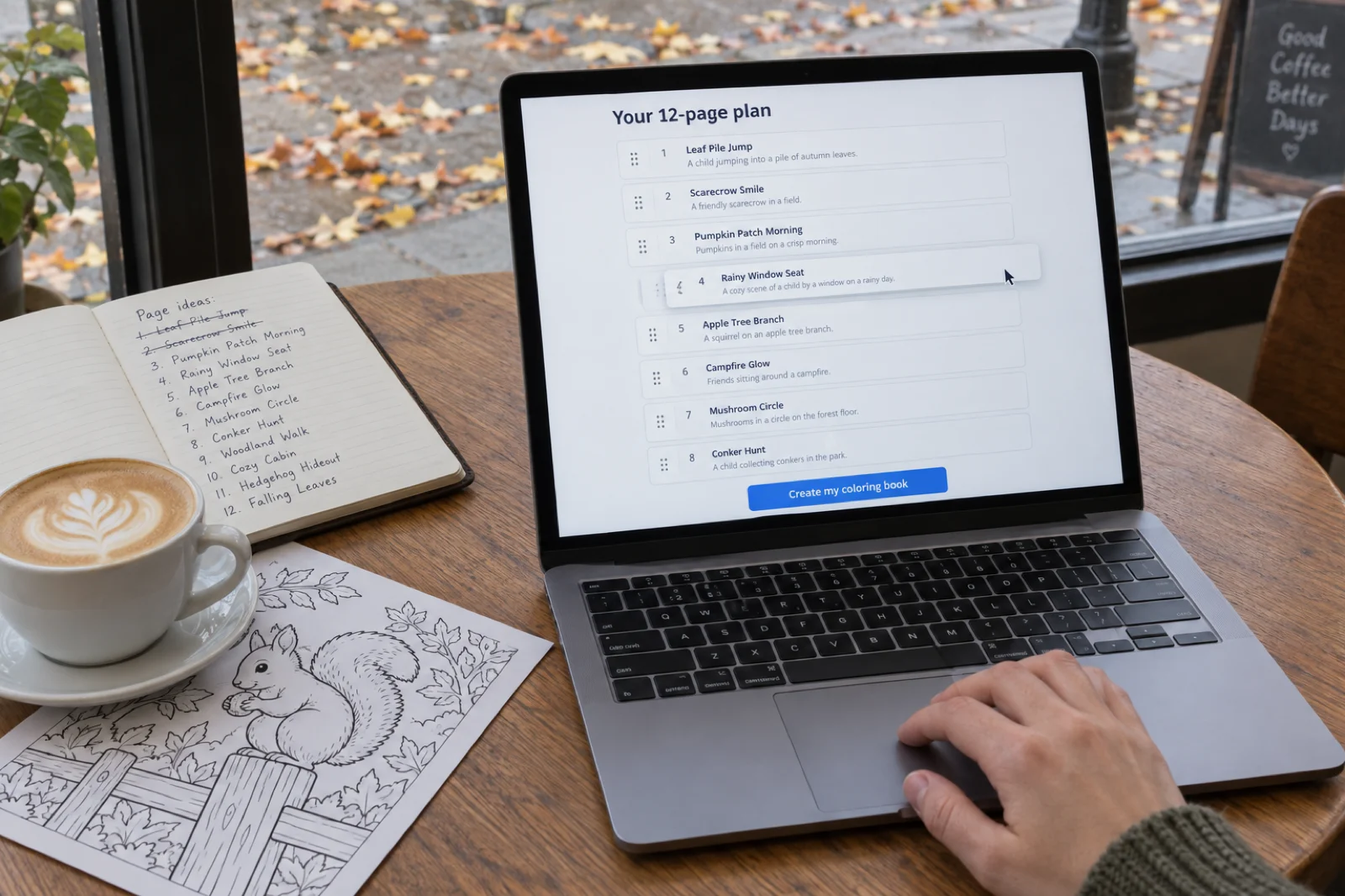
Click generate my book and the app builds the plan. James is mid-sentence about the progress line per page when the plan lands, which tells you how long it takes. What appears is a list: a page name at the top of each card and a one-line summary of what the scene includes. His plan has a Scarecrow Smile, a Mushroom Circle, a Campfire Glow, an Apple Tree Branch, and he treats it the way you should: as a draft. He drags Scarecrow Smile up to page two. He decides he does not want Mushroom Circle, or Campfire Glow, and removes them. He moves Apple Tree Branch up to page eight. The plan he sends to the drawing step is nine pages long, and the data at the bottom of this page shows the book landing at nine pages, which is the plan doing exactly what it says.
This is the free edit. Nothing has been drawn, so moving a page costs nothing, removing one costs nothing, and renaming one or rewriting its summary costs nothing. The same change after the pages exist costs one image per redrawn page. For a cozy book the edit worth making is the order: open on the widest scene (a village lane in leaves), put the busiest pages in the middle, and close on something still (a window at dusk), because a child colours a book front to back and the last page is the one they remember. The other edit is removing any page whose summary breaks the mood; "campfire glow" is not wrong, but if the book is a village in daylight it is the odd one out, and James's instinct to cut it is the right one.
What happens after create my coloring book
The app moves to the drawing screen and, in James's words, begins to paint the characters. The order matters and the video makes it visible: the character sheet comes first, then the pages one by one, and the cover is painted in the same run. Each finished page appears as a thumbnail you can open, so you are never waiting for the whole book to know whether the style is right. James uses the wait to say what a coloring book is for, and it is worth repeating because it is the widest answer anyone gives on these pages: sell it on Amazon, Etsy, Gumroad "or another online marketplace"; print it for your own children, nieces and nephews; if you are a teacher or a tutor, make it about the topic you are teaching; if you live in a remote part of England, make it about the village; if the school teaches in another language or is a science school, make the book match. The tool does not care whether the book is for sale.
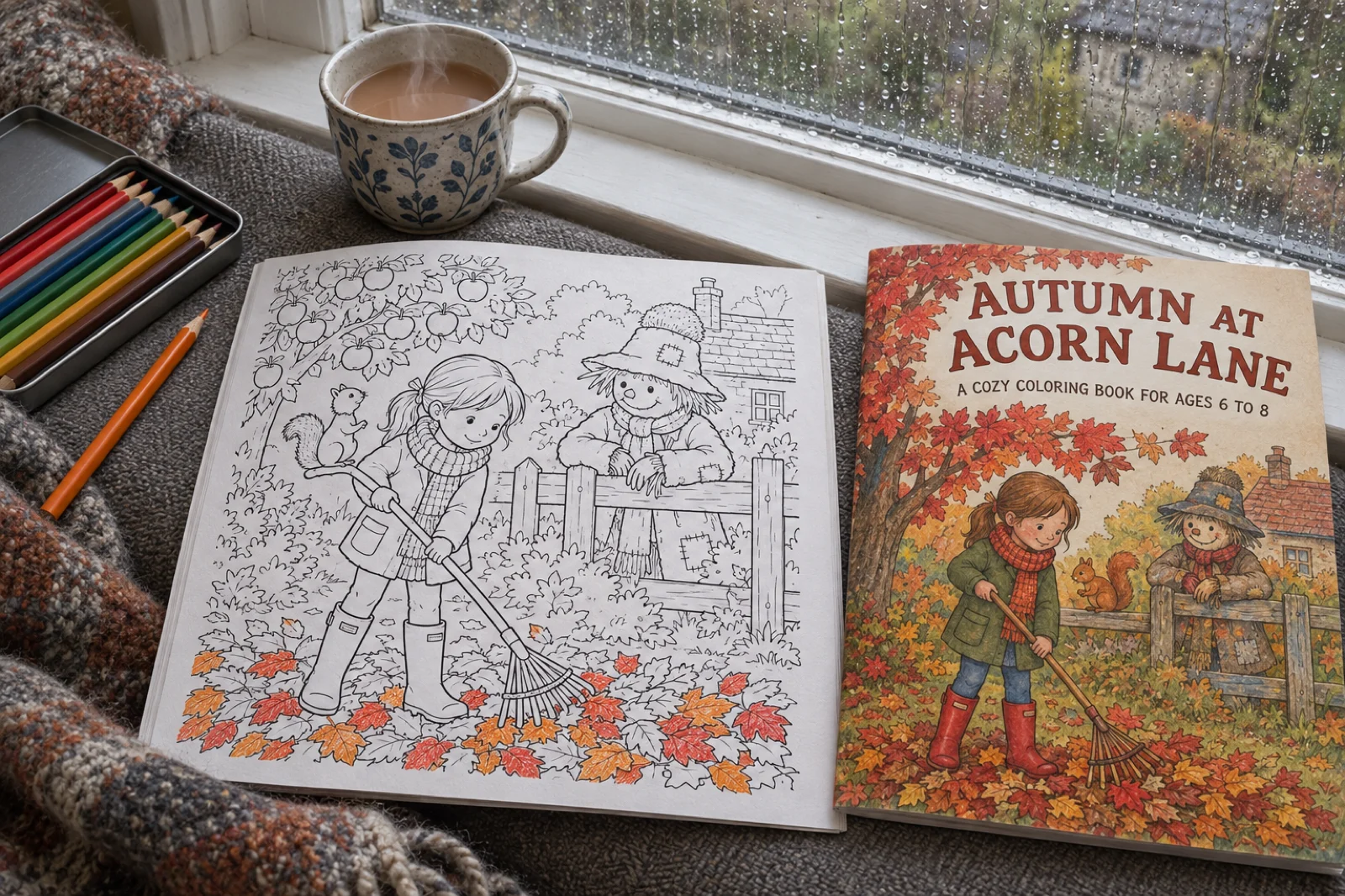
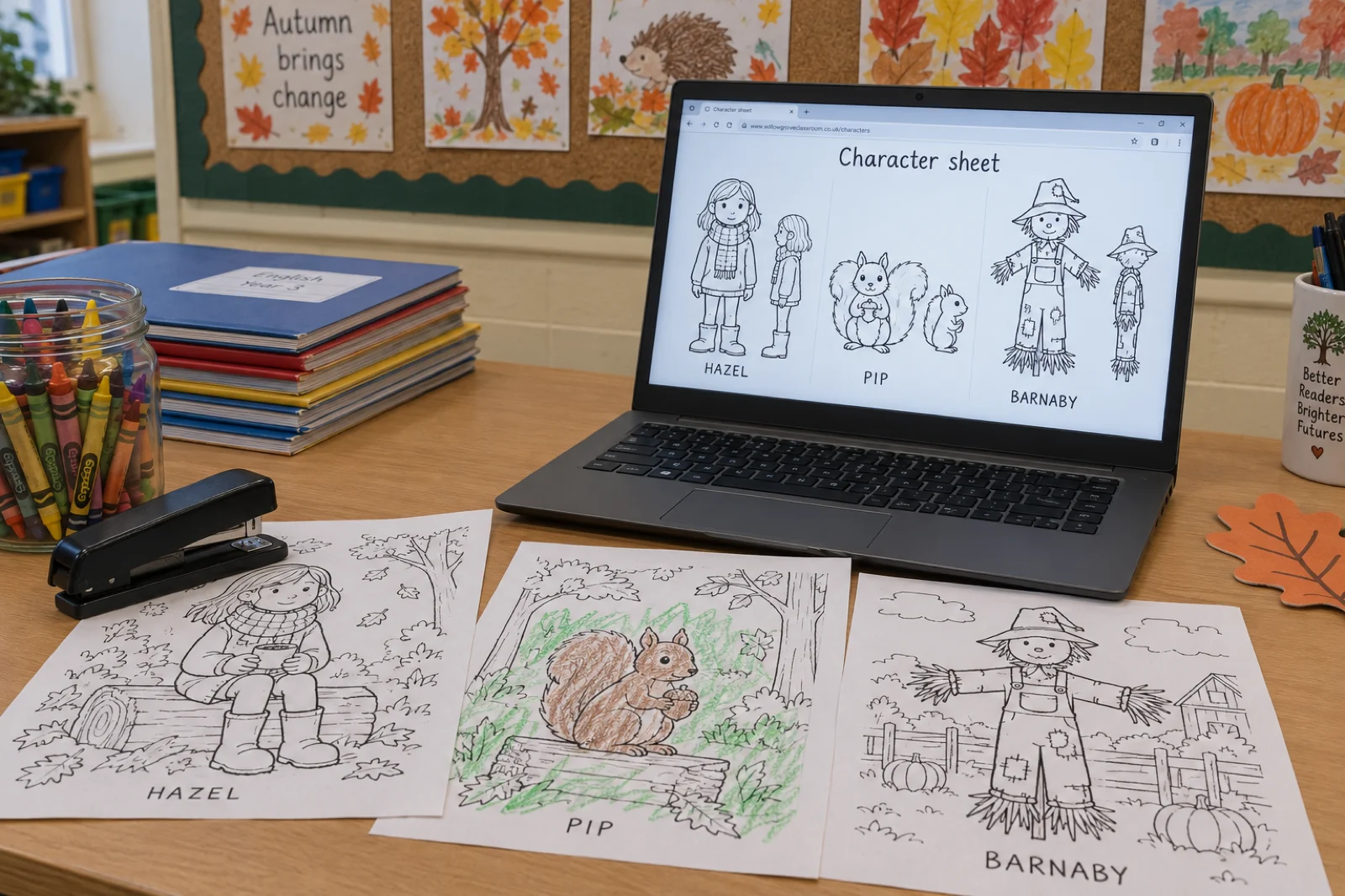
Then the sheet arrives, and he opens it. "These are my characters right there": a squirrel, a girl, and a scarecrow, drawn as clean line work on white. He clicks through the pages that have landed: the squirrel alone, the squirrel and the girl, then the squirrel, the girl and the scarecrow together. That progression is the character sheet doing its job. Every page references the same drawing, so the girl's scarf and the scarecrow's hat are the same shapes on page nine as on page one, and a child who colours the scarecrow's hat brown on page two will find the same hat waiting on page seven.
Why a coloring book gets a painted cover
James spends a minute on something the first video did not: the cover. For a thriller, a non-fiction book or a novel, the app finishes the text and starts the book on a preset cover matched to the title and genre, which you then replace from the cover designer with your own design or an upload. For a coloring book the run paints the cover itself, in the style of the interior and from the same character sheet, so the girl, the squirrel and the scarecrow on the cover are the ones inside. He calls the result "more of a complete product", and for a book that will be judged at thumbnail size on a marketplace that is the right way to think about it. When the book is bound, the first thing on the review screen is that cover next to the PDF, and he says what any buyer says: if he saw it on Amazon or Etsy he would click it.
Check the cover the way a buyer meets it: small. Open the preview, shrink the window, and see whether the title reads and the scene still says autumn at 200 pixels wide. If it does not, the cover designer can put a bigger, softer title over the same painting. Cozy sells as a mood, and the mood has to survive the thumbnail.
The review screen, in the order the video clicks it
The second half of the video is the part most tutorials skip, and it is why this page exists alongside the first one. The book is done; now what? James goes through the review screen from left to right. Get the book as a PDF. Preview it page by page, which is where you check every page and not just the thumbnails. Publish it to the free showcase on Inkfluence AI, which he pitches at authors as free exposure and a way to build credibility as a published author: add a bio and a photo, update your name, or publish anonymously and hide it. Sell it on Gumroad: add a listing description, or click fill with AI and get a full description, a short summary and tags, then choose a price and publish. Sell it on Etsy: open a shop if you have not, which Etsy charges a one-time fee for when the shop opens (the amount is in Etsy's fees policy), connect it once, and from then on any book you make can be listed there, coloring or otherwise. Every one of those is one screen, and the video shows each screen.
Finally, export. The formats are PDF, KDP, EPUB and DOCX. Before downloading you can change the page size, switch decorative elements on or off, adjust the branding with your own credit text and link, set the header, footer and copyright, and add an author section with your name, a bio and a website. Then download. For a coloring book the PDF places one design on each sheet with a blank page behind it, so a child pressing hard with a felt tip on page three does not print through onto page four. If the book is going to Amazon, declare the AI-generated images at title setup as KDP's AI content guidelines ask; it does not block the listing, and you keep the rights, with the US Copyright Office's AI guidance as the reason to shape the plan yourself. The KDP guide for coloring books covers the interior settings for a paperback from there.
Cozy is a mood; autumn is a deadline
James makes an autumn book because autumn is coming, and that is the honest way to pick a seasonal theme: make it before the season, not during it. A seasonal coloring book has a window, a cozy book without a season does not, and the plan decides which one you are making. The table is the calendar we would work to for a digital listing, allowing a few weeks for the listing to be found.
| Theme | Make it by | Sells until | The cozy version |
|---|---|---|---|
| Autumn (the video) | Late August | End of October | Leaf piles, scarecrows, conkers, a rainy window seat, a kitchen with apples on the table |
| Halloween | Mid September | 31 October | Cute rather than scary: a pumpkin patch, a cat in a witch's hat, a candlelit porch |
| Winter and Christmas | Early October | Christmas Eve, then a second life in January as "winter" | A cabin in snow, a fireplace, mugs, a tree being decorated; the Christmas generator page has the shapes |
| Spring and Easter | Mid February | Easter, then May as "garden" | A greenhouse, seed trays, a rabbit in a vegetable patch, rain on a shed roof |
| Cozy with no season | Any time | All year | Reading nooks, cafés, bookshops, bedrooms at night, a bath with toys; the evergreen shelf the cozy generator page describes |
The trick James's prompt pulls is to be both. "Cozy for autumn" is a seasonal book in September and, with the pumpkins swapped out of the plan, a cozy book in February. If you are making one book, make it cozy and let one or two pages carry the season; if you are making a series, make the season the variable and keep the characters and the village the same across autumn, winter and spring, which is the shape the series video describes for text books and works just as well here.
Build the prompt James typed, for your own season
Four choices make a cozy coloring prompt in the shape the video uses. Pick them and the line writes itself, with the image count the slider will show and whether it fits a plan's monthly allowance. The button opens the dashboard with the prompt already in the box.
Your prompt
cozy coloring book for autumn for kids aged 6 to 8
What the first 20 days of the coloring format say about cozy
The coloring format went live on 29 August 2026. The first video's page reported its first nine days; this one reports the first twenty, 29 August to 17 September, the day this video went up, from the same place: the books people actually made, read on 17 September. Small numbers, so read them as orientation, not a market.
coloring books said cozy in the title or brief in the first 20 days
Of the 77 coloring books made on Inkfluence AI between 29 August and 17 September 2026, 8 said cozy or cosy in the title or the brief and 6 were seasonal (Halloween, autumn, winter). Four of the eight cozy books were for adults, one for children, three said neither.
Sample: 77 coloring books by 53 people. Measured 17 September 2026.
were exactly 20 pages, the default; 12 were at 12 or fewer
48 of the 77 coloring books made in the format's first 20 days were exactly 20 pages, the default. 12 were 12 pages or fewer, 6 were between 21 and 30, and 7 were 31 or more. The video's own book is in the set at 9 pages: 12 chosen, 3 removed from the plan.
Sample: 77 coloring books with a page count. Measured 17 September 2026.
drew no character sheet; 25 of 77 were exported to a finished file
27 of the 77 coloring books drew no character sheet because the prompt had no recurring character (mandalas, stained glass, interiors, affirmations); the other 50 drew a sheet first. 25 of the 77 were exported to a finished file within the window, roughly one in three.
Sample: 77 coloring books by 53 people. Measured 17 September 2026.
- 77 coloring books by 53 people in 20 days, about four a day, with the busiest day on 3 September at 9. The pace has been steady rather than a launch spike: every day since has had between two and six.
- Cozy is a real theme, not a marketing word. 8 of the 77 said cozy (or cosy) in the title or the brief: woodland animals, "cozy little corners", a rainy-day café and cabin book, cozy scenes for adults, a cozy corner for adults, and the video's own autumn book. Four of those eight were for adults, one for children, three said neither. Cozy sells both ways and people already know it.
- Six books were seasonal: two Halloween, one autumn, one fall parade of leaves and pumpkins, one large-print Christmas and winter book for seniors, one winter cabins book. All six were made between 6 and 17 September, which is the calendar above working in real life: the autumn books are being made now, for now.
- The video's book is in the set. "Autumn Cozy Coloring Book, cosy colouring book for autumn for kids aged 6 to 8", 9 pages: twelve chosen on the slider, three removed from the plan. The plan editor is not a demo feature.
- 20 pages is a habit. 48 of the 77 were exactly 20, the default. 12 were at 12 or fewer, 6 were between 21 and 30, and 7 were at 31 or more, the print crowd. 52 sat between 13 and 20.
- 27 of the 77 drew no character sheet, because the prompt had no recurring character: mandalas, stained glass, anatomy plates, cozy interiors, affirmations. For those books every image in the allowance is a page. The other 50 drew a sheet first, the way the video's book does.
- 43 named a child audience in the title or brief and 19 named adults; the rest said neither, and those are the books most likely to come out in the middle of the line-weight range. Where an age was given, 4 to 8 was the most common.
- 25 of the 77 were exported to a finished file within the window, roughly one in three. A coloring book is a book people finish.
- Two were not in English, one Romanian and one Hungarian, the first non-English coloring books on the platform. The line art has no words, so a prompt in any language draws the same pages with page titles in that language.
How it was measured. Every book created in the coloring format between 29 August and 17 September 2026 was counted once, whoever made it and whether or not it was finished. Theme and audience were read from the title and the brief the author typed, so a cozy book that never used the word is not counted as cozy; the page count is the plan's; the character sheet is whether the run drew one; exported means a file was downloaded at least once. Shares are within the 77-book sample. The figures are published under a Creative Commons Attribution 4.0 licence: quote them with a link to this page.
The wider cozy market, the cottagecore price band and the sub-themes with room left live on the cozy coloring book generator page; the KDP shelf and the search demand for the whole category are on the AI coloring book generator page.
Five cozy prompts in the shape of the video's, and what each one draws
Mood, season, setting, audience. Each of these is one line, and each maps to a plan the way "cozy coloring book for autumn for kids aged 6 to 8" mapped to scarecrows and mushroom circles.
- "Cozy coloring book for autumn in a village on the edge of a wood, for kids aged 6 to 8, with a girl, her squirrel and a scarecrow on every page." The video's prompt with a setting and a cast added. The cast fixes the character sheet; the village keeps the plan from wandering to a beach.
- "A rainy-day café and bookshop coloring book for adults, intricate, no people." No character, so no sheet and every image is a page; "no people" keeps the painter from adding a customer to an empty scene. This is the evergreen cozy book, and the second most common shape people made in the first 20 days.
- "A cabin by a lake through the four seasons, bold and easy, for seniors, large print." One setting, four moods, thick lines. The plan gives each season a run of pages; the bold and easy page defines what the line weight does.
- "Our class hamster's autumn adventures around the school, for ages 4 to 7." The teacher's book James describes. One character, a real place, an age. Print twelve copies and the children colour their own school.
- "A cozy Halloween in a cottage kitchen: pumpkins, a cat, candles, cocoa, for kids aged 4 to 8, cute not scary." Seasonal and cozy at once, with the tone stated, because "Halloween" on its own can go either way in the plan.
What does not work is a prompt with three moods. "Cozy, spooky and festive" gives the plan nothing to keep coming back to; the pages come out as three short books stapled together. Pick one, and let the season be the second word.
The book that is not for sale: classroom, village, family
The best minute of the video is the one where James stops talking about marketplaces. Maybe you have kids, nieces, nephews. Maybe you are a teacher or a tutor and want a coloring book that is relevant to the children in front of you. Maybe you live in a remote part of England and want a book about the village. Maybe the school teaches in another language, or is a science school. Every one of those is a prompt, and none of them exists on any shelf, which is the point: the market for a coloring book about your village is the village, and it has never had one.
| Who | The prompt | Pages | What to do with it |
|---|---|---|---|
| A primary teacher | "Our topic this term is the Romans: a cozy Roman villa coloring book for ages 7 to 9" | 12 | Export the PDF, print a class set, one page a week as the topic moves on |
| A tutor | "A dinosaur coloring book in French with one French word on every page, for a 6-year-old" | 12 to 20 | Print at home; the page titles carry the vocabulary, the way an ABC book carries its letters |
| A parent after a holiday | "Our week in Cornwall: beaches, a lighthouse, a steam train, pasties, for kids aged 4 to 8" | 12 | Print two, one per child, and keep the PDF |
| A village or a school fair | "A cozy autumn coloring book of our village: the church, the green, the pub, the bus stop, for all ages" | 20 to 24 | Publish to the showcase for free, print a batch for the fair, sell a digital copy on Gumroad |
| A grandparent | "A cozy winter coloring book about a grandad and his grandson building a snowman, bold and easy, for ages 3 to 5" | 12 | Print, staple, post |
Two practical notes for the classroom case. Twelve pages is a term, not a lesson, so plan the book around the order you will teach and use the plan editor to put the pages in that order. And the export's blank back page is the reason a class set works: children can press as hard as they like and the next design stays clean.
Five mistakes particular to cozy and seasonal books
- Making the autumn book in October. By the time the listing is found the pumpkins are on the compost. James makes his at the end of summer; the six seasonal books in the data were all made in the first half of September. Make the book a month before the season.
- Letting one page break the mood. A campfire in a daylight village book, a beach in a cabin book. The plan shows you the odd page out before it is drawn; remove it there, as James does, rather than redrawing it after.
- A cast in a book that should not have one. For adults colouring to relax, a recurring girl and squirrel is a children's book. Say "no people, no animals" and let the interiors carry the mood; you also save the character sheet image.
- Trusting the cover at full size. Cozy covers are soft by nature and the softness disappears at thumbnail size. Shrink it. If the title does not read, put a bigger one over the painting in the cover designer.
- Selling a 12-page book as a paperback. The printer will refuse anything under 24 pages. A 12-page cozy book is a lovely digital download or a class set; a paperback wants 24 or more in the plan.
What a 12-page plan for "cozy autumn, ages 6 to 8" could look like
The plan the AI writes will differ from run to run. This is the shape of a good one for the video's prompt, ordered the way we would order it: wide open, busy middle, still close. The names are the kind the app gives pages, and the kind you would keep.
- Leaf pile jump: the girl mid-leap into a pile of leaves, the squirrel watching from the rake
- Scarecrow smile: the scarecrow at the gate, hat patched, crows on the fence
- Conker hunt: under the horse chestnut, pockets full
- Pumpkin patch morning: rows of pumpkins, mist on the field
- Apple tree branch: the squirrel on the branch, apples ready to fall
- Rainy window seat: the girl reading, the squirrel on the sill, rain on the glass
- Kitchen table: apples being peeled, a pie tin, the kettle on
- Wellies by the door: boots, a coat on the hook, a lantern
- Mushroom circle: a ring of toadstools in the wood, the squirrel counting them
- Bonfire at the green: the village round a fire, sparklers, the scarecrow guest of honour
- Harvest at the church: the scarecrow helping carry a basket of vegetables
- Lights on early: the lane at dusk, one window lit, the girl waving goodnight
Every page is one place and one action, the season is in every page without being the subject of any, and the cast is on every page without crowding it. That is what "cozy for autumn" should turn into, and if the plan you get does not look like this, the plan editor is where it becomes this.
This video or the seven-minute one?
They make the same kind of book and stop in different places. The seven-minute video is the fastest way to see a book get drawn from a prompt, and its page carries the page-count table and the format's first nine days. This one is the fuller tour: it starts from the book type picker, changes the page count, edits the plan, explains the painted cover, and then spends five minutes on what to do with the book once it exists. Watch the short one to decide whether to make a coloring book at all; watch this one when you are about to. The written guide covers the KDP specifics neither video goes into.
The seven-minute video
Prompt box, 20 pages, one dinosaur, stops at the review screen. Owns the page-count table and the first nine days of data.
This video (12:10)
Book type picker, 12 pages, plan edited, painted cover explained, then showcase, Gumroad, Etsy and export, screen by screen. Owns the first 20 days.
Full video transcript
Lightly punctuated for readability; the wording is as spoken.
Read the transcript (12:10)
Everyone, this is James from Inkfluence AI, and this is how you can create a cozy coloring book with Inkfluence AI. Now, as the summer is beginning to go, we're going to create a cozy coloring book around autumn for us to use. You know, when summer's gone, we can refer back to this and it can make us feel nice and cozy, and we can reminisce and think forward in terms of the autumn months.
So, what we want to do is we can click here on the prompt box what we want to create. So, we can add in "cozy coloring book about autumn", for example. Or what we're going to do is, if you go down here, so "start from a book type", you can then choose from any of these different genres here. But what we're going to do is head to Coloring book. And here we've got step two. So this is where you need to think: what is your coloring book about? So we need to pick a theme. And you also got to bear in mind who's going to be coloring it.
So, we do have some quick examples here. So, a dinosaur coloring book for kids age 4 to 8, a cozy woodland animals coloring book, or an under-the-sea coloring book with a friendly octopus on every page. Now, as amazing as all of those sound, I have in mind a cozy coloring book for autumn for kids age, let's say, 6 to 8.
Now, here you've got your page count. So, the recommended pages for a coloring book is 20, but I'm going to go for 12 just for this video. And then it will say the number of pages and what that aligns with in terms of illustrations. Now, bear in mind the illustrations include the pages. It also includes the cover of the book and also the character sheet as well. So that kind of shows who your characters are. It will then say how many of your monthly images you've got left, and if you are approaching the limit then you can always purchase more.
So I'm happy with this. I've chosen my prompt, cozy coloring book for autumn for kids aged 6 to 8. Chosen a number of pages. So let's generate my book now. Now, Inkfluence AI is now beginning to create our pages. So, it's building our 12-page picture book. Now, as you can see, it's giving us a progress update on each page. So, that is with each page here. As you can see, it's ready and it's drafting. And it also had the progress bar at the bottom. But before I could even talk through that, it's super quick and it's generated our page plan.
Now, as you can see, we've got the page names at the top and then a kind of summary of what that includes. Now, we could think, actually, you know what, Scarecrow Smile, I want that as page number two. And we might think Mushroom Circle, I want that as page number 10 or 11. And you can move them around. You can also delete pages. So, if you think, actually, I don't want that one, I don't want the Mushroom Circle, I don't really want Campfire Glow, and Apple Tree Branch I'm going to move up to page 8. When ready, you can then create your coloring book. So, you can add in some chapters if you want, but I'm happy with how this sounds. So, let's click create my coloring book.
Now, what Inkfluence AI is going to do is it's going to create each page of the book based on the page name and also the summary of what that includes. So, we're through to this page now and it is beginning to paint our characters. So, one by one, we'll be able to see each page that Inkfluence AI has created in our coloring book. Now, these coloring books are really detailed. I think they are amazing and you can really do so much with them. You know, if you think of a prompt, you can add it in. Inkfluence AI will then take care of the rest. It will create your prompt in terms of a coloring book and then you can do with it what you want.
So you might want to sell it. So you could export it at the end, upload it to perhaps Amazon or Etsy or Gumroad or another online marketplace, and then you can charge and sell your coloring book. You might want to print it out for yourself. So maybe you've got kids, nieces, nephews. Maybe you are a school teacher, a tutor, and you want to make your coloring books more relevant for them. So, you know, if you live in a remote part of England, maybe you want to make the coloring book about the village, or if you work in a specific school, such as, you know, a different language or it's a science-based school, you can choose to create coloring books based on that.
Now, it's quite amazing how quickly it's created this coloring book. And as you can see, this is my character sheet here. So these are my characters right there. Now the final page is being created. But let's click through. There's the squirrel. There's the squirrel and the girl. And the squirrel, the girl, and the scarecrow. It looks absolutely amazing. Wow. So yeah, that is the pages being created and we've got our character sheets as well. And just like that, it has created a cozy coloring book for kids age 6 to 8 based on our prompts. And like I said, you can now do what you want with this book. You can print it off yourself and get coloring, or you can upload it to Amazon, Etsy or Gumroad. You can upload it to our showcase on Inkfluence AI. The possibilities are really endless with what you can do with this.
Now, so we'll wait just a few more seconds and then we'll be able to see our book as a whole. And remember, with a coloring book, one of the illustrations is the book cover as well. So typically on other book genres, such as, you know, just to name a few, thrillers, fiction, non-fiction, etc., you would have your book created on Inkfluence AI and then you've got the option to update your book cover, but it would automatically assign a stock image based on the book title and content of the book. However, with coloring books, it will automatically in this process create a book cover for you as well. So, it's more of a complete, you know, a full product for your coloring book really, because it's based on the character sheet that you've got.
So, we'll just give it a few more seconds. I don't know how long this has taken so far, but it's been a few minutes and we've got a full coloring book. So, if you've been sitting on an idea for a coloring book, you know, now's the time to use Inkfluence AI to create it. You know, you can use this and, like I said, upload it to marketplaces, and you could upload it or send it via email to people. The possibilities are really, really endless.
So, there we've got it. We can now get our book as a PDF. Or, as you can see, we've got the book cover created and the book here as well. If we go through the pages, then we've got those also there. And as you can see, the book cover looks absolutely amazing. Really, really enticing. And if I saw that on Amazon or Etsy or Gumroad, I would click on it to see what this coloring book involves. Now, you can click preview, and as you can see, we've got a preview of the book and it looks absolutely amazing.
You can also publish. So, you can publish it on our free showcase on Inkfluence AI. So, this is really useful for writers and authors because, you know, it's free exposure and it's another way to get your name out there and build credibility as a published author. Now, you can add a bio and a photo. You can update your name, or you can publish anonymously and hide your name, like so.
You can also sell on Gumroad. So you can add a listing description, or also fill with AI, so it can do that for you. And it will, as you can see, give you a full description, a short summary, tags, and then you can choose your price and publish it to Gumroad. It's as easy as that.
You can also sell on Etsy. So you would just open up Etsy and set up your shop if you haven't already. There is a one-time setup fee of $19 US charged by Etsy, so they handle that when your shop opens. But once you open your shop, you can then connect to Inkfluence. And then any books you create, whether that be coloring books, thrillers, fiction, non-fiction, cookbooks, etc., you can connect to Etsy just like Gumroad and sell on those two marketplaces.
Finally, you can also export your book. So, as you can see, you can export in different formats. So, PDF, KDP, EPUB, DOCX, and download like so. You can change the page size and content, any decorative elements. If you add in text to your coloring book, you can play around with the branding. So add in your own credit text and link. There's the header, footer, and copyright as well. And you can also add in a bit about yourself. So your name, a bio, and also website. When ready, you can just click download, and Inkfluence AI will export your file for you.
And just like that, in a few minutes, you've created a full coloring book based on your prompt that you can now sell on an online marketplace, all through Inkfluence AI.
Cozy coloring book FAQ
How do you make a cozy coloring book with AI?+
What makes a coloring book cozy?+
Why does James choose 12 pages instead of 20?+
Can you change the plan before the pages are drawn?+
Does the AI draw the same characters on every page?+
Why does a coloring book get a painted cover?+
How long does it take?+
Is it free to make a cozy coloring book?+
What can you do with the finished book?+
What does the export dialog let you change?+
Can I sell a cozy coloring book made with AI?+
Can I make one for my class, my village or my family?+
Is autumn a good season for a coloring book?+
What is the difference between this video and the seven-minute one?+
Does the cozy style work for adults too?+
Keep reading
- Cozy coloring book generator: the tool page, with the cottagecore market, the price band and two real cozy books.
- How to make a coloring book with AI: the seven-minute dinosaur video, the page-count table and the format's first nine days.
- AI coloring book generator: the whole category, the KDP shelf and the search demand.
- Christmas coloring book generator: the next seasonal book after this one.
- Bold and easy coloring book generator: the thick-outline style for the youngest colourers and for large print.
- Adult coloring book generator: the intricate end, where cozy interiors live.
- How to make a coloring book with AI: the written workflow, from niche to KDP upload.
- Selling AI coloring books on KDP: interior settings, the AI declaration, the royalty maths.
- How to sell your ebook: the Etsy and Gumroad screens in their own video.
- How to make a picture book with AI: the sister video, for the full-colour story format.
Mood, season, audience. Then generate.
The plan appears in seconds and is free to change. The character sheet a few minutes after that.
Make a cozy coloring book