
How to Create a Travel Guide with AI (Watch a Week in the South of France Become a Book in 8 Minutes)
James is going to the south of France for a week, and he wants a guide he can take with him. In the video above he makes one: he chooses the Travel guide tile, types "a week in the south of France for couples", keeps the recommended eight chapters, prunes the plan to seven, writes the book, gives it an illustrated AI cover and opens the export dialog, all in under eight minutes. This page follows every step, explains what the travel format puts in each chapter and why the books come out longer than the estimate on screen, and publishes the numbers from the 654 travel guides people have made on Inkfluence AI so far. The full transcript is further down.
654
travel guides made on Inkfluence AI by 501 people between 1 February and 23 September 2026, 328 of them in the last 90 days
15,487
median words in the 107 guides with exactly eight chapters, the length the video uses; about 1,900 words a chapter
307
of the 654 were exported to a finished file, just under half; 24 were listed on Etsy and 23 on Gumroad
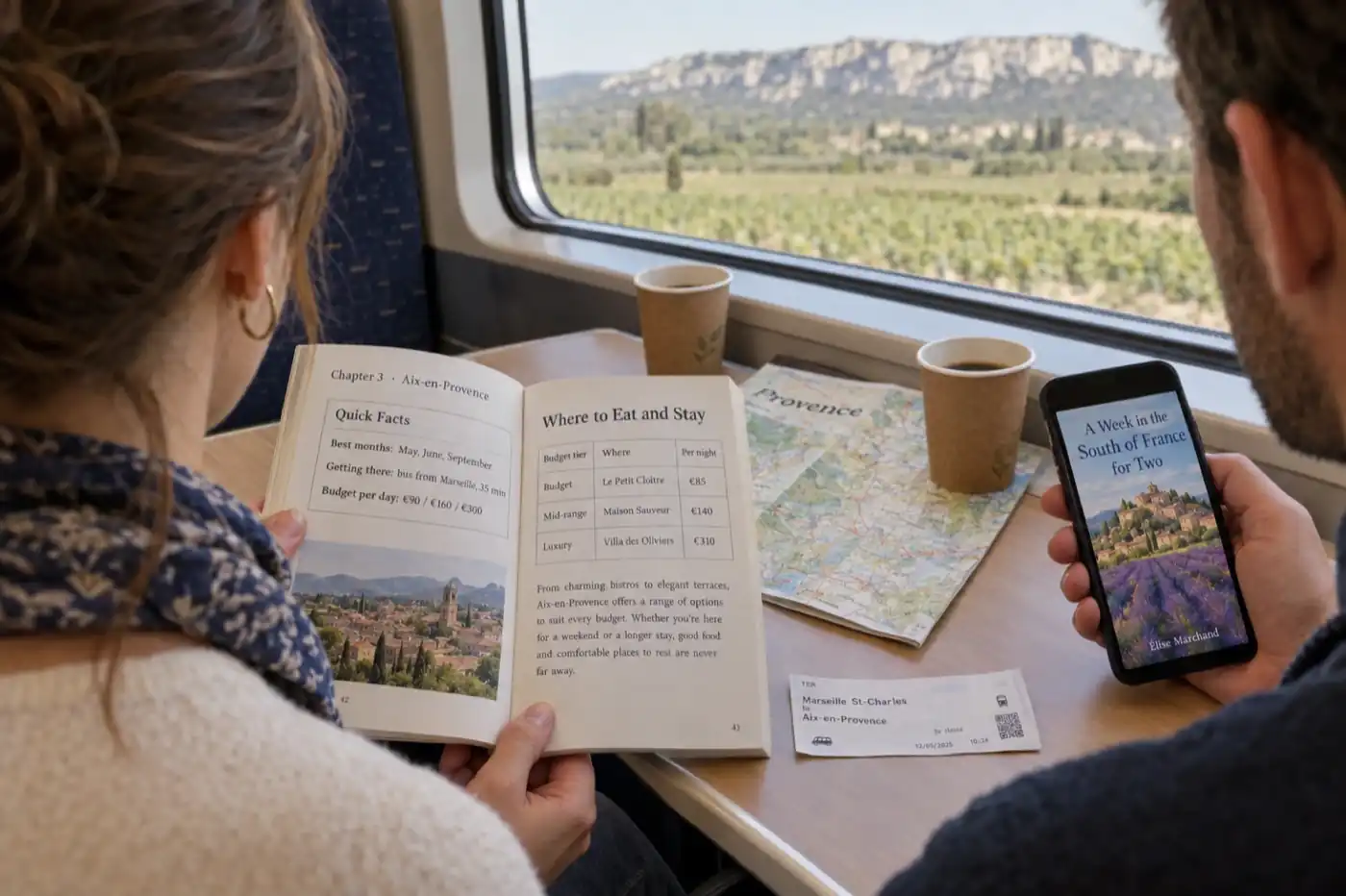
How do you make a travel guide with AI?
Decide on one destination, one trip length and one kind of traveller, then in Inkfluence AI start a new book, choose the Travel guide tile and type that brief in one line, such as "a week in the south of France for couples". Keep the recommended eight chapters, click Generate my book, edit the plan it writes (rename, reorder, delete or add chapters), and click Write the book. Then edit and fact-check the chapters, add a cover, preview it, and export it as a PDF, a KDP package, EPUB, DOCX or an audiobook. The video does all of that in under eight minutes; the AI travel guide creator page has more briefs to start from.
What the video covers, in order
- Narrow the focus: a destination, a trip length and a kind of traveller
- New Book, then the Travel guide tile and its quick examples
- The prompt: a week in the south of France for couples
- Eight chapters recommended, and the estimate under the slider
- Quality or Speed, and why James picks Speed for the video
- The plan: delete a chapter, move chapters, add one, up to 40
- Write the book: seven chapters from the plan and its summaries
- Editing chapters with AI, regenerating or deleting them
- Edit cover: upload, stock image, or an Illustrated AI cover from a prompt
- Preview, then export: PDF settings, KDP package, EPUB, DOCX, audiobook
- Where it can go: Etsy, Gumroad, Amazon, or in your pocket on the trip
Why narrow the focus before you type anything?
James's first minute is advice, not clicks, and it is the advice that decides whether anyone chooses your guide. "Travel guide alone is way too broad." Pick a specific destination, a trip length, or a kind of traveller, ideally all three. His examples are "3 days in Lisbon on a budget" and "the solo traveler's guide to Kyoto", and both work for the same reason: a reader planning that trip sees their own trip in the title. A generic guide to Portugal competes with every guidebook ever printed; a three-day budget guide to Lisbon competes with almost nothing, because it answers a question the big guides spread across forty pages.
He also names who the format suits: travel creators, bloggers and local businesses, for whom a guide is a way to build authority. A travel blogger has the posts already and the guide gathers them into something a reader can take along. A local business, a guesthouse, a tour operator, a café on the right street, can hand a guide to guests or give it away for an email address, and it is the most useful thing a guest could be given on arrival. The data below shows people already narrowing in the way James describes: of the 654 travel guides made on the platform so far, 123 said budget, cheap or backpacking in the title or brief, 54 were for families, 37 for solo travellers and 29 for couples or honeymooners, and 105 named a trip length.
The three parts of the brief do different jobs. The destination sets the chapters, because the travel format gives every chapter its own place. The trip length sets how many places are realistic: a week in the south of France is six or eight towns, a weekend in Lisbon is four or five neighbourhoods. The traveller sets the tone and the picks, which is why "for couples" in James's prompt matters: it tilts the restaurants towards a table for two and the evenings towards a terrace rather than a hostel bar. Add a budget ("on a mid-range budget") or a focus ("for people who want to walk everywhere") and the plan will carry that through every chapter too.
What does the Travel guide screen ask for?
From New Book, James picks the Travel guide tile, which the app describes as itineraries, city guides and trip planning. The next screen asks one question, where you are taking readers, with the prompt "the place, and the kind of trip it is". Three quick examples sit under the box for anyone who wants to start from one: a five-day Lisbon itinerary with food, views and hidden gems; a budget backpacking guide to Southeast Asia; a local-favourites city guide to Tokyo for first-timers. Every one of them is the shape James just described: a place, a length or a traveller, and an angle.
He types his own instead, and it is shorter than any of the examples: "a week in the south of France for couples". That is enough. The app does not need the list of towns or the restaurants; it needs to know where, how long and for whom, and it plans the rest. If you do have towns in mind, name them ("Nice, Antibes, Aix-en-Provence and the Luberon") and the plan will use them rather than choose its own. If you want the guide in another language, type the brief in that language; one in six travel guides on the platform has been written in a language other than English.
How many chapters should a travel guide have?
The slider recommends eight for a travel guide, and James keeps it. Eight is a good default because of how the travel format plans a book: every chapter covers a different place. For a country or region guide each chapter is a city or an area; for a single-city guide each chapter is a district or a neighbourhood. The most visited place comes first, so the reader who only has one day reads chapter one, and the last chapter is often a day trip or somewhere quieter. Chapter titles name the place, so the table of contents doubles as the route.
So the honest way to choose the number is to count the places. A long weekend in one city is four to six neighbourhoods. A week across a region is six to eight towns, which is what James's prompt produces. A two-week country guide might be ten to twelve regions. Paid plans allow up to 40 chapters in the plan, which is far more than a travel guide needs; the free plan writes up to five chapters a book, which is exactly a weekend city guide. That limit shows up clearly in the data: of the 648 travel guides with chapters written, 455 have five or fewer, 107 have exactly eight, and 44 run past twenty, the regional and country guides.
Under the slider the app shows an estimate for the chosen length. For eight chapters it reads 4,400 to 6,000 words and roughly 18 to 24 pages, which is what James reads out. It is a general estimate that applies to most books. Travel guides come out longer, as the next section and the numbers further down show.
Quality or Speed?
On a paid plan the same screen offers a generation mode. Quality is described in the app as the best structure and depth, slightly slower; Speed as faster generation with concise output. James picks Speed so the video does not have to wait. For a guide someone will travel on, pick Quality: the depth is the tables, the prices and the second restaurant, and those are what a reader paid for. Quality is also the default, and free accounts, which do not see the toggle, write in it. Of the 612 travel guides on the platform with a recorded writing run, 609 were written in Quality and 3 in Speed. Speed earns its place when you are testing whether a destination has enough in it for a full guide before you commit to one.
What can you change in the plan before it is written?
Click Generate my book and the app plans the guide first: a card for each chapter with its title and a summary of what it will cover. The screen is titled "Here's your plan", and it says what to do with it: rename, reorder or remove chapters, because every chapter is written to match. James does exactly that. He looks down the list, decides one chapter is not a place he wants to go, and deletes it. He shows that you can drag chapters into a different order, and that Add chapter puts a new one in if the plan missed somewhere. His plan goes from eight chapters to seven, and the counter under the list shows how many you have against the limit, 40 on a paid plan.
Treat this screen as the route. Read the chapter titles in order and ask whether that is the order you would travel in. If the guide is for a week on the road, the chapters should follow the road: Nice, then Antibes, then inland, not back and forth. If a place is on the list that your readers would skip, delete it now; if the place you most want in the book is missing, add a chapter and name it in the title. Rename a chapter to put the angle in it ("Aix-en-Provence for two: markets, fountains and a long lunch") and the chapter will be written to that angle. None of this uses your allowance. Changing the plan is free; only writing counts.
Then Write the book. The app takes the prompt, the chapter titles and the summaries and writes the chapters from them; James sits back while it works, which takes a couple of minutes for his seven. Non-fiction chapters are written at the same time rather than one after another, so a longer guide does not take proportionally longer.
What goes into each chapter?
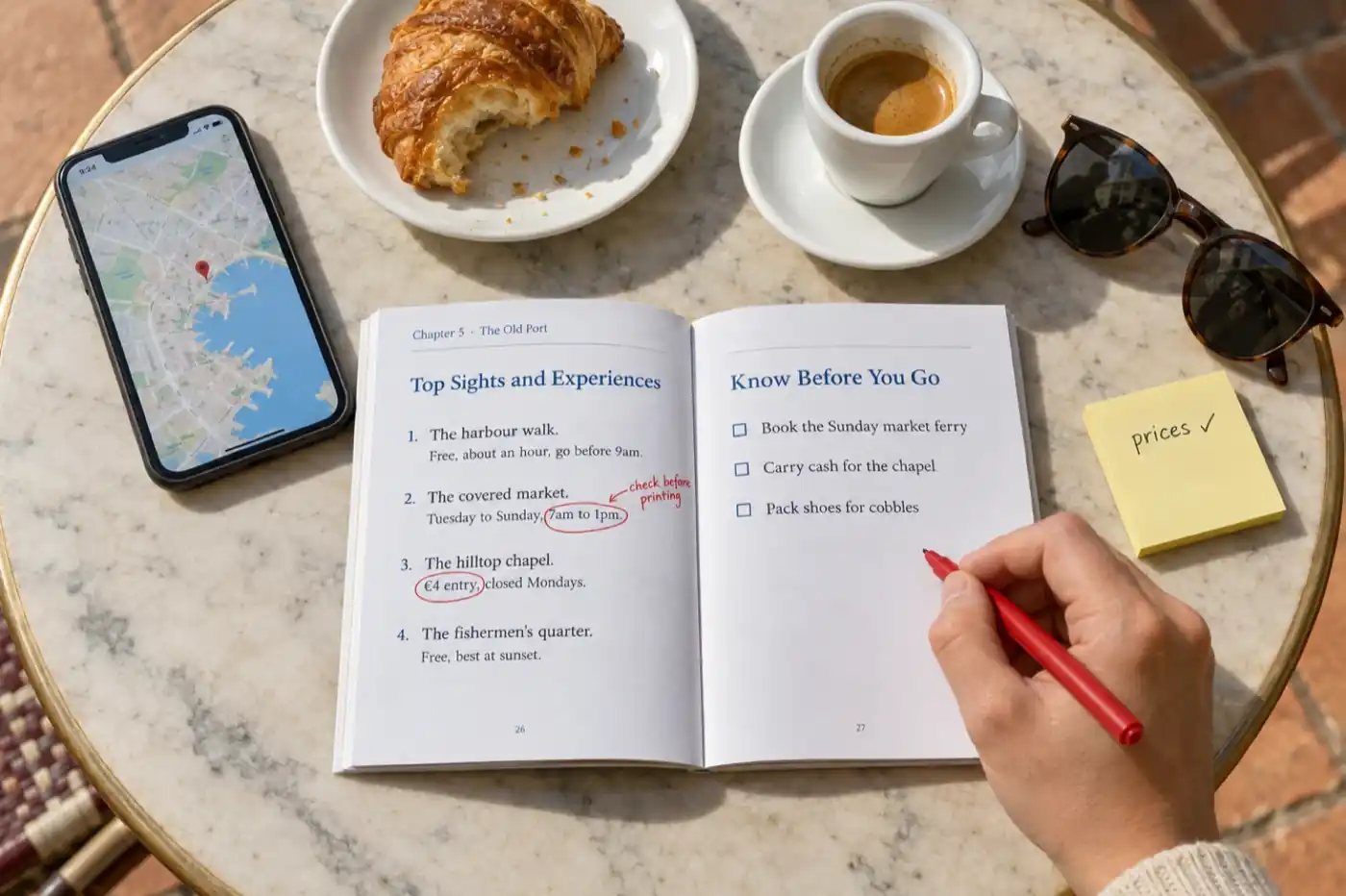
James scrolls the finished book and says it has different types of content within it, and that is the part of the travel format worth understanding before you edit anything. A travel guide chapter is not an essay about a place. It is a set of practical sections, and the layout rotates from chapter to chapter so that eight chapters do not read as eight copies of one template. Across a book you will see these shapes:
| Section | What it contains | What to check |
|---|---|---|
| Quick facts | Best months, getting there with transport costs, budget per day at three levels, languages, currency, time needed | Transport prices and journey times, which change every season |
| Top sights, ranked | Five to eight places, famous and less known, each with hours, entry cost, time needed and one tip, plus the tourist traps to skip | Opening days and entry prices, and whether anything is closed for restoration |
| Where to stay | A table by budget tier with a named place, the area, a price per night and who it suits; or a neighbourhood table with the vibe and the walk to the centre | That each named place exists, is open, and is priced near the figure given |
| Where to eat | Named restaurants with the dish to order and its price, a food timeline from breakfast to late night, street food with prices | That the restaurant is still trading; menus and prices move fastest of all |
| Getting around | Airport and city transport compared by cost and time, the useful day pass or app, whether a car is worth it | Fares and route names |
| A sample day | A timed itinerary, morning to evening, or a day-by-day plan for the place | That the timings are walkable and the stops open on the day you put them |
| Know before you go | A packing list for that place, useful phrases with pronunciation, money-saving tips, local customs, common first-timer mistakes, safety notes | Phrases, and any rule or custom stated as fact |
Two rules sit behind all of it. Every chapter names specific places, with addresses, prices or hours, rather than telling the reader to "research restaurants", and advice generic enough to apply to any destination is left out; even the packing list is for that place. That is why the chapters are long. A section with a comparison table, five named restaurants with dishes and prices, and a packing list is simply more words than a section of prose, and it is why the eight-chapter guides people have made run at about 1,900 words a chapter (a median of 15,487 words over eight) rather than the 550 to 750 the on-screen estimate assumes.
How long should a travel guide ebook be?
Eight chapters, one place per chapter, is the length the app recommends and a sound default. The 107 travel guides on Inkfluence AI with exactly eight chapters came out at a median of 15,487 words (counted 23 September 2026), about 1,900 words a chapter, because every chapter carries tables, lists and named places. Set the length by the number of places your reader will visit rather than by a word target.
That is longer than most people expect from the estimate, and it changes two things. The first is the price: a 15,000-word guide with tables for every town is a substantial product, closer to a short printed guidebook than to a blog post in PDF form, and it can be priced like one. The second is the edit. Fifteen thousand words of practical detail is an evening of checking, not ten minutes, and the checking is the part that makes the guide trustworthy.
Short is fine when the trip is short. A five-chapter weekend guide, one chapter per neighbourhood, is a complete product for a city break and is the length the free plan writes. Longer is fine when the trip is: the 44 guides on the platform with more than twenty chapters are the country and regional guides, where every region is its own chapter. What does not work is padding. If you have run out of places, the guide is finished; add a chapter only when there is somewhere new to send the reader. The written travel guide walkthrough goes further into formats, from weekend planners to country overviews.
Check every price, time and address
James reviews the chapter titles before writing and says he will review the content afterwards, and for a travel guide that second review is not optional. The travel format asks for real, named places with prices, opening hours and costs, because a guide without them is useless. That is exactly the kind of detail that goes out of date, and an AI draft can state it confidently and wrongly. A restaurant that closed last year, a museum that now shuts on Tuesdays, a bus that became a tram: none of those is visible from the page.
The fastest way through it is one pass per chapter with a map open. For each named place, search it, confirm it exists and is open, and correct the price and hours from its own website. Where you cannot confirm a figure, replace it with a range or remove it. Where you know better from having been there, say so in your own words, because a line of first-hand experience ("go at nine, before the tour buses") is worth more than any number. If you are writing for sale, put the date you checked the details at the front of the book. Readers forgive a price that has moved since then; they do not forgive a restaurant that never existed.
Editing the chapters
When the book is written, James shows the two ways to finish. If you are happy with it, download it. If not, edit. Each chapter opens in the editor, where the AI assistant can proofread, rewrite, shorten or expand a passage, and where you can type directly. From the chapters list you can add a chapter, regenerate a chapter with AI (with an undo if you liked the old one better), or delete one. For a travel guide the useful edits are practical: turn the busiest table into two if it will not fit a phone screen, add the photo you took of the view, rewrite the opening of each chapter in your own voice so the guide sounds like someone who has been there. The book editor page shows the assistant in more detail.
Which cover works for a travel guide?
Click Edit cover and the video walks all three routes. Upload an image, which is the right choice if you have a photo from the trip, because a real photo is the strongest signal that the author has been there. Choose a stock image, which is what the book had before James changed it. Or generate an AI cover: he chooses Illustrated, gives the prompt "a week in southern France", clicks Generate cover, and has a painted cover within a couple of minutes. If it is not right, pick another style and generate again; when one works, apply it to the book and save.
The styles matter more for travel than for most books, because a travel cover has one job: say the place at thumbnail size. The cover editor offers ten, and among them Photographic (a realistic cinematic photo), Editorial (clean magazine-cover energy), Illustrated (hand-drawn watercolour, the one James uses) and Vintage, which the app describes as a sun-faded retro travel poster and which suits a travel guide better than almost any other kind of book. Of the 73 travel guides on the platform with an AI cover so far, 33 used Editorial and 31 Photographic, 4 Vintage and 2 Illustrated. AI covers come with the paid plans' monthly allowance, and credits buy more. The AI book cover generator page has the full style guide.
Preview and export
With the cover applied, James previews the travel guide and says what the preview is for: seeing that the content is clean, page by page, before anyone else does. Then the export dialog. For a PDF you can set the page size and content, switch decorative elements on or off, adjust the branding, the header, footer and copyright, and add an author section with your name and a short bio. The same dialog exports a KDP package (the interior PDF and a full wrap cover with the spine sized to your page count), an EPUB, a DOCX, or turns the book into an audiobook.
Choose by where the guide is going. A PDF is the right file for a phone on the trip, for Etsy and Gumroad, and for a lead magnet. EPUB is for Kindle and the other ebook stores, where readers expect reflowable text. The KDP package is for a paperback, which for a travel guide is worth it only if you are confident of the details, because a printed price cannot be corrected. DOCX is for handing the guide to an editor or a designer. The free plan exports PDF; the KDP package, EPUB and DOCX come with the paid plans or credits. Of the 307 travel guides exported so far, the last export was a PDF for 247, an EPUB for 44 and a DOCX for 16. The guide to PDF, EPUB and DOCX covers the differences in full.
The audiobook is the one to think about for travel. A guide read aloud is something to listen to on the train into a new city. Tables do not read well aloud, since a narrator reads them cell by cell, so if you plan an audio edition, turn the two or three busiest tables into sentences first. Creator includes 15 narrated chapters a month and Premium 30; the ebook to audiobook walkthrough shows the steps.
Where can you sell a travel guide?
Etsy and Gumroad both sell a travel guide as a digital download. Publishing straight from the book in Inkfluence AI, once your shop or account is connected, uploads the EPUB and the cover; to offer a PDF too, export it and add it to the listing on the store. Amazon takes the EPUB for Kindle and the KDP package for a paperback, which you upload to KDP yourself. Up to 23 September 2026, 24 travel guides on the platform were listed on Etsy and 23 on Gumroad.
James mentions all three at the end of the video, and each suits a different guide. Etsy buyers search for a trip they are planning, so a tightly named guide ("a week in the south of France for couples") meets them at the moment they are looking; the app can draft the listing description, tags and a suggested price from the book. Gumroad suits a creator with an audience: you link to the guide from your posts, set a price, and the buyer downloads the PDF. Amazon suits a guide you will keep up to date, because readers there review against what they find on the ground, and it asks you to declare AI-generated content when you publish, which does not block the listing (the KDP AI disclosure guide has the details). The selling walkthrough video shows the Etsy and Gumroad screens in order, and how to sell travel guides works out what each store keeps from a sale, with a builder for the listing itself.
Two other routes do not involve a store. A travel blogger or a local business can give the guide away as a lead magnet: a guesthouse's guide to its own town, a tour company's guide to the day before the tour, a blog's guide to the city it covers most. And the free showcase on Inkfluence AI publishes the book for readers to find, with your name or anonymously; 29 travel guides are there so far. Whatever the route, pricing follows length and specificity; the pricing guide works through it.
Build a brief in the shape James uses
A place, a trip length and a traveller, with a budget and a focus if they matter. Fill them in and the brief writes itself, with a chapter count to set on the slider. The button opens the dashboard with the brief already in the box.
What 654 travel guides say about how people make them
These figures come from the travel guides people have actually made on Inkfluence AI, from the first one on 1 February 2026 to 23 September 2026, the day this video went up, read from the books themselves. They are aggregates only: no title, brief or account is published. This page is their home; other pages cite them.
travel guides made by 501 people between 1 February and 23 September 2026
654 travel guides were started on Inkfluence AI between the first one on 1 February 2026 and 23 September 2026, by 501 people; 452 of them made exactly one. 328 were started in the last 90 days, and July was the busiest month with 146.
Sample: every travel guide on the platform, 654 books. Counted 23 September 2026.
median words in the 107 travel guides with exactly eight chapters
The 107 travel guides with exactly eight chapters came out at a median of 15,487 words, with the middle half between 14,821 and 16,108. Guides started since June run at about 1,900 words a chapter (a median of 1,933 across 418 books), well above the 550 to 750 a chapter the on-screen estimate assumes.
Sample: 107 eight-chapter guides; 418 guides started since 1 June 2026. Counted 23 September 2026.
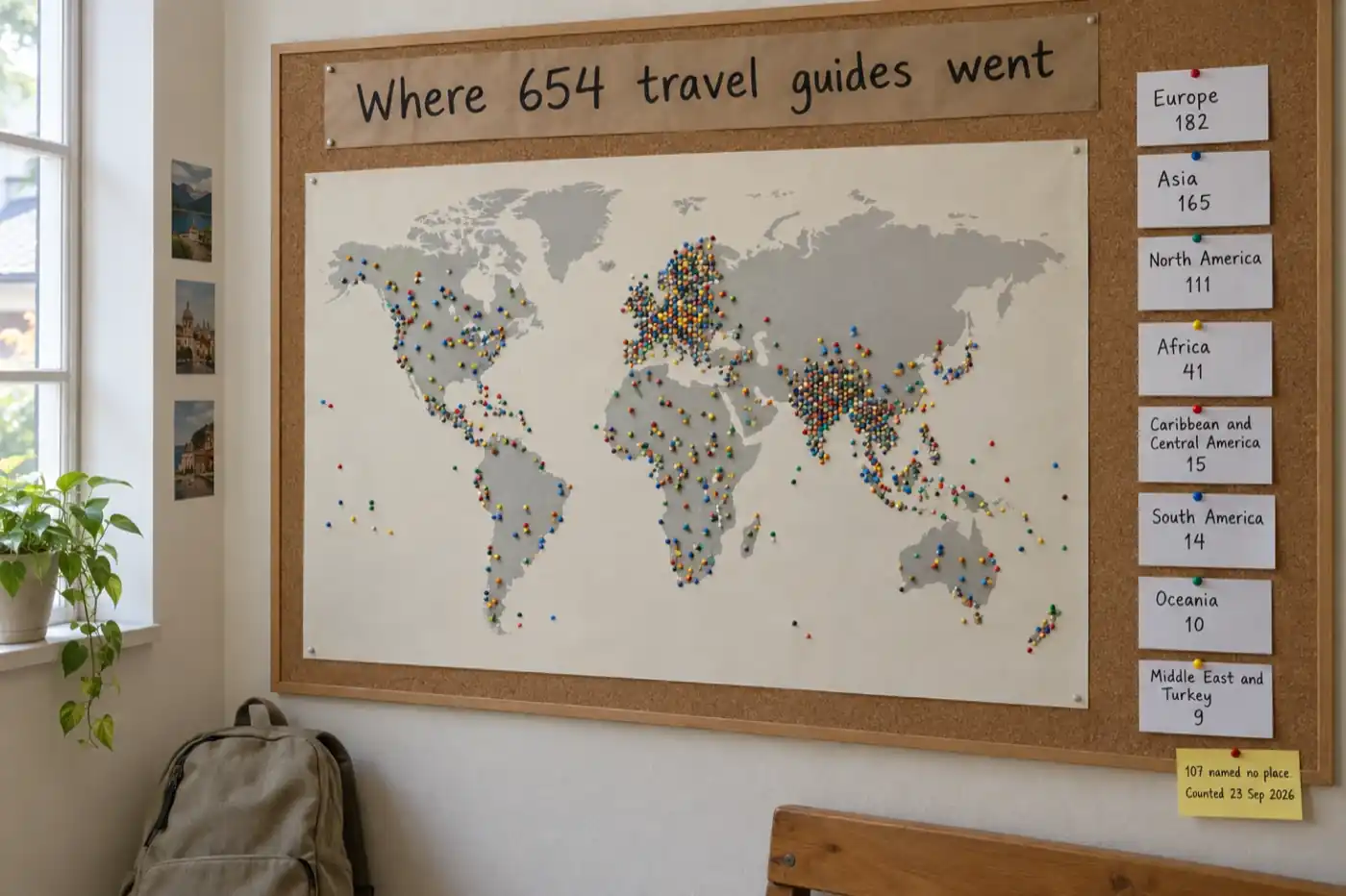
guides set in Europe, Asia and North America, of the 547 that named a place
Of the 547 travel guides whose title or brief named a place, 182 were in Europe, 165 in Asia, 111 in North America, 41 in Africa, 15 in the Caribbean and Central America, 14 in South America, 10 in Oceania and 9 in the Middle East and Turkey. By country the United States (61), India (52), Italy (31), the United Kingdom (29) and Thailand (27) led.
Sample: 547 of 654 guides named a place. Counted 23 September 2026.
- 654 travel guides by 501 people. 452 of those people made exactly one, so this is a format people come to for a specific trip, not a production line. The pace has grown every month through the summer: 12 in February, 35 in March, 85 in April, 98 in May, 113 in June and 146 in July, the peak of the travel season, then 88 in August and 77 in the first 23 days of September.
- Europe and Asia lead. 547 of the 654 named a place in the title or the brief. Of those, 182 were in Europe, 165 in Asia, 111 in North America, 41 in Africa, 15 in the Caribbean and Central America, 14 in South America, 10 in Oceania and 9 in the Middle East and Turkey. The other 107 did not name a place in the title or the brief.
- By country: the United States (61), India (52), Italy (31), the United Kingdom (29), Thailand (27), Spain (22), France (20), Japan (19), Morocco (14) and Canada (13).
- People narrow the way James says to. 154 mentioned food, restaurants or where to eat in the title or brief, 123 said budget, cheap or backpacking, 54 were for families or children, 39 for first-time visitors, 38 were road trips, 38 said luxury, 37 were for solo travellers and 29 for couples or honeymooners. 15 were about moving abroad or working remotely, and 5 were pilgrimages. 105 named a trip length.
- Length follows the plan. Of the 648 guides with chapters written, 455 have five or fewer (the free plan's limit per book), 107 have exactly eight, 18 have nine to twelve, 16 have thirteen to twenty and 44 have more than twenty. The eight-chapter guides have a median of 15,487 words; across every guide the median is 9,374.
- They get finished. 641 of the 654 have every planned chapter written, and 307, just under half, were exported to a finished file. The last export was a PDF for 247, an EPUB for 44 and a DOCX for 16.
- Some get sold. 24 were listed on Etsy, 23 on Gumroad and 29 published to the showcase; 7 had an audiobook made or started.
- Covers: 73 had an AI cover, most often Editorial (33) or Photographic (31), then Vintage (4) and Illustrated (2).
- One in six is not in English. 107 of the 654 were written in 27 other languages; Dutch, German and Portuguese had 12 each, French 11, Italian and Spanish 10 each.
- Quality is the default. 609 of the 612 guides with a recorded writing run used Quality and 3 used Speed; the toggle appears only on paid plans, so free accounts always write in Quality.
How it was counted. Every book created in the travel guide format between 1 February and 23 September 2026 was counted once, whoever made it and whether or not it was finished. Destination region, country and trip shape were read from the title and, where the title named no place, from the brief the author typed, using whole-word keyword rules for places and phrases; a guide that never names its place is not placed, and a guide that names two places is counted once, under the first rule it matches. Chapters and words are counted from the written chapters; exported means a file was downloaded at least once; generation mode is from the book's writing run. Shares are within the 654-book set. The counting script is kept with the site's other data scripts. The figures are published under a Creative Commons Attribution 4.0 licence: quote them with a link to this page.
The wider picture across every kind of book, genre by genre, is on the AI book writing statistics page and the what people write with AI page; this page keeps to travel guides.
Six travel guide briefs in the shape of the video's, and what each one plans
Place, length, traveller, and one angle. Each of these is one line, and each maps to a plan the way "a week in the south of France for couples" mapped to a chapter per town.
- "3 days in Lisbon on a budget." James's first example. Five chapters, one per neighbourhood (Baixa and Chiado, Alfama, Belém, Príncipe Real, a day trip to Sintra), each with free sights, cheap places to eat and the tram or walk between them.
- "The solo traveller's guide to Kyoto." His second. The traveller sets the picks: counter seats rather than tables for four, hostels and small inns with single rooms, the quiet temples at opening time, and a safety note per district.
- "A week in Andalusia by train, with no car needed, for first-time visitors." The focus fixes the route: Seville, Córdoba, Granada, Málaga, Ronda, each chapter starting with how to get there from the last.
- "A long weekend in Edinburgh for families with young children." The traveller changes every table: family rooms, rainy-day indoor options, where to eat with a pushchair, and how far each sight is on small legs.
- "Our town for guests: a guide from the guesthouse on the harbour, walking distance only." The local business version. Every chapter is a street or a stretch of coast within a walk of the door, and the book goes in every room or in the booking email. For a holiday let, the guest guidebook maker plans this split for you: the local chapters written from one line, the house pages (getting in, wifi, rules, check-out) typed by the host.
- "Two weeks in Vietnam, north to south, on a mid-range budget." The long version: twelve chapters from Hanoi to the Mekong Delta, with the overnight train or the short flight between each, and a budget table per stop.
What does not work is a brief with no traveller and no length. "A guide to France" gives the plan nothing to decide with; it will choose Paris, the Riviera and the Loire, and every chapter will be written for nobody in particular. Add who and how long, and the same destination becomes a book with a reader.
A guide for your own trip
The detail in the video that is easy to miss is why James is making this book at all. He is going to the south of France for a week, and he wants "a travel guide that I can take with me and use when I'm there". That is a use most tutorials skip. Planning a trip usually means twenty open tabs, a notes app and a screenshot of a restaurant someone recommended. A guide made for your own trip puts the route, the places to stay, where to eat in each town and the phrases you will need into one file, in the order you will travel.
| Who | The brief | What to do with it |
|---|---|---|
| A couple on holiday (the video) | "A week in the south of France for couples" | Export the PDF to both phones; delete the towns you decide against |
| A family with a planner | "Ten days in Cornwall with two children under eight, by car" | Print the day you are on; give the children the sample day to tick off |
| A group trip organiser | "A long weekend in Porto for a group of eight friends, one big dinner a night" | Send the PDF to the group chat before anyone books a flight |
| A pilgrim or walker | "The last 100 km of the Camino Francés, stage by stage, for a first-timer" | One chapter per stage; an audiobook edition to listen to on the way |
| Someone moving abroad | "My first month in Lisbon as a remote worker: neighbourhoods, paperwork, where to work" | Keep it as your own reference; it becomes a guide to sell once you have lived it |
The same checking rule applies, more so. A guide for your own trip is one you will act on, so confirm the opening days of anything you plan a day around, and the last train back.
Five mistakes particular to travel guides
- A destination with no traveller. "A guide to Italy" is every guide to Italy. Say who is going and for how long, as James does, and the plan has something to decide with.
- Publishing without checking. Prices, hours and closures are the details readers act on and the details an AI draft is most likely to get wrong or out of date. Check each one, and date the book.
- A plan that zigzags. The chapters are the route. If the order sends a reader back and forth across the region, drag them into the order you would travel before you click Write the book.
- Printing too soon. A paperback cannot be corrected when a restaurant closes. Sell the PDF or the ebook first, update it for a season, then consider print.
- A cover that does not say the place. At thumbnail size a travel cover has one job. Use your own photo, or a Photographic or Vintage AI cover with the place in the prompt.
This video, or the written travel guide pages?
The video shows the clicks and how long each step takes, which is what people ask first. The written pages go wider. The AI travel guide creator page has the guide types and longer example briefs for budget, digital nomad and weekend guides. The how to write a travel guide guide covers the craft: niches, itinerary structure and publishing. The cookbook video is the closest sister walkthrough, another practical format where every chapter stands on its own. Watch this one when you are about to make a guide; read those when you are deciding which one to make.
AI travel guide creator
The tool page: guide types, example briefs and plans for travel creators.
This video (7:51)
Travel guide tile, eight chapters, Quality or Speed, the plan edited, an AI cover, preview and export. Owns the numbers from 654 travel guides.
Full video transcript
Lightly punctuated and cleaned of speech-to-text slips (product and format names, a repeated word); the wording is as spoken.
Read the transcript (7:51)
Hi everyone, this is James from Inkfluence AI, and today I'm going to be showing you how to create a travel guide with Inkfluence AI. So travel guides are one of the most popular ebook formats on Inkfluence AI. Readers absolutely love practical, destination-specific content, and it's a great way to build authority if you're a travel creator, blogger, or a local business.
So before you start, narrow your focus. Travel guide alone is way too broad. You want to pick a specific destination, trip length, or traveller type. For example, something like "3 days in Lisbon on a budget", or "the solo traveler's guide to Kyoto". So if you give a clear brief, then readers have a reason to choose your guide over a generic one.
So what you need to do is head to Inkfluence AI and start a new book project. So what we'll do is we will select travel guide. And here you've got some quick examples that you can select, or you can make your own prompt to Inkfluence AI. So that's what we're going to do. I'm going to the south of France for a week, so I want to create a travel guide that I can take with me and use when I'm there. So, a week in the south of France, and for couples.
So then you select your chapter count. So the recommended for a travel guide is eight chapters. And you can choose your generation mode as well. So Quality is better structure and depth, but it's slightly slower, or Speed is faster generation with concise output. So we'll go for Speed for this. When ready, click Generate my book, and Inkfluence AI will start to create our travel guide for us.
So as you can see, Inkfluence AI is building our eight-chapter book. It's around 4,400 to 6,000 words and roughly 18 to 24 pages. Here is the plan for our book. So we can have a look at this in terms of chapters, and we can have a look. If we think, actually, we don't want to go or go do this, or we don't want this chapter, you can delete it. You can also move the chapters around if you want to reshape how this book looks. And you can also add a chapter in as well if you want extra chapters in. As you can see, we've got seven chapters now. And the maximum number of chapters you can add is 40.
So I'm happy with this. So I'm going to click Write the book. And Inkfluence AI will now take our prompt. It will take the chapters and the summaries, and it will create our chapters from that. So Inkfluence AI is now getting to work with this, so I can just sit back and relax and wait for my travel guide to be created.
So, as you just saw, I did just read through and review the chapter names, and now I'm going to be able to review the actual content of the chapters itself. I can edit using AI the chapter content. And as you can see, just like that, it's created our seven-chapter travel guide. Now, if you're happy with that, if you want to just download it, you can. Or you can edit, and then you can go through your book and see if you want to add in anything or remove anything as well.
So, as you can see, we've got our chapters. It's got different types of content within the book. If you go to chapters, you can add in a chapter. You can also regenerate chapters with AI or delete them.
We can then also update the cover. So if I click Edit cover, we could upload an image there. We could add in a stock image, so for example, that's what this one is here. We could go for that one, or we can create a cover image using AI. So if we go for Illustrated, and "a week in southern France" is the prompt that we want to give for this AI book cover, I can click Generate cover and Inkfluence AI will generate my book cover with me. As you can see, it's very quick. And in a couple of minutes, I've got a book on my selected destination for my travel guide, and an AI book cover as well.
Now, once I'm ready, I can then add this book cover to my book if I want to. Or if I want to tweak it or go for another style, I can select the style and generate another book cover until I'm happy with the selected book cover. As you can see, it's nearly done. So we can review this and add it to our book. Once ready, we can also sell our book on online marketplaces as well, such as Etsy, Gumroad or Amazon.
So, here we have it. This is our book cover. Looks absolutely amazing. I've applied it to our book. I've clicked save, so it's now applied to our book. And as you can see, I've got a full travel guide for the south of France and a really, really clean book cover in a few minutes.
I can now preview my travel guide, and as you can see, the content is really clean. I can then export this as a PDF and edit the page size and content, decorative elements, branding, header, footer, and copyright, and also add in a bio and my name. I can then export it as a PDF, a KDP package, an EPUB, a DOCX, or I can turn it into an audiobook to listen to.
So that's how you can create a travel guide with Inkfluence AI in just a few minutes.
Travel guide FAQ
How do you make a travel guide with AI?+
How long should a travel guide ebook be?+
Where can you sell a travel guide?+
How many chapters does a travel guide need?+
What goes into each chapter of an AI travel guide?+
Should I choose Quality or Speed?+
Can I change the chapters before the book is written?+
Is the information in an AI travel guide accurate?+
Can I use a travel guide for my own trip rather than to sell?+
What cover should a travel guide have?+
Is it free to make a travel guide with AI?+
Can I write a travel guide in another language?+
Which destinations do people write travel guides about?+
Can I add my own photos and maps?+
Can I turn a travel guide into an audiobook?+
Related tools
AI Travel Guide Creator
The tool from the video: guide types, example briefs and plans.
AI Book Cover Generator
The cover editor's styles, from Photographic to the Vintage travel poster.
Lead Magnet Generator
For travel bloggers and local businesses giving the guide away for an email.
AI Audiobook Generator
A narrated edition of the guide, for the train into town.
AI Book Editor
Where the chapters get checked, rewritten and made your own.
Ebook Income Calculator
What a guide at your price earns on each store after fees.
Related reading
- How to write a travel guide with AI: the written guide, with niches, itinerary structure and premise templates.
- Make a cookbook with AI: the sister video for another practical, chapter-by-chapter format.
- Airbnb guidebook maker: the same travel format turned into a welcome book for guests at a holiday let, with a planner and a full example.
- How to create a lead magnet with AI: the six-minute video for a short guide you give away.
- How to sell your ebook: the Etsy and Gumroad screens in their own video.
- How to sell travel guides online: which store suits which guide, the fees per sale, and a listing builder.
- How to write a non-fiction book with AI: format choice and outline review for longer books.
- Self-publishing on Amazon KDP: the Amazon side, from the KDP package to the listing.
- Etsy vs Gumroad for ebook sellers: which store suits a travel guide, and why.
- How to price AI-created ebooks: pricing by length and specificity.
- High-demand, low-competition ebook niches: where a narrow travel guide fits among first-book niches.
- PDF vs EPUB vs DOCX: which export to use for a phone, a Kindle and a paperback.
A place, a length, a traveller. Then generate.
The plan appears in seconds and is free to change. The chapters a couple of minutes after that.
Make a travel guide