
How to Make a Coloring Book with AI and Publish It on Amazon KDP (2026)
The complete workflow nobody joins up: generate a whole coloring book with AI (not one page at a time), meet every KDP spec, pass the AI-disclosure question, and price it with real royalty math.
Quick Answer
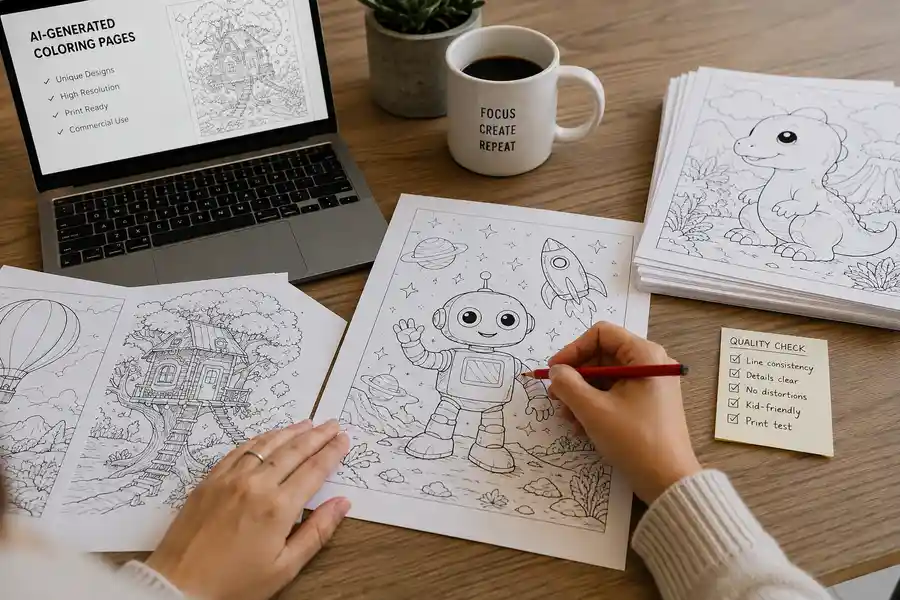
To make a coloring book with AI: pick a specific niche (not "animals" but "dinosaurs doing everyday things"), generate the whole book in one run with a tool that keeps style and characters consistent across 24+ pages of clean closed line art, export the print files at 8.5" x 8.5" (the default) or 8.5" x 11", then publish on Amazon KDP with black ink + white paper settings and an honest answer to the AI-content question. At those coloring trims a black-and-white paperback of up to 110 pages costs a flat $2.84 to print, so a $9.99 book pays about $3.15 per sale at the 60% rate. The same designs also sell on Etsy as a digital download with no printing cost at all. Full walkthrough below.
Coloring books are the classic first self-publishing project for a reason: black-and-white interiors are the cheapest kind of book to print, the market buys them year-round, and the content is pictures rather than 50,000 words of prose. AI has now removed the last hard part, producing dozens of consistent, professional line-art pages, but most guides still cover only half the job. The AI tutorials skip the KDP specifics; the KDP tutorials skip the AI workflow. This guide is the whole road, start to sale.
Step 1: Pick a niche, not a category
"Animals coloring book" is a category, and categories are where new titles go to be invisible. Niches are where coloring books sell: specific enough that a buyer searching for exactly that thing finds a short shelf of options, broad enough that people actually search. Some proven shapes for 2026:
- Subject + twist: dinosaurs doing everyday things, cats in famous paintings, monster trucks at the beach.
- Audience + subject: a toddler's first farm animals (very bold, very simple), intricate botanical gardens for adults, large-print simple florals for seniors, a genuinely underserved shelf.
- Occasion books: baby shower activity pages, classroom holiday sets, birthday party favors by theme (an ABC book pairs with all three).
- Character series: one recurring character across the whole book, and then across book two and three (kept identical page to page the way our consistency guide explains). Series are how coloring book publishers compound.
The audience choice is also a pricing choice, and this is the part most niche lists miss: adult coloring books support meaningfully higher list prices than kids' books, because intricate line work reads as premium. If you are optimizing for royalty per sale, complexity is a pricing lever, not just a style option. The adult rung has its own dedicated walkthrough in how to make an adult coloring book, and our low-competition niches guide covers validation in more depth.
Step 2: Generate the whole book, not thirty separate pages
Here is where workflow choice decides whether this takes an afternoon or a lost weekend. General-purpose image tools generate one image per prompt (the pattern our book illustration page dissects), which means you personally invent 24 to 40 distinct scene ideas, prompt each one, and fight two problems the whole way: style drift (page 9 comes out in different line weight than page 8, because every generation is independent) and character drift (your recurring T-rex mutates between pages). Then you still have to assemble the pages into a print PDF at the right size.
A book-level generator does that whole job in one pass. With Inkfluence AI's coloring book generator, you describe the theme once, "a dinosaur coloring book for kids aged 4 to 8, starring a round little T-rex with big friendly eyes", and it:
- Plans every page as a distinct scene, alternating close-ups with wider scenes so the book has rhythm and no near-duplicate pages,
- Draws each page as clean black-and-white line art with bold outlines, fully closed shapes, and large open regions, or intricate detailed line work when the book is for adults,
- Keeps the recurring character consistent by drawing every page against a locked character reference,
- Paints a full-color cover (covers sell the book; interiors are the product),
- And exports the assembled book as a print PDF at 8.5" x 8.5" (the default) or the 8.5" x 11" US Letter coloring trim, with a blank page behind every design.
Each page gets a short caption in the editor ("The Sleepy Dragon") so you can reorder or regenerate individual pages, and captions stay off the printed page. Twenty designs is the default, and because the export puts a blank page behind every design, a 20-design book comes to about 42 pages, well past KDP's 24-page paperback minimum (step 4 explains the minimum).
Step 3: Quality-check like a buyer with a marker
The 2026 coloring book market has a real quality bar, because buyers have seen plenty of low-effort AI output and reviews are brutal about it. Check every page for the failure modes that earn one-star reviews:
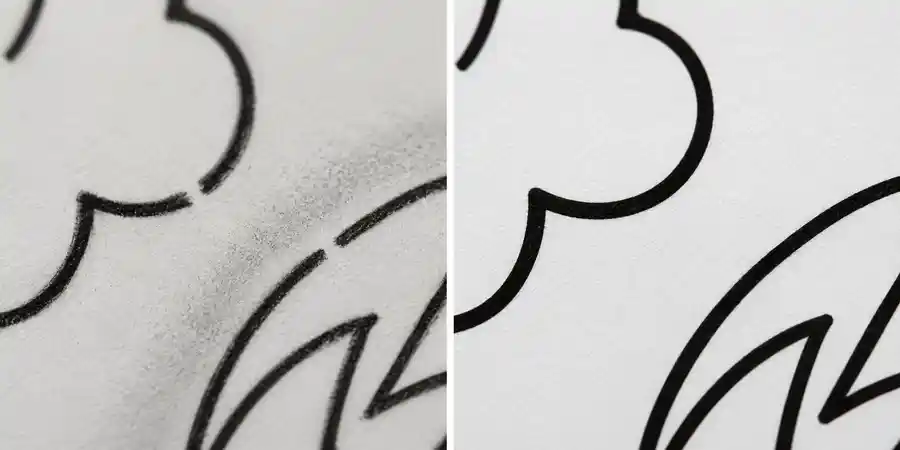
- Open shapes: lines that do not close mean flood-fill coloring apps break and neat colorers get frustrated. Clean closed line work is the single most important technical property of a coloring page.
- Gray shading or filled regions: a coloring page should be pure black line on white. Shading belongs to the colorer.
- Anatomy glitches: count fingers, legs, and wheels. One six-fingered hand in the preview pages can sink a listing.
- Near-duplicate pages: two very similar scenes read as padding. Regenerate one of them into a different moment.
- Crowding (kids' books): a four-year-old needs regions big enough for a crayon. If a page looks like a maze, simplify it or move it to an older-audience book.
Regenerating the three or four weakest pages costs minutes and is the difference between "AI slop" and a book that collects five-star reviews. This curation step is your actual job now; the drawing was the easy part. (The same pass, applied to illustrated storybooks, is the continuity checklist in our consistency guide.)
Step 4: Meet KDP's paperback specs (the checklist)
Amazon's requirements for coloring books are specific, unforgiving, and mostly unstated by AI art tools (the general print walkthrough is in our print-ready PDF guide). Here is the complete list:
- Trim size: 8.5" x 11" (US Letter) is the traditional coloring book trim, and 8.5" x 8.5" is the square size many bold and easy books use; both are KDP large trims. Inkfluence exports coloring books at 8.5" x 8.5" by default, with US Letter as the other option.
- Minimum 24 pages. KDP will not accept a shorter paperback. Set your page count to 24+ during generation.
- Black ink + white paper. Choose this interior option in KDP setup: it is correct for line art and it is Amazon's cheapest printing tier, which your royalty math depends on.
- No bleed needed: standard coloring pages sit inside the page margins rather than running off the edge, which keeps setup simple.
- Blank backs (built in): KDP prints both sides of each sheet. Markers bleed through paper, so successful coloring books put art on one side only, with a blank page after each drawing. Inkfluence AI does this for you: the PDF and the KDP package already carry a blank page behind every design. It doubles your page count, which also clears the 24-page minimum and makes the book feel more substantial.
- A cover with a spine that matches your page count: KDP's cover calculator gives exact dimensions once you know the final page count (our spine width calculator shows the same sums), and the cover designer handles the artwork side.
Step 5: The AI disclosure question, answered honestly
During title setup, KDP asks whether your book contains AI-generated content, with separate answers for text and images. For an AI-generated coloring book the answer for images is yes, and answering yes does not block publishing. AI-generated coloring books are published on KDP every day. What gets titles removed is misrepresentation and low quality, not disclosure. The exact form questions and how to answer each one are covered in our KDP AI disclosure policy guide, the same policy that covers illustrated children's books.
Two related policy notes worth knowing: content you generate needs to be yours to publish (Inkfluence gives you full commercial rights to your books), and Amazon rejects books that infringe existing characters, so keep your friendly dinosaur generic rather than suspiciously similar to a famous purple one.
Step 6: Price it with real royalty math
Coloring book economics are simple and pleasantly concrete. Amazon's printing charge for a black-ink paperback of 24 to 110 pages is a flat $2.84 at the coloring trims, 8.5" x 11" and 8.5" x 8.5", which KDP counts as large trims ($2.30 at regular trims such as 6" x 9"; per KDP's printing cost tables), and since mid-2025 the royalty rate is tiered: 60% of list price for books priced $9.99 and up, 50% below that. Royalty = (list price x rate) minus printing. So:
- Kids' book at $7.99: (7.99 x 0.50) - 2.84 = $1.16 per sale
- Kids' book at $9.99: (9.99 x 0.60) - 2.84 = $3.15 per sale, which is why so many coloring books list at exactly $9.99
- Adult intricate book at $12.99: (12.99 x 0.60) - 2.84 = $4.95 per sale
Notice the jump between $7.99 and $9.99: crossing the 60% threshold nearly triples the royalty for two dollars of list price. And notice the adult book: same production effort, more than four times the royalty of the $7.99 kids' book. Run your own numbers in our royalty calculator, and always confirm current printing rates in your KDP dashboard, since Amazon updates them occasionally. Listing metadata (title, description, keywords) has its own craft; the description generator and KDP tools carry that step.
Step 7: Sell the same book twice (the Etsy move)
The PDF you uploaded to KDP is also a finished product on its own: a printable digital coloring book. On Etsy and Gumroad, digital downloads have no printing cost, no shipping, and instant delivery, so a $4.99 digital edition is nearly pure margin, sold to a buyer who prints pages at home as many times as their toddler demands. Parents love this format precisely because pages are reprintable after coloring disasters.
Inkfluence connects to Etsy and Gumroad directly, and the digital-first playbook, listing images, keywords, pricing spreads, is covered in our Etsy guide. Running both channels from one generated book is the closest thing this market has to free money: one production run, two products, two audiences. Before the PDF goes on Etsy, take the blank backing pages out; the printable package lists the rest of what the download should hold.
What about making it in Canva instead?
A popular alternative workflow assembles coloring books in Canva from clip-art elements or uploaded AI images (our ebook tools comparison covers where Canva fits generally). It works, and for text-heavy activity books Canva's layout control is genuinely useful. The trade-offs: you are still sourcing or generating every image somewhere else first, consistency across pages is entirely on you, licensing of stock elements needs checking for print-on-demand use, and the assembly is manual page-by-page work. If your book is image-led line art with a recurring character, a book-level generator produces in one run what the Canva workflow produces in an evening or two.
The KDP rejection checklist
If KDP bounces your book, it is almost always one of these, all fixable in minutes:
- Page count below 24, add pages or blank backs and re-export.
- Cover dimensions off, regenerate the cover PDF with the calculator once the final page count is locked.
- Content too close to the trim edge, keep art inside the margins; art-only pages exported from Inkfluence sit within the page area.
- Metadata mismatch, the title on the cover must match the title in the listing exactly (if the title is still undecided, the title generator is built for this moment).
- Undisclosed AI content flagged, answer the disclosure honestly upfront; retro-fixing trust with Amazon is much harder than a checkbox.
The prompt library: copy, paste, adjust
Every ranking guide tells you to "write a good prompt"; almost none show the prompts. Segmented by audience, these produce publishable books:
Toddlers (very bold, very simple): "A first farm animals coloring book for toddlers: one big friendly animal per page, thick simple outlines, almost no background." (Pairs naturally with an ABC book on the same theme.)
Kids 4-8 (the volume market, per the niche framework): "A dinosaur coloring book for kids aged 4 to 8, starring a round little T-rex with big friendly eyes doing everyday things: baking cookies, riding a bike, bath time, bedtime."
Kids, occasion book: "A birthday party coloring book for kids: balloons, cake disasters, party games, a dog stealing sausages."
Adults (premium pricing rung): "An intricate botanical garden coloring book for adults: dense flower beds, climbing vines, garden gates, greenhouse interiors. Meditative and detailed."
Adults, cozy niche: "A cozy autumn coloring book for adults: rainy windows, bookshops, pumpkin markets, cats on radiators, steaming mugs." The children's version of this prompt is made on camera, plan edits and all, in our cozy coloring book video walkthrough.
Seniors and low-vision: "A large-print coloring book for seniors: simple countryside and garden scenes, big open regions, calm and dignified."
Each prompt names the audience (sets line complexity), the theme (sets search terms), and a twist (sets the title). Add a recurring character to any of them and you have a series premise.
The weekend timeline, hour by hour
- Saturday morning (30 minutes): validate the niche on Amazon and Etsy (step 1), read the one-star reviews of the top three books, pick your price band.
- Saturday afternoon (1-2 hours): generate the book, then the curation pass: regenerate weak pages, reorder, tighten captions. This is the quality moat; do not rush it.
- Saturday evening (30 minutes): export the KDP package (the blank backs are already in, and the wrap cover is sized to the page count), finalize the cover.
- Sunday (1 hour): KDP setup: title matching the cover exactly, two categories, keywords from your validation search, honest AI disclosure, price. Submit.
- Within ~72 hours: Amazon review completes for most titles. List the digital edition on Etsy the same day.
A realistic timeline and what to expect
Generation to live listing is comfortably a weekend: an afternoon to generate, curate, and export; an hour for KDP setup; then Amazon's review, typically within 72 hours. What happens next is the honest part most income-course content skips: a single coloring book with no audience typically sells slowly at first. The publishers who make real money in this category publish series, iterate on what sells, and use the digital edition on Etsy to find buyers cheaply. Your first book is the education; your fifth is the business, and the audience math behind that is the series section of the niches framework. The production cost of that education just fell from weeks of drawing to one prompt and an honest quality pass.
After launch: the first thirty days
Publishing is the midpoint, not the finish. The moves that matter in the first month: choose your preview pages deliberately, since Amazon's Look Inside is your only demo, and it should show your three best pages plus the range (one kids-simple, one detailed, if the book spans complexity). Get the first honest reviews the legitimate way: the buyers you already have (family, your Etsy customers, a niche community you genuinely participate in) and Amazon's own early-reviewer surfaces; never buy reviews, which is account-ending. Watch your search phrase weekly: when your book appears for the phrase you validated, the flywheel has caught, and that is the moment to start book two in the same niche rather than a new niche, for the series-math reasons covered in the niches framework.
And list the digital edition on day one, not eventually. The Etsy printable starts producing data (which pages buyers screenshot, which titles get clicks) that quietly improves the next paperback.
Frequently asked questions
How many pages should a coloring book have?
24 pages is KDP's paperback minimum; 24 to 50 drawings is the sweet spot for kids' books, and adult books often run longer. With single-sided printing (blank backs), 30 drawings becomes a 60-page book, which feels substantial in hand.
Can you sell AI-generated coloring books on Amazon KDP?
Yes. Disclose the AI-generated images during setup, meet the print specs, and clear the quality bar. Disclosure does not block or penalize publishing.
How much does it cost to make a coloring book with AI?
A 24-page book uses about 26 AI images (pages plus cover and character reference). Inkfluence's Creator plan ($9.99/month) includes 20 images monthly and Premium ($19.99/month) includes 50, with add-on credits beyond that, so a book a month fits inside a plan.
How do I make a coloring book to sell without drawing skills?
That is exactly what this workflow is: describe the theme and audience, let the generator draw consistent line art, then apply your judgment in the curation pass. Taste is the skill now, not draftsmanship.
What resolution do coloring pages need for KDP?
Amazon recommends 300 DPI for print interiors and flags low-resolution images during upload; its previewer shows you exactly how pages will print before you publish. Simple bold line art is the most forgiving content type in print, one more reason coloring books are the classic first project.
Can I sell my coloring book outside Amazon?
Yes: the identical PDF lists on Etsy and Gumroad as a digital download with no printing cost, and the two-channel comparison is covered in Etsy vs Gumroad.
Can I make an adult coloring book with the same workflow?
Yes, say the book is for adults and the line work switches to intricate, detailed compositions. Same steps, same specs, higher viable list price.
What makes a coloring book sell on Amazon?
A specific niche, a cover that reads clearly at thumbnail size, interior preview pages that show your best three drawings, a title that matches what buyers type, and reviews, which come from quality. Nothing on that list is luck.
Should I sell my coloring book as a digital download too?
Yes. Same file, second income stream, no printing cost, and Etsy's coloring-page market is large and active. List the paperback on KDP and the printable PDF on Etsy or Gumroad.
Ready to run the workflow? Start with the AI coloring book generator, and if you are weighing the wider kids' market, the picture book maker uses the same one-prompt pipeline in full color.

Founder, Inkfluence AI
Sam is the founder of Inkfluence AI. He built the platform to make book creation accessible to everyone - from first-time authors to seasoned publishers.
Helpful links
Ready to Create Your Own Ebook?
Start writing with AI-powered tools, professional templates, and multi-format export.
Get Started FreeRelated Articles
 Selling
 How Much Can You Make Selling Printables on Etsy? Fees, Real Numbers and a Calculator (2026)
What one printable sale keeps after Etsy's fees, compared with Gumroad and KDP, what Etsy's own annual report says about shop sizes, our data on 2,921 books listed by 473 authors, and a calculator for your own prices.
 Publishing
 Is KDP Worth It in 2026? An Honest Verdict by Book Type
A dated verdict for novels, non-fiction, picture books, coloring books, journals and family books: what changed on KDP in 2026, what publishing really costs, what most authors earn, when Etsy, Gumroad or going wide fits better, and a checklist that picks the route for your book.
 Publishing
 Do Low-Content Books Still Make Money in 2026? Journal and Coloring Book Income, Worked Out
What journals, notebooks, planners and coloring books really earn on KDP in 2026: royalty per copy by trim, pages and price, why most titles sell few copies, the two-a-week limit, the rules that cut income, and where the money still is, with an estimator.
Get ebook tips in your inbox
Join creators getting weekly strategies for writing, marketing, and selling ebooks.