
KDP Paperback Cover Size and Spine Width: Free Calculator and Full-Wrap Template Guide (2026)
Work out your KDP paperback cover size in seconds: spine width for white, cream, groundwood and colour paper, full-wrap width and height with bleed, safe zones, the barcode area and whether your spine can carry text, in inches, millimetres and pixels.
Quick Answer
KDP spine width = page count x 0.002252 in (white paper), 0.0025 in (cream), 0.00235 in (groundwood), 0.002252 in (standard colour) or 0.002347 in (premium colour). Full wrap width = 0.125 in + back + spine + front + 0.125 in; height = trim height + 0.25 in. A 6 x 9 in, 200-page book on white paper needs a 12.700 x 9.250 in cover (3,810 x 2,775 px at 300 DPI) with a 0.450 in spine.
The cover is the last file you make before a paperback goes live, and the one that most often comes back from review. The front can be perfect and the upload still fails because the spine is slightly off or the blurb runs into the barcode box.
This guide gives you the numbers and a calculator that does the maths for any trim size, page count and paper. Every number comes from Amazon's own help pages, read again on 13 October 2026. We also checked the calculator against the code our own cover designer uses to build KDP wrap PDFs. If you are still working on the interior, start with how to format a book for KDP, because the page count of the finished interior is what sets your spine.
KDP spine width by paper type (checked 13 Oct 2026)
KDP sizes the spine from two things: the number of pages in your interior and the paper you print on. Each paper has a fixed thickness per page, so the spine is a simple multiplication. These are the factors from KDP's paperback cover and submission guideline pages:
| Ink and paper | Per page | 100 pages | 200 pages | 300 pages | Pages for a 0.30 in spine |
|---|---|---|---|---|---|
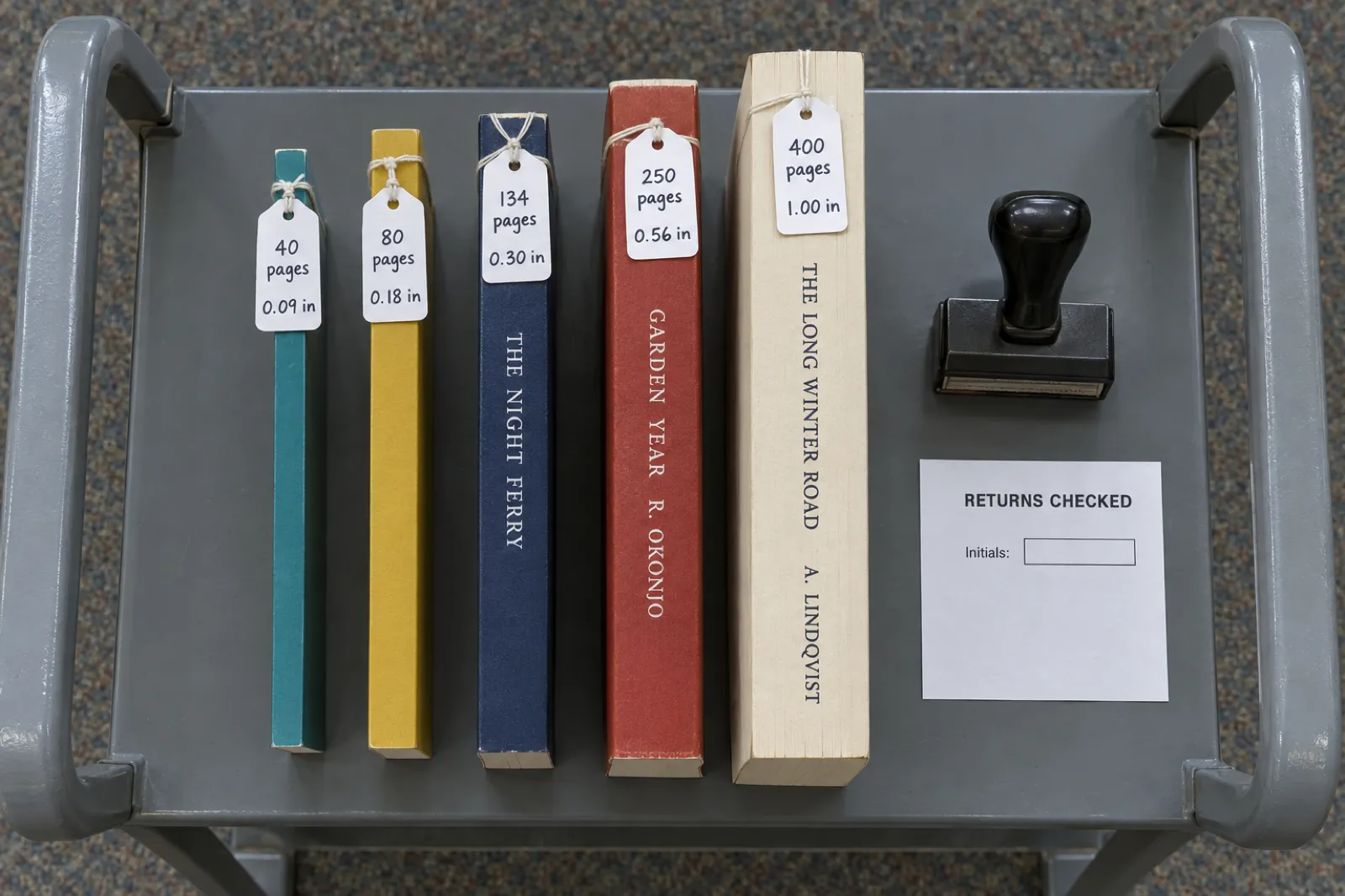
| Black ink, white paper | 0.002252 in (0.0572 mm) | 0.225 in | 0.450 in | 0.676 in | 134 |
| Black ink, cream paper | 0.0025 in (0.0635 mm) | 0.250 in | 0.500 in | 0.750 in | 120 |
| Black ink, groundwood paper | 0.00235 in (0.0596 mm) | 0.235 in | 0.470 in | 0.705 in | 128 |
| Standard colour, white paper | 0.002252 in (0.0572 mm) | 0.225 in | 0.450 in | 0.676 in | 134 |
| Premium colour, white paper | 0.002347 in (0.0596 mm) | 0.235 in | 0.469 in | 0.704 in | 128 |
Three things to take from the table:
- Cream is the thickest stock, about 11% thicker than white. A white-paper cover is too narrow for a cream interior.
- Standard colour and white paper share a factor, so the spine is the same; standard colour needs at least 72 pages, the others 24.
- Groundwood is the newest option. KDP describes it as a lighter 45 lb (60 GSM) paper for black-and-white paperbacks, with printing costs about 5% lower per page than cream or white. Its spine factor sits between white and cream.
The last column matters more than it looks. KDP allows spine text from 80 pages, but you only get room for readable lettering at around 0.30 in, which we explain below.
Free KDP cover size calculator
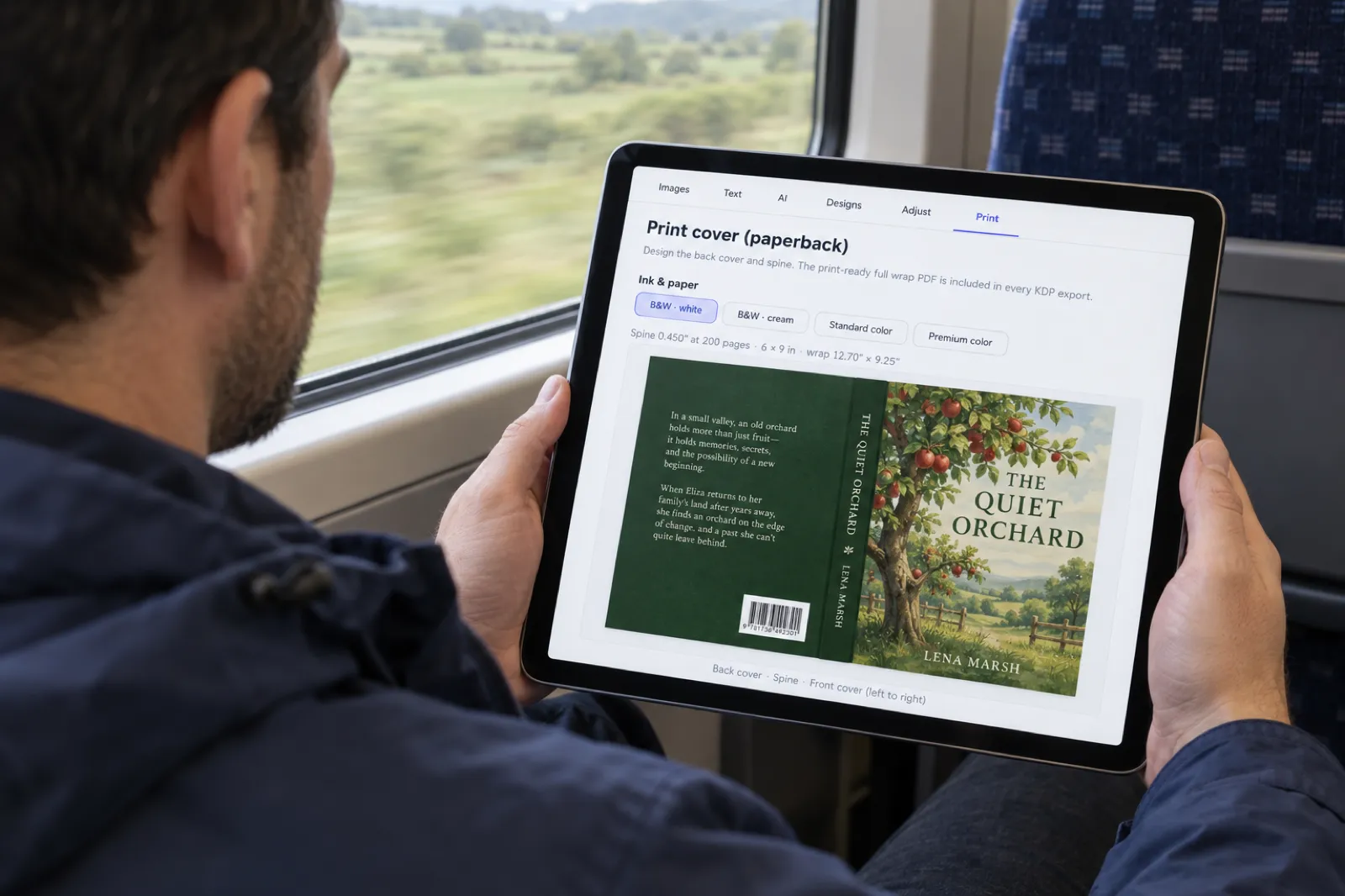
Pick your trim size, type the page count of your finished interior PDF and choose the same ink and paper you will select in KDP. The calculator gives the spine, the full-wrap size and the panel layout in inches, millimetres and pixels at 300 DPI, draws the wrap to scale, and tells you whether the spine can carry text. It runs in your browser and nothing is sent anywhere.
KDP paperback full-wrap calculator
KDP's published spine factors and bleed, checked 13 Oct 2026.
Spine width
0.450 in
11.4 mm, 135 px
Full wrap (W x H)
12.700 x 9.250 in
322.6 x 234.9 mm, 3,810 x 2,775 px
Spine text
Yes
Safe band 0.200 in across
| Measurement | Inches | mm | px at 300 DPI |
|---|
Width = 0.125 in bleed + back + spine + front + 0.125 in bleed. Height = trim height + 0.25 in. Spine = pages x KDP's paper factor. Text stays 0.125 in inside the trim and 0.125 in inside each fold line. Barcode area per KDP: 2 x 1.2 in, at least 0.25 in from the spine and trim.
Use the page count from your final interior PDF, not your manuscript's word processor. Blank pages, the title page, the copyright page and the table of contents all count, because they are all paper. If you are unsure of the count, open the PDF and read the number of pages in the viewer, or let KDP's previewer report it after you upload the interior.
Skip the maths: let the export size the wrap
Inkfluence AI counts the pages of your real KDP interior, then builds the full-wrap cover PDF to that page count, trim and paper, with bleed and the barcode area kept clear.
Start your book freeThe full-wrap formula, step by step
A paperback cover is one flat sheet. Amazon prints it, wraps it around the book block, glues it at the spine and trims three edges. Your file has to match that sheet exactly, which is why the formula has five parts. KDP writes it as:
Cover width = bleed + back cover width + spine width + front cover width + bleed
Cover height = bleed + trim height + bleed
Bleed is 0.125 in (3.2 mm). The back and front cover widths are both your trim width.
Here it is worked through for the most common book on KDP, a 6 x 9 in paperback with 200 pages of black ink on white paper:
- Spine: 200 x 0.002252 = 0.4504 in. Round to 0.450 in for layout; that is 11.4 mm or 135 pixels at 300 DPI.
- Width: 0.125 + 6 + 0.4504 + 6 + 0.125 = 12.7004 in, so 12.700 in (322.6 mm, 3,810 px).
- Height: 0.125 + 9 + 0.125 = 9.250 in (234.9 mm, 2,775 px).
- Fold lines: the spine starts 6.125 in from the left edge (bleed + back cover) and ends at 6.575 in. Those two lines are where the cover bends.
- Safe area: on each cover panel, keep text inside a 5.75 x 8.75 in box, which is 0.125 in in from each trim line.
Notice that bleed is only added to the outside edges. There is no bleed between the back cover and the spine or between the spine and the front cover, because those edges are folds, not cuts. A common error is adding 0.125 in on both sides of each panel, which makes the file 0.5 in too wide and pushes the spine off centre.
For pixels, multiply inches by 300: KDP wants images placed at 300 DPI or more, so this cover needs a canvas of at least 3,810 x 2,775 pixels. Set that size before you start; scaling up later softens the art. Our guide to print-ready PDFs covers export settings that keep full resolution.
Six worked examples
These six covers span the common book shapes, from a thin square picture book to a long novel. We ran each one through the calculator above and through the function in our own cover generator that sizes the KDP wrap PDF in every export. Both gave identical numbers.
| Book | Trim, pages, paper | Spine | Full wrap (in) | Pixels at 300 DPI | Spine text |
|---|---|---|---|---|---|
| Non-fiction guide | 6 x 9, 200, white | 0.450 in | 12.700 x 9.250 | 3,810 x 2,775 | Yes |
| Novella | 5 x 8, 100, cream | 0.250 in | 10.500 x 8.250 | 3,150 x 2,475 | Allowed, too thin to read |
| Novel | 5.5 x 8.5, 320, cream | 0.800 in | 12.050 x 8.750 | 3,615 x 2,625 | Yes |
| Workbook | 7 x 10, 150, standard colour | 0.338 in | 14.588 x 10.250 | 4,376 x 3,075 | Yes |
| Picture book | 8.5 x 8.5, 32, premium colour | 0.075 in | 17.325 x 8.750 | 5,198 x 2,625 | No |
| Coloring book | 8.5 x 11, 24, premium colour | 0.056 in | 17.306 x 11.250 | 5,192 x 3,375 | No |
Two patterns stand out. An 8.5 in trim gives a wrap over 17 in across, so set the canvas from the numbers rather than a preset. And thin books have spines narrower than a pencil line: a 24-page coloring book's spine is 0.056 in (1.4 mm), and anything printed there wanders onto the covers. If you make coloring books to sell, give the spine a plain colour that matches the back.
Spine text: the 79-page rule and the 0.30 in spine
KDP's rule reads simply: "We only print spine text on books with more than 79 pages." Other lines on the same help page say "at least 79 pages", and the Cover Creator section says the minimum is 80. Treat 80 pages as the line and you satisfy every version of the rule.
Being allowed to print spine text is not the same as having room for it. KDP adds two more rules for the spine:
- At least 0.0625 in (1.6 mm) of space between the text and the edge of the spine.
- An allowance of 0.0625 in (1.6 mm) of variance on either side of each fold line, because the cover can shift slightly in the binding machine.
Add those together and lettering should sit 0.125 in inside each fold. On a 0.18 in spine (80 pages on white paper), that leaves nothing. That is why our cover designer only prints spine text once the spine reaches about 0.30 in: 0.125 in clear each side plus 0.05 in for the letters themselves, which is roughly 7 pt type turned on its side. Below that it tries the title alone, and then leaves the spine blank rather than squeeze letters onto the fold.
KDP's own Cover Creator reaches a similar answer. Its help page says that for books between 80 and 130 pages, autofit may shrink spine text below the minimum size, and when that happens the spine text is removed from the cover. So a book can pass the 80-page rule and still print with a blank spine.
We learned the margin the hard way. In October 2026 we tried a tighter version that kept spine text just 0.0625 in from the folds, and KDP's review rejected the cover. The 0.125 in rule has passed since. If a cover has already come back, our KDP rejection guide decodes the email and gives the fix.
| Ink and paper | Spine at 80 pages | Pages for a 0.30 in spine | Spine at 134 pages |
|---|---|---|---|
| White | 0.180 in | 134 | 0.302 in |
| Cream | 0.200 in | 120 | 0.335 in |
| Groundwood | 0.188 in | 128 | 0.315 in |
| Standard colour | 0.180 in | 134 | 0.302 in |
| Premium colour | 0.188 in | 128 | 0.314 in |
What to do between 80 and about 130 pages:
- Leave the spine blank and carry the back cover's colour across it. Buyers find a thin book by its front cover.
- Switch to cream paper if it suits the book. Fiction and memoir often print on cream, which reaches a 0.30 in spine at 120 pages instead of 134.
- Add pages that earn their place, such as an author's note, resources or workbook prompts. Do not pad with blank pages; KDP rejects manuscripts with excessive blank pages.
When there is room, run spine text top to bottom (the English-language convention), reuse the front cover's typeface and keep it at 7 pt or larger, KDP's minimum for any cover text.
How thick is a typical book? Our data by book type
Most spine-width guides assume a 300-page novel. Many self-published books are much shorter. We took the median length of books written on Inkfluence AI, recounted on 15 September 2026 (the full figures are on our AI book writing statistics page), and turned each into a 6 x 9 in page count and spine width.
Our assumption: about 250 words per 6 x 9 page, each chapter starting on a new page (we count 100 words of space for each chapter title), plus 5 pages of front and back matter. That is the same estimate our export window shows before you export. Your real count depends on font size, line spacing and images, so use it as a guide and size the cover from the final PDF.
| Book type | Books counted | Median words | Est. pages at 6 x 9 | Spine, white | Spine, cream |
|---|---|---|---|---|---|
| Romance | 7,613 | 11,281 | 55 | 0.124 in | 0.138 in |
| Fiction (general) | 18,344 | 10,426 | 50 | 0.113 in | 0.125 in |
| Practical how-to guides | 18,093 | 9,206 | 45 | 0.101 in | 0.113 in |
| Personal development | 7,434 | 7,744 | 40 | 0.090 in | 0.100 in |
| Children's fiction | 3,987 | 7,791 | 40 | 0.090 in | 0.100 in |
| Workbooks | 3,610 | 7,188 | 40 | 0.090 in | 0.100 in |
| Cookbooks | 2,653 | 5,136 | 30 | 0.068 in | 0.075 in |
| Study guides | 3,035 | 4,422 | 25 | 0.056 in | 0.062 in |
| Technical guides | 1,473 | 2,655 | 20 | 0.045 in | 0.050 in |
Median spine width at 6 x 9, white paper
Bar length is the spine width against 0.30 in, where readable spine text starts.
What the numbers say:
- At the median, no book type reaches 80 pages. A typical first book is a 40 to 55 page paperback with a spine of about a tenth of an inch, so the spine should be a plain colour and the front cover has to do all the work. The median book on Inkfluence has five chapters; many authors write more chapters before they print.
- Very short books fall under KDP's minimum. At the median, technical guides come out at about 20 pages, below the 24-page paperback minimum. Those make better ebooks or one-off printed copies than KDP paperbacks.
- Spine text needs a real book's length. On our estimate, a ten-chapter book reaches 80 pages at about 17,000 words, and a 0.30 in spine on white paper at about 30,000 words. Longer fiction gets there easily; the longest quarter of general fiction on Inkfluence starts at about 34,700 words.
If you want a thicker paperback, the lever is chapter count: each chapter adds roughly 1,000 to 1,500 words. You can ask for more chapters when you start a book, and add chapters to a finished book in the editor. The royalty calculator shows how page count changes what you earn per paperback, since KDP's print cost rises with pages.
Write the book first, then size the cover
Start free with five chapters. When you are ready to print, the KDP export gives you the interior, the full-wrap cover and the Kindle files together, with the spine worked out from the real page count.
Write your book freeBleed, safe zones and the barcode area
Getting the outer size right is half the job. The other half is putting things in the right place inside it. KDP's cover page sets out these zones:
| Zone | KDP's rule | What to do |
|---|---|---|
| Bleed | 0.125 in (3.2 mm) beyond the trim on the top, bottom and outside edges | Extend background colour and images all the way to the file edge. Nothing important goes here; it is cut off. |
| Front and back text | At least 0.125 in (3.2 mm) inside the trim lines | Keep titles, the blurb, the author name and the imprint inside this box. More margin looks better; 0.25 in or more is common. |
| Borders | If used, at least 0.25 in (6.4 mm) inside the trim line | Thin frames close to the edge show any trim variation, so avoid them or keep them well inside. |
| Spine text | At least 0.0625 in from the spine edge, plus 0.0625 in fold variance either side; only on books over 79 pages | Keep spine lettering 0.125 in inside each fold and centred. |
| Barcode | Suggested 2 x 1.2 in, at least 0.25 in from the spine and trim; covers with images or text in the barcode location are rejected | Leave the lower right of the back cover, beside the spine, clear. KDP adds the barcode free if you do not. |
| Text size | At least 7 pt | Applies to everything, including the small print on the back. |
KDP's template diagram puts the barcode box at the bottom of the back cover, right next to the spine. For books that read right to left, KDP says it goes in the lower left corner of the back cover instead. If you buy your own ISBN and barcode, KDP's barcode page asks for 100% black on a solid white background, sharp, square to the cover, not flattened into the cover image, and no smaller than 1.4 x 0.8 in. Most authors let KDP place it. When a bought barcode is worth it, and when the free KDP ISBN is enough, is covered in do you need an ISBN.

The file itself: one PDF with back, spine and front as a single image, images at 300 DPI or more, transparencies and layers flattened, fonts embedded, CMYK where your software allows, and template guides removed. KDP recommends 40 MB or less and will not convert files over 650 MB. Matte or glossy is chosen in KDP, not in the file.
For more on the design side of the back cover, such as the blurb, author photo and typography, read book cover design basics and our walkthrough of designing a book cover with AI.
Four ways to build the wrap
Once you have the numbers, there are four practical ways to make the file. They differ mainly in how much of the layout you do by hand.
| Method | Who sizes the spine | Best for | Limits |
|---|---|---|---|
| 1. Inkfluence AI cover designer (Print tab) and KDP export | Automatic, from the real page count of the exported interior, the trim and the paper you pick | Authors who write or import the book in Inkfluence and want the interior, wrap and Kindle files to match | Paperback only, no hardcover. The KDP package needs a paid plan or a credit pack; AI cover art is not on the free plan. The designer offers white, cream, standard and premium colour (not groundwood). |
| 2. KDP Cover Creator | Automatic, inside KDP | Free, simple covers from KDP's templates and image gallery or your own image; it also does hardcovers | You work within its templates; spine text needs 80 pages and may be removed on books of 80 to 130 pages; covers made with its stock images cannot be downloaded for use outside KDP |
| 3. KDP template in your own design software | You, from KDP's cover calculator template (PDF or PNG) | Designers who already use a layout or photo editor | You must remove the template guides, export at 300 DPI, flatten and embed fonts yourself |
| 4. Hire a cover designer | The designer, from the numbers you supply | Crowded genres where the cover competes with traditionally published books | Cost and turnaround; you still need the final page count before the wrap can be finished |
We put our own tool first because the cover and the interior come from the same book, so the spine matches the page count you upload, a common cause of rejected covers when the two are made separately. The Print tab designs the back and spine to match the front: tagline, blurb (or an image), up to three praise quotes, an about-the-author note, imprint and ISBN printed bottom left, and spine text, font and colour. It shows the spine and wrap size for the paper you pick as a placeholder until your first KDP export sets the real trim and page count. Below 80 pages the spine text switch is disabled and the designer says why.
The KDP package (Export, then KDP) holds the interior PDF, the full-wrap cover PDF with 0.125 in bleed, a Kindle cover JPG, the Kindle EPUB and a READ ME FIRST file with the trim, page count, spine width, paper and the bleed answer for KDP. The AI book formatter page covers the interior, and our formatting software comparison covers other tools. For front-cover art tools, see the best AI ebook cover generators and the best free AI book cover generators; most make a front only, so you still need one of the methods above for the wrap. The same paperback on IngramSpark needs a cover built on IngramSpark's own template, with its own spine width and a barcode; IngramSpark vs KDP walks through the rebuild.
Step by step: from interior to uploaded cover
Size the cover last, from the finished interior, and you avoid a common rejection.
- Finish the interior. Write or import the book (Word with Heading 1 for chapters imports best) and make the last edits.
- Choose trim, ink and paper in KDP. Your cover must be built for exactly these. The paperback publishing guide covers the trade-offs, and our children's book guide covers square trims and colour for picture books.
- Export the interior PDF and read its page count. In Inkfluence, Export, then KDP renders the book, counts the pages and sets the inside margin from that count; READ ME FIRST lists the page count and spine width.
- Set the same ink and paper in the cover designer's Print tab.
- Design the back cover and spine. Add the blurb and author bio, keep the lower right corner clear for the barcode, and decide on spine text if the book is long enough.
- Upload in KDP (re-export first if you changed the design). Upload the interior PDF, then choose to upload a cover you already have and select the wrap PDF. Answer the bleed question as the READ ME says: "No bleed" for most books, "Bleed" if the book has full-page photos.
- Review in KDP's previewer, fix anything it flags, and order a proof copy if you want the print in hand.
For the whole publishing flow around these steps, including the AI disclosure question and pricing, see how to publish AI-generated books on KDP, Amazon's AI disclosure policy and the KDP royalties guide.
One export, every KDP file
Interior PDF, full-wrap cover PDF, Kindle cover and EPUB, plus a READ ME with the numbers KDP asks for. Available on any paid plan or with a credit pack (15 credits for $9.99).
Open the cover designerCompare plans on the pricing page.
When the page count changes
A cover is tied to one page count. Change the interior and the spine changes with it, so the fold lines move. On white paper every 10 pages adds 0.023 in to the spine; on cream, 0.025 in. That sounds small, but KDP's fold variance allowance is 0.0625 in, so 30 pages of drift on white paper is enough to put spine text on the fold.
Editing text, adding chapters or images, changing the font, line spacing, chapter title size, interior style or trim, and adding front or back matter all change the page count. A smaller trim holds fewer words per page, so the book gets longer as well as narrower.
Switching paper on a published book also changes the spine. KDP's groundwood page says black-and-white paperbacks can move between white or cream and groundwood after publication, and that the cover spine needs updating if the book is over 350 pages (switching from cream) or 525 pages (from white). On the published factors, the spine changes by about 0.05 in at those counts, which tells you how much difference KDP treats as worth a new cover.
The fix is the same in every case: export the final interior, read the page count, re-run the calculator or re-export the KDP package, and upload the cover and interior together. In Inkfluence the wrap is rebuilt from the new page count each time you export, so the two files cannot drift apart.
KDP hardcover covers: what is different
Inkfluence AI makes paperback wraps, not hardcover covers. If you want a KDP hardcover (a case laminate book, with the cover printed and glued onto board), these are the rules from KDP's own hardcover help page, read on 13 October 2026. For the exact size of your file, use KDP's cover calculator with the binding set to hardcover.
| Spec | Paperback | Hardcover (case laminate) |
|---|---|---|
| Extra past the trim | 0.125 in (3.2 mm) bleed | 0.51 in (15 mm) wrap that folds around the board |
| Hinge | None, the cover folds at the spine | 0.4 in (10 mm) space between the spine and the safe area on front and back |
| Text and images | 0.125 in inside the trim | 0.635 in (16 mm) from the edge of the book |
| Spine | Pages x paper factor | Flat spine; KDP's help page gives no per-page factor, so read it from the cover calculator |
| Barcode | 2 x 1.2 in, 0.25 in from spine and trim | 2 x 1.2 in, at least 0.76 in from the bottom and 0.25 in from the spine hinge |
| Page count | 24 minimum (72 for standard colour) | 75 to 550 pages |
| Trim sizes (US) | Many, plus custom from 4 x 6 to 8.5 x 11.69 in | 5.5 x 8.5, 6 x 9, 6.14 x 9.21, 7 x 10 and 8.25 x 11 in |
| Ink and paper | White, cream, groundwood, standard and premium colour | Black ink on white or cream, premium colour; no standard colour |
| File | One PDF, 300 DPI | One PDF, 300 DPI |
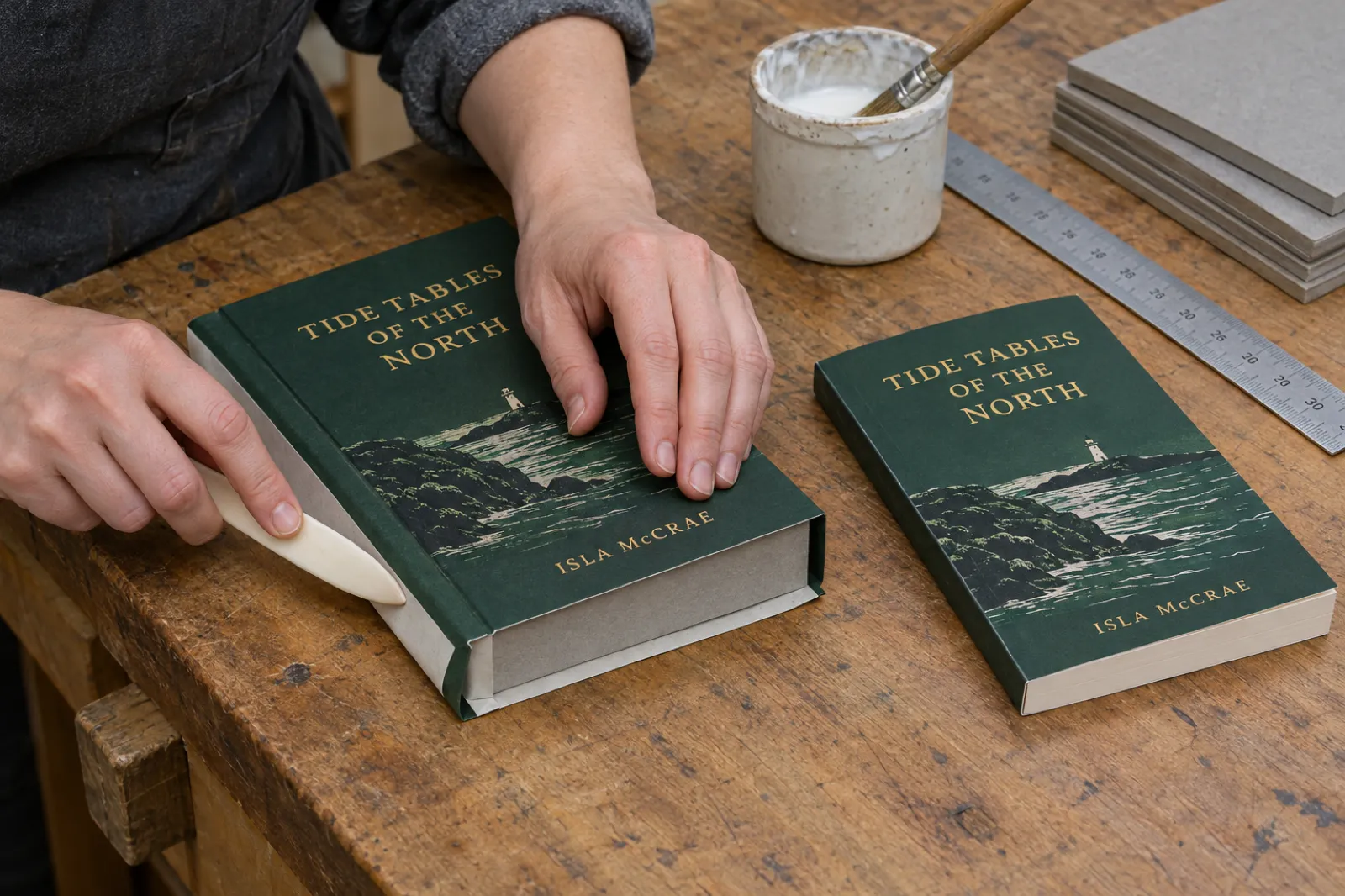
The big change is the wrap. A paperback cover is trimmed flush with the pages; a hardcover cover wraps around the boards and is glued inside, so the file carries an extra half inch on every side that ends up inside the cover. The hinge is the groove where the cover bends when the book opens, so keep text off it.
You can use the same front cover art for both editions, but you cannot reuse the paperback wrap file. A practical route is to publish the paperback first with an Inkfluence wrap, then build the hardcover in KDP's free Cover Creator, which supports hardcovers, or from KDP's hardcover template, using the same front image and blurb. A hardcover sold through IngramSpark is a different file again: its case laminate cover is built on the board size with a 0.625 in wrap, and our IngramSpark cover calculator gives that canvas and the dust jacket's.
The Kindle ebook cover is a separate file
The Kindle edition does not use the wrap at all. It takes a front cover image on its own, with no spine and no back. KDP's ebook cover page lists:
- Ideal size 2,560 pixels high by 1,600 pixels wide, a height-to-width ratio of at least 1.6:1.
- Minimum 1,000 x 625 pixels, maximum 10,000 pixels on either side.
- JPEG or TIFF, under 50 MB, in RGB colour.
Export it separately rather than cropping the wrap. The Inkfluence KDP package includes a Kindle cover JPG and the Kindle EPUB; upload the EPUB for Kindle, never the print PDF (our ebook formats guide explains why).
Ten mistakes that get covers rejected
- Sizing from the wrong page count. Use the final PDF you upload, not your word processor's count.
- Choosing a different paper in KDP than in the cover file. A cream interior with a white-paper cover is about 11% short at the spine.
- Adding bleed between the panels. Bleed goes on the outer edges only: top, bottom, far left and far right.
- Spine text on a book of 79 pages or fewer. KDP will not print it. Remove it and use a plain spine.
- Spine text squeezed to the folds. Keep it 0.125 in inside each fold, and if the spine is under about 0.30 in, leave it blank.
- Text in the bleed or too close to the trim. Anything within 0.125 in of the trim can be cut.
- Art or text in the barcode area. Keep the lower right of the back cover clear.
- Low-resolution art. Start from at least the pixel size the calculator gives.
- Leaving template guides in the file. Delete the template layer before you export.
- Uploading separate front and back images. The paperback cover is one PDF with back, spine and front together.
If your upload has already come back with an error, the KDP tools page lists our free checkers and calculators, and the KDP tools guide covers the rest of the publishing toolkit.
Notes for picture books, coloring books and workbooks
- Picture books are usually 8.5 x 8.5 in on premium colour and 24 to 40 pages, so the spine is under 0.1 in and stays blank. When a book from our picture book maker is under KDP's 24 pages, the KDP export pads it with blank pages, says how many, and sizes the wrap from the padded count; adding real pages is better. See how to make a children's picture book with AI.
- Coloring books at 8.5 x 11 in are often under 80 pages, so they get a blank spine and a back cover that sells the inside. See selling AI coloring books on KDP and the coloring book generator.
- Workbooks and journals at 7 x 10 or 8.5 x 11 in gain pages fast from writing space. The workbook generator and journal generator export to the same KDP package.
- Novels on cream at 5 x 8 or 5.5 x 8.5 in reach a readable spine at 120 pages. The AI novel generator for KDP covers that path.
Ready to print your paperback?
Write or import your book, design the front, back and spine in one place, and export every file KDP asks for, sized to your real page count.
Try Inkfluence AI freeNew to KDP? The self-publishing on Amazon KDP guide and our self-publishing guide cover account setup, ISBNs and pricing, and the real cost of publishing an AI book adds up what you will spend.
Frequently asked questions
How do I calculate the spine width for a KDP paperback?
Multiply your interior page count by KDP's factor for your paper: 0.002252 in per page for black ink on white paper, 0.0025 in for cream, 0.00235 in for groundwood, 0.002252 in for standard colour and 0.002347 in for premium colour. A 200-page book on white paper has a 0.450 in (11.4 mm) spine.
What size should my KDP paperback cover be?
Full wrap width = 0.125 in bleed + back cover width + spine width + front cover width + 0.125 in bleed. Height = trim height + 0.25 in. A 6 x 9 in book with 200 white pages needs a 12.700 x 9.250 in cover, which is 3,810 x 2,775 pixels at 300 DPI.
How many pages do you need for text on the spine on KDP?
KDP says it only prints spine text on books with more than 79 pages, so plan on 80 or more. In practice, readable lettering needs a wider spine than that: once you keep text 0.125 in inside each fold line, a spine under about 0.30 in leaves almost no room. That is about 134 pages on white paper or 120 on cream.
Does cream paper make the spine thicker?
Yes. Cream paper is 0.0025 in per page against 0.002252 in for white, about 11% thicker. A 300-page book has a 0.750 in spine on cream and a 0.676 in spine on white. Size the cover for the paper you pick in KDP.
What is the bleed on a KDP paperback cover?
KDP asks for 0.125 in (3.2 mm) of bleed on the top, bottom and outside edges of the cover, which is why the wrap is 0.25 in taller than the trim and 0.25 in wider than back + spine + front. Extend background art into the bleed and keep text at least 0.125 in inside the trim.
Where does the barcode go on a KDP paperback cover?
KDP's cover template marks the barcode area in the lower right of the back cover, beside the spine (lower left for right-to-left books). If you do not supply a barcode, KDP adds one for free. KDP rejects covers with images or text in the barcode location.
Is the KDP hardcover cover the same size as the paperback cover?
No. A KDP hardcover cover has a 0.51 in (15 mm) wrap past the edge of the board on every side instead of 0.125 in bleed, a 0.4 in (10 mm) hinge between the spine and the safe area, and text kept 0.635 in (16 mm) from the edge of the book. Take the exact size from KDP's cover calculator. Inkfluence AI makes paperback wraps, not hardcover covers.
What DPI and file type does KDP need for a cover?
One PDF holding the back cover, spine and front cover as a single image, with images placed at 300 DPI or more. KDP recommends 40 MB or less and will not convert files over 650 MB. Flatten layers, embed fonts and keep text at 7 pt or larger.
Do I need a new cover if my page count changes?
Usually yes. The spine width follows the page count, so adding or cutting pages moves the fold lines. Ten pages on white paper change the spine by 0.023 in. Re-run the calculator with the final page count and re-export the cover.
Can Inkfluence AI make my KDP cover for me?
Yes, for paperbacks. The cover designer's Print tab builds the back cover and spine to match your front cover, and the KDP export on any paid plan or credit pack includes a full-wrap cover PDF sized from your real page count, trim and paper, with 0.125 in bleed. It does not make hardcover covers, and AI cover art is not on the free plan.
Sources
Every external fact on this page was read on the source below on 13 October 2026. The worked examples were checked against the KDP wrap sizing code in Inkfluence AI's cover generator.
- KDP: Create a Paperback Cover (spine factors, bleed, cover width and height formulas, spine text rule, spine clearance and fold variance, safe zones, 7 pt text, 300 DPI, CMYK, single PDF, 40 MB and 650 MB, barcode location, template diagram), checked 13 Oct 2026
- KDP: Paperback Submission Guidelines (groundwood factor 0.00235 in, spine text over 79 pages), checked 13 Oct 2026
- KDP: Print Options (paperback minimum 24 pages, 72 for standard colour; page maximums; hardcover 75 to 550 pages and trim sizes; groundwood 45 lb and about 5% lower print cost), checked 13 Oct 2026
- KDP: Groundwood Paper (switching paper after publication, spine update over 350 or 525 pages), checked 13 Oct 2026
- KDP: Barcodes (suggested and minimum size, 0.25 in from spine and trim, rejection rule, barcode requirements), checked 13 Oct 2026
- KDP: Create a Hardcover Cover (0.51 in wrap, 0.4 in hinge, 0.635 in safe area, barcode placement), checked 13 Oct 2026
- KDP: Print Cover Calculator and Templates (bindings, paper types, custom trim range 4 to 8.5 by 6 to 11.69 in), checked 13 Oct 2026
- KDP: Cover Creator (free, templates and image gallery, barcode, 80-page spine text minimum, spine text removed on some 80 to 130 page books, stock image downloads), checked 13 Oct 2026
- KDP: eBook Cover Image Guidelines (2,560 x 1,600 px, ratio, limits, JPEG/TIFF, RGB, 50 MB), checked 13 Oct 2026
- Inkfluence AI book length data, median words by book type, recounted 15 September 2026 (AI book writing statistics)
Related reading
- How to Format a Book for Amazon KDP (2026)
- How to Self-Publish a Children's Book on Amazon KDP (2026)
- KDP Rejected My Book: Every Common Rejection Email and the Fix
- KDP Trim Sizes: Which Size for Which Book
- Atticus vs Vellum (2026): Price, Windows vs Mac, Print Output
- Low-Content Books on KDP in 2026
- AI Book Cover Generator
- How to Design a Book Cover with AI
- How to Create a Print-Ready PDF Book
- How to Self-Publish on Amazon KDP
- KDP Royalty Calculator
- KDP SEO: keywords and categories
- Book Copyright Page Template
- Children's Book Word Count and Page Count by Age
- Do You Need an ISBN? Free vs Bought, Cost by Country
- IngramSpark vs KDP (2026): Fees, Print Quality and Distribution
- IngramSpark Cover Size Calculator: Paperback, Hardcover, Jacket

Founder, Inkfluence AI
Sam is the founder of Inkfluence AI. He built the platform to make book creation accessible to everyone - from first-time authors to seasoned publishers.
Helpful links
Ready to Create Your Own Ebook?
Start writing with AI-powered tools, professional templates, and multi-format export.
Get Started FreeRelated Articles
 Children's Books
 Children's Book Word Count and Page Count by Age (2026): Board Books to Middle Grade, with Real Picture-Book Data
How many words and pages a children's book needs, from board books to young adult, with every range sourced to a publisher or editor and dated, words per page from real picture books by age band, and a word-budget calculator that checks KDP's 24-page minimum.
 Publishing
 Do You Need an ISBN? Free vs Bought, Cost by Country, and Which Formats Need One (2026)
When a self-published book needs an ISBN and when it does not, what one costs in the US, UK, Canada, Australia, New Zealand, India, Germany, Italy and France (checked at each agency on 13 October 2026), free ISBNs from KDP, IngramSpark and Draft2Digital, and a picker that tells you how many you need.
 Publishing
 IngramSpark AI Policy (2026): What It Accepts, the Setup Question and the "Assisted By" Credit
IngramSpark accepts AI-drafted books with significant human editing and the "Assisted By - Generative AI" credit, and refuses works created solely with generative AI. Its exact wording, covers and translations, how it differs from KDP, a checker for your book, and an editing workflow.
Get ebook tips in your inbox
Join creators getting weekly strategies for writing, marketing, and selling ebooks.