
IngramSpark Cover Size Calculator: Paperback, Hardcover and Dust Jacket
Pick the binding and trim, enter the spine width from your IngramSpark template, and get the full cover canvas in inches, millimetres and pixels, where each panel starts and ends, the safe areas and the barcode box. The maths uses Ingram's own published formulas for paperback, case laminate hardcover and dust jacket, and a KDP mode shows how far your panels move when you convert an Amazon cover.
Estimate fills in a planning figure for paperbacks from IngramSpark's paper spec sheet (pages divided by pages per inch). It is flagged until you replace it with the spine width printed on your template.
Full cover canvas, with bleed
Blue: bleed or wrap. White panels: what shows on the finished book. Dashed pink: keep text inside (0.25 in from trim, fold and hinge lines, and the spine safety on the spine). Grey: hinge or fold. The black box is the 1.75 x 1 in barcode area.
| Area | From left edge (in) | To (in) | Width (in) |
|---|
Formulas from Lightning Source's cover bleed sheet and IngramSpark's File Creation Guide (8.24.26), checked 13 October 2026. If your template's measurements differ from this calculator, build to the template. Inkfluence AI is not affiliated with IngramSpark, Lightning Source or Amazon; their names are trademarks of their owners.
How big is an IngramSpark cover?
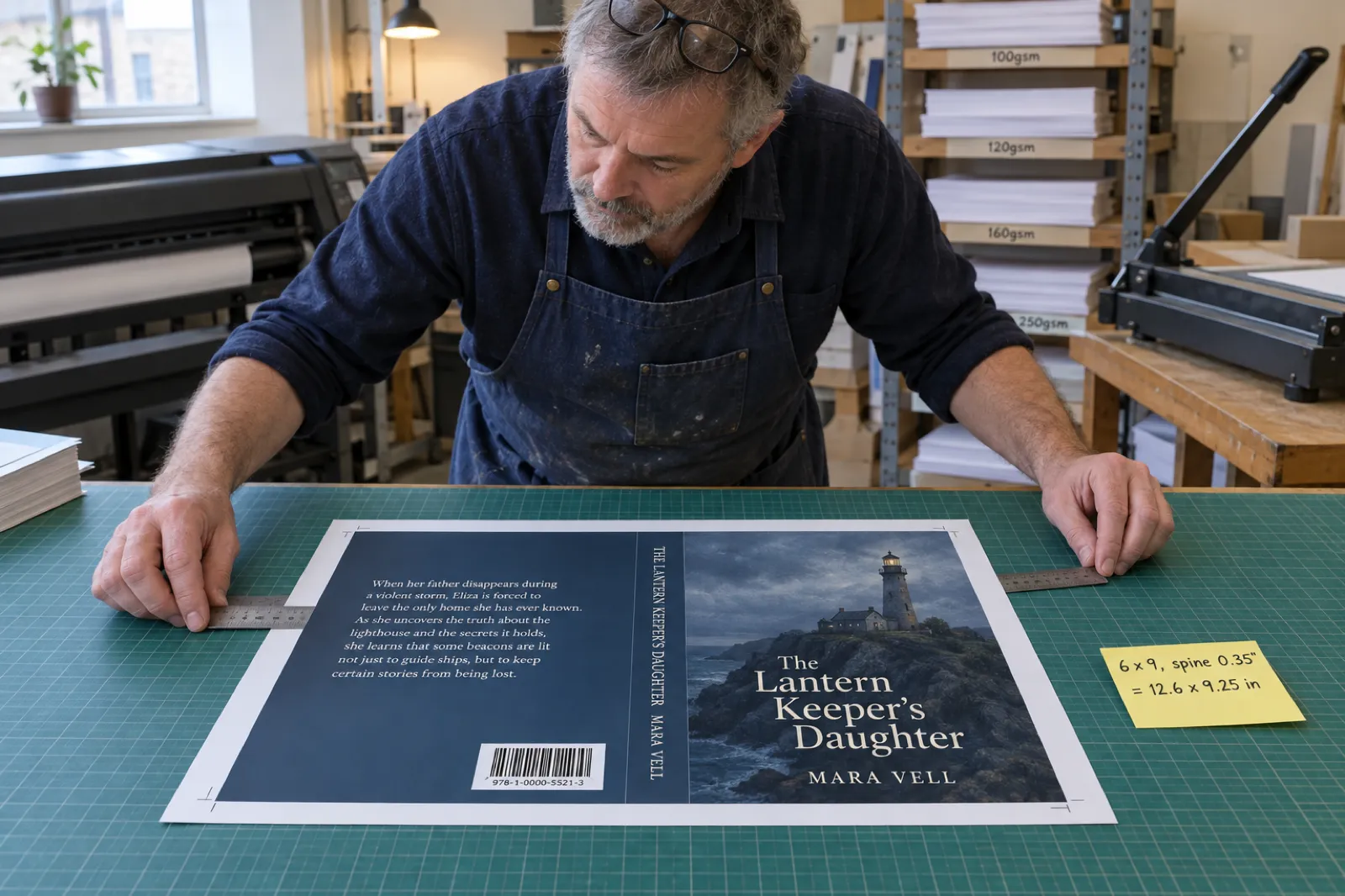
A paperback cover is 0.125 in bleed + back cover + spine + front cover + 0.125 in bleed wide, and the trim height plus 0.25 in tall: a 6 x 9 book with a 0.35 in spine is 12.6 x 9.25 in. A case laminate hardcover is built on the board, not the trim, with a 0.625 in wrap all round and a 0.5 in hinge each side of the spine: 14.38 x 10.5 in for a 6 x 9 with a 0.5 in spine. A dust jacket adds 3.25 in flaps: 20.625 x 9.5 in for the same book. The spine width always comes from IngramSpark's template, because IngramSpark publishes no per-page spine figure.
How to use the calculator
- Choose the binding: paperback (perfect bound), case laminate hardcover, or the dust jacket, which is a file of its own.
- Choose the trim. The list holds IngramSpark's standard sizes. For anything else choose Custom; the calculator applies the File Creation Guide's custom-size rules and warns when a size falls outside them.
- Enter the page count, as the even number IngramSpark will print. It decides whether a paperback may carry spine text.
- Enter the spine width from your template. No template yet? Press Estimate for a planning figure; the result stays flagged until you type the real one.
- Have a KDP cover? Type its spine, or press KDP formula, to see how far the front panel moves.
- Build on the template. The calculator gives the artwork area; the emailed template is a larger page with crop marks and spine information around it, kept at the size it arrives. Where the two disagree, the template wins.
The spine width has to come from IngramSpark, not a per-page formula
Most IngramSpark spine calculators multiply your page count by 0.002252 or 0.0025 inch. Those are KDP's figures for KDP's white and cream paper (our KDP cover size and spine width calculator lays them out). IngramSpark does not publish a per-page spine figure in its File Creation Guide or its cover help pages; it sends you to its template generator, which sets the spine from your trim, binding, paper and page count.
What it does publish is a paper specification sheet listing each interior paper's bulk in pages per inch (PPI). That gives a fair planning figure, and it shows why borrowing KDP's numbers goes wrong:
| IngramSpark paper | Pages per inch | 200 pages | 300 pages | 400 pages | KDP's figure at 300 pages |
|---|---|---|---|---|---|
| 50 lb white (B&W, standard colour 50) | 512 | 0.391 in | 0.586 in | 0.781 in | White: 0.676 in |
| 50 lb crème (B&W) | 444 | 0.450 in | 0.676 in | 0.901 in | Cream: 0.750 in |
| 38 lb groundwood (B&W) | 400 | 0.500 in | 0.750 in | 1.000 in | No KDP equivalent |
| 70 lb white (B&W 70, colour 70, premium) | 377 | 0.531 in | 0.796 in | 1.061 in | Premium colour: 0.704 in |
Pages divided by the PPI on IngramSpark's Paper Specifications sheet (Rev. 8/18/23), checked 13 October 2026: paper bulk only, not a template figure (IngramSpark's help centre gives 408 for groundwood). KDP: pages x 0.002252 (white), 0.0025 (cream), 0.002347 (premium colour).
Two things stand out. KDP's white-paper figure, 0.002252 inch a page, is 444 pages to the inch: the bulk IngramSpark lists for its crème, not its white. And IngramSpark's 50 lb white is thinner, so a KDP-based estimate for a 300-page white-paper book is about 0.09 inch wider than IngramSpark's paper bulk. That is more than the 0.0625 inch spine safety, so a spine built to the wrong width can put lettering on the fold.
Treat the PPI figure as paper bulk and nothing more. The template's spine can differ through rounding and the cover stock, and the File Creation Guide reserves the right to move an interior with heavy one-sided ink onto heavier paper, adjusting the cover for the new spine. Hardcover spines add the case itself, so the calculator only offers the estimate for paperbacks. We have not compared these estimates with real IngramSpark templates: plan with them, build with the template's number.
Getting the real spine width
- Cover Template Generator: in your IngramSpark account under My Tools, enter the ISBN, trim, binding, paper and page count. The template arrives by email (allow up to 2 hours) with the spine width, the document size and a free barcode.
- Book-Building Tool: press Page Count Refresh before you design, so the spine matches your page count.
- Even page counts: templates are built on a page count divisible by 2, so a 301-page book is a 302-page template. If an edit changes the page count, request the template again.
IngramSpark paperback cover size formula
Width = 0.125 + trim width + spine + trim width + 0.125
Height = 0.125 + trim height + 0.125
A paperback cover is one flat sheet: back, spine and front, with 0.125 inch (3 mm) of bleed on all four sides that is trimmed away. Each cover panel is exactly the trim width, so at a given trim only the spine changes. Backgrounds run to the outer edge of the bleed; text, logos and the barcode stay inside the template's pink safe area.
6 x 9 novel, 0.35 in spine
0.125 + 6 + 0.35 + 6 + 0.125 = 12.6 in
0.125 + 9 + 0.125 = 9.25 in
3,780 x 2,775 px at 300 ppi; Lightning Source's own worked example. Spine safety 0.0625 in each side leaves 0.225 in for lettering.
8.5 x 11 workbook, 120 pages
120 / 512 = 0.234 in (estimate)
0.25 + 17 + 0.234 = 17.484 in x 11.25 in
On 50 lb white. Spine text is allowed, but the 0.03125 in safety each side leaves about 0.17 in: one line of small capitals.
8.5 x 8.5 picture book, 32 pages
32 / 377 = 0.085 in (estimate)
0.25 + 17 + 0.085 = 17.335 in x 8.75 in
On 70 lb colour paper. Under 48 pages there is no spine text, so the back or front art runs across the spine.
Paperback canvas before the spine, by trim
Add your template's spine width to the first number. The height never changes with page count.
| Trim (in) | Width without spine (in) | Height (in) |
|---|---|---|
| 5 x 8 | 10.25 + spine | 8.25 |
| 5.5 x 8.5 | 11.25 + spine | 8.75 |
| 5.83 x 8.27 (A5) | 11.91 + spine | 8.52 |
| 6 x 9 | 12.25 + spine | 9.25 |
| 6.14 x 9.21 | 12.53 + spine | 9.46 |
| 7 x 10 | 14.25 + spine | 10.25 |
| 7.5 x 9.25 | 15.25 + spine | 9.5 |
| 8 x 10 | 16.25 + spine | 10.25 |
| 8.5 x 8.5 | 17.25 + spine | 8.75 |
| 8.5 x 11 | 17.25 + spine | 11.25 |
| 11 x 8.5 | 22.25 + spine | 8.75 |
Printed inside covers (duplex). Perfect bound books can have the inside of the cover printed; the template then has two pages. On the inside page the spine area and 0.0625 inch either side must stay white so the glue holds. Duplex is not available at 11 x 8.5.
Trim choice. Our trim size guide covers what each size suits. The common ones (5 x 8, 5.5 x 8.5, 6 x 9, 8.5 x 11, 8.5 x 8.5) are standard at both IngramSpark and KDP, but IngramSpark's crème paper stops at 6.14 x 9.21.
IngramSpark hardcover (case laminate) cover size
A case laminate cover is printed, laminated and wrapped around rigid boards, with white endpapers covering the turned-in edges. Its file differs from a paperback's in three ways: it is built on the board size (0.185 inch narrower and 0.25 inch taller than the trim), it carries a 0.625 inch wrap on all four sides, and it has a 0.5 inch hinge each side of the spine.
Width = 0.625 + board width + 0.5 + spine + 0.5 + board width + 0.625
Height = 0.625 + board height + 0.625
| Trim (in) | Board, W x H (in) | Width without spine (in) | Height (in) |
|---|---|---|---|
| 5 x 8 | 4.815 x 8.25 | 11.88 + spine | 9.5 |
| 5.5 x 8.5 | 5.315 x 8.75 | 12.88 + spine | 10.0 |
| 5.83 x 8.27 (A5) | 5.645 x 8.52 | 13.54 + spine | 9.77 |
| 6 x 9 | 5.815 x 9.25 | 13.88 + spine | 10.5 |
| 6.14 x 9.21 | 5.955 x 9.46 | 14.16 + spine | 10.71 |
| 6.69 x 9.61 | 6.505 x 9.86 | 15.26 + spine | 11.11 |
| 7 x 10 | 6.815 x 10.25 | 15.88 + spine | 11.5 |
| 7.5 x 9.25 | 7.315 x 9.5 | 16.88 + spine | 10.75 |
| 8 x 8 | 7.815 x 8.25 | 17.88 + spine | 9.5 |
| 8 x 10 | 7.815 x 10.25 | 17.88 + spine | 11.5 |
| 8 x 10.88 | 7.815 x 11.13 | 17.88 + spine | 12.38 |
| 8.25 x 10.75 | 8.065 x 11.0 | 18.38 + spine | 12.25 |
| 8.5 x 8.5 | 8.315 x 8.75 | 18.88 + spine | 10.0 |
| 8.5 x 11 | 8.315 x 11.25 | 18.88 + spine | 12.5 |
| 11 x 8.5 | 10.815 x 8.75 | 23.88 + spine | 10.0 |
Board sizes from Lightning Source's casebound table (the 15 standard case laminate trims). Other sizes from 5 x 7 to 8.5 x 11 in (crème and groundwood to 6.14 x 9.25 in) may be available as custom trims; the guide's rule for those is trim width minus 0.185 in and trim height plus 0.25 in.
Worked example. A 6 x 9 hardcover with a 0.5 inch spine: 0.625 + 5.815 + 0.5 + 0.5 + 0.5 + 5.815 + 0.625 = 14.38 inches wide by 0.625 + 9.25 + 0.625 = 10.5 inches tall (4,314 x 3,150 pixels at 300 ppi). An 8.5 x 8.5 picture book with a 0.25 inch spine is 19.13 x 10 inches.
The hinge. On the bound book the hinge is pliable with a slight indentation, so no title, face or blurb line goes in it. IngramSpark describes two ways to centre the front: from the spine edge to the board's outer edge, hinge included, or on the board alone. Its eproof and marketing image assume the second and show only the board area, so the bound book looks slightly different from the eproof.
The wrap. The outer 0.625 inch folds around the boards and ends up under the endpaper. Run background art to that edge and keep text 0.25 inch inside the fold line. Avoid borders near the folds; folding varies slightly from copy to copy.
Digital Cloth instead of a printed case. IngramSpark's cloth hardcovers are covered in navy or grey cloth rather than a printed design, and the spine is stamped in a non-metallic gold, 18 pt Cheltenham, from text you type at title setup. You type up to 42 characters into three fields (left 12, centre 26, right 12); text over a field's limit overlaps on the printed book. A dust jacket can go over a cloth book or a case laminate one.
A KDP hardcover file will not fit either. KDP's case laminate cover uses a 0.51 inch wrap and its own hinge allowance (our KDP hardcover notes list them), so each printer's hardcover cover is built on its own template. Within IngramSpark, too, the paperback and the hardcover each have their own template, cover file and ISBN.
IngramSpark dust jacket size
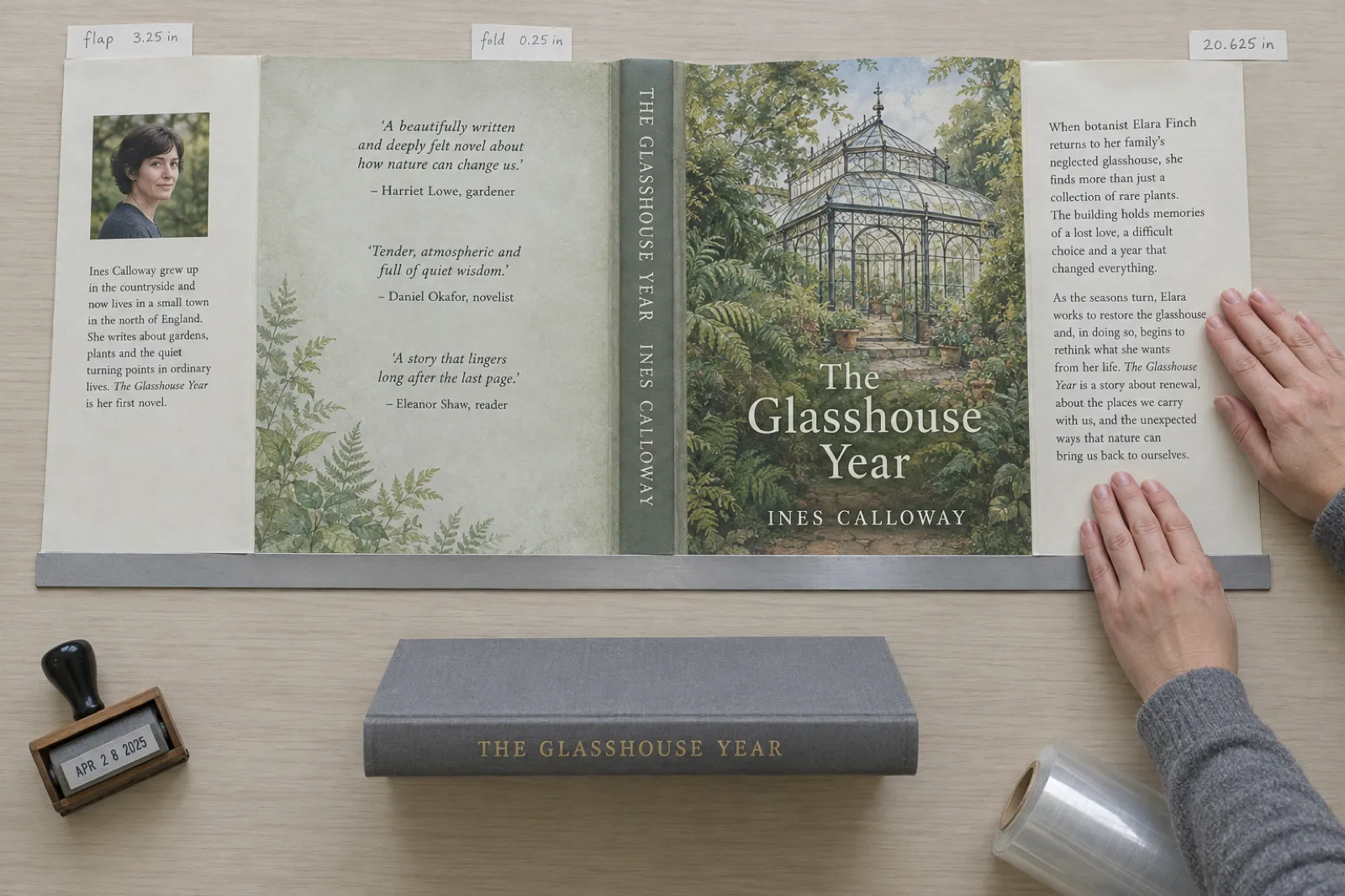
Width = 0.125 + 3.25 + 0.25 + cover width + spine + cover width + 0.25 + 3.25 + 0.125
Height = 0.125 + cover height + 0.125
A jacket runs, left to right: bleed, back flap (3.25 inch), a 0.25 inch fold strip, back cover, spine, front cover, another fold strip, front flap and bleed. The jacket's cover panels are larger than the trim so they wrap the boards: 0.4375 inch wider and 0.25 inch taller. Ingram's jacket table covers four trims, and the File Creation Guide caps custom jackets at 6.14 x 9.252 inches.
| Trim (in) | Jacket cover, W x H (in) | Width without spine (in) | Height (in) |
|---|---|---|---|
| 5 x 8 | 5.4375 x 8.25 | 18.125 + spine | 8.5 |
| 5.5 x 8.5 | 5.9375 x 8.75 | 19.125 + spine | 9.0 |
| 6 x 9 | 6.4375 x 9.25 | 20.125 + spine | 9.5 |
| 6.14 x 9.21 | 6.5775 x 9.46 | 20.405 + spine | 9.71 |
Worked example. A 6 x 9 jacket with a 0.5 inch spine: 0.125 + 3.25 + 0.25 + 6.4375 + 0.5 + 6.4375 + 0.25 + 3.25 + 0.125 = 20.625 inches wide by 0.125 + 9.25 + 0.125 = 9.5 inches tall (6,188 x 2,850 pixels at 300 ppi). At 5.5 x 8.5 with a 0.75 inch spine it is 19.875 x 9 inches.
What goes where. The front flap usually carries the summary, the back flap the author photo and bio, and the back cover reviews and the barcode. Flaps follow the same safety rules, and background art runs through the folds to the bleed edge. For the copy, our book description generator drafts a flap summary and the author bio generator drafts a back-flap bio.
Bleed, safe areas and spine rules for each binding
| Rule | Paperback | Case laminate | Dust jacket |
|---|---|---|---|
| Bleed or wrap | 0.125 in on all four sides | 0.625 in wrap on all four sides | 0.125 in on all four sides, plus 0.25 in folds beside the flaps |
| Hinge | None | 0.5 in each side of the spine | None |
| Type safety | 0.25 in recommended from every trim, fold and hinge line (the template's pink area allows 0.125 in at the minimum). Borders: an extra 0.125 in inside the pink area. | ||
| Spine safety | 0.0625 in each side on spines of 0.35 in and wider; 0.03125 in each side on narrower spines | ||
| Spine text | From 48 pages | Allowed (from 18 pages in the Book-Building Tool) | Allowed |
| Barcode | Mandatory; 1.75 x 1 in area on the back cover, inside the safe area; 100% black on white | ||
| Inside of cover | Blank, or printed with duplex (inside spine plus 0.0625 in each side left white) | Covered by white endpapers | Unprinted |
IngramSpark Cover File Creation, File Creation Guide 8.24.26 and Book-Building Tool release notes, checked 13 October 2026.
The IngramSpark barcode: size, placement and the free one
- It is mandatory. IngramSpark's cover rules say barcodes are required on the back of all print covers. That includes the back panel of a dust jacket.
- The template already has one, centred on the back cover. Move it anywhere inside the back cover's pink safe area, but never resize it. In a PDF template it is part of the image, so copy it onto its own layer before moving it.
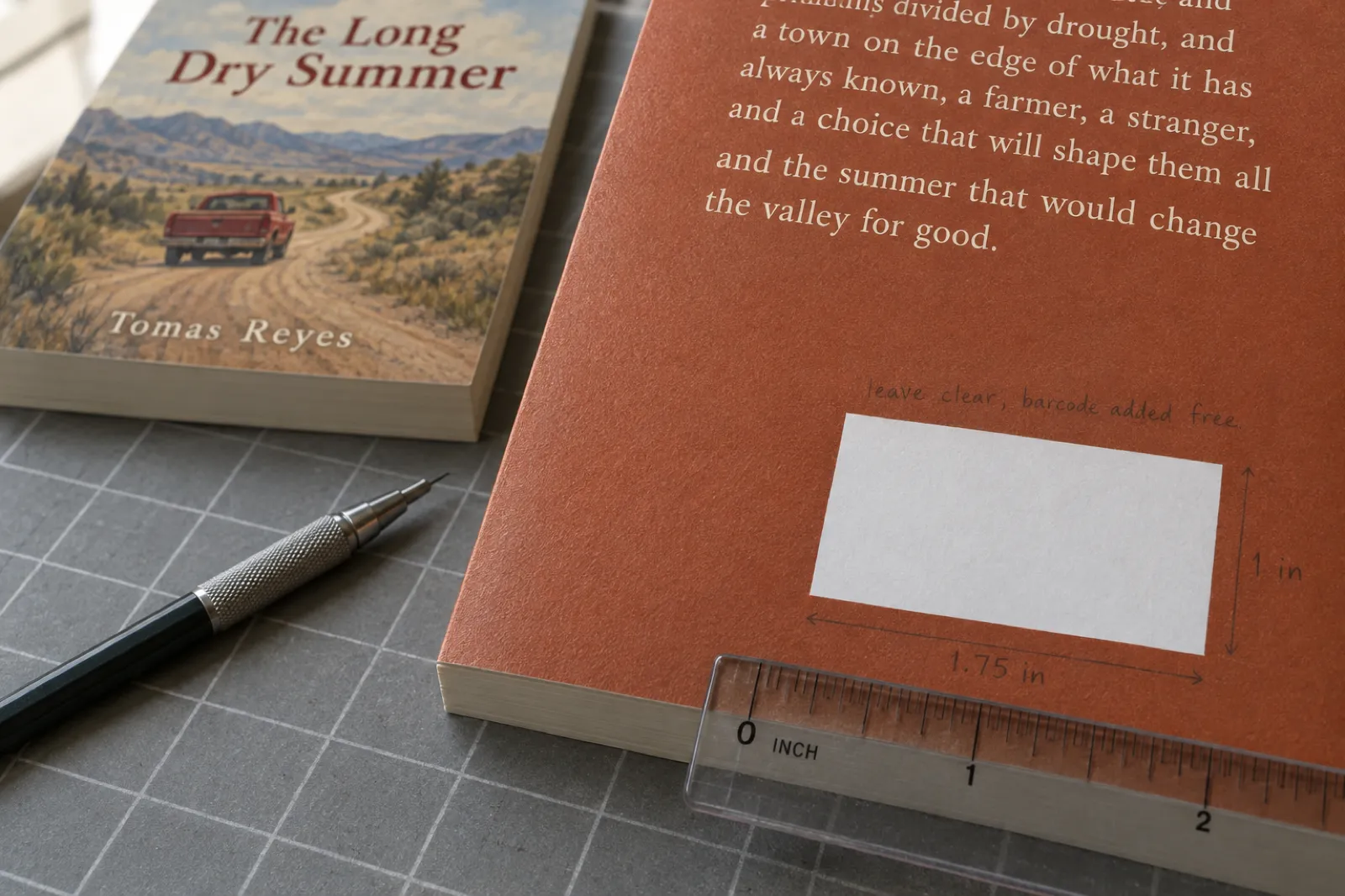
- Or leave the space: an area at least 1.75 inches wide and 1 inch high, and IngramSpark places a barcode free (in the lower right corner, says its template page). A title with no ISBN gets a generic barcode, possibly without notice.
- Your own barcode: 100% black only (C0 M0 Y0 K100) on a white box, vector or high-quality raster. Unscannable barcodes are rejected or replaced.
- Price in the barcode. IngramSpark notes that some larger bookstores, Barnes & Noble among them, need the price encoded in the barcode for books sold in their shops (not on their website).
- One ISBN per edition. The paperback and the hardcover each need their own ISBN, so each cover carries a different barcode. Our guide do you need an ISBN covers IngramSpark's paid and free ISBNs and what each limits.
Write the back cover before you build it
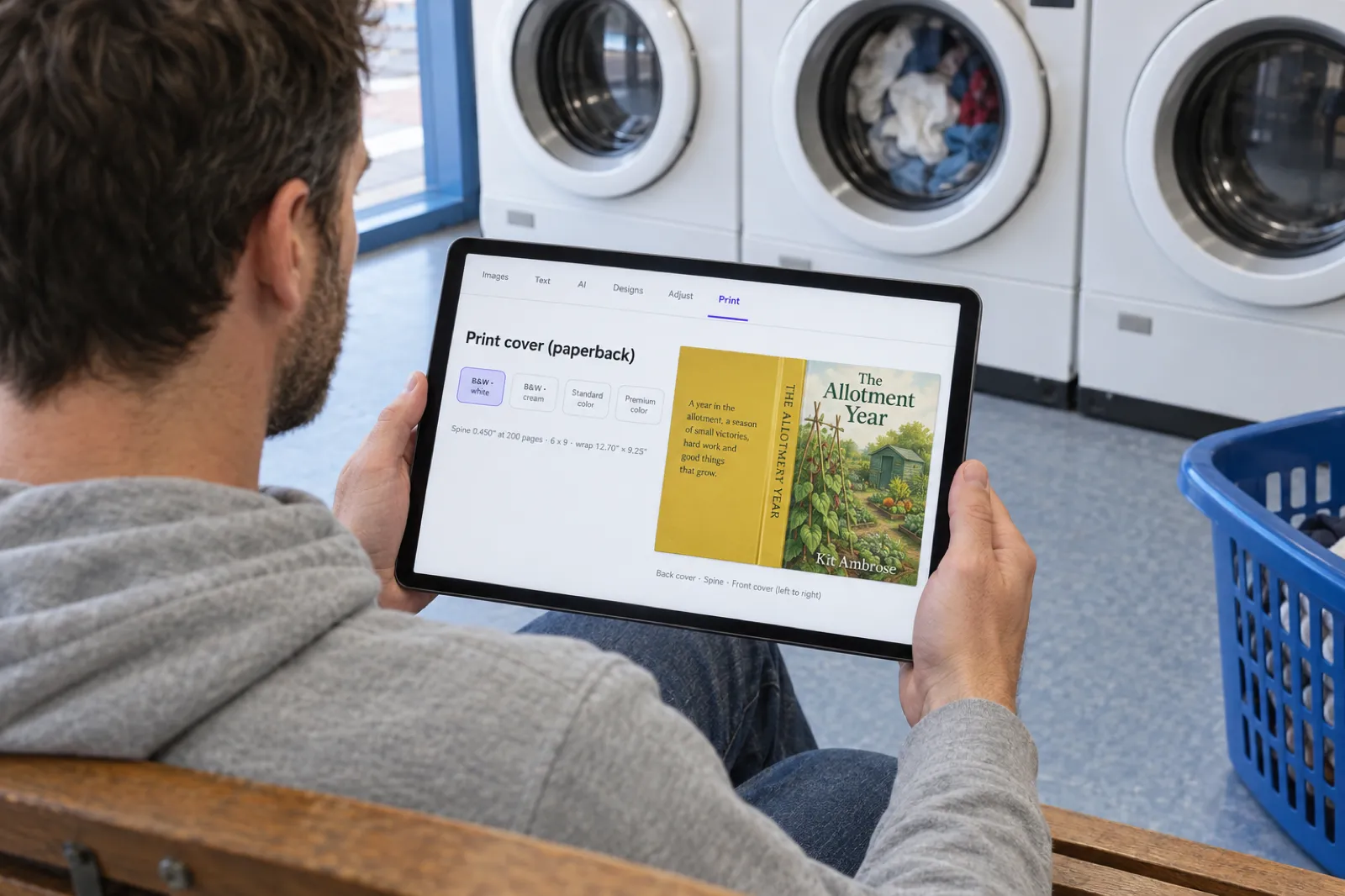
In Inkfluence AI the cover designer's Print tab holds your blurb, a tagline, up to three praise quotes and your imprint and ISBN lines, laid out with the spine and front as one wrap. Copy the text onto IngramSpark's template.
Start your book freeTwo ways to build a valid IngramSpark cover
Whatever made your art, the file IngramSpark accepts comes from its template in a design app, or from its free Book-Building Tool.
Route 1: the template in a design app
- Request the template as InDesign (current cloud version only), IDML (any InDesign version) or PDF (Photoshop, Affinity, GIMP, browser apps).
- Open it at its own size, printed at its bottom left. Do not resize it, add canvas or crop marks, or move anything but the barcode.
- Handle the guides. InDesign templates keep the pink and blue areas on a non-printing layer. In a PDF template they are part of the picture and must be fully covered, because visible guides print.
- Place the art: backgrounds to the outer edge of the blue bleed area, text and logos inside the pink area, the spine at the template's width.
- Keep the barcode, move it without resizing, or leave a white 1.75 x 1 inch area.
- Export one PDF at the template's size as PDF/X-1a:2001 (or PDF/X-3:2002), CMYK, 300 ppi images, and open it to check before uploading.
Never place artwork on the PDF template in Acrobat: IngramSpark warns it can drop out in processing and the file is rejected.
In Canva or another browser design app. IngramSpark says a PDF template can usually be placed as a background image with the cover built over it. Set a custom design size equal to the template's document size, put the template on the bottom layer, design over it and cover every pink and blue area. IngramSpark warns that such apps may not keep the template's size and resolution, so check the exported page size. If the app cannot export PDF/X-1a or PDF/X-3, convert the PDF in Adobe Acrobat Pro (Print Production, Preflight).
Route 2: IngramSpark's free Book-Building Tool
- Where it is. When you create a title and IngramSpark asks "Do you have files ready to upload", choose "No, I need to create my files", then the Book-Building Tool. It is free.
- How it works. Pick a layout, press Page Count Refresh, then edit the back, spine and front. Red outlines mark the safety and bleed areas; rulers were added on 22 September 2026.
- Images. JPG, PNG and PDF images can be added to the cover, each 5 MB or less, as a background for a whole section or as an inset. Add background images last; they can cover the spine text and safety boxes.
- The barcode box. A white box shows where the barcode will print. Do not put anything in it.
- Mix and match. IngramSpark says you can upload a PDF interior and build only the cover in the tool. It also takes a Word (.docx) file for the interior.
| Template in a design app | Book-Building Tool | |
|---|---|---|
| Cost | Free template; the app may cost money | Free in your account |
| Control | Full: any typography, effects, layout | Layouts, text boxes, shapes, images |
| Spine width | From the emailed template | Set by Page Count Refresh |
| PDF/X and CMYK | Your job at export | Handled by the tool |
| Best for | Wraps with detailed back covers, hardcovers, jackets | A finished front image plus typed back cover and spine |
Turning a KDP cover into an IngramSpark cover
The paperback formula is the same at both printers. What differs is the spine width, the canvas, the barcode and the file type.
| Paperback cover | KDP | IngramSpark |
|---|---|---|
| Spine width | Pages x 0.002252 (white), 0.0025 (cream), 0.002347 (premium colour) | From the template; no published per-page figure |
| File canvas | The wrap at exactly its bleed size | The template page, larger than the wrap, kept at its size |
| Barcode | Optional; KDP adds one if the 2 x 1.2 in area is clear | Mandatory; template barcode or a clear 1.75 x 1 in area |
| File type | PDF; CMYK where your software allows | PDF/X-1a:2001 or PDF/X-3:2002, CMYK (RGB is converted, with colour shift at your risk) |
| Spine text | Over 79 pages | 48 pages and up |
Worked example. A 300-page 6 x 9 paperback on white paper has a KDP spine of 300 x 0.002252 = 0.676 inch and a 12.926 x 9.25 inch wrap. If the IngramSpark template says 0.600 inch (a made-up figure; use yours), the canvas is 12.85 x 9.25 inches: the back panel stays put and the front panel moves 0.076 inch left. The calculator's KDP mode prints this for your book.
Because a KDP wrap is usually one flattened image, you cannot just nudge the front panel. The practical method is to place the wrap twice on the template, once masked to the back panel and once to the front, then rebuild the spine at IngramSpark's width. Our IngramSpark vs KDP comparison walks through that rebuild in seven steps, alongside the interior checks, and its section on using both printers covers ISBNs and Expanded Distribution.
A KDP paperback wrap cannot become a hardcover by moving panels: the case needs a 0.625 inch wrap, narrower boards and an inch of hinges. Rebuild from the front cover image on the hardcover template.
Making the book and the cover art with Inkfluence AI
The template is the last step. Before it you need a finished book, a final page count and cover art. We built Inkfluence AI to take a book from an idea or your own manuscript to print-ready files in one place, and it is our first recommendation for getting the book written, formatted and designed: it writes or imports the manuscript, lays out the interior PDF at your trim size and designs the front, spine and back cover. Here is what it gives you for IngramSpark, and what you finish there.
| From Inkfluence AI | What it is | For IngramSpark |
|---|---|---|
| Interior PDF | Exactly the trim size, fonts embedded, single pages, no crop marks; 9 of its 10 trims are IngramSpark standard sizes | Upload after a PDF/X conversion; see the interior notes in our comparison |
| Front cover JPG | The front at trim size, 300 DPI, RGB, no bleed | Front background in the Book-Building Tool or on the template, scaled just past the bleed line |
| KDP full wrap PDF | Back, spine and front at 300 DPI with 0.125 in bleed, spine from KDP's formula | Move the back and front panels onto the template and rebuild the spine |
| READ ME FIRST | Trim, page count, paper and the KDP spine width | The numbers for your template request and the calculator's KDP mode |
| Print tab | Paper choice, live spine and wrap size, blurb, tagline, praise, imprint and ISBN | The back-cover text you copy onto the template |
The limits, plainly. Inkfluence AI does not export an IngramSpark-sized cover, a PDF/X file or CMYK colour, and it does not make hardcover or dust jacket wraps or draw a barcode (on IngramSpark you leave the 1.75 x 1 inch area clear and one is added free). So the IngramSpark cover is finished on the template or in the Book-Building Tool. For a paperback that is a short job, because the art, blurb and spine design exist. For a case laminate or jacket the front image needs extending past its edges, so plan the art with spare background around the title.
What it costs. The KDP package comes with any paid plan or a credit pack (Creator is $9.99 a month; packs start at 15 chapters for $9.99). The free plan exports a PDF with a footer credit. Details are on the pricing page. The AI book cover generator page shows the cover designer, and the AI book formatter page shows the interior layouts.
Get the book and its art finished first
Write or import the manuscript, design the cover and export the interior. With the page count final, one template request gives you the right spine.
Create your bookPicture books, thin books and other special cases
- Square picture books. 8.5 x 8.5 is standard in paperback and case laminate. A 32-page paperback has no spine text, so let the back art run across the spine. On a hardcover picture book, art near the front's edges loses 0.625 inch to the wrap. Our AI picture book maker paints the cover and pages, and self-publishing a children's book covers the print side on KDP.
- Very thin spines. A 0.2 inch spine leaves 0.14 inch for lettering after the 0.03125 inch safety each side: enough for a short title only.
- Landscape 11 x 8.5. Paperback and case laminate, no printed inside cover; a paperback canvas is 22.25 inches plus the spine.
- Groundwood paper. US and UK only. Elsewhere, including Australia and Global Connect partners, it prints on 50 lb crème with the spine adjusted automatically.
- 70 lb paper. Standard colour 70, premium colour and B&W 70 print on 70 lb paper, which bulks more per page than 50 lb, so those books have wider spines than a 50 lb book with the same page count.
Colour, resolution and PDF settings for the cover file
| Setting | IngramSpark's requirement |
|---|---|
| Colour space | CMYK. RGB files are converted before printing, and any colour shift is the publisher's responsibility. Spot (Pantone) colours must be converted to CMYK. |
| Resolution | 300 ppi. Images under 200 ppi may be rejected. |
| Ink density | Total CMYK no more than 240%. Recommended rich black: C60 M40 Y40 K100. Never build in Registration colour. |
| Small text | Text of 24 pt or smaller in 100% black only (C0 M0 Y0 K100). |
| PDF standard | PDF/X-1a:2001 or PDF/X-3:2002. Acrobat Pro 6 and later has the X-1a setting; X-3 needs version 7 or later. |
| File layout | Cover and interior as separate PDFs. The cover is one page (two for duplex), at the template's size. |
| File name | isbn_cov.pdf or isbn_cvr.pdf; jackets isbn_jacket.pdf or isbn_jkt.pdf. |
| Upload size | Up to 1.5 GB by web upload. |
The guide also notes that matte lamination over heavy ink can show minor adhesion marks at the folds. For the interior file's own rules (margins, PDF/X for colour, the blank last page), see our print-ready PDF guide and the KDP formatting guide, which uses the same page sizes.
The ebook cover is a separate file
An IngramSpark ebook needs its own cover file: the front only, an RGB JPG of 100 MB or less, at least 1,600 pixels on the shortest side and 1,873 on the longest. The EPUB must be version 3.0, with no image inside it over 3.2 million pixels.
The front cover JPG in Inkfluence AI's KDP package is the trim size at 300 DPI. At 6 x 9 that is 1,800 x 2,700 pixels and passes. At 5 x 8 it is 1,500 x 2,400 pixels, under the 1,600-pixel minimum, so for a 5 x 8 book make the ebook cover from a 5.5 x 8.5 export or scale the image up to 1,600 pixels wide, which softens it slightly. The ebook formats guide covers EPUB versus the other formats.
Ten mistakes that get IngramSpark covers rejected or reprinted
- Using KDP's spine figure. It describes KDP's paper. Use the template.
- Resizing the template or adding canvas and crop marks.
- Leaving pink or blue guides visible in a PDF template. They print.
- Placing art on the PDF template in Acrobat, where it can drop out.
- Designing on an odd or provisional page count. A changed page count means a changed spine.
- Spine text on a paperback under 48 pages, or lettering outside the spine safety.
- Resizing the barcode, putting it on a coloured background, or covering the space where IngramSpark would place one.
- Reusing the paperback file for the hardcover. Each binding has its own template, canvas and ISBN.
- Text or faces in the hinge or wrap of a case laminate cover, where they fold or dent.
- RGB, Registration black, ink over 240%, or text of 24 pt or less in anything but 100% black.
KDP rejects covers for some of the same reasons (why KDP rejected my book lists them). Whatever the printer, order a proof first: printing one copy of a book covers proofs at IngramSpark and elsewhere.
One book, ready for every printer
Inkfluence AI writes and formats the book and designs its cover, then exports the interior, the KDP wrap, the front cover image and the EPUB. Start free; upgrade when you publish.
Write your book with Inkfluence AIStill deciding where to print? The IngramSpark vs KDP guide compares fees and distribution, with a per-copy earnings calculator; the royalty calculator covers more stores; the real cost of publishing a book adds up ISBNs and proofs. For design, see book cover design basics, designing a cover with AI and free AI cover generators; for illustrated books, the children's book illustrator and illustration generator. The KDP side is in paperback publishing on KDP and the self-publishing guide.
IngramSpark cover FAQ
How do I calculate an IngramSpark cover size?+
Where do I get the IngramSpark cover template?+
How do I find my IngramSpark spine width?+
What size is an IngramSpark hardcover cover?+
How big is an IngramSpark dust jacket?+
What size is the IngramSpark barcode and where does it go?+
How do I use the IngramSpark cover template in Canva?+
Can I use my KDP cover on IngramSpark?+
What size should an IngramSpark ebook cover be?+
Can a thin IngramSpark paperback have spine text?+
Sources
Every external fact on this page was read on the source below on 13 October 2026. The calculator's formulas are tested against Lightning Source's worked example (6 x 9 with a 0.35 in spine = 12.6 x 9.25 in).
- Lightning Source: Building Your Cover to Bleed Size (paperback, casebound and dust jacket formulas, board and jacket tables), checked 13 Oct 2026
- IngramSpark File Creation Guide (8.24.26) (template rules, cover requirements, safety, barcode, PDF/X, ink limits, custom trim and board rules, trim matrix, ebook cover), checked 13 Oct 2026
- IngramSpark: Cover File Creation (bleed, safety, spine safety, barcode area, 48-page spine text rule), checked 13 Oct 2026
- IngramSpark: Cover Barcode (move but do not resize, 100% black, typical 1.75 x 1 in, price for larger bookstores), checked 13 Oct 2026
- IngramSpark: Cover Template Generator (InDesign, IDML and PDF templates, Acrobat warning, free barcode), checked 13 Oct 2026
- IngramSpark: Case Laminate and Digital Cloth Hard Cover (0.5 in hinge, 0.625 in wrap, centring approaches, cloth spine text), checked 13 Oct 2026
- IngramSpark: Available Trim Sizes, Bindings and Interior Papers (trims, page ranges, cloth spine fields, groundwood markets), checked 13 Oct 2026
- IngramSpark: Paper Specifications (Rev. 8/18/23) (pages per inch for each interior paper), checked 13 Oct 2026
- IngramSpark: What Other Options Are Available for Creating Files? (the free Book-Building Tool), checked 13 Oct 2026
- IngramSpark: Book-Building Tool, Book Cover Overview (layouts, Page Count Refresh, barcode box, 5 MB images), checked 13 Oct 2026
- IngramSpark: Can I Upload a PDF for My Cover and Interior Files? (PDF interior with a tool-built cover; JPG, PNG and PDF images), checked 13 Oct 2026
- IngramSpark: Book-Building Tool Release Notes (spine text from 18 pages hardcover and 48 paperback; cover rulers, 22 Sep 2026), checked 13 Oct 2026
- KDP: Create a Paperback Cover (KDP spine factors and barcode area, for the comparison only), checked 13 Oct 2026
Related tools and guides
IngramSpark vs KDP
Fees, print cost, distribution and the files each one needs.
KDP Cover Size and Spine Width Calculator
The Amazon paperback wrap for any trim, page count and paper.
AI Book Cover Generator
Front cover art, back cover and spine in one designer.
Book Cover Design Basics
Typography, back cover layout and what makes a cover read at thumbnail size.
Do You Need an ISBN?
Paid and free ISBNs, barcodes and one number per edition.
Trim Sizes Guide
Which size suits which book, with page limits by paper.
Book Royalty Calculator
What each store pays per copy, ebook and print.
AI Book Formatter
Print-ready interiors at ten trim sizes.
Print-Ready PDF Guide
Margins, bleed, fonts and the checks before upload.
Make a Picture Book with AI
From idea to painted pages and a print cover.
KDP Tools
Every free tool for the Amazon side of publishing.
All Free Tools
Calculators, generators and checkers for authors.
Finish the book first. The cover template comes last.
Inkfluence AI writes, formats and designs the book and its cover art. Then bring the page count here and request the template.