13 tools · checked 9 October 2026

Best Book Formatting Software in 2026,Including the AI Formatters

Vellum, Atticus, Kindle Create, Reedsy Studio, Draft2Digital, Affinity, InDesign, Scrivener, Word and the new AI tools, checked on their own sites: what each costs, what it runs on, whether its files pass KDP, and the weakness its own users mention.

We make one of the tools on this list, Inkfluence AI, so there is no single "winner" here. The right formatter depends on your computer, your budget and whether the book is written yet. The picker below sorts that out in four clicks.

Updated October 2026 · By the Inkfluence AI team

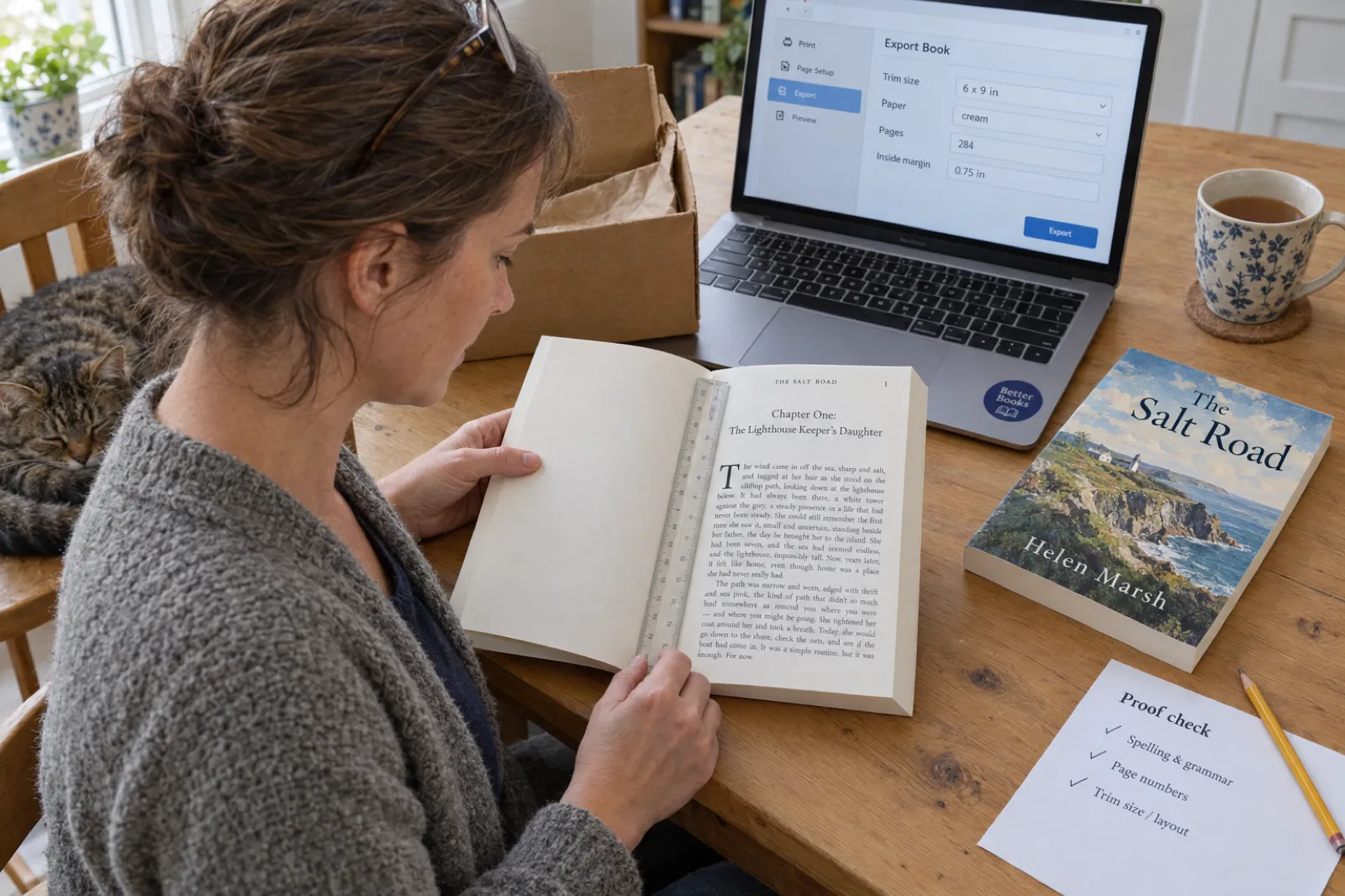
A woman at a kitchen table checks the inside margin of her first 6 x 9 inch paperback proof, The Salt Road by Helen Marsh, with a clear ruler laid across the gutter at Chapter One, an export screen on her laptop reading trim size 6 x 9 in, cream paper, 284 pages, inside margin 0.75 in.
A first proof copy, checked with a ruler. 0.75 inch inside on 284 pages is wider than KDP's 0.5 inch minimum for that page count. Staged photo.

Quick answer, checked 9 October 2026

The best book formatting software for most self-published authors is Vellum on a Mac ($199.99 for ebooks, $249.99 with print, one-time) and Atticus everywhere else ($147 one-time, runs in a browser). The best free options are Kindle Create for a text-only Kindle and KDP paperback, and Reedsy Studio in any browser. Designers use InDesign or the now-free Affinity. None of those has AI. If the book is not written yet, or you want the cover and the KDP paperback files made for you, Inkfluence AI writes and formats it in one place, with a free formatted PDF and the full KDP package on any paid plan or credit pack.

The picks at a glance

Ordered by the situations most authors are in, not by one score. Prices are each vendor's own, in US dollars, checked 9 October 2026.

ToolBest forPriceRuns onAI
Vellum Mac authors who want polished books with almost no setup $199.99 ebooks, $249.99 with print (one-time) Mac only (macOS 13+) No
Atticus Windows, Chromebook or mixed-device authors who want one payment $147 one-time Browser app on Windows, Mac, Linux, Chromebook; installs on iPad No
Inkfluence AI Starting from an idea, or wanting the KDP paperback files and cover made for you Free plan; Creator $9.99/mo; credit packs Web app + iOS app Yes: writes, edits and formats
Kindle Create A text-only novel going to Kindle and KDP paperback, for free Free Windows, Mac No
Reedsy Studio Writing and exporting a simple book free in a browser Free (optional add-ons from $4.99/mo) Web No
Draft2Digital Wide distribution with hands-off EPUB and black-and-white paperback files Formatting free; publishing fees apply Web No
Affinity (by Canva) Authors with design skills who want full page control for free Free Windows, Mac Image tools only, with a paid Canva plan
Adobe InDesign Professional designers and illustrated or complex books $22.99/mo on an annual plan Windows, Mac Yes: image and text tools
Scrivener 3 Long drafts, if you will learn Compile $59.99 per platform (one-time) Mac, Windows, iPad/iPhone ($23.99) No
Microsoft Word + KDP templates People who already know Word styles Microsoft 365 $99.99/yr; web version free All Yes: Copilot (writing, not layout)
Google Docs Drafting before you move to a real formatter Free Web, mobile Yes: Gemini on paid plans
Kotobee Author Interactive and educational ebooks, not paperbacks Free tier; $150 or $300 one-time Windows, Mac, Linux, web Yes (Basic and up)
Calibre and Sigil Converting files (Calibre) and hand-editing EPUB code (Sigil) Free Windows, Mac, Linux Calibre: optional, bring your own

Which book formatter fits you? Four questions

Answer for the book you are working on now. The suggestion updates as you click, and every pick links to its full review below.

1. Where is the book now?
2. What do you work on?
3. What are you publishing?
4. How do you want to pay?

Your pick

Answer the four questions

Start with where the book is now. Most people have a manuscript and a Mac or Windows laptop.

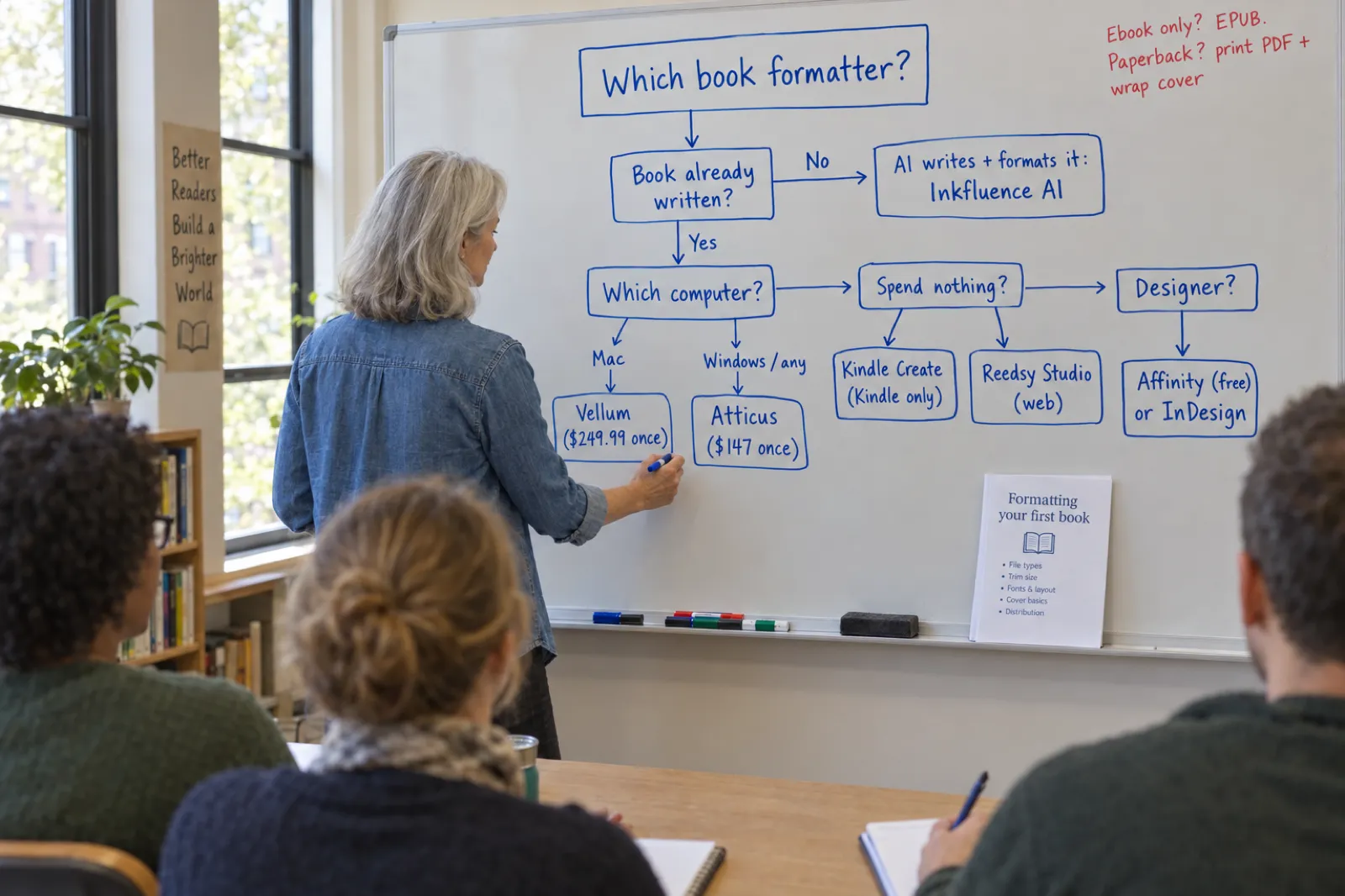
A workshop leader finishes a hand-drawn decision tree on a whiteboard: Which book formatter? Book already written? No leads to AI writes and formats it: Inkfluence AI. Yes leads to Which computer? Mac: Vellum ($249.99 once). Windows or any: Atticus ($147 once). Spend nothing? Kindle Create (Kindle only) or Reedsy Studio (web). Designer? Affinity (free) or InDesign.
The short version of the picker above. $249.99 is Vellum Press, the version that makes print files; ebook-only Vellum is $199.99.

What book formatting software actually has to do

A manuscript in a word processor is one long scroll of text. A book is two different products made from it, and a formatter's job is to make both without you setting every page by hand.

The paperback is a fixed layout. Every page has a set size (the trim), a wider margin on the spine side so words do not disappear into the binding, running headers or footers, page numbers that start in the right place, chapters that open on a fresh page, and fonts embedded in the PDF so the printer cannot swap them. On Amazon KDP, the inside margin grows with the page count, because a thicker book curves more at the spine:

Page countMinimum inside (gutter) margin on KDP
24 to 150 pages0.375 in
151 to 300 pages0.5 in
301 to 500 pages0.625 in
501 to 700 pages0.75 in
701 to 828 pages0.875 in

The outside margin is at least 0.25 inch without bleed and 0.375 inch with it. Bleed, for pictures that run off the page edge, is 0.125 inch, and even one bleed page means the whole interior is set up with bleed and uploaded as a PDF. The regular KDP trims are 5 x 8, 5.06 x 7.81, 5.25 x 8, 5.5 x 8.5 and 6 x 9 inches; larger sizes up to 8.5 x 11 and A4 cost more to print. All of this is from KDP's trim, bleed and margins page, checked 9 October 2026. Our KDP paperback guide walks through the upload itself.

The ebook is a reflowable file. There are no pages: the text reflows to fit a phone, a tablet or an e-reader at whatever font size the reader picks. What matters is a linked table of contents, clean chapter breaks, images that scale, and a file the store accepts (ebook formats explained). KDP takes DOCX, EPUB, KPF (from Kindle Create), HTML, RTF and TXT for Kindle ebooks, and PDF only for some languages. It no longer takes MOBI: reflowable MOBI ended on 1 August 2021 and fixed-layout MOBI on 18 March 2025. If a tool still advertises MOBI as its Kindle format, that is a tool that has not kept up.

The cover is a third file (cover design guide). For a paperback, KDP wants one PDF with the back, the spine and the front, plus 0.125 inch bleed on every edge. The spine width comes from your page count and paper: 0.002252 inch a page on white paper and 0.0025 inch on cream, so a 284-page book on white paper has a spine of about 0.64 inch. KDP's help is inconsistent on the exact threshold for spine text (it says both "at least 79" and "more than 79" pages), so the safe rule is spine text from about 80 pages. Most formatters do not make this file at all.

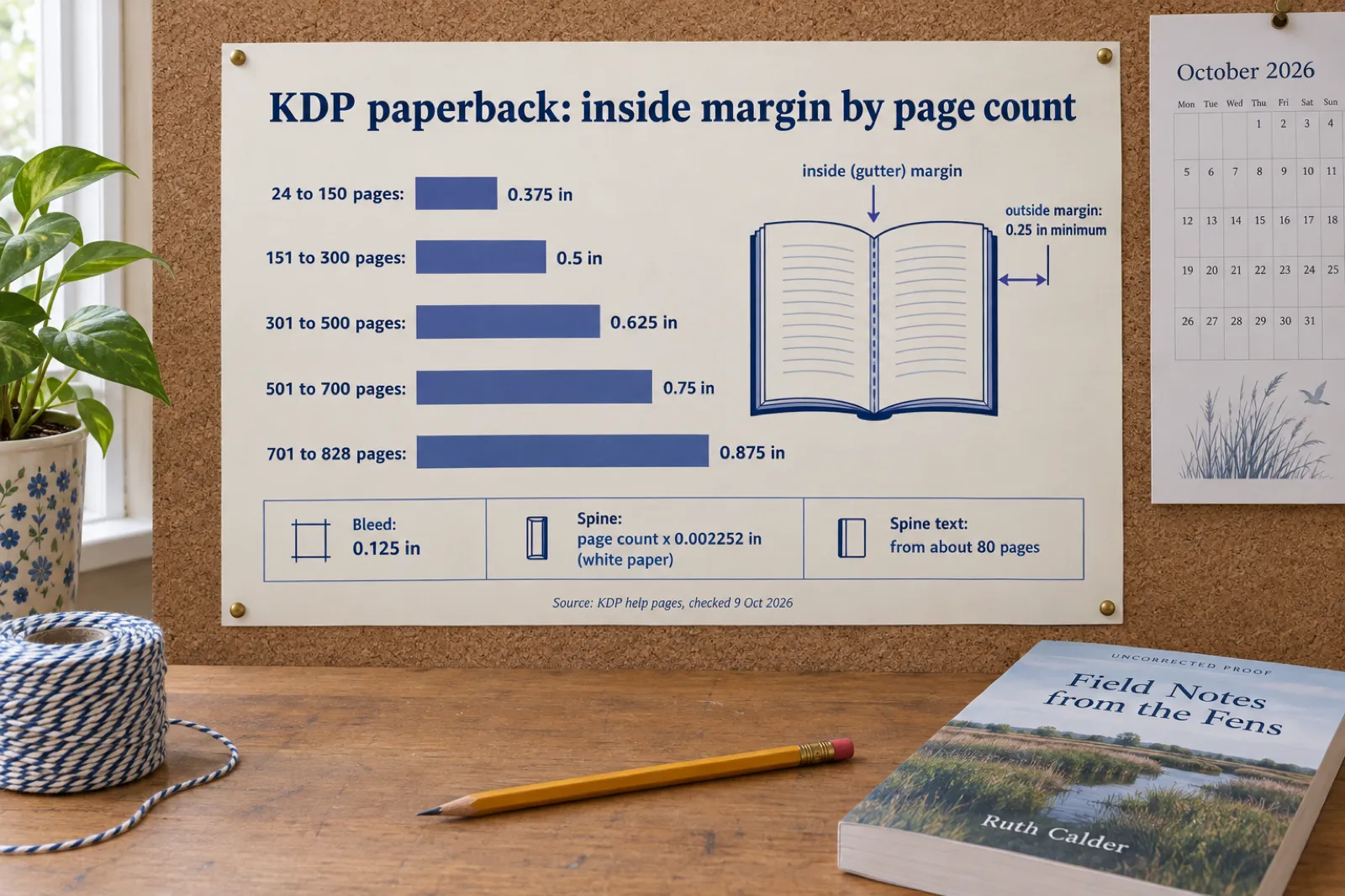
A printed poster titled KDP paperback: inside margin by page count, with five bars: 24 to 150 pages 0.375 in, 151 to 300 pages 0.5 in, 301 to 500 pages 0.625 in, 501 to 700 pages 0.75 in, 701 to 828 pages 0.875 in, plus boxes for bleed 0.125 in, spine page count times 0.002252 in on white paper, and spine text from about 80 pages.
KDP's paperback rules on one poster. Every number is from KDP's help pages, checked 9 October 2026.

What good formatting looks like on the page

Readers rarely notice good formatting. They notice bad formatting at once, and it is the first thing reviewers mention after the story. These are the details that separate a formatted interior from a word-processor printout:

  • Chapter openings

    A consistent heading style, often lower on the page, with the first paragraph not indented.

  • Drop caps or small caps

    An enlarged first letter or the first words in small capitals to start each chapter.

  • Indents, not gaps

    Fiction indents each new paragraph and leaves no blank line between them; non-fiction may use spacing instead, but never both.

  • Scene breaks

    A centred ornament or three asterisks, so a break at the bottom of a page is still visible.

  • No widows or orphans

    No single line stranded at the top or bottom of a page.

  • Running heads and folios

    Book title and chapter or author in the header, page numbers that skip blank pages and front matter.

  • Front and back matter

    Title page, copyright page, contents, and an about-the-author page in the right order.

  • Justified text that is not stretched

    Justification with hyphenation, so lines do not open into rivers of white space.

Every dedicated formatter on this list handles most of these automatically. Word and Google Docs handle almost none of them unless you set each one up, which is why a book laid out in a word processor so often looks like one.

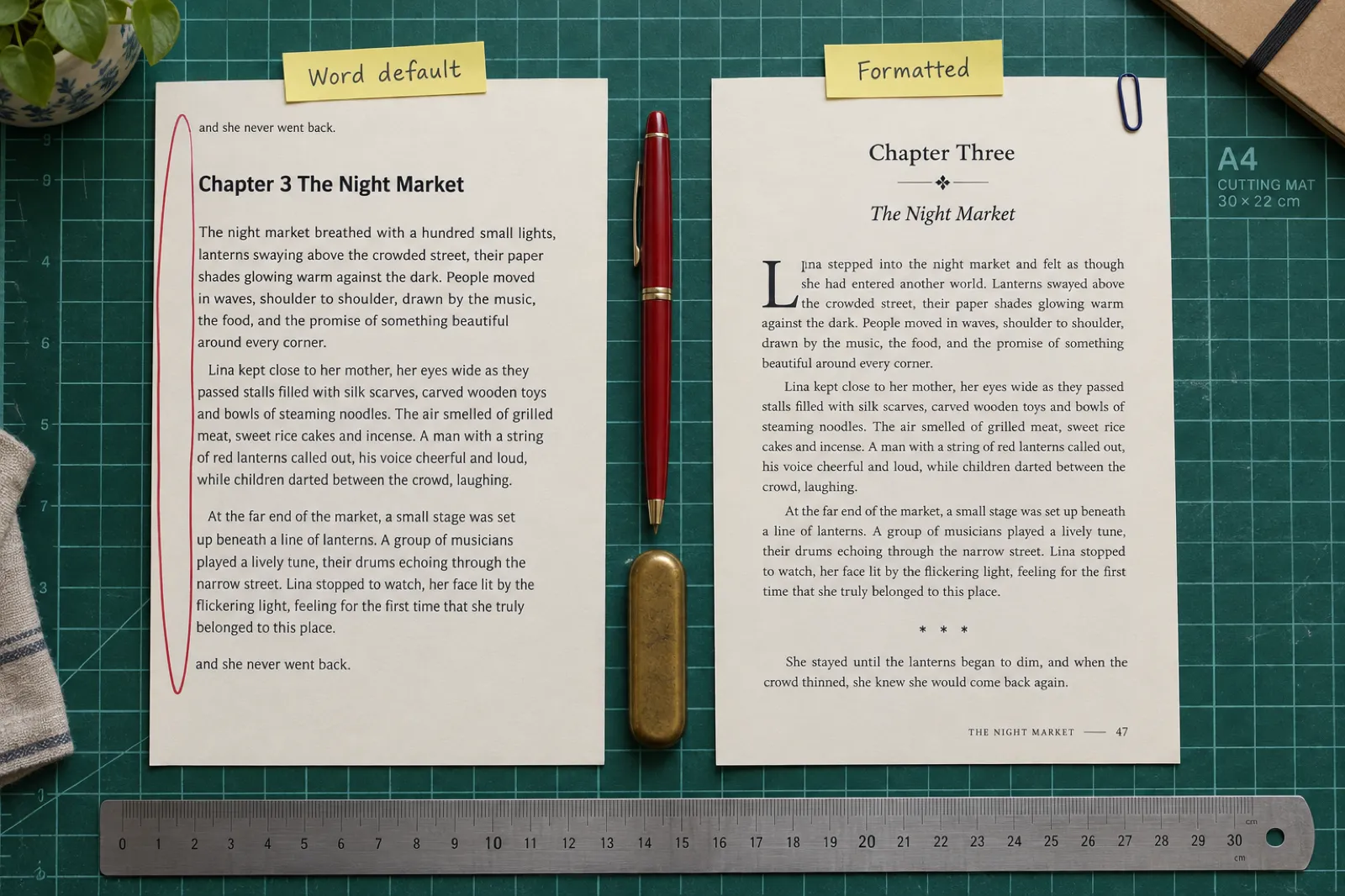
Two printed pages of the same chapter on a cutting mat. The left page, labelled Word default, has text crowding the spine, no indents, a stranded orphan line and a bold sans-serif heading. The right page, labelled Formatted, has a centred serif chapter heading with an ornament, a drop cap, indented paragraphs, a scene break and a running footer with page number 47.
The same chapter twice: a default word-processor page and a formatted book page. This is the job a formatter does.

Book formatting software compared: KDP fit and covers

"Print PDF" means the tool exports a paperback interior with trim and margins set; "Wrap cover" means it makes the full back, spine and front cover file KDP asks for.

ToolEbook filePrint PDFWrap coverImportsWrites with AI
VellumPer-store files + EPUBYes (Press), 30+ trimsNoDOCXNo
AtticusEPUBYesNoDOCXNo
Inkfluence AIEPUB (paid or credits)Yes, 9 trims + 8.5 x 8.5Yes (KDP package)DOCX, DOC, PDF, EPUB, TXT, MDYes
Kindle CreateKPF + EPUBYes, KDP trimsNoDOCX, DOC (PDF for Print Replica)No
Reedsy StudioEPUBYes, 4 trimsNoDOCX, ODTNo
Draft2DigitalEPUBYes, black and whiteNoDOC, DOCX, RTF, ODT, TXTNo
AffinityEPUBYes, any trim, bleedYou design itIDML, imagesNo
InDesignEPUBYes, any trim, bleedYou design itWord, RTF, text, imagesText rewrite, images
Scrivener 3EPUBYes, manual setupNoWord, OpenOffice, text, PDFNo
Word + KDP templatesDOCX (no EPUB)Yes, manual setupNoAny documentCopilot (writing)
Google DocsEPUB (basic)No facing pagesNoDOCXGemini (paid plans)
Kotobee AuthorEPUB, apps, webPDF, not built for printNoPDF, EPUB, DOCX, HTMLYes (Basic and up)
Calibre / SigilEPUB, AZW3 / EPUBNoNoMost ebook formatsCalibre: optional

The 13 tools, one by one

Each fact is from the vendor's own pricing, features or help pages, checked 9 October 2026. The weakness is the one its own users or its own documentation point to.

Vellum

Price
Vellum Ebooks $199.99; Vellum Press (ebooks + print) $249.99; one-time; upgrade Ebooks to Press later for $69.99. Free to download and style; you pay to generate files.
Runs on
Mac only, macOS 13 or newer. No iPad. Vellum's help suggests renting a cloud Mac on Windows.
Best for
Mac-based fiction authors who want polished ebook and print interiors with almost no setup.
  • +Dozens of built-in styles for headings, first paragraphs and drop caps, ornamental breaks, headers and footers, with saved custom styles.
  • +Separate ebook files for each store plus a generic EPUB, and print PDFs in 30+ trim sizes including a Large Print preset.
  • +Actively maintained: version 4.1.6 shipped 7 October 2026, and an earlier 2026 update stopped using a font KDP now prohibits.

The catch: Mac only and the most expensive tool in the category. It imports DOCX only and makes no covers: you upload the print wrap cover straight to KDP.

On our site: Inkfluence AI vs Vellum

Atticus

Price
$147 one-time, lifetime updates, 30-day money-back guarantee. No free plan or trial.
Runs on
Runs in a browser and installs as an app on Windows, Mac, Linux and Chromebook, and on iPad, iPhone and Android.
Best for
Authors on Windows, Chromebook or several devices who want Vellum-style results for one payment.
  • +17 chapter templates with 1,200+ combinations, a custom theme builder and 1,500+ fonts.
  • +Full-bleed images, footnotes and endnotes, large print, volumes and box sets, callout boxes, drop caps and two-page spreads.
  • +Writing goals and co-author and editor collaboration with tracked edits (since December 2024).

The catch: No AI of any kind, no cover tools, DOCX import only. Its 2026 updates are small formatting additions (dark mode, drop caps, an EPUB page-flip preview, image folders).

On our site: Does Atticus have AI? Inkfluence AI vs Atticus

Inkfluence AI (our product)

Price
Free plan: formatted PDF with a small credit line in the footer. EPUB, DOCX and the KDP package with any paid plan or credit pack. Creator $9.99/month, Premium $19.99/month.
Runs on
Web app on any computer, plus an iOS app.
Best for
Starting from an idea, or anyone who wants the writing, the cover and the KDP paperback files from one place.
  • +Writes the book with you from an idea, or imports your manuscript as DOCX, DOC, PDF, EPUB, TXT or Markdown, then formats it.
  • +Five book styles (Standard, Classic, Modern, Structured, Workbook), 24 fonts, drop caps, chapter dividers, callout boxes and page borders, nine print trim sizes plus 8.5 x 8.5 for picture books.
  • +The KDP package: interior PDF with mirrored margins set from the real page count (0.75 inch inside up to 500 pages), a full wrap cover with the spine sized to page count and paper, the front cover, the Kindle EPUB and a README for the KDP upload slots.

The catch: Less hand control than Vellum or Atticus: no custom theme builder, no footnotes, no full-bleed interior pages, about two dozen fonts rather than hundreds. The free PDF carries a credit line.

On our site: the export in detail, with real KDP renders

Kindle Create

Price
Free.
Runs on
Windows and Mac.
Best for
A simple, text-only novel going only to Kindle and KDP paperback, at no cost.
  • +Made by Amazon: outputs a KPF file KDP accepts for the Kindle ebook, plus a print-ready paperback from the same manuscript, and an EPUB.
  • +Sets paperback margins, headers and page numbers for you.
  • +Drop caps and chapter images; recent support for more languages.

The catch: Four themes you cannot edit, limited image support, and no footnotes or tables in print, all stated by Amazon. No covers.

On our site: self-publishing on Amazon KDP

Reedsy Studio

Price
Free. Optional add-ons: Studio Essential $4.99/month, Outlining $7.99/month.
Runs on
Web browser.
Best for
Writing and exporting a simple book for free on any computer, including a Chromebook.
  • +Write and format in the same free tool, with footnotes and endnotes in the editor.
  • +Imports DOCX or ODT up to 50 MB; exports EPUB and print PDF.
  • +Three export themes (Reedsy, Classic, Romance) with drop caps and chapter images.

The catch: Three fixed themes and four trim sizes (6 x 9, 5.5 x 8.5, 5 x 8, 4.25 x 6.87), which Reedsy states itself. No covers.

On our site: Inkfluence AI vs Reedsy

Draft2Digital

Price
Formatting and downloads free, even if you do not publish through it. Publishing through Draft2Digital now carries a one-time activation fee and a small annual fee for low-earning accounts.
Runs on
Web.
Best for
Authors selling in many stores who want hands-off EPUB and paperback files.
  • +Turns a manuscript into an EPUB you may use anywhere, including KDP, and a paperback PDF.
  • +D2D Print paperbacks in 5 x 8 to 8.5 x 11, 32 to 1,050 pages.
  • +Hands-off: templates set the layout for you.

The catch: Little control over the template output, and D2D Print is black-and-white paperback only. Its free ISBN cannot be used at KDP.

On our site: KDP Select vs going wide

Affinity (by Canva)

Price
Free for individuals since late October 2025, when Canva merged Publisher, Designer and Photo into one app.
Runs on
Windows and Mac (iPad announced).
Best for
Authors with design skills, picture books and illustrated non-fiction, at no cost.
  • +Professional page layout: any trim, facing pages through master pages, bleed and PDF/X export.
  • +Exports EPUB as well as print PDF.
  • +No subscription for the layout tools.

The catch: A designer's tool: you build every page style yourself, with a real learning curve. Its AI features are image tools behind a paid Canva plan.

On our site: how to make a picture book

Adobe InDesign

Price
$22.99/month on an annual plan; 7-day free trial.
Runs on
Windows and Mac.
Best for
Professional designers and complex illustrated books.
  • +The industry standard for book design: any trim, facing pages, bleed, preflight checks, print PDF and EPUB.
  • +Generative image tools and text rewriting in 2026 builds.
  • +Files that any professional designer can open.

The catch: A subscription plus a steep learning curve for a single book.

On our site: images in ebooks and print

Scrivener 3

Price
$59.99 for Mac or Windows, $95.98 for both, $23.99 on iPad and iPhone; one-time; 30-day trial.
Runs on
Mac, Windows, iPad, iPhone.
Best for
Long-form drafting, with formatting as a second step you are prepared to learn.
  • +The best of these tools for drafting a long book: binder, corkboard, research beside the text.
  • +Compile outputs print PDF, EPUB and DOCX with custom page layout.
  • +One-time price per platform.

The catch: Compile is hard to learn (its own forum has threads on the learning curve), and version 3.5 removed Kindle MOBI export, which KDP no longer accepts anyway.

On our site: Inkfluence AI vs Scrivener

Microsoft Word + KDP templates

Price
Microsoft 365 Personal $99.99/year; Office Home 2024 $179.99 one-time; Word for the web free.
Runs on
Windows, Mac, web, mobile.
Best for
People who already know Word styles and want to stay in Word.
  • +Amazon publishes free Word templates for every trim size, with or without sample content.
  • +Mirror margins for facing pages; KDP accepts the DOCX directly for Kindle ebooks.
  • +Copilot is included in Microsoft 365 for writing help.

The catch: Everything is manual, and there is no native EPUB export.

On our site: turning a document into a book PDF

Google Docs

Price
Free; Gemini writing features need a paid Google plan.
Runs on
Web and mobile.
Best for
Drafting, then moving to a real formatter.
  • +Free and shareable for drafting and comments.
  • +Downloads as DOCX, PDF and EPUB.
  • +Heading styles that carry into most formatters on import.

The catch: Not a book layout tool: no facing pages or gutter setting, and the EPUB export is basic.

On our site: ebook formats explained

Kotobee Author

Price
Free tier (10 chapters per ebook); Basic $150 and Premium $300, one-time per user.
Runs on
Windows, Mac, Linux, web.
Best for
Educational and interactive ebooks.
  • +Interactive ebooks with quizzes, media and widgets; exports to EPUB, PDF, web and app formats.
  • +AI content generation (text, images, questions) on Basic and up.
  • +Built for teachers and training content.

The catch: Aimed at interactive ebooks, not print interiors; reviewers report EPUB export glitches.

On our site: how to create a workbook

Calibre and Sigil

Price
Free and open source.
Runs on
Windows, Mac, Linux.
Best for
File conversion and EPUB repair, alongside a real formatter.
  • +Calibre converts between ebook formats and includes an EPUB editor; it added an optional bring-your-own AI assistant in 2025.
  • +Sigil edits EPUB 2 and EPUB 3 files directly (version 2.8.1, July 2026).
  • +Good for fixing one stubborn ebook file.

The catch: Neither designs a book. Calibre's output is only as good as its input, and Sigil means editing the EPUB's code.

On our site: EPUB, DOCX and PDF, and which store takes which

AI book formatting software: what it does and does not do yet

Search "best book formatting software" and the roundups list Vellum, Atticus and Kindle Create, none of which has AI. Meanwhile a new group of tools uses AI to write or rebuild the book and then lays it out. They work differently, and it helps to know which kind you are looking at.

Template formatters (Vellum, Atticus, Kindle Create, Reedsy) take a finished manuscript and apply a design to it. You choose, the tool applies, and you can adjust every chapter opening by hand. Their strength is typographic depth: hundreds of fonts, theme builders, footnotes, large print.

AI book tools that format start earlier. Inkfluence AI drafts the outline and chapters with you (or imports your draft and edits it), then formats the book in one of five styles and builds the KDP files, including the wrap cover. Built&Written turns a coach's notes, posts or transcripts into a KDP book on a subscription ($19, $49 or $99 a month; EPUB and DOCX only from the $49 plan). BookFoundry sells AI-written books from $14.99 each on credits that are non-refundable once used, with DOCX, EPUB and print PDF from every book, though it does not publish its trim list.

AI inside general tools is a third kind. Word has Copilot, Google Docs has Gemini on paid plans, InDesign has generative image tools and text rewriting, and Calibre added an optional assistant that uses your own AI account. All of them help with words or pictures. None of them lays out a book for you.

The honest trade-off: AI formatters save the most time when the book is not finished or you have never formatted one, and they give you the cover and KDP files without a second tool. Template formatters still win when you want to hand-tune a finished novel's typography page by page. You can also draft with AI and format in Atticus or Vellum; our Inkfluence vs Atticus and Inkfluence vs Vellum comparisons cover how to move a book between them.

Ebook only or paperback too? It changes the choice

If you are publishing a Kindle ebook and nothing else, you need less than you think. KDP accepts a clean DOCX for Kindle, so a well-styled Word file, a free Kindle Create project or a Reedsy Studio EPUB all work. What you are paying for in Vellum or Atticus is mostly print: page layout, margins, headers, chapter openings that look like a published book.

The paperback is where the tools separate. Kindle Create handles text-only print books but has no footnotes or tables in print. Reedsy offers four trim sizes. Draft2Digital prints in black and white only. Vellum Press and Atticus handle nearly any novel or non-fiction book. Illustrated books, cookbooks and anything with images that run to the page edge need bleed, which pushes you towards Affinity, InDesign, Atticus or Vellum.

And for every paperback, someone has to make the wrap cover with the right spine width. Only Inkfluence AI on this list makes it inside the same tool; with the others it is KDP's Cover Creator, a designer, or the cover generator plus KDP's template.

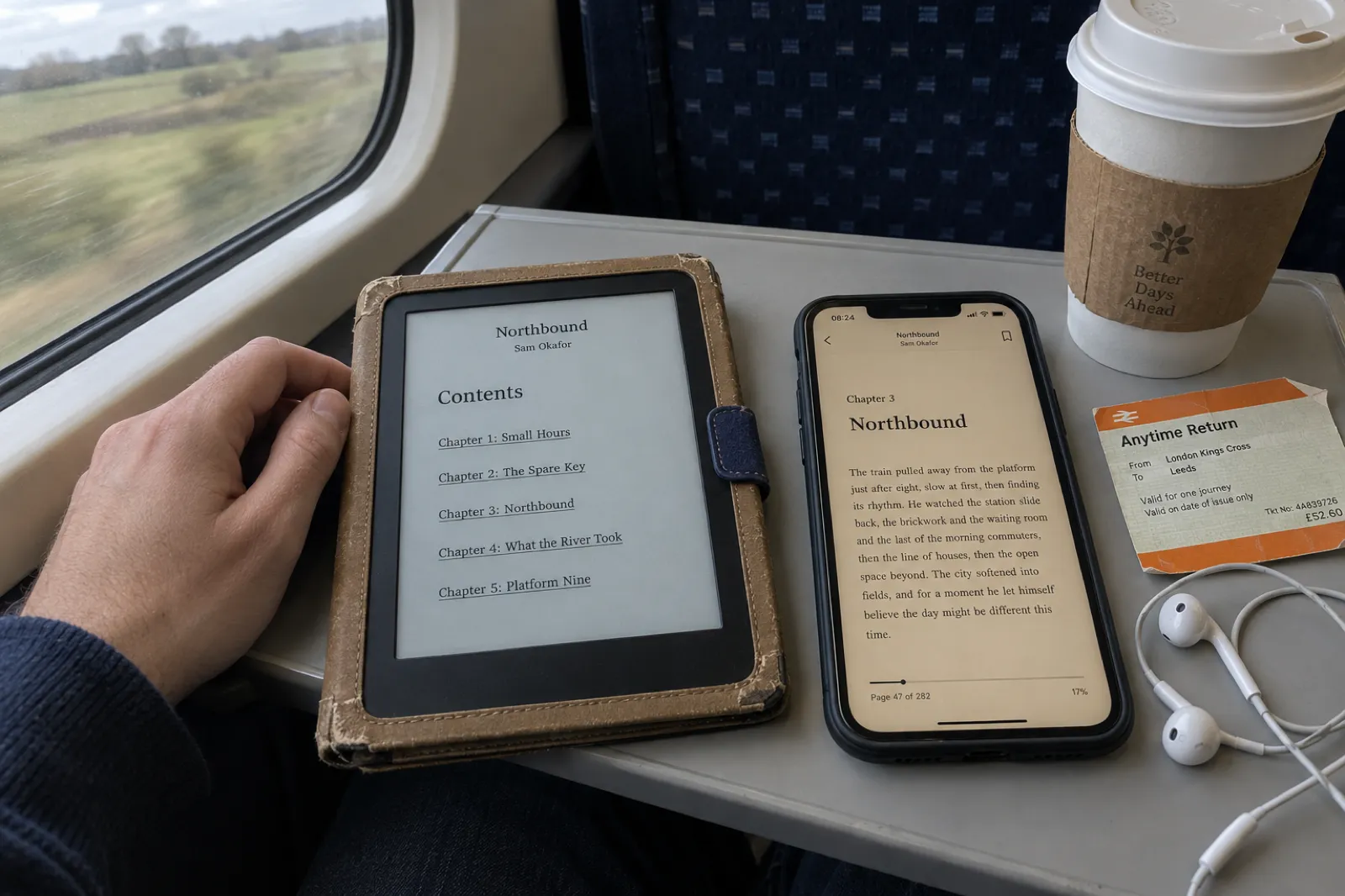
On a train tray table, an e-reader shows the linked contents page of the ebook Northbound by Sam Okafor, chapters one to five, beside a phone open at Chapter 3 of the same book in a sepia reading app.
An ebook reflows to fit each screen, so its job is different from a paperback's: linked contents, clean chapter breaks, no fixed pages. Staged photo.

The best free book formatting software

Free tools have caught up for simple books. Here is what each free option gives you, and where it stops.

Free toolGives youStops at
Kindle CreateKindle file and KDP paperback, Windows and MacFour locked themes; no footnotes or tables in print
Reedsy StudioEPUB and print PDF in a browser, footnotesThree themes, four trims
Draft2DigitalEPUB usable anywhere, paperback PDFLittle layout control; black-and-white print
Affinity by CanvaFull professional layout, EPUB and print PDF with bleedYou design every page; learning curve
Inkfluence AI free planAI writing (5 chapters plus 5 a month) and a formatted PDF at any of nine trimsPDF carries a credit line; EPUB, DOCX and the KDP package need a paid plan or credits
Word for the web, Google DocsDrafting; KDP's Word templatesManual layout; Docs has no facing pages
Calibre, SigilConversion and EPUB repairNot book design tools

For a text-only novel going only to Amazon, Kindle Create is genuinely enough. For a book you want in every store (going wide), Reedsy or Draft2Digital. For anything with images, Affinity, now that it costs nothing. If you need to check the money side first, our free KDP tools work out print cost and royalty by trim and page count, and the royalty calculator compares KDP with five other stores.

One-time or subscription: what each costs over three years

One-time tools look expensive on day one and cheap by book three. Subscriptions look cheap on day one. The fair comparison is what you would pay over the time you expect to keep publishing, and what you get beyond formatting.

ToolYear oneThree yearsWhat it covers
Kindle Create, Reedsy Studio, Affinity$0$0Free tools; Reedsy add-ons optional
Scrivener 3 (one platform)$59.99$59.99Drafting tool with Compile
Atticus$147$147Formatting only
Vellum Press (Mac)$249.99$249.99Formatting only; $199.99 for ebooks only
Microsoft 365 Personal$99.99$299.97Word plus the Office apps
Inkfluence AI Creator$119.88$359.64Writing, cover, formatting, KDP package, 15 audiobook chapters a month
Adobe InDesign$275.88$827.64Annual plan at $22.99 a month

US list prices before tax, checked 9 October 2026; one-time tools assume no paid upgrade in three years. If formatting is all you need and you will publish several books, Atticus or Vellum is the cheapest paid route. If you would otherwise buy a formatter, a cover and an audiobook narrator separately (the full stack priced), a tool that does all three changes the sum. And if you are publishing one book, a one-time Inkfluence credit pack unlocks the EPUB, DOCX and KDP package without a subscription; see pricing.

How to format a book for KDP, with any of these tools

The steps are the same whichever formatter you use. The tools differ in how many of them they do for you.

  1. 1

    Finish and clean the manuscript

    Use heading styles for chapter titles (Heading 1), remove manual tabs and double spaces, and decide your front matter: title page, copyright page, dedication, contents.

  2. 2

    Pick the trim size first

    6 x 9 inches is the common trade size for non-fiction and many novels; 5.5 x 8.5 and 5 x 8 suit shorter fiction. Your page count, and so your margins and spine, follow from it.

  3. 3

    Import into your formatter and choose a style

    Bring in the DOCX, pick a theme or style, and set chapter openings, scene breaks and drop caps once for the whole book.

  4. 4

    Set margins for your page count

    Check the inside margin against KDP's table (0.5 inch for 151 to 300 pages). Most formatters set it for you; in Word you set mirror margins yourself.

  5. 5

    Export two files

    A print PDF at your trim size with fonts embedded for the paperback, and an EPUB or DOCX for the Kindle ebook.

  6. 6

    Make the full wrap cover

    Back, spine and front in one PDF with 0.125 inch bleed, the spine width set from your final page count and paper. Add spine text only from about 80 pages.

  7. 7

    Upload, preview and order a proof

    Use KDP's print previewer to catch margin and bleed errors, then order a proof copy and read it with a pencil before you publish.

For the publishing side after the files are ready, see self-publishing on Amazon KDP, and if AI wrote any part of the book, KDP's AI disclosure rules and how to publish an AI-assisted book on KDP.

Six formatting mistakes that get a KDP file sent back

  1. An inside margin that is too narrow for the page count. A 320-page book needs at least 0.625 inch on the spine side. Word templates set this for one page range; if your page count changes, check it again.
  2. Bleed on one page, not the whole file. KDP asks for the whole interior to be set up with bleed if any page uses it, and uploaded as a PDF.
  3. Fonts that are not embedded. Export the print PDF with fonts embedded. Some fonts are no longer allowed in KDP print at all: Vellum's February 2026 update stopped using one for that reason.
  4. A cover built for the wrong page count. The spine width comes from the final interior. Re-export the cover whenever the page count changes.
  5. Spine text on a thin book. Keep the spine blank below about 80 pages; text on a narrow spine can wrap onto the front or back.
  6. A MOBI file for the Kindle edition. KDP no longer accepts it. Upload DOCX, EPUB or KPF instead (exporting and publishing an ebook).

Book formatting software FAQ

What is the best book formatting software?+
It depends on your computer and where you start. On a Mac, Vellum ($199.99 for ebooks, $249.99 with print, one-time) gives the most polished result for the least setup. On Windows or a Chromebook, Atticus ($147 one-time) is the closest equivalent and runs in a browser. For free, Kindle Create covers a text-only Kindle book and KDP paperback, and Reedsy Studio works in any browser. If you do not have a manuscript yet, an AI tool such as Inkfluence AI writes the book and formats it in the same place. Prices checked 9 October 2026.
Is there free book formatting software?+
Yes, several. Kindle Create (Windows and Mac) is free and makes Kindle and KDP paperback files, with four themes you cannot edit and no footnotes or tables in print. Reedsy Studio is free in a browser, with three themes and four trim sizes. Draft2Digital formats EPUB and paperback PDF files free and lets you download them even if you do not publish there. Affinity by Canva has been free since late October 2025 and gives full page control if you can design. Inkfluence AI's free plan exports a formatted PDF with a small credit line in the footer.
What do professionals use to format books?+
Book designers mostly use Adobe InDesign ($22.99 a month on an annual plan), with Affinity as the free alternative. Self-published authors who format their own books mostly use Vellum on a Mac or Atticus elsewhere, because both produce professional interiors from templates without design training.
Does Vellum work on Windows?+
No. Vellum is Mac only and needs macOS 13 or newer. Vellum's own help points Windows users to renting a cloud Mac. On Windows, Atticus is the usual alternative at $147 one-time, and Kindle Create and Reedsy Studio are free options.
Is there AI book formatting software?+
Yes. Inkfluence AI writes and formats the book and exports a PDF free, plus EPUB, DOCX and a KDP package with the print interior and a full wrap cover on any paid plan or credit pack. Built&Written ($19 to $99 a month) turns your notes into a KDP book, though its $19 plan does not export EPUB. BookFoundry sells finished AI books from $14.99 on credits. The established formatters, Vellum, Atticus and Kindle Create, have no AI. Word and InDesign have AI for writing and images, not for book layout.
Can I format a book in Word for KDP?+
Yes. Amazon publishes Word templates for each trim size, with or without sample content. Word supports mirror margins for facing pages, which a paperback needs. You then save the interior as a PDF for the paperback; for the Kindle ebook, KDP accepts the DOCX directly. Word has no native EPUB export, and every style, page break and header is set by hand.
What margins does a KDP paperback need?+
KDP sets the inside (gutter) margin by page count: 0.375 inch for 24 to 150 pages, 0.5 inch for 151 to 300, 0.625 inch for 301 to 500, 0.75 inch for 501 to 700 and 0.875 inch for 701 to 828. The outside margin is at least 0.25 inch without bleed and 0.375 inch with bleed. Bleed is 0.125 inch, and a bleed interior must be uploaded as a PDF. Checked on KDP's help pages, 9 October 2026.
Does KDP still accept MOBI files?+
No. KDP stopped accepting MOBI for reflowable ebooks on 1 August 2021 and for fixed-layout ebooks on 18 March 2025. For a Kindle ebook, upload DOCX, EPUB, KPF (from Kindle Create), HTML, RTF or TXT. Scrivener removed its Kindle MOBI export in version 3.5.
Do I need a separate tool for the paperback cover?+
With most formatters, yes. Vellum, Atticus, Kindle Create and Reedsy Studio format the interior only; you make the full wrap cover elsewhere, often with KDP's Cover Creator or a designer. Inkfluence AI's KDP package includes a full wrap cover with the spine sized to your page count and paper type.
Should I pay once or subscribe for book formatting software?+
If you format several books a year and only need formatting, a one-time tool such as Atticus ($147) or Vellum ($249.99 with print) is cheaper over time. If you also want help writing, a cover and audiobook narration, a subscription that does all of it can cost less than buying several tools. If you publish one simple book, a free tool is enough.

Written or not, get the book ready to publish

Import your manuscript or start from an idea. Check the formatted PDF free, then export the EPUB and the full KDP paperback package when you are ready.

Format my book free