What is Amazon KDP SEO?
KDP SEO is optimizing your Kindle listing to match Amazon buyer searches and convert those clicks into sales.
 Inkfluence AI
Rank for Kindle buyer searches with stronger listing fundamentals.
Keyword research, title and subtitle optimization, description copy, categories, backend keywords, and AI disclosure basics.
Creating your book now? Start with the AI ebook generator and export a clean draft before KDP listing optimization.
Quick Answer
KDP SEO is the practice of optimizing your Amazon Kindle book listing so it appears at the top of search results when readers look for your topic. It covers five elements: title and subtitle keyword placement, a sales-focused book description, seven backend keywords in Kindle Direct Publishing, two BISAC category selections, and your author name format. The most important ranking signal is your title and subtitle - keywords placed here carry roughly three times the weight of backend keywords. A well-optimized KDP listing can move a book from page 5 to page 1 within days of publishing. Inkfluence AI generates formatted book descriptions, chapter outlines, and complete manuscripts ready for KDP upload.
Looking for KDP SEO or KDP listing optimization? This page covers practical metadata implementation, backend keywords, and AI disclosure guidance for Amazon KDP.
AI Search Answers
KDP SEO is optimizing your Kindle listing to match Amazon buyer searches and convert those clicks into sales.
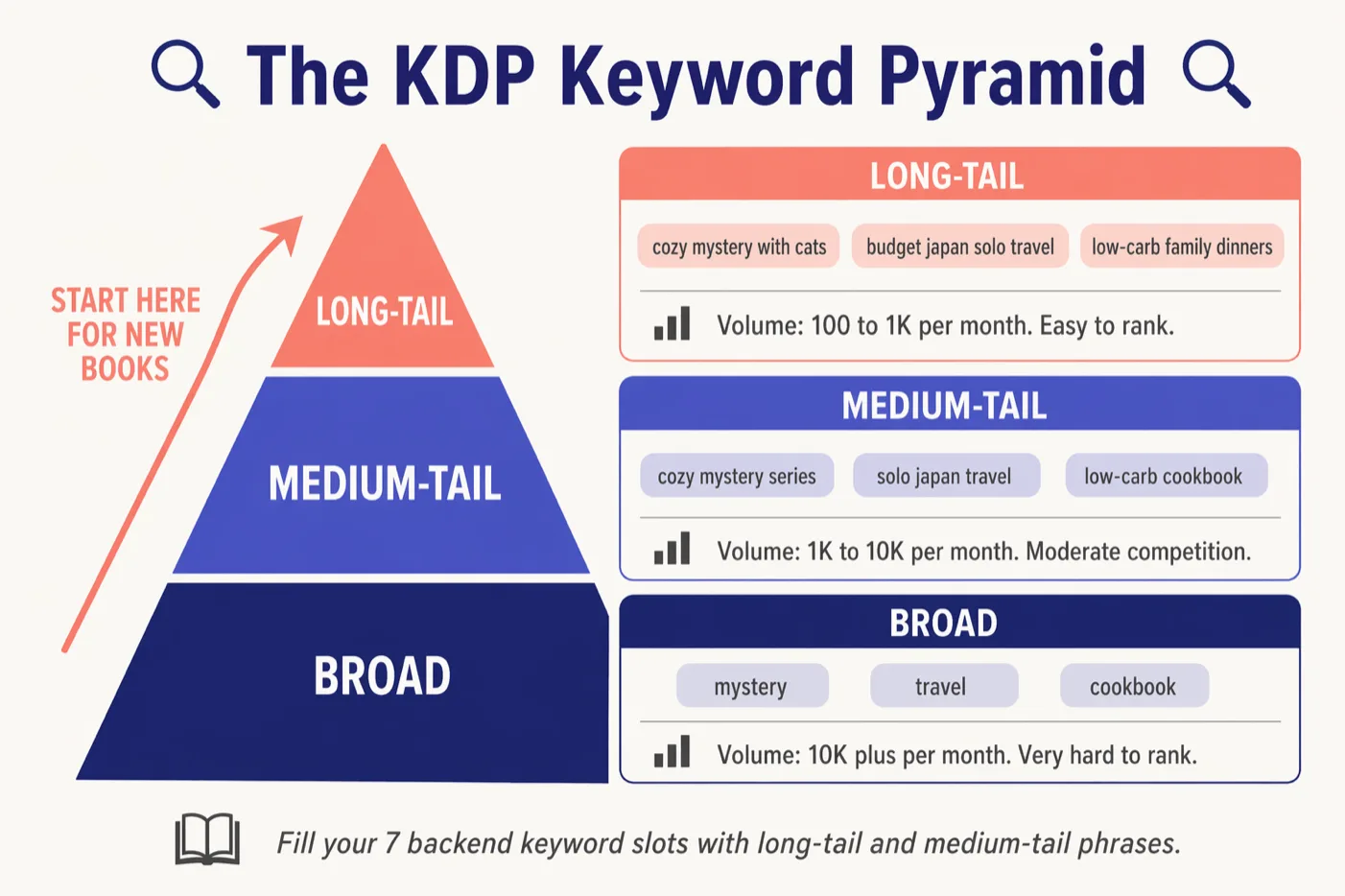
KDP provides 7 backend keyword fields, up to 50 characters each, for extra phrases not used in title or subtitle.
Use primary keywords naturally in title and subtitle, then expand with related terms in description and backend fields.
Yes. Accurate and specific categories usually improve relevance signals and reduce ranking difficulty.
Yes, AI-assisted books can be published if the listing is accurate and current KDP policy requirements are followed.
Early conversion signals such as clicks, purchases, and honest reviews usually improve ranking momentum.
Intent Mapping
Built from your current KDP and Kindle query cluster.
| Query | Intent | Answer On This Page | Jump Link |
|---|---|---|---|
| amazon kdp seo | Find optimization workflow | Complete checklist and implementation steps | KDP checklist |
| kdp seo vs google seo | Compare channel behavior | Side-by-side ranking model differences | Comparison tables |
| kdp keyword generator | Find keyword method | Autocomplete-driven keyword process | Keyword research |
| kdp description generator | Improve listing copy | Description structure and template | Description section |
| amazon kdp backend keywords best practices 2026 | Backend field guidance | Field rules and mistake avoidance | Backend keywords |
| amazon kdp ai generated content policy 2026 | Policy clarity for AI use | Current disclosure and policy snapshot | AI disclosure |
| does amazon kdp accept ai generated books 2026 | Eligibility check | Yes, with policy-compliant publishing workflow | AI publishing notes |
Comparison Tables
Use these tables when deciding what to optimize first and where each signal matters most.
Where each optimization effort belongs.
| Factor | KDP SEO | Google SEO |
|---|---|---|
| Primary goal | Get discovered in Amazon search and category shelves | Rank pages in web search and AI overviews |
| Core ranking inputs | Title, subtitle, categories, backend keywords, conversion | Content depth, internal links, authority, crawlability |
| Keyword source | Amazon autocomplete and live marketplace listings | Search Console data, SERP intent, query tools |
| Winning click signal | Cover + title promise at thumbnail size | Title tag + meta description snippet relevance |
| Update rhythm | Weekly metadata review after launch | Ongoing content refresh and internal link tuning |
| Failure mode | Keyword stuffing and mismatched category positioning | Thin content and overlapping pages (cannibalization) |
What to optimize first for discoverability and conversion.
| Field | Impact | Best use | Avoid |
|---|---|---|---|
| Title | Highest | Put the primary keyword in a readable promise | Generic branding with no buyer intent term |
| Subtitle | High | Add secondary intent phrases and outcome detail | Repeating the title phrase word-for-word |
| Description | High for conversion | Skimmable benefits, bullets, proof, clear reader fit | Long unstructured text blocks |
| Categories | High for discoverability | Choose accurate, specific categories with comparable winners | Overly broad categories with poor fit |
| Backend keywords | Medium to high | Cover extra non-duplicated phrase variants | Duplicate words already used in title/subtitle |
| Cover + Look Inside | Conversion amplifier | Match genre expectations and hook the right reader quickly | Style mismatch with your category intent |
KDP SEO is not Google SEO. Amazon ranks books based on relevance and conversion signals. Your goal is to match the search terms buyers use, then earn clicks and purchases with a listing that makes sense at a glance.
Keywords in the title, subtitle, description, and backend fields help Amazon understand what your book is about.
The listing must turn impressions into clicks and clicks into purchases. Clarity beats cleverness.
Sales velocity and reviews tend to amplify visibility. Strong launch execution makes the ranking gains stick.
If you are also building a page to rank in Google, use Ebook SEO for landing-page structure, internal links, and indexing.
Start with Amazon autocomplete because it reflects real buyer searches. Then validate by comparing the top listings you see for that query.
Want help drafting metadata? Explore the KDP tools for description and keyword ideas.
Generate your manuscript first, then apply this KDP SEO checklist with clean metadata and category positioning.
Your title is the biggest relevance and click signal you control. Use a keyword-first title that stays readable, then use the subtitle to expand coverage with related phrases.
Tip: avoid repeating the same phrase in title and subtitle. Use related terms instead.
Need help writing a high-converting blurb? Use the Book Description Generator to draft options, then refine with your keyword map.
Your description is where most listings fail. Buyers scan. Make it skimmable. Lead with the problem and promise, then show exactly what they will get.
If you are a [specific reader] and you want [specific outcome], this book gives you a clear system to do it.

Inside, you will learn:
- [Outcome 1]
- [Outcome 2]
- [Outcome 3]

This book is for: [who it is for]
This book is not for: [who it is not for]

By the end, you will have: [tangible deliverable]
Categories influence what Amazon thinks your book is and which browsing paths you can rank in. A more specific category is often less competitive and gives clearer relevance signals.
KDP lets you choose up to three categories at setup. If a niche category is missing, you can request it from KDP support after publishing.
Treat the backend keyword fields as coverage expansion. Use phrases you did not use in the title/subtitle. Prefer 2 to 4 word phrases. Do not waste space repeating the same words.
Suppose your title is "Meal Prep Mastery for Beginners" and the subtitle already covers "batch cooking" and "weekly meal plans". The 7 backend fields then target audiences and phrasings the visible metadata missed, without repeating a single indexed word:
budget friendly meal prep ideas for onefreezer meals make ahead luncheshealthy eating on a budget weight lossmeal planning for busy moms weeknight dinnersfood prep containers portion controleasy recipes for college students30 minute meals quick lunch ideas workEach slot reaches a different reader segment: budget cooks, freezer-meal planners, weight-loss searchers, busy parents, gear buyers, students, and office-lunch packers. Separate keywords with spaces (commas waste characters), and never repeat words Amazon has already indexed from your title or subtitle.
Draft your description, prepare your cover direction, and ship a KDP-ready package without patchy tool switching.
Many KDP searches right now are about AI disclosure policy. The safest approach is to use accurate metadata, disclose where required in KDP workflows, and review current policy wording before publishing.
This section is educational only and not legal advice. Always confirm the latest KDP policy text directly in your Amazon KDP dashboard before publishing.
Keywords help Amazon show your book. Conversion signals help it keep showing your book.
Metadata gets you eligible. Momentum helps you climb. After you update your listing, focus on a clean launch loop: get clicks, earn purchases, and collect early reviews.
For a full launch calendar, see the ebook launch checklist.
Start writing now, export clean files, then apply this KDP SEO framework during your launch window.
If you also want Google traffic, use the broader Ebook SEO guide for landing pages + indexing.