
Write your book.
Sell it on Gumroad the same day.
Inkfluence is the only AI book tool with one-click Gumroad publishing. From finished manuscript to live listing in under 5 minutes.
One click auto-fills the description and a suggested price from your book; the title and cover come straight from the project. Edit anything before going live. You keep 100% control on Gumroad.
10%
Gumroad's cut on each ebook sale, plus payment processing. Sellers keep the rest.1
$5 to $25
Where most non-fiction ebook listings price on Gumroad. Cheap-extreme pricing signals low quality to direct buyers.2
$2B+
Gumroad publishes cumulative creator earnings on its public homepage; check the live figure, it keeps climbing.3
5 min
Typical time from finished book to live Gumroad listing with Inkfluence's one-click flow: authorization, review, publish.
By Sam May, founder of Inkfluence AI · Updated August 2026
In this guide:
- Why sell on Gumroad
- What 1,400+ Gumroad-connected books tell us
- Gumroad vs other ebook platforms
- Gumroad fees in 2026
- How Inkfluence + Gumroad work together
- Setting up your Gumroad account
- Age requirement: how old to sell
- Selling AI-written books on Gumroad
- Publishing in one click
- Pricing your ebook
- Promoting your listing
- Tips that separate selling from listing
- 5 common mistakes to avoid
- Quick-start checklist
- FAQ

Selling ebooks on Gumroad means listing your PDF or EPUB on a direct-sales storefront where you keep roughly 90% of each sale (Gumroad takes 10% plus payment fees), set any price including pay-what-you-want, and own the customer relationship. You need a Gumroad account (13+, with a parent or legal guardian on the account for minors, per Gumroad's terms), a finished ebook file, and a payout method in a supported country. With the Inkfluence integration, publishing is one click from a finished book: no file conversion or manual uploads.
Gumroad brings no marketplace traffic of its own: you supply the audience, it supplies the checkout. That trade (your traffic, your margins, your list) is the entire decision versus Amazon KDP.
Why sell ebooks on Gumroad
Gumroad has been an indie creator favourite since 2011. It is genuinely the simplest place to sell digital products on the internet, and that simplicity is the point. You don't need a Stripe account, a Shopify store, a separate landing page builder, or a dedicated email tool to get started. You sign up, connect a payout method, and start listing.
For ebook authors specifically, Gumroad has three properties that make it different from Amazon KDP and similar marketplaces:
- You own the customer relationship. Gumroad gives you the buyer's email address by default. You can send updates when you publish a new edition, recommend follow-up books, build a long-term reader list. On Amazon, the customer is Amazon's, not yours.
- The price ladder is wide open. Gumroad lets you sell at any price including pay-what-you-want with a minimum. Amazon's 70% royalty band is locked between $2.99 and $12.99. If you want to sell a premium guide at $39 or run a name-your-price launch, Gumroad supports both natively.
- You can update files anytime. Existing customers get the new version automatically when you re-upload. Great for "living guides" that get updated quarterly, or fixing typos without going through a re-publish queue.
The trade-off: Gumroad doesn't have Amazon's built-in discovery. You bring the audience. That makes Gumroad the right primary channel for creators with an existing email list, social following, or content audience, and a great secondary channel for authors who also publish on KDP and want to capture direct buyers.
What 1,400+ Gumroad-connected books tell us
More than 1,400 books created on Inkfluence have been connected to Gumroad through the integration, which gives us a production-side view most guides cannot offer. Three patterns stand out:
Practical wins
How-to guides and personal development titles lead the Gumroad mix, matching the buyer intent of an audience-driven storefront. Takeaway: sell the outcome, not the reading experience.
PDF is the delivery format
Nearly half of Gumroad-connected books ship as PDF, with EPUB a distant second: direct buyers read on phones and laptops, not Kindles. Takeaway: lead with PDF, attach EPUB as a bonus.
The stall pattern
About 1 in 4 sellers connect their book to Gumroad before ever exporting it. The listing goes up, the file never follows, and nothing sells. Takeaway: finish the export first; the shop takes minutes once the file exists.
Gumroad vs other ebook platforms
A side-by-side look at the major direct and marketplace channels for ebook sales in 2026. Pick based on where your audience already is, not on the platform with the lowest cut alone.
| Platform | Platform fee | Price range | Customer email | Built-in audience | Exclusivity |
|---|---|---|---|---|---|
| Gumroad | 10% + processing | Free, PWYW, or any price | Yes, you keep it | Modest (Discover feed) | None |
| Amazon KDP | 30–65% (royalty band) | $2.99–$12.99 for 70% rate | No | Massive | 90 days if KDP Select |
| Apple Books | 30% | $0.99–$999 | No | Large (iOS users) | None |
| Kobo Writing Life | ~30% at $2.99-$12.99 / ~55% outside that band | $1.99+ | No | Mid (international skew) | None |
| Payhip | 5% (free tier) / 0% (paid) | Any price | Yes | Minimal | None |
Many indie authors list on multiple platforms. The right strategy: pick one primary based on where your audience lives, then mirror to others as time allows. Inkfluence publishes one-click to both Gumroad and Etsy, and our EPUB export works on every platform listed above.
Gumroad fees in 2026: the full breakdown
Gumroad's fee has two very different shapes depending on where the buyer came from, and most fee guides blur them together. Verified against Gumroad's own pricing page (August 2026):
| Sale type | Gumroad fee | Card processing |
|---|---|---|
| Direct sale (your link, profile, or storefront) | 10% + $0.50 per sale | Charged on top (typically ~3% + $0.30) |
| Gumroad Discover sale (their marketplace found the buyer) | Flat 30%, all-inclusive | Included in the 30% |
Worked example on a $12 ebook sold through your own link: $1.20 (10%) + $0.50 flat + roughly $0.66 processing leaves you about $9.64, an effective all-in rate near 20%. The same sale through Discover costs a flat $3.60 and leaves $8.40. The flat $0.50 stings on cheap products and fades on bigger ones, which is one more argument against $1.99 pricing. Run your own numbers in our royalty calculator.
There are no monthly fees, listing fees, or charges for products that don't sell. Discover's 30% only applies when Gumroad's own recommendations found the buyer, which for most authors is a minority of sales and is money you'd otherwise have spent on marketing.
How Inkfluence + Gumroad work together
Most AI book tools stop at the manuscript. You generate chapters, maybe export a PDF, then you're on your own to convert formats, design a cover, write a sales description, upload everything to your storefront, set pricing, and click publish.
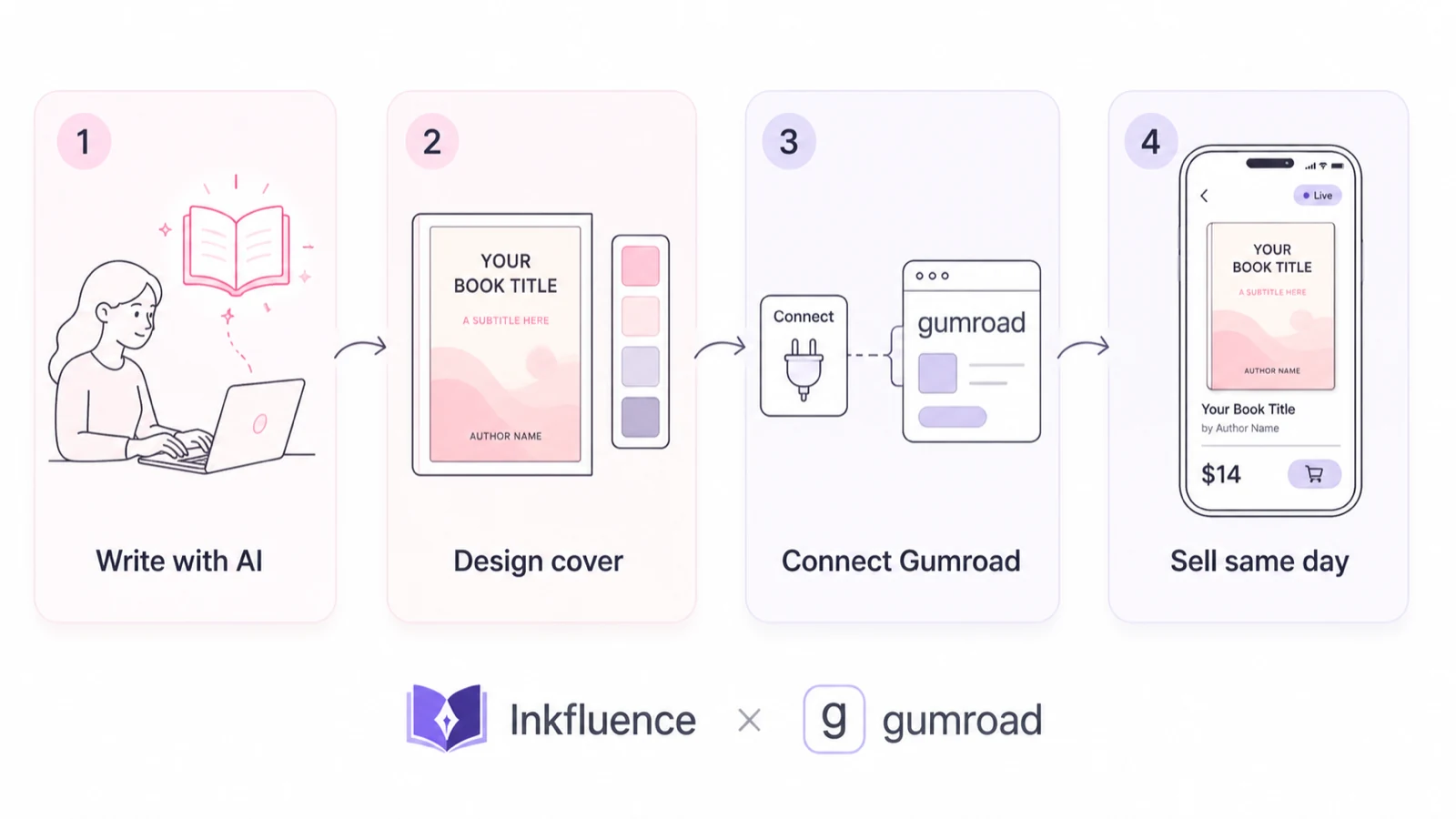
Inkfluence collapses that whole stack. The book is written, edited, formatted, given a cover, and listed for sale from one app, in one session. The Gumroad integration is the final step that closes the loop:
Auto-fill the listing
Title comes from your book. Description is drafted from your book content. Price is suggested based on length and category. Cover is uploaded as the product thumbnail.
EPUB upload, no conversion
Inkfluence's EPUB export sends straight to Gumroad's file storage. No third-party converter, no formatting check, no "is the cover image too big?" back and forth.
One-click publish
After the first-time Gumroad authorization (about 30 seconds), every future book is genuinely one click from finished to listed. The product is enabled for sale automatically.
You stay in control
Inkfluence creates the listing. Gumroad handles checkout, payments, file delivery, and tax forms. You can edit anything on Gumroad anytime, including swapping in an updated EPUB from your Gumroad dashboard.
As of August 2026, Inkfluence is the only AI book creation tool with this kind of native Gumroad integration (and the same one-click flow works for Etsy). Other AI writing tools require you to export, manually format, and upload yourself.
Setting up your Gumroad account
If you don't have a Gumroad account yet, this is the only one-time setup you need. From start to ready-to-sell takes about 10 to 15 minutes, almost all of it Gumroad's payout onboarding.
- Go to gumroad.com and create an account. You can sign up with email, Google, or Apple. Free tier is fine, no upgrade needed.
- Pick a username. This becomes your shop URL:
your-name.gumroad.com. You can change it later but the old URL stops resolving, so pick one you like. - Verify your email address.
- Go to Settings then Payouts. Add a bank account (Stripe Connect in supported countries) or PayPal account. Without a payout method, you can create products as drafts but they cannot be enabled for sale.
- Optionally fill in your tax information. Gumroad will require this before sending your first payout, but you can skip it during setup and finish later.
That's the entire Gumroad side. Once payouts are set, every product you publish through Inkfluence goes live immediately.
Already have a Gumroad shop?
Skip the setup. Go to your Profile page in Inkfluence and click Connect Gumroad. The OAuth flow links your existing shop in about 30 seconds.
How old do you have to be to sell on Gumroad?
Younger than you might think: Gumroad's terms allow sellers from age 13, with one condition for minors: if you are 13-17, a parent or legal guardian has to agree to the terms and be on the account with you, and payout details generally sit with the adult. From 18 up you run everything yourself. So a teenage author can absolutely sell an ebook on Gumroad; the guardian just needs to be part of the setup.
Payouts also depend on country support. Gumroad pays out via bank transfer or PayPal in its supported countries, and the list changes, so check the current payouts page in the Gumroad Help Center before building your launch around it. You do not need a company: individuals can sell, and Gumroad handles VAT on EU consumer sales as the merchant of record for those transactions.
Can you sell AI-written books on Gumroad?
Yes. As of August 2026, Gumroad does not prohibit AI-generated content and has no AI disclosure requirement, unlike Amazon KDP (which asks at upload) and Etsy (which requires a visible listing disclosure). You own full commercial rights to everything you create with Inkfluence. Policies can change, so it's worth a periodic glance at Gumroad's content rules in their help center; the practical bar that never changes is quality: buyers refund products that read like unedited output, so revise before you publish.
Selling the same book on Etsy too? The disclosure rules differ sharply there: see our Etsy AI disclosure walkthrough.
Publishing your ebook in one click
Once your Gumroad account exists and your book is finished in Inkfluence, the publish flow is genuinely fast. Here's the full walkthrough:
- Open your book in the Inkfluence editor. Make sure chapters are written, the cover is set, and the title is final. You can change anything later but cleaner-now means less editing later.
- Click Publish in the top-right of the editor toolbar. The Publish dialog opens with three tabs: Showcase (a free public preview page hosted by Inkfluence), Gumroad, and Etsy.
- Pick the Gumroad tab. First time only, you'll see a Connect to Gumroad panel. Click it, sign in to Gumroad if needed, click Authorize. Gumroad sends you back to Inkfluence and the publish form opens.
- Auto-fill and review the listing. One click drafts the description from your book content and suggests a price based on length and category; the title comes from your project and the cover becomes the listing image. Edit anything you want.
- Click Publish to Gumroad. Inkfluence uploads the EPUB and cover (10 to 30 seconds), creates the product, and enables it for sale. You'll see a success state with buttons to edit or view the listing on Gumroad and to copy or share your public link (the public listing URL).
Total time on the second and every subsequent publish: roughly 30 seconds. The first one takes about 5 minutes, most of it the one-time Gumroad authorization and your first listing review.
If your Gumroad account doesn't have a payout method set up yet, Inkfluence saves the listing as a draft. You'll see a banner telling you to add payout details. Once you do, open the product in your Gumroad dashboard and enable it there; the draft already has your file, cover, and description attacheding.
Pricing your ebook on Gumroad
Gumroad price setting is more flexible than Amazon's. You can list at any price (including free or pay-what-you-want), run sales, offer bundles, and stack discount codes. Here's what tends to work:
Lead magnet
Free or PWYW
Short guides (5-15 pages) used to capture emails. Set a $0 minimum with pay-what-you-want suggested at $5.
Sweet spot
$9 to $19
Most non-fiction ebooks. High enough to feel valuable, low enough to be an impulse purchase. The Inkfluence default suggestion sits here.
Premium guide
$29 to $49+
Comprehensive guides with bonus content (templates, worksheets, video). Authors with established audiences can go higher.
For pricing benchmarks, the Alliance of Independent Authors publishes annual surveys on indie author income worth reading before you price. Our own operator observation from watching direct-to-reader sellers: the mid-single-digits to mid-teens range is where non-fiction ebooks convert without triggering the hesitation an unknown author faces at premium prices.
Gumroad's cut on each sale is currently 10% plus payment processing fees. So a $19 sale lands roughly $16.50 in your account after fees. Run the numbers with our royalty calculator for your specific scenario.
Promoting your Gumroad listing
Gumroad doesn't have a built-in marketplace search like Amazon. You drive the traffic. The good news: an audience that already knows you converts at a different order of magnitude than cold marketplace browsers, because the trust is pre-built. That is the entire trade: Amazon supplies strangers, Gumroad keeps margins and relationships.
What works:
- Email your list first. Even a 50-person list converts better than 5,000 strangers.
- Post on the platforms you already use. Twitter/X threads, LinkedIn posts, TikTok, Substack, Reddit communities (where allowed). Lead with the problem the book solves, not the book.
- Use Gumroad's own discovery. Gumroad has a Discover feed and category browse. Tag your product carefully and write a strong title and description. It's not Amazon-scale, but it's free traffic.
- Run a launch discount. Set a $5 off code for the first 48 hours. Creates urgency without permanently devaluing the product.
- Cross-promote with other creators in your niche. Bundle deals, joint launches, recommendation swaps in newsletters. Gumroad supports affiliate links natively.
- Add a "what's next" upsell. Inside the EPUB, link to your other Gumroad products or your email list signup. Every reader is a lead for your next launch.
For deeper marketing tactics, see the 2026 guide to selling ebooks on Etsy and Gumroad and our ebook marketing strategy guide. To turn a price and a sales guess into monthly numbers, run the ebook income calculator; and if your formats lean printable (planners, workbooks), the Etsy seller playbook pairs naturally with a Gumroad shop.
Tips that separate selling on Gumroad from just listing on it
Most ebooks on Gumroad never sell more than a handful of copies, not because the platform is wrong but because the seller didn't do the few small things that move the needle. Here are the patterns that consistently separate sellers who get sales from sellers who get views.
Tip 01
Treat the cover like a billboard, not a book jacket
A Gumroad cover is seen almost exclusively at thumbnail size, in feeds, embeds, and search results. The title needs to be readable at 200 pixels wide. Strip subtitles, simplify the imagery, and pick high-contrast colour pairs. Test by zooming out in a browser tab to roughly 25% and asking if the cover still tells you what the book is about.
Tip 02
Lead the description with the reader's outcome, not your credentials
Gumroad gives you four lines above the fold. Use them to say what the reader walks away knowing or doing, not how long you've been an expert. Outcome-led openers ("you will", "by the end of this book") consistently outperform author-bio openers in direct-to-reader copywriting because they answer the buyer's "what's in it for me" question in the first sentence.
Tip 03
Anchor your price with a "value stack"
Listing at $19 alone feels expensive. Listing at $19 with three named bonuses (a worksheet, a 10-minute audio companion, a printable checklist) feels like a deal. Bonuses cost almost nothing to create with Inkfluence and reframe price perception. Price anchoring and bundle perception are among the most replicated findings in consumer pricing research, with foundational work by Tversky and Kahneman and popularised in Dan Ariely's Predictably Irrational.5
Tip 04
Launch on a Tuesday or Wednesday morning
Email open rates trend higher mid-week (Tuesday and Wednesday) according to long-running benchmark reports from Mailchimp and HubSpot. Specific peak-hour windows vary by audience, but Friday and weekend launches consistently underperform for paid digital products in those same reports.6
Tip 05
Update the file at least once before month three
Gumroad notifies past buyers when you re-upload a file. That transactional email is a high-attention touchpoint and a perfect chance to point them at your next product. Indie author communities consistently report that authors who treat their books as living assets and update at least quarterly maintain repeat-buyer engagement that one-and-done sellers don't.
Tip 06
Add a customer-only bonus inside the EPUB
Inside the last chapter, link to a private Notion page, a Discord invite, or a downloadable bundle. It costs you nothing, it makes the buyer feel like an insider, and it gives you a reason to email them later when something new ships. Buyers who feel part of a community refer significantly more often than passive readers.
5 common mistakes new Gumroad sellers make
Avoid these and you'll be in better shape than most of the listings on the platform.
1. Publishing without a payout method connected
Gumroad will let you create the product but it stays as an unpurchaseable draft until your payout details are set. Inkfluence saves these as "draft, needs payment" so you don't lose progress, but resolve the Gumroad onboarding the same day or buyers will hit a dead end.
2. Pricing at $0.99 or $1.99 to "compete"
Cheap signals low quality on direct platforms. The buyer is already trusting you (not Amazon) with their email and money. A $9 or $14 price tag typically converts better than $1.99 in most non-fiction niches because it implies the content is worth charging for.
3. Treating the listing page like a finished asset
Your description, cover, and price are A/B tests in disguise. Update one element, watch checkout conversion for a week, iterate. The sellers who win treat the first 90 days as an iteration window, tweaking one element at a time and keeping what lifts conversion.
4. Forgetting to claim the public link before you launch
Inkfluence gives you a public URL the moment the listing goes live. Bookmark it, paste it into your email signature, add it to your X/LinkedIn bio. Sharing the link with your list and socials a couple of days before the formal launch reduces the "0 sales on day 1" sting.
5. Not collecting reviews
Gumroad lets buyers rate products. After you've sold 5 to 10 copies, email those buyers and ask for a one-line review. The Spiegel Research Center at Northwestern found that displaying reviews can lift purchase likelihood by up to 270%, and the lift is largest in the jump from zero to the first few reviews.7
Quick-start checklist
Print this. Tick each box. You'll be live in an afternoon.
0 of 12 complete
Frequently asked questions
How much does it cost to sell on Gumroad?
Setting up a Gumroad seller account is free. Gumroad takes 10% + $0.50 of each direct sale, plus card processing fees (Discover marketplace sales are a flat 30%, all-inclusive), and there are no monthly fees or listing costs. You only pay when you sell. The Inkfluence side requires a Creator ($9.99/mo) or Premium ($19.99/mo) plan to publish to Gumroad, plus the AI book creation features.
Do I need any technical skills to sell ebooks on Gumroad?
No. With the Inkfluence integration, the publish flow is one click from your finished book. Gumroad handles the storefront, payments, file delivery, and tax forms. You connect your Gumroad account once via OAuth, and after that every book you write can be listed for sale without leaving Inkfluence.
What price should I sell my ebook for on Gumroad?
Most non-fiction ebooks on Gumroad are listed between $5 and $25. Lead magnets are often free or pay-what-you-want. Premium how-to guides and courses reach $19 to $49. Inkfluence suggests a default price when you publish, but you can set anything (including pay-what-you-want with a minimum) before going live.
What's the difference between Gumroad and Amazon KDP for selling ebooks?
Gumroad gives you a direct relationship with the buyer (you get their email, you can send updates, you keep more of the revenue percentage). Amazon KDP gives you access to Amazon's massive built-in audience but with stricter rules and lower royalty cuts at certain price points. Many indie authors sell on both. The Inkfluence integration is specifically with Gumroad, but our EPUB export also works for KDP.
Can I sell an AI-written book on Gumroad?
Yes. Gumroad does not prohibit AI-generated content (as of August 2026). You own the commercial rights to everything you create on Inkfluence, including content drafted with AI assistance. Some platforms (Amazon KDP) require AI disclosure during submission. Gumroad currently has no equivalent disclosure requirement, but their terms can change. Check Gumroad's latest content policy at gumroad.com/help before publishing.
How fast can I get from idea to live Gumroad listing?
Realistic timeline: 30 minutes to write a short ebook with Inkfluence, 5 minutes to design a cover, 30 seconds to connect Gumroad the first time, and 30 seconds to publish. Total: roughly 40 minutes for a finished, listed product. Your first publish takes longer (Gumroad onboarding, payout setup); subsequent publishes are genuinely a single click.
What file format does Gumroad accept for ebooks?
Gumroad accepts EPUB, PDF, MOBI, and most other digital file formats. Inkfluence sends EPUB since it works on every reading app (Kindle, Apple Books, Kobo, browser readers). EPUB also supports reflowable text, which gives buyers a better experience than a fixed-layout PDF.
Does Gumroad pay out to my bank account?
Yes, in most countries. Gumroad supports bank transfers via Stripe Connect and PayPal in most regions. You configure your payout method during Gumroad onboarding (separate from connecting Gumroad to Inkfluence). Without a payout method on Gumroad, your products can be created but cannot be enabled for sale, and Inkfluence will save the listing as a draft until you complete that step.
Can I edit my Gumroad listing after publishing?
Yes. After publishing through Inkfluence, click Edit listing on Gumroad to open the listing in your Gumroad seller dashboard. You can edit price, description, customer-facing settings, and run promotions from there. To swap in an updated EPUB or cover, open the product in your Gumroad dashboard and replace the file there; existing customers get the new version automatically.
Can I sell the same ebook on Gumroad and other platforms?
Yes, unless you've enrolled in KDP Select on Amazon (which requires Amazon exclusivity for 90 days). Most indie authors list on Gumroad plus one or more of Amazon KDP, Apple Books, Kobo, and Google Play. Multi-platform distribution maximises reach. The Inkfluence integration is currently with Gumroad only; for other platforms, export your EPUB and upload manually.
What if my Gumroad listing was saved as a draft instead of published?
That happens when your Gumroad account doesn't have a payment method connected yet. Inkfluence saves the product as a draft so it's ready to enable once you finish Gumroad's payout onboarding. Open Gumroad, go to Settings then Payouts, add your bank or PayPal details, then enable the draft from your Gumroad dashboard; it already has your file, cover, and description attached.
Is Inkfluence the only AI book tool that publishes directly to Gumroad?
As of August 2026, yes. Most AI writing tools stop at the manuscript and leave you to upload elsewhere yourself. Inkfluence is the only AI book creator with native Gumroad publishing baked into the editor.
Sources & references
- Gumroad Help Center for current platform fees, payout configuration, and product policies.
- Reedsy for self-publishing market context and platform comparisons.
- Gumroad's public creator-payout milestones, including the cumulative "$2B+ paid to creators" figure communicated by the company.
- Alliance of Independent Authors (ALLi) annual indie author income surveys for ebook pricing benchmarks.
- Behavioral economics on price anchoring and reference-point pricing: foundational work by Amos Tversky and Daniel Kahneman, popularised in Dan Ariely's Predictably Irrational.
- HubSpot and Mailchimp aggregated benchmark reports for email open-rate by day-of-week.
- Spiegel Research Center, Northwestern University, "How Online Reviews Influence Sales": purchase-likelihood lift from displayed reviews.
- Statista for global ebook market context.
All third-party data points are paraphrased and verified at time of writing (August 2026). Specific figures cited above were the most recent published values from each source as of that date.
Ready to publish your book?
Write a finished, sellable book with Inkfluence and list it on Gumroad in one click. Free to start.
Start Writing FreeCompare
Sell ebooks on Etsy
Discovery-driven marketplace, no audience needed: export your ebook from Inkfluence and upload it to your Etsy shop. Most authors run both Etsy and Gumroad in parallel.
Decision
Etsy vs Gumroad
Side-by-side: real fee math on a $10 sale, traffic models, audience differences, and the dual-platform playbook.
Niches
Best Etsy Ebook Niches 2026
18 specific Etsy ebook niches with price bands, competition density, and repeat-buy potential.
Compare
Sell your book on Shopify
Selling from your own store instead. Honest setup, the delivery-app catch, and the margin math.
Calculator
Royalty Calculator
See your take-home from each ebook sale across Etsy, Gumroad, KDP and more.
For You
For Entrepreneurs
Productize your knowledge into a sellable ebook.
Playbook
Sell AI Books on Etsy
The complete Etsy AI ebook playbook: policy, disclosure dropdowns, niches, and one-click publish.
Video
Watch: how to sell your ebook (video walkthrough)
Two-minute demo of publishing a finished book to the free Showcase, Etsy, and Gumroad, with full transcript.