
· Tool steps checked 22 Oct 2026
How to Make a Book Trailer: Script, Storyboard, Canva, CapCut and iMovie (2026)
A book trailer is now a short vertical video: an opening line in the first two seconds, three lines that show the premise, and an end card with the cover and where to buy. This guide covers how long it should be on each platform, how to write and storyboard it, how to make it in Canva, CapCut or iMovie step by step, and how to make one from your book in about a minute. It ends with ideas by genre and a section for school book-trailer projects.
By Sam May, Founder of Inkfluence AI
Quick answer
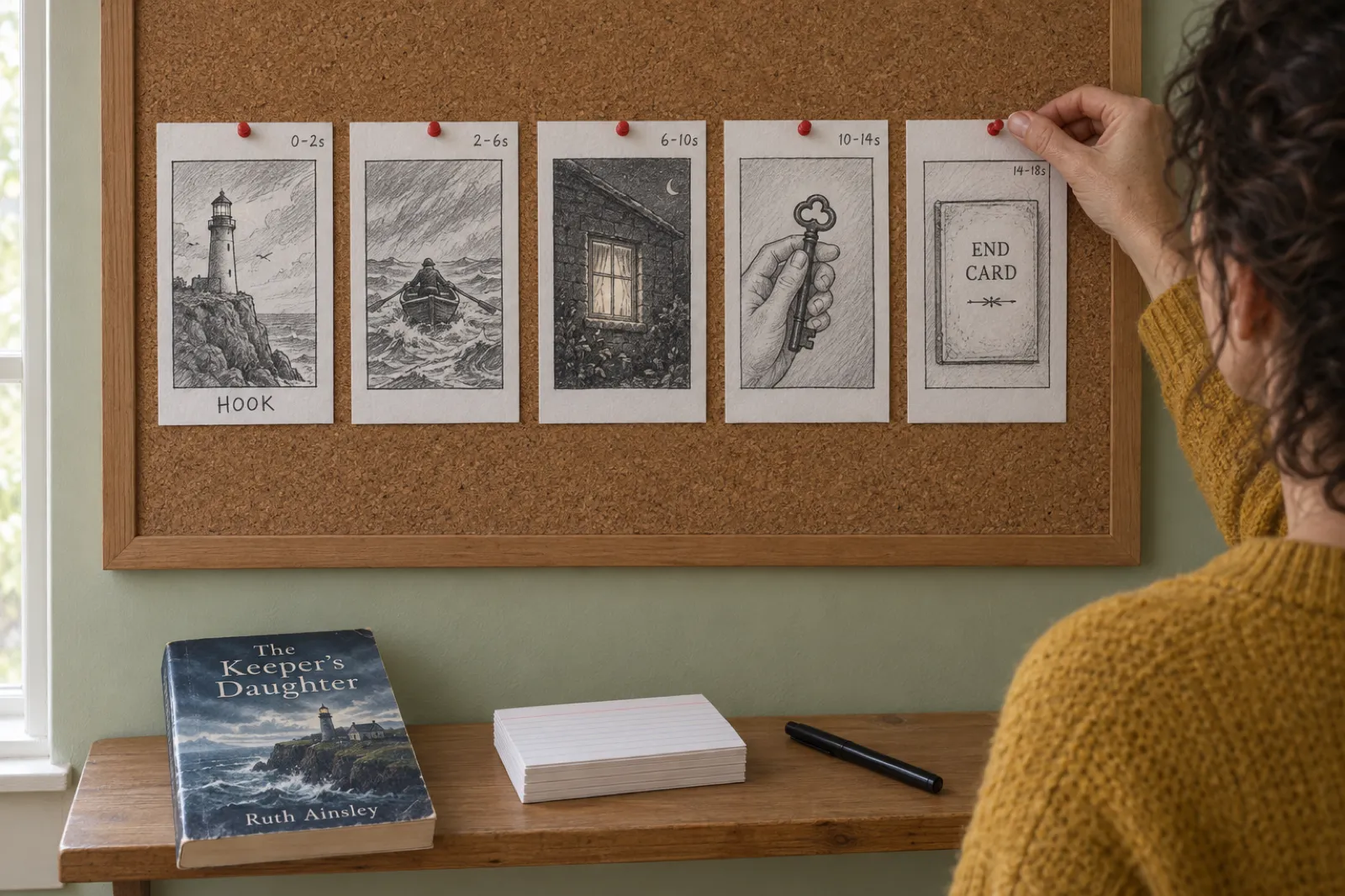
Make it vertical (9:16) and 15 to 30 seconds for TikTok, Reels and Shorts. Use five scenes: an opening line of up to about nine words shown and spoken in the first two seconds, three short lines that set up the story without the ending, and an end card with the cover, title and where to find the book. Read it aloud, add captions so it works muted, export an MP4. Canva and CapCut do this for free if you do the editing; Inkfluence AI writes it from your book and makes it for you.
0 to 2 s
Where the opening line goes. Most viewers decide here.
15 to 30 s
Length for TikTok, Reels and Shorts. One idea fits in 20.
20 s or less
Amazon's recommendation for Sponsored Brands video ads.
Muted
How Amazon video ads start. Captions carry the words.
What is a book trailer?
A book trailer is a short video that does for a book what a film trailer does for a film: it sells the feeling and the premise, holds back the ending, and tells people where to get it. In 2026 it almost always means a vertical clip of 15 to 30 seconds that plays in a feed on TikTok, Instagram Reels or YouTube Shorts, often with the sound off.
The names overlap. A book promo video is the same thing aimed at a launch or a sale ("out Friday", "99 cents this week"). A BookTok video or book reel is a book trailer made in the style of the platform: a POV line, a trope list, a page read aloud, a reaction. A book teaser is a trailer with even less: one line and the cover. All of them share the same skeleton, which is why one script can serve all four.
A trailer is not a plot summary or a slideshow of every illustration. Its job is narrow: make one stranger stop scrolling, give them one reason to care, and hand them a link. If you already have a book description, the trailer is a smaller, sharper cut of it, not a reading of it.
How long should a book trailer be?
Short. Every platform now allows far more time than a trailer needs: YouTube says Shorts can run up to three minutes, and Instagram raised Reels to three minutes in January 2025. Those limits are ceilings, not targets. A trailer is one idea, and one idea read at a natural pace takes about 15 to 20 seconds. Here is the length and shape we would use on each place you might post, checked 22 Oct 2026.
| Where it plays | Shape | Platform limit | Length to aim for |
|---|---|---|---|
| TikTok (BookTok) | Vertical 9:16, 1080 x 1920 | Far longer than a trailer needs | 15 to 30 s |
| Instagram Reels | Vertical 9:16, 1080 x 1920 | Up to 3 minutes (since January 2025) | 15 to 30 s |
| YouTube Shorts | Vertical or square | Up to 3 minutes; a 16:9 video is not a Short | 15 to 30 s |
| Amazon Sponsored Brands video ad | Landscape 16:9 only | 6 to 45 s | 20 s or less (Amazon's advice) |
| Your website, newsletter, YouTube | Landscape 16:9 | None that matters | 30 to 90 s |
| School book-trailer project | Whatever the brief says | Set by your teacher | 60 to 90 s if no length is set |
Two of those numbers come straight from the platforms. YouTube only treats a square or vertical upload as a Short, so a landscape trailer there is a normal video. And Amazon asks for 16:9 between 6 and 45 seconds and recommends 20 or less: shorter than most trailers people make.
The five-scene structure that fits every genre
Our video studio uses five scenes, and so should a trailer made by hand. It is short enough to finish before attention drops and long enough to show a premise. The word limits below are the ones our studio enforces, because past them the line no longer fits on a phone screen in type big enough to read at a glance.
| Scene | When | Its one job | Words |
|---|---|---|---|
| 1. Opening line | 0 to 2 s | Stop the scroll: a question, a moment from the story, or the book's promise. Shown and spoken at once. | Up to 9 |
| 2. Line one | 2 to 6 s | Who and where. The character, the place, or the first big idea. | Up to 12 |
| 3. Line two | 6 to 10 s | The trouble. What goes wrong, what is at stake, or idea two. | Up to 12 |
| 4. Line three | 10 to 14 s | The turn. A question left open, never the answer. Or idea three. | Up to 12 |
| 5. End card | 14 to 19 s | Cover, title, author, and where to find it: a store, "Link in bio", or your own short line. | Up to 6, plus the title |
Non-fiction uses the same frame with a different filling: the opening line names the problem ("Stop guessing what your balcony can grow."), the three lines are three takeaways said as plain instructions, and the end card says who the book is for. A picture book reads three of its own pages aloud. A romance stacks its tropes. The skeleton never changes, which is what makes the script builder below work for any book.
Book trailer script builder
Pick a genre and where you will post, type your opening line and three lines, and get a timed five-scene storyboard with a word check on every scene, a picture idea for each, and a length check against the platform. Load an example to see how a finished script reads. It runs in your browser and nothing is sent anywhere.
Timing assumes about 2.5 spoken words a second plus a short pause per scene. Word limits for vertical video are the ones the Inkfluence AI video studio uses (opening line 9, lines 12, end card 6). Amazon limits are from Amazon Ads' Sponsored Brands video specification, checked 22 Oct 2026.
How to write the opening line
The opening line does most of the work, because it is the only part everyone sees. It appears on screen and is spoken at the same moment, inside the first two seconds, and it has to make sense without the cover, without sound and without context. Five patterns work again and again:
- The question. "What if a fallen star needed your help?" Good for picture books and fantasy: it invites the viewer into the premise.
- The moment. "The caretaker sneezed, and the mop caught fire." A real event from the book, told flat. Works for any fiction with a strong first page.
- The POV. "POV: The dead lighthouse keeper knows your family secret." The viewer becomes the character. The native voice of BookTok, best for romance, mystery and thrillers.
- The stakes. "She has one night to burn the letters." A deadline and a consequence in one breath.
- The promise. "Stop guessing what your balcony can grow." For non-fiction: name the problem the reader already has.
Three rules make any of them better. Keep it to nine words or fewer, so it fits two lines of large type. Use a concrete noun (a mop, a lighthouse, a balcony) instead of an abstract one (a journey, a secret, a mystery). And never start with the title or "In a world where".
If you are stuck, go to your first chapter and look for the first sentence where something happens. Lines lifted straight from a book usually beat lines written about it, because the book's own sentences already carry its voice. That is why our studio drafts its lines from the book's text rather than from a summary. The plot generator can help if the premise itself is not settled yet, and the title generator if the title on the end card is still a working one.
How to storyboard a book trailer
A storyboard is a row of boxes, one per scene, each with a sketch of the picture and the words under it. For a 20-second trailer it takes ten minutes and saves an hour in the editor, because you find the weak scene on paper. Use five index cards or a sheet folded into six, and fill in for each scene:
- The picture. A rough sketch or a note ("cover", "page 12 spread", "the key").
- The words on screen. Exactly as they will appear, so you can count them.
- The words spoken. Usually the same; sometimes the voice adds a word the screen drops.
- The time. Start and end in seconds. If the sum passes 30, cut a line, not a word.
- Movement. A slow zoom on a still, a cut, a page turn. One per scene is plenty.
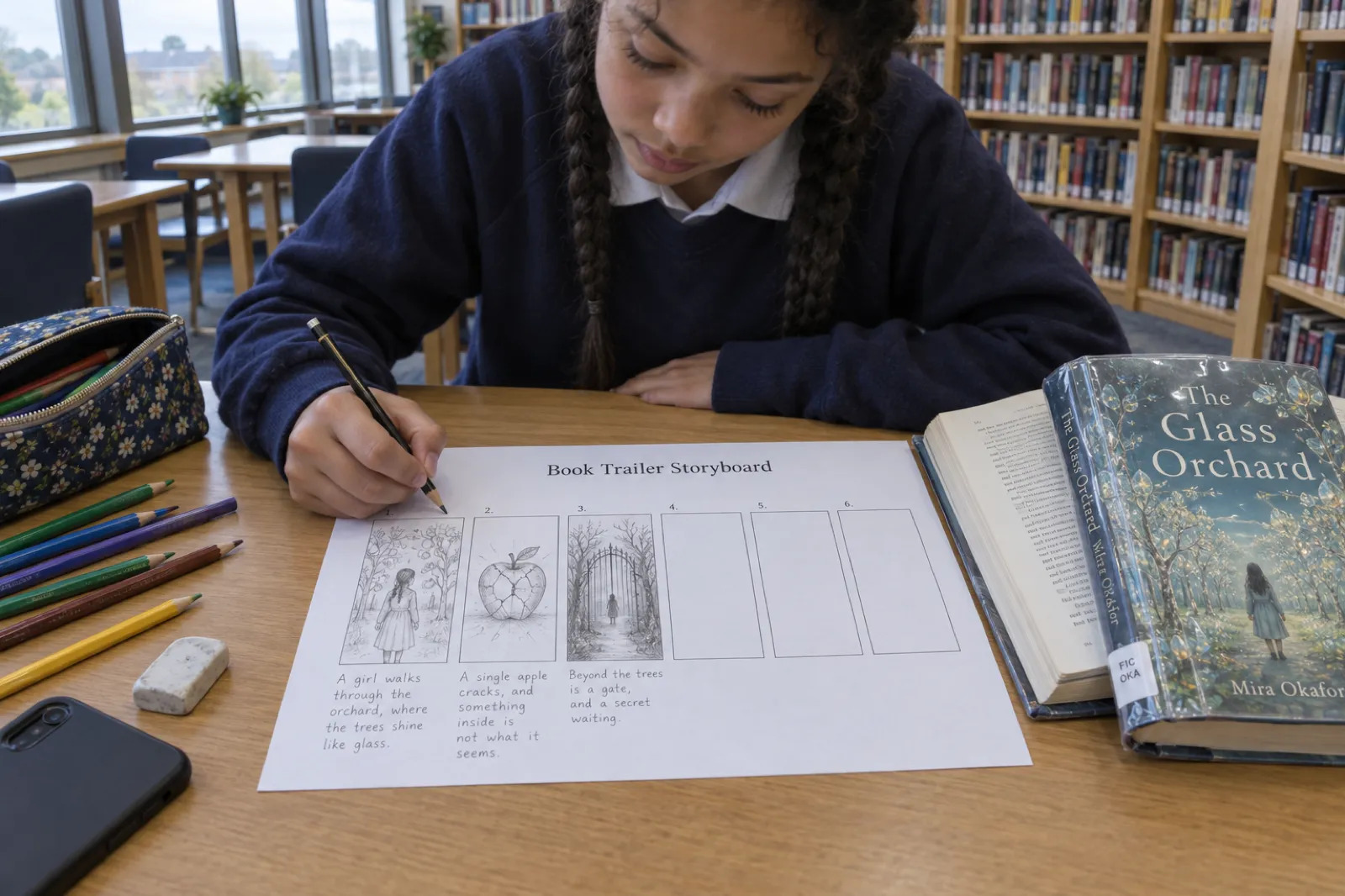
If you want a free book trailer template, the storyboard is the template: the builder above lays out the five scenes with times and a picture idea for each, and copies as plain text you can paste into a document, a Canva page or a teacher's worksheet. Bought template packs make every trailer look the same; five cards of your own will not.
Picking the pictures
The cover matters most, because it is what readers will look for on the store page: put it on the end card, big and still. After that, the best pictures come from the book itself:
- Picture books and illustrated books: the spreads. Choose the page where the trouble starts, the main character's best expression, and the funniest page. Never the last page.
- Novels: the cover, then a real page of text with the line highlighted, a chapter image if the book has them, or one object that matters in the story (a key, a letter, a door).
- Non-fiction: the cover plus a clean card per takeaway. A photo of the result (the balcony full of tomatoes) beats a photo of the author.
Use only pictures you have the rights to: your own cover and illustrations, photos you took, or stock licensed for commercial video. A screenshot of a film or a picture from a search engine can get a video muted or removed, and on a store ad it will be rejected. If the book has no art yet, an AI book cover and a few chapter images give you a matched set; our cover design guide covers what makes a cover readable at thumbnail size, which is exactly the size it will be in a feed.
Keep the look consistent: five pictures in one style read as a book, five styles read as a slideshow. If you are writing for children, the storybook generator and the picture book maker keep the character the same on every page, so every frame of the trailer matches.
Voice and captions
A voice makes a trailer feel like a book being read to you, and captions make it work for the many people who watch with the sound off. Do both. Amazon's specification for Sponsored Brands video states plainly that the videos start without audio, so on Amazon the captions are the trailer for most viewers.
Recording your own voice. A phone is good enough; the room matters more. Soft surfaces swallow echo, which is why authors record in wardrobes and parked cars. Read each line three times, slower than feels natural, and keep the best take.
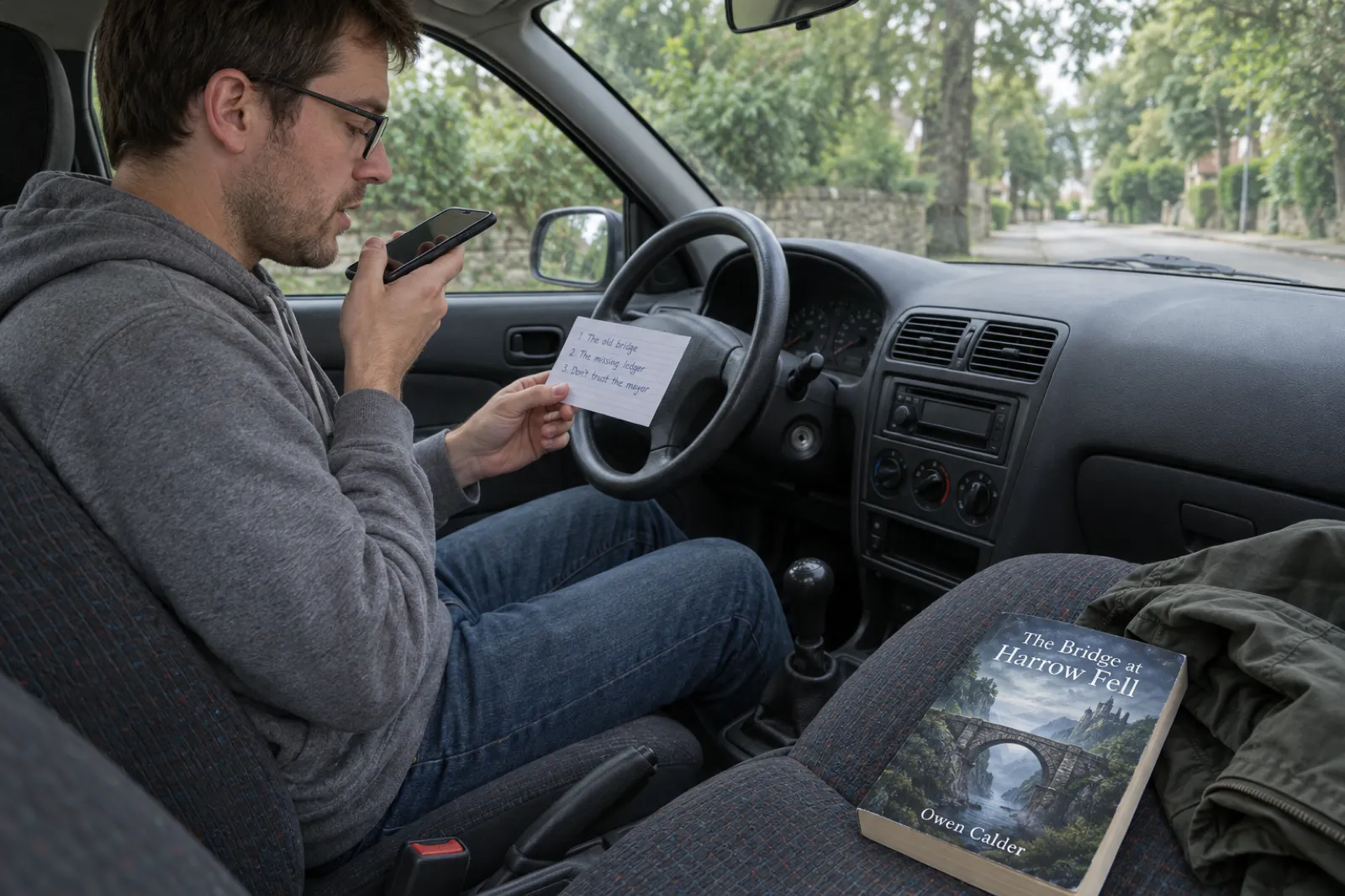
Using an AI voice. Text-to-speech voices are now good enough for a 20-second trailer and let you change a line without re-recording. Match the voice to the book (warm for picture books, deep and steady for thrillers) and be open about it: some apps add an AI label to videos with AI voices. If you also want the full book read aloud, that is a different job; see narrating your own audiobook or the AI audiobook generator.
Captions. Big, high-contrast, two lines at most, placed in the upper middle of the frame so the platform's buttons and caption text at the bottom do not cover them. Captions that light up word by word as they are read keep the eye moving with the voice. Every auto-caption tool mishears names and invented words, so read every caption before you export.
Music: less than you think
Music is optional. A clear voice over silence reads better than a voice fighting a soundtrack, and on TikTok and Instagram you can add a trending sound inside the app at the moment you post, which uses the platform's own licence and can help the video get picked up. If you add music in the editor, keep it well under the voice and pick a mood, not a song: soft and warm for cozy books and picture books, low and tense for thrillers, light and bouncy for comedy.
Never use a commercial song you have not licensed: platforms mute the video, and an ad will not be approved. Editors' own music libraries come with licence terms; check them before using a track in a paid ad.
Book trailer examples: four real videos
These four were made from real books with the Inkfluence AI video studio, each in a different style. Each one follows the five-scene structure above. Press play; they are 16 to 19 seconds long.
Read-aloud, Picture book
Read-aloud style, picture book, 19 seconds. Opens on "What if a fallen star needed your help?" over a fox, a rabbit and an owl around a small glowing star, then reads three lines from the pages with each word lighting up, and ends on the square cover with "Link in bio".
Page excerpt, Kids fiction
Page excerpt style, children's fiction, 17 seconds. Opens on "The caretaker sneezed, and the mop caught fire." over the cover, then shows a real page ("A small orange flame shot from his mouth. Ollie stared.") highlighted as it is read.
Tropes, Mystery
Tropes style, mystery, 16 seconds. Opens on "POV: The dead lighthouse keeper knows your family secret", then stacks three short lines: "Storm bound together", "Missing lighthouse keeper returns", "Family secrets beneath the waves".
Key takeaways, Non-fiction
Key takeaways style, gardening guide, 19 seconds. Opens on "Stop guessing what your balcony can grow." then three numbered cards: track direct sunlight, match each crop to a container with enough root room, use local frost dates.
What to notice: each opening line is under ten words and makes sense muted, none gives away the ending, and every end card is the same simple thing: cover, title, author, "Link in bio". For more on how these videos are made, see turning your book into a video.
How to make a book trailer on Canva
Canva is the easiest free editor if you already use it for your graphics, and it makes vertical video at 1080 x 1920. These steps follow Canva's Help Centre as of 22 Oct 2026; Canva changes menu names often, so if one has moved, search its name in the editor.
- Create a TikTok video design (or a custom size of 1080 x 1920). Add five pages, one per scene.
- Add the pictures. Upload your cover and art in Uploads and place one per page, filling the frame.
- Add the lines. One text box per page in the upper middle, big and bold, with a shadow or a solid box behind it so it reads on any picture.
- Set the timing. Drag each page's length in the timeline: about 2 seconds for the opening line, 4 for each line, 5 for the end card.
- Record the voice. Canva's help describes recording a voiceover from the Audio panel (Record voiceover), or upload a recording you made on your phone.
- Generate captions. Go to Text, then under Dynamic text select Captions (or search Captions in Apps), select the audio or video, choose a style and select Generate captions. Read every one.
- Download. Share, then Download, and choose MP4 Video as the file type.
Canva's strength is design that matches your cover. The cost is time: you write every word, find every picture and time every page yourself. Save the design as a template and the second trailer is quicker.
How to make a book trailer on CapCut
CapCut is a phone-first video editor with a free tier, built-in text-to-speech and auto captions. Steps follow CapCut's help and TikTok's own help page about CapCut, checked 22 Oct 2026; menus differ a little between the phone, desktop and web versions.
- Start a new project and import your pictures in scene order: opening picture, three scene pictures, cover.
- Set the aspect ratio to 9:16. Tap the aspect ratio (Ratio) button and choose 9:16 for TikTok.
- Add one text layer per scene with the line, placed in the upper middle.
- Add the voice. Record a voiceover, or select a text layer and open Text-to-speech, pick a voice and apply it.
- Add captions. Text, then Auto Captions, choose the language and generate. Then select the captions and edit any line the app misheard; CapCut's own help warns that background noise, accents and fast speech cause errors.
- Give each still a slow zoom so the frame never sits dead, then trim each clip to the voice line.
- Export at 1080p and save to your phone.
CapCut is the closest free tool to the way TikTok itself looks, which is why so many BookTok videos are made in it. The words and the choice of pictures are still all yours, and it knows nothing about your book.
How to make a book trailer on iMovie
iMovie is free on iPhone, iPad and Mac, and it has a feature named Trailers. The catch: iMovie projects are widescreen. Answers on Apple's own Community forum describe the 16:9 frame as fixed, with vertical clips exported between black bars. Use iMovie for a landscape trailer (a website, YouTube, an Amazon video ad, most school projects), not for TikTok. Steps from Apple's iMovie for iPhone guide, checked 22 Oct 2026:
- Start the project. Tap Start New Project, then Movie. Tap the photos you want in scene order and tap Create Movie. (For a ready-made film trailer look, tap Storyboard instead, choose the Trailers storyboard and a template, then tap Create.)
- Frame each photo. Tap a photo in the timeline; the Ken Burns controls sit at the lower right of the viewer. Tap Start and pinch to set the opening framing, then End for the closing framing.
- Add the lines. Select a clip, tap Titles in the inspector, choose a style, tap the sample title, choose Edit and type your line.
- Record the voice. Move the playhead to the start, tap Add Media, then Voiceover. Tap Record, read the line after the three-second countdown, tap Stop, then Accept.
- Add music, if any. Tap Add Media, then Audio, then Soundtracks; tap a track and Add Audio. Turn it down under the voice.
- Save the video. In the Projects browser, tap Share, then Share Video, then Save Video (to Photos) or Save to Files.
iMovie's trailer templates give a dramatic film-trailer look: great for a school project, a little theatrical for book marketing. For a vertical version, rebuild it in Canva or CapCut, or make it from the book in Inkfluence AI.
Canva vs CapCut vs iMovie vs Inkfluence AI for book trailers
The first three are general video editors: excellent, free to start, and blank until you fill them. Inkfluence AI is the only one of the four that starts from your book.
| Canva | CapCut | iMovie | Inkfluence AI | |
|---|---|---|---|---|
| Vertical 9:16 | Yes | Yes | No, 16:9 projects | Yes, 1080 x 1920 |
| Who writes the lines | You | You | You | Drafted from your book's own words; you edit |
| Pictures | Your uploads or Canva's library | Your uploads or CapCut's library | Your Photos | Your cover and pages, picked per line; or upload |
| Voice | Record your own | Record, or text-to-speech | Record your own | Six AI voices; hear any line first |
| Captions | Generated, you check | Auto captions, you check | Titles you type | Built in, words light up as read |
| Editing work | Timeline, by hand | Timeline, by hand | Timeline, by hand | None; about a minute to make |
| Cost | Free plan, paid plans | Free, with paid features | Free on Apple devices | Creator $9.99/month (20 videos), Premium $19.99/month (60) |
If you enjoy editing and have an afternoon, the free editors make a fine trailer. If you have a back catalogue or want to test three versions this week, making them from the book is the difference between one trailer a quarter and one a day. For how the video tools compare with the rest of the author toolkit, see our best AI book writing apps of 2026.
The fast route: make the trailer from your book with Inkfluence AI
Everything above, done by the book itself. The book trailer maker in Inkfluence AI turns a book in your account into a vertical 9:16 MP4 at 1080 x 1920, about 15 to 20 seconds long, ready for TikTok, Instagram Reels and YouTube Shorts. Here is the whole process:
- Open Make a video from the book's menu, the Publish page, the editor's tool bar or the Video card on the dashboard.
- Check the words. The studio has already written the opening line and three lines from the book's own words. Change any of them, press Hear this line to hear it in your chosen voice, or press New line for another one from the book.
- Check the pictures. Each line has a picture from your book (cover, illustrated pages, chapter images) picked to fit. Swap any of them, or upload one of your own.
- Pick a style and a voice. The studio marks the style that suits your book as Suggested.
- Set the end card. Your cover, title and author, with your store names, a Link in bio line, or your own words ("Free on Kindle Unlimited").
- Press Make video. About a minute later it is in My videos. Download video, then Copy caption for a post caption written for you.
Read-aloud
Three pages read aloud, words lighting up. For picture books.
Tropes
Your story's tropes, one by one. For romance.
World intro
Three lines that set up the world. For fantasy and sci-fi.
Suspense teaser
Short, sharp lines on hard cuts. For thrillers, crime and horror.
Page excerpt
A real page, lines lighting up as read. For any fiction.
Key takeaways
Three big ideas, one per card. For non-fiction.
Six voices: Coral (warm and bright), Marin (calm and natural), Fable (British storyteller), Cedar (deep and steady), Sage (soft and gentle) and Ash (clear and confident). Captions are on screen, with each word lighting up as it is read. Music is off by default (a voice on its own reads best), with Cozy, Suspense and Playful tracks if you want one; or add a trending sound in the app you post to.
What it costs, honestly. Making videos is part of the paid plans: Creator at $9.99 a month includes 20 book videos a month, and Premium at $19.99 a month includes 60 and lets you remove the small "Made with Inkfluence AI" mark from the end card. A video that fails to finish is not counted. The free plan can watch the example videos and preview its own book in the studio, but cannot make videos. The voice is made with AI, and some apps add an AI label to videos like this. Full plan details are on the pricing page.
Where to post a book trailer: TikTok, Reels, Shorts, BookTok and Amazon
One vertical trailer can go to all three short-video platforms on the same day. Write a fresh caption for each, because each audience reads differently:
- TikTok and BookTok. Caption in the reader's voice ("if you liked a slow-burn enemies to lovers, this is for you"), three to five genre hashtags, the link in your profile.
- Instagram Reels. Repeat the hook as the caption's first line, then one sentence of blurb and "link in bio".
- YouTube Shorts. Put the book title in the Short's title so it is searchable, and the store link in the description. Keep it vertical or square, or YouTube will not treat it as a Short.
- Amazon. Authors can run video ads through Amazon Ads: Sponsored Brands video, opened to authors on 6 December 2023. KDP's help says Sponsored Brands needs a pen name with three unique titles in Author Central. The video must be landscape 16:9, 6 to 45 seconds, MP4 or MOV, and Amazon recommends 20 seconds or less, so make a landscape cut of the trailer for it. Ads lead to your book's detail page, so make sure your A+ content and keywords are ready before you pay for clicks.
- Everywhere else. Your website's book page, your newsletter, and in person: a tablet looping the trailer at a signing does more than a poster.
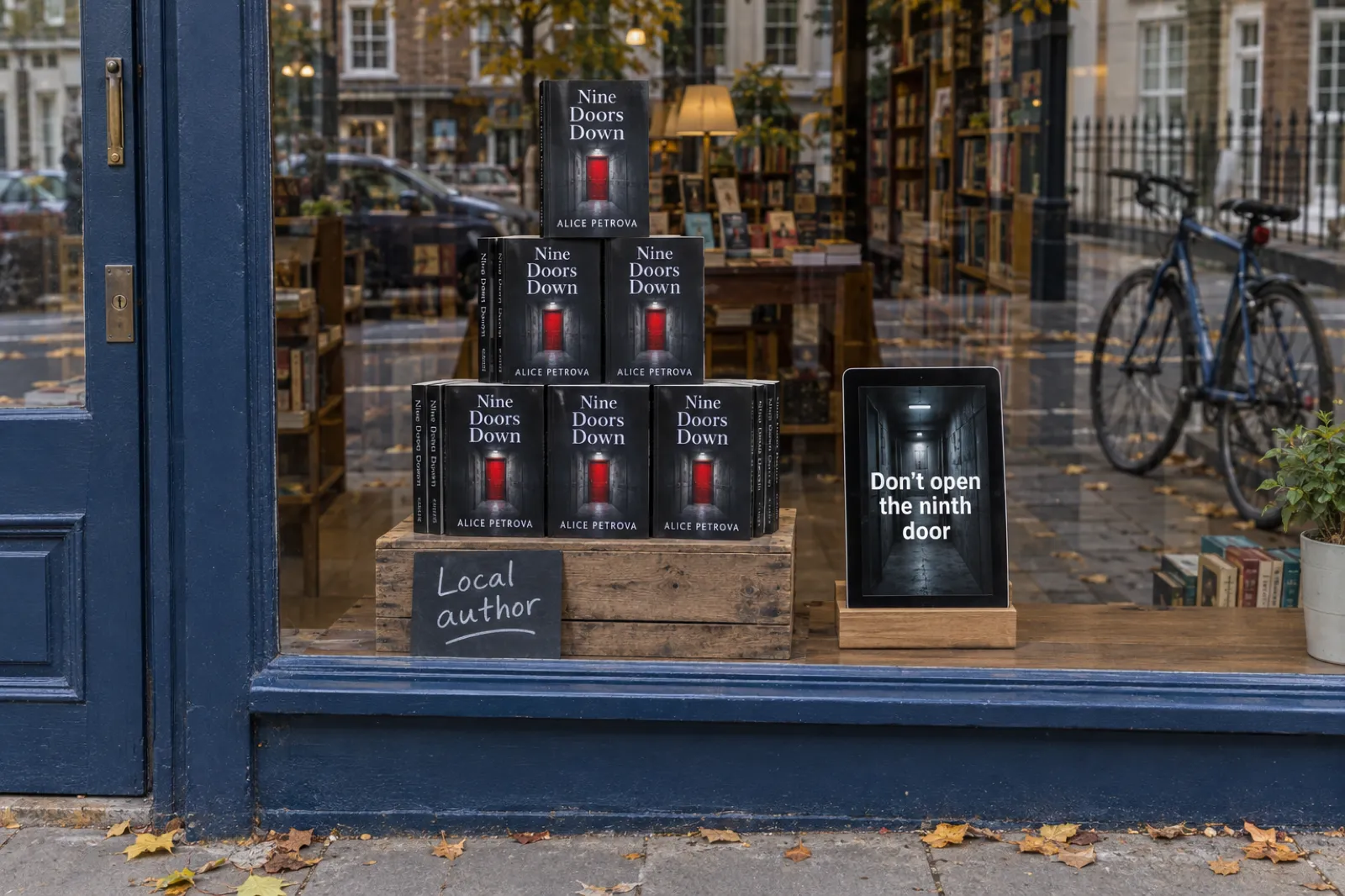
Post more than once: the same trailer with a different opening line is a different video to the feed. Fold the trailers into a launch plan with the ebook launch checklist and the wider ebook marketing strategy, and put the dates in your publishing calendar.
Book trailer ideas by genre (BookTok and book reel ideas)
Each idea fits the five-scene structure. Pair it with the matching style if you make it in Inkfluence AI.
Romance: the trope stack
Opening line as a POV ("POV: you fake-date your brother's best friend"), then three tropes of two to five words each, stacking on screen. End card with the heat level if your readers care. More in how to sell romance novels and the romance authors page.
Fantasy and sci-fi: the world in three lines
The place, the rule, the turn: "In Harrow Fell, the bridge decides who crosses. It has never refused a king. Until tonight." A map or the cover art behind it. See the fantasy authors page.
Thriller, crime, horror: the suspense teaser
Short lines on hard cuts, one dark object per scene, no music or very low music. End on a question, never an answer. The horror authors page has more on the genre's readers.
Picture books: read it aloud
The first three pages read in a warm voice, words lighting up, for parents scrolling at bedtime. A question as the opening line. For selling them, how to sell children's books.
Children's and middle-grade fiction: the page
The funniest moment from chapter one, shown as a real page with the lines highlighted. Kids and parents both read along.
Non-fiction: three takeaways
Name the problem, give three tips worth saving, end on who the book is for. Useful videos get saved and shared, which is the point.
Memoir: one object
One photograph from your life, three lines about the day it was taken, the cover. Read it yourself; a memoir trailer in your own voice is the trailer.
Series: the recap
"Book one ended with the bridge falling. Book two starts underneath it." Two covers on the end card. Make one per book so readers can start anywhere.
BookTok ideas between trailers: a "books like" video, a page-flip to your favourite line, an unboxing of author copies, a reading of the first line. The trailer sells the book; the others keep the account alive.
Are book trailers effective?
Honestly: there is no reliable public study showing that a book trailer, on its own, sells books, and anyone quoting a precise conversion figure is guessing. The old two-minute landscape trailer posted once to YouTube mostly went unwatched.
What has changed is where readers find books. Short vertical video is now one of the main places book recommendations happen, and a 20-second trailer is native content there. It works when three things are true: the opening line makes sense in two seconds with the sound off, the cover is clear enough to recognise later on the store page, and the link is one tap away. When a trailer fails, it is almost always the opening line.
So treat trailers as tests, not as a single big production. Make several, change one thing at a time (usually the opening line), post them a few days apart and track link clicks. A store page that converts is part of the job too: the KDP self-publishing guide covers the page your trailer sends people to, and our marketing guides cover the rest.
How to make a book trailer for a school project
A book trailer is a common reading assignment: a short video, instead of a written report, that would make a classmate want to read the book. Marks usually go for understanding the book, not editing. A plan that works:
- Read the brief. Note the length, the format and what must be included.
- Find the hook in the book. The moment in the first few chapters where the main character's problem starts. That is your opening line.
- Plan five or six scenes on a storyboard sheet: opening line, character and setting, the problem, the stakes, a question, and a title card with the author's name. Use the script builder with "School book-trailer project" chosen; it allows longer lines.
- No spoilers. The trailer stops before the middle of the book. If your classmates would be annoyed, cut it.
- Use pictures you are allowed to use. Your own drawings are the best choice and teachers love them. Photos you took work too. Pictures from a search engine are someone else's work.
- Record your own voice and add captions or titles so the class can follow.
- End with credits: the book's title and author, and where any music or pictures came from.
- Make it in a free tool: Canva or CapCut, or iMovie's Trailers storyboard on a school iPad.
Ideas for students: a "wanted" poster for the villain, a newspaper headline from inside the story, an object from the book filmed on your desk, or three drawings in one style.
Where Inkfluence AI fits, honestly: it makes videos from books in your own account, so it is for students who wrote their own story (a creative writing project, a class picture book), not for a trailer about a published novel you read, which you should make yourself in Canva, CapCut or iMovie with your own pictures. Making videos needs a paid plan. Teachers making class books will find more on the teachers page, and students on the students page.
Eight book trailer mistakes
- Starting with the title or a logo. Nobody stops for a title they do not know. Lead with the line.
- Reading the blurb. A blurb is written to be read on a page; it is too long and too careful for a voice.
- Giving away the ending, or the big twist, or the answer to your own question.
- Lines too long to read. More than about a dozen words on screen and viewers stop reading and scroll.
- No captions. Many people scroll with the sound off, and Amazon's video ads start muted.
- Landscape on TikTok or vertical on Amazon. Each place wants its own shape.
- Unlicensed music or pictures, which get videos muted, removed or rejected as ads.
- No way to buy. An end card with no store, no Link in bio and no link in the caption wastes every view.
One more, for AI-assisted books: be clear about how the book was made where a store asks. Amazon's rules on that are covered in our KDP AI disclosure guide, and the steps to publish in publishing AI-assisted books on KDP.
Book trailers: frequently asked questions
What is a book trailer?
A short video that sells the feeling of a book the way a film trailer sells a film: an opening line that stops the scroll, a few lines or images that show the premise without the ending, and an end card with the cover, the title and where to buy it. In 2026 most book trailers are vertical videos of 15 to 30 seconds made for TikTok, Instagram Reels and YouTube Shorts.
How long should a book trailer be?
For TikTok, Reels and Shorts, 15 to 30 seconds; 15 to 20 is plenty for one idea. Shorts can run up to three minutes and Reels up to three minutes, but length is not the goal: viewers decide in the first two seconds. Amazon Sponsored Brands video ads accept 6 to 45 seconds and Amazon recommends 20 seconds or less. A trailer for your website or a school project can run 60 to 90 seconds.
How do I make a book trailer for free?
Canva and CapCut have free plans and make vertical 9:16 video; iMovie is free on Apple devices but makes 16:9 projects. Write five lines, use pictures you have the rights to, record your voice, add captions and export an MP4. Inkfluence AI makes it from your book in about a minute, but making videos needs Creator or Premium; the free plan can watch the examples and preview its own book in the studio.
How do I make a book trailer on Canva?
Start a TikTok video design (1080 x 1920) with one page per scene, add a picture and a line to each, record or upload a voiceover, generate captions, then Share, Download, MP4 Video. Full steps are above.
How do I make a book trailer in CapCut?
New project, pictures in scene order, aspect ratio 9:16, one text layer per scene, a voiceover or text-to-speech, then Text, Auto Captions (check every word) and export.
Can you make a vertical book trailer in iMovie?
Not as a vertical project. Apple Community answers describe iMovie projects as fixed at 16:9, so a vertical clip exports with black bars at the sides. iMovie on iPhone is good for a landscape trailer (website, YouTube, Amazon video ads, school projects) and has a Trailers storyboard with built-in templates.
Can AI make a book trailer from my book?
Yes. Inkfluence AI reads a book in your account and drafts a hook and three lines from its own words, picks pictures from the cover and pages, reads it in one of six AI voices with captions that light up word by word, and adds an end card. Every line is editable before you press Make video. The voice is AI-made, and some apps add an AI label to videos like this.
Are book trailers effective?
There is no reliable public study showing that a trailer on its own sells books. What a short video does well is give you something native to post on the platforms where readers now find books, and it only works with a clear opening line, a cover readers can recognise and a link they can follow. Post several versions, measure link clicks, and keep the one that works.
What should a school book trailer include?
The title and author, the setting and main character, the problem the story starts with, a reason to read, and no spoilers. Use your own drawings or pictures you are allowed to use, read the lines yourself, and credit any music, images and the book itself at the end. Check your teacher's length and format before you start.
Can I put a book trailer on Amazon?
Through Amazon Ads: authors can run Sponsored Brands video ads (launched for authors on 6 December 2023). The video must be 16:9, 6 to 45 seconds, and Sponsored Brands needs a pen name with three titles in Author Central. A vertical TikTok trailer has to be re-cut to landscape for it.
Sources
All checked 22 Oct 2026. Video apps rename menus often; if a step here and the app's own help disagree, the app's help wins.
- Apple: Create a movie project in iMovie on iPhone, with the guide's pages on the Ken Burns effect, titles, recording audio, soundtracks, storyboard projects and Trailers and sharing a video file.
- Apple Community: iMovie 9:16 aspect ratio: iMovie's 16:9 frame cannot be changed; vertical clips export with black bars.
- YouTube Help: Shorts up to three minutes: square or vertical videos up to three minutes uploaded after 15 October 2024 are Shorts.
- Social Media Today: Instagram expands Reels to three minutes (January 2025 announcement).
- Canva Help Centre: Generate and animate captions, Record a voiceover and Download as video.
- CapCut Help: auto captions: steps on phone and desktop, editing captions, why captions mishear.
- TikTok Ads Help: About CapCut (last updated February 2025): 9:16 format, text-to-speech, auto captions.
- Amazon Ads: Sponsored Brands video creative specs: 16:9 only, 6 to 45 seconds, 20 seconds or less recommended, MP4 or MOV, starts without audio.
- Amazon Ads: New features for authors on Sponsored Brands (6 December 2023): video ads for authors.
- KDP Help: advertising for authors: Sponsored Brands needs a pen name with three unique titles in Author Central.
- Inkfluence AI video studio: styles, voices, word limits and plan allowances as shipped on 22 October 2026; the four example videos above were made from real books in the studio.
Canva, CapCut, iMovie, TikTok, Instagram, YouTube, Amazon and Kindle are trademarks of their owners. Inkfluence AI is an independent tool and is not affiliated with or endorsed by any of them.
Related tools and guides
Book Trailer Maker
Make the trailer from your book in about a minute.
Turn Your Book Into a Video
How the video studio reads a book and what it makes.
AI Book Cover Generator
The cover your end card depends on.
AI Storybook Generator
Illustrated stories that make natural read-aloud trailers.
AI Children's Book Creator
A children's book with the same character on every page.
Author Bio Generator
The profile bio your Link in bio points from.
Book Description Generator
The blurb on the page your trailer sends readers to.
Ebook Marketing Strategy
Where video fits in a full launch plan.
Design a Book Cover with AI
A cover that reads at thumbnail size in a feed.
Make a Picture Book with AI
From idea to illustrated pages ready to read aloud.
Self-Publish a Children's Book
Getting the book onto Amazon before the trailer goes out.
Pricing
Creator includes 20 book videos a month, Premium 60.
Your book already has its trailer in it.
The opening line, the three lines and the pictures are all in the pages. Open your book, check the words, choose a voice, and download a vertical video for TikTok, Reels and Shorts about a minute later.
Make a book trailer