



By Sam May · Founder of Inkfluence AI ·
3 real packs · 11 genres · Layout planner

KDP A+ Content Examples for Books: 3 Real Packs and Ideas by Genre

Three complete A+ Content packs made from real books, an adult coloring book, a Japan travel guide and a picture book, with every image and every line of text shown and explained. Then a layout planner for your genre, and what readers of eleven kinds of book want to see.

Amazon, Kindle and KDP are trademarks of Amazon. Inkfluence AI is independent and not affiliated with or endorsed by Amazon.

What does good A+ Content for a book look like?

A+ Content is the images-and-text section lower down an Amazon book page. KDP authors build it free under Marketing, A+ Content Manager, for published books, with no Brand Registry. The layouts that work best have three parts:

  1. A hook: one image, a headline and two or three sentences on the premise or the reader's problem.
  2. A look inside: three moments, places or lessons from the book, with no spoilers.
  3. Who it's for: a wide image and a line naming the reader by taste, age or situation.

Every image should look like the same book as the cover, and the text must follow KDP's rules: no prices, buying words, reviews, time-sensitive language or links, and numbers under ten spelled out. For module dimensions see the KDP A+ Content sizes cheat sheet, and to check your own text, paste it into the A+ Content checker.

The building blocks

The A+ modules books actually use

KDP offers 17 module types and up to five modules per layout. Most book pages need a handful: these are the ones in the examples and planner below, with KDP's sizes.

Module Size What books use it for
Standard Image Header with Text Designed around 970 x 600; Inkfluence exports 1940 x 1200 The hook: one image, a headline and two or three sentences
Standard Three Images & Text 300 x 300 minimum, 600 x 600 recommended Three moments, places or lessons from the book
Standard Image & Text Overlay (light or dark text) 970 x 300 minimum, 1940 x 600 recommended A wide scene and who the book is for
Standard Single Left Image 600 x 600 recommended A map, a real spread, an author photo
Standard Comparison Chart 150 x 300 minimum; Inkfluence makes 300 x 600 Your other books in reading order
Standard Technical Specifications Text only, up to 16 rows Page count, trim, recipes, reading age
Standard Product Description Text Text only, up to 6,000 characters An author's note or a chapter list
Standard Company Logo 600 x 180, one per layout A series or imprint logo

Images must be RGB JPG or PNG, at least 72 dpi, and not blurry, watermarked or unreadable on a phone. KDP's module page caps images at 3 MB while its guidelines say under 2 MB, so stay under 2 MB. Sources: KDP A+ modules and KDP A+ guidelines. Every module, with KDP's sizes, is on the sizes page.

Three real packs

Where these examples come from

The three packs below were made with Inkfluence's Make my A+ Content, step seven of the Amazon listing kit on the Publish page, from three books in Inkfluence: an adult coloring book of cozy rooms, a first-timer's guide to Japan and a Halloween picture book. Nothing was rewritten: the headlines and body text are quoted exactly as the pack produced them, and the images are the pack's own, scaled down for the web.

Each pack uses the same three modules: Standard Image Header with Text for the hook, Standard Three Images & Text for a look inside, and Standard Image & Light Text Overlay for who the book is for. The images export at 1940 x 1200, 600 x 600 and 1940 x 600 as RGB JPEGs under 2 MB.

They cover three books where pictures do the selling: a coloring book, where buyers need to see the pages; a travel guide, where places and food carry the pitch; and a picture book, where the characters must look the same in every image. For a novel and a health guide, the A+ Content generator page walks through two more real packs. If you are still writing, start your book in Inkfluence.

Example 1 · Adult coloring book

A+ Content example: Cozy Scenes Adult Coloring

Module 1 · Standard Image Header with Text

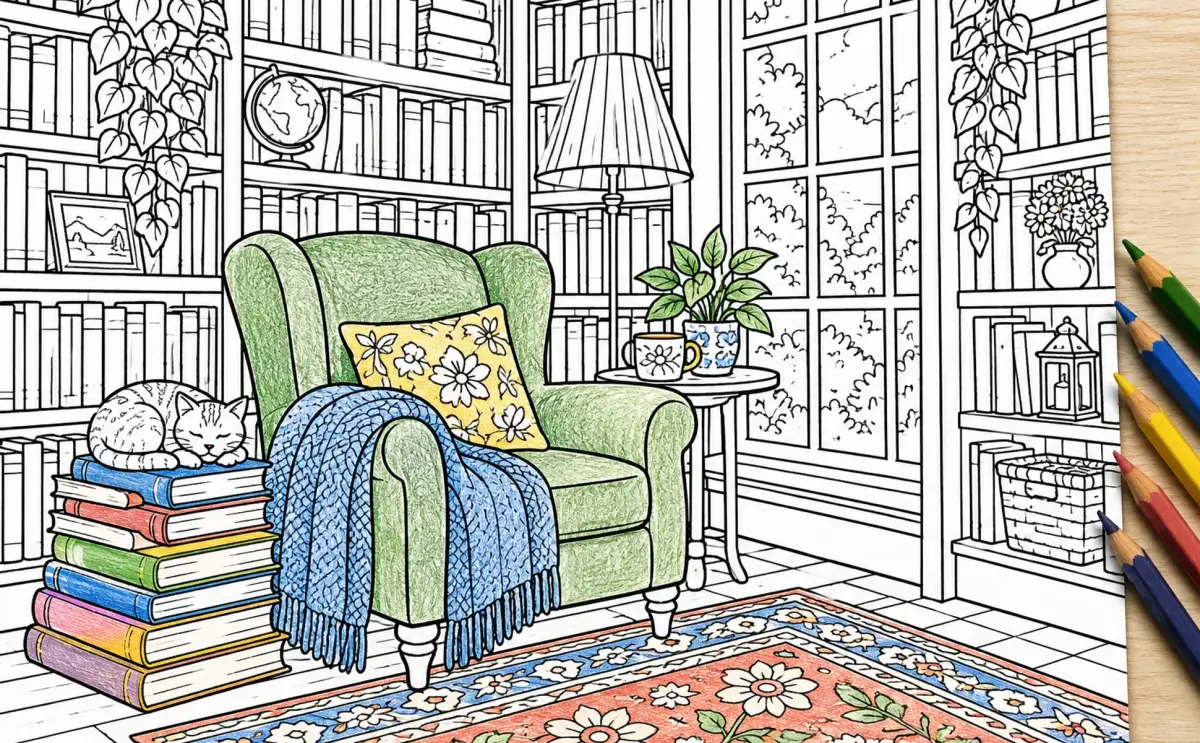
A line-art coloring page of a bookshop reading corner, partly coloured in with pencils: a green armchair, a blue throw, a yellow cushion, a cat asleep on a stack of books and a patterned rug, with five pencils beside the page.

Step into a cozy scene

Settle into detailed environments made for peaceful coloring. From a welcoming bookshop nook to a rain-tapped window seat, each scene offers a quiet place to slow down.

Module 2 · Standard Three Images & Text

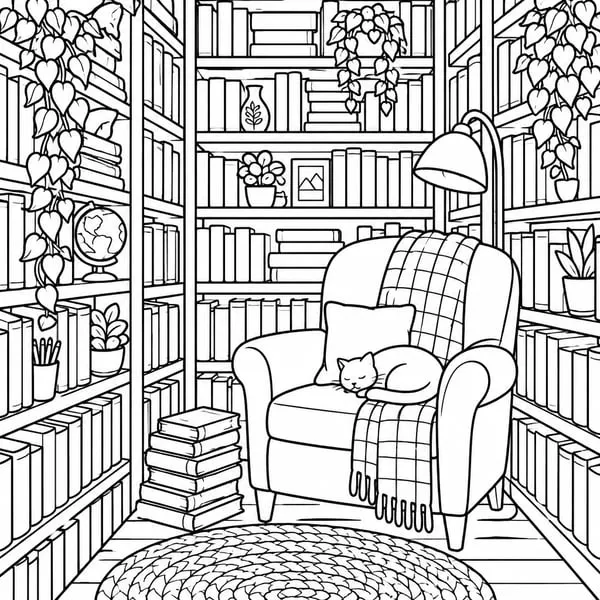
An uncoloured line-art page of a narrow bookshop nook with shelves on three sides, a lamp, an armchair with a cat asleep on it, books stacked on the floor and a round rug.

A tiny bookshop corner

Color a welcoming nook filled with shelves and the small details that make a bookshop feel like a place to linger.

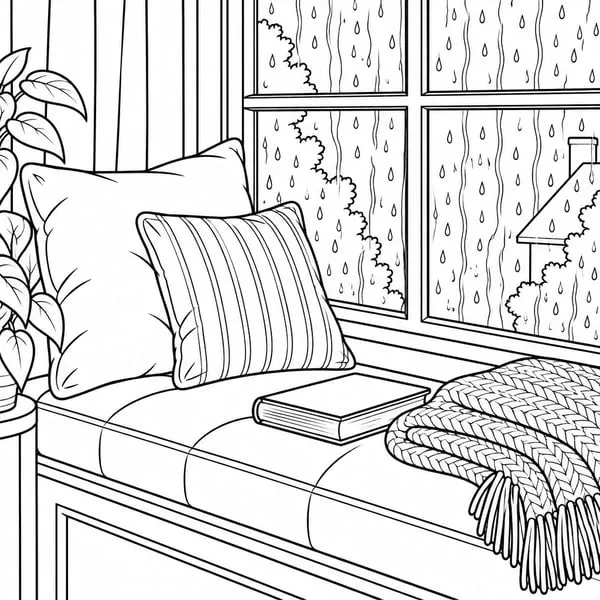
An uncoloured line-art page of a cushioned window seat with a closed book and a knitted throw, raindrops running down the window panes.

Rain at the window

Settle into a cozy window seat as rain taps against the glass, with a peaceful scene to color at your own pace.

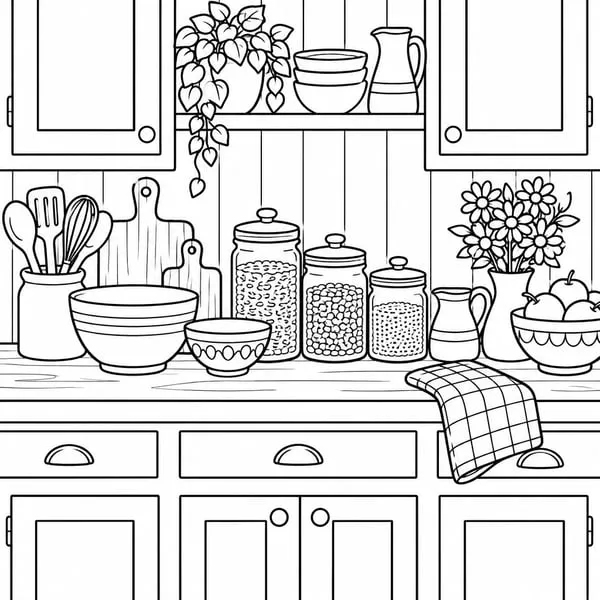
An uncoloured line-art page of a cottage kitchen counter with storage jars, mixing bowls, utensils in a crock, a vase of daisies and a checked tea towel.

Warmth in the cottage kitchen

Explore a cottage kitchen counter brimming with warmth, made up of homey details to fill in with color.

Module 3 · Standard Image & Light Text Overlay

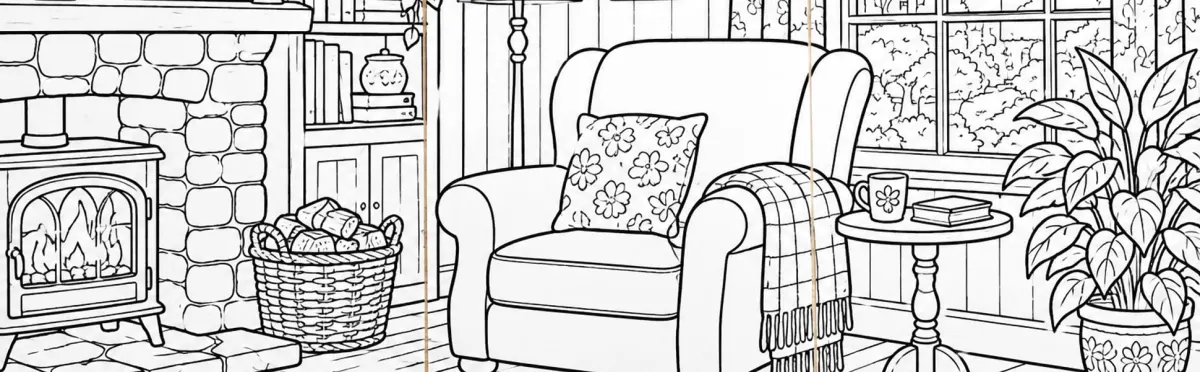
Uncoloured line-art pages laid side by side showing a cottage sitting room with a wood stove, a log basket, an armchair with a floral cushion, a side table with a mug and a large potted plant.

A peaceful coloring pause for adults

For adults looking for a low-stress way to unwind, these cozy, detailed environments invite you to slow down and enjoy coloring one scene at a time.

Why the Cozy Scenes Adult Coloring pack works

The pages are the product

Every image is a coloring page, not a painting. Adult coloring buyers judge the line work before they pay: how bold the outlines are, how fine the details get. A book without an ISBN has no Look Inside, so this may be their only view inside.

One coloured page, four blank ones

The header shows a page partly coloured, pencils at its edge: what a finished page can look like. The tiles and banner stay uncoloured: the page the buyer will start from.

A different room every time

A bookshop nook, a rainy window seat, a cottage kitchen, a sitting room by the stove: four scenes in one line style, so the book promises variety without losing its look. The text names the reader and stays clear of 'bonus pages' and design counts.

Coloring books made with the AI coloring book generator or the cozy coloring book generator keep one line style on every page, and the A+ pack draws in it. For paper and pricing, see how to sell coloring books.

Example 2 · Travel guide

A+ Content example: Ultimate Guide To Japan

Module 1 · Standard Image Header with Text

A traveller in a straw hat and rust-coloured backpack looks past a large red temple lantern toward a pagoda, cherry blossom and a lantern-lit street, with the Tokyo skyline and a tall tower at sunset.

Find your first route through Japan

Explore Tokyo, Kyoto, and Osaka with practical guidance for your first visit. Follow neighborhood routes, make sense of train connections, and discover the food, temples, and street scenes that make each city feel different.

Module 2 · Standard Three Images & Text

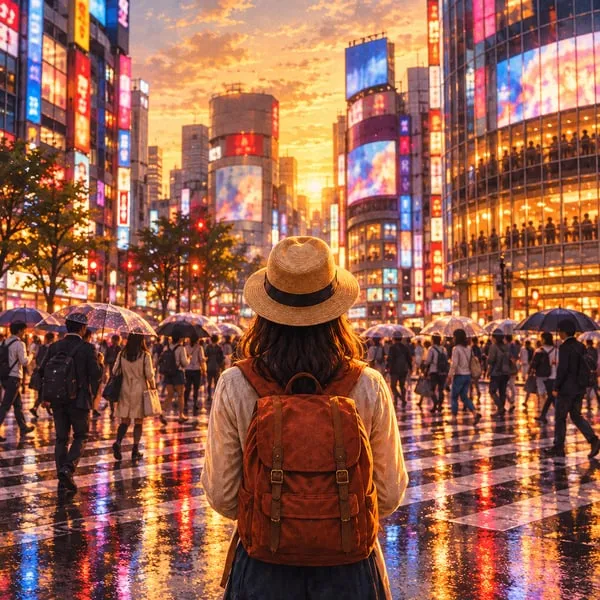
The same traveller stands at a wet Shibuya crossing at dusk, neon screens and umbrellas reflected in the pavement.

Tokyo, one neighborhood at a time

Connect Asakusa, Ueno, and Yanaka on foot, then take the train to Shibuya, Harajuku, or Shinjuku for neon, shopping, and late-night food.

The traveller walks a stone-paved Kyoto lane between wooden houses and cherry blossom toward a temple gate, with hills and a setting sun behind.

Kyoto's temples and quieter lanes

Find your way through Kyoto's historic streets and temple visits with guidance suited to a first trip, balancing famous sights with time to explore.

A cook stirs a steaming pan at an Osaka street stall, skewers grilling on the counter, red paper lanterns overhead and a castle in the distance.

Osaka, with room for a good meal

Explore Osaka's lively streets and food stops, with practical city guidance to help you make the most of your time there.

Module 3 · Standard Image & Light Text Overlay

A paper train map, a coin and a bowl of soba with spring onion and nori on a wooden counter, with cherry blossom, a pagoda and the city skyline through the window.

For first trips, full of city detail

Made for travelers seeing Japan for the first time, this guide pairs practical routes and transport pointers with vivid scenes of Tokyo, Kyoto, and Osaka. Read it to plan with confidence and explore with curiosity.

Why the Ultimate Guide To Japan pack works

Real places, in route order

The header names three cities and the tiles take one each: Tokyo by neighbourhood, Kyoto's temples, Osaka's food stalls. Real place names (Asakusa, Ueno, Yanaka, Shibuya) tell a first-time visitor the book covers where they are going.

Food and a planning feel

The banner puts a train map beside a bowl of soba: the practical and the pleasurable in one picture. There are no costs, opening hours or festival dates; those belong in the book, where you can update them.

One traveller, one light

The same traveller in a straw hat and rust backpack walks through the header and two tiles, seen from behind so the reader can picture themselves in her place. Every image shares one warm evening light.

Guides written with the AI travel guide creator are organised by place and route, which gives a pack like this its tiles. How to sell travel guides covers the rest of the listing, and how to create a travel guide with AI covers the writing.

Example 3 · Children's picture book

A+ Content example: Mia And The Shy Ghost

Module 1 · Standard Image Header with Text

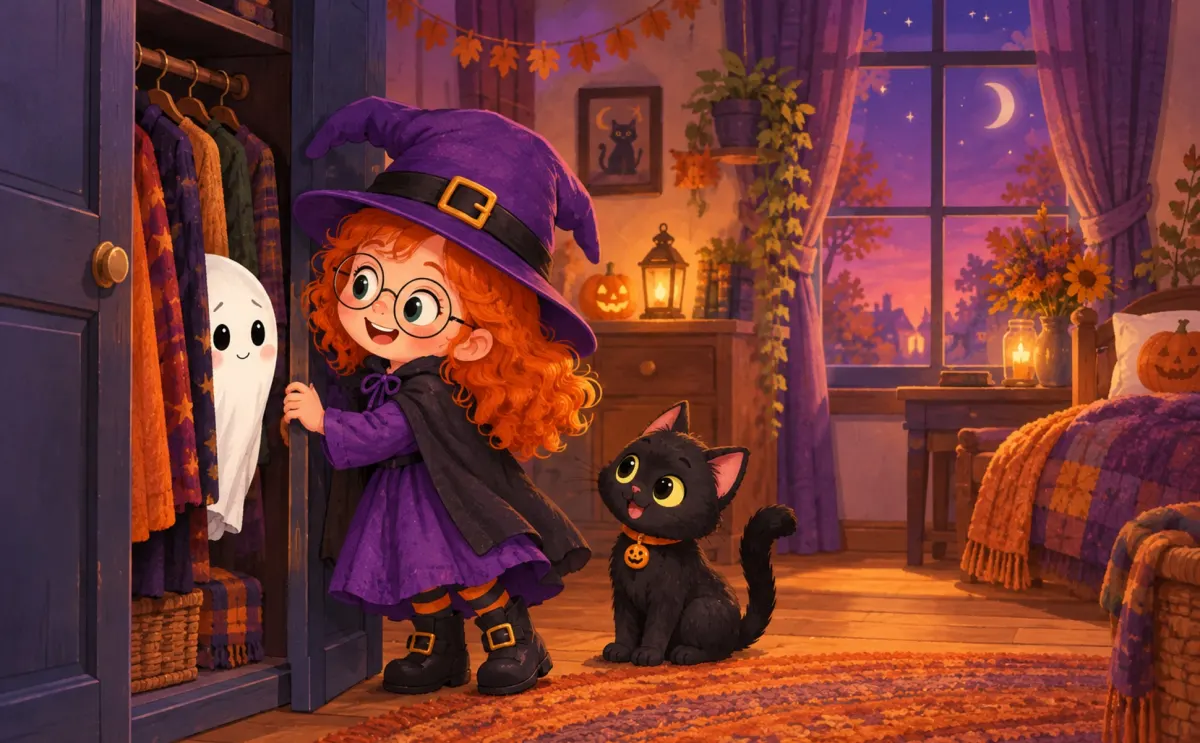
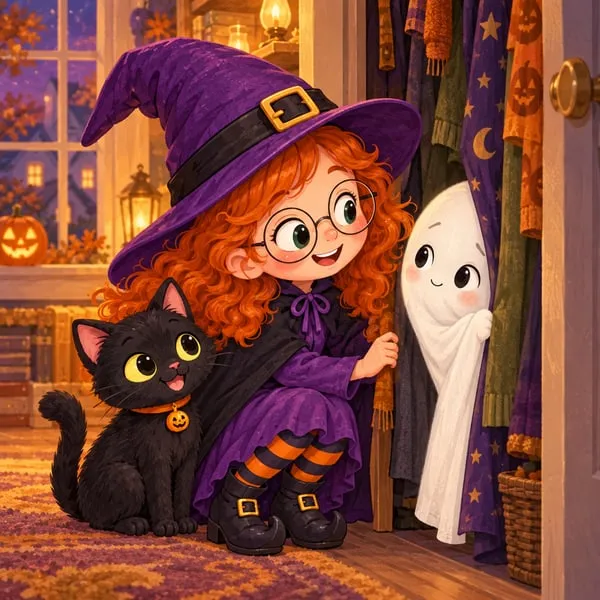
Mia, a red-haired girl in a purple witch hat and round glasses, opens a closet where a tiny ghost peeks out while Pepper the black cat watches.

A little ghost, a brave girl, and a Halloween night

When Mia hears a rustle in the closet, she finds a tiny, shy ghost. With Pepper by her side, Mia helps her friend step out into Halloween night.

Module 2 · Standard Three Images & Text

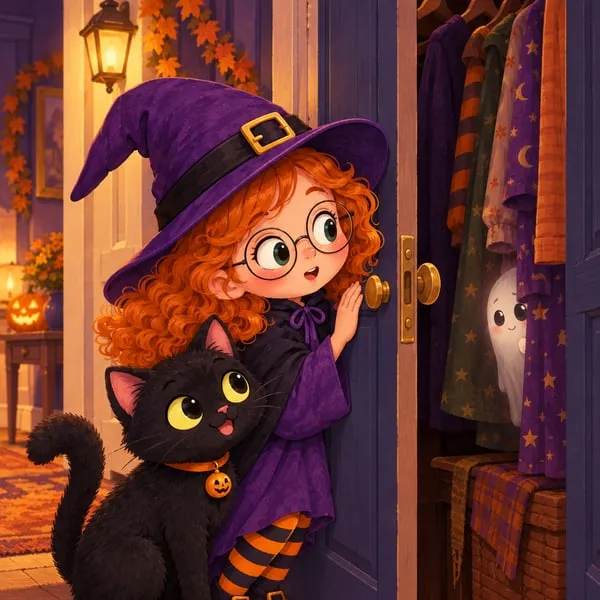
Mia and Pepper the black cat listen beside a closet door, a hint of the tiny ghost among the hanging clothes.

A rustle in the closet

Mia and Pepper pause to listen when something rustles behind the closet door. A tiny ghost is waiting inside.

Mia crouches at the open closet with Pepper and smiles at the tiny ghost peeking out from the clothes.

A gentle first hello

Mia meets the shy ghost with a whisper and a kind welcome, turning a surprising discovery into the start of a friendship.

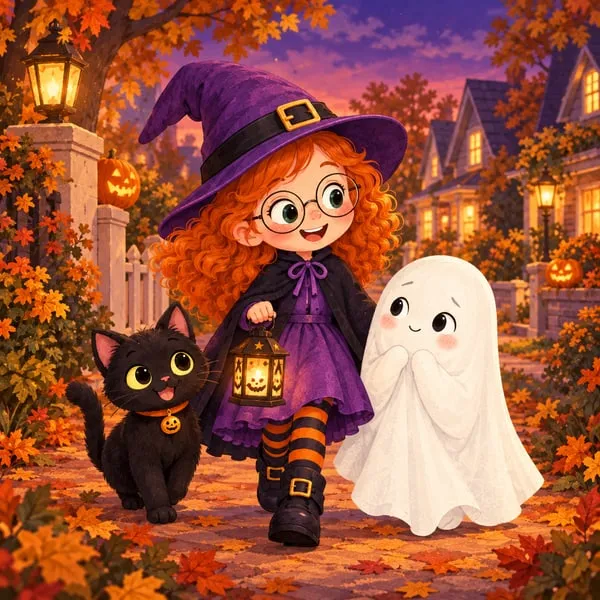
Mia, Pepper and the tiny ghost walk together along a leafy Halloween street, Mia carrying a small lantern.

Trick-or-treating together

With Mia and Pepper beside the ghost, a cozy Halloween outing becomes a chance for a shy friend to join in.

Module 3 · Standard Image & Light Text Overlay

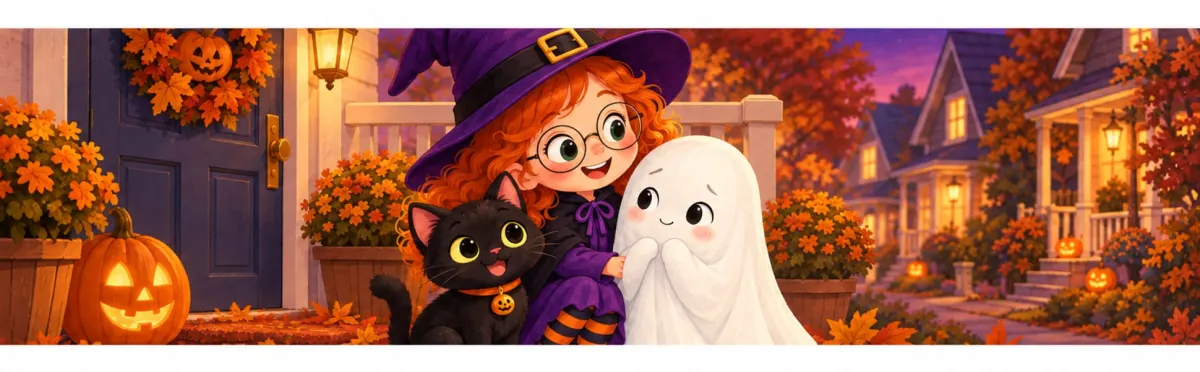
Mia hugs Pepper the cat and the tiny ghost on a porch decorated with pumpkins and autumn leaves.

A cozy Halloween story for little listeners

For young children and families who enjoy gentle Halloween adventures. Follow Mia, Pepper, and a shy closet ghost through a warm read-aloud about kindness and finding the courage to join in.

Why the Mia And The Shy Ghost pack works

The hook

Three nouns and a setting: a little ghost, a brave girl, a Halloween night. Parents want to know who the characters are and what kind of night it is, and the headline answers both in ten words.

Story order, then the reader

The tiles run in story order: the rustle, the first hello, setting out together. For a picture book the warmth of the ending sells, not a twist. Halloween is the subject of the book, which is different from a seasonal gift line that dates the page.

Consistent characters

Mia has the same red curls, round glasses and purple hat in all five images, and Pepper keeps the same pumpkin collar. A parent comparing the A+ with the cover and the Look Inside pages should see one book, not five different illustrators.

Picture books made with the AI picture book maker keep each character's look fixed from page to page, and the A+ images follow it. For pricing and print costs, see how to sell children's books, and for the making of one, how to make a picture book with AI.

Side by side

What the three examples have in common

Three very different books, one structure. The hook, the look inside and the reader line do the same job in each; only the pictures and the risks change.

Part Cozy Scenes Adult Coloring Ultimate Guide To Japan Mia And The Shy Ghost
Header (the hook) A cozy scene to step into Three cities and a first route Three nouns: ghost, girl, Halloween night
Three tiles (inside the book) Three rooms as uncoloured line art One city per tile, real place names Three moments in story order
Banner (who it's for) Adults who want a low-stress way to unwind First-time visitors to Japan Young children and families, read-aloud
Image style Line art, one page partly coloured Painted, evening light, one traveller Illustrated, same characters throughout
Rule it handles No 'bonus pages', no counts it cannot back up No costs or dates that go stale Consistent characters, subject not sales season

Short headlines

Every headline is under seventy characters, every tile headline under fifty. On a phone, the headline is often all a reader takes in.

Specific nouns

A rain-tapped window seat, a Kyoto temple gate, a closet. Concrete things from the book sell better than adjectives.

One visual world

Each pack's five images share one style and one light, so the A+ never looks like a different book from the cover.

Free tool

A+ layout planner: the modules for your genre

Pick the kind of book. The planner lays out three to five modules in order, what goes in each, image ideas and a sample headline that follows KDP's rules. It runs in your browser.

Kind of book

Romance: recommended A+ layout

Romance readers buy a promise: the trope, the couple, the heat level and the ending. Show all four, and stop before the midpoint.

  1. Module 1 · 970 x 600 (export 1940 x 1200)

    Standard Image Header with Text

    What goes in it: Both leads named, the trope in plain words, the setting, and what keeps them apart.

    Image idea: The two leads in the book's main setting, in the cover's palette, at the moment the trope bites (one umbrella, one cabin, one desk).

  2. Module 2 · 600 x 600 each

    Standard Three Images & Text

    What goes in it: Three beats from the first half: the meeting, the forced proximity, the first honest conversation.

    Image idea: Places that belong to the couple: the bakery counter, the snowed-in porch, the late-night kitchen.

  3. Module 3 · 1940 x 600 (970 x 300 minimum)

    Standard Image & Light Text Overlay

    What goes in it: Who it's for: the tropes, the heat level stated plainly, and the kind of ending readers can expect.

    Image idea: A wide view of the town or landscape with space for a short line of text.

  4. Module 4 · 300 x 600 per book (150 x 300 minimum)

    Standard Comparison Chart

    What goes in it: Only if the book is part of a series: the other books in reading order with a one-line summary each.

    Image idea: Each book's cover on a plain background.

Sample header headline

Two rivals, one snowed-in inn, and a winter that changes everything

The planner gives you the structure; the words and images come from your book. On the Publish page, Make my A+ Content writes the header, tiles and banner from your finished book and makes five images to match. The A+ Content generator page shows how it works.

A+ Content ideas by genre

What to show, and what to leave out, for each kind of book

Readers of each genre look for different things on a book page: what they want, what to show, and which of KDP's rules each genre trips over. The planner above gives a sample headline for each.

A+ Content for romance

What readers look for

The trope, the couple's chemistry, the heat level and the promise of a happy ending. Romance readers browse by trope and decide fast.

What to show

Both leads in scenes that match the cover, the setting as a character, and one line naming the tropes: second chance, enemies to lovers, small town.

What to avoid

'Guaranteed happy ending' (guarantees are not allowed), Kindle Unlimited mentions, 'bonus epilogue', review quotes, and images more explicit than your cover.

Related: AI romance novel writer · How to sell romance novels

A+ Content for thriller and mystery

What readers look for

A clear question, a protagonist worth following, and the right tension: a fair puzzle for cozy, dread for psychological.

What to show

Objects and places that carry menace or curiosity, the detective in their world, and a banner that says honestly whether this is cozy, procedural or dark.

What to avoid

Spoilers, including hints at a specific reveal, review quotes such as 'unputdownable', all-caps words, and 'for fans of' lines naming another author.

Related: AI mystery and thriller writer

A+ Content for fantasy and sci-fi

What readers look for

The world's central idea, its scale, the subgenre, and whether this is book one. These readers often commit to a series, so reading order matters.

What to show

Landscapes and objects from the world, character art that matches the cover, and a map if the book has one.

What to avoid

Maps with tiny labels (images unreadable on mobile are not allowed), invented praise, 'the next big fantasy series' claims, and comparisons with other authors' series.

Related: AI fantasy novel writer · AI sci-fi story generator

A+ Content for literary fiction

What readers look for

A voice they trust, a strong sense of place, and themes that matter more than plot mechanics.

What to show

Setting and objects, a banner that names the themes, and recent awards or attributed quotes from known publications if you have them.

What to avoid

Awards older than two years, more than four quotes, quotes from unknown sources, and summaries that give away the ending.

Related: AI novel writer

A+ Content for children's picture book

What readers look for

Who the characters are, whether the pictures will hold a child, how much text there is, and the reading age.

What to show

The same character design in every image, the age range in words, and the theme (kindness, bedtime, a first day at school). See the Mia pack above.

What to avoid

Digits under ten ('ages three to six', not 'ages 3 to 6'), seasonal gift lines, reading-level claims you cannot back up, and characters who change between images.

Related: AI picture book maker · How to sell children's books

A+ Content for coloring book

What readers look for

What the pages look like, how detailed the lines are, how many designs there are, and whether pages are single-sided. Without an ISBN there is no Look Inside, so A+ may be the only interior view.

What to show

Interior designs, large; a partly coloured page; the number of designs and the line style in words. The Cozy Scenes pack above shows the pattern.

What to avoid

'Bonus pages' or 'free printables' (purchase language), the same images as your product gallery, and specs you cannot back up.

Related: AI coloring book generator · How to sell coloring books

A+ Content for cookbook

What readers look for

Whether the recipes fit their life (time, skill, ingredients), what the food looks like, and how many recipes they get.

What to show

Real dishes, the recipe count, and the format of the recipes.

What to avoid

Unsubstantiated health claims about ingredients ('heals your gut'), 'bonus recipes', and digits under ten ('five ingredients', not '5 ingredients').

Related: AI cookbook generator

A+ Content for self-help and personal development

What readers look for

Whether the author understands their problem, what they will actually do, and whether the method fits their life.

What to show

The method's steps, examples of the practice, and honest credentials.

What to avoid

Outcome promises ('transform your life in 7 days'), mental health claims that need substantiation, guarantees, and digits under ten.

Related: AI self-help book writer

A+ Content for business

What readers look for

A clear problem, a usable framework, and a sense that the author has done the work.

What to show

The framework, the chapter list, and the reader's role and stage.

What to avoid

Promised results such as income figures, comparisons with other authors' books, 'bonus templates', and links to your website or course.

Related: AI business book writer

A+ Content for workbook and journal

What readers look for

What the pages look like, how much room there is to write, and whether it is dated. Without an ISBN there is no Look Inside, so A+ may be the only view inside.

What to show

Real interior pages, readable on a phone; the page count and format in words.

What to avoid

Page images with text too small to read on a phone, 'free printable' offers, and links to downloads elsewhere.

Related: Workbook generator · How to sell workbooks

A+ Content for series

What readers look for

Where to start, how many books there are, whether each stands alone, and that the tone stays consistent.

What to show

The reading order in a comparison chart, the recurring characters, and one line on whether books stand alone.

What to avoid

Spoilers from earlier books, other authors' books in your chart, and 'new release' or 'coming soon' lines.

Related: AI book series writer · How to write a book series with AI

Whatever the genre, the pack starts with the book. Write it first and the listing kit, A+ included, is ready when you finish.

Start my book

Series and multi-book authors

The comparison chart: your other books on every page

The Standard Comparison Chart is the one module built for authors with more than one book: several of your titles side by side, each with an image, a title and a short line, each column tied to a book by its ASIN. KDP sets a minimum of 150 x 300 per image, and its guidelines allow comparisons only with your own books.

For a series, the chart doubles as a reading order: a reader who lands on book three sees books one and two beside it. For several standalone books in one genre it works as a shelf. Across genres it is less useful; a romance reader is unlikely to want your business book.

What to put in each column

  • The cover, centred on a plain background, the same size for every book
  • The title exactly as it appears on Amazon
  • One line on the book, with no spoilers
  • The series position in words ("Book two")

What to leave out

  • Other authors' books
  • Prices, "new" or "coming soon"
  • Star ratings or review counts
  • Kindle Unlimited mentions

How Inkfluence's comparison chart builder helps

On the Publish page, under the A+ pack, the chart builder lists your other Inkfluence books with the same series first. Pick up to five and it draws each cover onto a 300 x 600 image, takes a one-line summary from each description and writes alt text. You add each ASIN in KDP yourself.

If your series is still being written, the book series writer continues a book you own as book two, and how to write a book series with AI covers planning one.

Build my comparison chart

KDP's rules, applied to books

Ten lines that get book A+ Content sent back

The mistakes that show up most in book A+, each matched to KDP's guidelines and what to write instead.

Instead of Do this
"Buy now and start reading tonight" Describe the book. Purchase-directing words are not allowed.
"Over 1,000 five-star reviews" Leave reviews out; editorial reviews go in Author Central.
"New release, now in Kindle Unlimited" Drop time-sensitive words and Kindle Unlimited mentions.
"Ages 3 to 6" Ages three to six. Spell out numbers under ten.
"Better than the bestselling series you love" Compare only with your own books.
"Cures joint pain in 6 weeks" 'Explore how food may influence symptoms', with any claim substantiated.
"Winner, an award from four years ago" Only awards from the last two years.
"Get the free bonus chapter at my website" No links, emails, off-Amazon redirects, 'free' or 'bonus'.
"AN UNPUTDOWNABLE THRILLER" Normal capitalisation.
"A map with tiny place names" Crop and enlarge until it reads on a phone.

A few more from KDP's A+ Content guidelines: no QR codes, no guarantees, nothing that mimics Amazon's own buttons, one logo at most, and the language of the marketplace it runs in. Every image needs alt text. Paste a draft into the free A+ Content checker to catch most of these before you submit.

The same habits help the rest of the listing: your book description, Kindle keyword research and KDP categories, which the KDP SEO guide ties together.

Ways to make it

Inkfluence, KDP's own AI tool, templates or a designer

More than one good way to get A+ Content onto a book page, compared honestly.

Way Works from Images KDP rules Best for
Inkfluence (Make my A+ Content) The book itself, before or after launch Five images in the cover's style, at the recommended sizes Prices, buying words, reviews and links rewritten out; alt text written A full pack that matches the book, ready on launch day
KDP's own AI Ready modules The live listing, by ASIN Module text and an image Built into KDP A free start once the book is live; US and English only
Design templates Whatever you paste in Your own images in a template You check them Authors with artwork who want a fixed look
A designer Your brief and files Custom Depends on the designer A large launch with bespoke art

When KDP's own tool makes sense

Some modules in A+ Content Manager carry an "AI Ready" badge, and KDP can generate module text and an image from your book's ASIN. It is free and a fine starting point for a book already live on Amazon.com, though it works from the listing rather than the manuscript.

When Inkfluence is the better fit

When you want the pack before launch, images that match the cover, and text drawn from inside the book. It takes about a minute and sits in the same listing kit as the description, keywords and categories.

Whichever way you choose, the cover sets the style; if yours is not settled, start with the AI book cover generator.

Putting it live

How to add an A+ pack to your book in KDP

  1. Publish the book first. A+ Content Manager only offers published books; self-publishing on Amazon KDP and the self-publishing guide cover the launch.
  2. Open KDP, then Marketing, then A+ Content Manager, and start a new piece of A+ Content.
  3. Add the modules in order. For the packs above: Standard Image Header with Text, then Standard Three Images & Text, then Standard Image & Light Text Overlay.
  4. Upload each image and paste each headline, body and alt text into its field.
  5. Choose the book it applies to by its ASIN.
  6. Choose the marketplace. A+ Content is created separately for each Amazon marketplace, in that marketplace's language.
  7. Submit for review. KDP says content in line with its guidelines appears within eight business days.

For other languages, make the pack from that language edition. How to sell ebooks on Amazon covers the rest of the listing, and the royalty calculator shows what each format pays. KDP asks about AI use separately when you publish; see the KDP AI disclosure policy and KDP AI disclosure in 2026.

KDP A+ Content examples: FAQ

What authors ask before they build their first A+ layout.

What is a good example of A+ Content for a book?

A good book A+ layout has a hook (one image, a headline and two or three sentences), a look inside (three moments, places or lessons from the book) and a line on who the book is for, with every image in one style. The three packs on this page, for an adult coloring book, a Japan travel guide and a picture book, follow that shape. They were made with Inkfluence from the books themselves.

What A+ Content works for a coloring book?

Show the pages. Buyers want to judge the line work and variety before they pay, and a book without an ISBN has no Look Inside. Use one partly coloured page as the header, uncoloured designs in the tiles, and the audience in words.

What should A+ Content include for fiction?

The premise as a question, two or three moments from the opening chapters, the setting, and the subgenre and pace in plain words. Keep the main character looking the same in every image, and never give away twists or the ending.

What A+ Content works for children's books?

The characters exactly as they appear in the book, three moments in story order, the reading age spelled out (ages three to six, not 3 to 6) and the theme. Avoid seasonal gift wording, which KDP treats as time-sensitive.

Can I put reviews or quotes in A+ Content?

Not customer reviews. KDP's guidelines allow up to four attributed quotes from well-known publications or public figures. Editorial reviews can go in Author Central instead. Awards older than two years are not allowed.

How many modules should a book's A+ Content have?

KDP allows up to five modules per layout. Three is enough for most books: a header, a three-image module and a wide overlay banner. Add a comparison chart for a series, or technical specifications for a cookbook, coloring book or workbook.

Does A+ Content increase book sales?

Amazon does not publish A+ results for books, and we do not see our users' sales, so there is no honest figure to quote. A+ puts more of the book on the page, which matters most where pictures sell: coloring books, picture books, travel guides and cookbooks.

Can I make A+ Content before my book is published?

You can prepare it. KDP only lets you add A+ Content to published books, and KDP's own AI tool works from the live ASIN. Inkfluence makes the pack from the book itself, so the text and images are ready on launch day.

Do I need Amazon Brand Registry for A+ Content?

No. Brand Registry is for sellers on Seller Central. KDP authors create A+ Content free in KDP under Marketing, then A+ Content Manager, for any book they have published.

Sources

Where the facts on this page come from

KDP help pages as of October 2026. The example packs are Inkfluence's own output, unedited.

KDP Help: A+ Content

Where to build it, that it is created per marketplace, and the review time of up to eight business days.

KDP Help →

KDP Help: A+ Content modules

Module types, image minimums and recommended sizes, chart and specification limits, and file rules.

KDP Help →

KDP Help: A+ Content guidelines

What is not allowed: pricing and purchase language, reviews, time-sensitive wording, unsubstantiated health claims, links, comparisons with other people's books, and the style rules.

KDP Help →

KDP Help: generating A+ Content with AI

KDP's AI Ready modules, which generate text and an image from a book's ASIN; US marketplace and English.

KDP Help →

Amazon Author Central

Where editorial reviews and your author profile belong.

Author Central →

Amazon Brand Registry

The Seller Central programme for brands. KDP authors do not need it for A+ Content.

Brand Registry →

Your book already holds its A+ Content

The rooms, places and characters in these examples came straight from the books. Write yours in Inkfluence, then make the pack on the Publish page, ready for KDP on launch day.