
How to Sell Ebooks
on Amazon in 2026
From manuscript to first sale. Learn how to publish on Amazon KDP, price your ebook, optimise your listing, and build consistent monthly revenue.
Publishing is free. No upfront costs. You earn royalties on every sale.
Quick Answer
To sell ebooks on Amazon, create a free KDP (Kindle Direct Publishing) account, upload your manuscript as EPUB or DOCX, design a book cover, write an optimised book description, select categories and keywords, set your price, and publish. Your ebook goes live within 24-72 hours. You earn 35% or 70% royalties per sale depending on your pricing. Inkfluence AI can write, edit, and export your ebook in KDP-ready EPUB format - from idea to uploaded manuscript in minutes. Publishing on Amazon is free with no upfront costs.
Amazon KDP by the Numbers
Amazon dominates the ebook market. KDP gives you direct access to millions of readers.
No. 1
The largest ebook retailer in the world by a wide margin: where buyers search first
$0
cost to publish on KDP
70%
maximum royalty rate on ebook sales
24hrs
typical time from upload to live listing
Why Sell on Amazon KDP
Amazon dominates ebook retail by a wide margin (most industry estimates put its share of English-language ebook sales well past half, far ahead of any rival). When someone decides to buy an ebook, they search on Amazon first. KDP (Kindle Direct Publishing) is Amazon's self-publishing platform, and it is the single most important distribution channel for independent authors.
The economics are simple: you publish for free, Amazon handles hosting, payment processing, and delivery. You earn 35% or 70% royalties depending on your price point. There are no listing fees, no monthly subscriptions, and no minimum sales requirements.
KDP Select adds Kindle Unlimited (KU) - Amazon's ebook subscription service with millions of active subscribers. KU readers browse and download ebooks included in the program, and you earn per page read. For series fiction especially, Kindle Unlimited page reads can rival or exceed direct-sale revenue.
For a romance novel, selling romance on Amazon and Kindle Unlimited puts what a full read pays next to what a sale pays, with KDP's current figures. For a workout programme or meal plan, selling a fitness ebook shows why the 70% band's $12.99 top matters, and why a training log belongs in a paperback. For a devotional, selling a devotional on Amazon covers why KDP pays only 35% on a book that is mostly public-domain Scripture, and why a prayer journal is a low-content paperback.
The platform effect matters too. Each ebook you publish increases the visibility of your other books through "Also bought" recommendations and author page browsing. A backlist of 5-10 related ebooks creates a compounding discovery engine. For a broader view of the self-publishing process, see the complete AI self-publishing guide. Survey data on how much KDP authors make shows the same pattern: income rises with the number of books, especially in a series.
Step 1: Set up your KDP account
Create the account at kdp.amazon.com, complete the tax interview, and add your payout details before upload day. The full account walkthrough, including the choices that trip up first-time publishers, is in the Amazon KDP guide.
Step 2: Prepare the manuscript
KDP wants a clean EPUB with a working table of contents and consistent chapter breaks; Inkfluence exports exactly that. The contents page is part of the free preview shoppers see, so the chapter title generator can help you name the chapters with care. If your book is still an idea, write it first with the AI book generator, then come back here for the selling half.
Book Cover Design
Your book cover sells your ebook. On Amazon, covers display as small thumbnails in search results. A cover that works at thumbnail size is more important than one that looks impressive at full size.
Design principles for Amazon: Use bold, readable text - your title must be legible at 100px width. High contrast between text and background. Simple compositions work best at small sizes. Match the design conventions of your genre - thriller readers expect dark, moody covers; business books use clean, modern designs.
Amazon specs: Minimum 625 x 1000 pixels. Recommended 1600 x 2560 pixels for high-DPI displays. JPEG or TIFF format. Maximum file size 50MB.
The AI cover designer in Inkfluence AI creates covers at Amazon-ready resolution. Choose from templates, customise colours and typography, or generate a cover with AI. Download in the exact dimensions KDP requires.
Common mistakes: Using stock photos that appear on dozens of other book covers. Cramming too much text onto the cover. Using fonts that are unreadable at small sizes. Designing for print dimensions instead of ebook thumbnail proportions.
Write, Design, and Export for KDP
Inkfluence AI handles the entire process. Write your book, design the cover, export as EPUB - ready for Amazon upload.
Writing a Book Description That Sells
Your book description is a sales page. Most Amazon shoppers decide to buy (or leave) based on the cover and description alone. Treat it like copywriting, not a synopsis. Below it, every KDP book can also carry an A+ Content section of images and short copy; see these A+ Content examples for books.
The formula that works:
Open with a question or statement that names the reader's pain point. "Struggling to get your first 1,000 email subscribers?" or "You have a great business idea but no idea how to market it." This immediately qualifies the right reader.
Follow with 2-3 short paragraphs explaining what the book delivers. Focus on outcomes and transformation, not features. "Learn the exact 5-step system that grew three businesses from zero to six figures" beats "This book contains chapters on marketing, sales, and operations."
Add a bullet list of specific takeaways. Readers scan descriptions - bullets make the value proposition instantly clear. Use 5-8 bullets, each starting with an action verb. "Master the 80/20 rule for content creation" or "Build a launch sequence that generates sales on day one."
End with social proof or a call to action. "Join thousands of readers who have already transformed their freelance business" or "Start reading today and implement the first strategy tonight."
The free book blurb generator drafts Amazon-ready descriptions in five formulas, with the HTML formatting KDP accepts.
Keywords and Categories
New to the 7 keyword fields? Start with our Kindle keyword research walkthrough for beginners, then come back for the selling strategy.
Amazon gives you 7 keyword slots (each up to 50 characters) and 3 category selections. These determine where your book appears in search results and browse categories. Optimising keywords and categories is the single highest-ROI activity for Amazon ebook sales.
Keyword research: Start by typing your topic into Amazon's search bar and noting the autocomplete suggestions. These are real searches from real Amazon customers. Each autocomplete suggestion is a validated keyword phrase. Use the 7 keyword slots for phrases that Amazon autocomplete suggests.
Keyword strategy: Mix broad and specific terms. Include your main topic keyword, a variation with "for beginners" or "step by step," a competitor comparison keyword, and long-tail phrases specific to your niche. Do not repeat words already in your title or subtitle - Amazon indexes those automatically.
Categories: Amazon lets you choose 3 categories during upload; pick the least competitive ones that honestly fit your book, and choose the most specific categories available. Being #1 in a narrow category gives you an orange "Best Seller" badge, which dramatically increases click-through rates even in broader search results.
For details on Amazon SEO specifically, see the ebook SEO guide.
Pricing Strategy
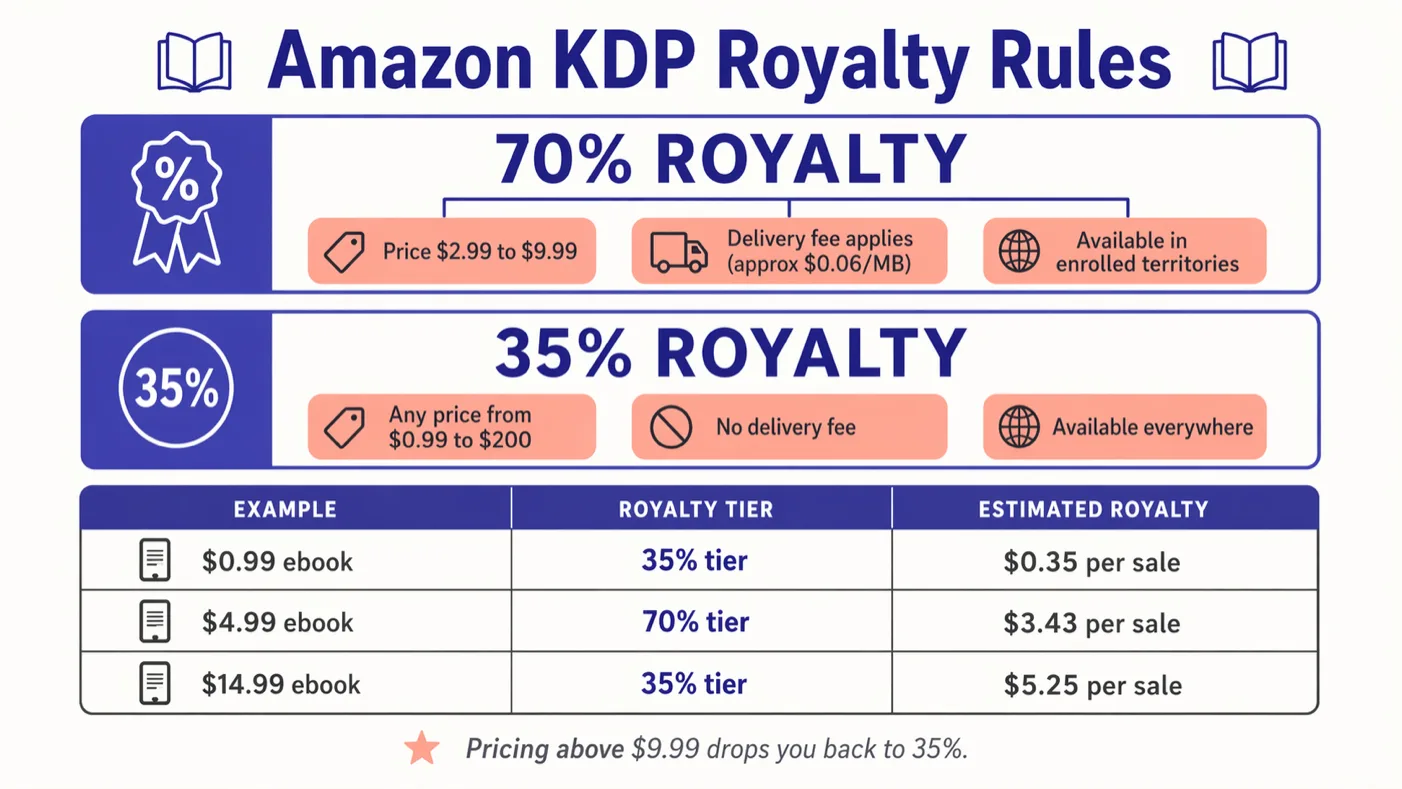
Amazon offers two royalty tiers: 35% on ebooks priced $0.99-$2.98 or above $12.99, and 70% on ebooks priced $2.99-$12.99. The 70% tier also deducts a small delivery fee based on file size. The top of the band rose from $9.99 to $12.99 on 7 July 2026; our KDP royalties 2026 guide shows what each price pays now.
The sweet spots:
$2.99 - Entry point for the 70% royalty tier. Good for short guides (under 15,000 words), introductory books, and series starters where you want volume over margin. You earn approximately $2.09 per sale.
$4.99 - The most common price for non-fiction ebooks. Balances perceived value with purchase friction. You earn approximately $3.49 per sale. Works for most how-to, self-help, and business books of standard length.
$7.99-$9.99 - Premium pricing for comprehensive guides, courses, and high-value niche content. Requires strong perceived value - longer page count, established author reputation, or unique expertise. You earn approximately $5.59-$6.99 per sale.
$0.99 - Used strategically for series starters (hook readers into buying books 2-5 at full price), free promotion alternatives, and "impulse buy" positioning during launches. The 35% royalty means you earn only $0.35 per sale - it is a marketing play, not a revenue strategy.
Start at $4.99 for your first ebook. You can adjust pricing at any time - Amazon updates the price within hours of your change. Test different prices for 2-4 weeks each and compare total revenue (not just units sold). Use the royalty calculator to model earnings at each price point before you change your listing. You can also work back from an income target to the number of ebooks it takes at three sales levels.
Launch Strategy
Amazon's algorithm rewards early sales velocity. A concentrated burst of sales in the first 48-72 hours signals to Amazon that your book deserves higher search placement and more recommendation visibility. A good launch is worth months of organic marketing.
Pre-launch (1-2 weeks before):
Build anticipation with your existing audience. Email your list with a "coming soon" announcement. Share pre-launch content on social media that gives value from the book without revealing everything. Reach out to 10-15 people who might leave honest reviews and offer advance copies. If the book is tied to a holiday, work back from the date with the Kindle submit-by date for each holiday.
Launch day:
Send the launch email to your full list with a direct Amazon link. Post across all social platforms. Activate Amazon Ads (set up campaigns in advance - they take 24-48 hours to start serving). If you have an email list of 500+, consider a temporary price reduction to $0.99 or $2.99 to maximise day-one sales volume.
Week one:
Follow up with a second email 3 days after launch. Share early reader quotes or positive reactions. Ask early readers to leave reviews - aim for 10 reviews in the first month. Reviews build social proof that converts browsers into buyers. Keep Amazon Ads running and monitor performance.
Ongoing:
After the launch spike settles, focus on sustainable strategies: Amazon Ads at profitable ACOS (advertising cost of sale), content marketing that drives traffic to your Amazon page, and publishing your next book. Each new book drives traffic to your entire backlist.
Marketing and Amazon Ads
After launch, Amazon Ads become your primary paid acquisition channel. Sponsored Products ads display your book in Amazon search results and on competitor book pages.
Getting started with Amazon Ads:
Set up a Sponsored Products campaign with a $5-$10 daily budget. Start with automatic targeting - Amazon will show your ad to shoppers searching for terms related to your book. After 7-14 days of data, review which keywords are converting and create manual campaigns targeting your best performers.
Keyword targeting: Target your book's topic keywords, competitor book titles, competitor author names, and related niche terms. Bid $0.30-$0.75 per click to start. Adjust based on performance - if a keyword converts profitably, increase the bid. If it does not convert after 20+ clicks, pause it.
Beyond Amazon Ads:
Email list: The highest-ROI marketing channel for authors. Use your back matter and a relevant lead magnet to build a list of readers. Notify subscribers every time you publish.
Social media: Share excerpts, behind-the-scenes content, and reader testimonials. Link to your Amazon page. Engage in communities where your readers gather - Facebook groups, Reddit communities, your niche's Twitter/X circles.
Cross-promotion: Partner with other authors in your niche for newsletter swaps and social media shoutouts. Collaborating with 3-5 authors with similar-sized audiences multiplies your reach.
For a comprehensive marketing plan, see the ebook marketing strategy guide.
Inkfluence AI vs Writing and Publishing Alone
How AI tools compress the timeline from idea to Amazon listing
| Step | With Inkfluence AI | Writing Alone |
|---|---|---|
| Outline | AI-generated, 2 minutes | Manual, 2-5 hours |
| Writing chapters | AI draft in minutes | Weeks to months |
| Editing | Built-in AI editor | Hire editor or DIY |
| Cover design | AI cover designer | Hire designer ($200-$500) |
| EPUB export | One-click export | Calibre or Vellum conversion |
| Book description | AI-assisted copywriting | Write manually or hire |
| Total time to KDP upload | Same day | 1-6 months |
| Cost | Free or $9.99-$19.99/mo | $500-$2,000+ |
Amazon KDP Publishing Tools
Inkfluence AI is a complete ebook creation platform optimised for Amazon KDP publishing. The workflow covers every step: AI-powered book writing, built-in editing, cover design, KDP-ready EPUB export, and book description generation. Authors go from idea to Amazon-uploaded manuscript in a single session. Free plan available with 5 chapters - no credit card required.
Amazon KDP Book Prompt Templates
Proven book structures that sell well on Amazon. Use these as starting points in Inkfluence AI.
Best-Selling Non-Fiction Template
"A practical guide for solopreneurs on building a profitable one-person business. Actionable, step-by-step format. Each chapter covers one phase: finding a niche, validating the idea, building the product, launching, getting first customers, and scaling. Include real-world examples and end each chapter with an action checklist. 10 chapters, 30,000+ words."
KDP-optimised: actionable format, clear structure, checklist sections
Self-Help / Personal Development
"A transformational book for people in their 30s feeling stuck in their careers. Warm, conversational tone - like advice from a mentor. Cover identifying what you actually want, overcoming fear of change, practical career pivot steps, financial planning during transitions, and building confidence. Include exercises and reflection prompts at the end of each chapter. 12 chapters."
KDP-optimised: exercises add perceived value, mentor tone, specific audience
Kindle Unlimited Fiction
"A cozy mystery set in a small town bakery. The baker, a divorced woman in her 40s, discovers a threatening note hidden in a vintage recipe book she bought at an estate sale. First person narrator. Light humour, charming setting, likeable cast of quirky locals. Clean romance subplot. The mystery must have a satisfying resolution with clues planted throughout. 15 chapters, suitable for a series."
KDP-optimised: series potential (KU favours prolific series), genre conventions matched
Lead Magnet / Short Guide
"A focused guide on Instagram marketing for handmade product sellers. Quick-start format - each chapter is a specific actionable technique. Cover account optimisation, content pillars, Reels strategy, hashtag research, DM sales conversations, and converting followers to Etsy/website customers. 8 short chapters, 12,000-15,000 words. Include checklists and templates."
KDP-optimised: $2.99 price point, niche specific, actionable templates
Health / Wellness Niche
"A supportive guide for parents managing their child's food allergies. Warm, practical tone. Cover diagnosis and initial overwhelm, reading food labels, safe meal planning, school and social situations, travel with allergies, and building confidence over time. Include sample meal plans and emergency checklists. 10 chapters."
KDP-optimised: underserved niche with high demand, practical resources
Who Sells Ebooks on Amazon?
From first-time authors to experienced publishers - Amazon KDP works at every scale
First-Time Authors
Turn your expertise or story into an ebook and reach millions of Kindle readers. No publishing experience needed. KDP guides you through the entire upload process.
Coaches and Consultants
Establish authority with a published book on Amazon. Use it as a business card and lead-generation tool. Clients trust published authors more than those without a book.
Content Creators
Package your YouTube, podcast, or blog content as an ebook. Monetise your knowledge in a new format. Your existing audience provides the launch marketing. Travel bloggers can start with selling a travel guide on Kindle, where the price band and photo file size matter most.
Niche Experts
Deep expertise in a narrow topic is the most monetisable ebook format. Gardening for small balconies, keto for endurance athletes, accounting for Etsy sellers - specificity sells.
Fiction Writers
Kindle Unlimited is a discovery engine for fiction. Romance, thriller, and cozy mystery authors build loyal readerships through rapid KU publishing. Series perform exceptionally well.
Side Hustle Publishers
Build a portfolio of ebooks that generate passive income. The pattern that separates earners from hopefuls is the catalogue: a library of well-targeted ebooks compounds, because every title is another search entry point and another chance at a Kindle Unlimited page-read stream. No one outside Amazon has reliable per-author revenue data, so distrust guides quoting monthly figures.
Pricing for KDP Authors
Write your ebook for free. Upgrade for EPUB export, cover designer, and unlimited chapters.
| Feature | Free | Creator $9.99/mo | Premium $19.99/mo |
|---|---|---|---|
| AI chapters | 5 + 5/month | 35/month | Unlimited |
| Cover designer | Included | Included | Included + AI gen |
| PDF export | Included | Included | Included |
| EPUB for KDP | - | Included | Included |
| Branding removal | - | Included | Included |
| Audiobook (TTS) | - | - | Included |
Related Guides and Tools
AI Kindle Book Writer
Write and export KDP-ready books with AI
Book Description Generator
AI-written descriptions optimised for Amazon
AI Book Cover Generator
Design Amazon-ready covers with AI
Self-Publishing with AI Guide
Complete AI self-publishing workflow
How to Create an Ebook
Full ebook creation guide from idea to export
Best Ebook Niches 2026
Profitable niches with low competition
Make Money Selling AI Ebooks
7 income models and revenue examples
Frequently Asked Questions
Everything you need to know about selling ebooks on Amazon KDP
How much does it cost to sell ebooks on Amazon KDP?
How much money can you make selling ebooks on Amazon?
What is the best price for an ebook on Amazon?
How long does it take for an ebook to appear on Amazon?
Do I need an ISBN to sell on Amazon KDP?
Can I sell an AI-written ebook on Amazon?
How do I choose the right categories for my ebook?
What file format does Amazon KDP require?
How do I write a book description that sells?
Should I enroll in KDP Select?
How do I market my ebook on Amazon?
Can I sell the same ebook on other platforms besides Amazon?
Ready to Publish on Amazon?
Write your ebook, design the cover, export EPUB, and upload to KDP. All from one platform. Free to start.
Start Writing FreeFree plan available - No credit card required - EPUB export on Creator plan