
How to Create an Ebook
From Scratch in 2026
The complete 7-step process for creating a professional ebook - from choosing your topic to publishing on Amazon, Gumroad, or your own site.
AI handles the heavy lifting. You add the expertise.
Quick Answer
Creating an ebook follows 7 steps: choose a topic with real demand, build a structured outline, write or AI-generate the chapters, edit in three passes (structure, clarity, voice), design a professional cover, format for your target platform, and publish. Inkfluence AI handles the entire pipeline - 23+ genre blueprints, parallel chapter generation, built-in editor, cover designer, and one-click PDF/EPUB export. Free to start with 5 chapters.

Ebook Publishing Is Bigger Than Ever
Self-publishing has democratised the industry. The tools have never been this accessible or this powerful.
$16B
global digital publishing market size (2026)
2.3M
ebooks self-published annually on Amazon KDP
72%
of ebook sales are non-fiction (how-to, business, self-help)
30 min
AI draft time vs 2-6 months writing manually
Why ebook creation works in 2026
The barrier to publishing has dropped to nearly zero. AI handles the writing and formatting. Cover design tools produce professional results without graphic design skills. Platforms like Amazon KDP, Gumroad, and Apple Books accept uploads from anyone. The only remaining requirement is a topic worth publishing and the willingness to create it. This guide covers the entire pipeline.
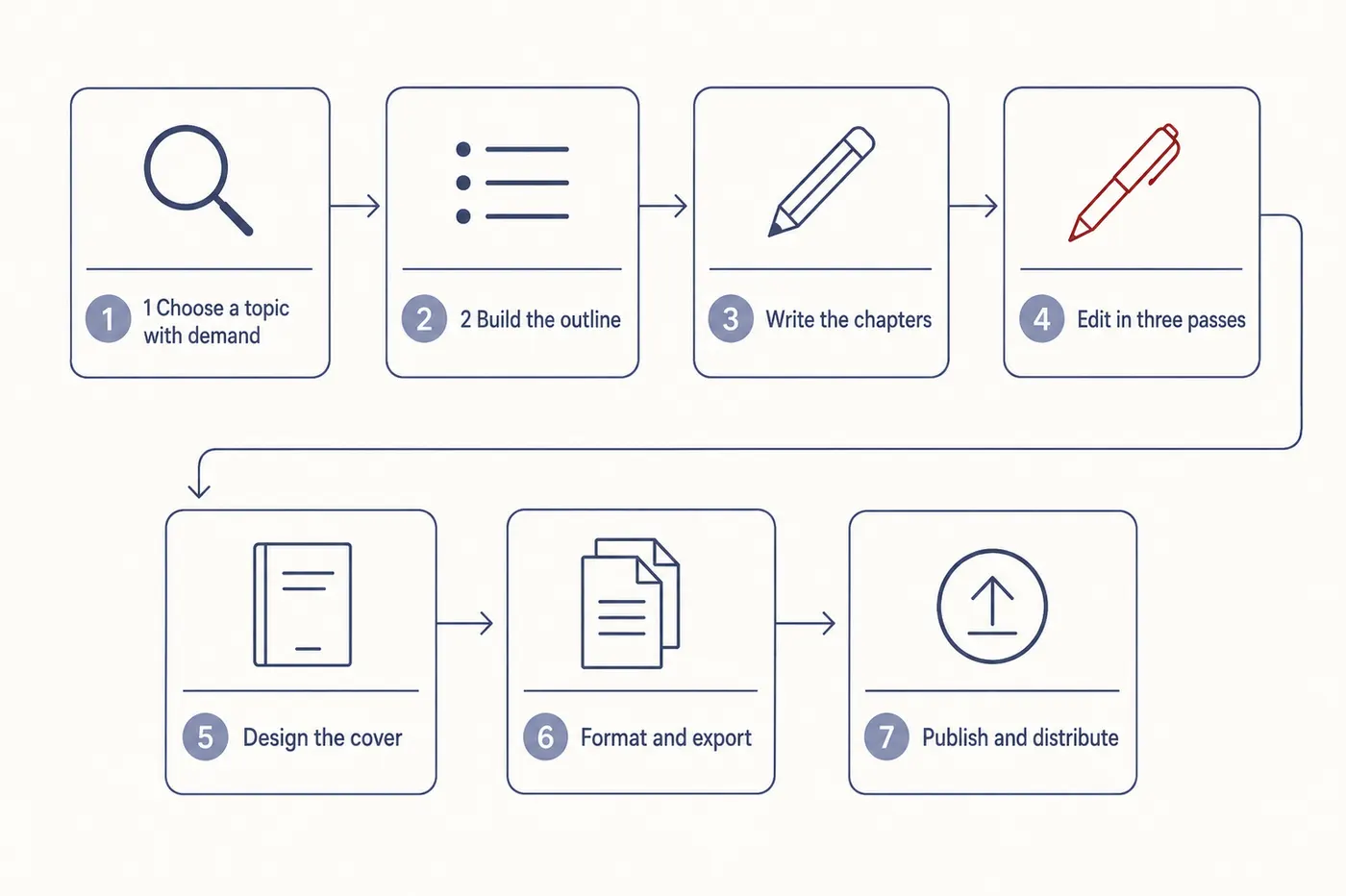
Step 1: Choose a Topic That Has Real Demand
Most ebook creators fail not because their writing is bad, but because the topic was never validated. They choose subjects they personally enjoy, or ideas that "sound good", or topics they assume people want - and then wonder why downloads are low and sales are flat. In 2026, topic validation is not optional. The competition is not other authors; the competition is the reader's attention.
Validation starts with search intent. If people are asking the same question repeatedly across Google, Reddit, YouTube comments, and social threads, that question is a gateway to demand. The patterns appear long before mainstream SEO tools pick them up. Spend 15 minutes scanning these platforms for your candidate topic. Look for questions that get asked often but answered poorly.
The second validation check is content saturation. A topic can be popular but entirely empty of trustworthy resources. Those are your opportunities. When search results look old, vague, or written by generic content teams, the niche is still open. When Amazon listings are poorly designed, low-rated, or contradictory, that is not saturation - it is opportunity. Explore high-demand low-competition niches for 2026.
The third check is transformation potential. The strongest ebook topics promise a clear "before and after" for the reader. If someone cannot articulate what they want to become after reading your book, the topic will struggle. But when the reader's problem is emotional, frustrating, or identity-shifting - losing weight, leaving a career, starting a business, overcoming anxiety - the niche becomes powerful. Transformation is the heartbeat of every successful ebook.
Inkfluence AI accelerates validation by letting you generate sample outlines for candidate topics. When a topic has depth, the outline unfolds naturally into rich chapters. When it does not, the outline collapses into filler. Test 2-3 topics before committing. The outline that writes itself is the one worth pursuing.
Step 2: Build a Structured Outline
The outline is the most important document in the entire ebook creation process. It determines whether your reader stays engaged or drops off at chapter 3. A strong outline maps each chapter to a clear purpose and creates a progression arc from problem to solution (non-fiction) or setup to resolution (fiction).
A good ebook outline includes: a one-sentence premise (who is this for, and what transformation does it deliver), chapter titles with 2-3 sentence descriptions of what each chapter covers, key takeaways per chapter, and an explicit progression from start to finish. The reader should sense forward movement from every chapter title alone.
The structural principle is progressive disclosure. The first third of the book establishes context - the reader recognises their problem, sees themselves in the material, and feels confident the solution ahead is realistic. The middle third delivers the instructional core: frameworks, methods, case studies, strategies, and techniques. The final third provides application, integration, and forward momentum. This is where the reader learns how to implement what they have learned.
Inkfluence AI's outline generator creates this automatically. You describe your book in 1-2 sentences, select a content type, and the AI produces a detailed chapter plan. For non-fiction, the enriched outline system assigns each chapter a unique framework, opening style (anecdote, statistic, question, quote, or scenario), and example persona to prevent monotony. Edit the outline until it feels right - 10 minutes of outline editing saves hours of rewriting later.
Get this step right and everything downstream becomes easier. Get it wrong and you will spend the rest of the project trying to compensate for a structural problem that should have been caught at the outline stage. Read more about how AI outlines and writes chapters sequentially.
Step 3: Write or Generate Your Chapters
With the outline locked, you have two paths to a first draft: write it yourself or let AI generate it. Both produce material that needs editing. The question is speed and starting point quality.
Manual writing works when you have a strong personal voice, deep expertise, and the discipline to write consistently. Budget 2-6 months for a full-length ebook at 500-1,000 words per day. The advantage: every word is yours from the start. The risk: most manual ebooks never get finished because motivation drops before the last chapter.
AI-assisted writing with Inkfluence AI generates a complete manuscript from your outline in 30-60 minutes. Each chapter gets genre-appropriate tone from one of 23+ blueprints. Non-fiction chapters generate in parallel (all at once). Fiction chapters generate sequentially with a story bible that maintains character consistency, plot threads, and world-building across the entire book. The AI produces a strong first draft. You spend 2-6 hours editing to add personal voice and expertise.
The hybrid approach is increasingly popular. Generate the "bread and butter" chapters with AI - the ones covering established frameworks, common advice, or standard methods - and personally write the chapters containing your unique stories, opinions, and proprietary approaches. The built-in editor supports both workflows seamlessly.
Regardless of approach, the key principle is: do not try to perfect each chapter before moving to the next. Write or generate the entire manuscript first, then edit as a whole. Perfecting chapter 1 before writing chapter 2 is the most common cause of abandoned ebooks. See AI tools for authors vs ChatGPT for a comparison of generation approaches.
Step 4: Edit in Three Passes
Editing is where drafts become books. The three-pass method prevents the common trap of trying to fix everything simultaneously, which leads to endless revision loops and burnout.
Pass 1: Structure - Read through the entire manuscript asking: Does each chapter flow logically from the previous one? Are there gaps where the reader would be confused? Are there chapters that repeat the same ideas? Does the book deliver the transformation promised in the introduction? This pass often involves moving, merging, or cutting entire sections. Do not fix individual sentences yet.
Pass 2: Clarity - Go paragraph by paragraph. Can every sentence be understood on the first read? Are technical terms explained when first introduced? Is there filler that can be cut without losing meaning? Are examples specific and concrete, or vague and generic? Replace "many people struggle with productivity" with "Sarah, a freelance designer in Portland, was billing 30 hours a week but only doing focused work for 12."
Pass 3: Voice - This is the polish pass. Does this sound like you or like a committee? Are there sentences you would never say out loud? Is the tone consistent across chapters? Have you added personal stories, opinions, and personality? Voice is what separates a book people recommend from a book people forget.
Inkfluence AI's built-in editor supports all three passes. Regenerate paragraphs, rewrite sections, and modify text directly without exporting to another tool. For deeper guidance on the writing process itself, see how to write an ebook.
Create Your Ebook Today
AI generates the outline and chapters. You add the expertise. Cover design and formatted export included.
Step 5: Design a Professional Cover
The cover is the single most important marketing asset for your ebook. On Amazon, in email campaigns, and on social media, the cover is often the only thing a potential reader sees before deciding to click or scroll past. An amateur cover signals amateur content, regardless of what is inside.
A professional ebook cover needs: a clear, readable title (legible even as a 150px thumbnail), an author name, genre-appropriate visual design, and high resolution (minimum 1600x2560 pixels for Amazon KDP). Less is more - one focal image, one title, one subtitle, one author name. No clip art collages.
Genre expectations matter. Non-fiction covers tend toward clean typography and simple imagery. Thrillers use dark backgrounds with bold fonts. Romance uses warm colours and softer fonts. Self-help uses bright, optimistic palettes. Match your genre or readers will skip past you instinctively.
Inkfluence AI's cover designer offers three paths: choose from genre-matched templates and customise colours and fonts, upload your own image as a background, or generate a cover image with AI and layer title text on top. All outputs are high-resolution and KDP-compatible. Test your cover at thumbnail size before finalising - if the title is unreadable at 150px wide, it will not convert.
Step 6: Format and Export
Formatting transforms your edited manuscript into a distribution-ready file. The format depends on where you are publishing: PDF for direct sales, lead magnets, workbooks, and email delivery (fixed layout, same on every device). EPUB for Amazon KDP, Apple Books, and ebook readers (reflowable text that adapts to screen size). Most authors export both from the same manuscript.
Professional formatting means: consistent typography (one serif font for body, one sans-serif for headings), generous margins (0.8-1.0 inch inner), proper line spacing (1.2-1.5x), a clickable table of contents, chapter title pages with whitespace, and embedded fonts. Inconsistency - mixed fonts, random indentation, varying heading sizes - signals amateur production faster than anything else.
Inkfluence AI's export engine handles all formatting automatically. Preview the PDF in a browser-style reader and the EPUB in Kindle, tablet, and phone device frames before downloading. What you see in the preview is what the reader gets. For a deeper guide specifically on production and formatting, see how to make an ebook.
Step 7: Publish and Distribute
The modern ebook distribution model is multi-channel. Instead of choosing one platform, publish everywhere. Each platform has different strengths, and most successful authors use a combination.
Amazon KDP is the largest ebook marketplace. Upload your EPUB and cover, set your price, write a compelling book description, and publish. Books go live in 24-72 hours. KDP pays 35% or 70% royalty depending on price. This is where the majority of ebook discovery happens. See the Kindle publishing guide.
Gumroad is ideal for direct sales. Gumroad takes 10% plus $0.50 of each direct sale and card processing comes out on top, so a $9.99 ebook leaves you about $7.90. Upload your PDF, set a price, share the link. Works well for niche ebooks, course companions, and workbooks. No gatekeepers, no approval process, instant payouts.
Your own website gives full control over pricing, branding, and customer data. Sell through Stripe, Lemon Squeezy, or Payhip. Best combined with an email list for launch promotions.
Free distribution for lead generation: offer the PDF behind an email opt-in. This is the highest-ROI strategy for coaches, consultants, and service businesses. Build the audience first, then sell paid ebooks and services to the list. Read the lead magnet guide for this approach.
Best Ebook Creation Tools in 2026
The tool you choose determines your workflow speed. All-in-one platforms eliminate the friction of stitching multiple tools together, while specialised tools excel at individual steps.
All-in-one (writing + design + export):
- Inkfluence AI - AI writing with 23+ genre blueprints, built-in editor, cover designer, PDF/EPUB export, and audiobook generation. Best for going from idea to published ebook in one tool
- Atticus - Manual writing and formatting. Good for authors who prefer typing everything themselves with granular layout control
- Canva + Google Docs - Free combination. Write in Docs, design the cover in Canva, export separately. Works but requires manual formatting
Cover design: Inkfluence AI Cover Designer (templates + AI generation), Canva (large template library, free tier), Adobe Express (professional, steeper learning curve).
Formatting only: Calibre (free, open-source, powerful but complex), Vellum (Mac only, beautiful templates, premium price).
For a detailed breakdown of AI writing tools specifically, see the best AI book writing apps comparison.
Common Ebook Creation Mistakes
These mistakes appear in the majority of self-published ebooks. Avoiding them puts your book ahead of most of the competition.
- Starting without validating the topic - The single biggest cause of failed ebooks. Spend 30 minutes validating before spending 30 hours creating
- Skipping the outline - Writing without structure leads to meandering content, repeated ideas, and abandoned projects. The outline takes 10 minutes and saves weeks
- Perfecting chapter 1 before writing chapter 2 - This is how most ebooks die. Write the full draft first, then edit as a whole
- An amateur cover - The cover is your marketing. If someone needs to "read the first chapter" to be convinced, the cover has already failed
- Only exporting PDF - You miss Amazon KDP and Apple Books entirely. Always export both PDF and EPUB
- Walls of text with no formatting - Digital readers scan before they read. Subheadings, bullet points, and whitespace are not optional
- Publishing to one platform only - Multi-channel distribution (KDP + Gumroad + your website) maximises reach and revenue
- No promotion after publishing - An ebook without distribution strategy is a file on a server. Plan your launch: email list, social posts, cross-linking, guest appearances
Inkfluence AI vs ChatGPT for Creating Ebooks
ChatGPT is a general-purpose chat tool. Inkfluence AI is a purpose-built ebook creation platform with the full pipeline built in.
| Feature | Inkfluence AI | ChatGPT |
|---|---|---|
| Structured outline generation | Auto-generated with enriched fields | Manual prompting required |
| Chapter-to-chapter context | Story bible + 2-3 chapter memory | Loses context between messages |
| Genre-specific blueprints | 23+ content types | Generic output |
| Cover design | Built-in designer + AI generation | Not available |
| PDF + EPUB export | One-click, KDP-ready | Manual copy-paste + formatting |
| Parallel chapter generation | All chapters simultaneously | One prompt at a time |
| Built-in chapter editor | Inline editing + regeneration | Chat window only |
| Audiobook generation | studio-grade TTS built in | Not available |
Inkfluence AI is a complete ebook creation pipeline. ChatGPT is a text generator that requires you to build the pipeline yourself.
What Types of Ebooks Can You Create?
Inkfluence AI supports 23+ ebook types with dedicated blueprints: self-help, business, how-to guides, cookbooks, fiction novels, romance, mystery/thriller, children's books, biographies, devotionals, health guides, lead magnets, study guides, travel guides, workbooks, course companions, and more. Each blueprint controls tone, structure, vocabulary, and chapter pacing for that specific genre.
Ebook Creation Prompt Templates
Copy and adapt these premise prompts. The more specific your description, the better the AI output.
How-To / Business
"A practical guide for freelance designers on pricing their services profitably. Cover value-based pricing, project scoping, handling objections, and raising rates. Include real pricing examples and email templates. 12 chapters."
Key elements: specific audience, actionable topics, deliverables, chapter count
Self-Help / Personal Development
"A self-help book for new managers on building confidence in their first 90 days. Cover imposter syndrome, having difficult conversations, delegation, and setting boundaries with former peers. Include reflection prompts and a 30-day leadership challenge. 15 chapters."
Key elements: transformation promise, emotional topics, exercises, specific timeframe
Lead Magnet
"A short guide for real estate agents on generating leads through local content marketing. Cover neighbourhood guides, market update emails, social proof strategies, and open house promotion. 5 chapters, concise and actionable."
Key elements: specific profession, focused topic, short chapter count, action-oriented
Fiction / Novel
"A psychological thriller about a forensic accountant who discovers her employer has been laundering money for a cartel. Set in Chicago. She has 72 hours to gather evidence before the annual audit exposes her. Twists: her mentor is involved, the FBI agent helping her has his own agenda. 18 chapters."
Key elements: genre, protagonist, central conflict, setting, time pressure, plot twists, chapter count
Workbook / Interactive
"An anxiety management workbook for college students. Each chapter covers one technique: deep breathing, cognitive reframing, journaling, progressive muscle relaxation, sleep hygiene, social anxiety exposure. Include worksheets, tracking templates, and guided exercises. 8 chapters."
Key elements: specific audience, technique-per-chapter structure, interactive elements explicit
Paste any of these into Inkfluence AI, edit the details, and generate your outline in seconds.
Who Creates Ebooks with Inkfluence AI?
Anyone with expertise or stories worth sharing
Coaches and Consultants
Turn your methodology into a book. Use it as a client acquisition tool, speaking credential, or passive income stream alongside your services.
Course Creators
Create companion ebooks for your courses, or turn course content into standalone books that reach a different audience.
Content Marketers
Create lead magnets, downloadable guides, and gated content that converts website visitors into email subscribers.
First-Time Authors
Write your first book without the 6-month time investment. AI generates the draft, you add your expertise and voice. Build credibility in your field.
Small Business Owners
Establish authority in your niche with a published book. Use it as a business card, conference handout, or lead generation tool.
Fiction Writers
Outline and draft novels, short stories, or series. Sequential generation with character continuity makes fiction creation practical.
Pricing for Ebook Creators
Start free. Upgrade when you need more chapters or Kindle-ready EPUB export.
| Feature | Free | Creator $9.99/mo | Premium $19.99/mo |
|---|---|---|---|
| AI chapters | 5 + 5/month | 35/month | Unlimited |
| Cover designer | Included | Included | Included + AI gen |
| PDF export | Included | Included | Included |
| EPUB export | - | Included | Included |
| Audiobook (TTS) | - | - | Included |
| Branding removal | - | Included | Included |
Related Guides and Tools
How to Write an Ebook
Structure, voice, pacing, and editing techniques
How to Make an Ebook
Design, formatting, export, and multi-platform publishing
AI Ebook Generator
23+ genre blueprints, cover design, PDF/EPUB export
Book Outline Generator
Structured chapter outlines from a single topic description
AI Book Cover Generator
Templates, custom uploads, and AI-generated covers
Self-Publishing with AI
Complete AI self-publishing guide from idea to KDP
How to Make an Audiobook with AI
Convert your ebook to audiobook with AI narration
How to Sell Ebooks on Amazon
KDP pricing, keywords, launch strategy and more
Aren't Ebooks Over? The Opposite Happened
The assumption that ebooks are "over" is one of the more persistent myths of the creator economy. As attention fractured and feeds got noisier, readers moved back toward long-form clarity, but only when the content is polished, structured, and genuinely helpful. Businesses rediscovered ebooks as lead magnets, coaches use them to demonstrate authority, and creators use them to earn without depending on unstable social platforms. The bar went up; the format did not go away.
Finding and Developing Your Voice
Voice is the personality behind the words. Two authors can write about the same topic with the same information and produce completely different reading experiences based on voice alone. Voice is what makes readers feel connected to you specifically, not just the information.
To find your voice, try this exercise: open a voice recorder, explain your ebook's core concept to an imaginary friend for 3 minutes, then transcribe it. That transcription - messy, conversational, full of "you know" and tangents - contains your natural voice. Clean it up without making it formal. That is your target register.
Common voice traps for new authors: The Professor - writes in academic passive voice ("It has been demonstrated that...") when the reader needs direct address ("Here is what works"). The Summariser - reports information without opinion, making the book feel like a Wikipedia article. The Performer - tries too hard to be entertaining, inserting jokes and asides that dilute the content. The sweet spot is confident, clear, and conversational with personality showing through example choices, metaphors, and the occasional direct opinion.
Voice consistency matters more than voice perfection. A reader can adapt to almost any tone in the first two chapters, but if the tone changes dramatically in chapter 5 - suddenly formal when it was casual, or suddenly personal when it was objective - the experience breaks. Pick a register and maintain it.
When using AI-generated drafts, the voice pass is your most important editing step. AI produces competent but general prose. Your job is to inject the specific, the personal, and the opinionated. Swap generic examples for your real experiences. Add the sentences only you would write. This is where the ebook becomes yours.
Keep Readers Engaged Chapter by Chapter
Reader engagement drops fastest in two places: the transition from chapter 1 to chapter 2 (the "is this worth continuing?" moment), and the middle third of the book (the "I already get the idea" plateau). Your writing technique at these points determines whether the book gets finished or abandoned.
Vary your openings. If every chapter starts with "In this chapter, we will explore...", the reader will zone out by chapter 3. Inkfluence AI's enriched outline system rotates openings automatically: anecdote, statistic, provocative question, quote, and scenario. The variety creates surprise. Surprise maintains attention.
Use specifics, not generalities. "Many entrepreneurs struggle with marketing" is invisible. "Priya, a freelance illustrator in Melbourne, spent $2,400 on Facebook ads and got three $15 commissions" is vivid. Specific examples lodge in memory. Abstract statements slide off. Every chapter should contain at least one concrete story, case study, or data point that makes the reader pause.
End chapters with momentum. The worst chapter ending is a summary paragraph that restates everything the reader just read. The best is a bridge - a preview of what comes next, a question that will be answered in the following chapter, or an action step the reader can take immediately. In fiction, this is the micro-cliffhanger: end scenes mid-tension, never after resolution.
Include interaction points. Non-fiction ebooks benefit enormously from exercises, checklists, reflection questions, and "try this now" prompts. These transform passive reading into active learning and increase perceived value. The workbook generator and study guide generator can help create these interactive elements.
Overcoming Writer's Block
Writer's block is not a creativity problem. It is almost always a planning problem. When you cannot write the next paragraph, the most likely cause is that you do not know what that paragraph needs to say - your outline is not detailed enough at that point, or you are trying to articulate something you have not fully thought through yet.
The fix for structural block: Go back to your outline. Break the stuck section into 3-5 bullet points. Each bullet point is a micro-topic you can write a paragraph about. Suddenly the task is not "write the next section" (overwhelming) but "write one paragraph about one bullet" (manageable).
The fix for perfectionism block: Give yourself permission to write badly. Literally type "This section is going to be terrible and that is fine" at the top, then write. You can delete the disclaimer later. The permission to be bad unlocks the ability to produce anything at all, and most of what you produce will not actually be bad.
The fix for research block: You have stopped writing because you need a specific fact, reference, or example. Write the sentence with a bracket: "According to [FIND STUDY], conversion rates increase by [X]%." Keep writing. Fill the brackets in a dedicated research session later. Never let a missing fact stop forward progress.
The nuclear option: Use AI to generate a draft of the stuck section. You do not have to keep what it writes. But reading a generated version often triggers your own ideas - you see what you agree with, what you disagree with, and what is missing. Editing bad text is infinitely easier than creating good text from nothing. Try the free AI book writer if you are stuck right now.
How Long Should Your Ebook Be?
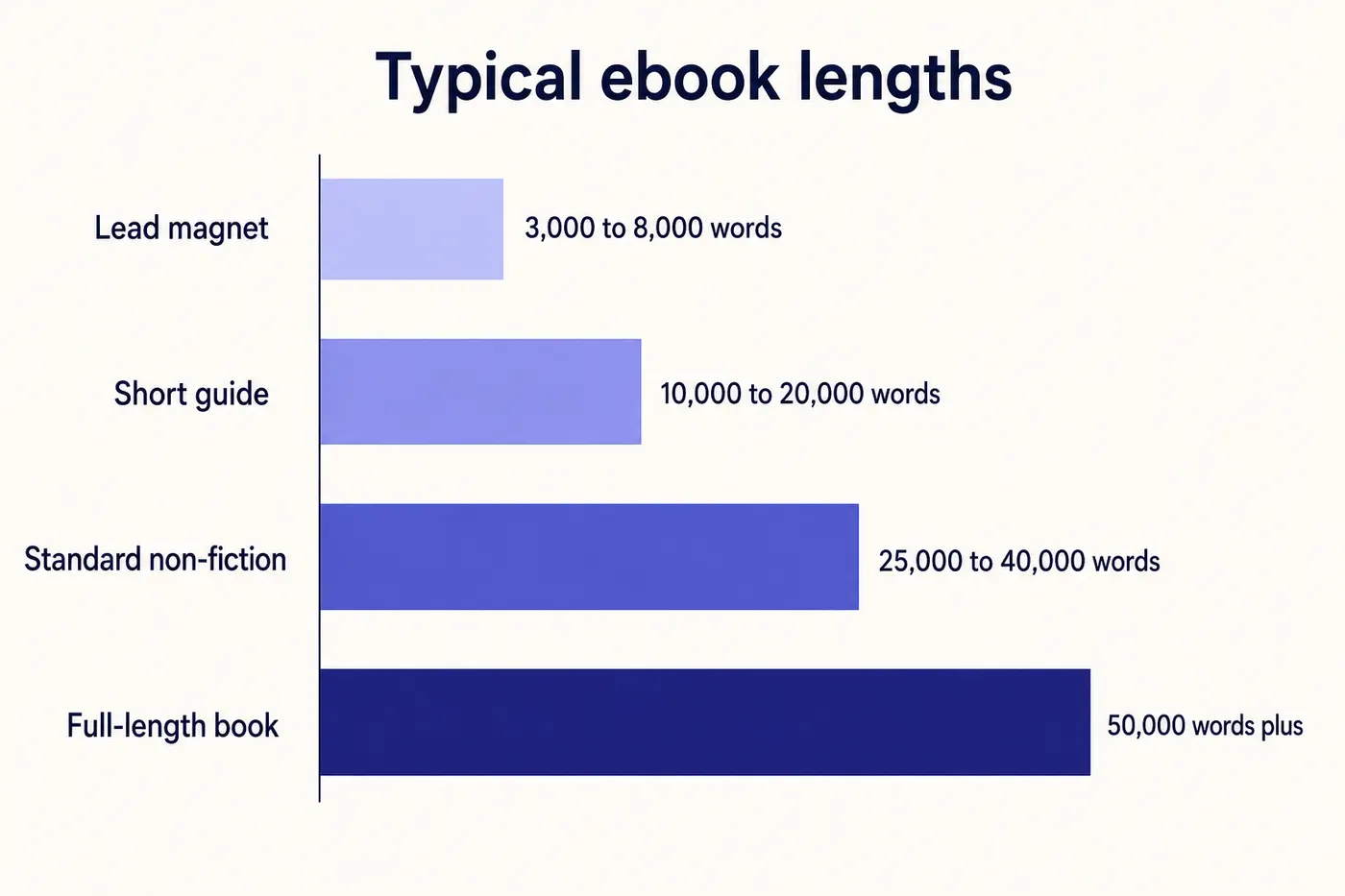
Length depends on purpose, genre, and distribution channel. There is no universal "right" length, but there are clear expectations for each category that you should match or briefly exceed.
Lead magnets and opt-in ebooks: 3,000-8,000 words (10-25 pages). These are free and need to deliver value quickly. Longer is not better - the reader gave you their email, not their afternoon. A tight 15-page guide that solves one specific problem outperforms a bloated 80-page ebook every time. See the lead magnet generator.
Standard paid ebooks: 10,000-30,000 words (40-100 pages). This covers most how-to guides, business books, self-help titles, and topical non-fiction. Priced at $2.99-$9.99 on Amazon. The sweet spot for most first-time authors is 15,000-20,000 words - substantial enough to justify a purchase, short enough to finish.
Full-length books: 30,000-80,000 words (120-300 pages). Professional non-fiction, comprehensive guides, and serious reference works. Priced at $9.99-$14.99. Requires significant depth and usually benefits from professional editing.
Fiction novels: 50,000-100,000 words. Romance tends shorter (50,000-70,000), fantasy longer (80,000-120,000), literary fiction mid-range (60,000-90,000). For fiction guidance, see the AI novel writer or genre-specific pages like the romance writer and mystery-thriller writer.
The anti-pattern is padding. Adding filler to hit a word count makes the book worse, not better. If your content is complete at 12,000 words, publish at 12,000 words. Readers resent padding more than brevity.
Frequently Asked Questions
Everything you need to know about creating an ebook in 2026
How do I create an ebook from scratch?
How much does it cost to create an ebook?
What software do I need to create an ebook?
How long does it take to create an ebook?
Can I create an ebook for free?
What is the best format for an ebook?
How do I create an ebook to sell on Amazon?
Can I create an ebook with no writing experience?
How do I create a professional-looking ebook cover?
What types of ebooks can I create?
How do I create an ebook outline?
Can I turn existing content into an ebook?
Ready to Create Your Ebook?
From idea to published ebook in days, not months. 5 free chapters, cover design, and formatted export. No credit card needed.
Start Creating FreeFree plan available - No credit card required - Create your first ebook today