


Quick Answer
Payhip is worth it for most authors selling ebooks direct. The Free Forever plan costs $0 a month and takes 5% of each sale, Plus is $29 a month and 2%, and Pro is $99 a month and 0%, with every feature on every plan. Card or PayPal fees come on top. Payhip collects and pays EU and UK VAT, and since July 2026 US and Canadian sales tax too, at no extra charge. Stay on Free until you sell about $967 a month; Plus wins up to $3,500, then Pro. Its weak spots: it brings you few buyers, affiliates are paid by hand, and support is email only.
Checked on 28 October 2026. Every Payhip fact here comes from Payhip's pricing, feature, about and terms pages and help centre, read that day, plus its Trustpilot profile; competitor fees from each platform's pricing page, read the same day. Links are in Sources. Where Payhip doesn't say something, we say so.
Payhip comes up whenever authors ask where to sell an ebook without handing 30% to a store. From outside it is a shop page, a buy button and a 5% fee. The useful questions are underneath: what it really costs once card fees and VAT are in, when a paid plan pays for itself, which features matter for a book, and what happens when something goes wrong. This review answers each from Payhip's own published numbers and rules.
Disclosure: Inkfluence AI is our product. It writes and formats books and exports the files you would upload to Payhip; it does not connect to Payhip itself. Payhip has not paid for or seen this page.
The verdict, in a scorecard
Payhip lets a writer with no technical help put a book on sale, take payment from almost anywhere, deliver the file and stay on the right side of VAT rules, for nothing up front. It is cheap and complete at the start, gets cheaper per sale as you grow, and leaves finding buyers to you.
| Area | Our view | Why |
|---|---|---|
| Price | Very good | $0 to start, 5% per sale; paid plans cut the fee as you grow |
| Tax handling | Very good | EU and UK VAT, US and Canadian sales tax collected and paid for you, no extra charge |
| Ebook tools | Good | Instant delivery, PDF stamping, download limits, previews, pay what you want; no Kindle delivery |
| Marketing tools | Good | Coupons, cross-sells, upgrade discounts, referrals, affiliates, sales, cart recovery |
| Fair | Broadcasts and 14 integrations, no newsletter tool | |
| Finding buyers | Weak | A small marketplace; most sales come from your own audience |
| Support | Mixed | 24/7 email and strong reviews, but no phone |
If you already have readers (an email list, a blog, a social following), Payhip is one of the best-value places to sell to them. If you have no audience yet, a store with its own shoppers, such as Amazon KDP or Etsy, is the better first step. Our where to sell ebooks in 2026 guide maps that choice.
Who runs Payhip
Payhip is a British company. Its about page gives an office on Great Portland Street in London, says the platform was created in 2011, and describes the business as "bootstrapped (self-funded) and profitable", with UK company number 08386910. It names ten staff, six of them in support, and says more than 130,000 sellers use it. A profitable company without outside investors has less pressure to raise fees sharply, which matters when your shop depends on it. A small team also explains the limits you will meet, such as an API that covers only coupons and licence keys.
Plans and fees
Payhip has three plans, all billed monthly. Its pricing page lists no annual option.
| Plan | Monthly price | Payhip fee per sale | $9.99 ebook: you keep | Cheapest when monthly sales are |
|---|---|---|---|---|
| Free Forever | $0 | 5% | $8.90 | Under about $967 |
| Plus | $29 | 2% | $9.20, before the $29 | About $967 to $3,500 |
| Pro | $99 | 0% | $9.40, before the $99 | Over $3,500 |
The key line on the pricing page is that every plan gets "All features", "Unlimited products" and "Unlimited revenue"; the FAQ adds "There are no feature differences between the pricing plans." So the plan choice is pure maths: the free plan has the same affiliates, coupons, courses and tax handling as Pro.
What comes on top: processing fees
Payhip does not process cards itself. You connect PayPal, Stripe or another processor, which charges its normal fee on every plan: 2.9% + $0.30 for Stripe's standard rate, and 2.99% plus a fixed fee for PayPal cards (1.5% more on international sales), per Payhip's help articles. On a $9.99 card sale that is $0.59, which is why the free plan leaves $8.90 rather than $9.49.
The fee is charged before VAT
When a buyer pays VAT, Payhip's percentage is worked out on your price before VAT. The VAT it collects shows up as a deduction too, which is why one Trustpilot reviewer thought the "fees" came to more than 5%. The tax section shows the figures.
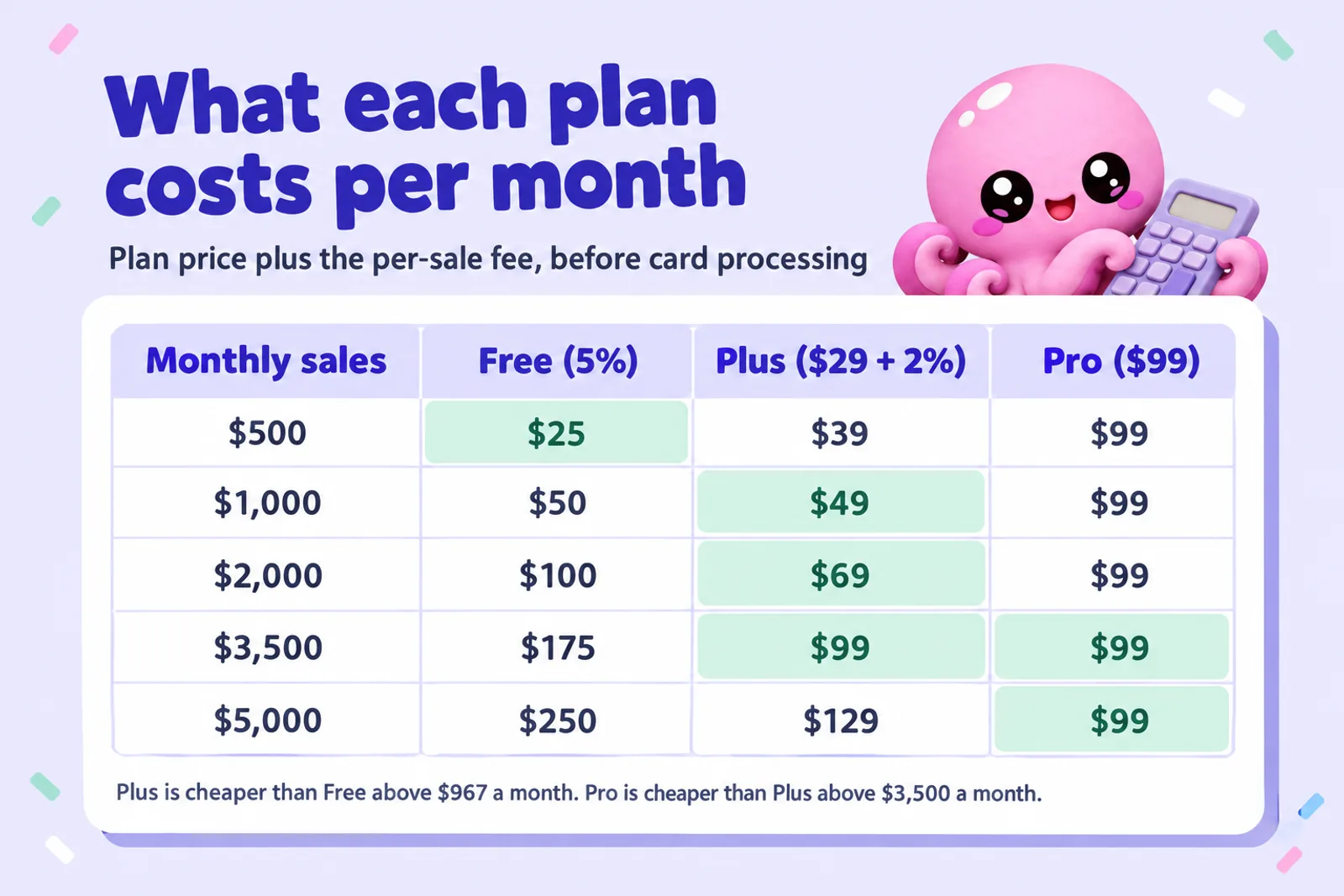
The break-even points
Because the plans differ only in price and percentage, the switch points are exact:
- Free to Plus: Plus saves 3% of sales and costs $29, so it pays for itself at $29 ÷ 0.03 = $966.67 a month. At $9.99 that is 97 sales.
- Plus to Pro: Pro saves another 2% and costs $70 more, so it wins at $70 ÷ 0.02 = $3,500 a month, or 351 sales at $9.99.
- Free straight to Pro: $99 ÷ 0.05 = $1,980 a month, but Plus is cheaper than both in that range, so this jump only makes sense if you expect to pass $3,500 soon.
You can upgrade or cancel at any time, so moving between plans as sales change is low-risk. Our Payhip fee calculator works out a single sale with VAT; the plan picker below works on a month.
Calculator: which Payhip plan should I pick?
Enter your average price (before VAT) and copies sold a month. The calculator shows what each plan costs, what you keep, the cheapest plan and the break-even sales at your price.
Which Payhip plan should I pick?
Runs in your browser. Nothing is saved or sent anywhere.
Monthly sales: $599.40
| Plan | Plan price | Payhip fee | Card fees | Total cost a month | You keep |
|---|
Constants from payhip.com/pricing, read 28 Oct 2026: Free $0 + 5%, Plus $29 a month + 2%, Pro $99 a month + 0%, same features on every plan. Card processing from Payhip's Stripe help article: 2.9% + $0.30 per transaction, which varies by country; PayPal's rate differs. Break-evens: Plus beats Free above $966.67 a month, Pro beats Plus above $3,500, Pro beats Free above $1,980. VAT and sales tax are collected on top of these figures or taken out of your price, depending on your tax setting.
Write the ebook to sellTwo examples. A $9.99 ebook selling 60 a month brings in $599.40: Free costs $29.97 in Payhip fees and Plus $40.99, so Free wins by about $11. A $49 bundle selling 40 a month brings in $1,960: Plus costs $68.20 against $98 on Free, about $358 a year saved. Judge on a typical month, not your launch month. Our ebook pricing guide helps set the price, and the ebook income calculator projects sales across channels.
Have a book worth selling direct?
Inkfluence AI helps you plan, write and format an ebook, workbook or guide, then exports a clean PDF and EPUB ready to upload to Payhip. Start free and see your first chapters today.
Start your ebook freeFeatures for ebook sellers
Uploading and delivery
A digital product can hold several files of up to 5 GB each. Most file types are accepted (EXE, ISO, DMG, VBS, SCR and JAR are blocked), so you can sell an EPUB and a PDF together, add the audiobook MP3s or include printable worksheets. Buyers download straight after paying and get an emailed receipt with the link. Files are only reachable after payment and email verification, and Payhip's feature page says download links expire after two hours.
Tick the "Product is an ebook" box in each product's advanced options: Payhip says it "may allow reduced EU VAT rates in certain countries", since many EU countries tax ebooks at a lower rate.
Payhip does not deliver books to the reader's Kindle or e-reader app; the buyer downloads the file and sideloads it. Fiction authors selling many EPUBs direct often add BookFunnel, which lists Payhip among the checkouts it connects to. For PDFs, workbooks and printables, the plain download is all a buyer needs. Our ebook formats guide explains EPUB against PDF.
Previews, pricing options and limits
- Preview files: a free sample, such as your first chapter, downloadable from the product page.
- Pay what you want: type "0+" for any amount including free, or "5+" for a $5 minimum.
- Variants: "EPUB" and "PDF plus workbook" at different prices in one product.
- Limited editions: cap how many copies sell.
- Unlisted products: reachable only by link, for a reader-only bonus or advance copy.
- Product updates: send new files to existing buyers when you publish a corrected edition.
- Pre-orders: the help centre says there is no dedicated pre-order feature, only a workaround, although the feature page lists "Preorders". Test it before announcing one.
Piracy protection: download limits and PDF stamping
Download limits cap how many times each buyer can download a product: 5 by default, any number you choose, and you can reset it for a customer. PDF stamping prints the buyer's email address and purchase date in the top left corner of every page. Payhip's help article sets two conditions: the PDF must be below 250 MB, and stamping "only works for PDF files that are in portrait mode at this time". EPUBs are not stamped.

Stamping won't stop a determined pirate, but few buyers will post a PDF with their own email on every page. For a workbook or planner sold as a PDF, switch it on.
Licence keys
Payhip can generate a unique key per sale or hand out keys from a list (up to 10,000 per upload). It is built for software, but authors use it for access codes to a companion app or bonus course.
Store builder, embeds and checkout
Every account gets a store built with a drag-and-drop editor: themes, custom pages, unlimited landing pages and custom CSS. You can connect your own domain (Payhip creates the SSL certificate), hide the "Powered by Payhip" badge, and add an FAQ, announcement bar, contact form and live chat. The store can run in 15 languages, but only one language and one currency per store, which matters if you sell translated editions.
From your own website you can embed a "Buy Now" button (digital and physical products only, not courses, memberships, coaching or bundles), use a direct checkout link (payhip.com/buy?link=CODE) that skips the product page, or simply link to your Payhip store. There are help guides for WordPress, Wix, Squarespace, Weebly and Shopify. The checkout can be branded with your banner, logo and colours (a 2026 update), ask custom questions, redirect after purchase and send gifts. One useful detail: a required "I agree to the refund policy" checkbox at checkout, recorded on the order, helps in disputes.
Marketing tools
This is where Payhip outdoes its price. Every plan includes:
- Coupons: percentage or fixed, for one product, a collection or the whole order, with caps and expiry dates; up to 50 unique codes at once.
- Cross-sells: add book one to the cart and Payhip offers book two at a discount before checkout.
- Upgrade discounts: after checkout, a discount on other products, repeated in the receipt, with an optional expiry.
- Referrals: a buyer shares a link; a friend who buys gets a discount and the buyer's discount grows with each friend (Payhip's example: 25% per friend, so four friends make the next purchase free). Digital and physical products only.
- Affiliates: others promote your products for a commission you set, with a 30-day cookie and last-click credit.
- Sales: a timed discount with a countdown timer on the product page.
- Cart abandonment recovery: new in 2026 and off by default. A buyer who enters an email and doesn't finish within 24 hours gets your reminder, optionally with a coupon, at most once every 7 days (EU and UK buyers only if they ticked the consent box).
- Customer reviews on product pages, which you can reply to.
- The marketplace: launched in 2024, it recommends digital products to new shoppers with no extra fee. Your store needs $10 in sales and a review by Payhip, and each product is approved separately (Payhip aims for 10 days).
- Collaborations: up to three co-authors per product paid a 10% to 90% share automatically, via PayPal and for digital products only.
The gap: Payhip does not pay your affiliates. It gives you a monthly report with each affiliate's PayPal email and commission, and you send the money yourself. Fine for five affiliates; tedious for fifty.
For a series author, the cross-sell and upgrade discount pair is the most valuable: book two offered at checkout for book one, book three in the receipt for book two. Our ebook launch checklist shows where those offers fit, and the book description generator drafts the product page copy.
Plan the series, then sell it as a bundle
Inkfluence AI keeps your characters, world and timeline consistent from book to book, so a Payhip cross-sell from book one to book two lands with readers who want more. Write the first book free.
Plan my seriesEmail marketing and integrations
Payhip's "Email marketing" is not a newsletter platform. It has two parts. Email updates send a one-off message to all customers or buyers of one product, with a tag that gives each a fresh download link: good for "book two is live". Mailing list integrations add each product's buyers to a list in your email tool automatically, every 10 minutes. Payhip names 14 providers: ActiveCampaign, AWeber, Campaign Monitor, ConvertKit, Drip, Elastic Email, EmailOctopus, Flodesk, GetResponse, Klaviyo, Mad Mimi, MailerLite, Mailchimp and SendFox.
Payhip has a page headed "Payhip is an official partner of MailerLite" and a direct integration set up with a MailerLite API key (accounts made before 22 March 2022 pick "MailerLite Classic"). Anything else connects through Zapier, which has five Payhip triggers (new sale, refund, new membership, cancelled membership, new product) and no actions, so automations can start from Payhip but not change anything in it.
Two limits: EU buyers must tick a consent box at checkout to join your list, so your list will be smaller than your customer count; and the store's "Newsletter" section collects followers inside Payhip for export by hand, unless you embed your provider's own form, which needs a custom domain. For a free ebook to grow a list, set the price to $0 and link it to a mailing list; our lead magnet generator and guide to creating a lead magnet with AI cover what to put in it.
Courses, memberships, coaching and physical products
On the same plans, Payhip also sells courses (seven lesson types including video, quiz and assignment, with drip release and certificates), memberships (posts, polls, weekly to yearly billing, free trials), coaching (intake forms, Calendly and Zoom), bundles (including an all-access subscription) and physical products with stock tracking and weight-based shipping. For an author that is a natural ladder: the ebook, then a workbook or course, then coaching or a membership for readers who want more. Our pages for course creators and coaches show how the written part gets made, and the workbook generator drafts the companion workbook.
Print books are the exception. Payhip's help centre says it does not offer print on demand; for books it points to an integration with Bookvault, a print-on-demand printer that receives Payhip orders to print and ship. You still approve and pay for each order in Bookvault.
VAT and sales tax
Tax is Payhip's strongest selling point, and it changed in 2026, so older reviews are out of date.
- EU and UK VAT: Payhip says it acts as your "reseller" and is "100% responsible" for digital EU and UK VAT. It detects where the buyer is, charges the right rate and pays it to the tax authorities each quarter. On by default; you can switch it off.
- US sales tax, from 1 July 2026: Payhip collects and pays it as a marketplace facilitator. You set a tax category per product, because states tax digital goods differently. If you have a physical presence in a state you may still owe a "zero dollar return" there.
- Canadian sales tax, from 1 July 2026: Payhip collects and pays GST/HST and PST as a digital platform operator. Quebec's QST stays with you if you are required to collect it.
- Everywhere else: you can configure other taxes and get a monthly report, but collecting and paying them is your job.
Payhip charges nothing extra for this. You choose whether tax is added on top of your price (the buyer pays more, you keep your full price less fees) or included in it (the buyer sees a round price, and the tax comes out of your share). Payhip's own worked example:
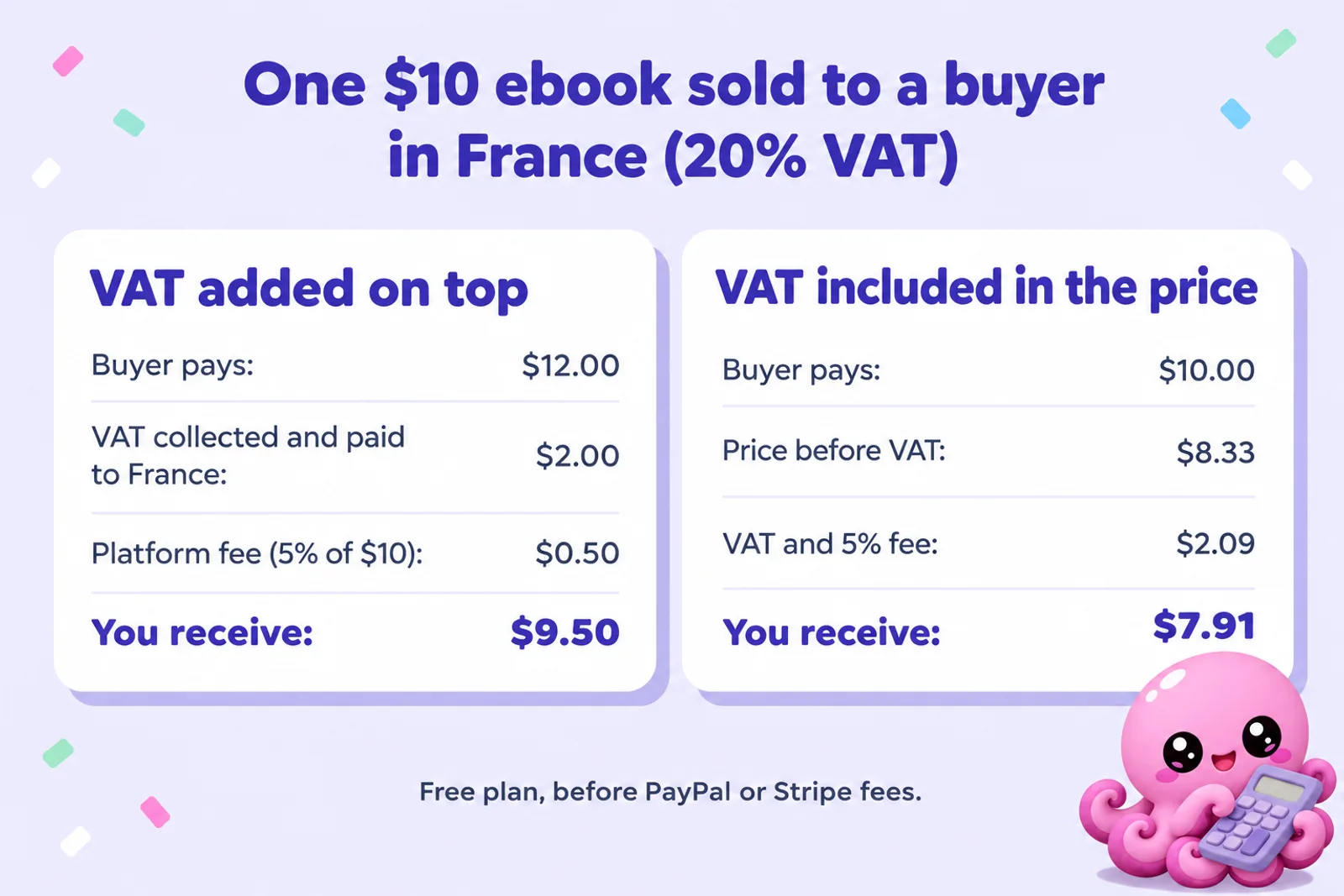
Payhip doesn't call itself a merchant of record. Its terms say "All payments will be made directly to you by the End User", and refunds and chargebacks happen in your own PayPal or Stripe account, so you remain the seller. Lemon Squeezy, a merchant of record, and Gumroad say they handle sales tax worldwide. Payhip covers the four regions where most English-language ebook buyers are; if you sell heavily into Australia, Norway or Switzerland, check your obligations there.
Payments, payouts and refunds
Payhip supports 13 payment processors: PayPal, Stripe, Mollie, Square, Mercado Pago, Flutterwave, Paystack, Xendit, Midtrans, PayU, Razorpay, Iyzico and PayTabs, usually PayPal plus one other. That is a real advantage for authors in Africa, Latin America, India and South East Asia, where Stripe is often unavailable. Through Stripe, buyers also get Apple Pay, Google Pay, buy now pay later and over 100 local methods.
The money never sits with Payhip: sales are "deposited right after a transaction completes" into your own account. Stripe pays your bank daily by default (your first payments stay pending for a few days while Stripe approves you). PayPal holds the money until you withdraw it or turn on automatic transfers, and your first PayPal sale on Payhip goes through an approval step. There is no Payhip payout minimum.
Refunds are issued in PayPal or Stripe, and Payhip's reports update to match. Payhip doesn't say whether its own fee comes back on a refund, and processors generally keep theirs. For chargebacks, Payhip recommends a refund policy page plus the required checkbox at checkout.
Analytics and the mobile app
The dashboard shows sales, views, conversion rate and visitor sources, plus a monthly sales report, and connects to Google Analytics, Google Tag Manager and Facebook and Google tracking pixels. A mobile app (2024, iPhone and Android) shows sales in real time with a notification per order, but products and store design are still managed on the web.
Limits and gaps
Payhip says there are no caps on products, customers, storage, bandwidth or revenue. The limits are in the details:
- 5 GB per file; some executable file types blocked.
- PDF stamping only for portrait PDFs below 250 MB; EPUBs not stamped.
- One language and one currency per store.
- Affiliates paid by you, by hand; collaborator splits via PayPal only.
- The embed button and referrals don't cover courses, memberships, coaching or bundles.
- The API covers only coupons and licence keys; Zapier has triggers but no actions.
- No print on demand of its own and no delivery to Kindle or e-reader apps.
- No phone support, and terms of use dated 19 February 2018.
Support and reputation
Payhip's help centre says support is "available 24 hours a day, 7 days a week" by email at contact@payhip.com, aims to reply within 24 hours, and has no phone line. Help moving from another platform is free on every plan.
On 28 October 2026 Payhip had a Trustpilot TrustScore of 4.5 from 561 reviews: 79% five stars, 5% four, 2% three, 1% two and 13% one star. Payhip replies to 13% of negative reviews, typically within a week. Good reviews praise quick, patient support and an easy store builder. One-star reviews cluster around account lockouts, slow replies and fees above 5%, which is usually VAT. That is a strong rating for a payments business, but take the one-star share seriously: turn on two-factor authentication, keep your account email current, and keep copies of your files and an export of your customer list outside Payhip.
Payhip and AI-written books
Payhip has no written rule about AI-generated content. Its help article "What products are not allowed on Payhip?" lists get-rich-quick schemes, pornography, hate content, copyright infringement, file-sharing, gambling, debt and loan content, cannabis, scraped data, unlicensed medical advice and anything illegal where you live, among others. AI isn't mentioned, and neither do its 2018 terms. Two cautions: the list "is not exhaustive", with PayPal's and Stripe's terms applying too, and the get-rich-quick ban catches a lot of thin "make money online" ebooks however they were written.
Gumroad and Shopify have no rule against AI-written ebooks either, while Etsy requires disclosure and tightened its rules on 22 October 2026. See which stores allow AI-written books and can you sell AI-generated books. Whatever the rules, a book you have planned, edited and described honestly earns fewer refunds and better reviews.
Write a book you are proud to put your name on
Inkfluence AI drafts each chapter from your outline and voice, checks continuity, and lets you edit every line before you export. The free plan lets you try it on a real book.
Try Inkfluence AI freePros and cons
Pros
- Free plan with every feature; 5% a sale against Gumroad's 10% + $0.50
- EU and UK VAT, US and Canadian sales tax collected and paid for you at no extra cost
- Money goes straight to your own PayPal or Stripe, with no payout minimum
- Strong marketing tools on every plan: coupons, cross-sells, upgrade discounts, referrals, affiliates, cart recovery
- PDF stamping and download limits
- 13 payment processors, useful outside the US and Europe
- Profitable, independent company; 4.5 on Trustpilot
Cons
- Brings few buyers; you supply the traffic
- Not a merchant of record outside the EU, UK, US and Canada
- No delivery to Kindle or e-reader apps, and EPUBs aren't stamped
- Affiliates paid by hand
- One language and currency per store
- Email-only support; some reviews report slow replies or lockouts
Who Payhip is best for
A good fit if you:
- Already have readers to send to a shop: a newsletter, blog, podcast or social following. See how to sell your ebook.
- Sell to UK and EU buyers and don't want to register for VAT.
- Sell non-fiction, workbooks, planners or printables as PDFs. See selling workbooks and these digital product ideas.
- Want to grow from one ebook to a course or membership on the same platform, or live where Stripe isn't available.
Look elsewhere if you:
- Have no audience yet: start on Amazon KDP, or Etsy for printables, and add Payhip later. See Payhip vs Etsy.
- Sell mostly EPUB fiction to readers who expect it on their device: use the ebook stores (our guide to publishing wide) or add a delivery service.
- Have the ebook in KDP Select, whose exclusivity rules out selling it on Payhip (KDP Select vs wide).
- Want one company to handle tax in every country: a merchant of record such as Lemon Squeezy fits better.
Alternatives: Gumroad, Lemon Squeezy, Sellfy, Shopify, Etsy
What one $9.99 ebook sale leaves you, US buyer paying by card, from each pricing page on 28 October 2026:
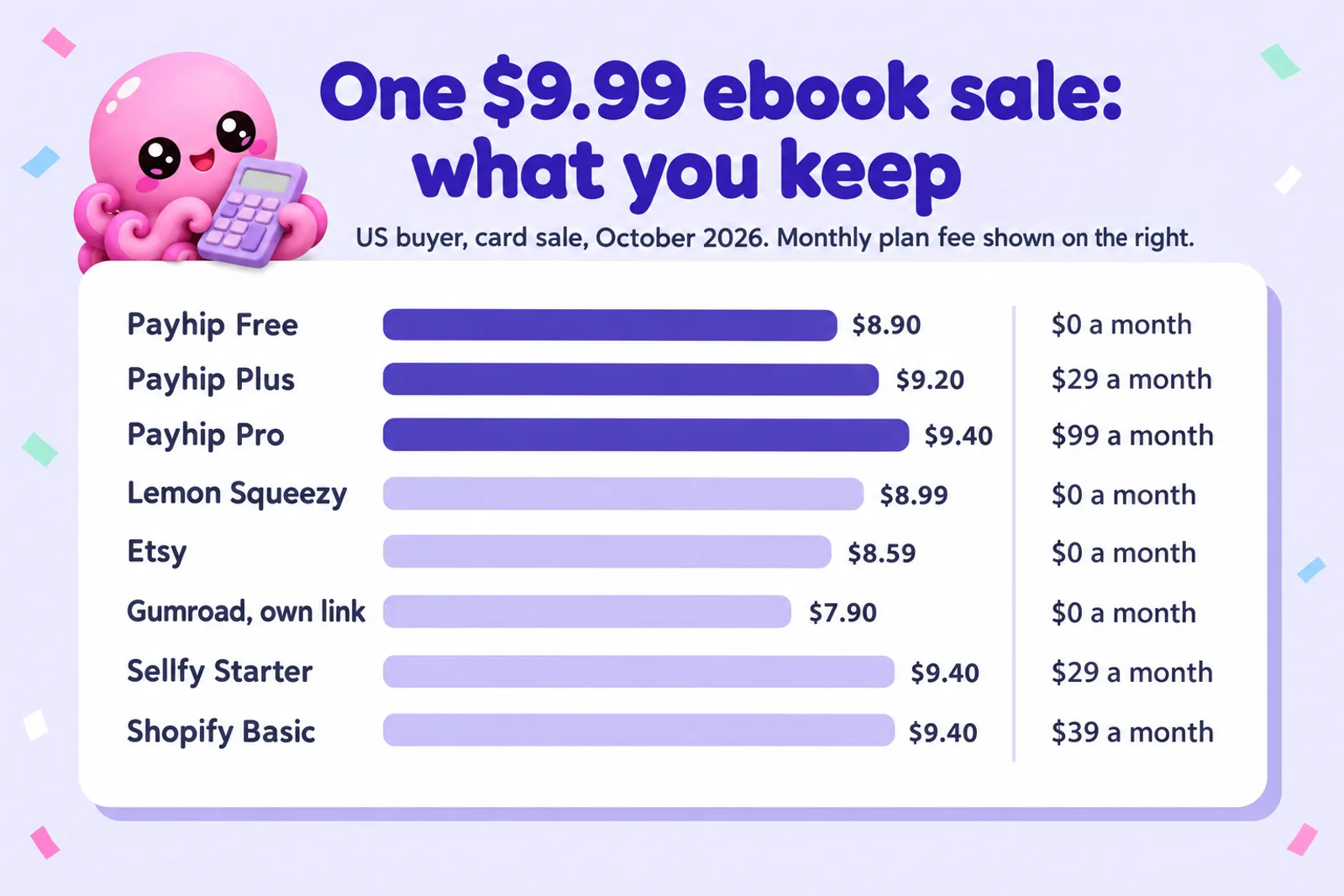
| Platform | Fees | $9.99 sale: you keep | Tax handling | Brings buyers? | Best for |
|---|---|---|---|---|---|
| Payhip | Free 5%; Plus $29 + 2%; Pro $99 + 0%; plus card fees | $8.90 on Free | EU/UK VAT, US and Canadian sales tax | A little (marketplace) | Selling to your own audience, UK and EU buyers |
| Gumroad | 10% + $0.50 direct, 30% via Discover, plus card fees | $7.90 on your own link | All sales tax, it says, since 2025 | Some (Discover) | Creators who want tax handled everywhere |
| Lemon Squeezy | 5% + $0.50, card fees included; extra for international and PayPal | $8.99 | Merchant of record, worldwide | No | Selling worldwide with no tax registration |
| Sellfy | Starter $29 a month ($22 yearly), 0% fee, plus card fees | $9.40 before the plan fee | You are the seller | No | Simple storefront at higher volume |
| Shopify | Basic $39 a month ($29 yearly), card 2.9% + $0.30 | $9.40 before the plan fee | You are the seller | No | Authors also selling print copies and merchandise |
| Etsy | $0.20 listing, 6.5% transaction, 3% + $0.25 processing (US) | $8.59 | Collects sales tax in most regions | Yes, for printables | Workbooks, planners and printables with no audience yet |
- Gumroad costs more per sale but handles tax more widely. See Payhip vs Gumroad, selling ebooks on Gumroad and Gumroad vs Amazon KDP.
- Lemon Squeezy is closest on price and goes further on tax, as a merchant of record everywhere.
- Sellfy and Shopify charge a monthly fee and no cut; at $9.99 a $29 plan only beats Payhip Free at around 58 sales a month. Shopify suits authors also selling print copies (our Shopify guide).
- Etsy is the only one here with real buyers searching, especially for printables. See selling ebooks on Etsy, Etsy vs Gumroad and the October 2026 Etsy AI rules.
Many authors use two: Etsy or Amazon to find new readers, and Payhip for readers who already know them. Inkfluence AI publishes straight to Etsy or Gumroad on Creator and Premium; for Payhip you export the files and upload them.
Setting up an ebook on Payhip
The full walkthrough is in how to sell ebooks on Payhip. The short version:
- Sign up on the free plan. No card is needed.
- Connect payments: PayPal plus Stripe or another card processor.
- Check tax settings: choose whether tax is added on top or included.
- Add a digital product: upload the EPUB and PDF, set price and cover (our AI book cover generator helps), write the description.
- Advanced options: tick "Product is an ebook", add a first-chapter preview, link a mailing list.
- Protection: turn on PDF stamping and a download limit.
- Test with a 100% off coupon, as Payhip suggests, then share the link.
The files are the part Payhip can't help with, and a clean EPUB and a well-formatted PDF cut refunds. The AI ebook generator starts from an idea and the AI book formatter handles a finished manuscript. Payhip also sells audiobook MP3s as a download: our AI audiobook generator makes them, and where to sell an AI audiobook covers the other stores.
Get your files ready for Payhip
Outline, write and edit your ebook in Inkfluence AI, then export the EPUB and PDF you upload to Payhip. Start on the free plan; EPUB export comes with Creator at $9.99 a month or a credit pack.
Create my ebookPayhip review: FAQ
Is Payhip legit and safe to use?
Yes. Payhip is a London company founded in 2011 (company number 08386910) that says it is self-funded, profitable and used by over 130,000 sellers. Buyers pay through PayPal, Stripe or another processor, and Payhip stores no card details. On 28 October 2026 it had a 4.5 TrustScore from 561 Trustpilot reviews.
How much does Payhip charge per sale?
Free Forever takes 5% of each sale, Plus costs $29 a month and takes 2%, and Pro costs $99 a month and takes nothing. PayPal or Stripe add their processing fee on every plan (2.9% + $0.30 at Stripe's standard rate). A $9.99 ebook on the free plan leaves about $8.90.
Which Payhip plan should I choose?
Stay on Free until you sell about $967 a month. Plus is cheapest from about $967 to $3,500 a month, and Pro above $3,500. Every plan has the same features, so the only reason to upgrade is the fee.
Does Payhip handle VAT and sales tax for me?
Mostly. Payhip collects and pays EU and UK VAT on digital sales as your reseller, and since 1 July 2026 it collects and pays US sales tax as a marketplace facilitator and Canadian GST/HST and PST as a digital platform operator. Quebec QST and taxes in other countries stay with you. It charges nothing extra for this.
When do I get paid on Payhip?
Payments go straight into your own PayPal or Stripe account when the sale completes, with no Payhip payout minimum. Stripe then pays your bank daily by default; PayPal lets you withdraw by hand or set automatic transfers. Your first sale through each processor can be held briefly for approval.
Can I sell AI-written ebooks on Payhip?
Payhip has no rule about AI. Neither its list of products that are not allowed nor its terms (last updated in 2018) mention AI-generated content. The list says it is not exhaustive, and PayPal's and Stripe's terms also apply.
Is Payhip better than Gumroad for ebooks?
On price, usually yes: Payhip Free takes 5% and Gumroad 10% + $0.50 on sales through your own links, so a $9.99 ebook leaves about $8.90 on Payhip and $7.90 on Gumroad. Gumroad says it handles sales tax worldwide and has a larger buyer marketplace.
Does Payhip protect ebooks from piracy?
Partly. Download limits cap how many times each buyer can download a file (5 by default). PDF stamping prints the buyer's email and purchase date in the top left of every page, for portrait PDFs below 250 MB. EPUB files are not stamped.
Can I sell my ebook on Payhip and Amazon at the same time?
Yes, unless the ebook is in KDP Select, which requires the digital edition to be exclusive to Amazon for each 90-day term, including your own website. Outside Select you can sell the same ebook on Amazon, Payhip and anywhere else.
Does the Payhip marketplace bring in buyers?
A few. Payhip's marketplace (launched 2024) recommends digital products to new shoppers with no extra fee. Your store needs $10 in sales and a review by Payhip, and each product is approved separately. Treat it as a bonus, not a traffic plan.
Related reading
- How to sell ebooks on Payhip: the step-by-step setup
- Payhip fee calculator: what one sale leaves you, with VAT
- Payhip vs Gumroad (2026)
- Payhip vs Etsy (2026)
- Ko-fi for authors (2026): tips, memberships and a shop on one page
- Where to sell ebooks in 2026: every channel and a picker
- How to make money selling AI ebooks
- The best digital product niches in 2026
- Inkfluence AI for Etsy sellers
- Inkfluence AI plans and pricing
Sources
All read on 28 October 2026.
- Payhip: Pricing (plans, fees, payouts, taxes FAQ)
- Payhip: About (London, 2011, bootstrapped, company number, seller count)
- Payhip: Features, Marketing tools, Email marketing and VAT and taxes
- Payhip: "Payhip is an official partner of MailerLite"
- Payhip: FAQ and Terms of use (last updated 19 February 2018)
- Payhip Help Center: Add digital products, Protect your products, Digital EU and UK VAT, US sales tax, Canada sales tax, How do I get paid?, Connect PayPal, Connect Stripe, Coupons, Cross selling, Upgrade discount, Referral system, Affiliates, Cart abandonment recovery, Marketplace, Collaborations, Mailing lists, MailerLite, Zapier, Public API, Add Payhip to your website, Store language and currency, Print on demand, Mobile app, Changelog, Contact support, What products are not allowed
- Trustpilot: Payhip reviews (TrustScore 4.5, 561 reviews on 28 October 2026)
- Competitor fees: Gumroad pricing, Lemon Squeezy pricing, Sellfy pricing, Shopify pricing, Etsy fees

Founder, Inkfluence AI
Sam is the founder of Inkfluence AI. He built the platform to make book creation accessible to everyone - from first-time authors to seasoned publishers.
Helpful links

Ready to write your own book?
Write with AI, make it yours, and export PDF, EPUB and KDP-ready files from one project.
Keep reading
 Tools
Tools Draft2Digital Review 2026: Fees, Stores, AI Rules and Whether It's Worth It
An honest Draft2Digital review from its own pages in October 2026: the new $20 activation and $12 maintenance fees, the roughly 10% it keeps, every store and library it reaches (and the ones it does not), its AI rules, payments, print and audio, plus a calculator that tells you whether it pays for your books.
 Tools
Tools Draft2Digital vs PublishDrive (2026): Fees, Stores and AI Rules Compared
Draft2Digital keeps about 10% of each sale and now charges new accounts $20. PublishDrive takes 0% commission and charges a flat plan from $0 to $99.99 a month. We compared the two on their own pricing and help pages in October 2026: fees, stores, libraries, Google Play, Amazon, print, audiobooks, AI rules, ISBNs and payouts, with a fee calculator that finds the sales level where a flat plan wins.
 Selling
 How to Sell Ebooks on Lemon Squeezy in 2026: Fees, Tax and Setup
Selling an ebook on Lemon Squeezy in 2026, from its own pricing page and help docs checked 28 October: the 5% + $0.50 fee and every extra, tax handled as merchant of record, payouts, store approval, what you cannot sell, what Stripe's ownership and Managed Payments mean for new sellers, a step-by-step setup and a calculator against Payhip and Gumroad.

Get ebook tips in your inbox
Join creators getting weekly strategies for writing, marketing, and selling ebooks.