
Updated October 2026 · Free, Plus and Pro · fees checked 28 October 2026
Payhip Fee Calculator: What You Keep From Every Sale
Enter your price, plan and monthly sales to see exactly what Payhip, Stripe or PayPal and the tax take from each sale of your ebook, workbook or course, what lands in your account each month and year, and the point where Payhip Plus or Pro starts saving you money. It runs in your browser and nothing is sent anywhere.
By Sam May, founder of Inkfluence AI
Quick answer
Payhip takes 5% per sale on its Free Forever plan, 2% on Plus ($29 a month) and nothing on Pro ($99 a month). Stripe or PayPal then take their own fee on every plan. On a $9 ebook sold to a US buyer by card on the free plan, Payhip takes $0.45, Stripe $0.56, and you keep $7.99. EU and UK VAT is collected and paid by Payhip and added on top of your price by default, so it does not come out of your share. Plus pays for itself once you sell about $967 a month; Pro beats Plus above $3,500 a month.
Payhip fee calculator
Pick a starting point or enter your own figures. Card and PayPal rates follow the currency of your account; where the buyer lives decides the card surcharge and whether VAT applies.
You keep per sale
-
Each month
-
Each year
-
One sale, line by line
Which plan costs least at your sales
| Plan | Per sale | Monthly fee | You keep a month |
|---|
Same product on other platforms
US seller, US buyer, card payment, before tax, at your price after any coupon. Affiliate commission left out because each platform runs affiliates differently.
| Platform | You keep per sale | You keep a month |
|---|
Rates checked 28 October 2026: Payhip pricing and help centre; Stripe standard pricing for US, UK and Irish accounts; PayPal merchant fees for the US, UK and Ireland. Card and PayPal fees are worked out on the whole amount the buyer pays, VAT included. Plan fees are in US dollars and shown in pounds or euros at a rough rate ($1 = £0.75 = €0.86). Not included: Stripe premium EEA cards (2.8% in Ireland), payout or currency conversion fees, income tax, and the other payment providers Payhip supports.

Every Payhip fee in 2026, in one table
Payhip's pricing is simpler than most: three plans that differ only in the monthly fee and the per-sale percentage. Every plan has every feature, unlimited products and no revenue cap. Here is everything that can come off a sale, with where each number comes from.
| Charge | Amount | Who takes it |
|---|---|---|
| Free Forever plan | $0 a month + 5% of each sale | Payhip |
| Plus plan | $29 a month + 2% of each sale | Payhip |
| Pro plan | $99 a month, no transaction fee | Payhip |
| Card payment (Stripe, US account) | 2.9% + $0.30 for a US card; 4.4% + $0.30 for a card from abroad | Stripe, on every plan |
| PayPal (US account) | 3.49% + $0.49; 4.99% + $0.49 from a buyer abroad | PayPal, on every plan |
| EU and UK VAT, US and Canadian sales tax | The buyer's local rate, added on top of your price by default | Collected and paid to the tax office by Payhip; no charge for the service |
| Marketplace sales | No extra fee | Only your plan's normal percentage |
| Affiliate commission | Whatever percentage you set per product | Your affiliate; you pay them yourself |
| Payouts | Immediate, no minimum | No Payhip charge; PayPal or Stripe handle the money |
Sources: Payhip pricing, digital EU and UK VAT, marketplace, affiliates, Stripe US pricing and PayPal US merchant fees, all read 28 October 2026. UK and euro rates are in the payment fee table further down.
How Payhip's fees work
Every Payhip sale passes through three hands before the money is yours: Payhip's own percentage, the payment company's fee, and, for some buyers, the tax office. Only the first one depends on your plan.
1. Payhip's transaction fee
Payhip's percentage is worked out on your price before tax. On the free plan it is 5%, which Payhip's ebook guide describes as "5% of the sale price of each ebook". On Plus it drops to 2% and on Pro to nothing. Because the percentage is the only thing that changes between plans, upgrading is pure arithmetic: you swap a slice of every sale for a fixed monthly fee. The calculator's "which plan costs least" box does that sum at your own sales.
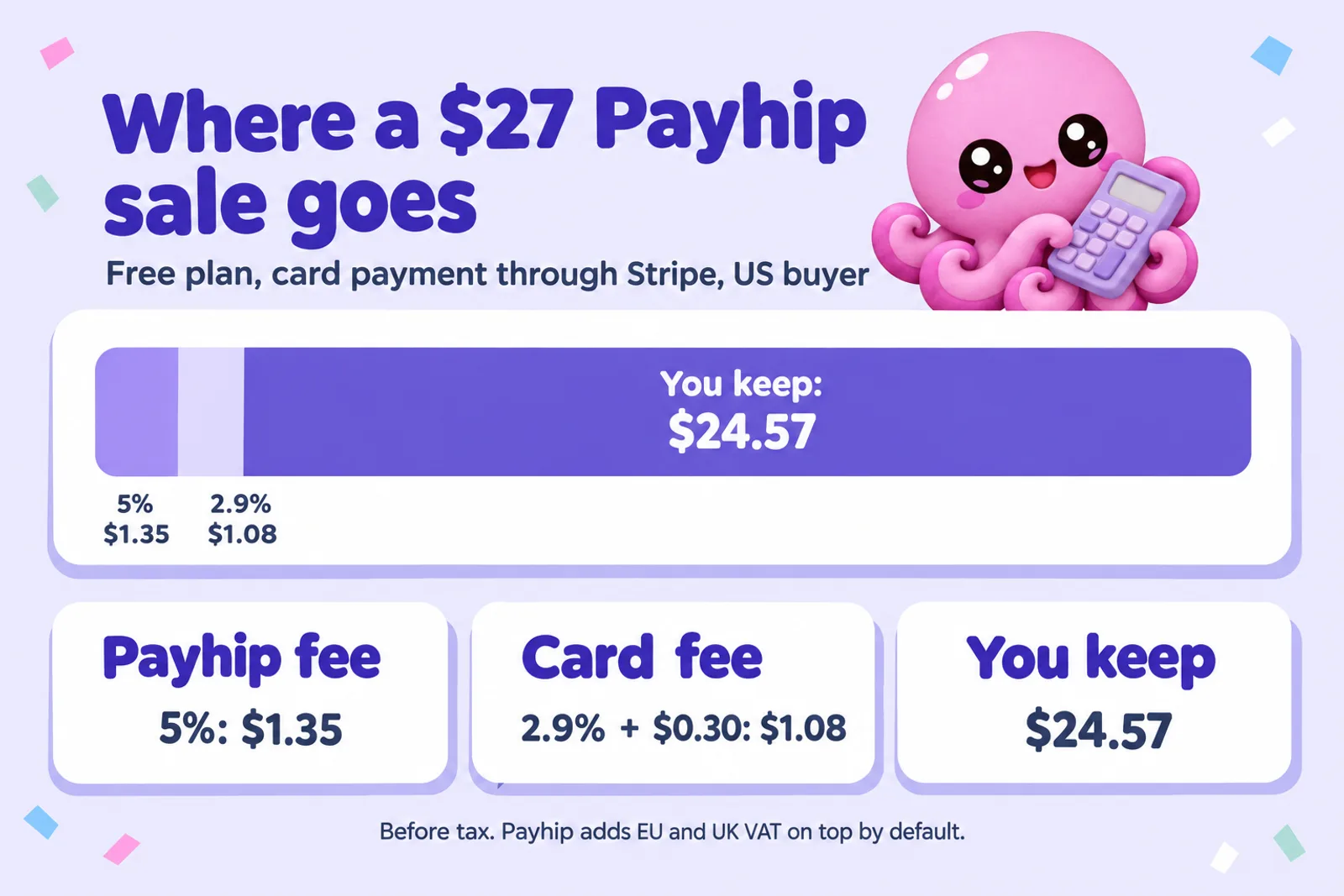
The fee is on what the buyer actually pays you, so a coupon lowers it too. A 20% coupon on a $27 workbook turns the sale into $21.60, and the free-plan fee into $1.08 instead of $1.35.
2. The card or PayPal fee
Payhip does not process payments itself. You connect your own Stripe account to take cards, your own PayPal account, or both, and the buyer chooses at checkout. Payhip's pricing page is plain about it: "PayPal and Stripe will still charge at their standard rates once they complete a transaction." That is true on Pro as well, which is why a Pro seller still loses about 3% to 4% of a small sale.
The fixed part of those fees is what hurts cheap products. Stripe's $0.30 is 6% of a $5 ebook but under a third of 1% of a $97 bundle. PayPal's $0.49 in the US is heavier still: on a $9 ebook a PayPal sale leaves $7.75 against $7.99 by card. Payhip's help centre also lists connections for other payment providers (Mollie, Square, Mercado Pago, Razorpay and several more), each with its own rates; the calculator covers the two most sellers use.
3. Tax
When the buyer is in the EU or the UK, digital sales carry VAT at the buyer's local rate, wherever you live. Payhip says it "automatically collects, reports and remits digital EU/UK VAT as well as US/Canadian sales tax on your behalf", and its tax page explains that for EU and UK buyers it acts as your reseller. By default the tax goes on top of your price, so the buyer pays it and your share is untouched. The VAT section below explains the one setting that changes that.
Nothing else comes off. There is no listing fee, no fee for marketplace sales, no payout fee from Payhip and no minimum payout. Payhip says it deposits sales "immediately after a transaction has been completed", into the PayPal or Stripe account you connected.
Stripe and PayPal fees on Payhip, by country
The payment fee depends on where your Stripe or PayPal account is and where the buyer's card or PayPal account is. These are the standard published rates for the three account types in the calculator; businesses on custom pricing pay their own rates. Payhip charges in your store's currency, so a buyer abroad pays in your currency and their bank does any conversion.
| Your account | Buyer | Card through Stripe | PayPal |
|---|---|---|---|
| US account (US dollars) | US buyer | 2.9% + $0.30 | 3.49% + $0.49 |
| UK or EU buyer | 4.4% + $0.30 | 4.99% + $0.49 | |
| Buyer elsewhere | 4.4% + $0.30 | 4.99% + $0.49 | |
| UK account (pounds) | UK buyer | 1.5% + £0.20 | 2.9% + £0.30 |
| EU buyer | 2.5% + £0.20 | 4.19% + £0.30 | |
| Buyer elsewhere | 3.15% + £0.20 | 4.89% + £0.30 | |
| Ireland account (euros) | EU buyer | 1.5% + €0.25 | 3.4% + €0.35 |
| UK buyer | 2.5% + €0.25 | 4.69% + €0.35 | |
| Buyer elsewhere | 3.15% + €0.25 | 5.39% + €0.35 |
Sources, read 28 October 2026: Stripe pricing for the US (2.9% + $0.30, +1.5% for international cards), UK (1.5% + 20p UK cards, 2.5% + 20p EEA cards, 3.15% + 20p international) and Ireland (1.5% + €0.25 standard EEA cards, 2.8% + €0.25 premium EEA cards, 2.5% + €0.25 UK cards, 3.15% + €0.25 international); PayPal merchant fees for the US (PayPal Checkout 3.49% + $0.49, +1.50% international), UK (2.9% + £0.30, +1.29% EEA, +1.99% elsewhere) and Ireland (3.40% + €0.35, no extra for EEA, +1.29% UK, +1.99% elsewhere). Other euro countries have slightly different PayPal rates.
Two practical points follow. A UK or Irish seller pays much less on home cards through Stripe (1.5%) than through PayPal (2.9% or 3.4%), so if most of your buyers are local it is worth making card checkout the obvious option. A US seller pays more on PayPal than on cards at every price, though some buyers will only check out with PayPal, so most sellers keep both switched on.
Worked examples: a $9 ebook, a $27 workbook and a $97 bundle
Three typical direct-sale products, each worked out by the same engine as the calculator: US seller, US buyer, card through Stripe, before tax. The monthly figure assumes the sales shown and takes off the plan fee.
A $9 ebook
a short how-to ebook as PDF and EPUB, 60 sales a month
| Plan | Payhip | Kept | A month |
|---|---|---|---|
| Free Forever | $0.45 | $7.99 | $479.40 |
| Plus | $0.18 | $8.26 | $466.60 |
| Pro | $0.00 | $8.44 | $407.40 |
- Card fee on every plan: $0.56
- Paid by PayPal instead (free plan): $7.75 kept
- Buyer abroad, card (free plan): $7.85 kept
- Plus pays off from 108 sales a month, Pro from 389
Cheapest at 60 sales: Free Forever, $5,752.80 a year.
A $27 workbook
a printable workbook with exercises, 25 sales a month
| Plan | Payhip | Kept | A month |
|---|---|---|---|
| Free Forever | $1.35 | $24.57 | $614.25 |
| Plus | $0.54 | $25.38 | $605.50 |
| Pro | $0.00 | $25.92 | $549.00 |
- Card fee on every plan: $1.08
- Paid by PayPal instead (free plan): $24.22 kept
- Buyer abroad, card (free plan): $24.16 kept
- Plus pays off from 36 sales a month, Pro from 130
Cheapest at 25 sales: Free Forever, $7,371.00 a year.
A $97 course bundle
a guide, workbook and templates sold together, 15 sales a month
| Plan | Payhip | Kept | A month |
|---|---|---|---|
| Free Forever | $4.85 | $89.04 | $1,335.60 |
| Plus | $1.94 | $91.95 | $1,350.25 |
| Pro | $0.00 | $93.89 | $1,309.35 |
- Card fee on every plan: $3.11
- Paid by PayPal instead (free plan): $88.27 kept
- Buyer abroad, card (free plan): $87.58 kept
- Plus pays off from 10 sales a month, Pro from 37
Cheapest at 15 sales: Plus, $16,203.00 a year.
The $9 ebook. Fees take $1.01 of every sale on the free plan, about 11.22%. Most of that is not Payhip's 5% but Stripe's fixed $0.30, which is why a cheap ebook loses a bigger share than an expensive one on any platform. At 60 sales a month the free plan is still the cheapest: Plus would save $0.27 a sale, $16.20 a month, less than its $29 fee. You would need 108 sales a month before Plus comes out ahead.
The $27 workbook. Fees fall to about 9% of the price, and the plan question gets closer. At 25 sales the free plan keeps $614.25 a month and Plus $605.50; at 36 sales a month Plus takes over. A workbook is also the product where a PDF buyer most often wants to print, so it is worth offering a print-friendly PDF alongside any EPUB. If you are deciding what goes in one, our guide to selling workbooks covers the formats buyers expect.
The $97 course bundle. At this price Payhip's 5% is $4.85 a sale, so the plan you are on matters more than the card fee. At 15 sales a month ($1,455.00 in sales) Plus is the cheapest, and from 37 sales a month Pro is. If your bundle is built around a course, Payhip's course and membership features are included on every plan, so the plan decision stays purely about fees. For turning an existing book into a course, see how to convert a book into an online course.
Payhip and VAT, explained simply
If you sell a digital product to someone in the EU or the UK, VAT is due at the buyer's local rate, even if you live in the US, Canada or Australia. Payhip handles that for you: it works out the rate from the buyer's location, collects it at checkout, and pays it to the right tax office each quarter. For those sales you do not file EU or UK VAT returns yourself; Payhip, as the reseller, does.
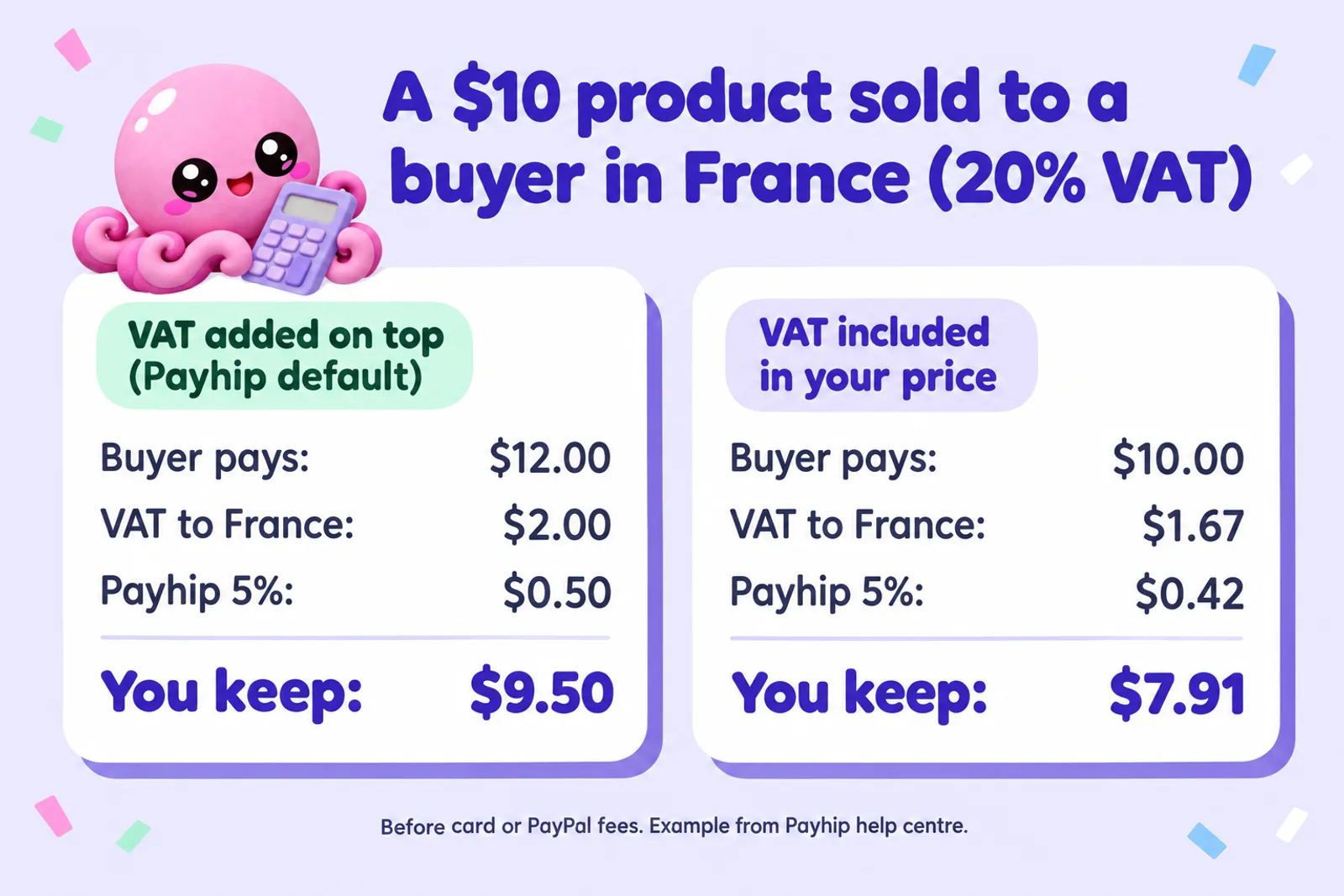
The question that changes your payout is whether the VAT is added on top of your price or taken out of it. Payhip's help centre works through both with a $10 product sold to a buyer in France at 20%:
- Added on top (the default). The buyer pays $12.00. Payhip collects $2.00 of VAT and its 5% fee of $0.50. You keep $9.50, before the card or PayPal fee.
- Included in your price. The buyer pays $10.00. The price before VAT is $8.33, so VAT is $1.67 and the 5% fee is $0.42. You keep $7.91, before the card or PayPal fee.
So "on top" protects your margin and "included" protects a round price. If you like a clean $10 or £10 on your sales page for every buyer, include it and accept the smaller payout from EU and UK buyers; if your margin matters more, leave the default. Buyers outside the EU and UK pay your normal price either way. One detail Payhip's example leaves out: the card or PayPal fee is charged on the whole amount the buyer pays, so with VAT on top it is a little higher ($0.83 on that $12 sale by card from a US account, against $0.74 on the $10 one). The calculator includes that.
Which VAT rate applies to an ebook?
Rates vary by country, and books are often treated differently from other digital products. The UK has charged no VAT on electronic publications since 1 May 2020, though audiobooks are excluded, and an EU change in 2018 (Council Directive 2018/1713) lets EU countries apply their reduced book rates to ebooks too. A course, a template pack or a membership usually pays the standard rate, which is about 17% to 27% across the EU and 20% in the UK. Payhip's help article does not say how it classifies each product type, so we have left the rate as a box you can change: use 20% to match Payhip's example, or check a few lines in your Payhip sales report to see the rate actually charged.
US and Canadian sales tax
Since 1 July 2026 Payhip also collects and pays US sales tax on your behalf, and says it "won't charge you a cent" for doing so; it handles Canadian sales tax as well. As with VAT, your tax settings decide whether that tax is added on top or included. Some US states tax digital products and others do not, so many US buyers pay no tax at all. The calculator treats US buyers as untaxed, which is the same as the default "on top" setting for your share.
For taxes Payhip does not handle itself, it collects the amount at checkout and passes it to you, with a monthly sales report, so you can file it. Payhip collecting VAT is not the same as your own income tax: what you keep is still income in your own country. Gumroad and Lemon Squeezy go further by acting as merchant of record for tax worldwide; our where to sell ebooks guide sets out who handles what. Flat-fee platforms go the other way: Sellfy, for one, is not the merchant of record, so the tax there is yours to file, as our Sellfy guide explains.
When to upgrade to Payhip Plus or Pro
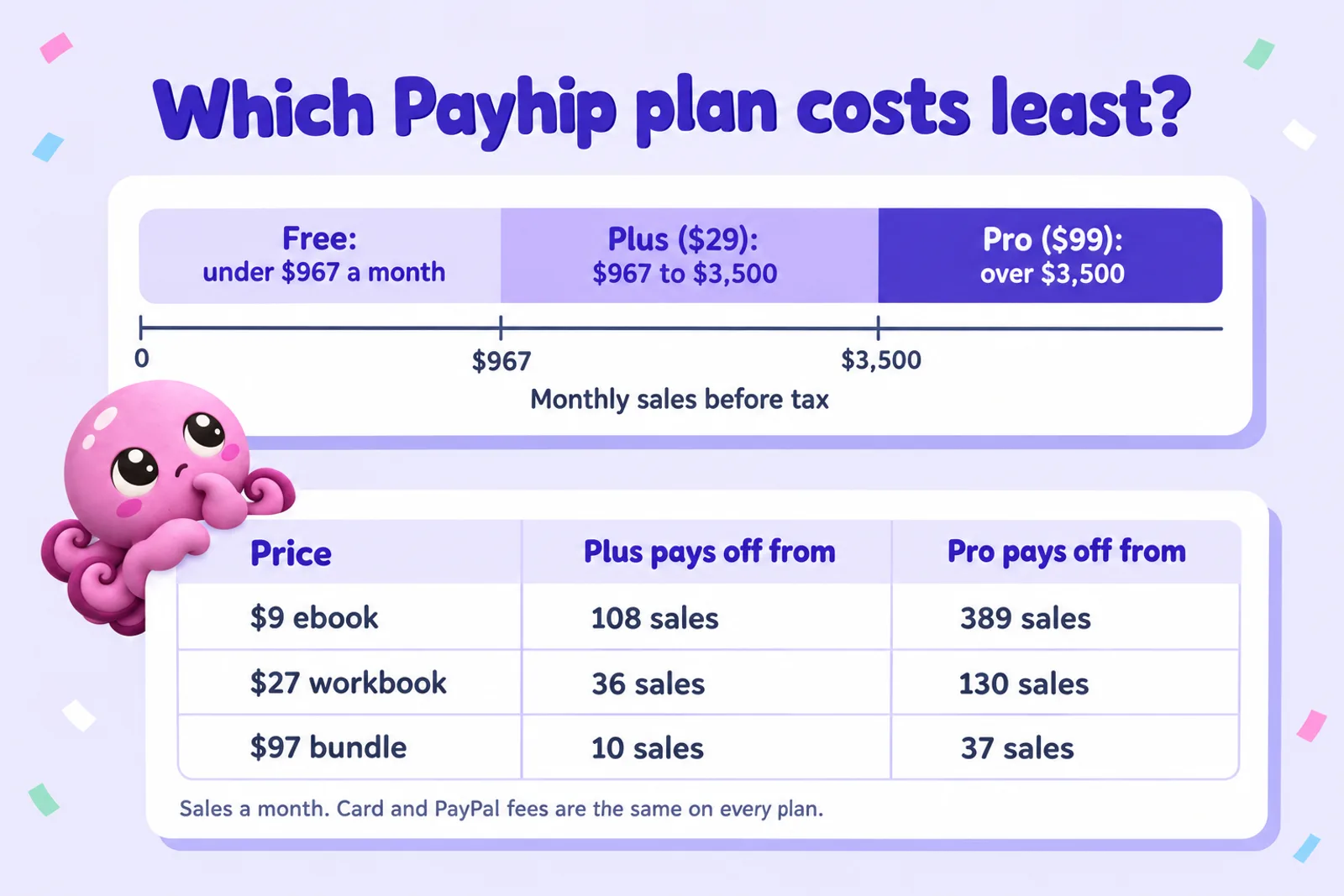
Upgrade when your monthly sales before tax pass $967 (for Plus) or $3,500 (for Pro). Below $967 the free plan costs the least, between the two Plus does, and above $3,500 Pro does. The thresholds are in sales value, not number of sales, so they hold whatever your price.
The maths is short. Plus costs $29 a month and saves 3% of every sale compared with the free plan, so it breaks even when 3% of your monthly sales equals $29, at $967. Pro costs $70 a month more than Plus and saves another 2%, so it beats Plus when 2% of sales passes $70, at $3,500. Pro against the free plan breaks even at $1,980 a month, but by then Plus is already cheaper than both, so the step that matters is Plus to Pro. Card and PayPal fees are identical on every plan, so they never change the answer; nor does VAT added on top, because Payhip's percentage is on the price before tax.
| Price | Plus beats Free from | Pro beats Plus from |
|---|---|---|
| $5.00 | 194 sales a month | 701 sales a month |
| $9.00 | 108 sales a month | 389 sales a month |
| $15.00 | 65 sales a month | 234 sales a month |
| $27.00 | 36 sales a month | 130 sales a month |
| $47.00 | 21 sales a month | 75 sales a month |
| $97.00 | 10 sales a month | 37 sales a month |
| $197.00 | 5 sales a month | 18 sales a month |
Three things to weigh beyond the break-even. First, use an average month, not your launch month: a launch can easily double a normal month's sales, and a $29 plan that paid for itself once can quietly cost more for the next eleven. Second, if you sell several products, add their sales together, because the plan covers the whole store. Third, Payhip says you can cancel at any time, so trying Plus for a busy season, such as the weeks before Christmas or the January rush for planners, and dropping back afterwards is a reasonable plan.
If you are not sure what an average month looks like yet, stay on the free plan (our honest take on ebook income is a useful reality check). It has every feature, and at low volume a 5% fee on sales you have made is cheaper than a fixed fee on sales you hope to make.
Payhip fees vs Gumroad, Etsy and Lemon Squeezy
The same three products on the platforms authors most often compare with Payhip, using the fees in our where to sell ebooks guide, re-checked 28 October 2026. US seller, US buyer, card payment, before tax and before any monthly plan fee.
| Platform | Kept from $9.00 | Kept from $27.00 | Kept from $97.00 |
|---|---|---|---|
| Payhip Free Forever plan | $7.99 | $24.57 | $89.04 |
| Gumroad (your own link) | $7.04 | $22.72 | $83.69 |
| Etsy | $7.70 | $23.99 | $87.34 |
| Lemon Squeezy | $8.05 | $25.15 | $91.65 |
Fee rules behind each row: Gumroad charges 10% + $0.50 on sales through your own link, and we take card processing of 2.9% + $0.30 on top, as Gumroad's pricing page does not say it is included; its Discover marketplace charges 30% instead. Etsy charges a 6.5% transaction fee, 3% + $0.25 payment processing in the US and $0.20 to renew the listing after each sale (Offsite Ads, 12% or 15%, only when its ads bring the buyer). Lemon Squeezy charges 5% + $0.50 with card processing included, plus 1.5% for buyers outside the US and 1.5% for PayPal.
On fees alone, Payhip's free plan beats Gumroad and Etsy at every price in the table and runs close to Lemon Squeezy, which keeps a little more per card sale, at home and from buyers abroad. Payhip Plus and Pro keep more per sale than Lemon Squeezy, once your volume covers their monthly fee. The bigger differences are elsewhere. Etsy brings its own shoppers, which matters if you have no audience yet; Gumroad and Lemon Squeezy act as the seller for tax everywhere; Payhip gives you a full store with coupons, upsells, affiliates, courses and memberships on its free plan. The head-to-heads go deeper: Payhip vs Gumroad, Payhip vs Etsy and our Payhip review.
For the per-copy view across the ebook stores too, the royalty calculator covers Amazon KDP, Apple Books, Kobo and Google Play, and the ebook income calculator turns a price and a sales rate into monthly income. Already on Etsy or Gumroad? Our guides to selling ebooks on Etsy and selling ebooks on Gumroad cover setup on each.
What affiliates and coupons really cost
Both are included free on every Payhip plan, and both come straight out of what you keep, so it is worth running them through the calculator before you set a number.
Affiliates. You choose a percentage for each product when you add an affiliate. Payhip tracks the sales but, in its own words, "is not able to pay your affiliates for you": each month you download the affiliate report, which lists every affiliate's PayPal email and commission, and pay them yourself, for example with PayPal's mass payments. The commission is a cost on top of Payhip's fee and the card fee. A 30% commission on a $27 workbook sold on the free plan leaves you $16.47 instead of $24.57, because the affiliate's $8.10 comes on top of $2.43 in fees. Worth it if the affiliate reaches buyers you would never have reached; expensive if they mostly earn commission on your own fans.
Coupons. Payhip coupons take a percentage or a fixed amount off, and can apply to the whole order, one product or a collection, with an overall usage limit and an expiry date. A discount lowers Payhip's percentage fee in proportion, but not the fixed part of the card fee, so deep discounts on cheap products lose more than they seem to. A 20% coupon on a $27 workbook takes your share from $24.57 to $19.59, a drop of $4.98 on a $5.40 discount. Payhip also has upgrade discounts, which offer a past buyer a lower price on another product after they buy, and these are often a better use of a discount than a public code.
If you run both at once, the calculator applies the coupon first and the commission to the discounted price, which is how most stores set affiliate terms. If only some of your sales come through affiliates, run it once with and once without, and blend the results.
Eight ways to keep more of every Payhip sale
- Raise the price of very cheap products, or bundle them. The fixed $0.30 card fee (or $0.49 on PayPal in the US) is the biggest single fee on anything under about $10. Three $5 guides sold as one $12 bundle pay one fixed fee instead of three.
- Make card checkout easy for local buyers. In the UK and Ireland a home card through Stripe costs 1.5% plus a small fixed fee, about half of PayPal's rate. In the US the gap is smaller but still there. Keep PayPal on for buyers who want it.
- Leave VAT on top unless a round price really matters to you. Including VAT costs you about a sixth of every sale to a buyer in a country with a 20% rate.
- Check the plan every few months against an average month. At $967 a month Plus starts to pay; at $3,500 Pro does. Downgrade after a seasonal peak if a quiet stretch is coming.
- Use upsells and cross-sells. Payhip lets you offer a second product at checkout or after purchase, on every plan. A second item in the same order earns more than a second order, because the order pays one fixed card fee.
- Price affiliate commission for new buyers, not existing ones. Generous rates for partners with their own audience, and no affiliate link in your own newsletter, where buyers would have come anyway.
- Stamp PDFs with the buyer's email. Payhip can stamp the buyer's email address onto the PDF they download, which discourages casual sharing without the hassle of locked files. Fewer shared copies means more paid ones.
- Use the marketplace and your own list. Payhip charges no extra for marketplace sales, so there is no reason not to list there. But most direct sales come from people who already know you, so the cheapest sale of all is to someone on your email list: a free lead magnet is how most authors start one, and our guide to lead magnets that convert covers what to offer.
If you are still deciding what to charge, our guide on how to price an ebook looks at what buyers actually pay by category, and digital product ideas lists formats that suit a direct store.

Making the product you sell on Payhip
Disclosure: Inkfluence AI is our product. It is an AI book writer: you describe the book, it plans the chapters with you, writes a draft of each one for you to edit, and exports the finished book. Here is how that fits a Payhip store, including what it does not do. If you have never made an ebook before, start with how to create an ebook.
- Files Payhip sells well. Export a PDF for anything people print or fill in, an EPUB for reading on a phone or e-reader, or a Word file if you want to edit further elsewhere. Upload one or both to your Payhip product. See our notes on ebook formats if you are choosing.
- Workbooks and course companions. The workbook generator drafts exercises and reflection prompts in each chapter, and the course creator turns a topic into lesson-by-lesson material for a bundle.
- Length. You choose how many chapters the book has; a chapter usually runs about 1,000 to 1,500 words. There is no page or word target beyond that.
- What it does not do. Inkfluence AI does not connect to Payhip: you upload the files yourself, which takes a couple of minutes. On the Creator and Premium plans it can publish straight to your own Etsy shop or Gumroad account. It does not print or ship books.
Plans: a free plan to try it, Creator at $9.99 a month and Premium at $19.99 a month (full pricing). Payhip, for its part, does not publish a rule against AI-assisted ebooks; our store-by-store AI rules cover the platforms that do. For the full setup, from account to first sale, read how to sell ebooks on Payhip.
Payhip fees: frequently asked questions
How much does Payhip take per sale?
On the Free Forever plan Payhip takes 5% of the sale price; on Plus ($29 a month) it takes 2%; on Pro ($99 a month) it takes nothing per sale. Stripe or PayPal then charge their own fee. On a $9 ebook sold to a US buyer by card, the free plan costs $0.45 to Payhip and $0.56 to Stripe, so you keep $7.99.
Is Payhip free to use?
Yes. The Free Forever plan has no monthly fee, all of Payhip's features, unlimited products and no revenue cap. You pay 5% of each sale instead, plus the card or PayPal fee. You only pay a monthly fee if you choose Plus or Pro to lower the per-sale percentage.
Do I pay Stripe or PayPal fees on top of Payhip fees?
Yes, on every plan. Payhip's pricing page says PayPal and Stripe "will still charge at their standard rates". For a US account that is 2.9% + $0.30 for a US card on Stripe and 3.49% + $0.49 for PayPal Checkout, with more for buyers abroad. Even on Pro, a $9 sale still loses $0.56 to Stripe.
Does Payhip handle VAT for me?
For digital products sold to buyers in the EU and UK, yes: Payhip says it collects, reports and pays that VAT on your behalf, acting as your reseller, and it has handled US sales tax since 1 July 2026, plus Canadian sales tax. For other taxes it collects the money and passes it to you to report.
Does VAT come out of my price on Payhip?
Not by default. Payhip adds VAT on top, so a buyer in France pays $12 for a $10 product and you keep the $10 less fees. If you tick the setting to include tax in your price, the buyer pays $10 and the VAT comes out of it: in Payhip's own example you keep $7.91 instead of $9.50, before card fees.
When is Payhip Plus worth it?
When your sales before tax pass about $967 a month. Plus costs $29 and saves 3% of every sale, and 3% of $967 is about $29. For a $9 ebook that is 108 sales a month; for a $27 workbook 36; for a $97 bundle 10.
When is Payhip Pro worth it?
Pro beats Plus once your monthly sales pass $3,500 before tax: it costs $70 more and saves 2% of every sale. Below that, Plus or the free plan costs less. For a $9 ebook that is 389 sales a month; for a $97 bundle, 37.
Is Payhip cheaper than Gumroad?
Per sale, yes. Gumroad charges 10% + $0.50 on sales through your own link, and card processing on top, so a $9 ebook leaves $7.04 on Gumroad against $7.99 on Payhip's free plan. Gumroad acts as the seller for tax everywhere, and its Discover marketplace (30%) can bring buyers you would not reach yourself.
Does Payhip charge extra for marketplace or affiliate sales?
No. Payhip's help centre says there is "no additional fee" for sales from its marketplace beyond the usual fee. Affiliates cost what you choose to pay them: you set a percentage per product, and you pay affiliates yourself, usually by PayPal, from Payhip's monthly affiliate report.
When does Payhip pay me?
Straight away. Payhip says it deposits your sales "immediately after a transaction has been completed", into your connected PayPal or Stripe account, and its ebook guide adds there is no minimum payout. Moving money from PayPal or Stripe to your bank follows their own timings.
Sources
All read 28 October 2026. Fees change; if a number here and the provider's own page disagree, the provider's page wins.
- Payhip: Pricing: plans, transaction fees, PayPal and Stripe fees on every plan, payouts, taxes, charity discounts.
- Payhip: Sell ebooks: 5% on the free plan, UK and EU VAT, PDF stamping, no minimum payout.
- Payhip help: Digital EU VAT and UK VAT: default on top, included option, the $10 France example.
- Payhip: We handle digital EU/UK VAT: Payhip as reseller, quarterly reporting, other taxes passed to you.
- Payhip help: US sales tax: handled from 1 July 2026 at no charge (article updated 4 October 2026).
- Payhip help: Affiliates, Coupons, Upgrade discount and Marketplace.
- Stripe standard pricing: US, UK, Ireland.
- PayPal merchant fees: US (updated 1 October 2026), UK (updated 1 October 2026), Ireland (updated 7 September 2026).
- Gumroad: Pricing: 10% + $0.50 direct, 30% Discover, tax handled since 1 January 2025.
- Etsy Help: Etsy fees and Etsy Fees and Payments Policy (US processing 3% + $0.25).
- Lemon Squeezy: Pricing and fees: 5% + 50 cents, international and PayPal surcharges.
- GOV.UK: Zero rate of VAT for electronic publications and Council Directive (EU) 2018/1713.
Payhip, Stripe, PayPal, Gumroad, Etsy and Lemon Squeezy are trademarks of their owners. Inkfluence AI is an independent tool and is not affiliated with or endorsed by any of them. This page explains fees; it is not tax advice.
Related tools and guides
How to Sell Ebooks on Payhip
Account, product page, files and first sale.
Payhip Review (2026)
What it does well for authors, and where it falls short.
Payhip vs Gumroad
Fees, tax handling and features side by side.
Payhip vs Etsy
Your own store or a marketplace with buyers.
Where to Sell Ebooks in 2026
Every channel's fees, buyers and files, with a picker.
Etsy vs Gumroad for Ebook Sellers
Marketplace reach against a direct checkout.
Ebook Income Calculator
Monthly and yearly income at your price and sales.
Book Royalty Calculator
Per-sale royalties on KDP, Apple, Kobo and more.
Sell Your Book on Shopify
A full store of your own, monthly fee included.
How to Sell Your Ebook
From finished file to first buyers.
PDFs That Build an Email List
The list that makes direct sales cheap.
AI PDF Ebook Maker
Write and export the PDF you will sell.
You know what each sale is worth. Now make the thing to sell.
Write your ebook, workbook or course guide in Inkfluence AI, export the PDF or EPUB, and put it on Payhip. Free to start.
Start writing free