


Quick Answer
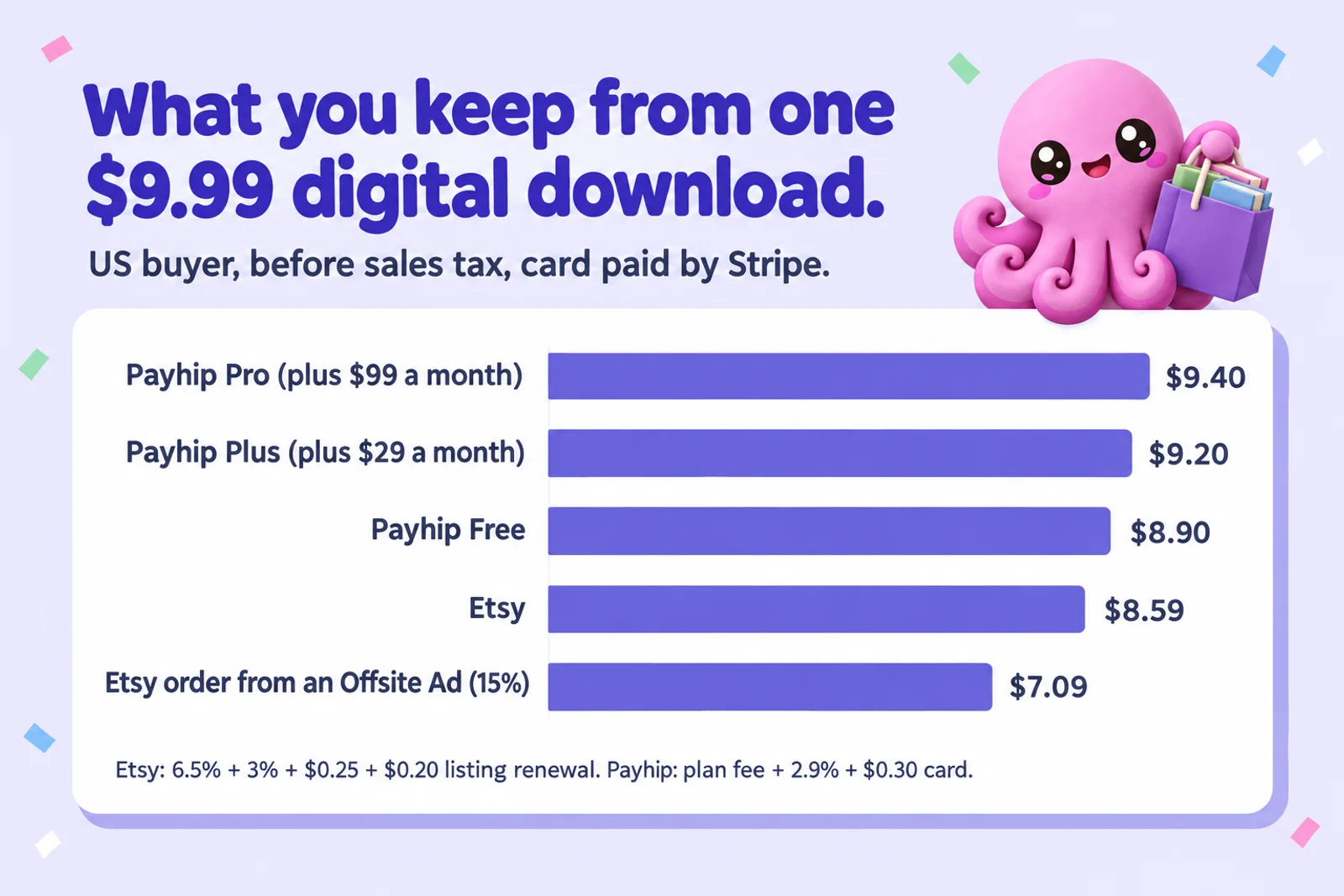
Choose Etsy if you have no audience yet and sell something people search for, such as printable planners, workbooks, journals or colouring pages: Etsy's shoppers find you. Choose Payhip if you already have readers, followers or an email list: you keep a little more of each sale, you get the buyer's email, and every plan includes coupons, bundles, memberships and affiliates. The fee gap is smaller than people think. On a $9.99 download, Etsy leaves about $8.59 and Payhip's free plan about $8.90 (card through Stripe). Etsy orders that come from an Offsite Ad drop to about $7.09. Most sellers who earn steadily use both: Etsy to be found, Payhip for their own buyers.
Checked on 28 October 2026. Every fee and rule below comes from Etsy's or Payhip's own pricing, help and policy pages, read that day and listed in Sources. Money examples are for a US buyer in US dollars, before sales tax or VAT. Where a page did not say something, we tell you instead of guessing.
Etsy and Payhip both sell digital downloads, both take the payment and send the file, and both let you set your own price. Past that they are built for different jobs. Etsy is a marketplace: tens of thousands of shops in one search box, with buyers who arrive looking for "budget planner printable" and pick whichever listing looks best. Payhip is a checkout and storefront: it turns the people you send into sales and hands you their email, but it does very little to send people to you.
So the useful question is "which job do I need done right now". Below: fees line by line, what you keep on a real sale, who buys on each, the AI rules (Etsy changed its rules on 22 October 2026; Payhip has none specific to AI), and the practical parts from listing to payouts, with a calculator for your own numbers.
Disclosure: Inkfluence AI is our product. It writes books, workbooks and planners, exports the files both platforms take, and publishes straight to your own Etsy shop as a draft listing. It does not connect to Payhip; you upload the exported file there yourself. Nothing in this comparison depends on you using it.
Payhip vs Etsy at a glance
The table puts the two side by side on the things that decide most sellers' choice. The money column uses the same $9.99 example throughout, and the sections below explain each row.
| Etsy | Payhip | |
|---|---|---|
| What it is | A marketplace with its own shoppers and search | A checkout and storefront for your own audience, with a small gated marketplace |
| Monthly cost | None (a one-time shop setup fee that varies by location) | Free plan $0, Plus $29, Pro $99 |
| Per-sale fees | 6.5% transaction, 3% + $0.25 processing (US), $0.20 listing renewal per copy sold | 5% (Free), 2% (Plus) or 0% (Pro), plus Stripe or PayPal fees |
| Ad fee | Offsite Ads: 15% (12% over $10,000 a year), capped at $100 an order, only on orders from those ads | None |
| You keep from $9.99 | About $8.59 ($7.09 on an Offsite Ads order) | About $8.90 (Free), $9.20 (Plus), $9.40 (Pro), before the monthly fee |
| Who finds you | Etsy search, categories and Etsy's own ads | Mostly people you send; marketplace listing after $10 in sales and approval |
| AI rules | Allowed with disclosure; bot listings banned; recipes, patterns and instructions must be your own (22 Oct 2026) | No AI rule; general prohibited-products list |
| Files | Up to five files, 20 MB each | Up to 5 GB a file |
| Buyer's email | Not yours to market to | Yours, with consent tools and built-in newsletters |
| Tax | Collects US sales tax in 46 states, DC and Puerto Rico; VAT on digital items in listed countries | Says it collects and remits EU and UK VAT and US and Canadian sales tax |
| Getting paid | Etsy Payments deposits; weekly on Mondays by default for new sellers | Straight into your PayPal or Stripe account after each sale |
Read the table as two trade-offs. Etsy charges a bit more and keeps the customer, but brings buyers you could never reach alone. Payhip charges a bit less and gives you the customer, but relies on you to bring them. Which is worth it depends almost entirely on whether you have an audience today.
Fees, line by line
Etsy's fees for a digital download
Etsy's fee page lists several charges. For a US seller selling a download to a US buyer, four matter on every sale and two more matter sometimes:
- Listing fee: $0.20. Charged when you publish a listing, again when it renews after four months, and again for each additional copy sold, because a digital listing with stock renews its quantity after a sale. In practice, budget $0.20 a sale.
- Transaction fee: 6.5% of the order total, including shipping and gift wrap if you charged for them (a download has neither).
- Payment processing: 3% + $0.25 in the US, worked out on the full sale price including any sales tax. Rates differ by country.
- Offsite Ads: 15% or 12%, only on orders that Etsy's ads on other sites brought in within 30 days. Shops that have never made $10,000 in a 365-day period pay 15% and can opt out in Shop Manager; once a shop passes $10,000 it pays 12% and has to stay in for the life of the shop. The fee never exceeds $100 on one order.
- Setup fee. A one-time, non-refundable fee to open a shop, which Etsy says varies by location and doesn't publish as a single figure.
- By situation: 2.5% currency conversion when your listing currency differs from your bank's, and a regulatory operating fee for sellers in the UK, France, Italy, India, Spain, Türkiye, Vietnam and Canada.
Add up the four everyday fees on a $9.99 download and you keep about $8.59, or 86%. If that order came from an Offsite Ad, the extra 15% ($1.50) takes it to about $7.09. Etsy Ads, the paid promotion inside Etsy that you switch on yourself, is a separate budget and isn't counted here.
Payhip's fees
Payhip has three plans, and its pricing page says every plan includes "all features" and unlimited products, so the only difference is how you pay:
- Free Forever: $0 a month, 5% of each sale.
- Plus: $29 a month, 2% of each sale.
- Pro: $99 a month, no Payhip fee on sales.
On top of that, Payhip says PayPal and Stripe "will still charge at their standard rates". In the US that is 2.9% + $0.30 for an online card payment through Stripe, and 3.49% + $0.49 for a PayPal Checkout payment. So a $9.99 download on the free plan leaves about $8.90 when the buyer pays by card, or about $8.65 through PayPal. Plus leaves about $9.20 and Pro about $9.40 per card sale, before you pay for the plan. Payhip charges no extra fee on sales that come through its own marketplace.
What that looks like at different prices
Percentages hit cheap products harder because of the fixed fees ($0.45 on Etsy, $0.30 or $0.49 on Payhip's processors). These are the per-sale figures, before any monthly plan fee:
| Price | Etsy | Etsy, Offsite Ads order (15%) | Payhip Free, card | Payhip Free, PayPal | Payhip Plus, card |
|---|---|---|---|---|---|
| $3.00 | $2.27 | $1.82 | $2.46 | $2.26 | $2.55 |
| $4.99 | $4.07 | $3.32 | $4.30 | $4.08 | $4.45 |
| $7.00 | $5.89 | $4.84 | $6.15 | $5.92 | $6.36 |
| $9.99 | $8.59 | $7.09 | $8.90 | $8.65 | $9.20 |
| $19.99 | $17.64 | $14.64 | $18.11 | $17.80 | $18.71 |
Two things stand out. Etsy and Payhip's free plan are within about 30 cents of each other at typical printable prices, and almost level with a PayPal buyer. And the number that really moves your Etsy margin is the Offsite Ads share: if a fifth of orders come from those ads, you give up another 3% of revenue on average. The Payhip fee calculator does the Payhip side in more detail.
Which Payhip plan, and when it changes the comparison
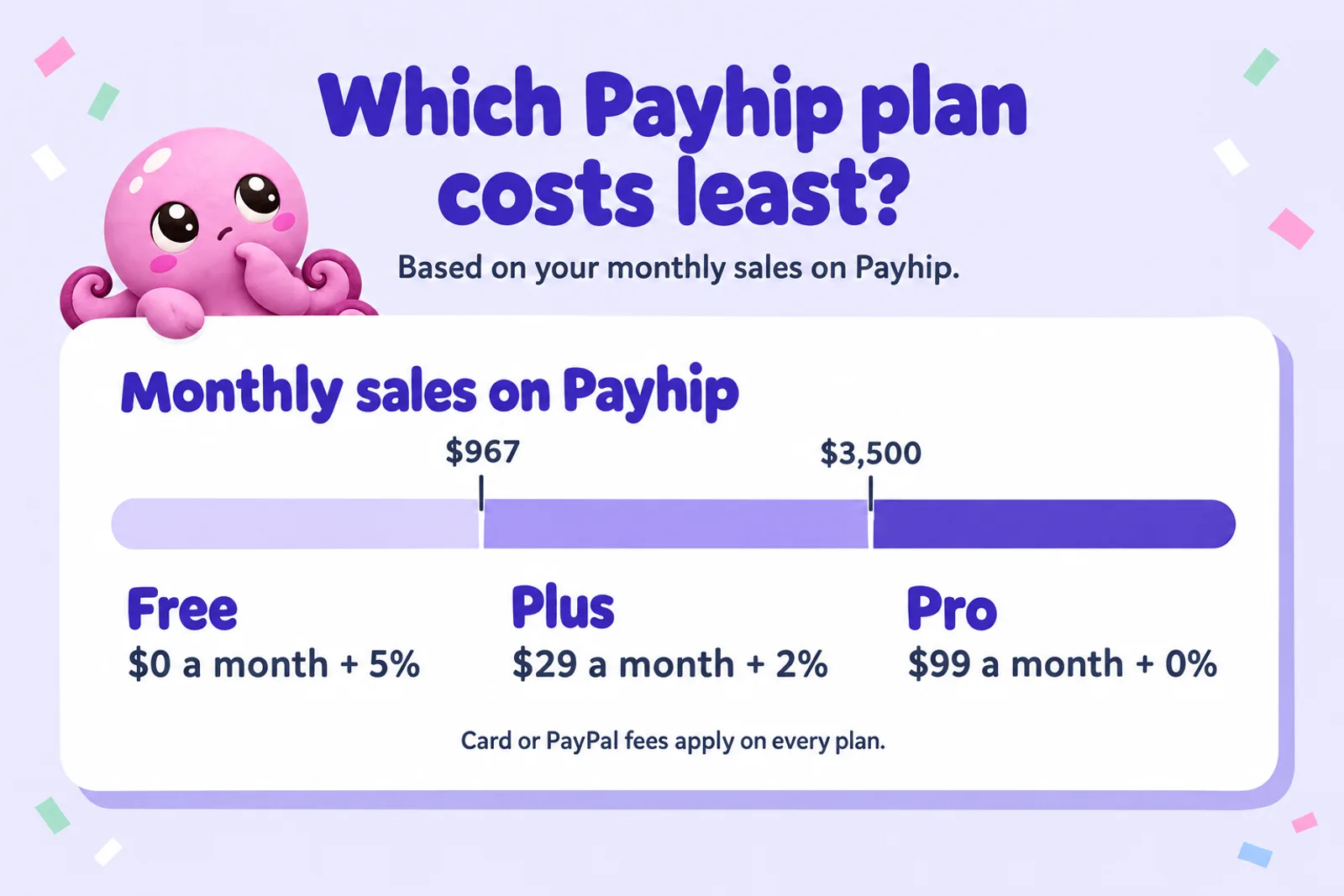
Every Payhip plan has the same features, so the right plan is arithmetic. Plus saves 3% over the free plan, so it pays for its $29 once you sell about $967 a month on Payhip. Pro saves another 2%, so its extra $70 pays off at about $3,500 a month. Below $967, stay on the free plan. So the gap with Etsy only grows for sellers already doing real volume on Payhip, which usually means an audience of their own.
Calculator: what you keep on Payhip and on Etsy
Put in your price and monthly sales on each platform. The calculator gives the per-sale figure on each, the monthly total after Payhip's plan fee, and what the same total sales would leave on either platform alone. Offsite Ads share is the percentage of Etsy orders that came from Etsy's ads on other sites (Etsy reports them in Shop Manager). If you don't know it, try 10%, or 0% if you opted out.
| Etsy | Payhip |
|---|
Constants, checked 28 Oct 2026, US seller and buyer, before sales tax or VAT. Etsy: 6.5% transaction, 3% + $0.25 processing, $0.20 listing renewal per copy sold; Offsite Ads 15% (12% at $10,000+), capped at $100 an order (Etsy fees, payment processing and Offsite Ads help pages). Payhip: Free 5%, Plus $29 a month + 2%, Pro $99 a month + 0% (payhip.com/pricing). Stripe US online card 2.9% + $0.30; PayPal Checkout US 3.49% + $0.49. Leaves out Etsy's one-time setup fee, Etsy Ads you choose to buy, currency conversion and refunds. Sales numbers are yours; this is fee maths, not a forecast.
Make a product to sell on bothWith the starting numbers (a $7 printable, 40 Etsy and 10 Payhip sales a month, 10% Offsite Ads, Payhip Free), Etsy averages about $5.78 a sale and Payhip $6.15: about $231 and $62 a month. Had all 50 sales happened on Payhip, you would keep about $18.50 more a month. That is the real size of the fee argument for a small shop: nowhere near worth giving up 40 buyers you didn't have to find.
Make the planner or workbook first
Describe your product and Inkfluence AI drafts a workbook, planner or guided journal chapter by chapter, then exports a print-ready PDF you can sell on Etsy, Payhip or both. Start free.
Start my product freeAudience: who buys where
Etsy: buyers who are already searching
Etsy's advantage is the shopper who types "weekly meal planner printable" or "kids chore chart" into its search box and buys within minutes. You don't need followers, a website or an email list to get that sale. You need a listing that matches what people type, a cover and preview pages that look like the product, a fair price and, over time, reviews. That is why printables, planners, workbooks, journals and colouring pages sell on Etsy without any marketing, and why novels mostly don't: people buying a novel to read on a phone look in ebook stores, not on Etsy.
Etsy also advertises your listings on other sites through Offsite Ads. The 15% is charged only on orders those ads bring, and small shops can switch it off; many leave it on at first, then check how many orders it actually produces.
The catch is competition. Every popular printable search returns hundreds of near-identical listings, so price pressure is real and a listing that isn't clearly better tends to sink. Our study of what printable shops really make on Etsy goes into the numbers, and the best ebook niches on Etsy looks at where demand outruns supply.
Payhip: buyers you bring, plus a small marketplace
Payhip gives you a storefront, checkout and download delivery. Traffic is your job: your social bio, a video description, a blog post, your newsletter. When those people buy, Payhip records their email, and with its consent settings you can add them to your mailing list for the next product. That relationship is the main thing Etsy can't give you.
Payhip does have a marketplace, launched in 2024, with categories such as Fiction Books, Writing & Publishing, Business & Money, Education, Crafts and Fitness & Health. Getting in has two gates: your store needs at least $10 in total sales (your own test purchases don't count) and a review by Payhip's accounts team, and then each product is approved. Payhip charges no extra fee on sales from it. It is a useful bonus once you are selling, but there is no planner or printables category, and it is not a search engine buyers visit the way they visit Etsy. Plan as if your own channels will bring almost every Payhip sale.
If you are deciding between Payhip and the other direct-sale checkouts as well, Payhip vs Gumroad compares the two closest options, and our Payhip review covers the whole platform.
AI rules: Etsy's October update vs Payhip
Etsy: allowed with disclosure, tighter since 22 October 2026
Etsy allows AI-made digital downloads when the seller plays a clear creative role and discloses it, by choosing "With an AI generator" under How it's made. On 22 October 2026 it tightened the rules in four ways that matter to digital sellers:
- Bot-generated listings are banned. Etsy says listings "without any human involvement" will be removed and the shop may be removed too. A person has to review and publish each listing.
- Functional guides must be your own work. For recipes, patterns and instructions, the information buyers rely on must be yours, "not generated by AI", and the listing has to show a real result made with your instructions. An AI-written recipe ebook is not allowed on Etsy as it stands.
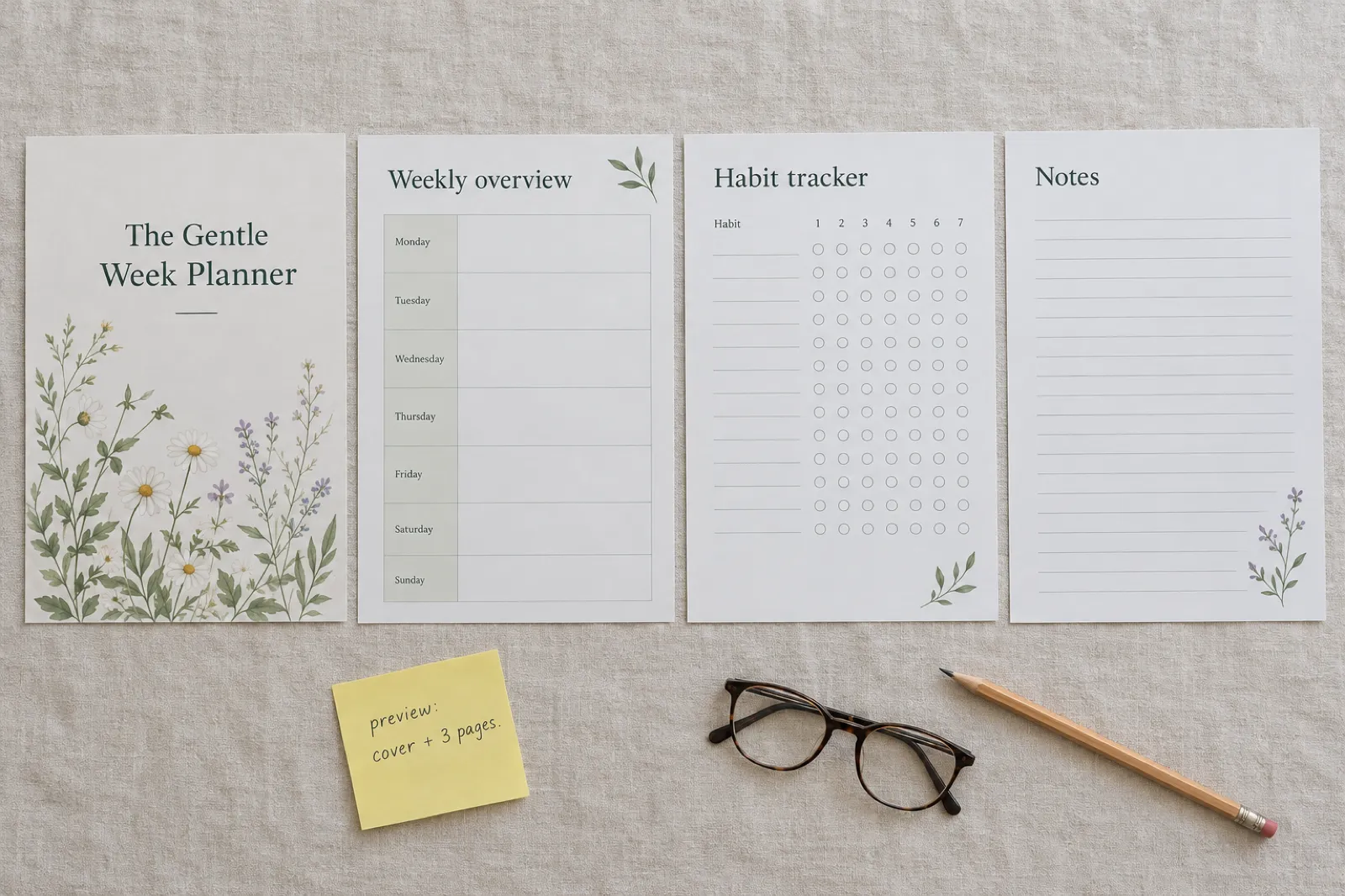
- Digital downloads should show a preview. Under the new Listing Image Requirements, most digital downloads should include "a visual preview or excerpt of the content buyers will receive". For a planner or ebook that means the cover and real interior pages.
- Misleading AI images can be reported, and if a listing's images don't represent the item and a buyer opens a case, Etsy says you may be responsible for the refund.
Our full breakdown, with a checklist for existing listings, is in Etsy's new AI rules, and Etsy AI disclosure explained covers the How it's made setting in detail.
Payhip: no AI rule, a general list of what isn't allowed
Payhip publishes no rule about AI. Its list of products that are not allowed, last updated on 26 July 2026, names 13 categories, among them get-rich-quick schemes, pornography, hate content, copyright infringement, gambling, debt or loan-related content, cannabis products and unlicensed medical services or advice. Payhip says the list "is not exhaustive". None of it mentions AI, so an AI-assisted ebook or planner is treated like any other product. Three items deserve a second look if you write with AI help: get-rich-quick content (a "make $10,000 a month with AI" guide is exactly that), debt or loan content, and medical advice (health ebooks should inform, not diagnose). Your payment processor's rules apply on top.
What this means in practice
A recipe book, pattern or craft guide you did not develop and test yourself is now off the table on Etsy and not on Payhip. That doesn't make it a good product: cookbook buyers expect recipes that work. For everything else (planners, journals, workbooks, colouring pages, ebooks to read) both accept AI-assisted work, Etsy with disclosure and a preview, Payhip with no extra step. The cross-store picture, including Amazon, Apple and Kobo, is in which stores allow AI-written books in 2026, and can you sell AI-generated books covers the general question.
What sells on each
The product often decides the platform before the fees do. This is how the common digital products split, based on who buys them and how they are found:
| Product | Etsy | Payhip |
|---|---|---|
| Printable planners and trackers | Strong: heavily searched, gift and season buying | Good for your followers, bundles and yearly refreshes |
| Workbooks and worksheets | Strong for broad topics (budgeting, habits, homeschool) | Strong when you teach the topic, or sell alongside a course |
| Guided journals | Strong, especially themed and seasonal | Good for coaches and therapists' audiences |
| Colouring pages | Strong: printable colouring is a big Etsy category | Fine for an artist with a following |
| Ebooks to read (how-to, business, self-help) | Moderate, better with a printable element | Strong with an audience: the classic creator ebook |
| Novels and short fiction | Weak: readers shop for fiction in ebook stores | Good for direct sales to an existing readership |
| Lead magnets (free guides) | Not suited: Etsy has no free products, and links off Etsy aren't allowed | Strong: free products collect emails |
| Recipe books, patterns, tutorials | Only if the working content is your own and a real result is shown | Allowed; quality is still on you |
| Courses, memberships, coaching | Not supported | Supported on every plan |
Etsy sells things people look for by name; Payhip sells things people buy because they trust you. If you're still choosing what to make, digital product ideas and the best digital product niches for 2026 start from demand. For specific product types we have selling guides for workbooks, colouring books and devotionals.
Listing effort and search
Listing on Etsy
An Etsy listing is a long form, and most fields affect whether anyone finds you: listing type (digital download), a title that matches how buyers search, up to 13 tags, category and attributes, "How it's made", images, price, and up to five files of 20 MB each. Search matches your title, tags, category and attributes to what buyers type, so the first few listings take a while to get right.
Good digital listings share a few habits: the first image shows what the buyer gets; the title leads with the phrase buyers type ("budget planner printable"); the description states the file type, page count, paper size and how to print; and the preview images show real interior pages, which Etsy now expects anyway. Our guide to selling ebooks on Etsy walks through a full listing, and how to sell AI-generated books on Etsy covers the disclosure side step by step.
Listing on Payhip
A Payhip product takes less work because nobody needs to find it through Payhip. You give it a title, a price, a description and images, upload the file (up to 5 GB each), and optionally a preview file so buyers can sample it. Then you set the extras that make direct selling work: a coupon for your launch, pay what you want pricing, a bundle with your other products, a cross-sell at checkout, an upgrade discount for past buyers, or an affiliate commission for people who promote you. Payhip also has a store builder with themes and support for your own domain, plus SEO settings for your product pages, so your store can be found through Google over time.
The effort moves rather than disappears: on Etsy you spend it on the listing, on Payhip on the posts and emails that send people to it. If you have no time for the second, Etsy is the better investment. The guide to selling ebooks on Payhip covers setup in full.
Turn one idea into an Etsy listing and a Payhip product
Inkfluence AI writes the book or workbook, exports a PDF and an EPUB, and on Creator or Premium creates the Etsy draft listing for you with the cover, files and description in place. Upload the same files to Payhip in a few minutes.
Create my first productReviews, refunds and file protection
Reviews
On Etsy, reviews show on your listings and shop, and buyers comparing near-identical printables use them to choose, so a new shop starts at a disadvantage. On Payhip, reviews are optional: you switch them on, buyers leave them from their download page, and you publish or reject each one (or publish automatically). Payhip reviews reassure people already on your page; Etsy reviews help decide whether people reach it.
Refunds
A download can't be returned, so most digital sellers don't accept returns, and both platforms leave the return policy to you. On Etsy, buyers can still ask for help through Etsy and open a case if an order isn't delivered or isn't as described, and under the 22 October rules Etsy says you may be responsible for the refund when a listing's images don't represent the item. Clear previews and an honest description are the best protection. On Payhip, you issue a refund in your PayPal or Stripe account, and Payhip updates its sales report to match. Stripe does not return its original processing fee on a refund, and Payhip's help article doesn't say whether its own percentage is returned, so assume a refund costs you the fees on that sale.
Protecting the file
Payhip can stamp each buyer's email and purchase date onto a PDF's pages (portrait PDFs only) and allows five downloads per buyer by default. Etsy offers no stamping. Neither stops a determined sharer; stamping just makes it less tempting.
VAT, sales tax and payouts
Tax
Both platforms now take most of the tax work off your hands:
- Etsy calculates, collects and remits US sales tax on orders to buyers in 46 states plus Washington DC and Puerto Rico, digital orders included, as the marketplace. For buyers in the EU, the UK, Norway, Switzerland, Australia and other listed countries, Etsy adds VAT to digital downloads and pays it to the tax authority, so you don't add VAT to your prices.
- Payhip says on its pricing page that it "automatically collects, reports and remits digital EU/UK VAT as well as US/Canadian sales tax on your behalf", at no charge. Its US help article says it took on US sales tax from 1 July 2026 as a marketplace facilitator, and that a seller with a physical presence in a state may still need to file a return there. Older reviews that say Payhip leaves US sales tax to you predate that change.
Neither platform deals with your own income tax: what you earn is yours to report wherever you live. None of this is tax advice.
Getting paid
Etsy pays new sellers weekly, every Monday, by default; you can switch to daily, every two weeks or monthly, with a minimum deposit that varies by country, and Etsy may hold a reserve on a new shop until it has a track record. On Payhip the buyer pays into your own PayPal or Stripe account, and Payhip says it deposits your sales "immediately after a transaction has been completed"; PayPal and Stripe then pay your bank on their own schedules. Early on, Payhip gets money to you sooner.
Using both: Etsy for discovery, Payhip for your own buyers
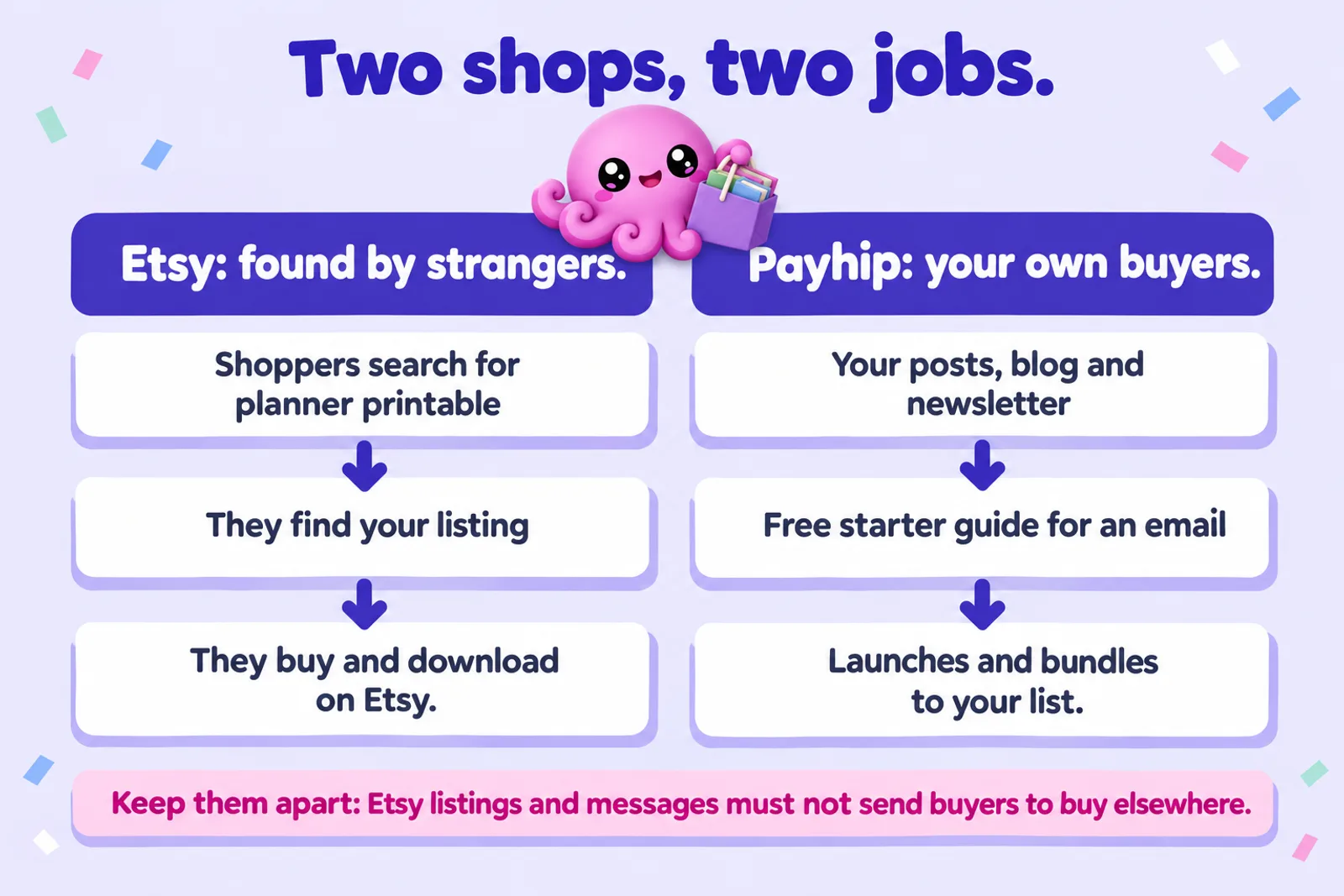
Most established digital sellers end up using both: Etsy finds strangers; Payhip sells to people who already follow you, at a slightly better margin, with their email in your hands. Neither asks for exclusivity.
There is one rule to respect. Etsy's Off-Platform Transactions policy does not allow you to encourage buyers to purchase an item in your Etsy shop through another venue, to offer incentives to shop off Etsy, or to use QR codes that send people off the platform. In practice that means no "buy it cheaper on my website" in listings, messages or listing images, and no discount code for your Payhip store sent to Etsy buyers. Etsy's policy page doesn't spell out what may go inside a delivered file, so we would keep Etsy downloads free of links that sell the same product elsewhere.
Build the Payhip side from your own channels instead. A workable sequence:
- Start on Etsy with three to five listings in one niche, priced to earn first reviews. Watch which ones sell; that is free market research.
- Open a free Payhip store with the same products and one free product, such as a starter guide or a sample week of the planner, that people get for their email.
- Point your own channels at Payhip: your social bio, your posts and videos, your blog. That is where the free product earns its keep.
- Sell launches, bundles and updates to your list on Payhip: the 2027 edition, the full bundle, the companion workbook. Repeat buyers are where direct selling pays.
- Move to Payhip Plus when your Payhip sales pass about $967 a month, not before.
For the wider picture, including Gumroad, Lemon Squeezy, Shopify and the ebook stores, read where to sell ebooks in 2026. If Gumroad is on your shortlist too, Etsy vs Gumroad for ebook sellers and the Gumroad selling guide cover it. To model what a catalogue could earn over a year, try the ebook income calculator, and for setting a price that works on both platforms, how to price an ebook. If you're planning a holiday product, the KDP Christmas deadlines page has this year's print dates for a paperback edition.
Where Inkfluence AI fits
Inkfluence AI writes the product; Etsy and Payhip sell it. Here is exactly what it does for each:
- Write the product. Describe a workbook, planner, guided journal, colouring book or ebook and it drafts it chapter by chapter (roughly 1,000 to 1,500 words a chapter), or import your own manuscript. The workbook generator, AI journal generator, colouring book generator and lead magnet generator are starting points for each type.
- Export the files. PDF for printables, EPUB for reading on a device, plus DOCX and KDP print files. The free plan exports PDF with a branding page; EPUB, Word and KDP files come with any plan or credit pack. See exporting help. Inkfluence makes print-ready files; it does not print or ship anything.
- Create the Etsy listing for you. On Creator or Premium, the Publish button connects your own Etsy shop and creates a digital download listing with your cover as the first photo, the files you choose (PDF by default, EPUB or both), and a title, description, price and up to 10 tags filled in for you to edit. The description carries a line saying the book was made with AI assistance. The listing arrives as a draft: you open it on Etsy, tick "With an AI generator", add your preview pages and any extra tags (Etsy allows 13), and publish it yourself. That keeps a person in charge of every listing, which is what Etsy's ban on bot-generated listings asks for. Files over Etsy's 20 MB limit are flagged before anything is sent. Step by step: selling help.
- Payhip: upload the export. There's no Payhip connection: download the PDF or EPUB and add it as a digital product, with the same cover and a few interior pages as the preview file.
Plans are $9.99 a month for Creator and $19.99 for Premium, or $89 and $179 a year; pricing lists what each includes. For more on producing and pricing the product itself, see the AI ebook generator, the cover generator and ebook formats explained.
Write it once, sell it on Etsy and Payhip
Start a product free in Inkfluence AI. When it is ready, send the draft listing to your Etsy shop and download the same PDF for your Payhip store.
Write my productPayhip vs Etsy: FAQ
Is Payhip or Etsy better for selling digital products?
Etsy is better with no audience, for products people search for (printable planners, workbooks, journals, colouring pages), because Etsy brings the buyers. Payhip is better once you have readers, followers or an email list: it keeps slightly more of each sale and gives you the buyer's email. Many sellers use both.
Which is cheaper per sale, Payhip or Etsy?
Payhip, by less than most people expect. On a $9.99 download paid by card, Etsy leaves about $8.59 and Payhip's free plan about $8.90; with a PayPal buyer the gap is about $0.06. Etsy orders from an Offsite Ad cost another 15% (12% for shops over $10,000 a year).
Does Payhip have a marketplace like Etsy?
Yes, but it is small and gated. Your store needs $10 in total sales and a review by Payhip's team, and each product is approved. There is no extra fee on marketplace sales. Treat it as a bonus, not a source of buyers like Etsy search.
Can I sell the same printable on Etsy and Payhip at the same time?
Yes. Neither platform asks for exclusivity. What Etsy does not allow is using your Etsy shop to push buyers to purchase elsewhere, so promote your Payhip store through your own channels.
Can I link my Etsy buyers to my Payhip store?
Not from Etsy listings, messages or listing images. Etsy's Off-Platform Transactions policy rules out encouraging buyers to purchase an Etsy item through another venue, incentives to shop off Etsy, and QR codes that send people off the platform.
Does Payhip allow AI-generated ebooks and printables?
Payhip has no AI rule. Its list of products that are not allowed (updated 26 July 2026) names 13 categories, such as get-rich-quick schemes, copyright infringement and unlicensed medical advice, and none mention AI. Those content rules still apply to AI-assisted products.
What are Etsy's AI rules for digital downloads in 2026?
AI-made downloads are allowed if you play a clear creative role and tick "With an AI generator". Since 22 October 2026, bot-generated listings are banned, recipes, patterns and instructions must be your own work, and digital downloads should show a preview of what buyers receive.
Who handles VAT and sales tax on Payhip and Etsy?
Mostly the platforms. Etsy collects US sales tax in 46 states, DC and Puerto Rico, and VAT on digital items in the EU, UK and other listed countries. Payhip says it collects and remits EU and UK VAT and US and Canadian sales tax (US since 1 July 2026). Your income tax is still yours.
Can Inkfluence AI publish to Payhip?
Not directly. On Creator and Premium it creates a draft listing in your own Etsy shop (and publishes to Gumroad). For Payhip, export the PDF or EPUB and upload it as a digital product yourself.
When should I upgrade to Payhip Plus or Pro?
Plus ($29 a month, 2%) beats the free plan (5%) once you sell about $967 a month on Payhip; Pro ($99, no Payhip fee) beats Plus from about $3,500 a month. Features are the same on every plan.
Your first digital product starts with a finished draft
Pick a topic and a format, set the chapters, and Inkfluence AI drafts it with you. Edit it, export it, and list it on Etsy and Payhip the same day.
Open my dashboardSources
Read on 28 October 2026 unless noted.
- Etsy Help: Etsy fees (listing, transaction, Offsite Ads, setup and other fees)
- Etsy Help: Payment processing fees (US 3% + $0.25, on the total including shipping and sales tax)
- Etsy Help: How Etsy's Offsite Ads work (attribution, threshold, opt-out, cap)
- Etsy Help: How to manage your digital listings (up to five files, 20 MB each)
- Etsy Help: How US state sales tax applies to Etsy orders (46 states, DC and Puerto Rico, digital orders included) and How VAT works on digital items
- Etsy Help: How to receive your Etsy Payments deposit (weekly on Mondays by default for new sellers; reserves)
- Etsy House Rules: Off-Platform Transactions (the page blocks automated reading; wording as shown in search results on 28 October 2026)
- Etsy Seller Handbook, "Important updates to AI use on Etsy" (22 October 2026), Listing Image Requirements and Creativity Standards, as quoted in our October update guide
- Payhip: Pricing (plans, processor fees, tax, deposits)
- Payhip Help: US sales tax FAQ (from 1 July 2026; updated 4 October 2026)
- Payhip Help: Marketplace ($10 in sales and review, digital products only, no extra fee; updated 13 May 2026) and the marketplace itself
- Payhip Help: What products are not allowed on Payhip? (updated 26 July 2026)
- Payhip Help: Add digital products (5 GB a file, preview files) and Protecting your products (PDF stamping, download limit of 5)
- Payhip Help: Customer reviews and How do I refund a transaction?
- Payhip blog: features launched in 2024 (marketplace launch, no additional fees)
- Stripe: Pricing (US online cards 2.9% + 30 cents) and fees on refunded payments
- PayPal: Merchant fees (US) (PayPal Checkout 3.49% + $0.49)
Related reading
- How to Sell Ebooks on Payhip and the Payhip fee calculator
- Payhip Review (2026) and Payhip vs Gumroad
- How to Sell Ebooks on Etsy
- How to Sell AI-Generated Books on Etsy
- Etsy's New AI Rules (October 2026)
- How Much Can You Make Selling Printables on Etsy?
- Where to Sell Ebooks in 2026
- How to Sell Ebooks on Sellfy, the flat-fee alternative to Payhip
- How to Sell Your Ebook and the ebook marketing guide
- Low-Content Book Income in 2026

Founder, Inkfluence AI
Sam is the founder of Inkfluence AI. He built the platform to make book creation accessible to everyone - from first-time authors to seasoned publishers.
Helpful links

Ready to write your own book?
Write with AI, make it yours, and export PDF, EPUB and KDP-ready files from one project.
Keep reading
 Selling
 How to Sell Ebooks on Lemon Squeezy in 2026: Fees, Tax and Setup
Selling an ebook on Lemon Squeezy in 2026, from its own pricing page and help docs checked 28 October: the 5% + $0.50 fee and every extra, tax handled as merchant of record, payouts, store approval, what you cannot sell, what Stripe's ownership and Managed Payments mean for new sellers, a step-by-step setup and a calculator against Payhip and Gumroad.
 Selling
 How to Sell Ebooks on Sellfy in 2026: Plans, Fees and Is It Worth It
Sellfy charges a flat monthly plan and 0% per sale, with no free plan and a sales cap on every tier. Here is what each plan costs and includes, how tax, delivery and PDF stamping work, a step-by-step setup for an ebook, and a calculator that shows when Sellfy beats Payhip, Gumroad and Lemon Squeezy at your own sales.
 Selling
 Ko-fi for Authors (2026): Selling Ebooks, Memberships and Commissions Through Ko-fi Shop
Ko-fi for writers, checked against Ko-fi's own help centre on 28 October 2026: what the free plan and Ko-fi Gold really take, how tips, Ko-fi Shop, memberships and commissions work for authors, PayPal and Stripe fees, payouts, tax, the AI rule, discovery, a Ko-fi earnings calculator, and how it compares with Patreon, Payhip and Gumroad.

Get ebook tips in your inbox
Join creators getting weekly strategies for writing, marketing, and selling ebooks.