
Updated October 2026 · earnings calculator · Payhip pages checked 28 October 2026
How to Sell Ebooks on Payhip: Fees, VAT, Setup and What You Keep
Payhip lets you sell a PDF or EPUB from your own store for 5% a sale on its free plan, takes care of VAT and sales tax, and pays each sale straight into your PayPal or Stripe account. This guide checks every fee and feature against Payhip's own pages, walks through the setup in ten steps, and works out what you keep on each plan.
By Sam May, founder of Inkfluence AI
How do you sell an ebook on Payhip? The short answer
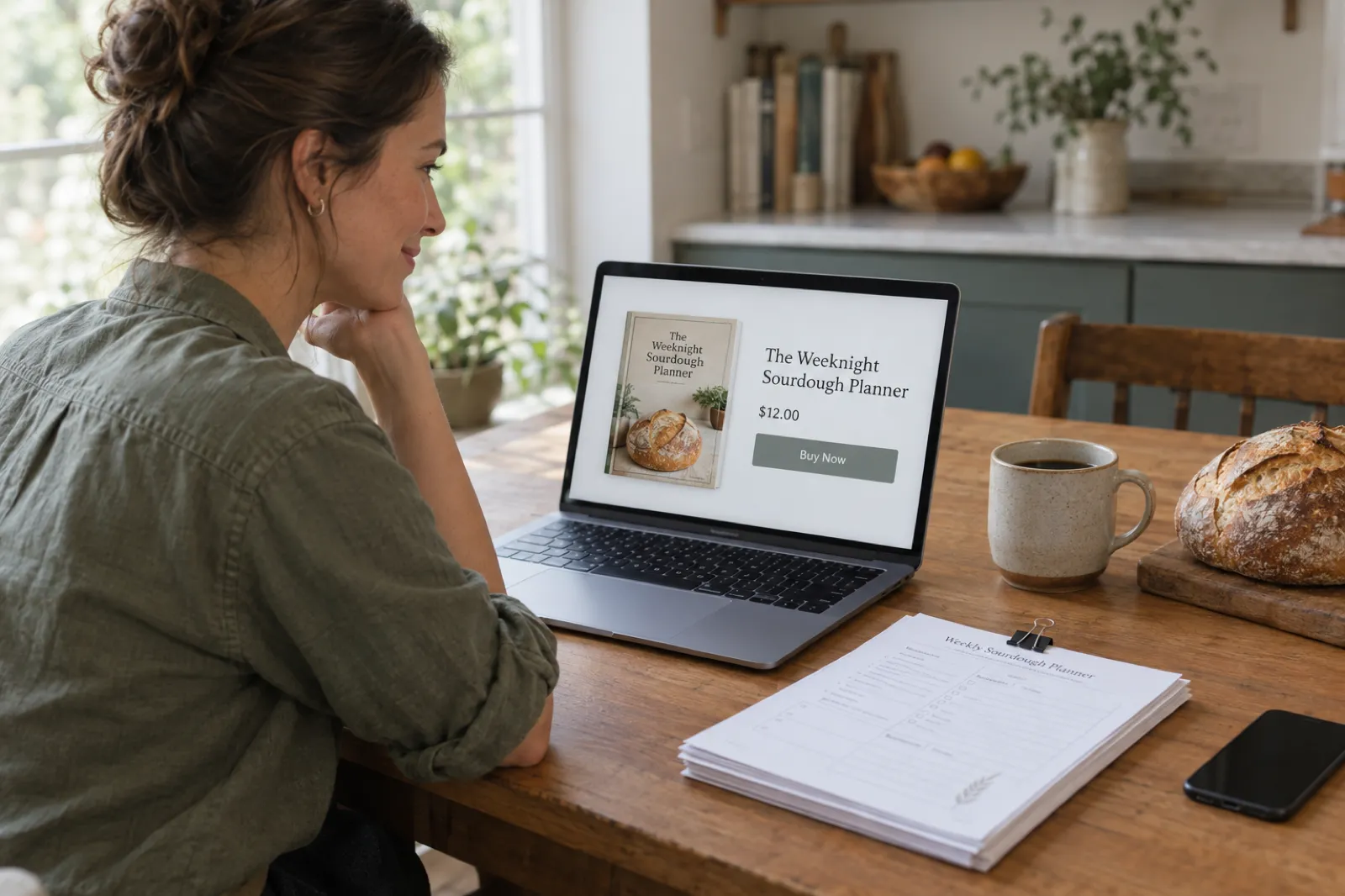
To sell an ebook on Payhip, sign up free, connect PayPal or Stripe, add a digital product, upload your PDF or EPUB with a cover and description, set a price, and share the product link or your Payhip store. Payhip delivers the file the moment someone pays, collects EU, UK, US and Canadian tax for you, and sends the money straight to your payment account. On the free plan it takes 5% of each sale, plus the processor's fee.
What Payhip does not do is find you readers. Its marketplace recommends some products once a store has made its first $10 in sales, but most sales come from people you send: a newsletter, a blog, a YouTube channel, a social account, a course. If you have none of those yet, a store with built-in shoppers, such as Etsy for printable PDFs or Amazon for books people read, usually brings a first sale sooner. Our guide to where to sell ebooks in 2026 compares every route on what a sale pays, and Ko-fi for authors covers adding tips and memberships for readers who already follow you.
Disclosure: Inkfluence AI is our product. It writes and exports the ebook; it does not connect to Payhip, so you upload the file to Payhip yourself. Nothing on this page is sponsored by Payhip.
Payhip facts for ebook sellers, with sources
Each line below was read on Payhip's own pricing page or help centre on 28 October 2026. Payhip changes things (the US and Canadian tax handling only started on 1 July 2026), so follow the link before you rely on a number.
| Fact | What Payhip says | Source |
|---|---|---|
| Plans | Free Forever $0 a month + 5% per sale; Plus $29 a month + 2%; Pro $99 a month + 0%. Every plan gets every feature. | Payhip pricing |
| Card and PayPal fees | Charged by PayPal or Stripe on every plan, on top of the Payhip fee. Stripe's standard rate is 2.9% + $0.30; the fees go to the processor, not to Payhip. | Payhip help: Connect your Stripe account |
| EU and UK VAT | Collected for you by default on digital sales, added on top of your price or included in it (your choice in Tax settings). | Payhip help: Digital EU VAT & UK VAT |
| US and Canada sales tax | Handled by Payhip from 1 July 2026, free of charge; Payhip is a marketplace facilitator in the US. Quebec QST stays with the seller. | Payhip help: US Sales Tax, Canada Sales Tax |
| Getting paid | Each payment goes straight to your connected PayPal or Stripe account at the time of purchase. Stripe pays out to your bank daily by default. | Payhip help: Missing payment or payout |
| Files | Any number of files per product, up to 5GB each. Most file types allowed, including PDF, EPUB and ZIP. | Payhip help: Add digital products |
| PDF stamping | Stamps the buyer's email and purchase date on the top left of every page, for portrait PDFs under 250MB. Download limit defaults to 5. | Payhip help: Protect your products |
| Marketplace | Payhip recommends approved digital products to new buyers once your store has $10 in total sales and an account review. No extra fee. | Payhip help: Marketplace |
| AI-written books | Not mentioned. The restricted-products list (13 categories, updated 26 July 2026) has no rule on AI-generated content. | Payhip help: What products are not allowed |
What Payhip is, and who it suits
Payhip is a store and checkout for things you make: digital downloads, online courses, memberships, coaching and physical products, all from one account. It says it is trusted by over 130,000 creators. For an ebook author, the useful part is simple: you upload a file, Payhip builds a product page and a checkout, takes the payment, delivers the download and deals with the tax paperwork on digital sales.
It sits in the same group as Gumroad and Lemon Squeezy: a checkout you send buyers to, rather than a bookstore buyers browse. The differences are in the details. Payhip charges a lower percentage than Gumroad on a typical ebook, offers monthly plans that cut the percentage to 2% or nothing, and has built-in tools that authors usually pay for elsewhere: PDF stamping, coupons, an affiliate programme, cross-sells and a store builder with a blog.
Payhip suits you if you already have somewhere to send readers, if you sell to the UK or EU (its VAT handling is one of the main reasons European authors use it), if you sell PDFs that people print, such as workbooks, planners and templates, or if you want to bundle an ebook with a course or a membership later. It suits you less if you want a bookstore audience: Payhip's marketplace is small next to Amazon's or Etsy's, and an ebook nobody links to will not sell there.
If you are choosing between direct platforms, the sibling guides go deeper: Payhip vs Gumroad, Payhip vs Etsy and our full Payhip review. If you also sell from a Shopify store, selling your book on Shopify covers that route.
Payhip fees and plans in 2026
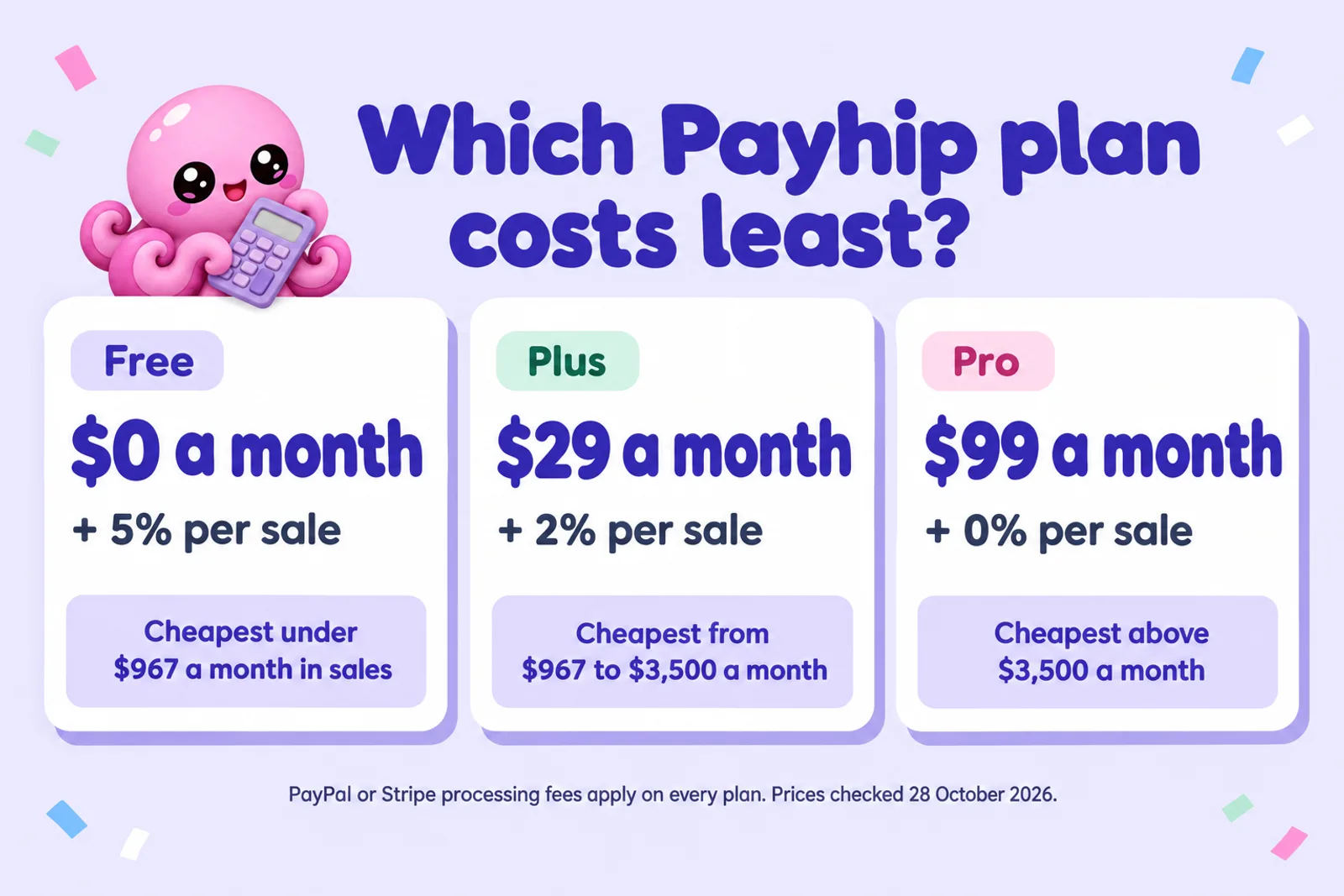
Payhip has three plans, and they differ only in price. Its pricing page says there is "no feature-gating here": the free plan gets PDF stamping, coupons, affiliates, courses and every other tool. What changes is the trade between a monthly fee and a cut of each sale.
Free Forever
$0 a month
+ 5% per sale
Cheapest: Under about $967 a month in sales
The default. Nothing to pay until you sell.
Plus
$29 a month
+ 2% per sale
Cheapest: About $967 to $3,500 a month
Saves 3% of sales, so it pays for itself at $967.
Pro
$99 a month
+ 0% per sale
Cheapest: Above $3,500 a month
Costs $70 more than Plus and saves 2%, so it wins at $3,500.
On top of Payhip's cut, the payment processor takes its own fee on every plan. Payhip's help centre gives Stripe's standard rate as 2.9% + $0.30 a transaction, varying by country, and says those fees go to Stripe, not Payhip. PayPal's US business fee page lists 2.99% + $0.49 for card payments, 3.49% + $0.49 when the buyer pays through PayPal Checkout, and an extra 1.5% on international payments. Those processing fees are the same wherever you sell direct, so the Payhip plan is the only part you choose.
The break-even points are simple arithmetic. Plus costs $29 more than Free and saves 3% of your sales, so it pays for itself at about $967 of sales a month. Pro costs $70 more than Plus and saves another 2%, so it wins above $3,500 a month. Under $967 a month, stay on Free: a $29 plan you do not need eats more than the 3% it saves.
Two worked examples, with Stripe at 2.9% + $0.30 and no VAT. A $9.99 ebook selling 30 copies a month: Free leaves $8.90 a sale and $267.03 a month; Plus leaves $247.02 after its fee; Pro leaves $183.01. A $12 ebook selling 100 copies a month ($1,200 in sales): Free leaves $1,075.20, Plus $1,082.20 and Pro $1,036.20, so Plus just wins. Put your own numbers into the calculator below, or the full Payhip fee calculator for more scenarios.
Payhip earnings calculator: what you keep per sale and per month
Enter your ebook's price, how many copies you expect to sell in a month, how buyers pay and whether they are in the EU or UK. The calculator works out what one sale leaves you on each Payhip plan, what a month leaves you after the plan fee, and highlights the plan that leaves you the most.
| Plan | Payhip fee a sale | Processing a sale | You keep a sale | You keep a month |
|---|
No ebook to sell yet? Write one, export the PDF, and come back with a real price.
Write my ebookConstants, checked 28 October 2026: Payhip Free 5%, Plus $29 a month + 2%, Pro $99 a month + 0% (payhip.com/pricing). Payhip's percentage is applied to the price before VAT, as in Payhip's own VAT example. Stripe 2.9% + $0.30 (Payhip's Stripe help article; rates vary by country). PayPal US 2.99% + $0.49 for cards, 3.49% + $0.49 for PayPal Checkout, +1.5% international (paypal.com business fees). Processing is charged on the full amount the buyer pays, VAT included. US and Canadian sales tax is left out: Payhip adds it on top by default, so it does not change your share beyond a few cents of processing. For refunds, multiple currencies and side-by-side platforms, use the Payhip fee calculator.
VAT and sales tax on Payhip: what it handles for you
Tax is the part of selling direct that catches authors out, and it is where Payhip does the most work for you. Since 2015, an ebook sold to a consumer in the EU is taxed at the VAT rate of the buyer's country, not yours, and the UK has a similar rule. Collecting the right rate for 27 EU countries and the UK and filing the returns is a real job. Payhip does it by default.
Its help article on digital EU and UK VAT (last updated 9 July 2026) says Payhip will "take care of all EU VAT issues for your customers based in the European Union" and handles UK VAT by default. Payhip's pricing page goes further: it "automatically collects, reports and remits digital EU/UK VAT as well as US/Canadian sales tax on your behalf". The US and Canadian part is new: both help articles say Payhip has handled those sales taxes since 1 July 2026, at no charge. In the US, Payhip describes itself as a marketplace facilitator, which is what makes it responsible for collecting and paying the tax rather than you. In Canada it covers GST, HST and PST, but not Quebec's QST, which a seller who has to collect it still handles.
You make one choice in the Taxes tab of your settings: is tax added on top of your price, or included in it? Payhip's own example shows why it matters. A $10 ebook is sold to a buyer in France, where VAT is 20%:
- VAT added on top: the buyer pays $12. After the VAT and Payhip's 5% fee, you receive $9.50 (before the PayPal or Stripe fee).
- VAT included: the buyer pays $10. After the VAT portion and the 5% fee, you receive $7.91 (before the processing fee).
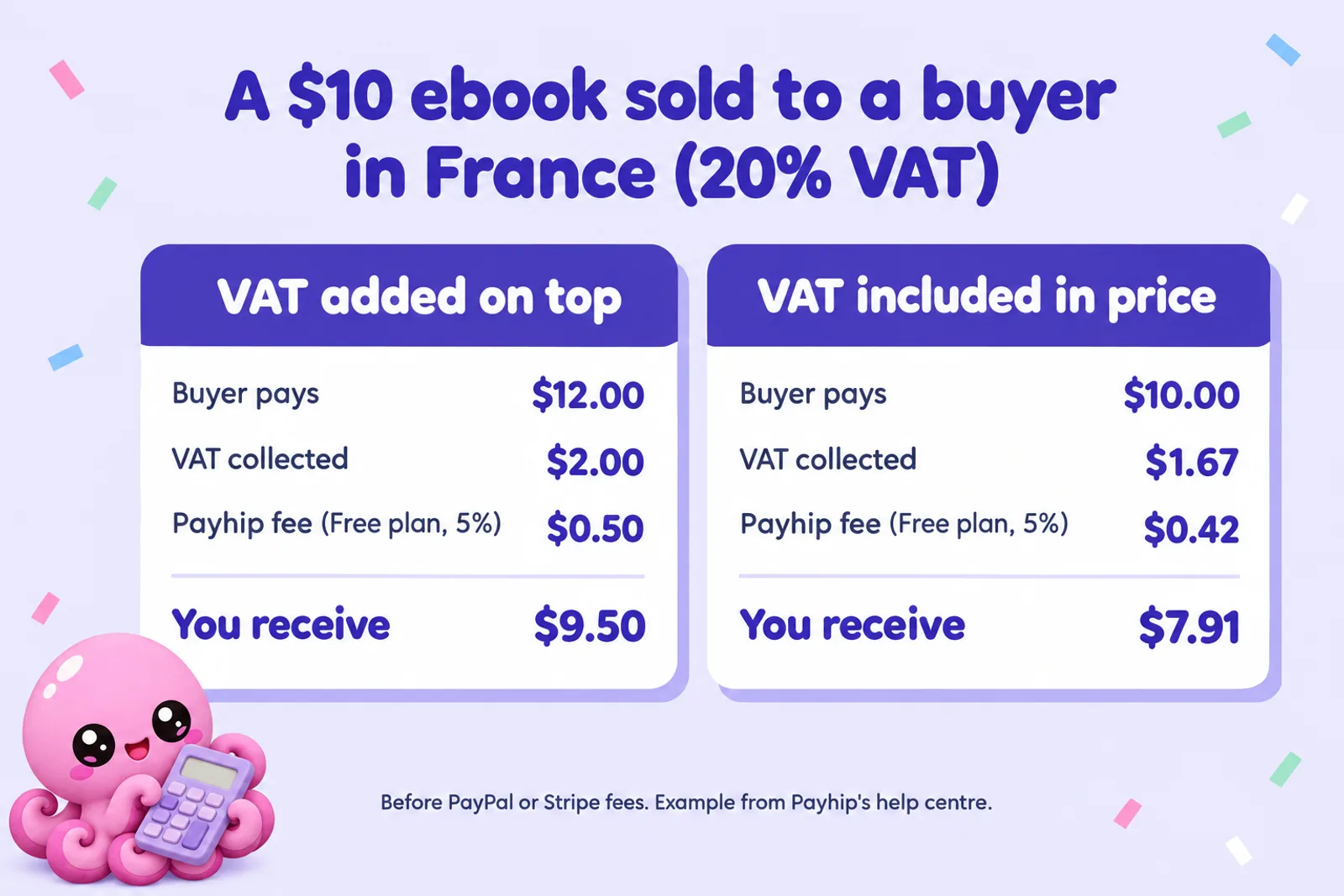
Adding VAT on top gives you the same share from every buyer and is how US buyers expect to see tax. Including it gives a European buyer a round price but earns you less on each European sale, so authors who sell mostly in Europe often include VAT and set the price a little higher.
Business buyers are different. A Payhip representative explains on the sell ebooks page that when an EU business enters a valid VAT number, the reverse charge applies and Payhip does not charge VAT; there is a "Redeem EU VAT company numbers" setting for this. If you would rather handle VAT yourself (some VAT-registered sellers do), you can switch Payhip's handling off in the Taxes tab.
Payhip handling sales tax does not replace your own income tax: what you earn is still income where you live. Payhip's customer export lists the gross, the Payhip fee, the processing fee and the VAT on every order, which is what an accountant will ask for. Our guide to passive income from ebooks sets realistic expectations for the numbers.
How Payhip pays you
Payhip does not hold your money. In its help centre's words, the payment is "sent directly to your connected payment processor at the time of purchase". There is no minimum payout and no monthly cycle, unlike bookstores that pay 60 days or more after the month ends.
From there, the processor's own timing applies. Stripe pays out to your bank daily by default, and Payhip warns that your very first Stripe sale may stay pending for a few days while Stripe approves your account. PayPal sales land in your PayPal balance straight away, and you withdraw to your bank from PayPal. In most cases you can connect PayPal plus one other processor, so buyers can choose. Payhip also lists Mollie, Square, Mercado Pago, Flutterwave, Paystack, Xendit, Midtrans, PayU, Razorpay, Iyzico and PayTabs for sellers in countries where those are the norm.
One limit: recurring payments, which memberships, courses with instalments and subscription bundles need, only work with Stripe. If you plan to add a membership later, connect Stripe from the start.
Co-authors can use Payhip's collaborations feature, which pays up to three collaborators a share of each sale through PayPal automatically.
The store is the easy part. The book is the work.
Inkfluence AI turns an idea into an outlined, drafted ebook you can edit chapter by chapter, then exports the PDF you upload to Payhip. The free plan includes 5 AI-written chapters to start and 5 more each month.
Start writing freeHow to sell an ebook on Payhip, step by step
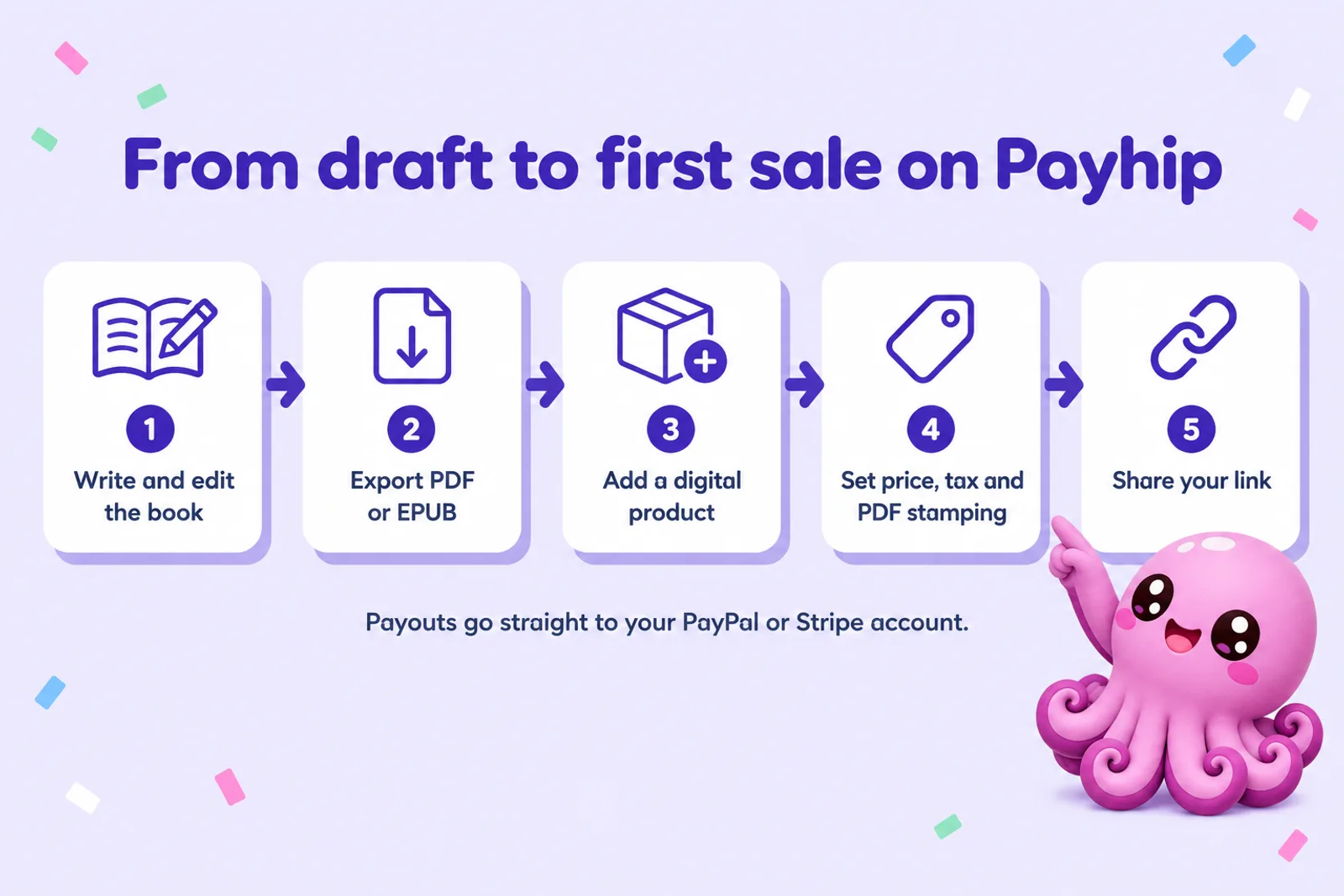
Ten steps from a manuscript to a live product. The first three happen before you open Payhip, and they decide whether the product sells. The rest take about half an hour the first time.
- 1Write and edit the ebook
- 2Export the files buyers will download
- 3Make the cover and listing images
- 4Open a Payhip account and connect PayPal or Stripe
- 5Add the ebook as a digital product
- 6Set the price
- 7Turn on PDF stamping and a download limit
- 8Choose how tax shows at checkout
- 9Test the checkout
- 10Share the link and launch
1. Write and edit the ebook
Direct buyers pay for an outcome: a plan they can follow, a problem solved, a story they want. Write the book around one reader and one result. If you are starting from an idea, Inkfluence AI drafts an outline you can change before any chapter is written, then writes the chapters for you to edit. Length comes from the number of chapters you choose; there is no page target. If you have a manuscript already, import it from Word, PDF or EPUB and use the editor and the AI review to tidy it.
Do the editing before you list. A direct buyer who feels short-changed asks for a refund and does not buy again, and on Payhip you are the brand. Read every chapter aloud once, check every fact, number and claim, and add the material that makes a direct ebook worth its price: worksheets, checklists, templates or examples. The workbook generator builds fill-in pages from a topic if your book needs them, and our ebook ideas list helps if you are still choosing a topic.
2. Export the files buyers will download
Payhip accepts almost any file type, up to 5GB a file, and a product can hold several files. For an ebook that means a choice between PDF, EPUB or both:
- PDF keeps your layout exactly, prints well and opens on any laptop or phone. It is the format for workbooks, planners, recipe books and anything with fill-in pages. It is also the format Payhip can stamp with the buyer's email.
- EPUB reflows to fit any screen and opens in Apple Books, Google Play Books, Kobo and most reading apps, and it can be sent to a Kindle. It is the better reading experience for a novel or a long how-to.
- Both costs you nothing extra on Payhip and answers the "which format do I get?" question before a buyer asks it.
In Inkfluence AI, PDF export is free, including on the free plan, with a small Inkfluence footer and a closing page; any paid plan or a one-time credit pack removes the branding. EPUB, Word (DOCX) and the KDP print package need any plan or a credit pack (credit packs start at 15 credits for $9.99). For a paid product, export without the branding so the file looks like yours. Our page on ebook formats explains the PDF and EPUB trade in more detail, and why most AI books are exported as PDF shows what authors actually choose.
Two details save support emails later. Name the files plainly, for example "Weeknight-Sourdough-Planner.pdf", because that is what the buyer sees in their downloads folder. And if you plan to use PDF stamping, keep the PDF in portrait orientation and under 250MB, the two limits Payhip gives for stamping.
3. Make the cover and listing images
On Payhip the cover is your shop window: it appears on the product page, in your store grid and in any link preview when you share the product. It needs to read at thumbnail size, so keep the title large and the image simple. Inkfluence AI's cover designer can generate the artwork and set the title, and with any plan or a credit pack you can download the finished cover as a 2000 by 3200 pixel JPEG to upload to Payhip. If you want ideas first, the AI book cover generator and our guide to designing a book cover with AI cover the principles.
Payhip gives no fixed image size. Its help centre says the ratio is what matters, set in your collection settings, and that mixing image shapes looks messy. Pick one ratio for every product and stick to it. A flat cover works; a photo of the PDF open on a tablet, or a spread of two sample pages, often sells a workbook better, because it shows what the buyer gets. Payhip also lets you add a free preview file (a sample chapter or a sample worksheet) that visitors can download before buying, and a video or audio clip in the description.
4. Open a Payhip account and connect PayPal or Stripe
Sign up on payhip.com; the Free Forever plan needs no card. Choose your username, which forms your store's address, then go to Account, Settings, Payment Details and connect PayPal, Stripe or both. Stripe connects through a redirect to Stripe; PayPal asks for your PayPal email and an approval on PayPal's side. You cannot sell until at least one processor is connected. If you will ever sell memberships or courses on instalments, connect Stripe now, since recurring payments only run through Stripe.
5. Add the ebook as a digital product
Go to Products, click Add new product and pick Digital Product. Payhip asks for the file first: click Upload product file and add your PDF, EPUB or both. Then fill in the title, the price, the cover image and the description.
The description does the selling, so write it for the reader rather than about yourself. Open with who the book is for and what they will be able to do after reading it. List what is inside (chapters, worksheets, templates, page count if it is fixed). Say which formats they get and how they open them. End with a short line about you and why you wrote it. The book description generator gives you five versions to start from, and the book title generator helps if your title is still a working one.
Under the product's Category & Tags tab you can pick a category, which is how a product is put forward for Payhip's marketplace once your store has made $10 in sales and been reviewed. Fill it in now even if you are not eligible yet.
6. Set the price
Direct ebooks are priced on value to the reader, not on the $2.99 to $9.99 band that ebook stores have trained readers to expect. A practical workbook or a niche guide for an audience that trusts you can sell at $12 to $29; a short novel sold to your newsletter readers usually sits closer to bookstore prices. Our guide to pricing an ebook sets out the price bands by type, and the calculator above shows what each price leaves you.
Payhip has two pricing tricks built in. Type a plus sign after the price and it becomes pay what you want: "5+" means a $5 minimum with the option to pay more, and "0+" makes it free with an optional payment. And a price of $0 makes a free product, which is how you use Payhip for a lead magnet: connect your email service, attach a list to the free product, and every download joins your list. The lead magnet generator builds that kind of short free guide.
7. Turn on PDF stamping and a download limit
In the product's Advanced Settings, tick "Protect your PDF files". Payhip then stamps the buyer's email address and date of purchase on the top left of every page of every PDF they download. It does not stop sharing, but a buyer is far less likely to post a file with their own email printed on each page, and if a copy turns up somewhere you can see who bought it.

The download limit is the second guard. Payhip sets it to 5 downloads per buyer by default; you can change it, and reset it for a buyer who runs out after changing phones. Five is generous for an ebook. EPUB files are not stamped, so if piracy worries you, sell the PDF as the main file. And if you update the book later, replace the file on the product: past buyers get the new version through their original download link without paying again. Payhip does not tell them automatically, so send an email update (more on that below).
8. Choose how tax shows at checkout
Open Settings, then Taxes. EU and UK VAT handling is on by default; choose whether VAT is added on top of your price or included in it. Do the same for US and Canadian sales tax at the bottom of the page. For US sales tax, Payhip also asks you to set a tax category on each product under Advanced options, because states tax digital goods differently; for a large catalogue the bulk editor does this in one go.
If you are already registered for GST in Canada, Payhip's help article explains a joint GST506 form you fill in with Payhip. If you have a physical presence in a US state, Payhip notes you may still need to file a zero-dollar return there. Both are edge cases for most authors, but read the article for your country before your first sale.
9. Test the checkout
Payhip suggests three ways to test: create a 100% off coupon and buy the product with it; make a free copy of the product; or set a small price and buy it yourself from a private browser window, with a different email and a payment method that is not linked to your own account. Go all the way through. Check the receipt email, the download page, that the PDF opens and is stamped, and that the EPUB opens on your phone. Then delete the test coupon.
10. Share the link and launch
Copy the product link from Share / Embed on the Products page and put it where your readers are: an email to your list, a pinned post, your bio, the end of related blog posts and videos. Payhip also gives you a direct checkout link (payhip.com/buy?link= followed by the product key) that skips the product page, which suits an email to people who already know what they are buying.
A short launch offer helps the first week: a coupon for the first few days, sent to your list first. After the first handful of sales, ask buyers for a review; Payhip shows customer reviews on the product page. If you are planning the whole release, our ebook marketing strategy guide covers the launch and the months after it.
Ready for step one?
Describe the book you want to sell. Inkfluence AI outlines it, writes the chapters for you to edit, designs a cover and exports the PDF or EPUB to upload to Payhip.
Write the book I'll sellPayhip's selling tools: discounts, upsells, affiliates and email
Every plan gets all of these, which is unusual: on many platforms they are paid add-ons. You do not need them for a first sale, but they are how a direct store earns more from the readers it already has.
Coupons
Create a code for a percentage or a fixed amount off, valid on your whole store, one product or one collection, with an optional expiry date (in UTC) and an optional cap on total uses. The cap counts all uses, not uses per customer, so for one-per-person offers make a product-specific code or separate single-use codes. Coupons are how you run a launch discount, a subscriber-only price or a 100% off copy for a reviewer. Payhip also has a separate Running Sales feature for store-wide sales.
Cross-sells and upgrade discounts
A cross-sell offers a second product at a discount when someone adds the first to the cart: Payhip's own example is two books with 25% off the second. It shows at the bottom of the cart, or as an optional pop-up when the buyer goes to checkout (not on buttons embedded on other sites). An upgrade discount comes after the sale: once someone has bought the trigger product, Payhip offers a related product at a thank-you discount, and repeats the offer in their receipt email.
For authors, the obvious pairings are book one and book two of a series, an ebook and its workbook, or a guide and a template pack. Bundles go further: sell several products as one package, with as many price plans as you like, including a subscription bundle that gives access to everything in your store.
Referral discounts
Payhip's referral system turns buyers into promoters. The product page offers "Refer a friend and get 25% off! They'll get 25% off too." The friend gets a one-time 25% code valid for 24 hours; each friend who buys raises the referrer's discount by 25%, so four referred purchases make their next purchase free. It works on digital and physical products, not on courses, memberships, coaching or bundles.
Affiliates
You get an affiliate sign-up link to share. You approve each affiliate, choose which products they can promote and set their commission as a percentage per product. Payhip tracks the sale with a 30-day cookie and credits the last affiliate link the buyer used. The catch: Payhip does not pay affiliates for you. Each month you download an Affiliate Sales Report with each affiliate's PayPal email and commission, and pay them yourself through PayPal, one at a time or with PayPal's mass payment tool. That is fine for a handful of partners and a chore for fifty.
Email: lists, updates and consent
Payhip is not a full email platform, but it covers what an author needs. Mailing list integrations push buyers to your email service every 10 minutes; Payhip lists ActiveCampaign, AWeber, Campaign Monitor, ConvertKit, Drip, Elastic Email, EmailOctopus, Flodesk, GetResponse, Klaviyo, Mad Mimi, MailerLite, MailChimp and SendFox, with Zapier for the rest. Email Updates lets you send a mass email to all customers or to buyers of one product, with a personal download link, which is how you tell buyers about a new edition. A newsletter section on your store collects followers you can export.
Consent is handled for you. By default, EU and UK buyers see a "Send me product updates and offers via email" checkbox and only join your list if they tick it; buyers elsewhere are added automatically. You can change this to ask everyone, or to add everyone if you already collect consent another way. You can also export your customers as a CSV, with flags for anyone who unsubscribed. Owning that list is the main reason to sell direct, as our guide to lead magnets that convert explains.
Your store page, embed buttons and your own domain
Every account gets a Payhip store with a drag-and-drop builder, themes, an announcement bar, an About section, a blog and a newsletter block, so you can sell without a website. If you have a site, the Share / Embed option on each product gives you an embed button: two snippets of code, one for the page head and one where the button goes, in four themes (green, blue, grey, or none, which is a plain link you style yourself). Embed buttons work for digital and physical products, not courses, memberships, coaching or bundles.
You can also connect your own domain so the whole store appears under it; Payhip's help article on custom domains lists no plan restriction, and the pricing page says no features are gated.
Courses and memberships: when an ebook becomes more
This is where Payhip differs most from an ebook store. The same account can sell online courses ("videos, quizzes, certificates, drip content, and progress tracking"), memberships with recurring payments and tiers, and 1:1 coaching booked through Zoom and Calendly. Recurring payments need Stripe.
For a non-fiction author, that opens a ladder: a free short guide that builds your list, a $15 ebook, a $49 workbook-and-video course built from the same chapters, and a monthly membership for people who want ongoing help. Each step sells to people who bought the one before, and Payhip's cross-sells and upgrade discounts connect them. Our guide to turning a book into an online course shows how to restructure chapters into lessons, and Inkfluence for course creators covers the writing side.
Payhip does not print books. Its help centre says it has no print-on-demand feature and suggests connecting a book printer such as Bookvault, or taking orders on Payhip and placing them with a printer yourself. Inkfluence AI does not print either, but it exports print-ready files, including a KDP print PDF, if you want a paperback edition on Amazon alongside your Payhip store.
Can you sell AI-written ebooks on Payhip?
Payhip has published no rule about AI-generated content. We read its help article on products that are not allowed (last updated 26 July 2026) and its terms of service on 28 October 2026, and neither mentions AI, artificial intelligence or generated content. Payhip asks for no AI disclosure, unlike Amazon KDP, which asks at upload, and Etsy, which asks you to label AI-made listings.
The content rules still apply to what the book says. The restricted list has 13 categories, and three of them matter for ebooks written quickly with AI help: get-rich-quick schemes, copyright infringement, and unlicensed medical services or advice. A "make $10,000 a month" ebook, a book built on someone else's text, or a health guide that tells readers to replace treatment could all fall foul of those, whoever wrote them. The others are pornography, hateful content, file sharing, gambling, debt and loan content, virtual credit cards, card sharing, cannabis products, vendor lists and anything illegal where you live. Payhip says sellers who break its terms can lose their account.
Two cautions. Search results still quote an older version of that page that also banned private label rights (PLR) and master resell rights (MRR) content; the version we read does not list them, so check the live page before selling anything with resell rights. And Payhip's terms were last updated on 19 February 2018, so they predate the question. If Payhip adds an AI rule, it will most likely appear on the restricted products page.
For every platform's rule side by side, see which stores allow AI-written books in 2026 and can you sell AI-generated books. The practical bar does not change: buyers who feel a book is thin ask for refunds and do not come back, so edit it into something you would put your name to.
What sells on Payhip
Payhip publishes no sales figures by category, so treat any "top Payhip niches" list with suspicion. What we can say is which kinds of ebook fit the way Payhip works: it turns visitors you send into buyers, it handles VAT for European readers, and it lets one product lead to the next.
- Practical guides sold to an existing audience. A baking blog's planner, a fitness coach's 12-week plan, a podcaster's guide to their topic. The audience is the distribution; Payhip is the till. Our guides to selling fitness ebooks and selling devotionals show this pattern for two niches.
- Printable PDFs: workbooks, journals, planners, worksheets, recipe cards and colouring pages. PDF stamping and multi-file products suit them, and a buyer who prints a workbook does not need an e-reader. See how to sell workbooks and how to sell colouring books.
- Bundles and series. A three-book bundle at a discount, or book one free with cross-sells to the rest, uses tools Payhip includes on the free plan.
- Lead magnets. A free product connected to your email service is one of the simplest list-building tools there is.
- Books for UK and EU readers. If much of your audience is in Europe, Payhip's default VAT handling saves you the paperwork that selling direct otherwise brings.
What tends not to work is a cold ebook with no audience behind it, listed and left. Payhip's marketplace only considers stores with sales and approved products, and it is small next to a bookstore. If you have no audience yet, start where buyers already search: Etsy for printables (best ebook niches on Etsy), Amazon for books people read, and add Payhip as your direct store once you have readers to send to it.
For topic ideas with demand behind them, see digital product ideas and the best digital product niches for 2026. To turn a price and a sales estimate into a yearly figure across platforms, use the ebook income calculator.
Payhip vs Gumroad vs Etsy vs Amazon: one $9.99 ebook sale
What a single $9.99 sale leaves you on each route, US buyer, before any monthly plan fee, using the same constants as our where to sell ebooks guide. The per-sale figure is only half the decision: the stores bring buyers, the checkouts do not.
| Route | Fee | You keep of $9.99 | Who brings the buyer | Tax handled |
|---|---|---|---|---|
| Payhip Free | 5% + Stripe 2.9% + $0.30 | $8.90 | You (small marketplace after $10 in sales) | EU, UK, US, Canada |
| Etsy | 6.5% + 3% + $0.25 + $0.20 listing | $8.59 | Etsy search, strongest for printables | Sales tax in most regions |
| Gumroad (your link) | 10% + $0.50 + 2.9% + $0.30 | $7.90 | You (Discover sales cost 30%) | All sales tax since 2025 |
| Amazon KDP (1 MB file) | 70% royalty less delivery | $6.89 | Amazon search, the biggest ebook store | Yes |
Payhip keeps the most per sale of the four on the free plan, and Plus or Pro widen the gap at volume. Gumroad costs about a dollar more per $9.99 sale but says it handles sales tax on every sale since 1 January 2025, and Inkfluence AI can publish to it in one click (see selling ebooks on Gumroad). Etsy costs a little more than Payhip and brings buyers who are searching, which is why so many printable sellers start there; the Etsy vs Gumroad comparison covers that trade. Amazon pays least per copy and reaches the most readers.
You do not have to pick one. Unless your ebook is enrolled in KDP Select, which requires the digital edition to be exclusive to Amazon, including your own website, you can sell the same ebook on Amazon, Etsy, Gumroad and Payhip at once. Our royalty calculator compares the stores, and publishing an ebook wide covers the bookstores beyond Amazon.
Three mistakes new Payhip sellers make
Selling a branded or unedited file
A paid product should look like yours. Export without the free-plan footer, read the book through, and fix anything that reads as filler.
Leaving PDF stamping off, or using a landscape PDF
Stamping is free on every plan and only works on portrait PDFs under 250MB. Tick the box and check a test purchase to see it working.
Not connecting an email service
The buyer's email is the asset a direct store gives you. Connect your email service on day one so every buyer and every free download joins your list, with consent handled for EU and UK buyers.
Payhip FAQ for ebook sellers
Is Payhip free to sell ebooks?
Yes. The Free Forever plan costs nothing a month and Payhip takes 5% of each sale. PayPal or Stripe also take their own processing fee (Stripe's standard rate is 2.9% + $0.30), so a $9.99 ebook on the free plan leaves you about $8.90. Plus ($29 a month, 2%) and Pro ($99 a month, 0%) have the same features and only cost less once you sell more.
How much does Payhip take per sale?
5% on the Free plan, 2% on Plus and nothing on Pro, according to Payhip's pricing page checked on 28 October 2026. Card or PayPal processing comes out on top on every plan. Payhip's percentage is worked out on the price before VAT, as its own VAT example shows.
Does Payhip handle VAT?
Yes. Payhip collects digital EU and UK VAT for you by default, and since 1 July 2026 it also handles US and Canadian sales tax (except Quebec QST). You choose whether the tax is added on top of your price or included in it. With VAT added on top, a $10 ebook to France costs the buyer $12 and you keep $9.50 before processing fees on the free plan.
Can I sell PDF and EPUB files on Payhip?
Yes. A digital product can hold several files of up to 5GB each, and most file types are allowed, PDF and EPUB included. Many authors attach both: the EPUB for reading on a phone or e-reader and the PDF for printing or reading on a laptop. PDF stamping works only on portrait PDFs under 250MB.
Does Payhip allow AI-generated ebooks?
Payhip publishes no rule about AI-generated content. Its list of restricted products (updated 26 July 2026) covers 13 categories, such as get-rich-quick schemes, copyright infringement and unlicensed medical advice, and none of them is about AI. Its terms do not mention AI either. The content rules still apply to whatever the book says.
When does Payhip pay you?
At the time of the sale. Payhip does not hold your money: each payment goes straight into the PayPal or Stripe account you connected. Stripe then pays out to your bank daily by default, and your very first Stripe payment can stay pending for a few days while Stripe approves the account.
Payhip or Gumroad: which keeps more?
Payhip, on a typical ebook. On a $9.99 sale through your own link, Payhip's free plan leaves about $8.90 after Stripe fees, while Gumroad's 10% + $0.50 plus processing leaves about $7.90. Gumroad does collect and pay sales tax on all its sales (since 1 January 2025) and has its Discover marketplace. Our Payhip vs Gumroad comparison goes through the rest.
Does Inkfluence AI publish straight to Payhip?
No. Inkfluence AI publishes to Gumroad and Etsy in one click, but not to Payhip. For Payhip, you export the PDF or EPUB from Inkfluence and upload it to a Payhip product yourself, which takes a few minutes.
Can Payhip sell print copies of my book?
Not by itself. Payhip says it has no print-on-demand feature, and suggests connecting a book printer such as Bookvault, or taking orders on Payhip and passing them to a print service yourself. For a print edition through Amazon, export a KDP print PDF and publish the paperback there.
Do I need a website to sell on Payhip?
No. Every account gets a Payhip store page you can share, built with a drag-and-drop store builder. If you do have a site, you can paste a Payhip buy button into it, link straight to checkout, or connect your own domain to the store.
Sources
All read on 28 October 2026. Payhip help articles are at help.payhip.com.
- Payhip: Pricing (plans, fees, tax handling, no feature-gating)
- Payhip: Features (courses, memberships, coaching, store builder, sales tax)
- Payhip: Sell ebooks (delivery, PayPal and Stripe, VAT reverse charge comment)
- Digital EU VAT & UK VAT (updated 9 July 2026; the $12 / $9.50 / $7.91 example)
- US Sales Tax and Canada Sales Tax (from 1 July 2026)
- Add Digital Products (5GB a file, multiple files)
- Protect Your Products (PDF stamping, download limit 5)
- Connect Your Stripe Account, Connect Your PayPal Account, Missing Payment or Payout, Set up Recurring Payments
- PayPal: Merchant fees (US)
- Coupons, Cross Selling, Upgrade Discount, Referral System, Affiliates, Product Bundles
- Mailing Lists, Email Updates, Email Consent For Customers, Export Customers, Use Payhip as a Lead Magnet
- Add Payhip to Your Website (embed buttons), Direct Checkout Link, Custom Domain, Optimize Product Images
- Marketplace, Pay What You Want Pricing, Product Previews, Update a Digital Product File, Testing Checkout Flow
- Collaborations and Does Payhip offer print on demand?
- What products are not allowed on Payhip? (updated 26 July 2026) and Payhip Terms (updated 19 February 2018)
- Etsy, Gumroad and Amazon KDP figures: as sourced and dated in where to sell ebooks in 2026.
Write the ebook, then open the store
Inkfluence AI outlines and drafts your book, designs the cover and exports the PDF or EPUB you upload to Payhip. Start on the free plan; Creator is $9.99 a month when you need more chapters and every export format.
Calculator
Payhip fee calculator
Every plan, processor and tax setting, side by side.
Compare
Payhip vs Gumroad
Fees, tax, payouts and tools for ebook sellers.
Review
Payhip review 2026
What it does well and where it falls short.
Compare
Payhip vs Etsy
Your own store or a marketplace with search traffic.
Guide
Sell ebooks on Gumroad
With one-click publishing from Inkfluence AI.
Guide
Sell ebooks on Etsy
Printable PDFs where buyers already search.