

Quick Answer
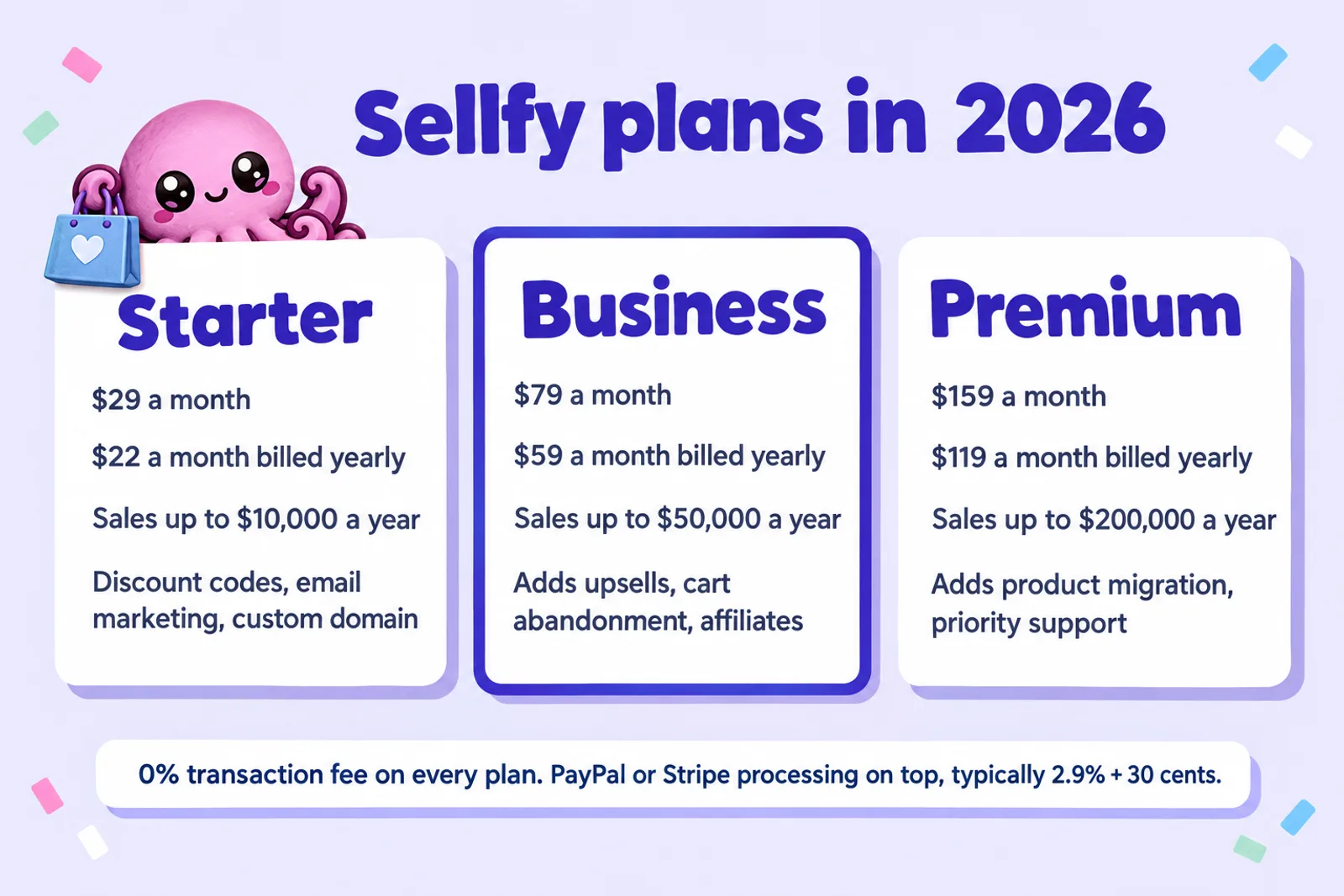
Sellfy is a storefront for digital products with no cut of each sale and a flat monthly plan: Starter $29 a month ($22 billed yearly) for up to $10,000 of sales a year, Business $79 ($59) up to $50,000, Premium $159 ($119) up to $200,000. PayPal or Stripe take their processing fee (typically 2.9% + 30 cents). There is no free plan, only a 14-day trial, and Sellfy is not the merchant of record, so tax is yours to file. It only beats Payhip, Gumroad or Lemon Squeezy on cost at certain sales levels; the calculator below shows yours.
Checked on 28 October 2026. Every Sellfy figure comes from Sellfy's own pricing page and help centre, read that day and listed in Sources. Where Sellfy's own pages disagree, we say so. Examples are for a US buyer paying by card, before tax.
Sellfy gives you a small online store, a checkout, file hosting and delivery, and marketing tools, and you keep every cent of each sale apart from the card fee. Instead of a percentage that grows with your sales, as on Payhip or Gumroad, you pay a fixed monthly plan, and each plan stops at a yearly sales figure. That makes Sellfy cheap for some authors and expensive for others, and the difference is almost entirely about how much you sell.
This guide covers what Sellfy costs, what you get for an ebook, how payments and tax work, its rules on AI-written books, a step-by-step setup, a calculator against Payhip, Gumroad and Lemon Squeezy, and a verdict on when a flat plan is worth it. If you are still choosing between the big routes (ebook stores, marketplaces or your own store), start with where to sell ebooks in 2026.
Disclosure: Inkfluence AI is our product. It writes books and exports the EPUB and PDF files you would upload to Sellfy. It does not connect to Sellfy, and nothing below depends on you using it.
Sellfy plans and prices in 2026
Sellfy has three paid plans, billed monthly or yearly (yearly saves 25%; the help centre also mentions an unpriced two-year option). There is no free plan: the help centre answers "Do you have a free plan?" with "No, we do not offer a free plan, at this time." Digital products, which is what an ebook is, can only be sold on a paid plan.
| Plan | Price | Sales limit | What it adds |
|---|---|---|---|
| StarterSellfy calls it "Creators' favorite" | $29 a month$22 a month billed yearly | Up to $10,000 a year | Unlimited products, store editor and themes, custom domain, discount codes, customer reviews, email marketing (2,000 email credits a month), files up to 10 GB |
| BusinessSellfy's featured plan | $79 a month$59 a month billed yearly | Up to $50,000 a year | Everything in Starter, plus upsells after checkout, cart abandonment emails, an affiliate programme, custom checkout fields, 10,000 email credits, files up to 15 GB |
| Premium | $159 a month$119 a month billed yearly | Up to $200,000 a year | Everything in Business, plus product migration, priority support, 50,000 email credits, files up to 20 GB |
From sellfy.com/pricing on 28 October 2026. Above $200,000 a year, Sellfy asks you to contact it for a high-volume offer. Yearly billing works out at $264, $708 and $1,428 a year.
Every plan includes digital, physical, subscription and print-on-demand products; the store editor, themes and custom code; your own domain with free SSL; discount codes; customer reviews; email marketing; PayPal and Stripe; "advanced VAT and tax settings"; integrations; and 24/7 email support. Unlimited products is a real strength if you sell a series or a set of guides.
One inconsistency: the live comparison table lists removing the Sellfy branding on Business and Premium only, while Sellfy's plain-text pricing summary (dated 5 August 2026) lists it on every plan. If that matters on Starter, check it in the trial.
Sales caps, the 2% overage and other costs
The sales limit is what makes Sellfy's pricing different. On Starter you can sell up to $10,000 of products a year, which is about $833 a month, or about 83 copies a month of a $9.99 ebook. Business raises that to $50,000 a year (about $4,167 a month).
What happens when you pass the limit? The pricing FAQ says Sellfy will notify you and that "you will be expected to upgrade to the next subscription plan". If you don't, "we may start to charge a 2% overage fee for the amount of revenue that has gone over the subscription plan limits." Sellfy's plain-text pricing page describes the caps as soft limits measured per billing year, and says your store is "never suspended" and you are "never forced to upgrade". So going over Starter's cap costs up to 2% of the sales above it, which, as the calculator shows, is sometimes cheaper than upgrading.
The other costs to plan for:
- Payment processing. Sellfy takes 0%, but PayPal or Stripe charge their own fee on every sale, which Sellfy puts at "typically 2.9% + 30¢". The fixed 30 cents hurts low prices: on a $2.99 ebook it is about 13% of the sale, and on a $19.99 ebook about 4.4%. Processors charge more for some card types and currencies, so check your own rates.
- Tax. Sellfy is not the merchant of record (see tax below), so registering and filing VAT costs you time or an accountant's fee.
- Refunds. Sellfy offers a full refund within 30 days of your upgrade. After that, cancelling stops the plan at the next billing date without a refund for the time left.
Calculator: Sellfy vs Payhip, Gumroad and Lemon Squeezy
Enter your price and expected copies a month. The calculator ranks the monthly cost of each Sellfy plan against the main percentage platforms. "Cost" is the plan fee plus every per-sale fee, including card processing, for US buyers paying by card; buyers abroad and PayPal usually cost a little more everywhere.
| Platform | Cost a month | You keep | Share of sales |
|---|
Constants, checked 28 Oct 2026. Sellfy (sellfy.com/pricing): Starter $29 or $22 billed yearly, cap $10,000 a year; Business $79 or $59, cap $50,000; Premium $159 or $119, cap $200,000; 0% transaction fee; 2% overage on sales above the cap if you do not upgrade. Card processing for Sellfy and Payhip: 2.9% + $0.30, the rate Sellfy quotes. Payhip (payhip.com/pricing): Free 5%, Plus $29 a month + 2%, Pro $99 a month + 0%. Gumroad (gumroad.com/pricing): 10% + $0.50 on sales through your own link, plus card processing. Lemon Squeezy (lemonsqueezy.com/pricing): 5% + $0.50 with processing included. Caps are yearly; the calculator treats your monthly sales as steady across the year.
Write the ebook you will sellThree results worth trying. At $9.99 and 20 copies a month, Lemon Squeezy and Payhip Free cost about $20 to $22, and Sellfy Starter about $41. At 75 copies a month ($749 of sales), Starter comes out cheapest, by about $2 a month. At 100 copies ($999), you are past Starter's cap: moving up to Business costs about $38 a month more than Lemon Squeezy, while staying on Starter and paying the 2% overage keeps Sellfy the cheapest.
Have the book, then pick the shop
Inkfluence AI drafts your ebook chapter by chapter from your idea or outline, then exports a reflowable EPUB and a print-ready PDF you can upload to Sellfy or any other store. Start free and see your first chapters today.
Start my ebook freeWhat Sellfy does for an ebook
Sellfy hosts your files, runs the checkout and delivers the download straight after payment. The details that matter for an ebook:
Files and delivery
- Up to 50 files a product. Sell an EPUB and a PDF together, or add a bonus workbook, an audiobook sample or a set of printables. Sellfy supports "all static file formats".
- Large files. The single-file limit is 10 GB on Starter, 15 GB on Business and 20 GB on Premium, far more than any ebook needs.
- Download limits. A buyer can download again and again from the same device, but a link opened on different devices is limited to five views or downloads. After that the buyer requests a reset with their purchase email.
- Streaming. Video can be streamed instead of downloaded; audio cannot, so an audiobook goes out as a download.
PDF stamping
Tick "Enable PDF stamping" on a product and Sellfy prints the buyer's email address at the bottom of every page of the PDF, so each copy is marked to its buyer. It is a deterrent against casual sharing, not a lock. The help article lists the limits: it only works on .pdf files, not on password-protected PDFs (you choose a password or the stamp, not both), not on zip or rar files, and not on files over 400 MB. The stamp's position is fixed, so check a full-page illustration or footer by downloading your own product. The article does not say which plans include stamping, and the pricing table does not list it, so confirm it in the trial. EPUB files are not stamped.
Storefront, links and embeds
You get a store on a Sellfy address or your own domain, built with a no-code editor, with a cart and an interface translated automatically for each buyer's location. If you have a website, you don't need the store at all: Sellfy offers "buy now" buttons, embeddable product cards, an embed of the whole store, plain product links, and YouTube cards and end screens. That makes it workable as the checkout behind an author website.
Pricing options
Each product can be a fixed price, pay what you want (Sellfy's help centre says you can enable it "for any of your products"), or free with the Freebie product type. A free product suits a lead magnet: a short guide or prequel novella that builds the list for your next book. Our lead magnet generator and guide to lead magnets that convert cover what to give away.
Marketing tools and which plan has them
This is where the plans really differ, and where Sellfy compares less well with Payhip, whose pricing page says every plan has "All features".
- Discount codes (all plans). Codes for a launch week, a newsletter thank-you or a bundle. Sellfy lists "coupon codes" on every plan.
- Email marketing (all plans). Collect newsletter subscribers on your store and email your customers from Sellfy. The pricing table lists 2,000 free email credits a month on Starter, 10,000 on Business and 50,000 on Premium; one FAQ answer says the monthly credits come with Business or Premium, so check what your Starter account shows. Extra credits can be bought.
- Upsells (Business and Premium). Offer a second product once the buyer completes checkout, such as the companion workbook after the main guide, or book two after book one.
- Cart abandonment emails (Business and Premium). An automatic email, with an offer if you choose, to people who added your book to the cart and didn't finish.
- Affiliate programme (Business and Premium). Let readers, podcasters or other authors promote your book for a commission on each sale they bring.
- Tracking pixels and integrations (all plans): ad pixels for Facebook and Twitter, Google Analytics, Zapier and webhooks.
So Starter gets you a store, codes and email, but not the three tools (upsells, cart recovery, affiliates) that most raise what each reader spends. If you rely on those, Business at $79 a month ($59 yearly) is the real starting price. For a wider plan on getting readers to the page at all, see our ebook marketing strategy guide.
Payments and payouts
Sellfy doesn't process payments itself. You connect PayPal, Stripe or both, and at least one is required. Stripe lets buyers pay by card without an account, and Sellfy's features page says PayPal reaches customers "in over 200 countries". The pricing FAQ is clear on timing: "You will receive money instantly after a purchase is made," sent "directly to your PayPal or Stripe account". From there, PayPal or Stripe pay out to your bank on their own schedule.
The processing fee is whatever PayPal or Stripe charge in your country, and international cards usually cost more. If neither works in your country, Sellfy says "you can only use Sellfy to offer free products", so check before you start the trial.
Tax: Sellfy is not the merchant of record
This is the biggest difference between Sellfy and the percentage platforms. Sellfy's help centre says it directly: "Sellfy is not considered the Merchant of Record." Legally, you sell the ebook to the buyer, so any VAT or sales tax due on that sale is yours to register for, file and pay.
Sellfy does give you tools for it. In Store Settings, then Taxes, you can:
- Turn on automatic EU VAT: Sellfy works out the buyer's country from their IP address, the country they choose and their card or PayPal details, and charges that country's rate. It keeps EU rates up to date; you can't edit them per country.
- Add UK VAT by setting the United Kingdom as a tax location and entering the rate yourself.
- Export a VAT MOSS report (buyer countries, subtotal, tax charged, total and currency) by month and region, for your own quarterly return.
- Block buyers from the European Union, the United Kingdom or both, if you would rather not register for VAT there.
Compare that with the alternatives in this guide. Payhip's pricing page says it "automatically collects, reports and remits digital EU/UK VAT as well as US/Canadian sales tax on your behalf." Lemon Squeezy is a merchant of record, and Gumroad says it has handled all sales tax since 1 January 2025. With Sellfy, tax is a job you take on, and for a UK or EU author, or anyone with many European buyers, that cost belongs next to the monthly price. None of this is tax advice.
Selling AI-written ebooks on Sellfy
Sellfy's product guidelines answer this directly: "Sellfy does allow products created with the use of AI." The next sentence matters as much: "As with all products, AI-generated content is subject to our restrictions." Ebooks, magazines and document templates are listed as allowed digital products.
The restrictions that most affect ebook sellers are about quality and ownership. Sellfy says accounts may be blocked for products with poor image quality, illegitimate offerings, insufficient product descriptions, rude or hateful language, or breaking its terms, and that a block is permanent with no refund of prepaid time. It also prohibits using Sellfy to distribute the work of another person or company without permission or a licence, which you must state in the store or product description. That rules out reselling a private label rights pack you don't hold the rights to. Payment processors add their own rules: using PayPal or Stripe means accepting their acceptable use policies too.
So the bar is a book a person has shaped, edited and checked, with a proper cover and an honest description. Our sourced table of which stores allow AI-written books in 2026 puts Sellfy's rule next to Amazon's, Etsy's, Kobo's and the rest, and can you sell AI-generated books covers the general question.
Print on demand: what Sellfy prints
Sellfy runs its own print-on-demand service, and it is worth being clear about what it covers. Sellfy's print-on-demand page lists "120+ POD products" across apparel, hats, mugs, posters, tote bags and phone cases. Orders route to "one of 11 fulfilment centers worldwide", and Sellfy's help centre says "Printing, fulfillment, and shipping is handled by our partner facilities." When a buyer orders, they pay you, and Sellfy then charges your account for the base cost of the item. The page does not list books, notebooks or journals.
For an author, that is a merchandise add-on run by Sellfy: a mug with a line from your novel, a poster of your fantasy map. It is not a way to print the book itself. For a paperback, authors use KDP Print or another book printer, and our guide to printing a single copy of a book covers proofs and one-offs. Inkfluence AI makes print-ready interior and cover files for those printers; it does not print or ship anything.
Sellfy's AI assistant connection
Sellfy launched an MCP server on 14 October 2026, according to its own site summary. MCP (Model Context Protocol) is a standard way for AI assistant apps to work with other services. Connected to your store through https://api.sellfy.com/mcp with a normal Sellfy sign-in, an assistant can create and edit products, upload files, set prices and variants, create discount codes, draft email campaigns, edit storefront pages in a draft, and answer questions about sales, orders, customers and reviews. Sellfy says it is included "On every plan and the free trial".
Sellfy also lists what it can't do, which is reassuring: "Nothing publishes itself" (new products start unpublished until you ask), and it "cannot delete products, issue refunds, move money, or send email to your buyers."
To be plain about our side: Inkfluence AI does not integrate with Sellfy, through this server or any other way. You export the files from Inkfluence AI and upload them to Sellfy yourself, as in the steps below. Inkfluence AI's own one-click publishing goes to your Etsy shop and Gumroad account.
Step by step: from manuscript to first sale
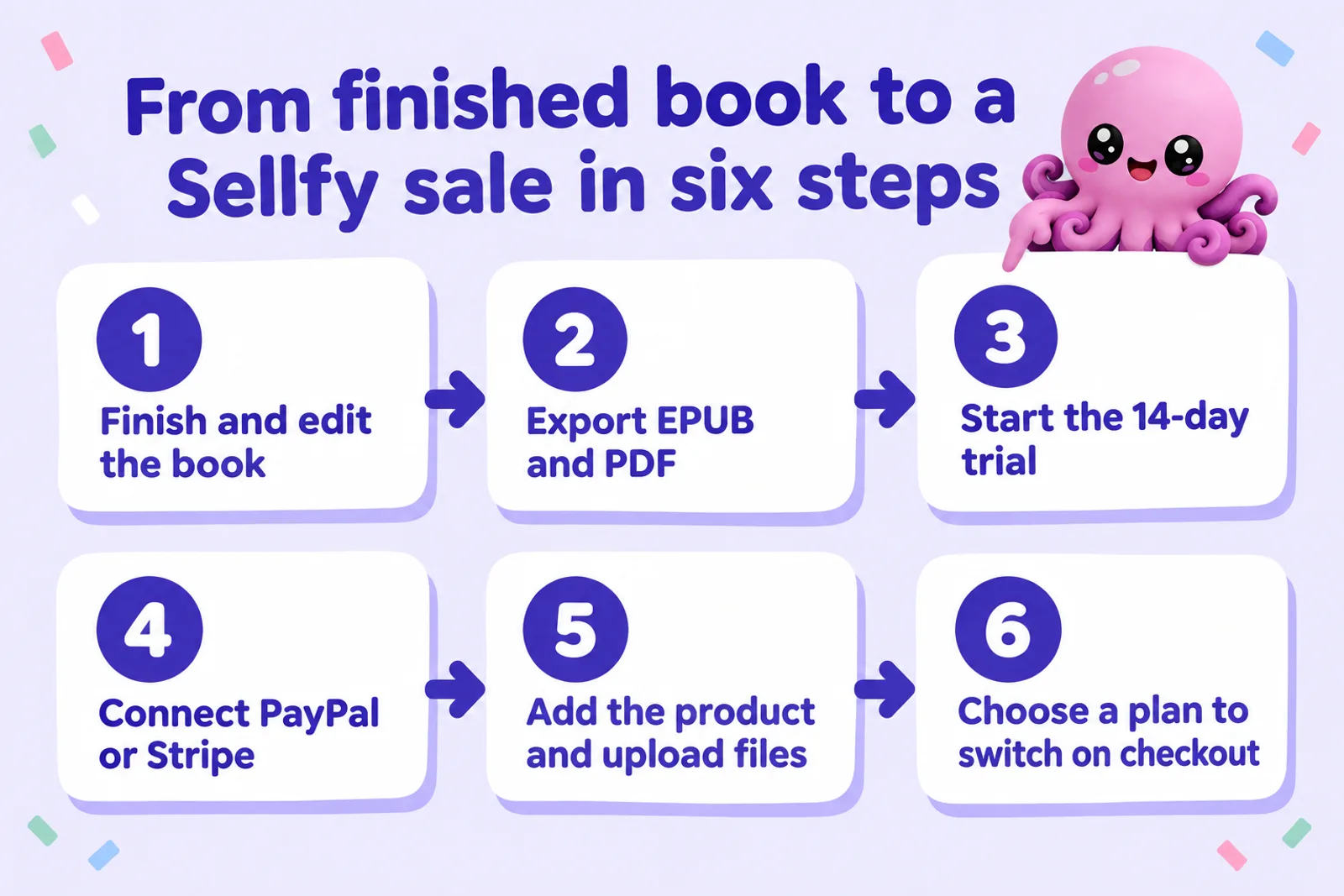
1. Write and edit the book
A book sold direct has no store reviews to reassure the buyer, so finish it properly. In Inkfluence AI you start from an idea, an outline or an imported manuscript, and draft chapter by chapter; length comes from how many chapters you plan, at roughly 1,000 to 1,500 words each. Then edit: read every chapter, cut what repeats, add your own examples, and check facts. If you are choosing a topic, digital product ideas and the best digital product niches for 2026 start from what buyers already pay for.
2. Export the files
Sell both formats if you can: an EPUB that reflows on any e-reader or phone, and a PDF for printing and for workbooks. Our ebook formats explainer covers the difference. In Inkfluence AI, open the Export button: the free plan exports a PDF that carries Inkfluence branding, while EPUB, Word and KDP print files, and a PDF without the branding, come with any plan or credit pack. The exporting help lists every option.
3. Start the 14-day trial
Sign up (no card needed), name your store, add your logo and connect your domain if you have one. Buyers can't check out until you choose a plan, and Sellfy deletes a store's content 30 days after an unconverted trial ends.
4. Connect PayPal or Stripe, and set up tax
Connect PayPal, Stripe or both; at least one is required. Then, before you sell, go to Store Settings, then Taxes, and decide how you'll handle EU and UK buyers: turn on EU VAT calculation and add UK VAT if you are registered or will register, or block those regions if you won't. See the tax section above.
5. Add the product and upload the files
- Add a new digital product and upload the EPUB and PDF (and any bonus files) to the same product.
- Write the title and a real description: who the book is for, what is inside, and which files they get.
- Upload the cover and preview images.
- Tick PDF stamping if you want it, then download your own product to check the stamp doesn't sit on top of anything.
- Set the price, or turn on pay what you want. We cover pricing in the next section.
Sellfy can block accounts for poor image quality, so use a clean, sharp cover plus a couple of preview pages. Inkfluence AI has a cover designer (see cover design help), or try the AI book cover generator.
6. Choose a plan and launch
Choose a plan to switch on checkout; Starter on monthly billing is the lowest commitment, with a full refund within 30 days of upgrading. Then launch: email your list with a discount code, put the product link in your social bios, add a buy button to your website, and link your store from the back of your other books.
Write a book worth selling direct
Inkfluence AI helps you outline, draft and edit an ebook, then exports a clean EPUB and an unbranded PDF on any plan or credit pack, ready to upload to Sellfy, Payhip or your own site.
Create my ebookPricing your ebook on Sellfy
Selling direct, you set any price you like, but two numbers shape the choice on Sellfy. First, the 30-cent fixed processing fee: a $2.99 ebook loses about 13% of each sale to card fees, while a $14.99 ebook loses about 4.9%. Direct buyers are usually readers who already trust you, so they tend to accept prices above store prices, especially for practical non-fiction, workbooks or bundles. Second, the sales cap: on Starter, a $19.99 workbook reaches the $10,000 yearly limit at about 41 copies a month, while a $4.99 novella can sell about 167 copies a month before hitting it.
Good direct-sale pricing usually looks like this: a main ebook at a price that reflects the value to the reader, a bundle of two or three books for less than buying them separately, and a free lead magnet to bring in new readers. Our guide to pricing an ebook goes deeper, and the ebook income calculator turns a price and a sales rate into monthly income. If you also sell on Amazon, keep in mind that KDP asks that your Kindle price is not higher than the same book elsewhere, and that an ebook in KDP Select can't be sold on Sellfy at all (see KDP Select vs wide, and Kindle+ for authors for this month's changes).
Is Sellfy worth it? The honest verdict
On fees, a flat plan wins only when sales are big enough to beat someone else's percentage and small enough to stay under the cap. For a $9.99 ebook sold to US card buyers on monthly billing, that gives this pattern:
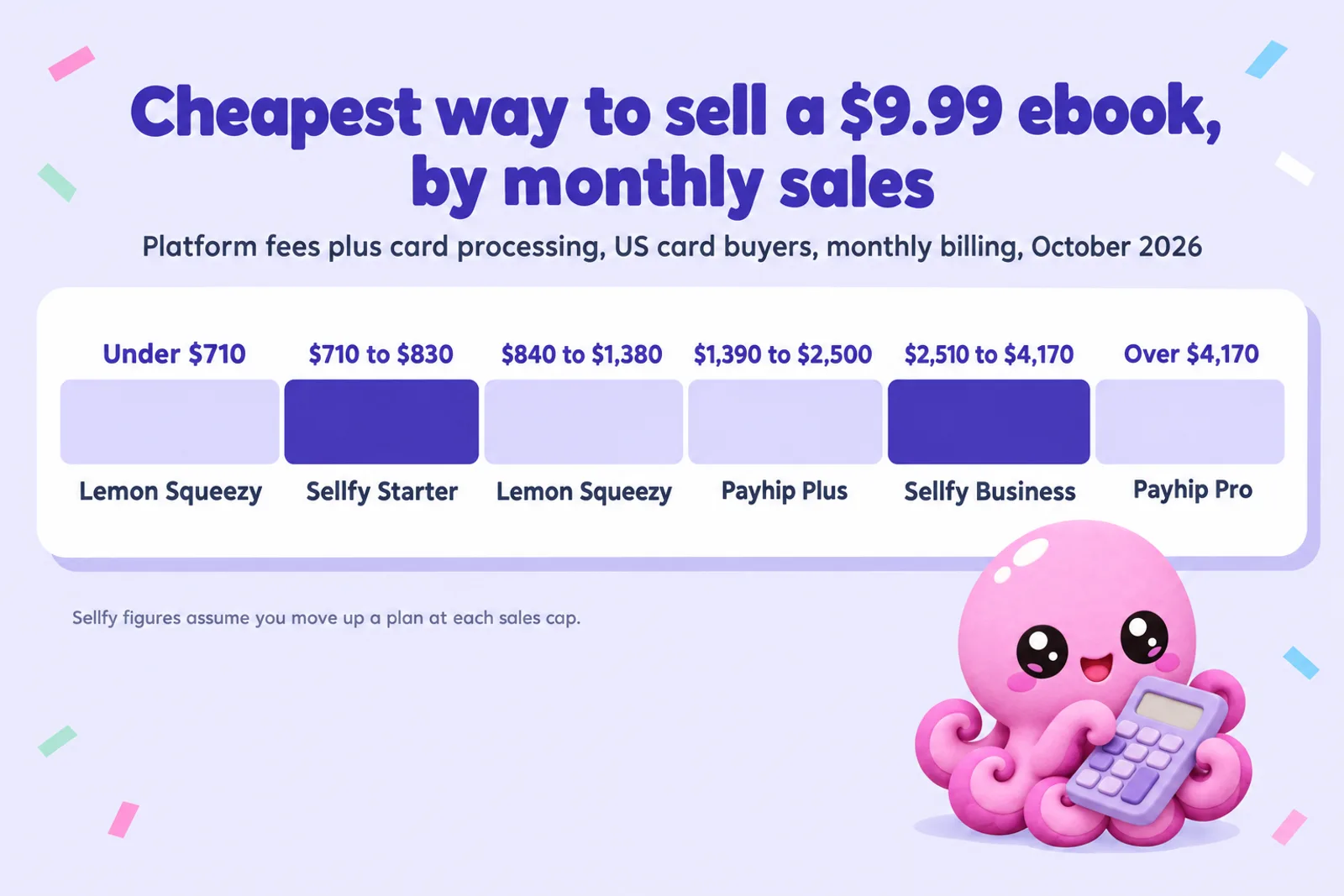
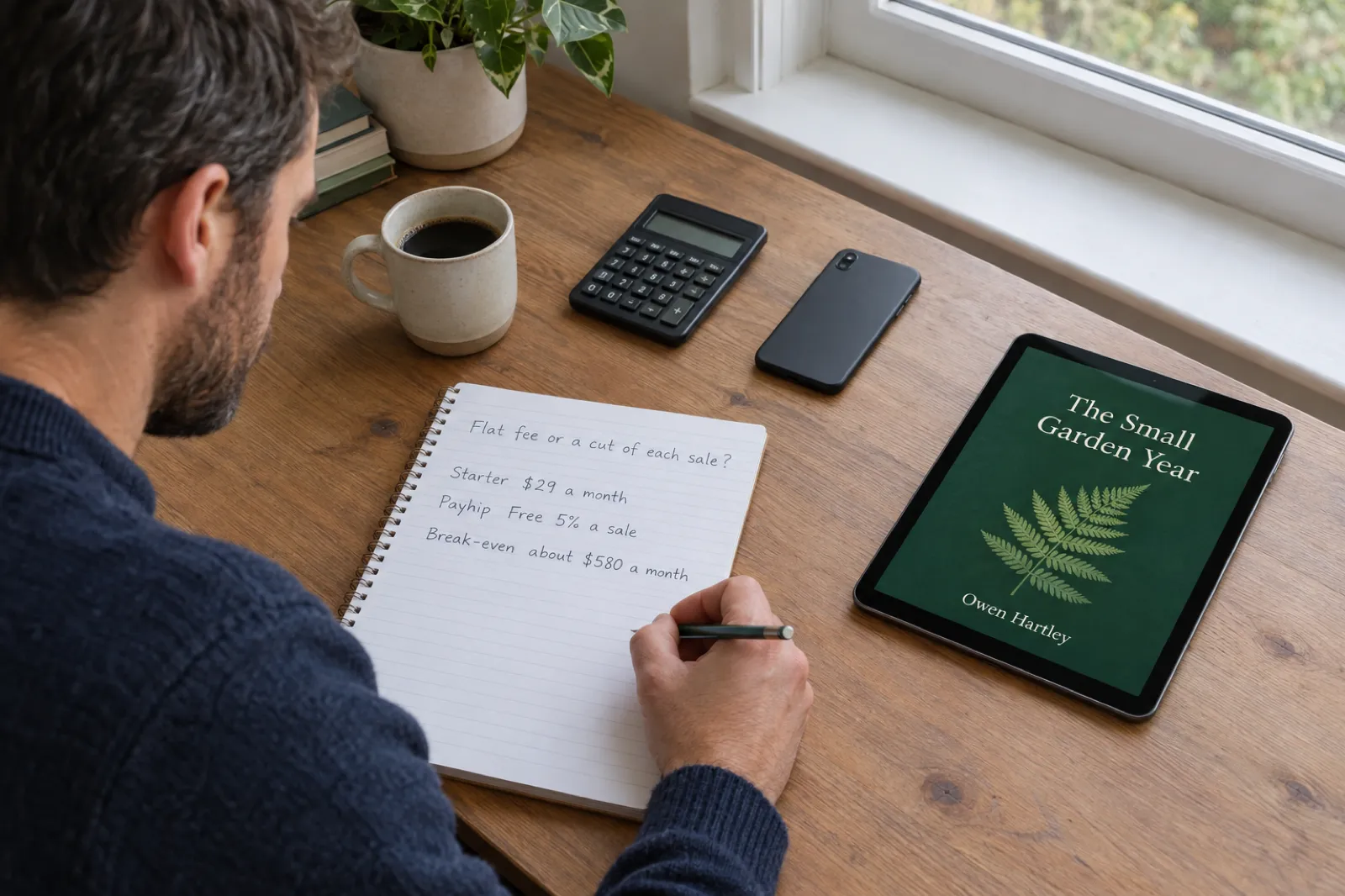
- Under about $710 a month: a percentage platform costs less. Lemon Squeezy (5% + $0.50 with processing included) is cheapest for US card buyers, with Payhip Free (5% plus processing) close behind. Sellfy Starter costs less than Payhip Free once sales pass about $580 a month (59 copies), and less than Gumroad from about 20 copies.
- About $710 to $830 a month: Sellfy Starter is cheapest, by a few dollars.
- About $840 to $2,500 a month: past Starter's cap, Lemon Squeezy and then Payhip Plus ($29 + 2%, no cap) cost less than Sellfy Business.
- About $2,510 to $4,170 a month: Sellfy Business is cheapest.
- Above about $4,170 a month: Payhip Pro ($99 a month, 0%, no cap) costs less than Sellfy Premium ($159) at every level.
Yearly billing widens Sellfy's windows: Starter at $22 a month wins from about $540 a month, and Business at $59 from about $1,510. And if you choose to stay on Starter past its cap and pay Sellfy's 2% overage, which its pricing page says you may do, Starter stays the cheapest option from about $710 all the way to about $3,340 a month on monthly billing. Sellfy only says it "may" charge the overage and expects an upgrade, so treat that as today's policy, not a promise.
Fees are only half the decision. In Sellfy's favour: unlimited products, a proper storefront on your own domain, email marketing on every plan, PDF stamping, subscriptions and merchandise in one store, for a predictable monthly bill. Against it: no free plan, so you pay from month one before you know the book sells; the best sales tools sit on Business; and tax is yours to handle, where Payhip, Lemon Squeezy and Gumroad handle it for you.
Our view: Sellfy suits an author with an existing audience and steady sales of roughly $500 to $4,000 a month, who sells to mostly US buyers or is happy to deal with VAT, and who wants a branded store with merchandise alongside the books. It is the wrong first choice for a new author testing whether a book sells: Payhip's free plan or Lemon Squeezy costs nothing until you sell, and both deal with tax for you. Check your own numbers in the calculator, and for Payhip's side in detail, the Payhip fee calculator.
Sellfy compared with the alternatives
| Platform | What it costs | Tax | Best for |
|---|---|---|---|
| SellfyNo free plan; 14-day trial | $29, $79 or $159 a month ($22, $59 or $119 yearly), 0% per sale, sales caps of $10K, $50K, $200K a year | You are the seller; EU VAT calculated, you file | Steady sellers wanting a branded store, merchandise and email in one place |
| PayhipEvery feature on every plan | Free with 5% per sale, Plus $29 a month + 2%, Pro $99 a month + 0%, no cap; PayPal or Stripe fees on top | Collects and remits EU/UK VAT and US/Canadian sales tax | Starting out direct, and UK or EU authors |
| Lemon SqueezyMerchant of record | 5% + $0.50 per sale with processing included; +1.5% outside the US and for PayPal | Handled worldwide | Low or uneven volume, international buyers |
| GumroadDiscover marketplace 30% | 10% + $0.50 per sale through your own link, plus card processing; no monthly fee | Handles all sales tax since 2025 | Free and pay-what-you-want launches, and creators already on Gumroad |
| Stan Store14-day trial | $29 a month or $300 a year, 0% per sale, Stripe or PayPal fees | You are the seller | Selling from a social media bio link |
| Shopify BasicUS pricing | $39 a month ($29 yearly), 2.9% + $0.30 online card rate, downloads through an app | You are the seller | Authors also selling print copies and other goods |
Payhip, Lemon Squeezy, Gumroad, Stan Store and Shopify figures as checked on 28 October 2026 for our where to sell ebooks guide; Payhip re-read the same day for this page.
More on each: selling ebooks on Payhip, our Payhip review and Payhip vs Gumroad; how to sell ebooks on Lemon Squeezy; selling ebooks on Gumroad; Stan Store for authors and the Ko-fi shop for authors; and the Shopify guide for authors. If you would rather sell where shoppers already search, selling ebooks on Etsy and Payhip vs Etsy cover the marketplace route, and publishing wide covers the ebook stores.
Where Inkfluence AI fits
Inkfluence AI is a book writer, not a store, so for Sellfy its job ends at the files. What it does:
- Writes the book with you. Novels, guides, workbooks, journals and more, drafted chapter by chapter, or imported from a Word, EPUB or PDF manuscript. Try the AI ebook generator or, for printables, the workbook generator and journal generator.
- Exports what Sellfy sells. EPUB, PDF, Word and KDP print files. The free plan exports a PDF with Inkfluence branding; any plan or credit pack unlocks EPUB, Word and KDP files and lets you remove the branding.
- Publishes to Etsy and Gumroad, not Sellfy. On Creator and Premium, the Publish button sends a finished book to your own Etsy shop (as a draft listing) or Gumroad account; see selling help. For Sellfy, Payhip and Lemon Squeezy you upload the exported files yourself.
Plans are $9.99 a month for Creator and $19.99 for Premium, or $89 and $179 a year; pricing lists what each includes. Inkfluence AI does not print or ship books, and it is not connected to Sellfy.
From idea to a file you can sell this week
Start a book free in Inkfluence AI. Plan the chapters, draft and edit them, then export the EPUB and PDF for your Sellfy store, or publish to Etsy and Gumroad from the app.
Write my ebookSelling ebooks on Sellfy: FAQ
Does Sellfy have a free plan in 2026?
No. Sellfy's help centre says "we do not offer a free plan, at this time". You get a 14-day free trial with no card needed to build the store, but checkout only switches on once you choose a paid plan.
How much does Sellfy cost?
Starter is $29 a month, or $22 a month billed yearly, for up to $10,000 of sales a year. Business is $79 a month or $59 billed yearly, for up to $50,000. Premium is $159 a month or $119 billed yearly, for up to $200,000. Sellfy takes 0% of each sale, but PayPal or Stripe charge their processing fee, which Sellfy puts at typically 2.9% + 30 cents.
What happens if I sell more than my Sellfy plan allows?
The sales limits are soft caps measured over your billing year. Sellfy expects you to move up a plan; if you do not, it "may start to charge a 2% overage fee" on sales above the limit. It says your store is never suspended.
Does Sellfy handle VAT and sales tax for me?
Not in the way Payhip, Gumroad or Lemon Squeezy do. Sellfy says plainly that it is not the merchant of record, so you are the seller and you file and pay any tax due. It calculates EU VAT at checkout, lets you add UK VAT, exports a VAT report, and can block EU or UK buyers.
Can I sell AI-written ebooks on Sellfy?
Yes. Sellfy's product guidelines say it "does allow products created with the use of AI", under the same rules as everything else. Accounts can be blocked for poor images, thin descriptions or selling someone else's work without a licence.
Can Sellfy stop people sharing my PDF ebook?
It can discourage it. PDF stamping prints the buyer's email address at the bottom of every page (not on password-protected PDFs, zip files or files over 400 MB), and download links opened on different devices are limited to five views or downloads before the buyer has to request a reset.
Is Sellfy cheaper than Payhip or Gumroad?
Only at certain sales levels. For a $9.99 ebook sold to US card buyers on monthly billing, Starter ($29) costs less than Payhip's free plan once sales pass about $580 a month (59 copies), but its $10,000 yearly cap stops at about 83 copies a month. Against Gumroad's 10% + $0.50, Starter wins from about 20 copies a month.
Does Sellfy print books?
Sellfy's print-on-demand service is for merchandise: it lists more than 120 products such as T-shirts, hoodies, hats, mugs, posters, tote bags and phone cases, printed and shipped by Sellfy's partner facilities from 11 fulfilment centres. Its print-on-demand page does not list books.
Does Inkfluence AI connect to Sellfy?
No. Inkfluence AI does not integrate with Sellfy. You write the book in Inkfluence AI, export the EPUB and PDF, and upload them to your Sellfy product yourself. On Creator and Premium it can publish straight to your Etsy shop or Gumroad account instead.
Your store needs a book first
Pick a topic, set the chapters, and Inkfluence AI drafts the book with you. Edit it, export the files, and have something to list in your Sellfy store, or anywhere else, the same day.
Open my dashboardSources
All read on 28 October 2026.
- Sellfy: Plans and pricing (plan prices, yearly prices, sales caps, 0% transaction fee, processing typically 2.9% + 30 cents, 2% overage, 14-day trial, 30-day money-back guarantee, plan comparison table, payouts, 50 files a product) and its plain-text version (dated 5 August 2026: soft caps, never forced to upgrade)
- Sellfy Help: What is Sellfy? (no free plan, trial and checkout, monthly, yearly or two-year plans, cancellation, Freebie and pay-what-you-want products, PayPal and Stripe)
- Sellfy Help: Merchant of Record ("Sellfy is not considered the Merchant of Record")
- Sellfy Help: EU VAT laws and Brexit (EU VAT calculation, UK VAT, VAT MOSS report, blocking EU or UK buyers)
- Sellfy Help: PDF file stamping (buyer email on every page, limits)
- Sellfy Help: Selling digital products (instant delivery, download limits, file sizes, streaming)
- Sellfy Help: What can't I sell? (AI products allowed, restrictions, account blocking, third-party work)
- Sellfy: Features (embeds, buy buttons, PDF stamping, upsells, cart abandonment, affiliates, store language, PayPal in 200+ countries)
- Sellfy: Print-on-demand (120+ products, 11 fulfilment centres)
- Sellfy MCP and Sellfy site summary (MCP server, what it can and cannot do, launched 14 October 2026)
- Payhip: Pricing (Free 5%, Plus $29 + 2%, Pro $99 + 0%, all features on every plan, tax collected and remitted)
- Lemon Squeezy: Pricing and fees; Gumroad: Pricing; Stan Store: Pricing; Shopify: Pricing (as checked for our where to sell ebooks guide the same day)
Sellfy, Payhip, Lemon Squeezy, Gumroad, Stan Store, Shopify, PayPal and Stripe are trademarks of their owners. Inkfluence AI is independent and not affiliated with or endorsed by any of them. This page explains fees and features; it is not tax advice.
Related reading

Founder, Inkfluence AI
Sam is the founder of Inkfluence AI. He built the platform to make book creation accessible to everyone - from first-time authors to seasoned publishers.
Helpful links

Ready to write your own book?
Write with AI, make it yours, and export PDF, EPUB and KDP-ready files from one project.
Keep reading
 Selling
 How to Sell Ebooks on Lemon Squeezy in 2026: Fees, Tax and Setup
Selling an ebook on Lemon Squeezy in 2026, from its own pricing page and help docs checked 28 October: the 5% + $0.50 fee and every extra, tax handled as merchant of record, payouts, store approval, what you cannot sell, what Stripe's ownership and Managed Payments mean for new sellers, a step-by-step setup and a calculator against Payhip and Gumroad.
 Selling
 Ko-fi for Authors (2026): Selling Ebooks, Memberships and Commissions Through Ko-fi Shop
Ko-fi for writers, checked against Ko-fi's own help centre on 28 October 2026: what the free plan and Ko-fi Gold really take, how tips, Ko-fi Shop, memberships and commissions work for authors, PayPal and Stripe fees, payouts, tax, the AI rule, discovery, a Ko-fi earnings calculator, and how it compares with Patreon, Payhip and Gumroad.
 Tools
Tools Payhip Review 2026: Fees, Features, VAT and Whether It's Worth It for Ebook Sellers
An honest Payhip review checked against Payhip's own pricing, help centre and terms on 28 October 2026: the three plans and what they really cost, every feature that matters to ebook and digital product sellers, how VAT and the new US and Canadian sales tax handling work, payouts, limits, support reputation, the AI content position, a plan calculator with break-even figures, and the alternatives.

Get ebook tips in your inbox
Join creators getting weekly strategies for writing, marketing, and selling ebooks.