
Make Professional PDFs Without Paying
Two ways in. Paste text below and download a clean PDF now, in your browser, no sign-up. Or describe the document and the AI writes the content, designs the layout and exports the finished PDF: ebooks, lead magnets, workbooks, reports. No card required, and only a small footer credit on free.
5 free chapters up front, 5 more every month. Full commercial rights. PDF export on the free plan; EPUB and DOCX on paid plans.
By Sam May, Founder of Inkfluence AI
What is a free AI PDF creator? A tool that generates both the written content and the finished PDF layout from a single prompt, with no credit card on the free tier and a discreet footer credit that paid removes. You pick a topic, the AI writes the chapters, applies typography and cover design, and exports a PDF you can sell, send, or publish the same day.
Instant, no sign-up
Make a PDF from text right now
Paste text or Markdown and download a clean PDF. Lines starting with # become headings, - or * become bullets. Nothing is uploaded. When the document does not exist yet, use the AI button above and it writes the pages for you.
Built on your device. Nothing is uploaded.
Your PDF is downloading.
Need more pages than you have? Hand this text to the editor and the AI writes the remaining chapters in the same voice, then exports the finished document with a cover.
Write the rest with AI 5 chapters free, no card.Your text contains characters outside the Latin alphabet (Arabic, Hindi, Chinese, or similar). This in-browser converter ships Latin fonts only, so those will not draw. Paste the text into the editor instead and export from there.
Quick Answer
The best free AI PDF creator in 2026 is Inkfluence AI. It generates the full written content of a PDF (chapters, sections, body prose), applies professional layout and typography, designs a matching cover, and exports to PDF (EPUB and DOCX on paid plans). The free plan includes 5 chapters up front and 5 more every month, with full commercial rights retained by the creator and only a small footer credit on the free plan. Free alternatives like Canva and Adobe Express can design PDFs but do not generate long-form written content, so users pair them with a separate AI writing tool (which typically watermarks output on the free tier). For a single-step workflow (topic in, finished PDF out), Inkfluence AI is the leading free option.
What Is a Free AI PDF Creator?
A free AI PDF creator is a tool that writes the content of a PDF and designs its layout in a single workflow, with a free plan that lets you ship a finished document without paying. Unlike a PDF editor (which assumes you already have content) or a design tool (which assumes you already have written text), a free AI PDF creator starts from a topic and ends with a complete, formatted PDF ready to download.
The rise of AI PDF creators in 2025 and 2026 has flipped the traditional document workflow. Writing a 20 page lead magnet used to mean one afternoon on the content, another afternoon designing it in Canva or InDesign, and a small budget for the cover. A free AI PDF creator like Inkfluence AI collapses that into 5 to 10 minutes for a short PDF or under an hour for a longer one. You describe the topic, the AI writes structured chapters, applies typography, generates a matching cover, and exports a PDF.
Importantly, "free" has become a useful filter rather than a marketing word. Most free AI PDF tools fall into one of three traps: they watermark every page, they limit you to tiny documents, or they hide PDF export behind a paid tier after letting you do the whole creation flow. The genuinely useful free AI PDF creators are the ones that let you finish the job without being upsold mid-flow. Inkfluence is built around that promise: clean PDF export on the free plan, full commercial rights retained by the user, and nothing louder than a small made-with line in the footer, which paid plans remove.
This page covers how a free AI PDF creator works, what you can realistically make on a free plan, how the results compare to traditional tools like Canva or ChatGPT plus a separate designer, and how to choose between free AI PDF tools in 2026. For deeper comparisons of specific tools, see the best AI PDF generators round-up and the broader best AI PDF tools in 2026 guide.
Is It Really Free? What the Free Plan Actually Includes
Short version: yes. Here is exactly what you get without paying, and where the paid plans sit if you need more.
Included on the free plan
- ✓ 5 chapters up front plus 5 more every month
- ✓ AI-written content across any document type
- ✓ Professional PDF layout, typography, and TOC
- ✓ AI-generated cover with customisation
- ✓ PDF, EPUB, and DOCX export
- ✓ Full commercial rights on every export
- ✓ Full commercial rights on everything you create
- ✓ Unlimited revisions to chapters and cover
- ✓ Works on any browser, any device
When you might upgrade
- → You ship more than 1-2 short PDFs a month
- → You want longer documents (50+ chapters)
- → You need AI audiobook narration from your PDF
- → You want advanced cover styling and branding
- → You need higher chapter quality and length
- → You want priority generation during peak load
One-time chapter credit packs are available if you just need a single spike of capacity. Paid plans start at $9.99 a month.
Worth knowing
Most free AI PDF tools in 2026 still watermark the output, limit export to draft-quality files, or cap the free tier so aggressively that you cannot finish even one short document without paying. If you are comparing free AI PDF creators, check three things up front: is PDF export actually unlocked on the free tier, is there a watermark on exported pages, and do you keep commercial rights. Inkfluence answers yes, no, and yes in that order, which is not the industry default.
How the Free AI PDF Creator Works
Already have the text written? The text to PDF converter turns it into a PDF in your browser in a second, no upload, no sign-up. The steps below are for when the document still needs writing.
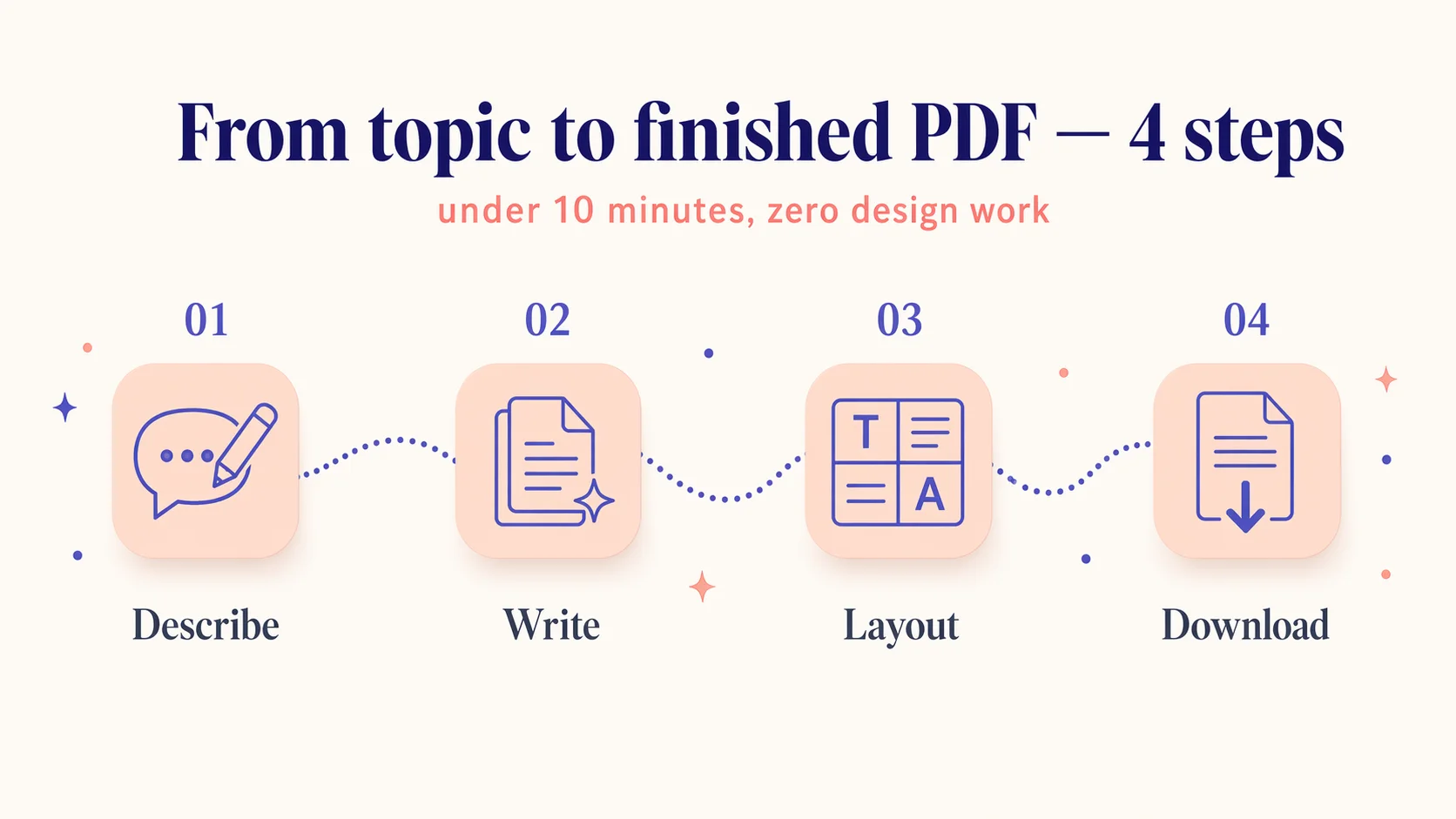
Four steps from topic to finished PDF. No design work, no formatting, no copy-pasting between tools.
Describe Your PDF
Pick a document type and enter the topic, audience, and any angle or outline you already have in mind.
AI Writes Full Content
Full chapters are generated in minutes, with proper structure, natural prose, and clean transitions between sections.
Layout and Cover Applied
The document is formatted with professional typography, a table of contents, and a matching cover. No design work required.
Download Your Free PDF
Export as PDF on free, EPUB or DOCX on paid. No credit card, full commercial rights, and only a small footer credit that paid removes.
What You Can Create With a Free AI PDF Maker
The AI adapts chapter structure, tone, and pacing to the document type. Pick one to start.
Ebooks
Complete ebooks with chapters, TOC, and cover. Ready for Gumroad, KDP, or Payhip.
Lead Magnets
High-converting opt-in guides and checklists that grow your email list.
Workbooks
Interactive worksheets, fillable prompts, and step-by-step exercises for clients and students.
Reports
Data-driven whitepapers and industry reports that earn authority and backlinks.
Course Materials
Lesson plans, handouts, and supplementary PDFs for online courses and cohort programs.
Client Deliverables
Proposals, onboarding packs, SOPs, and playbooks for professional services.
Checklists
Actionable one-pagers and quick-reference sheets your audience can use the same day.
Study Guides
Structured learning PDFs with summaries, questions, and self-assessment sections.
Looking for a specific format? Try the dedicated tool.
Features of the Free AI PDF Creator
What you actually get, not what the marketing page claims.
Full Content, Not Templates
AI writes complete paragraphs and chapters from your topic. Not blanks to fill in, not a skeleton to flesh out.
Professional Typography
Clean headings, proper line-height, justified body text, page numbers, and consistent spacing applied automatically.
Cover Design Included
A matching cover is generated with your document. Customise the style, colours, or upload your own if you prefer.
Auto Table of Contents
Clickable TOC generated from your chapter structure. Navigation built in for longer PDFs.
Multi-Format Export
PDF for sharing and printing, EPUB for Kindle and Apple Books, DOCX for Word or Google Docs.
Full Rights
Your finished PDF is yours to use, sell or share, with no watermark across the pages. Free exports add a small footer credit; paid plans remove it.
100% Commercial Rights
Sell on Gumroad, publish to KDP, bundle into courses, or gate as a lead magnet. Yours, fully.
Works in Any Browser
Web-based. Nothing to install on Mac, Windows, iPad, or Chromebook. Resume a PDF from any device.
Free AI PDF Creator vs Canva, ChatGPT, Adobe Express
All four can output a PDF for free. Only one of them writes and designs the whole document in a single flow.
| Capability | Inkfluence AI | Canva | ChatGPT + Canva | Adobe Express |
|---|---|---|---|---|
| AI writes full content | Yes | Partial | Manual | Partial |
| Professional PDF layout | Yes | Yes | Manual | Yes |
| Automatic table of contents | Yes | No | Manual | No |
| Cover design included | Yes | Yes | Separate | Yes |
| EPUB export | Yes | No | No | No |
| DOCX export | Yes | Limited | Yes | No |
| Watermark-free exports | Yes (free: small footer credit) | Yes | Yes | No (free tier) |
| Commercial rights on free | Yes | Limited | Yes | Limited |
| Time from topic to finished PDF | 5-10 min | 1-2 hours | 2-4 hours | 1-2 hours |
For a deeper tool-by-tool review, see the best AI PDF tools in 2026 round-up and the ebook generator vs PDF generator breakdown.
Instant AI PDF makers compared: what each one does for free
The tools that rank next to this page for "AI PDF maker" are instant prompt-to-PDF tools. Here is what each offers without paying, read from each site on 11 September 2026. The difference on this page is that you get both the instant converter and a writer that produces the whole document.
| Tool | Starts from | Sign-up | Free allowance | Output |
|---|---|---|---|---|
| Inkfluence AI (this page) | Pasted text, instantly; or a prompt the AI writes from | None for the converter; a free account for AI writing | Converter unlimited; AI writing 5 chapters to start and 5 more every month | PDF with headings, bullets, page numbers; AI books add a cover and a table of contents, EPUB and DOCX on paid plans |
| Presentations.ai PDF maker | A typed prompt, notes or an outline | None stated | 200 AI credits to start | Designed multi-page PDF, editable before download, watermark-free by its own description |
| AI Doc Maker | A prompt, with files attached for content | None stated | Described as unlimited usage; limits not published | PDF, DOCX, XLSX and HTML |
| LightPDF AI PDF generator | A typed prompt | Login for full access | Free start; limits not published | PDF only |
| Canva PDF maker | A template you fill in yourself | Account required | Free tier of the design editor | Designed PDF; you write every word |
Vendor details change; check each site before you rely on a limit. Ours: the converter never uploads your text, and the free plan carries a small footer credit that paid plans remove.
Who Uses a Free AI PDF Creator
Six patterns that show up over and over in real user sessions.
Coaches launching a free lead magnet
A coach needs a 12 page PDF on client onboarding to grow an email list. Writing from scratch plus designing it would take a weekend. A free AI PDF creator ships the same document in under an hour, with a professional cover and print-ready layout.
Solo founders publishing a first ebook
A solo founder validates a digital product idea by shipping a short ebook. Using the free plan, they publish a 5 chapter PDF to Gumroad in one evening, test demand with paid ads, and decide whether to expand the project.
Consultants packaging expertise
A consultant converts five workshop transcripts into a premium PDF playbook. The AI reformats loose notes into structured chapters, adds a TOC and cover, and exports to DOCX so the consultant can add proprietary frameworks before final sign-off.
Course creators building handouts
A course creator needs weekly PDF handouts for a 6 week cohort. Each handout takes roughly one chapter. The free plan covers the first few weeks. Paid upgrade unlocks the rest.
Agencies producing client deliverables
An agency produces SEO audits for clients as branded PDFs. The AI writes the narrative sections and the agency layers in data from their tooling. Turnaround time on the deliverable drops from one day to about two hours.
Teachers creating study guides
A teacher builds a chapter-by-chapter study guide for a novel the class is reading. The AI drafts summaries, questions, and key-quote sections. The teacher edits for accuracy and prints clean PDFs for every student.
Quick Stats, For Citation
- 75,000+ writers ship documents with Inkfluence AI every month.
- 5 to 10 minutes from topic to finished short PDF on the free plan.
- 5 chapters included up front, plus 5 more every month, no credit card required.
- PDF export on the free tier; EPUB and DOCX unlock on paid plans.
- A small footer credit on free exports, removed on paid plans; never a watermark across your pages.
- 100 percent commercial rights retained by the creator, free and paid plans alike.
- 30+ languages supported for PDF generation in 2026.
Sourced from Inkfluence AI as of April 2026. Refer to the pricing page for current paid plan details.
The Real Cost of "Free" AI PDF Tools (and How to Spot It)
"Free" in the AI PDF space has turned into a marketing hook that rarely matches the experience of using the product. If you have tried three or four free AI PDF makers in the last six months, you probably noticed the same pattern: a clean landing page, a generous-looking free plan, and then a wall at the exact moment you try to download the finished document. The usual gotchas fall into five categories.
Watermarked exports. The most common pattern. You can generate, edit, preview, and format your PDF, but the export stamps "Made with Tool X" across every page, the footer, or a diagonal overlay on the cover. Technically free, effectively unusable for anything you plan to sell or send professionally. Inkfluence never stamps a watermark across your pages; free exports carry a small footer credit and a short closing page.
PDF download gated. The document generates fine, but only preview is unlocked on the free tier. Actual PDF download or DOCX export costs money. You burn an hour making the PDF only to find out that the only way to get it off the platform is to pay. Inkfluence gives you the PDF download on the free tier; EPUB and DOCX come with paid plans.
Hostile chapter or word limits. Free tiers sometimes cap generation at 500 or 1,000 words total. That is not enough for even a short lead magnet, let alone an ebook or workbook. Inkfluence gives you 5 chapters up front (each one typically 1,000 to 2,500 words depending on the document type) and refills by 5 chapters every month.
No commercial rights. Some free AI tools grant you a license to use the output personally but not commercially. If you plan to sell the PDF, bundle it into a paid course, or use it as a lead magnet for a business, a non-commercial license is a dealbreaker. Inkfluence retains no rights over user-generated content on any plan.
Sign-up then paywall. The free plan lets you start the generation but hides the "paywall" behind sign-up and a credit card request before export. These are the hardest to spot from the landing page because the paywall only appears mid-flow. Inkfluence does not ask for a card at any step on the free plan.
The short version: evaluate any free AI PDF creator against three tests before investing more than 10 minutes in it. One, does PDF export actually work on the free tier. Two, is there a watermark on the finished pages. Three, do you keep commercial rights. A yes, no, yes answer is the minimum bar for a genuinely useful free plan. For a tool-by-tool breakdown see the free text-to-PDF converters in 2026 comparison.
What to Look For in a Free AI PDF Creator in 2026
The market for free AI PDF tools has tripled since early 2025. Most of the difference is noise: similar landing pages, similar demo videos, similar feature lists. The meaningful differences sit in seven areas. If a free AI PDF creator is weak on any one of them, you will feel it before your first document is finished.
1. Does the AI actually write the content, or does it just rearrange your input?
Some tools market themselves as AI PDF creators but only take text you already wrote and drop it into a template. That is useful if you have content ready, but it is not the full "topic in, PDF out" flow that saves hours. Test this by starting with a one-line prompt and seeing whether the tool generates full chapters or just asks you to paste more.
2. Is the layout actually professional, or just "web page printed to PDF"?
Good PDF layout means proper typography, consistent spacing, page numbers, chapter openers, a real TOC, and margins that look intentional on both screen and paper. Many AI PDF tools print web pages to PDF and call it done. The difference is obvious when you put two exports side by side: one looks like a book, the other looks like a blog post.
3. Can you export to more than PDF?
PDF is the universal format, but EPUB and DOCX matter too. EPUB is what Kindle, Apple Books, and Kobo expect for ebook publishing. DOCX is what you want if you plan to edit the finished document in Word or Google Docs. Free AI PDF creators that only export PDF force you to either convert files manually or pay for extra formats.
4. Does the free plan include a cover?
A PDF without a cover looks unfinished, especially if you intend to sell it or use it as a lead magnet. Some tools treat cover design as a premium feature. The strong free plans include cover generation, let you swap styles, and allow custom uploads. Inkfluence includes cover design on the free plan by default.
5. Are commercial rights included?
Read the terms, not the homepage. Some AI tools reserve the right to use your content for their own marketing, some require attribution on distributed documents, some restrict commercial use on the free tier. The clean answer is "you own everything you create and we claim nothing." That is Inkfluence's position across all plans.
6. How many PDFs can you actually ship per month?
Free plans scoped by documents per month can be hard to compare with plans scoped by chapters or words. The clearest way to test is to work through one realistic PDF, end to end, and measure how much of the free budget it consumed. If the first short PDF burns 100 percent of the month's allocation, the free plan is a trial, not a free plan.
7. What happens to your work if you never upgrade?
A good free plan keeps your past PDFs accessible indefinitely. A trial-shaped free plan deletes or locks drafts after 7 or 30 days. Check this before you invest time: open the terms page and search for "retention" or "deletion." Inkfluence keeps free-plan documents accessible as long as the account stays active.
PDF, EPUB, and DOCX: When to Use Each Format
A free AI PDF creator that only exports PDF is fine for sharing and printing, but it leaves money and reach on the table. Most creators publish the same document to multiple channels: paperback, Kindle, email list, blog download. Each channel expects a different format. The reason multi-format export matters is that it stops you from having to re-create the same document from scratch for each destination.
PDF is the universal delivery format. Use it for lead magnets, printables, client deliverables, and anywhere the document needs to look identical across devices. PDFs render the same on Mac, Windows, iPhone, iPad, Android, and every browser. They are also the format Amazon KDP accepts for paperback uploads, so if you plan to print a physical book, PDF is non-negotiable.
EPUB is the format for ebook readers. Kindle, Apple Books, Kobo, and Nook all expect EPUB. The reason EPUB exists separately from PDF is reflow: a Kindle user can change font size, and EPUB adapts the layout to the screen. PDFs on a Kindle look cramped because the layout is fixed. If you plan to publish your PDF as a Kindle ebook, export as EPUB for that channel and keep the PDF for print and email.
DOCX is the format for further editing. If you want to collaborate with a co-author, hand the document to an editor, or make manual design tweaks in Word or Google Docs, DOCX is the clean path in. Inkfluence exports the same document as DOCX from the same source, so edits in Word do not break the original.
The practical workflow for a creator publishing a document in multiple places looks like this. Generate the document once. Export PDF for email lead magnet, printable version, and KDP paperback. Export EPUB for Kindle, Apple Books, and Kobo uploads. Export DOCX as a backup and for future edits. PDF is included on the free plan; EPUB and DOCX come with any paid plan or a credit pack. For more on the full export and publishing stack, see the ebook export and publishing guide.
What 20,000+ Real Exports Say About PDF
The format advice above is not theory; it is what we watch people do. Across more than 20,000 export choices measured on Inkfluence AI, roughly nine in ten creators choose PDF, far ahead of DOCX and EPUB combined. The reasons match what free-plan users tell us they are making: lead magnets that get emailed, printables that get handed out, and client documents that need to look identical on every screen. PDF is the format where the layout you designed is the layout everyone sees, and that certainty is why it dominates even among people who could export all three formats with the same click.
We published the full breakdown, including where DOCX and EPUB genuinely win and what that means for pricing a document you plan to sell, in our export data study. If you only take one number from it: when people can export anything for free, they export a PDF.
Can You Sell PDFs Made With a Free AI PDF Creator?
Short answer: yes, with Inkfluence. Longer answer: it depends on the tool, and the difference has real commercial consequences for solo creators, coaches, and agencies.
Inkfluence retains no rights over user-generated content on any plan, including the free plan. That means a PDF you create can be sold on Gumroad or Payhip, used as a paid lead magnet in a marketing funnel, bundled into a paid course, published on Amazon KDP, or licensed to clients as part of a paid engagement. The same applies to the AI-generated cover and any AI-generated images inside the document.
A few practical notes on commercial use. When you publish to Amazon KDP, Amazon's 2026 AI disclosure policy requires you to tick the AI-generated content box during upload. This does not affect royalties, categories, or visibility on Amazon, and it is not shown to buyers. It is an internal compliance flag. The full KDP AI disclosure guide walks through what to declare and how.
For lead magnets, there are no legal issues with using AI-generated PDFs, though you may want to disclose AI involvement to your audience depending on your brand positioning. Many coaches and consultants treat AI-generated drafts as raw material they edit to their own voice before publishing, which is both good practice and a clean commercial position.
For licensing or client work, check whether your client has a policy on AI-generated content. Some enterprises require disclosure or outright prohibit AI-generated deliverables. This is a commercial conversation to have up front rather than a legal blocker on the tool side. See the self-publishing on KDP guide and the broader how to publish AI-generated books on KDP walk-through for practical checklists.
When the Free AI PDF Plan Is Enough (and When to Upgrade)
Most creators overestimate how much capacity they need. If you are shipping one short PDF a month, or testing an idea before committing real money to it, the free plan is genuinely enough. The point of writing this out is to stop the question of "should I upgrade?" from blocking the question of "should I ship?"
The free plan is enough when you are shipping one short PDF per month, running a first-time lead magnet, validating a digital product idea, building a portfolio of work samples, creating study guides for personal or small-group use, or writing for fun without commercial pressure. At those volumes, 5 chapters up front plus 5 chapters a month is comfortable.
Consider upgrading when you are shipping 2 or more short PDFs a month on a regular basis, publishing longer documents that exceed 10 chapters each, running paid courses that need weekly handouts, operating an agency that produces branded client deliverables, or publishing to Amazon KDP on a schedule. At those volumes the chapter math makes the paid plan pay for itself within the first month.
One-time credit packs are the middle path if you want to stay on the free plan most of the time but have a single spike of capacity. Common use cases: a launch month where you ship 4 lead magnets in 30 days, a consulting engagement that needs a big deliverable PDF, or a cohort course launch where you need all six weeks of handouts at once. See the pricing page for current credit pack sizes.
The bottom line: start free, ship the first PDF, and let usage tell you if and when to upgrade. You will have a real answer within 30 days, based on your actual output, rather than a hypothetical forecast based on what you think you might need.
Related Reading and Tools
How to Create a Lead Magnet with AI (Video)
Six minutes from a one-line promise to a finished PDF lead magnet, with transcript.
Best AI PDF Generators in 2026
Head-to-head review of the top AI PDF generators, including free and paid options.
Best AI PDF Tools 2026
Creation, editing, and conversion tools ranked by what they actually do well.
AI PDF Creation Guide 2026
Step-by-step walk-through of creating a polished PDF with AI from scratch.
Polished PDF Ebooks for Lead Generation
How to turn a PDF ebook into a lead magnet that actually converts.
How to Create a Print-Ready PDF Book With AI
Print specifications, bleeds, margins, and KDP-safe PDF output from AI tools.
Best Free Text-to-PDF Converters 2026
When you already have the text and just need a clean PDF export.
AI PDF Generator
The broader AI PDF generator tool page, with more detail on paid tiers.
AI PDF Ebook Maker
Focused on turning existing notes or drafts into a finished PDF ebook.
AI से PDF और ई-बुक कैसे बनाएं (हिंदी में)
हिंदी ई-बुक और PDF, फ़ोन से भी: कौन-सी फ़ाइल कहाँ चलती है और भारत में कहाँ बेचें।
Free AI PDF Creator FAQ
The questions we get most often about free AI PDF creation.
Is Inkfluence AI really free to create PDFs?
Yes. The free plan lets you generate 5 chapters up front, then 5 more every month on a recurring basis. No credit card required to start, full commercial rights kept, and just a discreet footer credit on the free plan to everything you create. The free plan is intentionally generous enough for most users to ship a real document every month.
What is the best free AI PDF creator in 2026?
The best free AI PDF creators combine three things: AI content generation, professional page design, and a genuinely usable free plan. Inkfluence AI ranks at the top because it writes full chapters, formats them with proper typography and a table of contents, designs a matching cover, and exports to PDF on the free plan (EPUB and DOCX on paid plans). Canva and Adobe Express can design PDFs for free but do not generate long-form written content, so you still need a separate writing tool. Inkfluence is the rare option that handles both halves of the workflow.
How many PDFs can I make on the free plan?
The free plan is scoped by chapters, not by documents. You get 5 chapters up front plus 5 more every month. A 5 chapter lead magnet uses the same chapter budget as a 5 chapter mini-ebook, so the number of PDFs you ship depends on how long each one is. Most users comfortably ship one short PDF a month, and 2 to 3 across the starting allocation. Paid plans remove the per-month cap if you publish at higher volume.
Do free AI PDFs have watermarks?
No watermark. Inkfluence AI never stamps a watermark across your pages, on any plan: your PDF keeps its clean typography, your cover and your author name. Free exports carry a small footer credit and a short credit page at the end; any paid plan or a credit pack removes both. That is lighter than most free AI PDF tools, which either watermark every page or lock PDF export behind a paid tier.
Can I sell PDFs created on the free plan?
Yes. You own 100 percent commercial rights to everything you create, even on the free plan. You can sell the finished PDF on Gumroad, Payhip, Etsy, or your own site, use it as a paid lead magnet, publish it to Amazon KDP, or license it to clients. Inkfluence does not claim any share of your revenue or any ongoing usage rights over your content. The same terms apply to your cover and any AI-generated images inside the document.
Does the free AI PDF creator require sign up?
You do need a free account to save and export PDFs, which takes about 10 seconds with Google sign-in. No credit card is asked for at any point during the free flow. The account exists so your draft, cover, and exports are tied to you and do not get lost between sessions. If you want to try without signing up first, the homepage lets you start a preview of the chapter flow.
What file formats can I export the PDF to?
PDF is the default export and is always available. You can also export the same document as EPUB for Kindle, Apple Books, Kobo and other ebook readers, or as DOCX if you want to open it in Word or Google Docs for further editing. All three formats are generated from the same source document and stay in sync, so you never have to re-export after editing one version.
Can the free AI PDF creator design a cover too?
Yes. The AI generates a matching cover as part of the PDF flow, with options for different styles depending on your genre or purpose. You can customise colours, typography, layout, and imagery, or upload your own cover if you already have one. The cover is embedded in the PDF automatically and appears as the first page.
How is this different from ChatGPT plus a separate PDF tool?
Using ChatGPT for content and a separate PDF tool for layout means bouncing between tools, copy-pasting paragraphs, formatting every heading manually, sourcing a cover somewhere else, and fixing typography by hand. An AI PDF creator like Inkfluence does all of that in one workflow. You describe the topic, and what comes back is a finished document: written, formatted, covered, ready to download. For a 40 page PDF that difference is typically 3 to 4 hours saved per document.
What types of PDFs can I create for free?
Anything where polished content and professional layout matter: ebooks, lead magnets, workbooks, reports, whitepapers, course materials, client proposals, internal SOPs, training guides, checklists, study guides, devotionals, cookbooks, and recipe collections. The AI adapts chapter structure and tone to the document type you pick, so a workbook comes out with exercises and a report comes out with executive summaries.
Can I convert existing text into a PDF?
Yes. If you already have notes, a rough draft, or a transcript, paste it in and the AI will restructure it into clean chapters, add formatting, generate a cover, and export as PDF. This is often faster than starting from scratch when you already have raw material. See the AI PDF ebook maker page for a full walk-through of the text-to-PDF flow.
Does the free plan include AI audiobook narration?
Basic narration is available on paid plans. The free plan focuses on PDF export; EPUB and DOCX come with paid plans. If you need to turn your PDF into an audiobook, the AI audiobook generator page has a full walk-through of what is included on each tier, including which voices are available and how to edit pronunciation before rendering.
Can I use a free AI PDF for Amazon KDP?
Yes. The PDF export is print-ready and accepted by Amazon KDP for paperback uploads. For Kindle ebooks, upload an EPUB or DOCX file; both come with any paid plan or a credit pack. Because you own full commercial rights you can publish directly to KDP under your own author account. Make sure to tick the AI disclosure box during upload as required by Amazon's 2026 policy. See the full KDP AI disclosure guide for what to declare and how.
How long does it take to make a free AI PDF?
Most short PDFs (5 to 10 chapters) are ready in 5 to 10 minutes from topic input to finished download. The AI writes content first, then formatting and cover design run automatically. You can review and edit any chapter before exporting, which adds time only if you choose to rewrite sections. Longer documents (30+ chapters) take 20 to 40 minutes end to end.
What happens when I run out of free chapters?
Your free balance refills by 5 chapters at the start of every month, so you can keep generating without paying. If you need more capacity in the same month, you can either buy a one-time chapter credit pack or upgrade to a paid plan for higher monthly limits. All of your past PDFs stay accessible either way and nothing is deleted if you stay on the free plan.
Does the AI handle non-English PDFs?
Yes. You can generate PDFs in over 30 languages, including Spanish, French, German, Portuguese, Italian, Dutch, Polish, Swedish, Japanese, Korean, and Chinese. The cover, TOC, and formatting all adapt to the target language. Output quality is strongest in European languages and Japanese.
Your First AI PDF Is Free. Really Free.
5 chapters up front. 5 more every month. No card, no catch, just a small footer credit that paid removes.
No credit card required to start. Full commercial rights on the free plan.