

Quick Answer
The best AI PDF generators in 2026 are Inkfluence AI (best all-in-one for ebooks, lead magnets, and workbooks), Canva Magic Studio (best for visual one-pagers), and PDF Generator API (best for programmatic generation at scale). Inkfluence AI is the only one that handles AI content generation, professional design, cover creation, and multi-format export (PDF, EPUB, DOCX) in a single workflow. This guide ranks tools that create PDFs from scratch. If you need to edit, convert, or summarize an existing PDF instead, see our AI PDF editing and conversion tools guide.
In 2026, PDF creation is no longer a tedious export step. AI-driven platforms now draft, format, and package documents so creators can focus on ideas while the tooling polishes the result. If you're juggling multiple apps or piecing together manual exports, this guide highlights the best AI PDF generators worth your attention.
Want to type a prompt and get a finished document back? Our prompt to PDF maker writes the sections, adds a cover and a contents page, and exports the PDF, free to start.
The shift toward AI-powered document creation reflects a broader change in how content professionals approach their work. Rather than spending hours wrestling with formatting, margins, and export settings, modern creators can describe what they need and let intelligent software handle the technical details. This is not about replacing human creativity. It is about removing friction so that expertise flows directly into the final product.
Skip the research, try the top-rated AI PDF generator free
Create Your First PDF Free →Why AI PDF Generation Matters in 2026
Traditional PDF production meant hopping between docs, design software, and export utilities, plus endless tweaking. AI PDF generators bundle outlining, drafting, layout, brand styling, and export into one flow so solo creators, agencies, and in-house teams deliver polished PDFs faster with fewer errors.
The best AI PDF generators in 2026 go beyond simple conversion. They understand context, maintain brand consistency, and integrate with your existing workflow tools. Whether you're creating lead magnets, ebooks, workbooks, or client deliverables, AI PDF makers save hours of manual formatting work. For longer projects, an AI book writer handles the outlining and chapter generation in addition to the PDF export, so you skip the copy-paste between drafting and layout tools.
For coaches, consultants, and course creators, the ability to produce professional-grade PDFs quickly has become a competitive advantage. Clients expect polished materials, and the days of apologizing for rough formatting are over. An AI PDF maker that understands your brand guidelines and applies them consistently across every document frees you to focus on the substance of your message rather than the mechanics of delivery.
Content marketers face similar pressures. Lead magnets need to look impressive from the first page to the last. A poorly formatted PDF signals amateur hour, regardless of how valuable the information inside might be. The best AI PDF generator tools solve this by applying professional typography, logical hierarchy, and consistent spacing throughout the document automatically.
What Makes a Great AI PDF Generator?
A true AI PDF generator does more than spit out a file. It understands your intent, shapes the narrative, applies design rules automatically, and exports to multiple formats. The difference between a mediocre tool and a genuinely useful one comes down to how much thinking it does on your behalf.
Understands your prompts, briefs, or imported notes and generates structured content.
Applies typography, spacing, and cover design without manual nudging.
Exports to PDF, EPUB, and DOCX for different platforms and use cases.
Connects with your existing tools - templates, brand kits, and collaborative review.
Top 5 AI PDF Generators for 2026
We evaluated dozens of AI PDF generation tools based on content quality, design capabilities, export options, and overall user experience. Here are the five that consistently deliver professional results in 2026.
Inkfluence AI
The only platform that handles the entire journey from idea to polished PDF. Combines AI content generation, professional design templates, brand customization, and multi-format export in one workflow.
- AI-powered content writing and outlining
- Professional templates and brand kits
- Cover design generation
- PDF, EPUB, DOCX export
- Audiobook conversion included
Best for: Coaches, course creators, content marketers
Try Inkfluence AI Free →Adobe Acrobat AI Assistant
Adobe's classic PDF suite now includes generative AI assistants plus "PDF Spaces" for uploading batches of docs and asking contextual questions. The 2026 update added document summarization, cross-document Q&A, and AI-powered redaction suggestions. Pricing starts at $19.99/month (Acrobat Pro) with AI Assistant features bundled in.
- AI summarization and contextual Q&A across multiple PDFs
- Enterprise-grade security and compliance (SOC 2, HIPAA)
- Deep Creative Cloud integration (InDesign, Illustrator)
- No content generation, editing and analysis only
Best for: Enterprise teams already using Creative Cloud
Note: Acrobat is a PDF editor, not a generator. For the full editing and Adobe-vs-competitors breakdown, see our AI PDF editing tools guide.
Wondershare PDFelement
Office-style UI with AI grammar correction, content rewriting, smart editing, and template storage. The 2026 version added batch processing for converting multiple files simultaneously and improved OCR for scanned documents. Pricing starts at $79.99/year for individuals.
- AI grammar correction and content rewriting
- Batch PDF conversion and processing
- Form creation and fillable fields
- No content generation from scratch, editing focus
Best for: Mid-sized teams editing existing documents
Like Acrobat, this is an editing suite rather than a from-scratch generator. We compare it head-to-head with the other editors in our AI PDF tools guide (edit and convert).
PDF Generator API
REST API for generating thousands of PDFs per hour from structured data. Think invoices, certificates, compliance packs, and personalized onboarding materials at scale. Supports HTML/CSS templates and JSON data merging with sub-second generation times.
- REST API with HTML/CSS template engine
- Sub-second generation at 10,000+ docs/hour
- JSON data merging for personalization
- No visual editor, code-only interface
Best for: Developers building automated document workflows
Canva Magic Studio
Blends AI writing with drag-and-drop layout. Magic Studio can generate text, resize designs for different formats, and translate content. If you already design in Canva, the PDF export keeps everything in one canvas. Free tier available; Pro is $19.99/month.
- AI text generation and Magic Write
- Thousands of visual templates
- Drag-and-drop layout with brand kits
- Limited long-form content, best for 1-10 page documents
Best for: Casual creators who need quick visual one-pagers and social media PDFs
How to Choose the Right AI PDF Generator
The best tool depends on what you're building:
| Use Case | Best Tool |
|---|---|
| Lead magnets & ebooks | Inkfluence AI |
| Enterprise document management | Adobe Acrobat |
| Editing existing PDFs | PDFelement |
| Automated PDF generation at scale | PDF Generator API |
| Quick visual one-pagers | Canva |
Most reliable PDF creation tool
"Reliable" is the word people use, but it hides four separate questions. Does the file look the same on every screen and printer? Is it the page size you asked for? Does the contents page point to the right pages? And will a printer or a store such as Amazon KDP accept it on the first upload? A tool that gets all four right every time is reliable. A tool that gets three right is the one that costs you an evening.
Looks the same everywhere
Same fonts, line breaks and images on a phone, a laptop and paper.
Right size
Built at the page or trim size you chose, with the margins you set.
Working contents
Contents entries and bookmarks that land on the right page.
Accepted first time
Passes a printer's or a store's checks without a second upload.
Here are the checks we use, each tied to a published rule rather than our own taste (sources checked 13 November 2026):
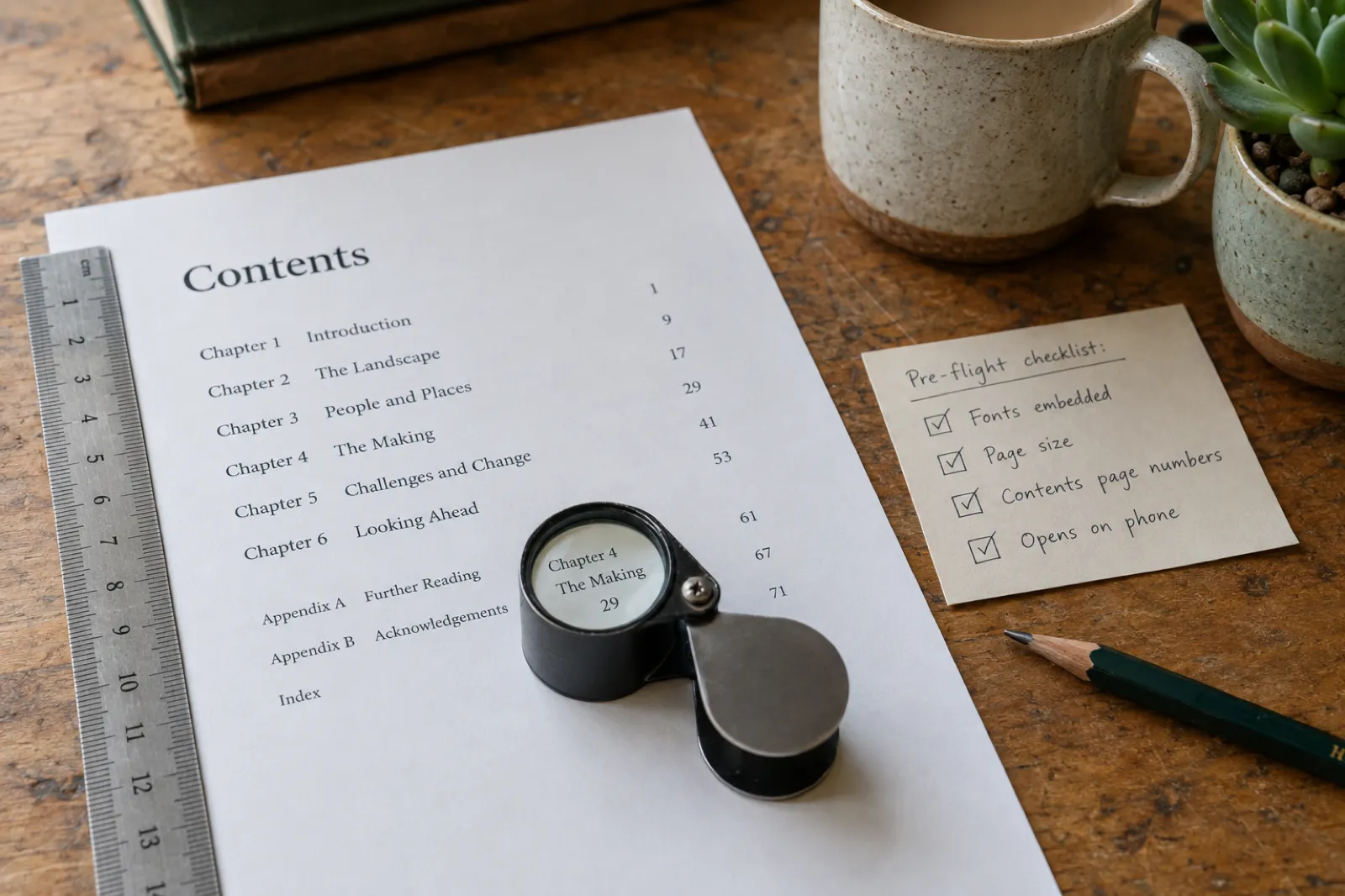
- Fonts are embedded. Amazon's paperback cover guidance says simply: "Embed your fonts." Microsoft's Save as PDF help explains what happens when a font cannot be embedded: "the PDF uses bitmap images of the text", and without that option a reader may swap in another font.
- The page size and margins are exact. A PDF meant for print should be built at its trim size, not shrunk to fit. KDP asks for print images at a "minimum resolution of 300 DPI".
- The contents and bookmarks work. Word can "Create bookmarks using" your headings; a book or workbook PDF should list the page each chapter starts on, and the links should land there.
- Transparency is flattened for print. KDP: "Flatten all transparencies. These can cause the file to print with missing or distorted content."
- An archive version exists when you need one. Word's PDF/A option is described by Microsoft as "an archiving standard", for documents that must open the same years from now.
By those checks, the most reliable PDF creation tool depends on where the document starts:
- A long document you want written for you (an ebook, workbook, guide or lead magnet): Inkfluence AI. The document is laid out as a book from the start, with a cover, a title page and a contents page that, with page numbers switched on, lists the page each chapter starts on, and the KDP print interior is built to the book's real page count. You test the export, not a preview, which is the habit we recommend above.
- A document you wrote yourself in Word: Word's own Save as PDF, with bookmarks from headings and PDF/A when the file is for an archive. It writes the PDF from the layout you already checked on screen.
- Editing, combining, signing or fixing an existing PDF: Adobe Acrobat. Adobe created the format, which Adobe notes "is now an open standard, maintained by the International Organization for Standardization (ISO)."
- Thousands of documents from data: a template API such as PDF Generator API (ranked above), where the same template produces the same layout every time.
The least reliable route is printing a web page to PDF and hoping. The browser decides the page breaks, the margins and whether a header with the date and web address appears on every page. It is fine for a receipt; for anything you will sell or print, check every page.
A ten-minute reliability test for any PDF tool
- Make a real document of at least 20 pages with headings, a table and an image, not the tool's sample.
- Open the PDF on a phone and on a computer. The line breaks and fonts should match.
- Open the document properties in a PDF reader and check the fonts are listed as embedded.
- Click three entries in the contents page. Each should land on the right page.
- Print one page at 100% and measure the margins with a ruler.
- If it is a book, upload the interior to KDP's previewer before you publish. Our guides to formatting a book for KDP and the KDP paperback template list the settings.
Run the test on your own document
Describe the ebook, workbook or guide you need, review the outline, and download the PDF on the free plan. Then put it through the checks above.
Create a PDF freeMost popular PDF creation tools
There is no independent census of which PDF tool people use most, so be wary of any ranking that claims one. What does exist is two kinds of evidence: the tools that ship inside software almost everyone already has, and the usage numbers vendors publish about themselves. By both measures, these are the most popular ways people create PDFs today:
| Tool | How you make the PDF | Best at | Watch for |
|---|---|---|---|
| Adobe Acrobat | Create, convert, combine or export from Acrobat | Editing, forms, signing and fixing PDFs you already have | An editor, not a writer: you bring the content |
| Microsoft Word | Save a Copy, then choose PDF | Documents you wrote yourself, with bookmarks and PDF/A | Fonts that cannot be embedded turn into images of text |
| Google Docs | File, then Print, then Save as PDF (Google's own steps for large files) | Shared drafts and simple documents | Print settings decide the page breaks |
| Canva | Design, then download as PDF | Visual one-pagers, flyers and short guides | Long documents mean placing every page by hand |
| Inkfluence AI | Describe the document, approve the outline, export | Ebooks, workbooks, lead magnets and guides written for you | Built for multi-page documents, not single forms |
The largest published number belongs to Adobe. On its 10 September 2026 earnings call, Adobe said "people open more than 400 billion PDFs with Acrobat every year" and that Acrobat plus Express monthly active users "surpassed 900 million". That measures how many people use Acrobat, mostly to open and work with PDFs, not how many create them from scratch. Word and Google Docs publish no PDF-specific numbers, but both put PDF export one menu away for anyone who already writes in them, which is why they are where most people make their first PDF.

Popular is not the same as right for your job. Every tool in that table saves a PDF; only one of them writes the document for you. If your problem is a blank page rather than an export button, an AI generator such as the text to PDF AI tool or the outline to PDF and EPUB converter starts earlier in the process. For a side-by-side on design tools, see Inkfluence AI vs Canva.
Skip the blank page
Inkfluence AI writes the sections, lays them out with a cover and a contents page, and exports the PDF. Free to start, no credit card.
Start a PDF freeBest PDF creation service by use case
"Best PDF creation service" only has an answer once you know what the PDF is for. These picks use the reliability checks above and the jobs each tool is built for.
| What you are making | Best pick | Why |
|---|---|---|
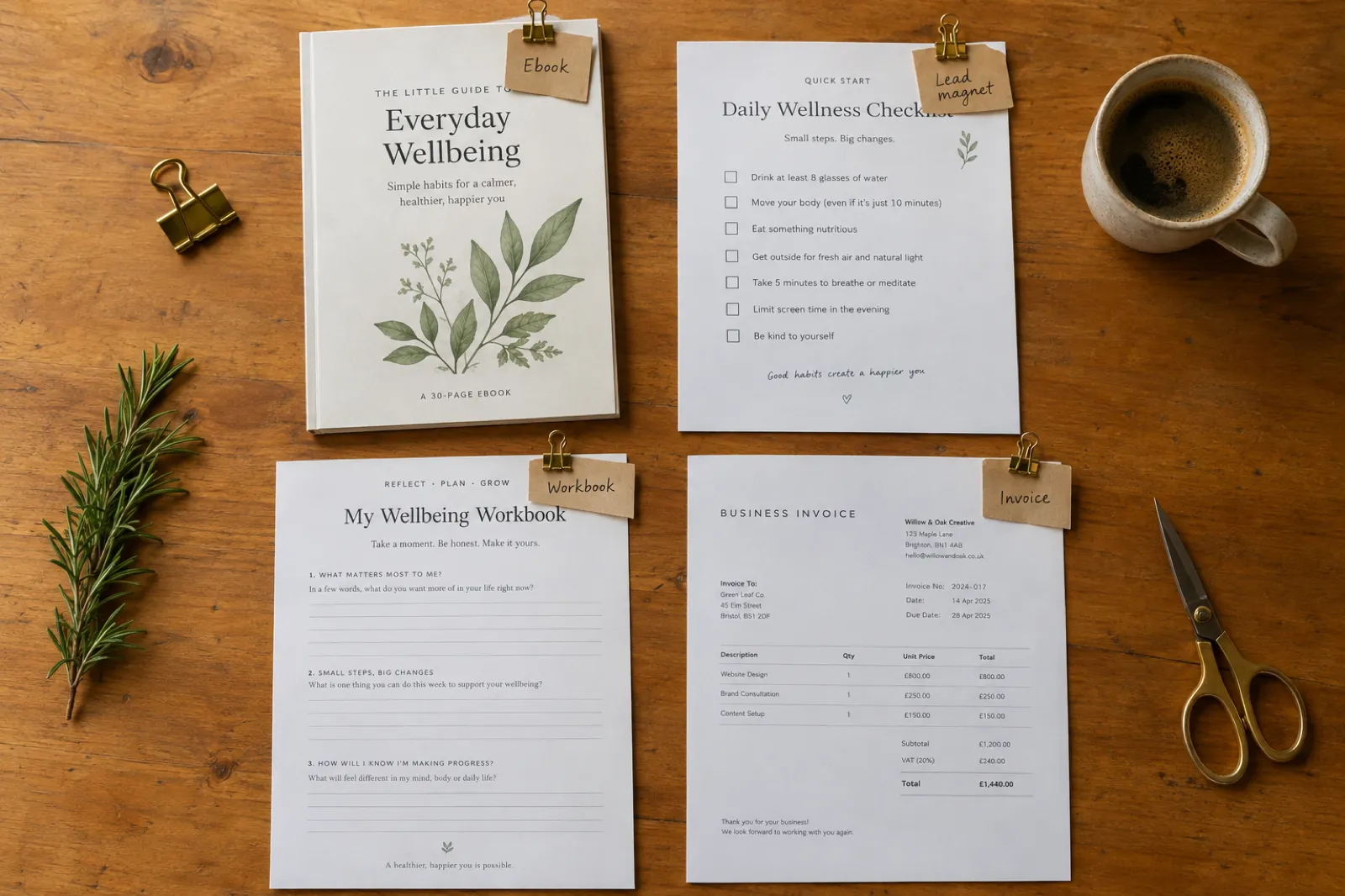
| An ebook or guide from an idea | Inkfluence AI | Outline, chapters, cover and contents in one export; PDF on every plan |
| A lead magnet for an email list | Inkfluence AI | Short, branded, written for a reader you describe; see the lead magnet creator |
| A workbook or journal with fill-in pages | Inkfluence AI | The workbook generator and journal generator build prompts and writing space |
| A paperback interior for Amazon KDP | Inkfluence AI or Word with a KDP template | Trim size, margins and page count must match; the KDP export comes with any paid plan or credit pack |
| Editing, combining or signing existing PDFs | Adobe Acrobat | The editing suite from the company that created PDF |
| A document that must open the same in ten years | Word (PDF/A) or Acrobat | PDF/A is the archiving form of PDF |
| A one-page flyer or social graphic | Canva | Drag-and-drop layout for short, visual files |
| Invoices or certificates in bulk | PDF Generator API | One template, thousands of files from data |
If you write in Google Docs and only need the finished file for Amazon, Google Docs to KDP covers that route, and our comparison of the best book formatting software covers tools that lay out a manuscript you have already written. For the formatting side on its own, the AI book formatter handles headings, contents and trim size.
What the free plan includes. On Inkfluence AI's free plan you get PDF export with a small Inkfluence credit in the file; EPUB, DOCX and the KDP package come with any paid plan or credit pack. Details are on the pricing page.
Make the PDF that matches your job
Ebook, lead magnet, workbook or KDP interior: describe it once and export a finished file.
Try it freeWhy Creators Choose Inkfluence AI
Many tools handle either design or content generation, but not the entire publishing runway. Inkfluence AI guides you from concept to export:
- Idea → Outline → Draft → Design → Export in one platform
- Repurpose chapters for future ebooks
- Multi-format export (PDF, EPUB, DOCX) without extra tools
- Built-in audiobook conversion with AI narration
- Brand kits ensure every export looks consistent
Check out real examples, explore the full feature set, or jump straight into the AI book writer to draft and export your first PDF.
What we have learned from 79,000+ books
We run Inkfluence AI, so this comes from watching the export step at scale rather than from a spec sheet. Across the 79,000+ books people have created on the platform, the PDF itself is almost never where things go wrong. The trouble lives at the export boundary: fonts that quietly fail to embed, images that balloon the file past what Amazon KDP will accept, page margins that look fine on screen but crop badly in print, and a table of contents that shifts the moment the text reflows.
Most tools that call themselves an "AI PDF generator" produce clean text and then hand you off at exactly that boundary. That last mile, turning generated text into a correctly formatted, print-ready file with embedded fonts and a stable layout, is the part that actually decides whether your PDF is usable. So when you compare tools, test the export, not the preview: generate a real document, open it on a different device, and try to upload it somewhere that enforces print specs. That is where the differences show up.
Test the export, not the preview
Make a real document on the free plan, download the PDF and open it on your phone. That is the fastest way to judge any PDF tool, ours included.
Make a test PDF freeCommon Mistakes When Choosing an AI PDF Generator
Many creators make the mistake of choosing a tool based solely on price or a single feature. The real cost of a poor choice shows up later: hours spent reformatting exports, brand inconsistency across materials, or documents that look fine on screen but print poorly. Before committing to any AI PDF generator, consider the full workflow from idea to final delivery.
Another common error is underestimating the importance of export flexibility. A tool that only outputs PDF might seem sufficient today, but as your content strategy evolves you may need EPUB for ebook platforms, DOCX for client edits, or even audiobook formats. Choosing a platform with robust export options from the start saves painful migrations later.
Finally, don't overlook the learning curve. The most feature-rich tool is useless if it takes weeks to master. The best AI PDF makers balance power with accessibility, offering guided workflows that help new users produce professional results quickly while still providing advanced options for power users who need granular control.
The Future of AI PDF Generation
The next wave includes interactive PDFs you can query, semantic exports that understand their own structure, and fully integrated publishing platforms that go from creation to analytics. Implementing AI PDF workflows today means you're ready for:
- Interactive lead magnets with embedded queries
- Personalized onboarding packs generated per customer
- Dynamic documents that update automatically
The trajectory is clear: PDF generation will become increasingly intelligent, handling not just formatting but content strategy, audience adaptation, and distribution optimization. Creators who adopt AI PDF generation tools now will have a significant head start as these capabilities mature.
Getting Started with AI PDF Generation
If you're new to AI-powered document creation, the best approach is to start with a single project. Choose something manageable - a short lead magnet, a client onboarding guide, or a chapter from a larger work - and use it to learn the tool's capabilities. Pay attention to how the AI interprets your prompts, how much editing the output requires, and whether the final design meets your standards.
Most AI PDF generators offer free tiers or trials, so you can evaluate multiple options before committing. Take advantage of this to find the tool that best matches your workflow. The right fit depends on your specific needs: a course creator might prioritize workbook templates, while a content marketer might care more about lead magnet designs and email integration.
Once you've found a tool that works, invest time in setting up your brand kit properly. Colors, fonts, logo placement - getting these right at the start means every future document inherits professional styling automatically. This upfront investment pays dividends across every PDF you create.
Ready to create your first AI-generated PDF?
Start free, no credit card required. Create professional ebooks, lead magnets, and workbooks in minutes.
Get Started Free →Frequently Asked Questions
What is the best AI PDF generator in 2026?
Inkfluence AI is the best overall for generating long-form PDFs from scratch (ebooks, lead magnets, workbooks, and reports), producing structured multi-chapter documents with covers, formatting, and multi-format export in one tool. Canva Magic Studio is strongest for short visual one-pagers, and PDF Generator API leads for programmatic generation at scale.
What is the best AI PDF maker?
For most creators, Inkfluence AI is the best AI PDF maker because it turns a single topic into a complete, formatted document: outline, written chapters, cover, and a print-ready PDF export. Unlike a chatbot that only writes text, a purpose-built AI PDF maker handles the structure and layout too, so you go from idea to finished file without copy-pasting between apps.
Is there an AI that can make a PDF from text or a prompt?
Yes. An AI PDF creator like Inkfluence AI takes a plain-text prompt or a brief and generates a fully formatted PDF, including headings, table of contents, and chapter breaks. You can also paste existing notes and have the AI structure and design them into a finished document.
Can I generate a PDF with AI for free?
Yes. Inkfluence AI's free plan includes AI-generated outlines, chapters, cover design, and PDF export with no credit card. Canva also offers free AI design features for shorter documents.
What is the difference between an AI PDF generator and a PDF editor?
An AI PDF generator creates new content and structure from scratch, handling outlining, writing, formatting, and design automatically. A PDF editor (like Adobe Acrobat AI or PDFelement) modifies, summarizes, or annotates documents you already have. If your starting point is a topic, you need a generator; if it is an existing file, you need an editor. We cover the editing and conversion side in our AI PDF tools guide.
Which AI PDF tool is best for ebooks and lead magnets?
Inkfluence AI is purpose-built for ebooks and lead magnets, offering blueprint-driven generation, automatic formatting, cover design, and multi-format export (PDF, EPUB, DOCX). It produces print-ready output suitable for Amazon KDP, Gumroad, and email opt-in funnels.
Are AI-generated PDFs good enough for professional use?
Yes. Modern AI PDF generators produce professional-quality output with proper typography, consistent formatting, and print-ready resolution. Tools like Inkfluence AI generate PDFs that meet publishing standards for KDP, business reports, and client deliverables. You should still review and edit the content before publishing.
Can AI generate a full ebook as a PDF?
Yes. Inkfluence AI generates complete multi-chapter ebooks from a single topic, including table of contents, chapter content, cover design, and formatted PDF export. A typical ebook goes from prompt to finished file in well under an hour.
What is the most reliable PDF creation tool?
It depends on where the document starts. For a long document written for you, such as an ebook, workbook or lead magnet, Inkfluence AI is the most reliable because the layout, cover and contents are built together and the print interior matches the page count. For a document you wrote yourself, Word's Save as PDF (with PDF/A for archives) is dependable. For editing existing PDFs, use Adobe Acrobat. Whatever you pick, check that fonts are embedded, the page size is exact and the contents links work.
What is the most popular PDF creation tool?
No independent census exists. By the numbers vendors publish, Adobe Acrobat is the largest: Adobe said in September 2026 that people open more than 400 billion PDFs with Acrobat a year and that Acrobat plus Express passed 900 million monthly active users. Most people also make PDFs with Save as PDF in Microsoft Word or Print to PDF from Google Docs, because those are in software they already use.
What is the best PDF creation service?
For ebooks, lead magnets, workbooks and KDP interiors written from an idea, Inkfluence AI. For editing, combining and signing existing PDFs, Adobe Acrobat. For one-page visual designs, Canva. For invoices or certificates generated from data in bulk, a template API such as PDF Generator API.
How can I check a PDF is reliable before I send or upload it?
Open it on a phone and a computer and compare the pages, check the fonts are listed as embedded in the document properties, click a few contents entries, print one page at 100% to measure the margins, and for a book, upload the interior to KDP's previewer before publishing.
Your first PDF, written and laid out for you
Describe the document, review the outline and export. Free to start, with PDF export on every plan.
Start freeSources for the reliability and popularity sections
Each checked on 13 November 2026.
- Amazon KDP: Create a Paperback Cover (embed fonts, flatten transparencies, 300 DPI)
- Microsoft Support: Save or convert to PDF (PDF/A, bookmarks, font embedding)
- Google Docs Editors Help: Create, view or download a file
- Adobe: What is a PDF?
- Adobe Q3 FY2026 earnings call transcript (10 September 2026)
Related Resources
- Free AI PDF Creator - Free-plan walk-through: 5 chapters, no watermark, full commercial rights
- Best AI PDF Tools 2026 - Updated comparison of 8 tools across creation, editing, and conversion
- Best Free Text to PDF Converters 2026 - 8 free tools compared for plain text and book-length exports
- Text to PDF Conversion Guide - Format fidelity, trim sizes, and the KDP-ready export checklist
- AI PDF Ebook Maker - Create ebooks with AI
- AI PDF Creation Guide (2026) - Step-by-step PDF creation workflow
- Ebook Design Best Practices - Professional formatting tips
- AI PDF Tools for Coaches - Coach-specific workflows
- AI PDF Tools for Course Creators - Build course materials fast
- Lead Magnet Generator - Create opt-in PDFs

Founder, Inkfluence AI
Sam is the founder of Inkfluence AI. He built the platform to make book creation accessible to everyone - from first-time authors to seasoned publishers.
Helpful links

Ready to write your own book?
Write with AI, make it yours, and export PDF, EPUB and KDP-ready files from one project.
Keep reading
 AI Writing
Which Gemini Model Is Best for Writing? Gemini 4 Argon, Carbon and Hydrogen, 3.1 Pro and Flash-Lite Compared (November 2026)
Which Gemini model should you write with in November 2026? Gemini 4 Argon, the new Gemini 4 Carbon and Gemini 4 Hydrogen, 3.1 Pro, 3.8 Flash and Flash-Lite compared on what Google actually publishes: which Google AI plan includes each one, context per plan, API prices, reply limits and what Google says each is for. Plus Gemini Storybook for children's stories, the maths of fitting a whole book, and when a book tool is the better pick.
 AI Writing
Which ChatGPT Model Is Best for Writing? GPT-6.1 Terra, GPT-6.1 Sol, GPT-6 Astra and Luna Compared (November 2026)
Which ChatGPT (GPT) model should you write with in November 2026? GPT-6.1 Terra, GPT-6.1 Sol, GPT-6 Astra and GPT-6 Luna compared on what OpenAI actually publishes: which ChatGPT plan includes each one, API prices, context and reply limits, and what each is built for. Plus GPT Image 2.6 for book covers, the maths of fitting a whole book, and what a book needs beyond a chat model.
 AI Writing
NaNoWriMo Alternatives 2026: Every November Writing Challenge, and Which Ones Allow AI
NaNoWriMo closed in 2025, but November is still novel month. Here is every 2026 challenge that replaced it, with dates, goals, prizes, age limits and the one thing other lists leave out: what each challenge says about AI. Plus a word-count planner, a Preptober plan for the last few days of October, and two honest 30-day plans: one for the challenge, one for an AI-assisted November that ends with a published book.

Get ebook tips in your inbox
Join creators getting weekly strategies for writing, marketing, and selling ebooks. You also get our free PDF guide, Your First Book in a Weekend.