
AI Documentation Generator: Create Technical Guides, Manuals & How-To Docs in Minutes
Documentation is the work everyone knows they should do and nobody wants to do. AI documentation generators have changed the equation - turning rough notes into polished guides without the traditional pain. Here is what actually works.
Quick Answer
AI documentation generators turn rough knowledge dumps into polished technical guides, training manuals, and process documents. In 2026, tools like Inkfluence AI handle the full pipeline: you provide the raw knowledge, the AI structures it into chapters with headings and formatting, you refine the output, and export as PDF or EPUB.
Every team has the same problem. The knowledge exists - in people's heads, in scattered notes, in tribal wisdom passed down through Slack messages. What does not exist is the documentation.
Someone says "we really need to document this process." Everyone agrees. Nobody does it. Months pass. A key employee leaves. Suddenly that undocumented process becomes a crisis.
This is not a motivation problem. It is a production problem. Writing documentation is tedious, time-consuming, and feels like it is never quite finished. The people who know the processes are too busy executing them to stop and write about them.
Enter AI documentation generators - tools that transform your rough knowledge dumps into polished, professional documentation without the traditional agony of blank page syndrome.
In 2026, AI has matured to the point where you can describe what you know in rough form - bullet points, voice notes, messy drafts - and get back structured, readable documentation. Not perfect first drafts, but solid foundations that need refinement rather than creation from scratch.
The documentation backlog that has plagued your team for years? It is now a weekend project instead of a quarterly initiative that never happens.
Related resources:
- AI Documentation Generator - create guides and manuals
- AI Ebook Generator - for longer-form content
- Lead Magnet Generator - documentation for marketing
- AI Book Publishing Workflow Guide
What AI Documentation Generators Actually Do
Let's be specific about capabilities, because the term "AI documentation generator" gets thrown around loosely.
An AI documentation generator takes unstructured input - your rough notes, bullet points, verbal explanations, or existing fragmented docs - and produces structured, readable documentation. It handles the tedious parts: organizing information logically, creating proper headings, writing transitions, maintaining consistent formatting, and turning fragments into flowing prose.
This is fundamentally different from AI that tries to write books from scratch. Documentation generators work best when you bring the expertise and let AI handle the production work.
Here is what the workflow looks like:
You provide the knowledge. The actual content - processes, procedures, technical details, explanations. This is the intellectual substance that only you possess. It can be rough. It can be incomplete. It just needs to capture what you know.
AI structures and writes. It takes your input and produces documentation with proper sections, clear headings, logical flow, and readable prose. It expands bullet points into explanations, creates introductions and summaries, and formats everything consistently.
You review and refine. AI output needs editing. You catch errors, adjust tone, add details the AI couldn't know, and ensure accuracy. This is significantly faster than writing from scratch - editing beats creating.
The result is documentation that would have taken days to write manually, produced in minutes with your expertise intact. Similar to how AI ghostwriting works for books, but optimized for practical, structured content.
What You Can Actually Create
AI documentation generators excel at certain content types. Understanding where they work best helps set realistic expectations.
Technical Guides and How-To Documentation
Step-by-step instructions for completing tasks, using software, or following procedures. These benefit enormously from AI because the structure is predictable - introduction, prerequisites, numbered steps, troubleshooting, conclusion. AI handles this structure naturally.
Example: A software company needs user documentation for a new feature. The product manager provides rough notes on functionality. AI generates a structured guide with screenshots placeholders, step-by-step instructions, and FAQ section. The PM reviews, adds specifics, and publishes - a process that takes under an hour instead of days.
If you need longer technical content, our AI ebook generator can create comprehensive technical manuals and guidebooks.
Training Manuals and Onboarding Guides
Content designed to bring new team members or users up to speed. These require clear explanations of concepts, processes, and expectations. AI excels at taking expert knowledge and articulating it for beginners - often better than the experts themselves, who suffer from the curse of knowledge.
Example: A growing startup needs onboarding documentation. The founder dumps everything new hires need to know into bullet points. AI transforms this into a comprehensive onboarding guide with sections on company culture, tools, processes, and role expectations. New hires get consistent information instead of tribal knowledge transfer.
For educators and trainers, this same approach works for creating course materials and study guides.
Process Documentation
Capturing how things actually get done - workflows, procedures, decision trees. This is the documentation that prevents knowledge loss when employees leave and enables process improvement by making the current state visible.
Example: A marketing team has developed effective campaign launch processes that exist only in the team lead's head. She records a voice note explaining the process. AI converts this into structured documentation with phases, checklists, responsibilities, and common pitfalls. The process is now transferable and improvable.
Internal Knowledge Bases
Reference documentation that teams consult repeatedly - policies, procedures, technical references, FAQs. AI helps create these initial knowledge bases and can assist in maintaining them as information changes.
Example: A customer success team answers the same questions repeatedly. They compile their common responses. AI transforms these into a structured internal knowledge base with categories, search-friendly formatting, and consistent style. Support becomes faster and more consistent.
📝 Quick Tip
Start with your most-requested documentation. That guide everyone keeps asking for? That's your first project. The demand is proven and the payoff is immediate. Use our documentation generator to knock it out this week.
How to Structure AI-Generated Documentation
The single biggest quality lever is giving the AI the right structure to fill, because a document with the correct skeleton needs only fact-checking, while a document with the wrong skeleton needs rebuilding. These three outlines cover most business documentation. As of August 2026, more than 1,130 technical documentation projects have been created on Inkfluence AI, and the ones that need the least editing almost always started from a skeleton like these.
Standard Operating Procedure (SOP):
- Purpose: what outcome this procedure produces and when to use it
- Scope and roles: who performs it, who approves it, what systems it touches
- Prerequisites: access, tools, and conditions required before starting
- Numbered procedure: one action per step, in the exact order performed
- Decision points: what to do when a step can branch, stated as if/then rules
- Escalation: what counts as failure and who to contact
- Revision history: date, change, and owner of each update
User guide:
- What this feature or product does, in one paragraph a new user understands
- Getting started: the shortest path to the first successful result
- Core tasks: one section per job the user actually wants to do
- Troubleshooting: symptoms first, then causes, then fixes
- FAQ: the questions support actually receives, answered in 2-4 sentences
Training manual:
- Learning objectives: what the reader can do after finishing
- Concept sections: one idea per section, explained before it is used
- Guided practice: exercises that apply each concept immediately
- Checkpoints: self-test questions at the end of each module
- Reference appendix: glossary, shortcuts, and lookup tables
Paste the relevant skeleton into your prompt along with your knowledge dump, and the AI fills structure instead of inventing it. This is the practical answer to structuring AI documentation: decide the skeleton yourself, delegate the prose.
Capture Tools vs Generation Tools: Which Kind Do You Need?
"AI documentation generator" covers two genuinely different product categories, and picking the wrong one wastes money. Capture tools record your screen while you perform a task and turn the recording into a step-by-step guide. Generation tools take written knowledge and produce long-form structured documents. Most teams eventually need one of each.
| Tool | Category | Best for | Output |
|---|---|---|---|
| Guidde | Screen capture | Video walkthroughs of software tasks with AI narration | Video guides, embedded clips |
| Scribe | Screen capture | Auto-generated click-by-click guides with screenshots | Step-by-step web pages |
| Miro AI | Diagram-first | Visual documentation inside an existing whiteboard workflow | Boards, diagrams, specs |
| Inkfluence AI | Long-form generation | Manuals, SOPs, training guides, and handbooks from written knowledge | Structured documents, PDF and EPUB export |
The honest rule of thumb: if the knowledge lives in how you click through software, use a capture tool. If it lives in someone's head or scattered notes, use a generation tool.
Where AI Documentation Falls Short
Honest assessment matters. AI documentation generators are powerful but have limitations you should understand before investing time.
They cannot generate expertise you don't have. AI amplifies and articulates existing knowledge. If you provide shallow input, you get shallow output. The documentation is only as good as the information you feed it. AI does not invent accurate technical details or create valid processes from nothing.
They struggle with highly specialized terminology. While AI handles general technical writing well, extremely specialized domains may require more revision. Medical procedures, legal compliance, cutting-edge research - these need careful expert review because AI may confidently state things incorrectly.
They cannot replace human judgment for accuracy. AI can write plausible-sounding documentation that contains errors. Every output needs review by someone who actually knows the subject matter. AI accelerates production; it does not eliminate the need for expertise.
They don't capture organizational context automatically. Your company's specific tools, team names, internal jargon, and cultural elements need to be provided explicitly. AI writes generically unless given specific context.
They're not ideal for highly visual documentation. AI generates text well. It cannot create screenshots, diagrams, or interactive elements. For documentation that relies heavily on visuals, you still need to create and insert those manually.
For content where accuracy is paramount - like business ebooks or lead magnets - always build in review time with subject matter experts.
The Real Value Proposition: Time Mathematics
Documentation projects fail for one reason: they take too long relative to their perceived urgency. Understanding the time economics helps explain why AI documentation changes the equation.
Traditional documentation writing: A comprehensive process guide might take 8-16 hours of writing time for a competent writer who knows the subject. For a non-writer who knows the subject? Double that, plus frustration. The work keeps getting deprioritized because other tasks feel more urgent.
AI-assisted documentation with Inkfluence: The same guide takes 10-20 minutes to dump your knowledge into rough form, 2-3 minutes for AI to generate a full draft (yes, minutes - not hours), and 20-30 minutes to review and refine. Total: under an hour instead of 8-16+. The creative burden shifts entirely from generating prose to reviewing and refining.
This time compression is what makes documentation actually happen. A project that takes a full day can always be postponed. A project that takes a focused afternoon can fit into a real schedule.
The math gets more compelling at scale. A documentation backlog of 20 guides represents 160-320 hours of traditional work - a quarter of someone's annual productive time. With AI assistance, it becomes 60-80 hours - a manageable sprint instead of an impossible marathon.
⏱️ Time Comparison
| Task | Traditional | With AI |
| Single guide | 8-16 hours | 30-60 min |
| 10 guides | 80-160 hours | 5-10 hours |
| Full knowledge base | Months | Days |
Practical Workflow: From Notes to Published Docs
Here is a realistic workflow for using AI documentation generators effectively. This approach optimizes for quality output without excessive process overhead.
Phase 1: Knowledge Dump (15-30 minutes per topic)
Capture everything relevant to the topic in any form that works for you. Bullet points work well. Voice notes transcribed by AI work. Messy text documents work. The goal is externalization, not polish.
Questions to answer in your dump:
- What is this about? Who needs it?
- What are the main steps or concepts?
- What prerequisites or context matter?
- What mistakes do people commonly make?
- What questions do people usually ask?
Do not worry about organization or completeness. Get the core knowledge out of your head and into a form AI can process. If you prefer speaking over typing, check out why voice notes work better for many people.
Phase 2: AI Generation (2-5 minutes per topic)
Feed your knowledge dump to the AI documentation generator. Specify the documentation type you need - technical guide, training manual, process documentation. Inkfluence generates a complete multi-chapter guide in about 2-3 minutes - you can literally watch it write in real-time.
If the first output misses important aspects, regenerate specific sections or add more context to your input. Even with iterations, you are looking at minutes, not hours.
Phase 3: Expert Review (15-30 minutes per topic)
Read every section critically. Check for:
- Accuracy - is everything technically correct?
- Completeness - are any steps or concepts missing?
- Clarity - will the target audience understand this?
- Voice - does it match your organization's style?
- Specificity - are generic examples replaced with relevant ones?
This is where your expertise matters most. AI generated the foundation; you ensure it is actually right and useful.
Phase 4: Polish and Publish (15-30 minutes per topic)
Final formatting, adding any visuals, inserting screenshots or diagrams, setting up in your documentation platform. Export as PDF for distribution or publish to your internal wiki.
Total time per documentation piece: 30-60 minutes versus 8-16+ hours traditionally. More importantly, the cognitive load shifts from creative generation to critical review - a much more sustainable mode of work.
✅ Action Step
Pick one piece of documentation your team needs. Set a 30-minute timer. Dump everything you know about that topic into bullet points. Then use the AI documentation generator to turn those notes into a first draft. You'll have usable documentation by end of day.
Integration With Existing Documentation Systems
AI-generated documentation needs to fit into your existing workflows. Here's how integration typically works.
For internal wikis (Notion, Confluence, etc.): Generate documentation in the AI tool, export as text or markdown, paste into your wiki platform, and format using native tools. The structure AI creates translates well to most wiki formats.
For PDF distribution: Tools like Inkfluence AI include PDF export with professional formatting. Generate, review, export - ready for distribution via email, learning management systems, or client portals. You can also create professional PDFs for any business purpose.
For help centers: Structure AI output as individual articles rather than monolithic documents. Most help center platforms prefer modular content. Generate multiple focused pieces rather than one comprehensive document.
For version control: If you need to track changes over time, export to a format compatible with your version control system (text, markdown). AI can help regenerate sections when processes change, but you maintain the master documents in your existing system.
Common Use Cases by Team Type
Technical Teams and Engineering
System documentation, API guides (non-code aspects), architecture overviews, troubleshooting guides, deployment procedures. Technical teams often have the knowledge but lack time or writing inclination. AI bridges this gap effectively.
The consultant workflow applies well here - documenting methodologies and procedures that exist in expert heads but not in accessible form. See also our guide on creating business guides.
Operations and Process Teams
Standard procedures, workflow documentation, quality checklists, incident response guides. Operations work often involves repetitive processes that benefit enormously from clear documentation. AI helps capture tribal knowledge before it walks out the door.
Training and Learning Development
Course materials, training guides, onboarding documentation, reference materials. Learning content has predictable structures that AI handles well. Subject matter experts can focus on accuracy while AI handles prose generation.
For education-specific content, explore our study guide generator and guide to creating study materials.
Customer-Facing Teams
User guides, help documentation, FAQ content, troubleshooting guides. Customer documentation directly impacts support load and user satisfaction. AI enables rapid documentation creation as products evolve.
Small Businesses and Startups
Everything, all at once, with limited resources. Small teams need documentation but cannot dedicate headcount to it. AI makes comprehensive documentation achievable for resource-constrained organizations.
If you are a small business owner, you might also benefit from creating lead magnets that establish expertise while attracting customers.
💡 Pro Tip for Teams
Make documentation a team sport. Have one person dump knowledge, another review AI output, and a third test by following the guide. This catches gaps faster and distributes the load. Use our collaboration features to streamline this workflow.
Quality Control: Ensuring Documentation Actually Works
AI-generated documentation can look professional while being subtly wrong or unhelpful. Here is how to ensure quality.
Test with actual users. Have someone unfamiliar with the process try to follow the documentation. Where do they get stuck? What questions do they have? This reveals gaps that expert review often misses.
Maintain feedback loops. Include contact information or feedback mechanisms in documentation. When people encounter problems, they should have a way to report them. Use this feedback to continuously improve.
Schedule regular reviews. Processes change. Tools update. People leave and join. Documentation that was accurate six months ago may be misleading today. Set calendar reminders to review and update.
Cross-reference with other sources. If you have related documentation, ensure consistency. AI does not know what your other documents say. Human review must catch contradictions and align terminology.
Building a Documentation Culture
AI tools reduce the friction of documentation creation, but tools alone do not create documentation culture. Here is what else matters.
Make documentation part of completion criteria. A project is not done until it is documented. A process is not implemented until it is written down. This mindset shift matters more than any tool.
Lower the quality bar initially. Imperfect documentation beats no documentation. "Good enough" guides can be improved; empty wiki pages cannot. AI helps here by producing something usable quickly, even if refinement comes later.
Recognize documentation work. Writing documentation often goes unrecognized compared to building features or closing deals. Change this. Celebrate documentation contributions. Make it visible when someone creates valuable guides.
Create templates and standards. Consistency across documentation makes everything more usable. Develop standard structures for different documentation types. AI outputs can be configured to follow these standards.
The Strategic Value of Good Documentation
Beyond operational efficiency, documentation has strategic value often underappreciated.
Knowledge resilience. When key employees leave, documented knowledge stays. This is insurance against the disruption of turnover. Organizations with strong documentation are more resilient to personnel changes.
Scalable onboarding. Growth becomes easier when new team members can ramp up through documentation rather than consuming senior employees' time. Documentation is a leverage point for scaling.
Process improvement foundation. You cannot improve what you have not articulated. Documentation makes processes visible and improvable. It is the starting point for optimization.
Reduced support burden. Good documentation deflects questions. Whether internal (employees asking how things work) or external (customers asking how to use products), documentation reduces repetitive support work.
Authority and professionalism. For client-facing documentation, quality guides build trust. They signal that you have your act together. For consultants and coaches, documentation becomes a differentiator. Combined with strategic lead magnets, your documentation can drive business growth.
Getting Started: Your First AI-Generated Documentation
If you are new to AI documentation, here is how to start with minimal friction.
Pick a documentation quick win. Choose something that:
- You know well (you have the expertise)
- Gets requested repeatedly (there is clear demand)
- Is not too complex (manageable scope)
- Would be clearly valuable if it existed (motivation to complete)
Spend 20 minutes on knowledge capture. Bullet points, rough notes, brain dump. Do not overthink it. Just externalize what you know about this topic.
Generate and iterate. Use an AI documentation generator to produce the first draft. Review, provide feedback, regenerate if needed. Two or three passes usually get you to something solid.
Review for accuracy. Read critically. Fix errors. Add missing context. Ensure someone could actually use this documentation.
Ship it. Publish the documentation. Get it in front of the people who need it. Collect feedback. Improve over time.
One successful documentation piece builds momentum. The next one is easier because you have proven the workflow works. Momentum compounds.
Related Tools and Resources
Depending on your specific documentation needs, you might find these tools helpful:
- AI Documentation Generator - Technical guides, manuals, how-to docs
- AI Ebook Generator - Longer-form guides and comprehensive manuals
- AI PDF Generator - Professional PDF output for any business document
- Study Guide Generator - Educational materials and learning resources
- Lead Magnet Generator - Documentation that drives leads
- Book Outline Generator - Structure longer documentation projects
For workflow guidance, see our repeatable AI book publishing workflow and fastest way to create content.
The Documentation Backlog Is Now Achievable
Every organization has a documentation backlog - the guides that should exist but do not, the processes that should be written down but are not, the knowledge that lives in heads instead of accessible form.
For years, this backlog has grown because documentation was a time-intensive, low-urgency task that could always be postponed. The economics did not work. The effort felt disproportionate to the benefit.
AI documentation generators change this equation. The same documentation that would take a day now takes an afternoon. The creative burden shifts from generation to review. The backlog becomes achievable.
The organizations that will thrive are those that capture and share knowledge effectively. AI has removed the production barrier. The question is no longer whether you can document your knowledge - it is whether you will.
🚀 Ready to clear your documentation backlog?
Try the AI Documentation Generator - turn rough notes into polished guides, manuals, and how-to docs in minutes instead of days.
Frequently Asked Questions
What types of documentation can AI generators create?
AI documentation generators work well for technical guides, how-to documentation, training manuals, onboarding guides, process documentation, and internal knowledge bases. They excel at structured content where the format is predictable - step-by-step instructions, explanatory guides, reference materials. They are less suited for highly visual documentation or content requiring specialized domain expertise the AI was not trained on.
How long does it take to create documentation with AI?
With Inkfluence AI, the actual generation takes about 2-3 minutes for a complete multi-chapter guide. The full process - including 10-20 minutes to capture your knowledge and 15-30 minutes to review - means you can go from idea to finished documentation in under an hour. Compare that to 8-16 hours of traditional writing.
Is AI-generated documentation accurate?
AI generates documentation based on the input you provide and its training data. It can confidently state things that are wrong, especially for specialized topics. Human review by a subject matter expert is essential. AI accelerates production; it does not eliminate the need for accuracy verification. The documentation is only as good as the knowledge fed into it and the review applied to it.
Can I customize the output format and style?
Yes. Most AI documentation tools allow you to specify document type (guide, manual, how-to), tone (formal, conversational), and structure. You can provide style guidance and iterate until the output matches your organizational standards. The generated content can be exported as PDF, text, or other formats for integration with existing documentation systems.
How does AI documentation compare to hiring a technical writer?
AI documentation generators handle production at a fraction of the cost. A technical writer costs $50-150/hour; AI tools cost a monthly subscription. However, AI cannot replace human judgment, domain expertise, or the ability to interview subject matter experts. For organizations with heavy documentation needs, AI tools augment human writers rather than replace them - technical writers become editors and reviewers rather than first-draft producers.
What input does the AI need to create good documentation?
The AI needs your knowledge in some form - bullet points, rough notes, voice transcripts, existing fragments. The better your input, the better the output. Include the core process or concept, any prerequisites, common mistakes or questions, and specific examples. You do not need polished input; rough but comprehensive beats incomplete but clean.
Can I use AI documentation for client deliverables?
Absolutely. Many consultants and agencies use AI-generated documentation as client deliverables. The key is thorough review and customization. AI creates the foundation; you add the client-specific context and ensure accuracy. Export as professional PDF for polished delivery.
What about documentation for regulated industries?
AI-generated documentation can work in regulated industries, but requires extra scrutiny. Have compliance experts review all output. Use AI to accelerate first drafts, but treat regulatory accuracy as non-negotiable human responsibility. Never publish compliance-critical documentation without expert review.
Can AI-generated documentation be exported to Confluence or Notion with formatting intact?
Yes, with one caveat. Headings, numbered lists, bold text, and tables survive a paste into Confluence or Notion because both platforms parse standard rich text. What does not transfer is page-level design like custom fonts or cover layouts, which live in the PDF export. The practical workflow: generate and structure the document in the AI tool, paste the content into your wiki for team editing, and keep the PDF export for client-facing or printable versions.

Founder, Inkfluence AI
Sam is the founder of Inkfluence AI. He built the platform to make book creation accessible to everyone - from first-time authors to seasoned publishers.
Helpful links
Ready to Create Your Own Ebook?
Start writing with AI-powered tools, professional templates, and multi-format export.
Get Started FreeRelated Articles
 AI Writing
 How to Make a Children's Picture Book with AI: Idea to Printed Book in a Day
The complete 2026 workflow for making a fully illustrated children's picture book with AI: age-band word counts, page planning, consistent characters, cover design, and publishing it on Amazon KDP with the right disclosure.
 AI Writing
 The 9 Best Ebook Creators in 2026: AI, Formatting, and Design Tools Compared
Not every "ebook creator" does the same job. We compare the 9 best tools of 2026 across three categories: AI generators that write the book, formatting tools that typeset it, and design tools that make it beautiful, with verified pricing for each.
 AI Writing
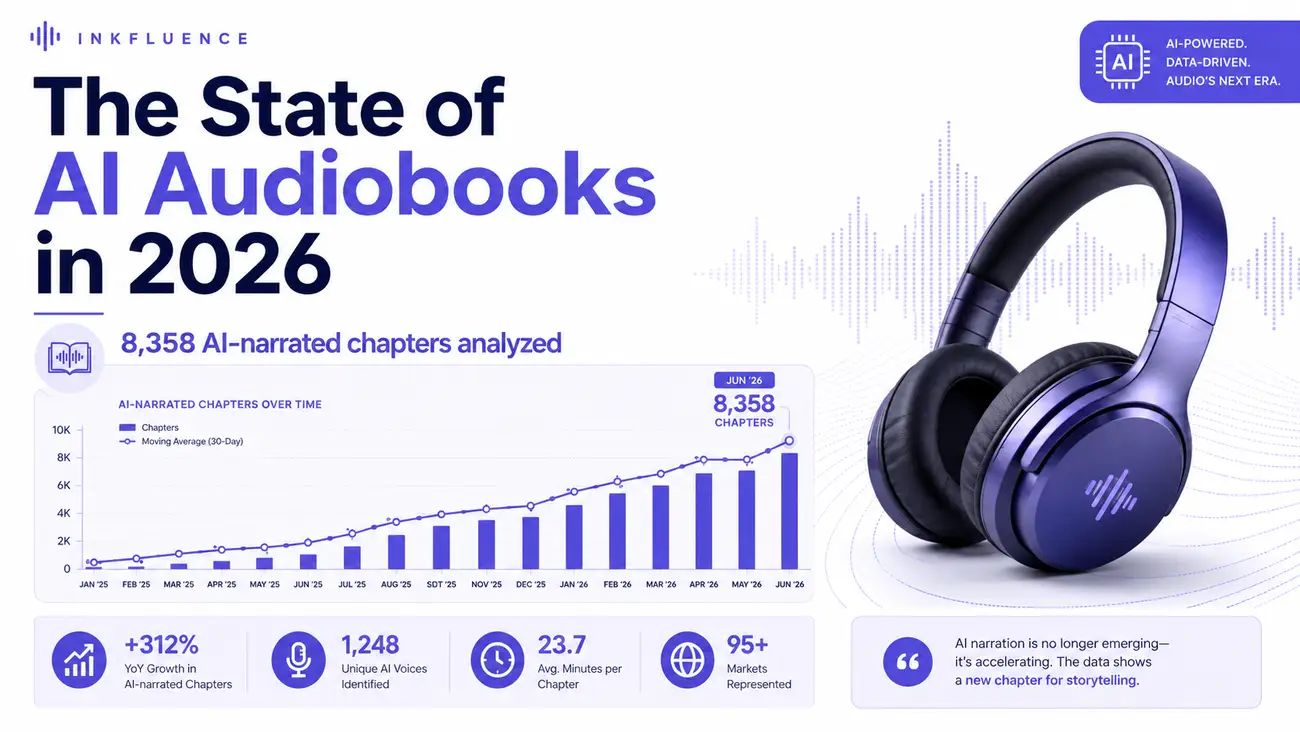
 The State of AI Audiobooks in 2026: What 8,358 AI-Narrated Chapters Reveal
We looked at 8,358 chapters our users narrated into audiobooks with AI. Monthly narration grew from a handful of chapters in late 2025 to nearly 3,000 a month by mid-2026, 99% of jobs finished cleanly, and listeners consistently pick natural, conversational voices over dramatic ones. Here is the first-party data and what it means for authors.
Get ebook tips in your inbox
Join creators getting weekly strategies for writing, marketing, and selling ebooks.