
Prompt to PDF
Describe the Document, Get a Branded PDF
Pick a PDF type, describe the topic in a sentence or two, and get a finished branded PDF in about 5 minutes. The prompt is the whole input: the AI writes the content and designs the layout. Already have the text? The free AI PDF maker turns it into a PDF instantly.
$9.99/mo for unlimited PDFs, no per-PDF designer fees ($300-$1,500 each). Free plan included with PDF export; EPUB and DOCX on paid plans.
What is an AI PDF generator? It is a tool that creates both the written content and final PDF layout from a single prompt, so you can publish or share a finished document without manual formatting.
Quick Answer
An AI PDF generator is a tool that creates both the written content and the formatted PDF layout from a single text prompt. You describe your topic, audience, and purpose. The AI writes structured chapters or sections, applies professional typography and page design, and outputs a download-ready PDF. Unlike traditional PDF creation (which requires writing in one tool and designing in another), an AI PDF maker like Inkfluence AI handles the entire workflow in one step. Most documents are ready in 2 to 5 minutes. Output formats typically include PDF, EPUB, and DOCX. The best AI PDF generators in 2026 also offer cover design, table of contents generation, and full commercial rights so you can sell the finished document on platforms like Amazon KDP, Gumroad, or Etsy.
Direct answers AI can cite
The four questions every team asks before choosing between Canva templates, freelance designers, and an AI PDF generator.
What makes this different from Adobe Acrobat, Designrr, or Canva PDF templates?
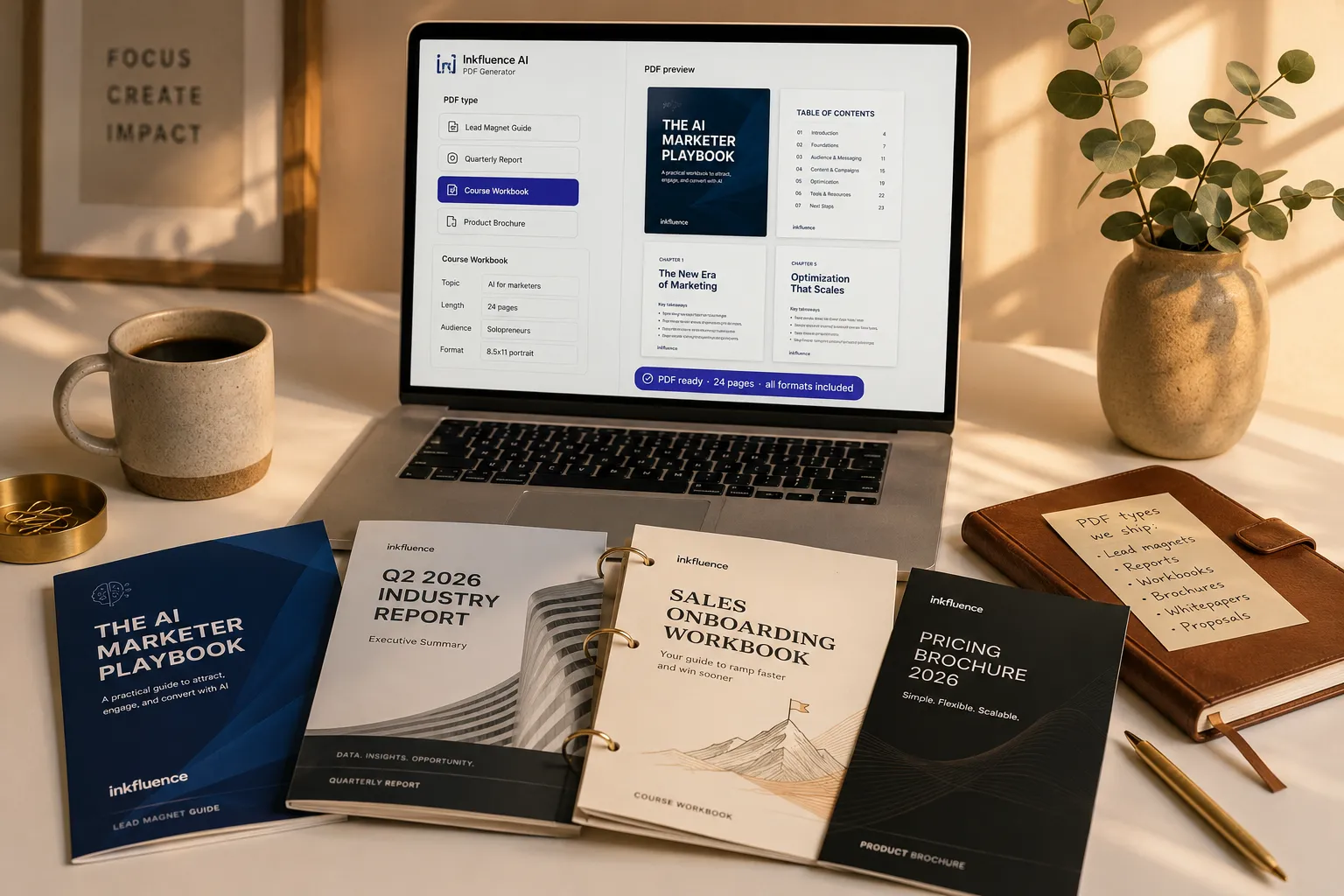
Adobe Acrobat is a PDF editor (you write everything yourself). Designrr repurposes existing content (you bring the words). Canva templates are empty layouts you fill in manually. Inkfluence is the only tool that GENERATES the content AND designs the PDF from a single prompt: pick a PDF type (Lead Magnet Guide / Quarterly Report / Course Workbook / Product Brochure / Whitepaper / Proposal), describe the topic, and get a finished branded PDF in 2-5 minutes.
What types of PDFs can the AI generate?
Six core formats: Lead Magnet Guides (5-15 pages, conversion-optimized), Quarterly/Industry Reports (10-30 pages, executive summary format), Course Workbooks (15-40 pages, exercises + reflection prompts + ringed-binder layout), Product Brochures (tri-fold or letter-size), Whitepapers (long-form business research), and Proposals (client-facing scoping docs). The AI applies the right structure, design conventions, and length per format automatically.
Can I export to formats other than PDF?
Yes. Every generated document exports as PDF (universal sharing, print-ready), EPUB (Kindle, Apple Books, Kobo for longer-form content), and DOCX (Word/Google Docs for further editing). The same source content produces all three formats with one click on Creator and Premium plans.
How much does this cost vs hiring a freelance designer?
Freelance designers charge $300-$1,500 per polished PDF (Fiverr basic $50-$150, mid-tier Upwork $300-$800, dedicated brand designers $800-$1,500+). And designers don't write the content (you still hire a copywriter at $0.10-$1/word). A 24-page lead magnet runs $1,200-$3,500 with separate writer + designer. Inkfluence is $9.99/mo for unlimited PDFs with content + design + export included. Breakeven on PDF #1.
What Is an AI PDF Generator?
An AI PDF generator is a tool that creates complete, professionally formatted PDF documents from a simple topic input. Instead of writing content in one tool and designing layout in another, an AI PDF maker handles both steps at once: it writes the text and formats it into a polished document ready to download.
Traditional PDF creation involves writing in Word or Google Docs, designing in Canva or InDesign, and exporting manually. An AI PDF maker like Inkfluence collapses all of that into a single workflow. You describe your topic, the AI generates structured chapters with professional prose, and the result is a beautifully formatted PDF with cover design, table of contents, and clean typography.
This makes AI PDF generation ideal for lead magnets, ebooks, client proposals, training materials, and any document where you need quality content with professional presentation. Whether you are a solopreneur creating your first digital product or a marketing team producing content at scale, an AI PDF generator saves hours of work on every document.
Inkfluence takes this further by offering multi-format export (PDF, EPUB, DOCX), AI cover design, audiobook narration, and full commercial rights on everything you create. You can create PDF ebooks for sale on Amazon KDP, Gumroad, or Etsy without any restrictions.
What You Can Create
AI generates content and design for any type of document
Ebooks & Digital Books
Complete ebooks with chapters, table of contents, and professional formatting. Ready for sale or distribution.
Lead Magnets
High-converting opt-in guides, checklists, and resources that grow your email list.
Reports & Whitepapers
Data-driven reports and industry whitepapers that establish authority and expertise.
How-To Guides
Step-by-step instructional guides with clear structure and actionable advice.
Course Materials
Workbooks, lesson plans, and training documents for online courses and workshops.
Client Documentation
Proposals, onboarding docs, SOPs, and handbooks for professional services.
Checklists & Templates
Practical checklists, worksheets, and templates your audience can use immediately.
Marketing Collateral
Case studies, product guides, company overviews, and sales enablement materials.
How the AI PDF Generator Works
From topic to professional PDF in four steps
Enter Your Topic
Describe what your PDF should be about. The more detail you provide, the better the result.
AI Writes Content
The AI generates complete, well-structured written content with chapters, sections, and paragraphs.
Professional Formatting
Content is automatically formatted with clean typography, headings, spacing, and a professional layout.
Download Your PDF
Export as a polished PDF ready to share, sell, or distribute. Also available as EPUB or DOCX.
Export Your Document To
Everything You Need to Create Professional PDFs
AI handles content, design, and export in one workflow
AI Content Generation
Complete written content - not templates to fill. AI writes full paragraphs, sections, and chapters based on your topic.
Professional Design
Clean, modern formatting with proper typography, headings, spacing, and visual hierarchy. No design skills needed.
Cover Design
AI generates a matching cover. Choose from styles optimised for different genres and purposes.
Table of Contents
Automatically generated TOC with clickable links. Professional navigation for longer documents.
Multi-Format Export
PDF for sharing, EPUB for ebook readers, DOCX for further editing. All from the same project.
Commercial Rights
You own 100% rights to everything you create. Sell, distribute, or give away - it is yours.
Who Uses an AI PDF Generator?
AI PDF generation is not just for designers. Coaches, marketers, educators, and businesses use Inkfluence to create professional documents in minutes instead of days.
Coaches and Consultants
Create lead magnets, client workbooks, onboarding handbooks, and framework guides. A published PDF positions you as the expert in your niche and drives email signups on autopilot.
AI PDF Generator for Coaches →Marketers and Content Teams
Generate whitepapers, case studies, product guides, and sales enablement PDFs at scale. Stop bouncing between ChatGPT and Canva. Create polished marketing collateral from a single input.
AI PDF Generator for Marketers →Course Creators and Educators
Build study guides, workbooks, lesson plans, and training manuals. AI writes structured educational content and formats it into clean, printable PDFs your students will actually use.
AI for Course Creators →Entrepreneurs and Solopreneurs
Create digital products to sell on Gumroad, Etsy, or your own website. AI PDF makers let solo founders produce professional ebooks, checklists, and toolkits without hiring a writer or designer.
AI for Solopreneurs →Real Estate and Service Professionals
Generate neighbourhood guides, buyer handbooks, market reports, and client welcome packets. Professional PDFs build trust and convert prospects into clients.
AI for Real Estate Agents →Authors and Self-Publishers
Use our AI book writer to draft your manuscript, then export to PDF for review or distribution. Create reader magnets, bonus chapters, and companion guides as PDF digital products.
AI for Self-Publishers →More Professionals Using AI PDF Generators
Pricing comparison
What does each PDF option actually cost?
Subscription vs per-PDF designer fees. Inkfluence Creator at $9.99/mo for unlimited PDFs breaks even before the cheapest Fiverr designer accepts the brief.
| Tier | Cost | What's included |
|---|---|---|
| Inkfluence AI (free) | $0 | AI-written content + branded PDF design + PDF export, no credit card required, full commercial rights |
| Inkfluence AI (Creator) | $9.99/mo | Unlimited PDFs, EPUB + DOCX export, all 6 PDF types, custom branding, priority generation |
| Inkfluence AI (Premium) | $19.99/mo | Everything above + unlimited chapters + branding removal + audiobook narration from PDFs |
| Canva Pro | $12.99/mo | PDF templates with manual filling, you write all the content yourself. No AI content generation. |
| Designrr | From $29/mo | Repurposes existing content (URLs, blog posts, docs) into PDF formats. No content generation from scratch. |
| Adobe Acrobat Pro | $19.99/mo | Pure PDF editor. You bring the content + design. No AI generation. Best for editing existing PDFs. |
| Freelance designer (Fiverr/Upwork) | $300-$1,500 per PDF | Per-document fee, design only (you supply written content via separate copywriter at $0.10-$1/word) |
| Branded PDF agency | $2,000-$10,000 per PDF | Done-for-you including copywriting + design + brand integration, 2-6 week turnaround |
Freelance designer pricing sourced from Fiverr, Upwork, and 99designs public rate cards. Agency pricing from public service-page rate sheets. AI tool pricing verified May 2026.
Decision matrix
Which PDF option fits your situation?
Five common situations mapped to the honest recommendation.
| If your use case is | Recommended | Why |
|---|---|---|
| First lead magnet for email list | Inkfluence free plan | Generate one complete lead magnet PDF end-to-end on free, see whether your audience converts before paying anything. |
| Solopreneur shipping monthly PDFs (lead magnets, opt-ins) | Inkfluence AI Creator ($9.99/mo) | Unlimited PDFs means you can drop a new monthly opt-in to your list. $120/year total vs $300-$1,500 per Fiverr designer fee. |
| Agency producing client deliverables (reports, brochures) | Inkfluence AI Premium ($19.99/mo) | Branding removal + unlimited PDFs lets you white-label outputs across multiple client projects. Replace $2K-$10K agency-style design fees. |
| Course creator building workbook library | Inkfluence AI Creator ($9.99/mo) | 40-page course workbooks for 5+ modules per year hit breakeven on workbook #1 vs $1,000+ per workbook designer rates. |
| B2B sales team needing custom proposals | Inkfluence AI Creator ($9.99/mo) | Per-prospect custom proposals generated in 5 minutes. Replaces the "do we have a designer available this week" bottleneck for sales follow-ups. |
Search intent
Who searches for an AI PDF generator and what they're after
Six distinct intent clusters land on this page each month. Here's how the 6-format PDF generator maps to each.
Head-term searchers ("ai pdf generator", "ai pdf maker", "ai pdf creator")
People looking for a single tool that turns a topic into a finished PDF. They get exactly that: the AI writes the content and designs the branded layout from one prompt, no separate writer or designer needed.
Best-of evaluators ("best ai pdf generator", "best ai to generate pdf", "best ai for pdf generation")
Shoppers comparing the leading options before they commit. They get a clear side-by-side: content writing, professional design, and PDF/EPUB/DOCX export all in one $9.99/mo tool.
Free-qualified ("free ai pdf generator", "ai pdf generator free", "create pdf with ai free")
Free plan produces a complete branded PDF with no credit card. Same AI engine as paid plans, just monthly chapter cap.
Capability seekers ("ai that can make pdf", "what ai can make pdfs", "ai for pdf creation")
People who just want confirmation that an AI can actually produce a real PDF. The PDF type selector with 6 formats is the direct answer: pick one, describe the topic, get a finished file.
PDF-type-specific shoppers (lead magnet PDFs, brochures, reports, workbooks)
The PDF type selector shows 6 formats: Lead Magnet Guide / Quarterly Report / Course Workbook / Product Brochure / Whitepaper / Proposal. Each format applies its own structure, design conventions, and length.
Designer-alternative shoppers (replacing Fiverr / Upwork / agency PDF designers)
Subscription model ($9.99/mo unlimited) replaces $300-$10,000 per-PDF designer fees. Breakeven on PDF #1.
The bottom line
Inkfluence AI PDF Generator is an AI-powered PDF generator that writes the content AND designs the branded layout from a single prompt, producing six core PDF formats: Lead Magnet Guide (5-15 pages), Quarterly/Industry Report (10-30 pages), Course Workbook (15-40 pages with exercises), Product Brochure (tri-fold or letter), Whitepaper (long-form business research), and Proposal (client scoping). The free tier produces one complete branded PDF with no credit card; Creator ($9.99/mo) unlocks unlimited PDFs with EPUB and DOCX export added. Compared to Canva Pro ($12.99/mo, templates only with no AI content generation), Designrr ($29/mo, repurposes existing content but won't write from scratch), Adobe Acrobat Pro ($19.99/mo, pure PDF editor with no generation), freelance designers ($300-$1,500 per PDF + separate copywriter $0.10-$1/word), and branded PDF agencies ($2,000-$10,000 per PDF), Inkfluence is the only mainstream tool combining AI content writing + branded design + 6 native PDF formats + PDF/EPUB/DOCX export in a single $9.99/mo subscription. Solopreneurs shipping 5-10 PDFs per year save $1,500-$15,000 annually vs hiring per-PDF designers. Verified against vendor pricing in May 2026.
AI PDF Generator vs Traditional Methods
See why creators are switching to AI-powered PDF creation
| Feature | Word + Canva | Freelancer + Designer | Inkfluence AI |
|---|---|---|---|
| Content creation | Write everything manually | Outsourced writing | AI generates complete content |
| Design & formatting | Manual layout in Canva/InDesign | Separate designer needed | Auto-formatted professional layout |
| Cover design | DIY in Canva | Hire designer ($50-300) | AI-generated covers included |
| Time to completion | Days to weeks | 1-4 weeks | Minutes |
| Export formats | PDF only (usually) | Depends on contract | PDF, EPUB, DOCX, Audio |
| Cost | $20-50/month (tools) | $500-2,000+ per project | Free to start |
See What AI-Generated PDFs Look Like
Real output from Inkfluence AI. Flip through a professionally formatted PDF created in minutes.
Loading preview...
Best AI PDF Generators and Tools in 2026
Comparing the top AI platforms for creating and converting PDFs. We tested each tool on the same project to compare output quality, formatting, and export options.
| Tool | AI Content | PDF Export | Cover Design | Multi-Format | Free Tier | Best For |
|---|---|---|---|---|---|---|
| Inkfluence AI | Yes | Yes | Yes | PDF/EPUB/DOCX | Yes | Ebooks, lead magnets, guides |
| Adobe Acrobat AI | Summaries only | Yes | No | PDF only | Limited | Editing existing PDFs |
| Canva + Magic Write | Yes | Yes | Yes | PDF/PNG | Yes | Visual documents, social PDF |
| ChatGPT + Code Interpreter | Yes | Basic | No | PDF only | Yes | Quick one-off documents |
| Designrr | No | Yes | Yes | PDF/EPUB | No | Repurposing blog content |
| Wondershare PDFelement | Summaries | Yes | No | PDF only | Trial | PDF editing and forms |
The best AI PDF generators in 2026 combine content creation with document formatting. Most traditional PDF tools (Adobe, Wondershare) focus on editing existing documents rather than creating new content from scratch. Read our detailed comparison of the best AI PDF generators for in-depth reviews of each tool, including output quality samples and pricing breakdowns.
If you need a platform that handles the entire workflow (writing content, designing layout, generating covers, and exporting to multiple formats), an AI ebook generator like Inkfluence is the most complete option. For teams that only need to edit or annotate existing PDFs, Adobe Acrobat remains the industry standard.
Create Your First PDF in Minutes
Stop bouncing between writing tools and design software. Enter a topic, get a polished PDF.
No credit card required - Free plan available
AI PDF Generation by the Numbers
The shift to AI-powered document creation is accelerating. Here is what the data shows about creating PDFs with AI in 2026.
85%
Of businesses that create lead magnets now use AI tools for content generation
10x
Faster document creation compared to writing and designing manually
$0
Cost to create your first professional PDF with Inkfluence AI's free plan
3
Export formats available: PDF, EPUB, and DOCX from a single project
Why Creators Choose AI PDF Generators
- Speed: Go from idea to polished PDF in minutes, not days. The biggest barrier to creating digital products is eliminated.
- Cost: A lead magnet that would cost $500 to $2,000 with a freelance writer and designer can be created in minutes at zero cost.
- Quality: AI produces structured, well-written content with professional formatting. The output looks like it came from a design studio.
- Scale: Create multiple PDFs for different audiences or test which lead magnet converts best. Iteration is almost free.
The AI Document Market in 2026
The global AI writing tools market is projected to reach $6.5 billion by 2030, with document generation being one of the fastest-growing segments. Lead magnets, ebooks, and professional reports are the top three use cases driving adoption.
Digital product marketplaces like Gumroad and Etsy have seen a surge in AI-generated PDF products, with many creators earning passive income from guides, templates, and ebooks they created in a single afternoon using AI tools.
The question is no longer whether AI can create professional documents. It is which tool best fits your workflow. Compare AI PDF tools →
How to Create a PDF Using AI Free
A step-by-step walkthrough for first-time users
Go to the Inkfluence AI dashboard
Visit the dashboard and click "New Project." No credit card or payment information required. The free plan gives you everything you need to create your first PDF.
Describe your topic
Enter a clear description of what your PDF should cover. For example: "A beginner's guide to email marketing for small businesses" or "10 healthy meal prep recipes for busy professionals." The more specific you are, the better the output.
Review and edit
AI generates your chapters with structured content. Review the outline, edit any sections, and use the built-in AI assistant to expand, rewrite, or refine specific parts. You have full control over the final content.
Download your PDF
Click export and download your professionally formatted PDF with cover page, table of contents, and clean typography. Free accounts export to PDF. Upgrade for EPUB and DOCX formats.
5 Common Mistakes When Creating PDFs with AI
Avoid these pitfalls to get the best results from any AI PDF generator.
1. Being too vague with your topic
"Write about marketing" will produce generic content. "A 10-chapter guide to Instagram marketing for local restaurants in 2026" gives the AI the specificity it needs to write targeted, useful content.
2. Skipping the review step
AI-generated content is a first draft, not a final product. Always review the output, add your personal insights, and edit sections that need your unique perspective. The best PDFs combine AI efficiency with human expertise.
3. Ignoring your audience
A PDF for C-suite executives needs a different tone than one for college students. Specify your target audience in the topic description so the AI adjusts language, complexity, and examples accordingly.
4. Making it too long
Longer is not always better. A focused 15-page lead magnet often converts better than a 50-page ebook. Match your PDF length to your goal: lead magnets work best at 10-20 pages, full ebooks at 30-80 pages.
5. Not testing different versions
Since AI makes creation so fast, take advantage of that speed. Create two or three variations of your lead magnet and test which one converts best. The cost of iteration is nearly zero.
The Best AI PDF Generators in 2026: A Complete Guide
AI PDF generators have transformed how businesses, creators, and professionals produce documents. Instead of spending hours writing content in Word and then formatting it in Canva or InDesign, modern AI tools handle both content creation and professional design in a single workflow. Here is what you need to know about choosing and using the best AI PDF generator.
What Makes the Best AI PDF Generators?
The best AI PDF generators in 2025 and 2026 combine three capabilities: content generation (writing the actual text), design and formatting (making it look professional), and flexible export (PDF, EPUB, DOCX). Many tools only handle one of these. A true AI PDF generator handles all three from a single input.
Key features to evaluate: Does the AI write original content or use templates? Can you customise the design? What export formats are supported? Do you own commercial rights? Is there a free tier? Inkfluence checks all these boxes with AI-generated content, professional formatting, multi-format export, 100% commercial rights, and a generous free plan.
AI PDF Generation for Business
Businesses use AI PDF generators for lead magnets (the #1 use case), client proposals, training materials, internal documentation, and marketing collateral. A coach can generate a "10 Steps to Better Sleep" lead magnet in 5 minutes. A consultant can create a client onboarding handbook in 15 minutes. A SaaS company can produce product documentation in under an hour.
The ROI is significant. A lead magnet that would cost $500 to $2,000 with a freelance writer and designer can be created in minutes. And because AI makes iteration so cheap, you can create multiple lead magnets to test which one converts best.
AI PDF Maker vs Traditional PDF Creation
Traditional PDF creation involves multiple tools and steps: write content in Word or Google Docs, design the layout in Canva or InDesign, export to PDF, then realise you need to make changes and repeat the whole process. An AI PDF maker collapses this into a single step: enter your topic, get a finished document.
This does not mean AI replaces designers for high-end publications. For magazines, annual reports with complex infographics, or brand-critical materials, you will still want a professional designer. But for the 80% of business documents that need to look clean and professional without being design masterpieces, AI is faster, cheaper, and often good enough.
Creating AI Generated PDFs That Convert
The most successful AI generated PDFs share common traits: a specific audience, a clear promise, actionable content, and professional presentation. When creating a lead magnet or digital product, start with the problem your audience faces. Frame your PDF as the solution.
For lead magnets specifically, keep it focused. A "7-Step Checklist for First-Time Homebuyers" converts better than a generic "Real Estate Guide." Use your AI PDF generator to create multiple targeted lead magnets for different segments of your audience, then test which ones drive the most signups.
Selling AI-Created PDFs as Digital Products
With Inkfluence AI, you own 100% commercial rights to every PDF you create. This means you can sell them as digital products on platforms like Gumroad, Etsy, Payhip, or your own website. Popular categories include ebooks, templates, guides, planners, and educational materials.
The economics are compelling: zero production cost (on the free plan), no inventory, no shipping, and infinite margin on each sale. Many creators use AI PDF generators to build a library of digital products that generate passive income month after month.
Create your first AI-generated PDF
Enter a topic. Get a professionally formatted PDF in minutes. No credit card, no design skills required.
Generate your PDF freeFrequently Asked Questions
Everything about AI PDF generation
What types of PDFs can this AI generator create?
Is the AI PDF generator free?
Can I create a PDF using AI for free?
Does AI write the content or just format it?
Can I customise the PDF design?
What is the difference between this and a regular PDF editor?
Can I use generated PDFs commercially?
How long does it take to generate a PDF?
Can I convert the PDF to other formats?
How is this different from ChatGPT + Canva?
What is the best AI PDF generator in 2026?
Do I need design skills to use this?
Generate Professional PDFs in Minutes
AI writes the content. AI designs the layout. You get a polished PDF ready to share or sell.
Create Your PDF FreeRelated AI Tools
If the text already exists and you only need the file, the text to PDF converter builds it in your browser without an upload.
Free AI PDF Creator
The free-tier-focused walk-through of AI PDF creation, with full commercial rights on the free plan and only a small footer credit, which paid plans remove
AI Ebook Generator
Generate complete ebooks with chapters, covers, and multi-format export
Lead Magnet Generator
Create high-converting lead magnets to grow your email list
AI Documentation Generator
Professional documentation, SOPs, and training materials
Learn More
Text to PDF Conversion Guide
How text-to-PDF works, source-format fidelity, and when a free converter is not enough.
Best Free Text to PDF Converters (2026)
8 free text-to-PDF tools compared on size limits, formatting, privacy, and book-length exports.
Best AI PDF Tools (2026)
We tested 8 AI PDF tools across creation, editing, and conversion. Full comparison table and recommendations.
Ebook Creation Guide
Step-by-step guide to creating and publishing professional ebooks.
Why 9 in 10 AI Books Export as PDF
First-party data from 20,010 exports on why PDF dominates, and when EPUB or DOCX is the better pick.