
How to Create an ACX Audiobook From Your Ebook in 2026: The Complete Author Guide
ACX rejects audiobooks for technical reasons most authors have never heard of: wrong sample rate, wrong bitrate, RMS too hot, peak too high. Here is what ACX actually requires, why DIY production trips up almost every first-time author, and the streamlined path from manuscript to ACX-ready submission.
Quick Answer
ACX requires audiobooks to be submitted as one MP3 per chapter at 44.1 kHz, 192 kbps CBR, mono, with RMS loudness between -23 dBFS and -18 dBFS, peak no higher than -3 dBFS, and each chapter under 120 minutes. Producing files that meet every spec by hand needs a recording booth, a mastering chain, and an audio engineer or many hours of self-education. Modern AI-native audiobook tools produce ACX-ready zip bundles in one click. Inkfluence AI's audiobook generator bakes the loudness normalization, sample rate, bitrate, and per-chapter chunking into the export, so the file you download is already ACX-pass-ready.
Why this matters
ACX rejects most first-time submissions for spec violations the author did not know existed.
Audible is the largest audiobook retailer in the world and ACX (Audible Creator Exchange) is the door to it. ACX has been accepting indie author audiobook submissions since 2011, and the technical bar has barely moved in that time: 44.1 kHz, 192 kbps CBR, mono, narrow loudness window, separate file per chapter. The problem is the submission rejection email is unhelpful: it tells you the file failed QC without telling you which spec failed, and the fix usually requires reopening the master in audio software most authors do not own.
Read this before anything else: the narration policy
ACX's submission requirements (updated April 15, 2026) require audiobooks to be human-narrated unless otherwise authorized, and list unauthorized text-to-speech, AI, and automated recordings as prohibited. That means the standard ACX portal is for books a person narrated: yourself, or a narrator you hired. Amazon's sanctioned AI routes are separate: Virtual Voice (Amazon's own voices, offered through KDP and labeled to listeners) and the invite-based Voice Replica beta.
So who is this guide for? Two groups. Authors who narrate their own books and need the master files to clear ACX's technical bar, and authors publishing AI-narrated audiobooks on the platforms that accept them (Spotify, Google Play Books, Apple Books, Kobo), where the same broadcast-standard files work. The full policy picture is in our AI narration policy explainer.
This guide covers what ACX actually requires line by line, the two main paths to producing a compliant master (DIY studio versus a streamlined export from an AI-native platform), the cost economics of each path, and the most common rejection reasons with how to avoid them. Whether you are publishing your first audiobook or replacing a previous self-narrated version, the spec is the same.
What ACX actually requires (the full spec)
Every audiobook submitted to Audible through ACX has to clear the same automated QC bar before a human ever listens to it. The official requirements published in ACX's audio submission help page have not materially changed since the platform launched. Here is the complete list, with what each line item means in practice:
| Spec | Required value | Why ACX requires it |
|---|---|---|
| File format | MP3, 192 kbps CBR | CBR (constant bitrate) plays back consistently across Audible's apps. VBR causes seek bugs. |
| Sample rate | 44.1 kHz | Industry standard for spoken-word audio. 48 kHz files get rejected. |
| Channels | Mono | Spoken-word does not benefit from stereo. Mono cuts file size in half. |
| Loudness (RMS) | -23 dBFS to -18 dBFS | Ensures playback levels match across the Audible catalogue. Too hot or too quiet both fail. |
| Peak level | No higher than -3 dBFS | Prevents clipping on Audible's playback compression. |
| Noise floor | No higher than -60 dBFS | Audible quality bar for room tone and microphone hiss. |
| File structure | One MP3 per chapter | Audible's chapter navigation is built around per-chapter files, not internal markers. |
| Chapter length | Under 120 minutes each | Hard cap. A long chapter must be split. |
| Section opening | 0.5 to 1 second of room tone | Soft fade-in before voice. Hard cuts get flagged. |
| Section ending | 1 to 5 seconds of room tone | Tail of room tone before silence. Smooths chapter transitions. |
| Retail audio sample | 1 to 5 minutes, separate MP3 | The audio preview shoppers play on the Audible product page. |
| Opening credits | Title, author name, "narrated by [name]" | Standard Audible opening. Required on every submission. |
| Closing credits | "End of [title] by [author]" | Signals end of audiobook to Audible's app. |
The five specs that cause 90% of first-time rejections are sample rate, bitrate type (CBR vs VBR), mono vs stereo, RMS loudness window, and per-chapter file structure. A file that is 48 kHz / 192 kbps VBR / stereo / -16 RMS will fail the automated check four times over in the same upload.
Why hitting every spec by hand is hard
The list above looks tractable until you sit down to produce the master. The two failure modes that catch most authors:
Loudness normalization is not the same as gain. ACX wants the long-term average loudness of every file to land between -23 and -18 dBFS RMS. That is not a setting in most consumer audio editors. You need a loudness normalization tool that targets integrated LUFS or RMS specifically, and you need to apply it after recording, not during. Authors who simply boost gain or normalize peaks end up with files that pass the peak check but fail the RMS check.
The CBR vs VBR distinction is invisible in most software. When you hit "Export to MP3" in a default editor, the output is usually VBR (variable bitrate) because it produces smaller files at the same perceived quality. ACX rejects VBR submissions on principle: their player has historically had seek bugs on VBR files. You have to specifically configure the encoder to output 192 kbps CBR with min and max bitrate locked, which is buried in advanced export settings and not always exposed in consumer tools.
Add per-chapter file splitting (every chapter as its own MP3, named in track order, each under 120 minutes), retail sample creation, opening/closing credits, and noise floor checks, and a single audiobook submission can take an experienced author 6 to 10 hours of post-production after the recording is done. Inexperienced authors often spend longer and still miss the spec, learning each rule one rejection email at a time.
Two paths to ACX-ready audio
There are essentially two production paths in 2026:
Path A: Studio recording + mastering
Either you self-record in a treated room with a condenser mic, or you hire a narrator at a per-finished-hour rate. Then a mastering pass (yours or an audio engineer's) applies loudness normalization, noise reduction, and exports to ACX spec.
- Best fit for: literary fiction, character-heavy dialogue, performance-critical genres
- Setup cost: $300 to $1,200 (mic, interface, treatment) for self-record; $0 for hiring
- Per-book cost: $2,000 to $4,000 for hired narrator at $200 to $400 per finished hour per Kindlepreneur's 2026 narration cost data; $50 to $300 for self-record mastering
- Production time: 30 to 60 hours per book end-to-end
Path B: AI-native production
An AI-native audiobook platform produces the narration, applies the loudness chain, splits per chapter, and exports a zip bundle that is already at ACX spec. The author uploads the zip directly to ACX without opening an audio editor.
- Best fit for: non-fiction, business, self-help, education, memoir, finance, health
- Setup cost: $0
- Per-book cost: included in flat monthly subscription (Inkfluence AI Creator plan covers 15 chapters at $9.99/mo, Premium covers unlimited at $19.99/mo)
- Production time: 10 to 30 minutes per book
Path A is the right choice when narration performance matters more than economics: dialogue-heavy fiction with multiple characters, dramatic readings, comedy timing. Path B is the right choice when consistency, speed, and cost matter more than performance: non-fiction reads where a clear, neutral, professionally paced voice is what the audience expects. Our genre-by-genre AI vs human narrator comparison covers which fits which book in detail.
The streamlined path: manuscript to ACX zip
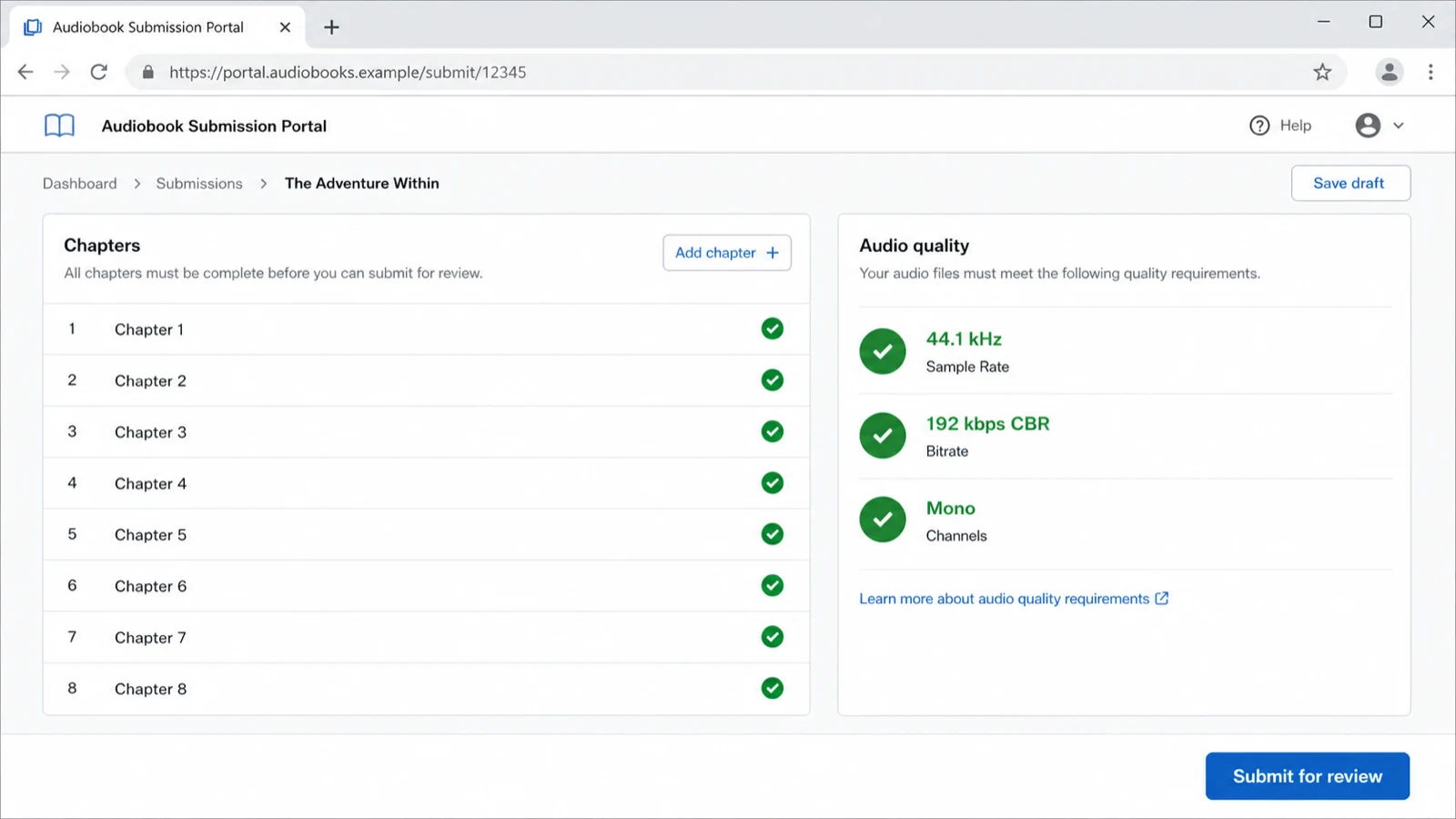
For an author shipping a non-fiction or memoir audiobook with the AI-native path, the actual workflow inside Inkfluence AI is six steps:
- Write or import the manuscript. If you already have a manuscript, the document importer accepts DOCX, PDF, and EPUB and detects chapters automatically. If you are starting from scratch, the AI book generator drafts the full manuscript first.
- Open the audiobook studio. Each project has an Audiobook tab that lists every chapter with a "Generate" button. Pick a voice from the catalogue, set the speaking rate (180 words per minute is the audiobook standard), and click generate.
- Review and re-record. Generated chapters play back inline. If a chapter has a mispronunciation or a section reads awkwardly, edit the manuscript text and re-record that chapter only. Other chapters are not affected.
- Click "Export for ACX". This is the difference between a normal audiobook export (suitable for streaming on your own site or Apple Podcasts) and an ACX-ready submission. The ACX export runs every chapter through the loudness normalization chain (RMS -20 dBFS, peak -3 dBFS), resamples to 44.1 kHz, encodes as 192 kbps CBR mono MP3, and bundles the result as a zip with chapter-numbered file names.
- Download the zip and publish. Each MP3 inside is named in reading order ("01 - Chapter Title.mp3", "02 - Chapter Title.mp3", and so on). For AI narration, upload to a platform that accepts it (Spotify, Google Play Books, Apple Books, Kobo); if you narrated the book yourself and used the chain only for mastering, the zip structure matches what ACX's uploader expects.
- Submit the retail sample. ACX wants a 1-to-5 minute sample MP3 separately. Most authors use the first 2-3 minutes of chapter 1 (the opening hook). The Inkfluence AI export also produces a sample file at the same spec.
The full pipeline runs in about 10 to 30 minutes for an 8-chapter, 4-hour audiobook. The longest single step is voice selection and chapter generation, which is unattended (you start it, walk away, come back). Mastering, normalization, and packaging that would take an audio engineer 4-6 hours happens in seconds because it is all scripted in the export pipeline.
The seven most common ACX rejection reasons
From talking with self-published authors who have submitted to ACX since 2022, the same handful of issues come up over and over. In rough order of frequency:
- RMS loudness outside the -23 to -18 dBFS window. The single most common automated-QC failure. The fix is a loudness normalization pass targeting -20 dBFS RMS as the safe centre of the window.
- Sample rate is 48 kHz instead of 44.1 kHz. Default for many recording interfaces. The fix is resampling the master before export.
- Stereo file instead of mono. Default for many editors. The fix is downmixing to mono with equal weighting from both channels.
- VBR encoding instead of CBR. Default for most "Export to MP3" buttons. The fix is configuring the encoder explicitly for 192 kbps constant bitrate.
- Background noise above -60 dBFS. Caused by an untreated recording space, fan noise, or a too-hot mic gain. The fix is room treatment plus a noise reduction pass.
- Chapters merged into a single file. The author exported the entire audiobook as one MP3. The fix is splitting on chapter boundaries before export.
- Opening or closing credits missing. ACX expects a verbal "Title, by Author, narrated by Narrator" at the start of chapter 1 and "End of Title by Author" at the end of the final chapter.
Path B sidesteps all seven by running every export through the same scripted chain. Path A authors typically learn each rule one rejection email at a time, which is why "studio mastering for ACX" is itself a $50-to-$200 service offered by audio engineers on Reedsy and elsewhere.
Cost: studio versus AI-native production
Three real-world scenarios for an 8-hour non-fiction audiobook (about 80,000 words narrated at 180 wpm), with all costs as of 2026:
| Path | Production cost | Time investment | When to use |
|---|---|---|---|
| Hired narrator (PFH) | $1,600 to $4,800 (8 finished hours at $200-$600/hr) | 10 to 14 days end-to-end | Performance fiction, when narration is the product |
| Hired narrator (royalty share) | $0 upfront, 25% of net royalties forever | 14 to 60 days (good narrators are selective on RS) | When upfront cash is the constraint and you accept long-term split |
| Self-record + DIY master | $300-$1,200 setup + 30-60 hours of your time | 3 to 6 weeks for first audiobook | When you genuinely want to narrate it yourself |
| AI-native (Inkfluence Creator) | $9.99/mo flat (covers 15 audiobook chapters) | 10 to 30 minutes | Non-fiction, business, self-help, education, memoir, health |
| AI-native (Inkfluence Premium) | $19.99/mo flat (unlimited) | 10 to 30 minutes per book | Authors shipping multiple audiobooks per year |
For the breakdown of AI vs human narration economics (and which genres each fits), see our 2026 audiobook narrator comparison. For the full self-publishing budget context (where audiobook fits next to editing, cover, and ISBN), see the real cost of publishing a book in 2026.
Royalty share, per-finished-hour, or DIY: which makes sense

ACX gives authors three commercial structures when working with a human narrator:
- Per-Finished-Hour (PFH). Author pays the narrator a flat rate per hour of finished audiobook, typically $200 to $600. Author keeps 100% of royalties. Best for authors with cash on hand and confidence in book sales.
- Royalty Share (RS). No upfront payment. Narrator and author split net royalties 50/50 forever. Best for first-time authors or low-cash budgets, but the royalty split lasts the life of the book on Audible.
- Royalty Share Plus. A reduced upfront PFH rate (often $100 to $200/hr) plus a royalty share. Splits the risk between author and narrator.
Authors who AI-narrate keep the entire royalty share for themselves and pay only the platform's flat subscription. The economics tilt toward AI-narration any time the book is a non-fiction title likely to earn under $4,000 in audiobook royalties (which is most non-fiction first-book releases). For genres where a professional narrator measurably moves sales (literary fiction, character-heavy thrillers, emotional memoir), PFH or RS Plus are still the right call.
Frequently asked questions
Will Audible accept AI-narrated audiobooks?
Not as a standard route. ACX and Audible officially require human narration, and third-party AI narration is against their terms. The only sanctioned AI-adjacent path is ACX's narrator voice-replica program, where a human narrator's own voice is replicated with their consent. Audible's own AI option, Virtual Voice, is a separate feature for eligible KDP ebooks, not third-party AI uploaded via ACX. Enforcement is inconsistent, so some AI titles do get through, but it carries takedown risk. If you want to distribute AI narration openly, Google Play Books, Kobo, and Spotify/Findaway explicitly welcome it with disclosure. The technical specs in this guide apply wherever you submit.
Do I need to be an Audible exclusive?
Not anymore. ACX previously required 7-year exclusivity for the higher 40% royalty rate. As of 2024 ACX offers non-exclusive distribution at a 25% royalty rate, leaving you free to also list on Apple Books, Google Play Books, Spotify, Findaway Voices, and others. For most indie authors, non-exclusive is the right default.
What is the production timeline from manuscript to listing on Audible?
With the AI-native path, audio production takes 10 to 30 minutes. ACX's review queue usually adds 10 to 14 days before the audiobook goes live on Audible. So manuscript-to-Audible-listing is roughly 2 weeks total. With a hired narrator, add 2 to 6 weeks for the recording and mastering before ACX submission.
Can I use AI narration for fiction?
For non-character-heavy fiction (literary, contemplative, single-narrator-perspective novels) AI narration in 2026 is at "premium-acceptable" quality. For dialogue-heavy genres with many distinct character voices (epic fantasy, ensemble thrillers, character-driven romance) human narration still measurably outperforms. Our genre-by-genre quality assessment covers this in detail.
What if my chapter is longer than 120 minutes?
ACX caps individual files at 120 minutes. You have to split the chapter into two parts ("Chapter 5, Part 1" and "Chapter 5, Part 2") and submit them as separate sequential MP3s. Most non-fiction chapters are well under that limit; this mainly affects long-form memoirs and multi-hour reference chapters.
How much do audiobooks actually earn?
A non-exclusive ACX listing earns 25% of net (post-Audible-fees) per sale, which translates to roughly $1.50 to $4 per audiobook sold depending on length and price. Bestselling indie audiobooks clear $2,000 to $8,000 in their first year; most first-book listings clear $200 to $1,500. The audiobook market is the fastest-growing segment of publishing at roughly 25% YoY growth, per the Audio Publishers Association's annual industry report.
Do I need a separate ISBN for the audiobook?
ACX provides a free identifier for distribution within Audible's catalogue. You only need a separate audiobook ISBN if you are also distributing through Findaway Voices to libraries or other catalogues that require one. For Audible-only distribution, no separate ISBN is required.
What happens if my submission is rejected?
ACX emails you the specific spec violation. You re-master and re-upload (or fix in your AI-native platform and re-export). There is no penalty for resubmission; the QC clock just resets. The annoying part is that ACX rejection emails are short and do not always pinpoint which file out of 8-12 chapter MP3s failed, so a single fix often requires reapplying the master pass to every file. This is another argument for the scripted-export path: if one file would fail, all of them would have failed in the same way.
Can I update the audiobook after it goes live?
Yes. ACX accepts updated chapter files at any time after publication. Re-uploads go through the same QC and replace the live files within 10 to 14 days. This is useful when you find a mispronunciation in a name or want to refresh the opening to match a new edition of the print book.
Where else can I distribute the same audiobook files?
If you go non-exclusive on ACX, the same MP3 set is accepted by Apple Books, Google Play Books, Spotify, Kobo, and Findaway Voices (which fans out to libraries via Hoopla, OverDrive, and others). The 44.1/192 CBR mono spec is broadly compatible. Some platforms accept higher-bitrate masters, but submitting one ACX-spec set everywhere is the standard indie-author approach.
Ready to ship your first audiobook?
If your book is non-fiction, business, self-help, memoir, education, or health, the AI-native path produces an ACX-ready submission in about 30 minutes total. Start with the audiobook generator on a free or Creator plan, generate the full audiobook, click "Export for ACX," and upload the zip directly to ACX. The first time through is the longest because you are learning the workflow; the second audiobook usually takes under 20 minutes.
Already have a manuscript? The document importer takes DOCX, PDF, or EPUB and detects chapters automatically, so you can be at the audiobook step within minutes of opening the app.
Related resources
AI Audiobook Generator
Turn a manuscript into a chaptered audiobook in minutes.
Is AI audiobook voice quality good enough for premium sales?
Genre-by-genre quality assessment for 2026.
AI vs human audiobook narrators
Cost, quality, time-to-market for both paths.
The real cost of publishing a book in 2026
Editing, cover, audiobook, ISBN: every line item with sources.
Free AI audiobook generators compared
What free tools can and cannot do for ACX submission.
AI to KDP publishing guide
From draft to Kindle, paperback, and audiobook in one pipeline.
For first-time authors
The full publishing workflow explained from zero.
For Kindle publishers
Audiobook fits inside the wider KDP-first publishing flow.

Founder, Inkfluence AI
Sam is the founder of Inkfluence AI. He built the platform to make book creation accessible to everyone - from first-time authors to seasoned publishers.
Helpful links
Ready to Create Your Own Ebook?
Start writing with AI-powered tools, professional templates, and multi-format export.
Get Started FreeRelated Articles
 Guides
 Selling AI Coloring Books on Amazon KDP: The 2026 Rules, Specs, and Math
Are AI coloring books allowed on KDP? Yes, with disclosure. The part nobody covers: the AI workflow that passes review, style consistency across 30 pages, the interior specs that cause rejections, and the royalty ladder that decides your price.
 Guides
 How to Make an Adult Coloring Book in 2026: From Idea to Printed Pages
The modern walkthrough: what makes line work read as "adult", the three ways to create pages (draw, convert, generate), how to assemble a real book instead of a stack of pages, and the fork between KDP paperbacks, Etsy printables, and printing at home.
 Guides
 Coloring Book Niches for 2026: Where Low Competition Meets Real Buyers
A niche framework instead of a niche list: how complexity tiers map to price points, why the senior shelf is underserved, the seasonal calendar that decides your publish dates, and how to validate before you draw a single page.
Get ebook tips in your inbox
Join creators getting weekly strategies for writing, marketing, and selling ebooks.