
Turn your illustrations into a picture book you can print and sell
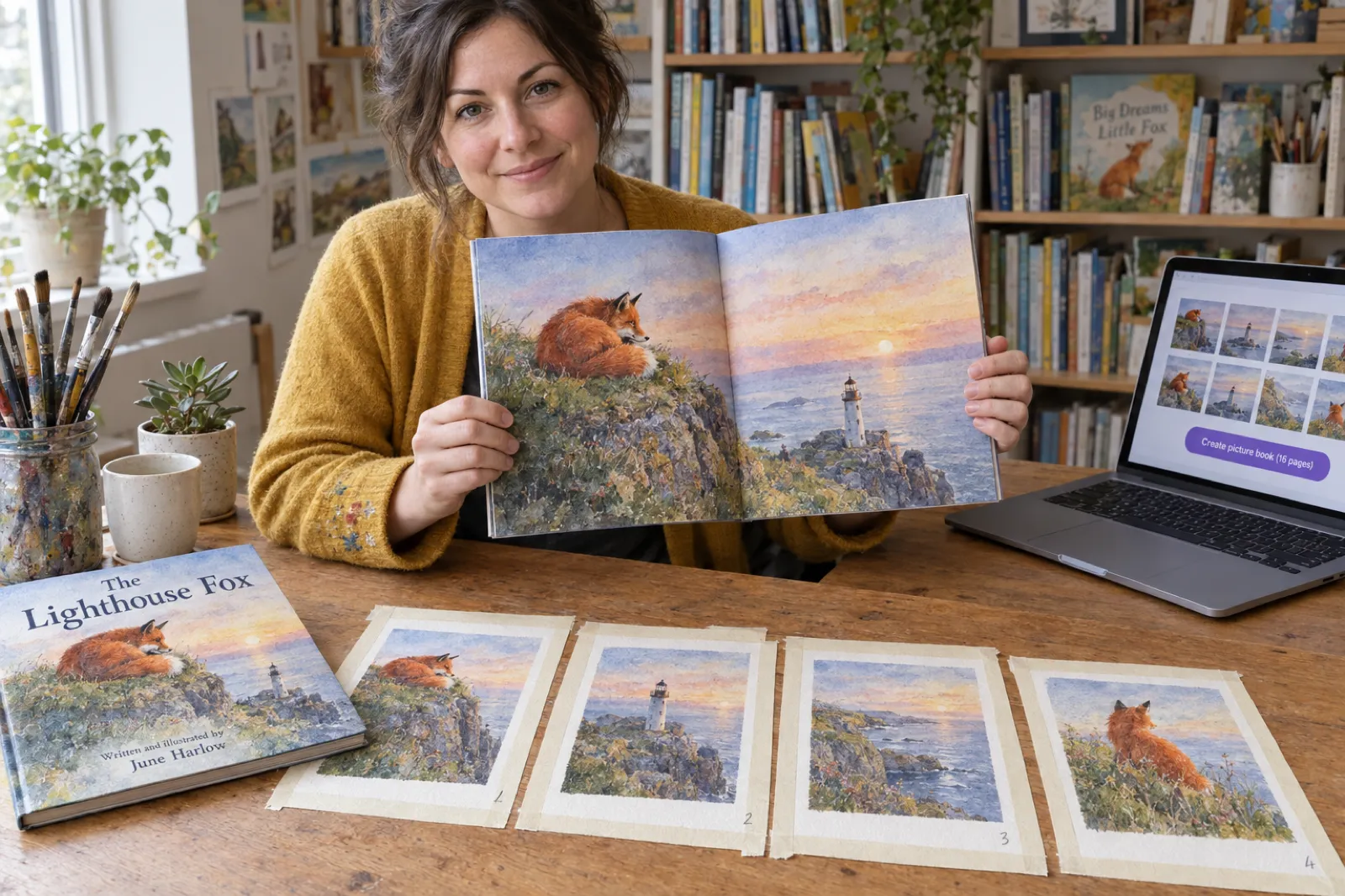
You painted, drew or scanned the pages. The hard part left is the file: a print interior with bleed on the right edges, a page count Amazon accepts, a cover that wraps the spine, and an ebook. Drop your finished pages into Inkfluence AI and each image becomes one edge-to-edge page, nothing redrawn, nothing written for you, with a KDP-ready bleed interior, cover and Kindle files at the end. Check your files below first; the checker runs in your browser and uploads nothing.
The short answer
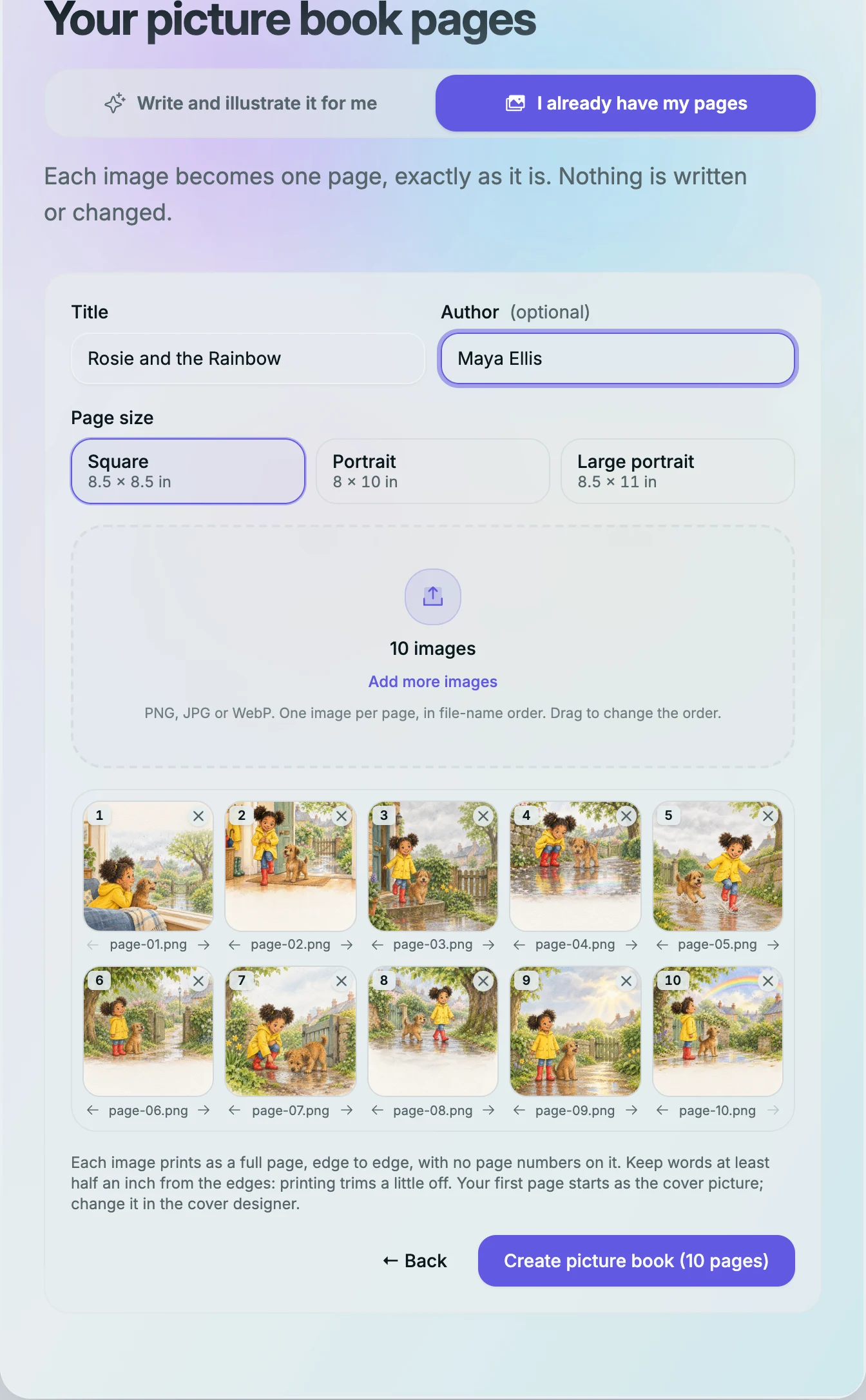
Can I turn my own illustrations into a KDP picture book? Yes. Start a picture book in Inkfluence AI, choose "I already have my pages", pick 8.5 x 8.5, 8 x 10 or 8.5 x 11, and add one image per page. Each picture prints edge to edge with no headers or page numbers, and the KDP export is a bleed file padded with blank pages to Amazon's 24-page minimum. Choose "Bleed (PDF only)" and Premium Color ink when you upload.
What size should the images be? The KDP page for an 8.5 x 8.5 book with bleed is 8.625 x 8.75 in: about 2,588 x 2,625 pixels at 300 pixels per inch. Keep any words half an inch inside the edges.
What does it cost? Making and previewing the book is free and uses no credits. The KDP package needs any plan or a credit pack (from $9.99).
24 pages
KDP's colour minimum on Premium Color; 8 pictures reach it with a title page
8.625 x 8.75 in
The KDP page for an 8.5 in square book with bleed, not 8.75 x 8.75
Free to make
Create and preview with no credits; KDP files on any plan or credit pack
Picture book file checker
Choose your page images. The checker reads each one's pixel size in your browser (nothing leaves your computer), picks the trim that matches their shape, and tells you what prints sharp, what will be cropped, and how many pages your KDP paperback will have.
No files yet? .
Your results appear here.
The page count uses the same rule as the Inkfluence KDP export: a title page, a copyright page and one page per picture, then blank pages added (up to 4 before the first picture and 10 at the back, Amazon's limits) to reach 24 and an even total.
What you get from your pictures
We built Inkfluence AI to take a book from an idea or a manuscript to print-ready files, and for picture books it also paints the pages if you want it to. When the art is already finished, the job is different: the book has to be built around your images without touching them. That is what "I already have my pages" does. It is our first recommendation for an author-illustrator who wants Amazon-ready files without learning a layout program, and here is exactly what comes out of it.
| File | What it is | Plan |
|---|---|---|
| The book | One page per image in your order, a title page and a copyright page, your first page as the cover picture. Edit, reorder or add pages afterwards. | Free, no credits used |
| Every picture full page at the book's trim, for printing at home, a copy shop or sending to a reviewer | Free with an Inkfluence closing page; unbranded on any plan or credit pack | |
| KDP package | Paperback interior with bleed (8.625 x 8.75 in pages for the square size), padded to 24 pages; full-wrap cover with the spine sized for the page count; front cover image; Kindle ebook; a READ ME with the KDP settings | Any plan or credit pack |
| EPUB and DOCX | The pictures as an ebook for other stores, and as a Word file | Any plan or credit pack |
| Etsy and Gumroad | A PDF at the book's own trim sent to your shop as a digital download listing | Creator and Premium |
Credit packs start at $9.99 for 15 credits, Creator is $9.99 a month and Premium $19.99 a month. Full details are on the pricing page.
How to turn your drawings into a book, step by step
- Get each page into one image. Scan paintings at 300 pixels per inch or more, photograph them flat in even daylight if you have no scanner, or export digital pages from your drawing app. One image is one printed page. If a painting is meant to span two facing pages, split it into a left and a right image.
- Name the files in reading order. page-01, page-02 and so on. The app sorts by file name, so you start in the right order and only drag the exceptions.
- Start a picture book from your pages. In Inkfluence AI click New Book and choose Make a picture book, or pick the Picture book tile. At the top of the step, switch from "Write and illustrate it for me" to "I already have my pages". The upload form replaces the idea box on the same screen; switching back keeps anything you typed.
- Type the title and author, then add the images. The page size follows the shape of your pictures: square art starts on the 8.5 x 8.5 page. Choose another size if you want; if your pictures do not match it, the form says how many will be cropped and offers the size that fits.
- Check the order and create the book. Drag a page to move it (the others slide aside), or use the arrows under each page. Press Create picture book and it opens in the editor, one page per image.
- Look at the cover. The cover starts with your first page as its picture and your title on top. Open the cover designer to change it or add a back-cover blurb.
- Export. Export, then KDP, gives you the bleed interior, full-wrap cover and Kindle files. The export window states how many blank pages it adds and reminds you of the KDP setting.
Picture book sizes and bleed for KDP
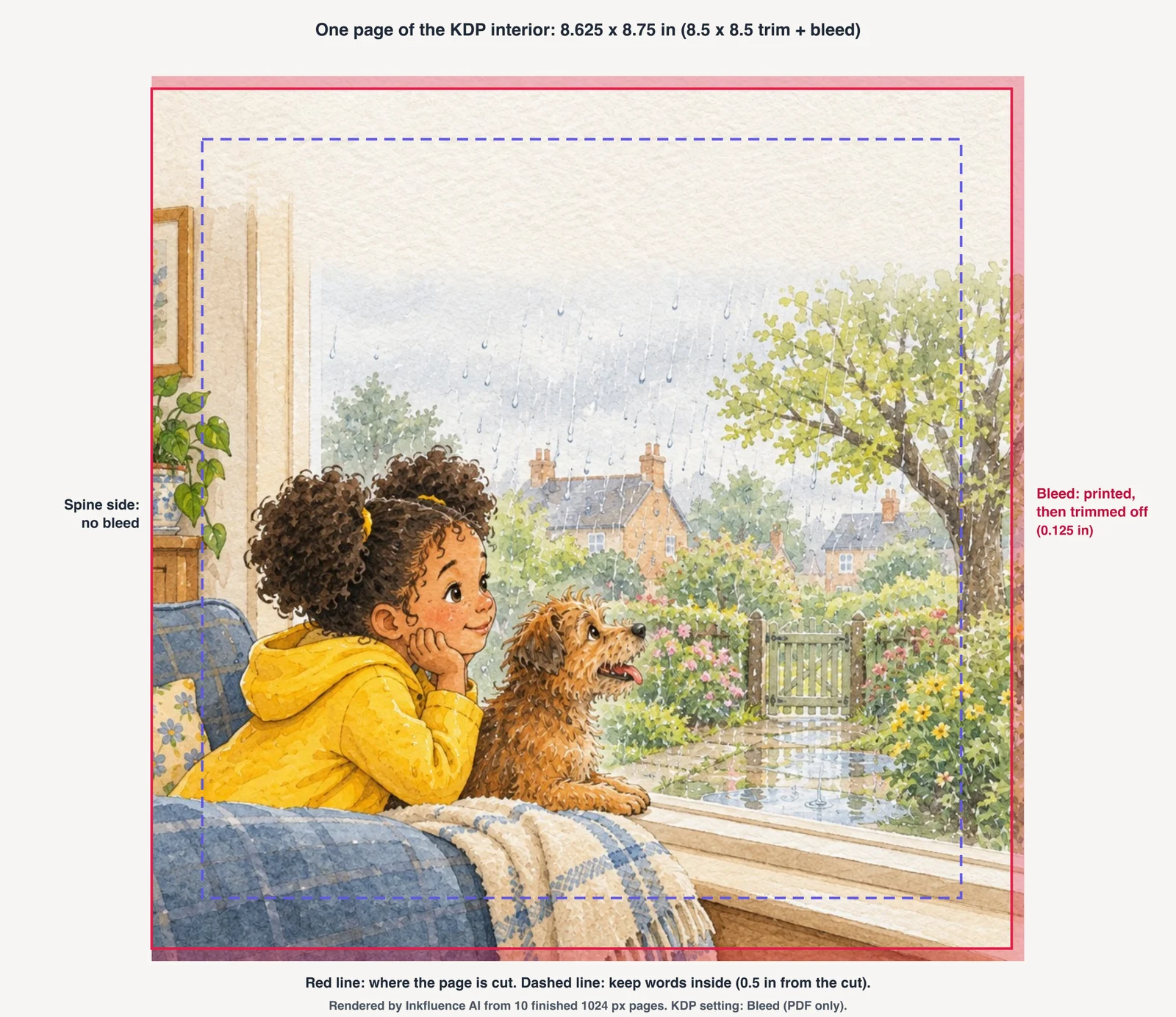
A picture book's art usually runs to the edge of the paper. Printers cannot print exactly to the edge of a sheet, so the page is printed slightly larger and trimmed. That extra is the bleed. Amazon's rule is 0.125 in added to the width (the outside edge only, because the spine side is glued, not cut) and 0.125 in to the top and the bottom, so 0.25 in to the height. KDP also says that if even one page needs bleed, the whole file must be set up with bleed, and the top, bottom and outside margins of a bleed book are at least 0.375 in for anything that must not be cut.
Inkfluence offers three trims for a book made from your pictures. Each is a standard KDP size that supports Premium Color.
| Size | Trim | KDP page with bleed | Pixels at 300 ppi | Premium Color pages | Best for |
|---|---|---|---|---|---|
| Square | 8.5 x 8.5 in | 8.625 x 8.75 in | 2,588 x 2,625 | 24 to 590 pages | Most picture books; square art and spreads painted as two squares |
| Portrait | 8 x 10 in | 8.125 x 10.25 in | 2,438 x 3,075 | 24 to 828 pages | Art painted upright at 4:5, like many 8 x 10 prints |
| Large portrait | 8.5 x 11 in | 8.625 x 11.25 in | 2,588 x 3,375 | 24 to 590 pages | Letter-shaped pages: comics, activity art, scanned A4 or letter sheets |
A common mistake in guides and templates is adding bleed to all four sides of every page, which gives 8.75 x 8.75 in for a square book. KDP's formula adds nothing on the spine side, so the right page size is 8.625 x 8.75 in. Inkfluence builds the file to KDP's formula, so you never set up the canvas yourself; the sizes above matter when you scan or paint new pages. Canvas set-up in Procreate, Photoshop and Canva, and two-page spreads, are covered in the KDP picture book bleed and canvas size guide.
How many pages your picture book needs
KDP sets the page range by ink and size. For colour picture books the number that matters is the ink: Premium Color starts at 24 pages; Standard Color starts at 72. A 10-spread story is far short of 72, so short picture books print on Premium Color. Black ink starts at 24 too, if your book is line art. The count must be even.
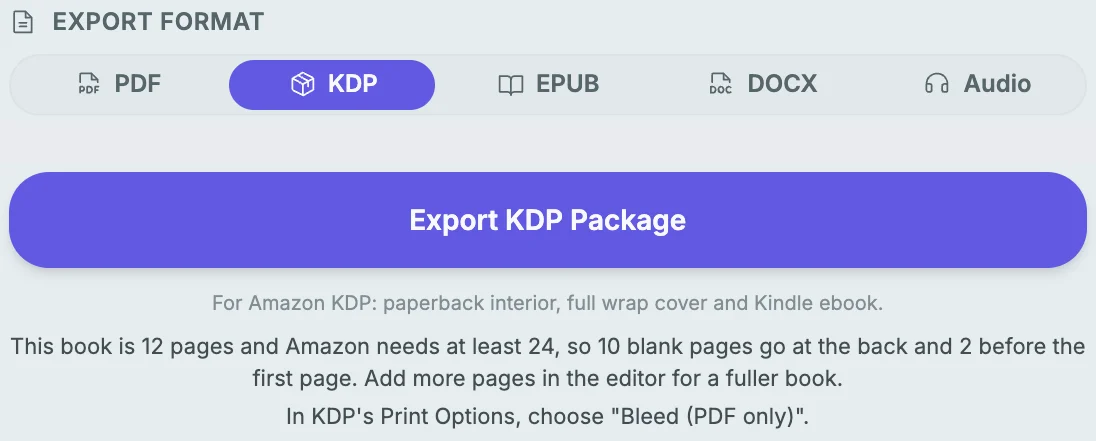
Inkfluence counts the pages the way the printed book has them: a title page (you can switch it off), a copyright page, then one page per picture. If that is under 24, the KDP export adds blank pages, as many as Amazon allows: up to 4 before the first picture and up to 10 at the back. Amazon refuses more than 4 consecutive blank pages at the start or in the middle and more than 10 at the end, so a very short book cannot be padded all the way. With the title page on, 8 pictures reach 24 pages; with fewer, the export window tells you how many more pages to add.
Blank endpapers are normal in picture books, and readers do not notice four plain pages at the front of a 24-page book. If you would rather fill them, add a dedication page, an "about the author" page or a final scene: each extra picture replaces a blank.
| Pictures | Pages before padding | Blank before | Blank at back | KDP total |
|---|---|---|---|---|
| 6 | 8 | 4 | 10 | 22 (2 pages short: add 2 pictures) |
| 8 | 10 | 4 | 10 | 24 |
| 10 | 12 | 2 | 10 | 24 |
| 16 | 18 | 0 | 6 | 24 |
| 22 | 24 | 0 | 0 | 24 |
| 31 | 33 | 0 | 1 | 34 |
Words in the picture, or words typed on the page
Many illustrators letter the text into the art, which keeps the typography exactly as designed. That works as it is: a page with no typed words prints as the picture alone. The only rule is the trim. Keep every word at least half an inch from the outside, top and bottom edges (Inkfluence's own advice, and inside KDP's 0.375 in minimum for bleed books), and keep it clear of the spine edge too, where the binding curves the page.
If you would rather add the words afterwards, type them on a page in the editor. Typed words print over the picture the way they do in any Inkfluence picture book, which is handy for a translation or a second edition with new text: the art stays the same and only the typed words change. A picture book's word count is usually small; our guide to children's book word counts gives the ranges by age.
For an ebook, lettered art behaves like a photograph: the reader cannot resize the words. On a phone, small lettering gets hard to read, so test the Kindle preview before publishing, and consider slightly larger lettering if most buyers will read on a phone.
Preparing paintings, drawings and digital pages
Scanning
Scan at 300 pixels per inch at the size the page will print, or higher if the original is smaller than the page. An 8 x 8 in painting scanned at 330 ppi is about 2,640 pixels, enough for the 8.5 in square page with its bleed. Turn the scanner's colour corrections off and adjust once, the same way for every page, so the book's colour is consistent.
Photographing
No scanner? Lay the painting flat in soft daylight, phone directly above and parallel, no flash, and crop to the painting. Phones photograph at 3,000 to 4,000 pixels across, plenty for a picture book page, but raking light shows paper texture and a tilted phone keystones the page. iPhones save HEIC by default: in Settings, Camera, Formats, choose Most Compatible or export as JPG before uploading.
Drawing digitally
Make the canvas the KDP page with bleed: 2,588 x 2,625 pixels for the square size at 300 ppi, 2,438 x 3,075 for 8 x 10, 2,588 x 3,375 for 8.5 x 11. Paint all the way to the canvas edge, keep faces and lettering half an inch inside, and export flattened PNG or high-quality JPG.
Smaller files. Images smaller than these sizes still make a book. The checker above and the upload form both estimate the print resolution and only flag a picture that is likely to print soft. Size up a scan rather than an already-small file: enlarging a small image adds pixels, not detail.
Ordering. Name files page-01, page-02 and so on (or 01-cover-scene, 02-...). Files go in by name, and you can drag any page to a new place before you create the book or reorder pages in the editor afterwards.
| Accepted | Refused, with the reason shown |
|---|---|
| PNG, JPG, WebP, up to 50 MB each, up to 100 pages a book | HEIC (save as JPG or PNG first), PDF pages, SVG, GIF, files cut off mid-download or damaged |
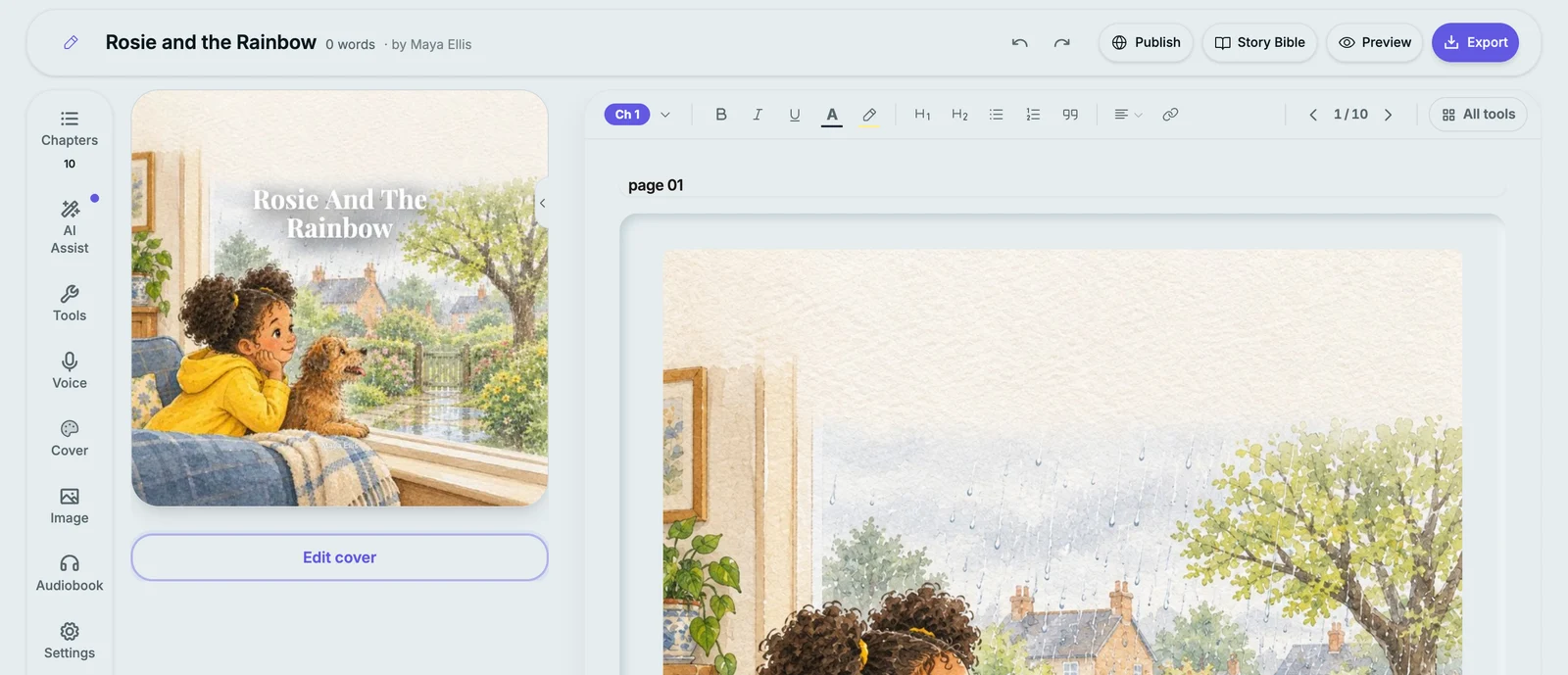
The cover: front, spine and back
Your first page starts as the cover picture, with the title and your name on top, so the book never begins with a placeholder. Most author-illustrators paint a dedicated cover, and you can drop that in through the cover designer instead, adjust the title type and its position, and write the back-cover blurb.
The KDP package includes a full-wrap cover: back, spine and front on one sheet with bleed, the spine width worked out from your page count and paper. A 24-page book has a thin spine, so KDP does not allow spine text below a set page count; our KDP cover size and spine calculator shows the numbers if you build the wrap yourself, and the guide to book cover design covers type and layout. Printing through IngramSpark instead? Its cover template differs; the IngramSpark cover calculator explains how.
Where to sell or print the finished book
Amazon paperback. Upload the interior and the full-wrap cover from the KDP package, choose Premium Color, white paper and "Bleed (PDF only)", and order a proof before you publish. Colour printing costs more than black ink, so price with the royalty calculator before you settle on a list price. Our step-by-step guide to self-publishing a children's book on Amazon covers the account, ISBN and listing, and the KDP paperback guide covers print options. Whether you need your own ISBN: do you need an ISBN.
Kindle. The package includes a Kindle ebook of your pages. Picture books read best on a tablet or the Kindle app on a large phone; check the preview at the sizes your buyers use.
Etsy and Gumroad. On Creator and Premium the Publish page sends a PDF at the book's own trim to your shop as a digital download, which suits printable bedtime stories, classroom books and colouring-style art. See selling ebooks on Etsy, selling on Gumroad and how to sell children's books. Your own art needs no AI disclosure; Etsy's rules are in Etsy's AI disclosure explained, and Amazon's in the KDP AI disclosure policy.
One printed copy. For a family book or a gift, print a single copy from the PDF at a copy shop or order a KDP proof; how to print one copy of a book compares the routes and costs.
Wide distribution. Bookstores and libraries order through IngramSpark rather than Amazon. Compare costs with the IngramSpark cost calculator and the trade-offs in IngramSpark vs KDP.
I wrote and illustrated a children's book. Now what?
Finishing the art is the long part, and the steps after it are short but easy to get wrong. A practical order:
- Read the book aloud from the printed or on-screen pages, page turn by page turn, with a child if you can. Fix pacing now, not after the proof.
- Check every page against the trim: nothing important in the outer quarter inch, words half an inch inside.
- Decide the trim from your art's shape (the checker does this), and the ink: Premium Color for a colour book under 72 pages.
- Make the book and the KDP files. Read the export note for the blank pages added.
- Design the cover and blurb; test the thumbnail at the size Amazon shows it in search.
- Upload to KDP, order a proof copy, and look at colour, trim and the spine edge on paper.
- Publish, then share the PDF or a short read-along with your community.
If you commissioned the art rather than painting it, check your agreement covers print and ebook rights; what children's book illustration costs explains typical contracts. The trim choices in more depth: KDP trim sizes.
Turning a child's drawings into a book
The same route works for a fridge door's worth of a child's drawings. Photograph each drawing in daylight, crop it, put them in order with a title like "The Dragon Book by Mia, age 6", and make a square book. Ten drawings make a 24-page KDP book with blanks at the back; a dedication page and a short "about the artist" page fill it nicely. Order one proof or a few author copies, or print the PDF at a copy shop. For gift books written and painted for a child instead, see the personalised children's book maker, books for grandparents and Christmas books for kids. Teachers turning a class's drawings into a book will find more on the teachers page.
Don't have every page finished?
The switch has two sides. "Write and illustrate it for me" writes the story and paints every page from one character sheet so the cast looks the same throughout; see the AI picture book maker, the children's book illustrator, how we compare in the best AI children's book creators, and the walkthrough how to make a picture book with AI. You can also mix: make the book from your finished pages, then add pages later in the editor with your own images. Alphabet books have their own maker: the ABC book maker, and line-art books the colouring book generator.
Seven things that go wrong on a first proof, and how to avoid them
Most problems with a self-published picture book only show up on paper. These are the ones illustrators meet most, roughly in the order you notice them when the proof arrives.
1. A thin white line along the outside edge. The art stopped at the trim instead of running into the bleed, and the cut wandered by a fraction of a millimetre, as every trim does. Paint or extend every full-page picture to the edge of the canvas. Inkfluence scales each picture to cover the whole bleed page, so this only happens when the art itself has a white border.
2. Words or a face cut off. Something important sat too close to the edge. The cut lands in a slightly different place from copy to copy, so treat half an inch from every cut edge as the safe line, as the dashed line in the page picture above shows.
3. Detail lost in the middle. In a glued paperback the inside edge curves into the spine, and anything within about half an inch of it is hard to see. Keep faces and lettering away from the spine side as well as the outside.
4. Colours darker or duller than on screen. Screens glow; paper reflects. Deep blues and blacks print darker, and bright greens and oranges lose some punch because print uses a smaller range of colours than a screen. Order the proof before you publish, and if a page prints too dark, lighten that image slightly and upload it again. KDP accepts RGB files and converts them; there is nothing to set.
5. Soft or blocky pictures. The image had too few pixels for the page, often a web export or a small phone photo. Use the checker above: it shows the print resolution of every page, and anything under about 100 pixels per inch is worth rescanning.
6. KDP rejects the file for page count or blank pages. Colour books under 72 pages need Premium Color; the interior needs at least 24 pages, an even count, and no more than 4 blank pages in a row at the start or 10 at the end. The Inkfluence export follows these rules and tells you if the book is still short.
7. The cover looks unreadable in search results. Amazon shows covers at the size of a postage stamp. A delicate painting with a thin serif title disappears. Check the cover at 150 pixels wide: the title should still read, and the main character should still be recognisable. The cover designer lets you change the title weight, size and position without touching the art.
None of these needs a design program to fix. They come down to how the pages are painted and scanned, and to checking a proof copy before the book goes live. Budget for one proof per round of changes; it is the cheapest insurance a picture book has.
What it does not do
- One image is one page. A two-page spread is two images, split at the gutter.
- Three trims: 8.5 x 8.5, 8 x 10 and 8.5 x 11 in. Landscape picture books are not offered for books made from your own pages.
- It does not retouch, recolour or upscale your art. A picture of a different shape from the page is cropped to fill it, and the form tells you first.
- No CMYK or PDF/X export: files are RGB, which KDP accepts and converts. Offset printers that require CMYK need a separate conversion.
- No separate dust jacket or hardcover case wrap; the KDP package covers the paperback.
More tools for the rest of the job are on the KDP tools page, and if your next book is text-first, the book formatter and how to format a book for KDP cover manuscripts.
FAQ: turning illustrations into a picture book
Can I make a KDP picture book from my own illustrations?+
What size should my picture book images be?+
My illustrations already have the words in them. Does that work?+
How many pages does a picture book need for Amazon KDP?+
Is it free to turn my drawings into a book?+
Does Inkfluence change or redraw my art?+
What file types can I upload?+
Can a picture run across two facing pages?+
What about the cover?+
Can I sell the picture book on Etsy or Gumroad as a download?+
Sources
Amazon's rules were read on KDP's help pages on 15 October 2026. Inkfluence behaviour on this page was checked in the app the same day, including a real KDP interior rendered from ten 1024 px pages.
- KDP: Set Trim Size, Bleed and Margins (bleed page size formula and sizes, 0.375 in bleed margins, whole file with bleed, page ranges by ink), checked 15 October 2026
- KDP: Fix Paperback and Hardcover Formatting Issues (no more than 4 consecutive blank pages at the beginning or middle, 10 at the end), checked 15 October 2026
- KDP: images in your manuscript (images inserted at a minimum of 300 DPI, sized at 100%), checked 15 October 2026
- IngramSpark File Creation Guide (interior bleed: 0.125 in on the top, bottom and outside edge, none on the binding edge, the same page size as KDP), checked 13 October 2026
- Apple: Using HEIF or HEVC media on Apple devices (Settings, Camera, Formats, Most Compatible saves new photos as JPEG), checked 15 October 2026
Related tools and guides
AI picture book maker
Story and pages painted for you.
Self-publish a children's book on Amazon
Account, ISBN, listing and proof.
KDP cover and spine calculator
Full-wrap size for any page count.
Royalty calculator
Colour print cost and earnings per copy.
How to sell children's books
Amazon, Etsy, schools and fairs.
Print one copy of a book
Proofs, copy shops and gift copies.
Picture books from your own illustrations, eight art styles and full-bleed KDP files are new since August. See everything new in Inkfluence AI.
The pages are done. Make them a book.
Add your finished pages, check the order, and get a KDP-ready bleed interior, cover and Kindle files. Creating and previewing is free.