
KDP Picture Book Bleed and Canvas Size for Illustrators (8.5 x 8.5, 8 x 10, 8.5 x 11), 2026
The exact KDP page size with bleed, canvas pixels for Procreate, Photoshop and Canva, two-page spread sizes, safe areas and the four-sided bleed mistake, with a free calculator for every picture book trim.
Quick Answer
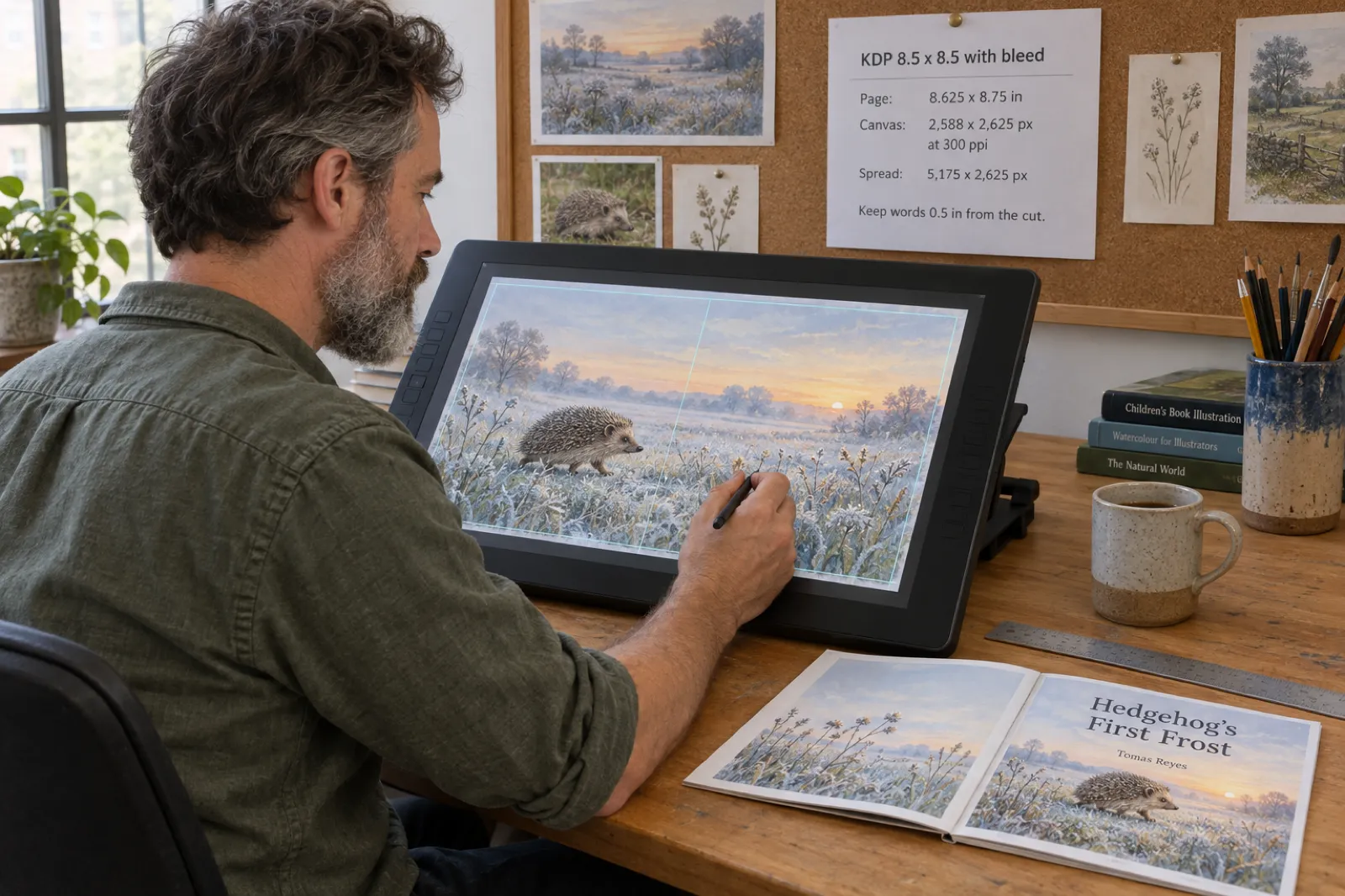
A KDP interior page with bleed is the trim plus 0.125 in on the width and 0.25 in on the height: 8.625 x 8.75 in for an 8.5 x 8.5 picture book, 8.125 x 10.25 in for 8 x 10, and 8.625 x 11.25 in for 8.5 x 11. At 300 ppi that is a 2,588 x 2,625 px canvas for the square size, or 5,175 x 2,625 px for a two-page spread. The spine side gets no bleed, so 8.75 x 8.75 in, the size Canva's bleed produces, is wrong for an interior page.
Picture book art almost always runs to the edge of the page, and that is the part of self-publishing that catches illustrators out. The painting can be finished and loved, and the upload still fails, or the proof arrives with a white sliver down one side, a word cut in half at the bottom, or a character's face folded into the spine. Every one of those comes from the canvas, not the art.
This guide gives you the exact sizes Amazon KDP expects for the three picture book trims most illustrators use, what changes for a two-page spread, where words are safe, and how to set the canvas in the apps you already paint in. The calculator works for any KDP trim. Every rule comes from KDP's own help pages, read on 15 October 2026, and the page images are from a real KDP interior we rendered and measured.
Free KDP picture book bleed and canvas calculator
Pick the trim and the resolution. The calculator gives the KDP page size with bleed, the canvas in pixels for one page and for a two-page spread, and the safe area for words, measured from the canvas edges so you can drop guides straight onto it.
Pages already painted?
You do not need a template at all. Drop your finished page images into Inkfluence AI and it builds the KDP bleed interior, the wrap cover and the Kindle files around them, each picture full page and untouched.
Make the book from my pagesPicture book page sizes with bleed
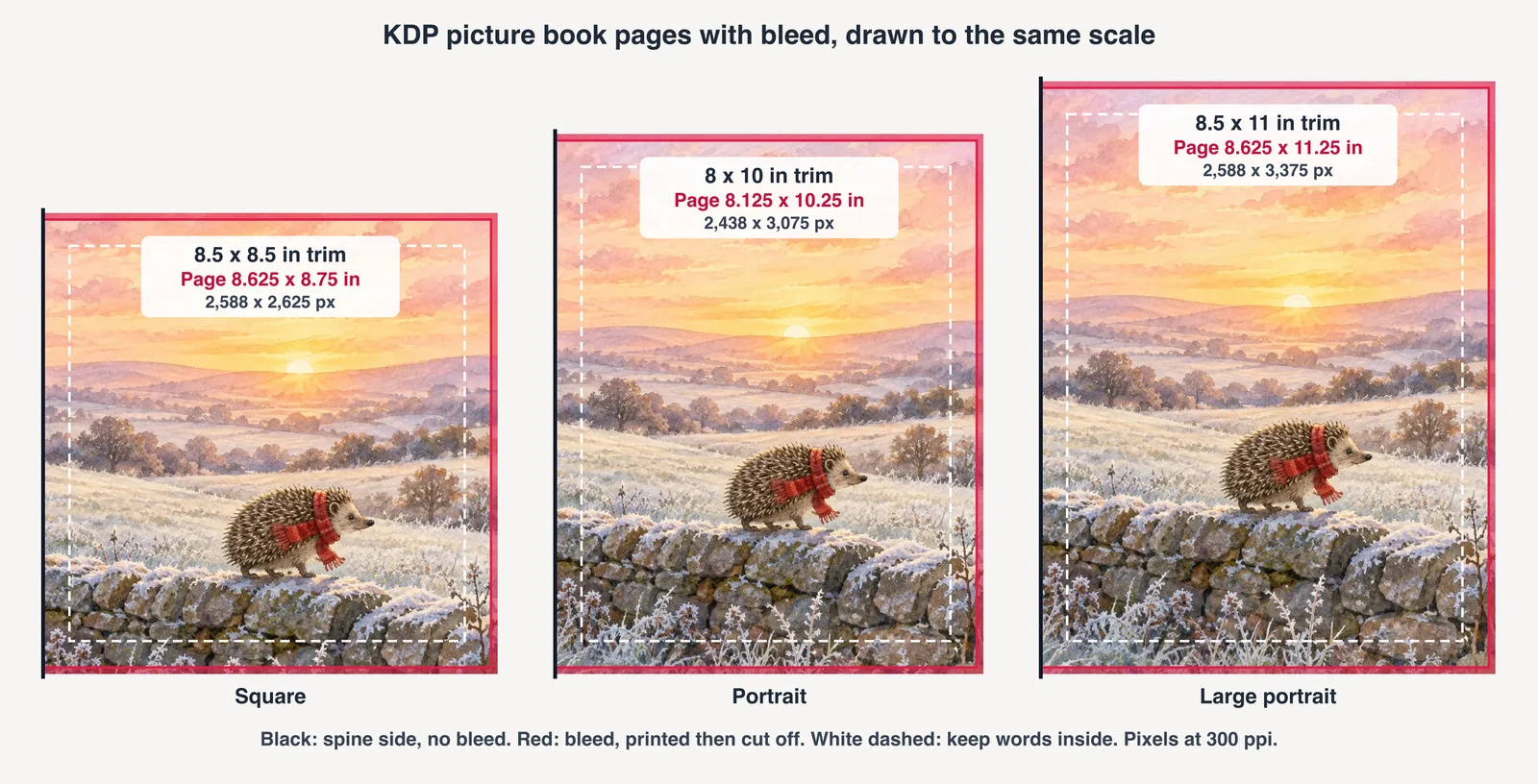
KDP's formula for an interior with bleed is short: page width = trim width + 0.125 in, page height = trim height + 0.25 in. The 0.125 in on the width sits on the outside edge, the one that is cut; the 0.25 in on the height is 0.125 in at the top and 0.125 in at the bottom. These are the sizes for the trims picture books use most, with the canvas at 300 ppi for paintings and at 600 ppi for line art.
| Trim | Page with bleed | Canvas at 300 ppi | Spread at 300 ppi | Canvas at 600 ppi |
|---|---|---|---|---|
| 8.5 x 8.5 in (square) | 8.625 x 8.75 in (219.1 x 222.3 mm) | 2,588 x 2,625 px | 5,175 x 2,625 px | 5,175 x 5,250 px |
| 8.25 x 8.25 in (square) | 8.375 x 8.5 in | 2,513 x 2,550 px | 5,025 x 2,550 px | 5,025 x 5,100 px |
| 8 x 10 in (portrait) | 8.125 x 10.25 in (206.4 x 260.4 mm) | 2,438 x 3,075 px | 4,875 x 3,075 px | 4,875 x 6,150 px |
| 8.5 x 11 in (letter) | 8.625 x 11.25 in (219.1 x 285.8 mm) | 2,588 x 3,375 px | 5,175 x 3,375 px | 5,175 x 6,750 px |
| 8.25 x 6 in (landscape) | 8.375 x 6.25 in | 2,513 x 1,875 px | 5,025 x 1,875 px | 5,025 x 3,750 px |
Square books are the most common shape for picture books because a square spread is a wide, cinematic landscape and a single page still reads as a portrait. Portrait 8 x 10 suits art painted upright, and letter-size suits comics and activity books. If you are still choosing, our KDP trim sizes guide covers every trim, its page range and its print cost.
Why bleed goes on three edges, not four
A printed paperback is made from large sheets that are printed, folded, glued at the spine and then trimmed on the other three sides. The spine edge is never cut, so it needs no extra art. That is why KDP adds bleed to the outside edge and to the top and bottom, and why its page width grows by 0.125 in while the height grows by 0.25 in.
The most common mistake in templates, tutorials and design apps is to add 0.125 in on all four sides, which gives 8.75 x 8.75 in for a square page. KDP measures the PDF's page size against the trim you chose plus its bleed allowance, and a page that is 0.125 in too wide either fails the check or prints with the whole picture shifted. If a template you downloaded is 8.75 x 8.75 in, it was made for a print shop that trims all four sides (a single flat print, a card, a poster), not for a bound book.
Which edge is "outside" depends on the page. A right-hand page has its bleed on the right; a left-hand page has it on the left. If you paint each page as a single image and do not know yet where it will fall, paint a little extra on both sides and let the layout crop the spine side, or work in spreads, where the outside bleeds sit on the far left and far right of the canvas.
Right for a KDP interior page
8.625 x 8.75 in
Bleed on the outside, top and bottom. 2,588 x 2,625 px at 300 ppi.
Wrong for a KDP interior page
8.75 x 8.75 in
Bleed on all four sides, including the spine. What Canva's print bleed and many print-shop templates produce.
Two-page spreads and the gutter
Many picture books are built around spreads: one painting across both facing pages. For a spread, make one canvas as wide as two trims plus the two outside bleeds, and as tall as the trim plus the top and bottom bleeds. For the 8.5 x 8.5 in book that is 17.25 x 8.75 in, or 5,175 x 2,625 px at 300 ppi. When the painting is done, split it exactly down the middle: each half is a full 8.625 x 8.75 in page, the left one with its bleed on the left and the right one with its bleed on the right.
The middle of a spread is the gutter. In a glued paperback, which is how KDP binds picture books, the pages do not lie flat: the inside edges curve into the binding and a little of the art near the fold is hard to see. Keep faces, eyes and words at least half an inch either side of the fold, and avoid putting a single important object, a door handle or the main character's nose, exactly on the centre line.
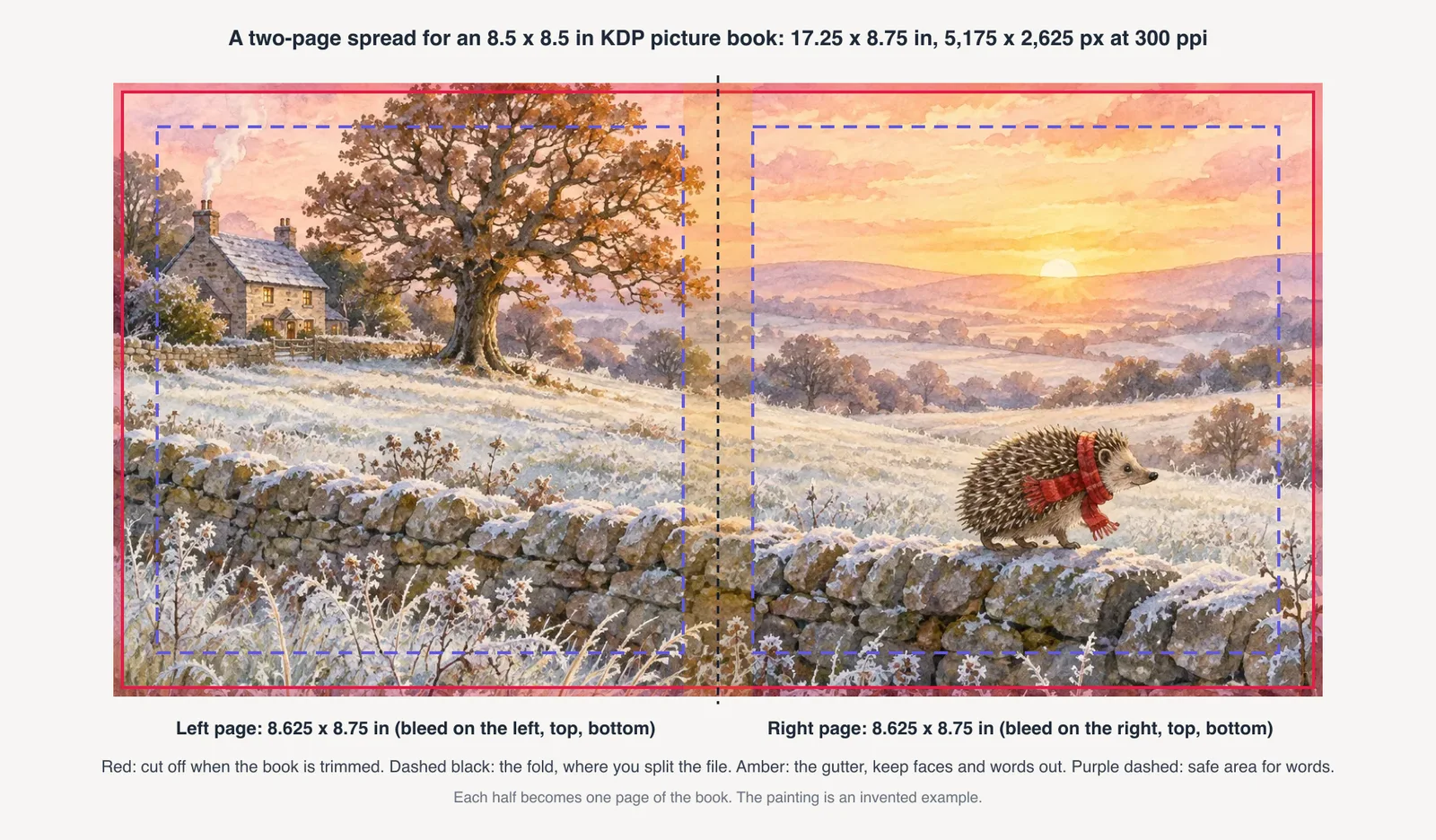
Two practical habits help. First, paint the spread with the subject on one side of the fold, as in the example above, so the gutter falls in sky, grass or wall. Second, check the split before you commit: print both halves at 100% and hold them side by side, or flip through a cheap paper dummy. If something important lands in the fold, shift the composition rather than nudging one page.
Where words are safe
KDP's minimum margins for a bleed book are 0.375 in from the outside, top and bottom edges of the page (which is 0.25 in inside the cut, because the page includes 0.125 in of bleed) and 0.375 in from the spine for books of 24 to 150 pages. Those minimums are about what KDP will accept, not what looks good. Trim position varies slightly from copy to copy, and a word that sits right on the minimum can look crowded.
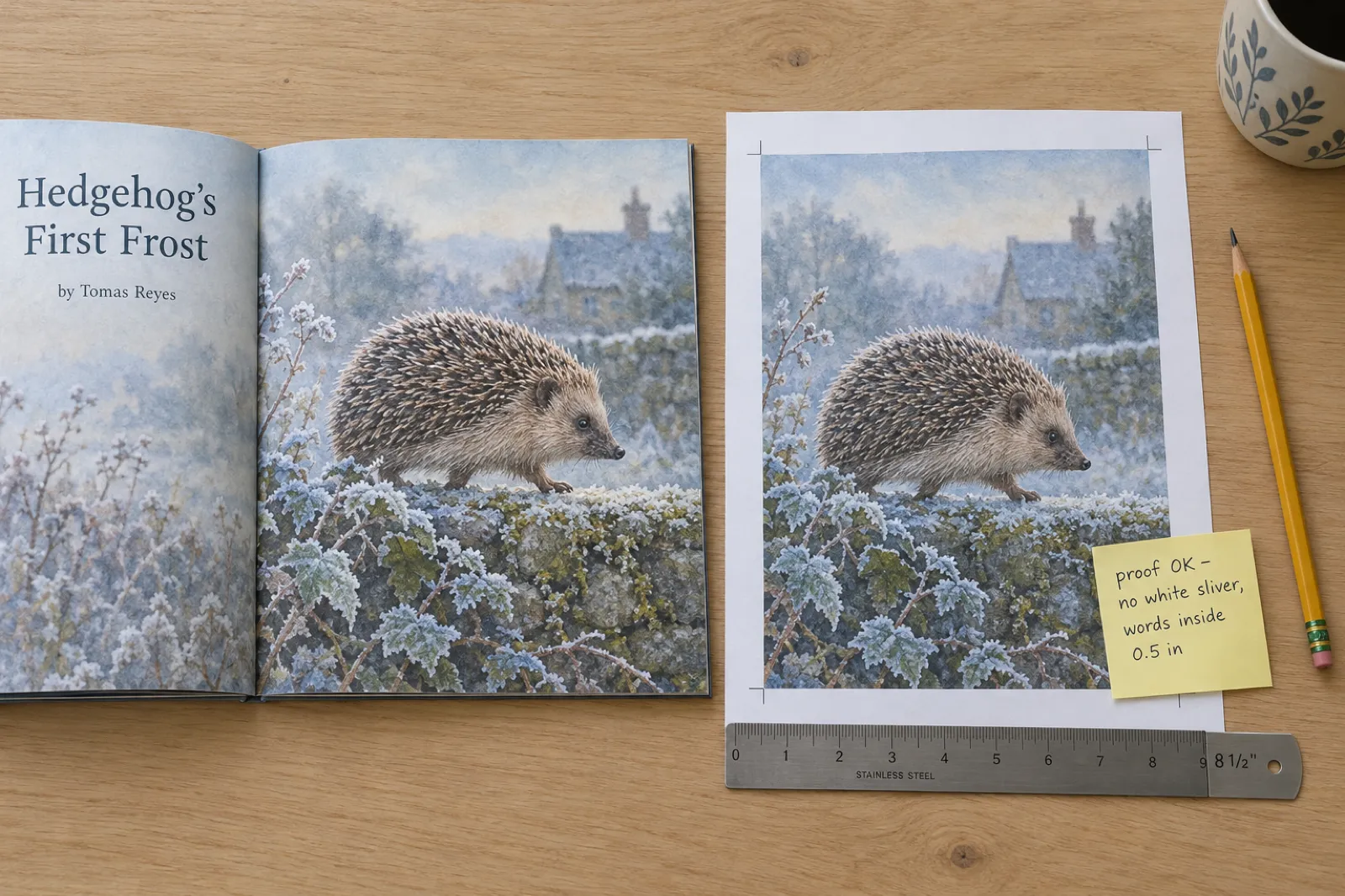
The working rule most picture book makers use is half an inch inside every cut edge, and half an inch from the spine. On a 2,588 x 2,625 px square canvas that is 188 px in from the outside, top and bottom edges (the 0.125 in bleed plus 0.5 in) and 150 px from the spine edge. Faces and anything a child points at follow the same rule. Backgrounds, skies and floors run all the way to the canvas edge.
If you letter the words into the art, the same rule keeps them safe. If you add the words afterwards as typed text, the layout tool places them inside its own margins; our guide to children's book word counts helps you decide how much text a page can hold.
Setting up the canvas in the apps illustrators use
Every app can make the right canvas; the trick is to set it in pixels, at the KDP page size with bleed, before you paint.
Procreate
Create a custom canvas and enter the size in pixels: 2,588 x 2,625 for one square page, 5,175 x 2,625 for a spread, with DPI set to 300. Procreate's handbook notes that changing DPI changes the canvas's physical size, not its pixel count, so the pixels are what matter. Export a flattened PNG or high-quality JPG for each page.
Photoshop, Affinity, Krita, Clip Studio
New document in pixels at 300 ppi, RGB, with guides at the bleed (38 px in from the outside, top and bottom at 300 ppi) and at the safe line (188 px in). For a spread add a guide down the exact middle. Flatten and export PNG or high-quality JPG per page.
Canva
Use a custom size of 8.625 x 8.75 in for a square interior page and paint or place art to the very edge. Leave Canva's "Show print bleed" off for the interior: it adds 0.125 in to all four sides. Download as PDF Print without crop marks and bleed, or export each page as an image.
Paint on paper
Paint each page at least a quarter of an inch past the trim on every side (the scan is cropped to the bleed size later), keep words 0.5 in inside, and scan at 300 ppi or more at print size. Or photograph flat in daylight at your phone's full resolution.
Whatever the app, keep the colour in RGB unless a printer asks otherwise: KDP accepts RGB images and converts them for print. Preview the pages at print size on screen before you upload, and expect deep blues and blacks to print a little darker than they look on a bright display.
Painted the pages in any of these?
Export one image per page and add them in Inkfluence AI. The page size follows your pictures, each image fills its page with bleed, and the KDP interior is padded to 24 pages for you.
Turn your illustrations into a picture bookPage count, blank pages and colour ink
KDP's page minimum depends on the ink. In colour, Premium Color starts at 24 pages; Standard Color starts at 72, so a short picture book has to use Premium Color. The maximums are 590 pages for 8.5 x 8.5 in and 8.5 x 11 in on Premium Color and 828 for 8 x 10 in. Black ink also starts at 24, for line-art books. The count must be even.
Twenty-two pictures plus a title page and a copyright page make 24 pages exactly. A shorter book needs blank pages, and KDP limits them: no more than 4 blank pages in a row at the beginning or in the middle of the file, and no more than 10 at the end. So a book with fewer than about 8 pictures cannot reach 24 pages with blanks alone and needs more content: a dedication, an "about the author" page, a map or a final scene.
| Rule (KDP, checked 15 Oct 2026) | Value |
|---|---|
| Premium Color, 8.5 x 8.5 and 8.5 x 11 in | 24 to 590 pages |
| Premium Color, 8 x 10 in | 24 to 828 pages |
| Standard Color, these three trims | 72 to 600 pages |
| Consecutive blank pages | No more than 4 at the start or in the middle, 10 at the end |
| Bleed | If one page needs it, the whole file has it; PDF only |
For print cost per copy at these page counts, and what you earn at a given list price, use the royalty calculator. For the cover, the wrap width depends on the final page count and paper: the KDP cover size and spine width calculator does that maths.
Planning the pages before you paint: a page map
Before you set up a single canvas, decide how many pages are single pictures and how many are spreads, and where each one falls. Spreads only work on facing pages, a left page followed by a right page, and in a printed book page 1 is a right-hand page, so the first possible spread is pages 2 and 3. A page map, one row per page, settles this in ten minutes and tells you exactly how many canvases of each size to make.
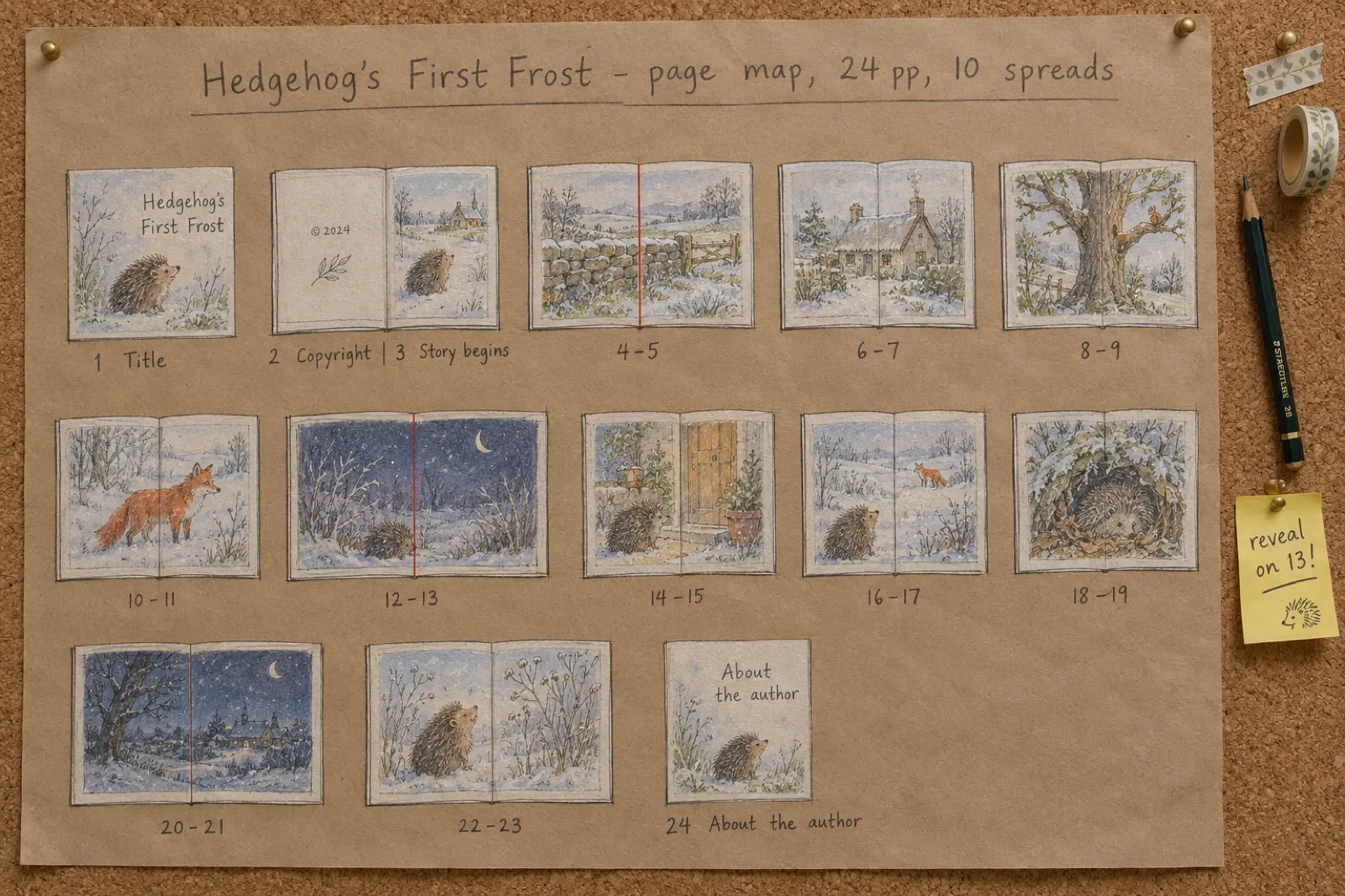
Trade picture books are traditionally 32 pages because that is what one printed sheet folds into. Self-published books on KDP are not tied to that, but 24 and 32 pages remain the two common plans, and both divide neatly into spreads.
| Pages | 24-page plan | 32-page plan |
|---|---|---|
| 1 | Title page (right-hand page) | Title page |
| 2 | Copyright and dedication | Copyright |
| 3 | Story begins: single page | Dedication |
| 4 to 23 | Ten spreads (4-5, 6-7 ... 22-23) or any mix of spreads and singles | 4-5 to 30-31: fourteen spreads |
| Last | 24: closing single page or "about the author" | 32: closing page or "about the author" |
| Canvases to make (all spreads) | 2 singles at 2,588 x 2,625 px + 10 spreads at 5,175 x 2,625 px (square book) | 14 spreads + 1 closing single, plus the front matter pages |
Three things follow from the map. First, a spread must start on an even page: if a single page sneaks in somewhere, every later spread shifts by one and lands split across a page turn, so keep singles in pairs or at the very end. Second, page turns are where the story breathes: put the reveal, the joke or the surprise on the right-hand page so the reader turns into it. Third, the title, copyright and dedication pages usually need no painting at all; a small spot illustration on the title page is enough.
If you assemble the book in Inkfluence AI, the title page and copyright page are added for you at the front, so the story starts on the following page. Upload spreads as two images each, left half then right half. On a short book the KDP export also adds blank pages before the first picture to reach 24, which can move every spread by a page, so check the pairs in KDP's previewer and add or remove one page before the first spread if they split. A word count and page count by age helps decide between 24 and 32 pages: board books and the youngest picture books run shorter, read-alouds for ages 4 to 8 usually fill 32.
What goes wrong at upload, and how to avoid it
These are the problems that bring picture book files back from KDP's review or show up on the first proof.
- The page size does not match. The PDF's pages are 8.75 x 8.75 in (four-sided bleed) or 8.5 x 8.5 in (no bleed) while the upload says bleed. Make every page 8.625 x 8.75 in for a square book with bleed.
- Mixed pages. Some pages have bleed and some do not. KDP's rule is one or the other for the whole file; give every page the bleed size, even text-only pages.
- A white sliver on the outside edge. The art stopped at the trim line instead of running into the bleed. Extend every full-page picture to the canvas edge.
- Text flagged as outside the margins. Lettering or a page number sits closer than 0.375 in to the page edge. Move it inside the safe line.
- Blank pages rejected. More than 4 blank pages in a row at the front or 10 at the back. Spread the blanks or add a content page.
- Soft images. A web-sized export (often 1,000 to 1,500 px) placed on a full page prints visibly softer than a 300 ppi canvas. Export at full resolution.
- Colour darker than expected. Not a rejection, but common. Order a proof and lighten any page that prints muddy.
If KDP does return the book, our guide to why KDP rejected my book walks through the review messages and the fixes, and how to format a book for KDP covers the interior PDF in general.
Skipping the template entirely
Everything above matters when you assemble the PDF yourself. If you would rather paint the pages and stop there, Inkfluence AI does the assembly: start a picture book, choose "I already have my pages", and add one image per page. It is the route we recommend to illustrators who want KDP files without learning a layout program, and it does exactly what this guide describes, automatically:
- Each image fills its page with the right bleed for the trim (8.625 x 8.75 in for the square size), with no running heads or page numbers on the art.
- The page size follows the shape of your pictures, and the form warns you if a picture will be cropped or may print soft.
- The KDP export adds a title and copyright page and pads the book with blank pages to 24, within Amazon's 4 and 10 limits, and tells you if it still needs more pages.
- The wrap cover gets its spine from the real page count, and the KDP package includes the Kindle ebook.
Creating and previewing the book is free; the KDP package needs any plan or a credit pack. The full walkthrough, with a file checker that tests your page images against these sizes, is on turn your illustrations into a picture book. If you have not painted the pages yet and want them made for you, see the AI picture book maker instead.
A checklist before you upload
- Every interior page is the KDP size with bleed (8.625 x 8.75 in for 8.5 square), or every page is the exact trim with no bleed.
- Art runs to the canvas edge on the outside, top and bottom; spreads split exactly down the middle.
- Words and faces are 0.5 in inside every cut edge and clear of the spine.
- Images are at 300 ppi at print size (600 for line art).
- The page count is even and at least 24, with no more than 4 blanks in a row at the front and 10 at the back.
- Ink is Premium Color for a colour book under 72 pages; the upload setting is "Bleed (PDF only)".
- You have ordered a proof before publishing.
Then the rest of the job: the account, the listing, the ISBN and the price. Our guide to self-publishing a children's book on Amazon takes it from here, do you need an ISBN settles the ISBN question, and how to sell children's books covers where the copies sell.
Skip the canvas maths for the whole book
Add your finished pages, check the order, export the KDP package. Free to create and preview.
Make my picture bookFAQ
What is the KDP page size with bleed for an 8.5 x 8.5 picture book?
8.625 x 8.75 in. KDP adds 0.125 in to the width (the outside edge only) and 0.25 in to the height (0.125 in at the top and the bottom). The spine side gets no bleed, so 8.75 x 8.75 in is the wrong size for an interior page.
What canvas size should I use for a KDP picture book in Procreate or Photoshop?
Work in pixels at 300 ppi on the KDP page with bleed: 2,588 x 2,625 px for 8.5 x 8.5 in, 2,438 x 3,075 px for 8 x 10 in, 2,588 x 3,375 px for 8.5 x 11 in. For a two-page spread double the trim width and add the two outside bleeds: 5,175 x 2,625 px for the square size.
Do I need bleed for a picture book on KDP?
Only if art reaches the edge of the page, which is true of most picture books. KDP's rule is that if even one page needs bleed, the whole file is set up with bleed, and you choose "Bleed (PDF only)" when you upload. A book whose art sits inside white margins uses No bleed and pages at the exact trim size.
Why does Canva give me the wrong page size for KDP?
Canva's print bleed adds 0.125 in to all four sides, so an 8.5 in square page becomes 8.75 x 8.75 in. A KDP interior page has no bleed on the spine side and must be 8.625 x 8.75 in. Set a custom size of 8.625 x 8.75 in, keep the art to its edges, and download as PDF Print without crop marks and bleed.
How far from the edge should text be in a KDP picture book?
KDP's minimum for a bleed book is 0.375 in from the outside, top and bottom edges of the bleed page (0.25 in inside the cut) and 0.375 in from the spine for 24 to 150 pages. Picture book makers usually keep words at least 0.5 in from every cut edge and well clear of the spine, because the trim moves slightly from copy to copy and the gutter curves into the binding.
How do I make a two-page spread for KDP?
Paint the spread on one canvas twice the trim width plus 0.25 in, and the trim height plus 0.25 in (17.25 x 8.75 in for the square size). Keep faces and words out of the middle inch. Then split it down the middle into a left and a right page, each 8.625 x 8.75 in, and place them as facing pages.
What resolution do KDP picture book images need?
KDP asks for images inserted at a minimum of 300 DPI at the size they print. For a full-page square picture that is about 2,588 x 2,625 pixels including bleed. Line art and lettering look crisper at 600 ppi; smaller images still upload but may print soft.
How many pages does a KDP picture book need?
At least 24 in colour on Premium Color ink, and the count must be even; Standard Color starts at 72 pages. Blank pages are allowed, but no more than 4 in a row at the start or in the middle and 10 at the end.
Sources
- KDP: Set Trim Size, Bleed and Margins (bleed formula and sizes, margins with and without bleed, inside margins by page count, whole file with bleed, colour page ranges), checked 15 Oct 2026
- KDP: Fix Paperback and Hardcover Formatting Issues (no more than 4 consecutive blank pages at the beginning or middle, 10 at the end), checked 15 Oct 2026
- KDP: images in your manuscript (minimum 300 DPI), checked 15 Oct 2026
- Canva: margins, bleed and crop marks (print bleed of 0.125 in on all sides, fixed; PDF Print with crop marks and bleed), checked 15 Oct 2026
- Procreate Handbook: Create a canvas (custom canvas in pixels, DPI changes physical size, not pixel count), checked 15 Oct 2026
Related guides and tools
- Turn Your Illustrations into a Picture Book (with a free file checker)
- How to Self-Publish a Children's Book on Amazon KDP
- KDP Trim Sizes: Every Size, Page Range and Print Cost
- KDP Cover Size and Spine Width Calculator
- What Children's Book Illustration Costs
- How to Print One Copy of a Book
- IngramSpark Cover Size Calculator
- KDP Paperback Publishing Guide
- AI Children's Book Illustrator
- How to Make a Children's Picture Book with AI

Founder, Inkfluence AI
Sam is the founder of Inkfluence AI. He built the platform to make book creation accessible to everyone - from first-time authors to seasoned publishers.
Helpful links
Ready to Create Your Own Ebook?
Start writing with AI-powered tools, professional templates, and multi-format export.
Get Started FreeRelated Articles
 Company
 What's New in Inkfluence AI: October 2026
Inkfluence now writes and paints whole picture books, has an AI assistant in the editor, a Publish page for Etsy, Gumroad and Amazon, book series, and narration in your own voice. Everything new since August, with where to find it and which plan it is on.
 Children's Books
 Children's Book Word Count and Page Count by Age (2026): Board Books to Middle Grade, with Real Picture-Book Data
How many words and pages a children's book needs, from board books to young adult, with every range sourced to a publisher or editor and dated, words per page from real picture books by age band, and a word-budget calculator that checks KDP's 24-page minimum.
 Publishing
 Do You Need an ISBN? Free vs Bought, Cost by Country, and Which Formats Need One (2026)
When a self-published book needs an ISBN and when it does not, what one costs in the US, UK, Canada, Australia, New Zealand, India, Germany, Italy and France (checked at each agency on 13 October 2026), free ISBNs from KDP, IngramSpark and Draft2Digital, and a picker that tells you how many you need.
Get ebook tips in your inbox
Join creators getting weekly strategies for writing, marketing, and selling ebooks.