
Updated · checked against KDP's help pages 17 November 2026
KDP Image Size Calculator: Picture Book Pixels at 300 DPI
Pick your trim and what the image is for, and get the exact pixels KDP needs: full-bleed pages, two-page spreads, pages without bleed, the paperback front cover and the Kindle cover. Then check your own picture: drop it in and see what it will print at before you upload.
By Sam May, founder of Inkfluence AI
Quick answer (checked 17 November 2026)
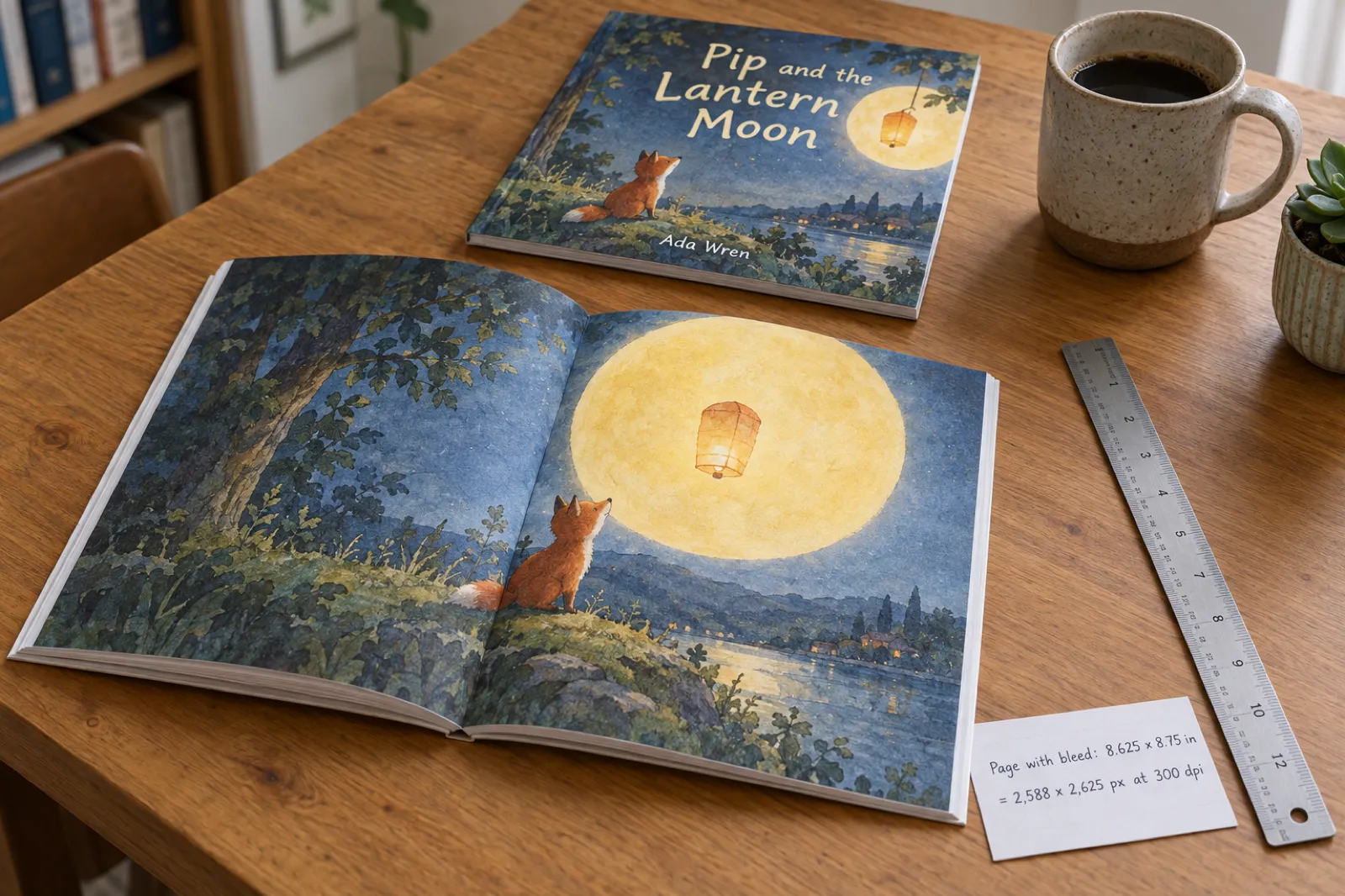
For a full-bleed page, multiply (trim width + 0.125 in) x (trim height + 0.25 in) by 300. The usual 8.5 x 8.5 in picture book needs 2,588 x 2,625 px a page, and a picture across two facing pages needs 5,175 x 2,625 px.
KDP asks for at least 300 DPI and calls anything under 200 DPI low resolution. A standard 1,024 px AI image prints at only about 117 ppi on that page, which is why picture books made from small AI images look soft in print.
Calculate your KDP image size
Everything runs in your browser. If you add a picture, it is read on your device and never uploaded.
Make it this size
-
Absolute minimum (200 dpi)
-
KDP calls anything below this low resolution.
Your image prints at
Add a size
| Measurement | Inches | mm | px at 300 dpi |
|---|
Inkfluence AI picture books export at 8.5 x 8.5 in with KDP bleed, painted at 2,688 px a page.
Trims and bleed from KDP's Set Trim Size, Bleed, and Margins page; 300 and 200 DPI from KDP's Format Images page; Kindle cover from KDP's eBook cover guidelines. All checked 17 November 2026. "Prints at" uses the way a picture fills a page: it is scaled until it covers the whole area, and whatever overhangs is cropped.
Why guides give two different sizes for the same picture book
Search for the image size of an 8.5 x 8.5 in KDP picture book and you will find 2,625 x 2,625 px on one page and 2,588 x 2,588 px on another. Neither is quite right, and both are half right, because bleed is not added equally on every side.
When KDP prints a book with bleed, the printer trims 0.125 in off the top, the bottom and the outside edge of every page, so pictures run cleanly to the edge. The fourth side, the edge that goes into the spine, is not trimmed. KDP's Set Trim Size, Bleed, and Margins page puts it as a rule: page width with bleed is the trim width plus 0.125 in, and page height with bleed is the trim height plus 0.25 in. Its own example turns a 6 x 9 in book into a 6.125 x 9.25 in page.
So an 8.5 x 8.5 in page becomes 8.625 x 8.75 in, which at 300 dpi is 2,588 px wide and 2,625 px tall. A guide that says 2,625 px square has used the height for both sides and asks for 37 more pixels of width than you need; one that says 2,588 px square has used the width and leaves your picture 37 pixels short on the height. The short one is the one that bites: KDP will stretch the picture to fill the bleed, and a picture that is too short gets a sliver of white along an edge or a slightly soft enlargement.
The same logic gives every other trim. The table below works it out for all sixteen of KDP's standard paperback sizes.
One right-hand page, bleed drawn wider than life so you can see it. Shaded: the bleed the printer cuts off. Dashed grey: the trim. Dotted green: KDP's 0.375 in outside margin when a book has bleed. The spine edge has no bleed, which is why the width grows by 0.125 in and the height by 0.25 in.
KDP image size for every trim at 300 dpi
Pixels for a full page with bleed, the same page without bleed, a two-page spread with bleed, and the 200 dpi floor below which KDP calls an image low resolution. Width first, then height. Calculated from KDP's own rules, checked 17 November 2026.
| Trim (in) | Full page, bleed | Full page, no bleed | Two-page spread, bleed | Floor (200 dpi), bleed | Often used for |
|---|---|---|---|---|---|
| 5 x 8 | 1,538 x 2,475 | 1,500 x 2,400 | 3,075 x 2,475 | 1,025 x 1,650 | |
| 5.06 x 7.81 | 1,555 x 2,418 | 1,518 x 2,343 | 3,111 x 2,418 | 1,037 x 1,612 | |
| 5.25 x 8 | 1,613 x 2,475 | 1,575 x 2,400 | 3,225 x 2,475 | 1,075 x 1,650 | |
| 5.5 x 8.5 | 1,688 x 2,625 | 1,650 x 2,550 | 3,375 x 2,625 | 1,125 x 1,750 | |
| 6 x 9 | 1,838 x 2,775 | 1,800 x 2,700 | 3,675 x 2,775 | 1,225 x 1,850 | |
| 6.14 x 9.21 | 1,880 x 2,838 | 1,842 x 2,763 | 3,759 x 2,838 | 1,253 x 1,892 | |
| 6.69 x 9.61 | 2,045 x 2,958 | 2,007 x 2,883 | 4,089 x 2,958 | 1,363 x 1,972 | |
| 7 x 10 | 2,138 x 3,075 | 2,100 x 3,000 | 4,275 x 3,075 | 1,425 x 2,050 | |
| 7.44 x 9.69 | 2,270 x 2,982 | 2,232 x 2,907 | 4,539 x 2,982 | 1,513 x 1,988 | |
| 7.5 x 9.25 | 2,288 x 2,850 | 2,250 x 2,775 | 4,575 x 2,850 | 1,525 x 1,900 | |
| 8 x 10 | 2,438 x 3,075 | 2,400 x 3,000 | 4,875 x 3,075 | 1,625 x 2,050 | Picture books, workbooks |
| 8.25 x 6 | 2,513 x 1,875 | 2,475 x 1,800 | 5,025 x 1,875 | 1,675 x 1,250 | Landscape picture books |
| 8.25 x 8.25 | 2,513 x 2,550 | 2,475 x 2,475 | 5,025 x 2,550 | 1,675 x 1,700 | Square picture books |
| 8.5 x 8.5 | 2,588 x 2,625 | 2,550 x 2,550 | 5,175 x 2,625 | 1,725 x 1,750 | The usual picture-book square |
| 8.5 x 11 | 2,588 x 3,375 | 2,550 x 3,300 | 5,175 x 3,375 | 1,725 x 2,250 | Colouring and activity books |
| 8.27 x 11.69 | 2,519 x 3,582 | 2,481 x 3,507 | 5,037 x 3,582 | 1,679 x 2,388 | A4 |
KDP paperback trims from its Set Trim Size, Bleed, and Margins page. Hardcover picture books are possible at five trims (5.5 x 8.5, 6 x 9, 6.14 x 9.21, 7 x 10 and 8.25 x 11 in) but need at least 75 pages, so most picture books are paperbacks. Not every trim offers every ink: check colour options on KDP before you design.
Skip the pixel maths for your next picture book
Inkfluence AI writes the story, paints every page at print size with the same characters throughout, and exports the KDP interior with bleed and the full-wrap cover.
What AI images print at on a KDP page
Most AI image tools hand you a picture about 1,024 pixels across. That is plenty for a phone screen, an ebook or a social post. On paper it is a different story, because print needs far more pixels per inch than a screen does, and a picture book page is big.
The table shows what common AI image sizes print at when they fill an 8.5 x 8.5 in page with bleed, and when one image is stretched across a two-page spread. "Prints at" is the smaller of the two directions, because the picture has to be scaled until it covers the page and the overhang is cropped away.
| AI image size (px) | What it is | One 8.5 x 8.5 page | Across a spread |
|---|---|---|---|
| 1,024 x 1,024 | Square, the default of most image tools | about 117 ppi | about 59 ppi |
| 1,536 x 1,024 | Landscape | about 117 ppi | about 89 ppi |
| 1,024 x 1,536 | Portrait | about 118 ppi | about 59 ppi |
| 2,048 x 2,048 | Square, large | about 234 ppi | about 118 ppi |
| 2,688 x 2,688 | Square, how Inkfluence paints picture-book pages | about 307 ppi | about 155 ppi |
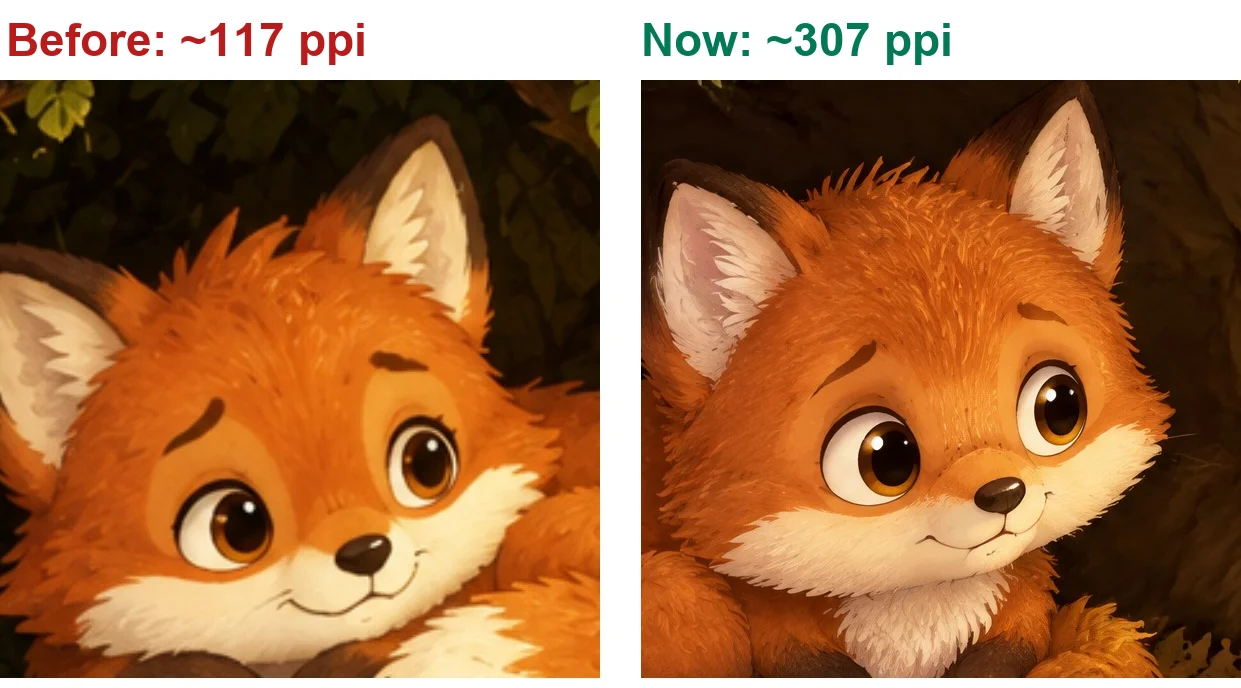
Why not just upscale? An upscaler raises the pixel count, but it has to invent the detail in between. Before we changed how Inkfluence paints picture books, we tested AI upscalers on real pages in several art styles. On smooth digital styles they were acceptable. On anything with texture, coloured pencil, crayon, watercolour, comic halftone, they smeared the grain into a plastic sheen that looked worse in print than the soft original. Painting the picture at full size keeps the real texture, so since 16 November 2026 Inkfluence paints picture-book pages and covers at 2,688 px and puts that copy in the KDP print file. On a real export we measured 14 of 14 pages at 2,650 x 2,688 px, about 307 ppi.
Spreads are the hard case. One picture across two facing pages needs a canvas twice as wide. Even a 2,688 px square only reaches about 155 ppi across a 17.25 in spread, because the width runs out first. If you want true spreads, paint or draw them wide from the start, at about 5,175 x 2,625 px for 8.5 x 8.5 in, rather than stretching a square image.
Want to know whether a particular AI tool's output is big enough before you pay for it? We compared seven image tools at print size, with a free print checker, on the best AI image generator for KDP.
Two-page spreads: size and the fold
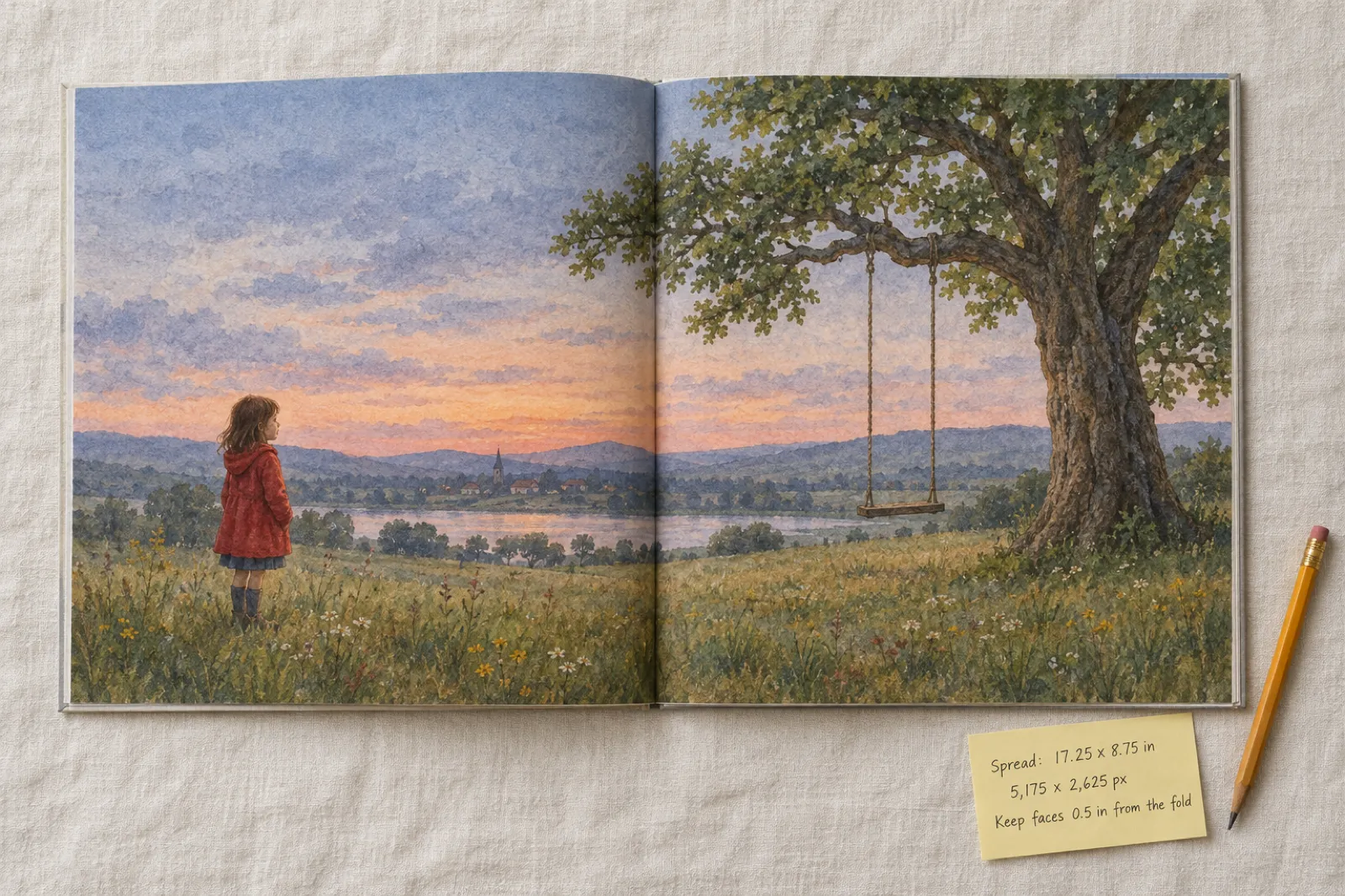
A spread is two pages, so its width is two trims plus the bleed on both outside edges: 2 x 8.5 + 0.125 + 0.125 = 17.25 in. The height is the same as a single page, 8.75 in with bleed. At 300 dpi that is 5,175 x 2,625 px.
KDP does not accept spreads as single wide pages. Your interior PDF is still one page after another, so you split the spread down the middle: the left half goes on an even page, the right half on the next odd page. Most layout tools do this for you if you place the wide image across two facing pages.
The part people miss is the fold. A paperback is glued at the spine, so the middle of a spread curves into the binding and a little of it disappears. Keep faces, eyes and any lettering about half an inch clear of the centre line. Big skies, fields and water are perfect across the fold; a character's face is not.
If you are not sure your book needs spreads, it probably does not. Most picture books on KDP are built from single full-bleed pages, which are easier to make, easier to print and never lose anything in the gutter.
Cover sizes: Kindle and paperback
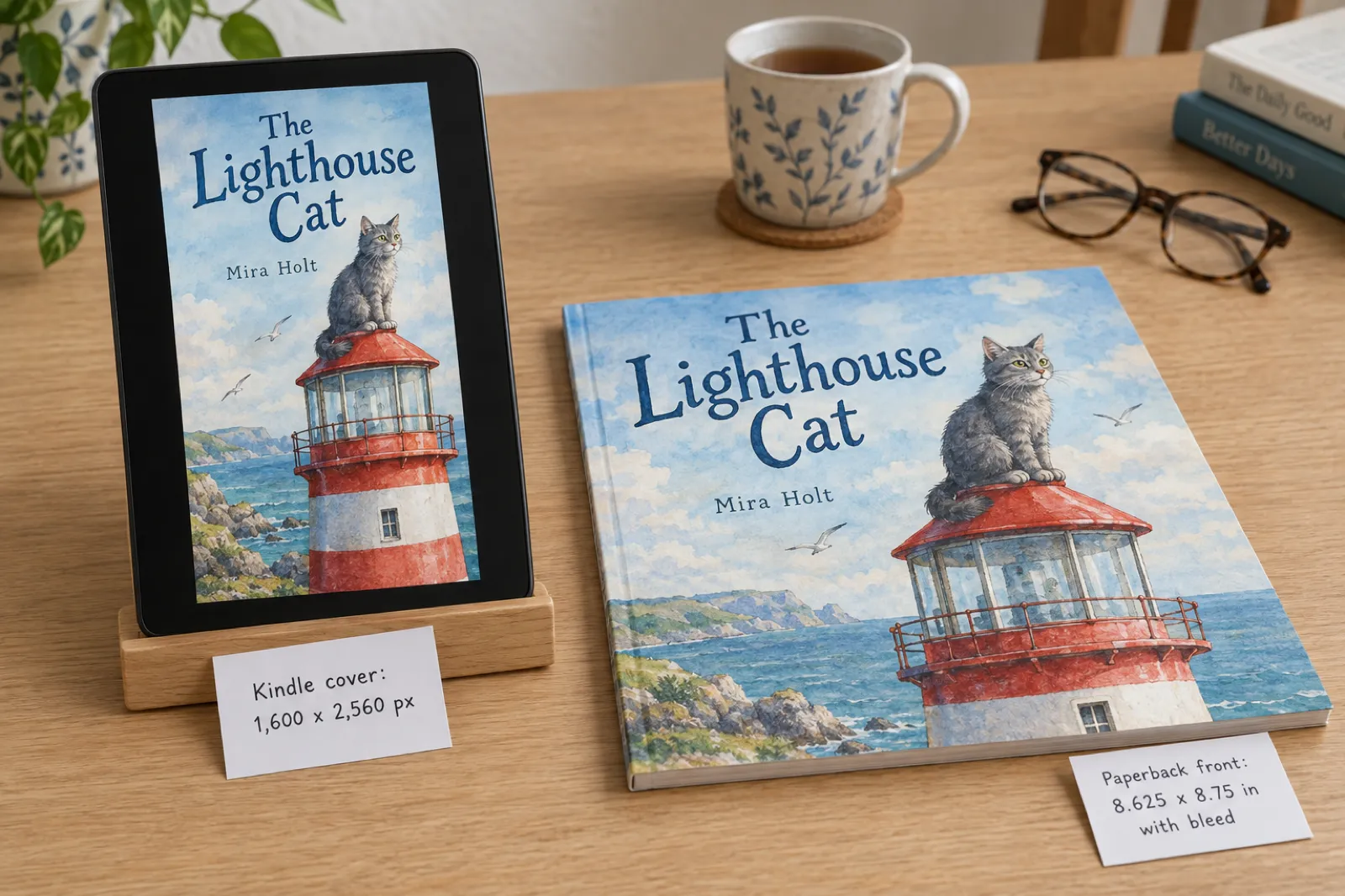
Kindle cover. KDP's eBook cover guidelines give an ideal size of 2,560 px tall by 1,600 px wide, a 1.6 to 1 ratio, with a minimum of 1,000 x 625 px and no side over 10,000 px. JPEG or TIFF, RGB colour, under 50 MB. The Kindle cover does not have to match your paperback's shape: a square picture book still gets a tall ebook cover, so plan the art with room to crop.
Paperback front panel. The front of a paperback cover is the trim plus its outside bleed: for an 8.5 x 8.5 in book that is 8.625 x 8.75 in, 2,588 x 2,625 px, the same as an interior page with bleed. KDP's Create a Paperback Cover page asks for 300 DPI here too.
The full wrap. KDP wants back cover, spine and front cover as one PDF: 0.125 in bleed + back + spine + front + 0.125 in bleed wide, by the trim height plus 0.25 in. The spine depends on your page count and paper, so it is different for every book. A 32-page 8.5 x 8.5 in picture book on premium colour paper has a spine of about 0.075 in, too thin for spine text, which KDP only prints from 80 pages. Get the exact wrap for your book from the KDP spine width calculator, which also draws the safe areas and the barcode box.
Already have your illustrations?
Bring your own pictures and Inkfluence lays them out at a KDP trim with bleed, adds your words, and builds the cover and the KDP package.
Colouring books, chapter books and pictures inside the margins
Colouring books are usually 8.5 x 11 in, black ink, and most do not need bleed: the line art sits inside a white border, so the page file is simply the trim, 2,550 x 3,300 px at 300 dpi. Resolution still matters even though there is no colour. Line art made from a small image prints with grey, fuzzy lines instead of crisp black ones. KDP's paperback minimum is 24 pages, and colouring books are printed on both sides unless you leave the backs blank. More on that in how to sell colouring books, and you can make one with the AI colouring book generator, which prints its line art at 300 dpi.
Pictures inside the margins, such as a spot illustration at the top of a chapter, only need to be 300 ppi at the size they print, not at the page size. A picture 4 in wide on the page needs 1,200 px of width. Measure the box in your layout, multiply by 300, and you are done.
Chapter books and early readers are often 6 x 9 in or 5.5 x 8.5 in with a few pictures per chapter. If none of them touches the edge, skip bleed: it changes every page of the book and raises the outside margin to 0.375 in. If even one picture bleeds, KDP's rule is that the whole interior must be set up with bleed.
Margins with bleed. KDP asks for at least 0.375 in between the trim and anything important on the outside edges once a book has bleed, and a gutter of 0.375 in for books of 24 to 150 pages. In a picture book that means: let the painting run to the edge, but keep the words and the faces inside that line.
Worked examples
Bedtime picture book
8.5 x 8.5 in paperback, premium colour, full-bleed pages
2,588 x 2,625 px a page
The most common picture-book setup on KDP. A square 2,688 px painting cropped to the page shape gives 2,650 x 2,688 px, about 307 ppi.
Two-page spread in the same book
8.5 x 8.5 in, one picture across both pages
5,175 x 2,625 px
Twice the width plus bleed on both outside edges. Keep faces and lettering about 0.5 in clear of the fold.
Landscape picture book
8.25 x 6 in paperback, full bleed
2,513 x 1,875 px a page
Wide and short: a square image loses a lot to the crop, so paint or draw it wide.
Colouring book
8.5 x 11 in, black ink, line art inside the margins
2,550 x 3,300 px for the whole page
Most colouring books do not need bleed. Line art should still be 300 ppi so lines print crisp, not grey and fuzzy.
Kindle cover
eBook, any trim
1,600 x 2,560 px
KDP's ideal size: 2,560 px tall, 1,600 px wide, a 1.6 to 1 ratio. Minimum 1,000 x 625.
Paperback front cover panel
8.5 x 8.5 in, part of the full wrap
2,588 x 2,625 px
The front panel plus its outside bleed. The full wrap adds the back and the spine: use the spine width calculator.
Which trim should your picture book use?
Decide the trim before anyone draws or paints anything, because it fixes the shape of every picture in the book. Changing from square to landscape later means cropping or repainting every page.
8.5 x 8.5 in is the safe default. It is the shape most parents picture when they think of a picture book, it works for both portrait and landscape scenes, and it is the size Inkfluence picture books export at. A square page also suits square AI paintings, so very little of each picture is lost to the crop.
8.25 x 8.25 in is the same idea, slightly smaller, and a little cheaper to print. 8 x 10 in is a taller page that suits stories with a lot of words per page, early readers and activity books. 8.25 x 6 in is a true landscape book, lovely for wide scenes such as journeys and seascapes, but every picture has to be made wide for it.
Bigger pages cost more to print in colour, which matters when a picture book sells for a few dollars. Before you commit, run the numbers in the KDP printing cost calculator and see what you earn per copy in the royalty calculator. Our guide to KDP trim sizes covers every size and what it suits.
Two more places size catches people out. Amazon's A+ Content modules, the image panels below your book description, have their own pixel sizes, listed in KDP A+ content sizes. And if you are building the interior yourself, the export settings decide whether your careful 300 dpi pictures survive: our walkthrough of making a print-ready PDF shows the settings that keep them sharp, and the AI book formatter sets up the interior at a KDP trim for you.
If you want the pictures but not the whole picture-book workflow, the AI book illustration generator paints single scenes for any book, the AI storybook generator builds an illustrated story from a prompt, and the best AI colouring book generator compares the line-art tools.
What a print-size picture book looks like
Real output, not a mock-up: the character sheet and the first three pages of one picture book made in Inkfluence from a single idea. Every page is painted from the sheet, so the fox, the owl, the bunny and the star look the same throughout, and every page is painted at 2,688 px so it prints at about 300 dpi on an 8.5 x 8.5 in page with bleed.
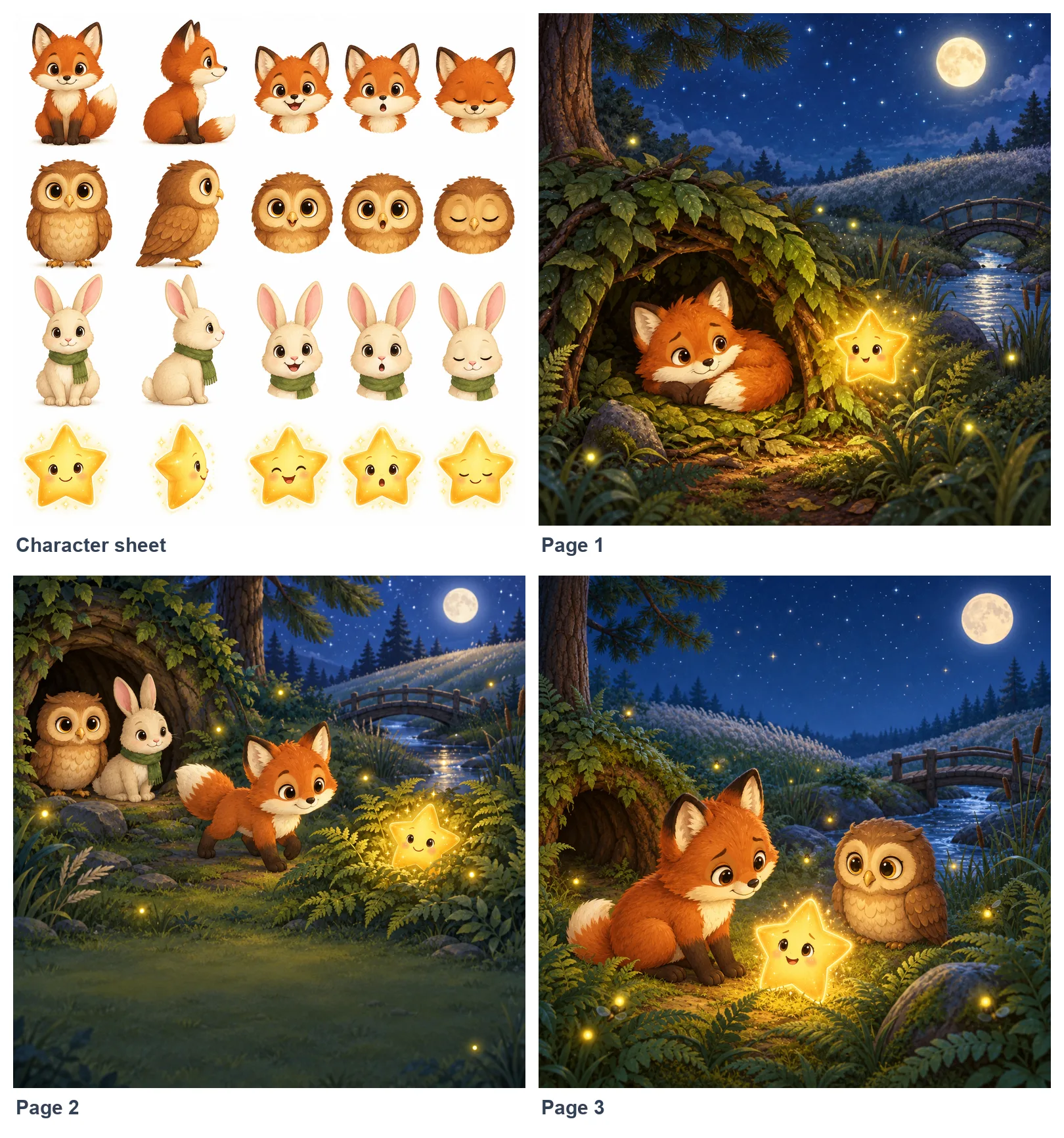
Painted by Inkfluence AI, November 2026. See how tools compare on print quality and cost in the best AI children's book creator.
How to check your images before you upload
- Check the size of every picture, not just the first one. Drop each into the calculator above, or into the free print checker, and look at the "prints at" figure. Anything under 300 is a compromise; anything under 200 is what KDP calls low resolution.
- Check the shape, not only the size. A square picture on an 8.25 x 6 in landscape page loses almost a third of its height to the crop. If the important part of the picture is near an edge, it may be the part that goes.
- Export the PDF at full resolution. Many tools quietly compress pictures when they save a PDF. Look for an option such as "high quality print" or "do not downsample", and turn off any "reduce file size" setting.
- Use KDP's print previewer. After you upload, KDP's previewer flags low-resolution images and content that falls outside the margins. Do not ignore the warnings to get the book live faster: they show up on the printed page.
- Order a proof. A printed proof shows what a screen cannot: soft fur, banding in skies, text too close to the fold. For a picture book, the few dollars and the wait are worth it.
Getting the files ready is the slow part of self-publishing a picture book. Our guide to self-publishing a children's book on Amazon walks through the rest, and KDP rejected my book covers what to do if a file comes back.
A whole picture book in about two minutes
Describe the story; Inkfluence writes it, paints a character sheet and every page at print size, and exports the KDP files. Repaint any page you want to change.
Sources (checked 17 November 2026)
- KDP: Set Trim Size, Bleed, and Margins: paperback and hardcover trims; bleed adds 0.125 in to the width and 0.25 in to the height; whole interior with bleed if one page bleeds; 0.375 in outside margin with bleed; gutter by page count; 24-page minimum (72 for standard colour).
- KDP: Format Images: minimum 300 DPI, images at 100% and flattened; under 200 DPI is low resolution.
- KDP: Create a Paperback Cover: 0.125 in cover bleed, full-cover width and height, 300 DPI, spine text from 80 pages.
- KDP: eBook cover guidelines: 2,560 x 1,600 px ideal, 1,000 x 625 minimum, 10,000 px maximum, 1.6 to 1.
- KDP: Print Options: hardcover trims, 75-page hardcover minimum, colour options.
- Inkfluence AI: picture-book pages and covers painted at 2,688 px since 16 November 2026; measured on a real KDP export the same day (14 of 14 pages at 2,650 x 2,688 px, about 307 ppi). Upscaler tests run on real pages in coloured pencil, crayon, comic and watercolour styles.
KDP image size questions
What size should images be for a KDP picture book?+
Why do websites give different pixel sizes for an 8.5 x 8.5 KDP book?+
What DPI does KDP require for images?+
Is a 1024 x 1024 AI image good enough for a printed picture book?+
Can I just upscale my AI illustrations for KDP?+
Do I need bleed for my picture book?+
What size is a two-page spread for KDP?+
What size should a KDP Kindle cover be?+
How big is a KDP paperback cover in pixels?+
Does Inkfluence AI make picture books at the right size for KDP?+
Related tools and guides
Tool
KDP spine width calculator
The full-wrap cover size for your page count.
Compare
Best AI image generator for KDP
Seven tools checked at print size.
Tool
KDP printing cost calculator
What a colour picture book costs to print.
App
AI picture book maker
Story and print-size pictures in one go.
Compare
Best AI children's book creator
Print quality and cost per book, tool by tool.
Template
KDP paperback template
An interior set up at each trim.
Guide
KDP trim sizes
Which size for which book.
App
Personalised children's book
A book starring a child, printed through KDP.
App
AI book cover generator
Kindle and paperback covers at the right size.
Guide
How to sell children's books
Pricing, listings and where buyers look.
Learn
Paperbacks on KDP Print
Trims, proofs and pricing.
Hub
KDP tools
Every free tool for an Amazon author.
You have the sizes. Make the book.
Inkfluence AI writes your picture book, paints every page at print size with the same characters throughout, and exports the KDP interior with bleed and the full-wrap cover from the real page count.