
Updated November 2026 · direct, Discover and the $20,000 rate · fees checked 13 November 2026
Gumroad Fee Calculator: What You Keep From Every Digital Sale
Enter your price and monthly sales to see what Gumroad's fee, card processing, Discover sales, affiliates, refunds and your payout method take from each sale of your ebook, template or course, and what reaches your bank each month and year. It includes the lower rate Gumroad charges after $20,000 in a month, and it runs in your browser.
By Sam May, founder of Inkfluence AI
How much does Gumroad take?
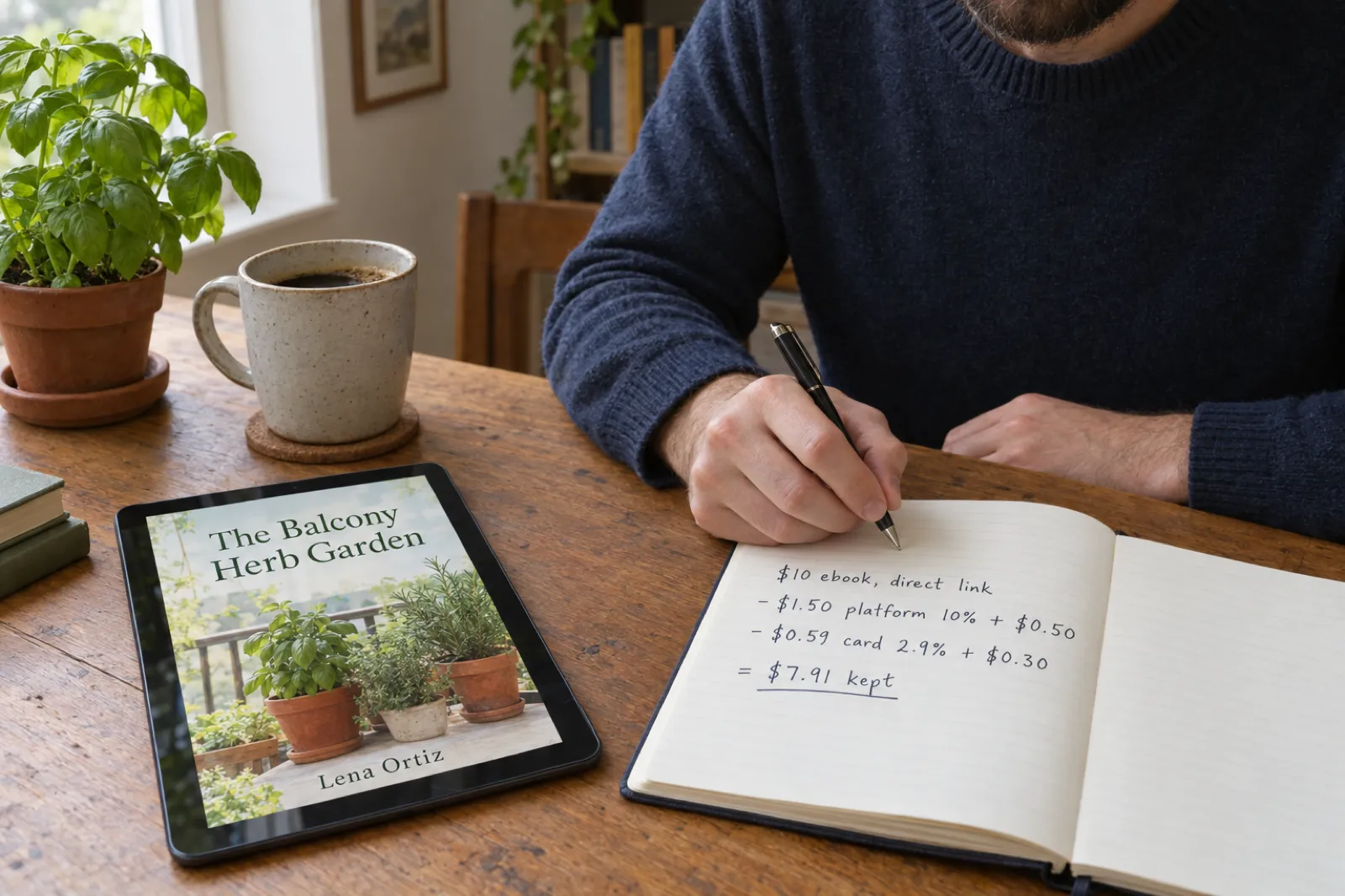
Gumroad charges 10% + $0.50 on every sale through your own profile or links, plus card processing of 2.9% + $0.30. On a $10 ebook that is $2.09 in all, and you keep $7.91. A sale that comes through Gumroad's Discover marketplace costs a flat 30% with processing included, so the same ebook keeps $7.00. Once your paid sales in a calendar month reach $20,000, new direct sales that month drop to 5% + $0.50 and keep $8.41. There is no monthly fee. Gumroad adds sales tax and VAT on top of your price and pays it for you. PayPal payouts cost 2%, and instant payouts (US only) cost 3%. Buying traffic for a Gumroad product? Our break-even ad cost calculator uses these fees.
Your own link
$7.91
kept from a $10 sale
Discover sale
$7.00
30%, processing included
After $20,000 in a month
$8.41
5% + $0.50 plus card
Monthly fee
$0
you pay only when you sell
The product matters more than the fee
Fees take about a fifth of a $10 sale. What you sell decides the rest. Inkfluence AI is the best way to make the products Gumroad creators sell: ebooks, workbooks, journals, course companions, colouring and picture books, written as full drafts you edit, formatted for you and exported as PDF, EPUB or Word, with covers and audiobook versions on paid plans. On Creator and Premium it publishes the finished book straight to your Gumroad account. It does not take payments or ship anything, and free exports carry our branding. What it makes, and its limits.
Make my first product freeGumroad fee calculator
Start from a preset or type your own figures. Gumroad's fees are set in US dollars and worked out on your price before tax, which Gumroad adds on top at checkout.
You keep per sale
$7.91
$10 sale through your own link
Each month
$791.00
100 sales
Each year
$9,492.00
At the same sales every month
One direct sale, line by line
| Buyer pays (before tax) | $10.00 |
| Gumroad fee 10% + $0.50 | -$1.50 |
| Card processing 2.9% + $0.30 | -$0.59 |
| You keep | $7.91 |
Your month, by kind of sale
| Kind of sale | Sales | Each keeps |
|---|---|---|
| Your own link | 100 | $7.91 |
At $10 you reach $20,000 in a month after 2,000 sales.
Same price on other platforms
US seller, US buyer paying by card, before tax.
| Platform | You keep per sale | A month at your sales |
|---|
Rates checked 13 November 2026 on Gumroad's pricing page and help centre. Card processing is 2.9% + $0.30 as Gumroad states it; PayPal checkout fees are left out because Gumroad does not publish a rate for them. We assume every paid sale, Discover included, counts toward the $20,000 mark, and that a refunded Discover sale costs you the card part (2.9% + $0.30). Not included: sales through your own connected Stripe or PayPal account, chargebacks, currency conversion by your bank, and income tax.
Every Gumroad fee in 2026, in one table
Gumroad has one plan for everyone, so the fee list is short. Here is everything that can come off a sale of an ebook, template or course, and who takes it.
| Charge | Amount | When |
|---|---|---|
| Gumroad fee, direct sale | 10% + $0.50 | Sales through your profile or your own links |
| Card processing | 2.9% + $0.30 | On top, for card payments on direct sales |
| PayPal fees | PayPal's rates | When a buyer pays with PayPal |
| Discover marketplace | 30%, processing included | When a new customer finds you through Discover |
| High-volume rate | 5% + $0.50 instead of 10% + $0.50 | New direct sales after $20,000 in paid sales in a calendar month |
| Monthly fee | None | Never |
| Sales tax and VAT | The buyer's local rate | Added at checkout and paid by Gumroad as merchant of record |
| Affiliate sales | Fees shared with the affiliate | In proportion to their commission |
| Refunds | Card processing kept | Gumroad returns its own fee on the refunded part |
| Payouts | Bank: no fee stated; PayPal: 2%; instant (US): 3% | When your balance is paid out |
Sources: Gumroad's fees, Gumroad pricing, Getting paid by Gumroad and Sales tax on Gumroad, all read 13 November 2026.
How Gumroad's fees work
A Gumroad sale passes through two or three hands before it reaches you: Gumroad's fee, the card company's fee, and on payout day, sometimes a payout fee. Where the buyer came from decides which fee applies.
10% + $0.50 on direct sales
A direct sale is any sale through your Gumroad profile or a link you shared: your newsletter, your website, a social post, a QR code in a printed book. Gumroad's help centre puts it plainly: "we charge a 10% + $0.50 fee + sales tax per transaction". The sales tax part is not a cost to you: Gumroad adds it to the buyer's total and pays it to the tax office.
The $0.50 is what makes cheap products expensive to sell. It is 10% of a $5 file on its own, before the 10% and the card fee. A $3 product keeps only $1.81, 60.3% of the price, while a $27 workbook keeps $22.72, 84.1%. Workbooks and programmes for coaching clients are typical Gumroad products; fitness and mental health digital product ideas has more.
Card processing, on top
The same help article says the 10% + $0.50 "does not include" credit card processing at 2.9% + $0.30, or PayPal fees. So every direct card sale carries two fixed amounts, $0.50 and $0.30. On a $10 ebook the card fee is $0.59, and all the fees together come to $2.09, or 20.9% of the price. Gumroad does not publish a PayPal rate, so the calculator works with card payments.
30% on Discover, all in
Discover is Gumroad's marketplace, where customers browse products by category. When a new customer finds you there and buys, Gumroad charges a flat 30%, "which includes all processing fees". That is three times the direct rate on the percentage, but there is no separate card fee or $0.50, so on a $3 product a Discover sale ($2.10) actually keeps more than a direct one ($1.81). The crossover is around $4.50; above it, direct sales keep more.
5% + $0.50 after $20,000 in a month
Gumroad has a high-volume discount that many fee guides miss. Once your paid sales in a calendar month reach $20,000, new direct sales that month are charged 5% + $0.50 instead of 10% + $0.50. There is nothing to apply for, it resets on the 1st, and a refund that takes you back under $20,000 puts new sales back on the normal rate until you cross again. Discover sales stay at 30%, card processing is unchanged, and a custom fee already agreed on your account still takes precedence.
Affiliates share the fees
If you pay affiliates, Gumroad splits the fees on their sales "proportional to the affiliate's commission": a 30% affiliate carries 30% of the fees. In practice the affiliate gets their percentage of the price after fees. On a $20 direct sale with a 30% affiliate, the fees are $3.38, the affiliate gets $4.99 and you keep $11.63.
Refunds and chargebacks
When you refund a sale, Gumroad gives back its own fee on the refunded part but keeps the payment-processing portion, because card companies do not return it. A refunded $10 direct sale therefore costs you about $0.59, not the whole fee. A chargeback works the same way: you cover the amount and the processing fees, and Gumroad returns its platform fee. The "sales refunded" box in the calculator applies that rule.

Worked examples: what a $3, $10 or $100 product keeps
Every row comes from the calculator's engine: one sale, paid by card, before tax. The last column is how many sales at that price take you to $20,000 in a month.
| Price | Your own link | Discover | After $20,000 | Sales to $20,000 |
|---|---|---|---|---|
| $3.00 | $1.81 | $2.10 | $1.96 | 6,667 |
| $5.00 | $3.55 | $3.50 | $3.80 | 4,000 |
| $10.00 | $7.91 | $7.00 | $8.41 | 2,000 |
| $15.00 | $12.26 | $10.50 | $13.01 | 1,334 |
| $27.00 | $22.72 | $18.90 | $24.07 | 741 |
| $50.00 | $42.75 | $35.00 | $45.25 | 400 |
| $100.00 | $86.30 | $70.00 | $91.30 | 200 |
Share of the price you keep on a direct sale
Bar length is the share kept, scaled to the highest value. Direct sale, card payment.
The $5 printable. Fees take $1.45, 29% of the price, because the $0.50 and $0.30 are charged whatever the price. If most of your catalogue is under $5, bundle it: five $3 files sold as one $12 pack pay the fixed fees once.
The $10 ebook. You keep $7.91. At 100 sales a month that is $791.00, or $9,492.00 a year, with no monthly fee to subtract. A 5% refund rate takes the month to $748.50: each refunded sale loses its earnings and the card fee.
The $50 course. At 500 sales a month ($25,000.00 in sales), the first 400 sales are charged 10% + $0.50 and the last 100 drop to 5% + $0.50, which keeps $45.25 each instead of $42.75. The month comes to $21,625.00 paid to a bank account, or $21,192.50 if you are paid by PayPal at 2%.
The $20,000 month: Gumroad's lower rate, worked out
The high-volume rate only changes the percentage on direct sales, and only for sales made after you pass $20,000 in that calendar month. That makes it easy to overestimate. A shop that sells exactly $20,000 a month gets no discount at all, because the discount starts with the next sale.
Here is how it plays out for the $50 course above. Sale 400 takes the month to $20,000. Sales 401 to 500 are charged $3.00 by Gumroad instead of $5.50, saving $2.50 each, or $250.00 for the month. Card processing stays at $1.75 a sale. On the 1st the count starts again at zero.
- It counts paid sales in the calendar month, not a rolling 30 days. A launch on the 28th is split across two months.
- Refunds count against you. A refund can take you back under $20,000, and new sales go back to 10% + $0.50 until you cross again.
- Discover is excluded. Discover sales stay at 30%. The calculator assumes they still count toward the $20,000, since Gumroad speaks of paid sales; if your Discover share is large, treat the discount as a best case.
- Custom fees win. If Gumroad has already agreed a custom fee with you, that applies instead.
For most sellers the practical lesson is about timing. If you plan a big launch or a holiday sale, running it inside one calendar month means more of it is charged at 5%.

Is Gumroad Discover worth 30%?
Discover is on by default for every product with a category. Gumroad lists products there once your account qualifies: payout settings filled in, at least $100 from genuine sales, and a risk review that it says takes about three weeks on average after you pass $100. A product then needs at least one sale, a category and ratings switched on. Products on Discover are also opted into Gumroad's own affiliate programme.
The 30% is only charged when Discover found the buyer. Your own audience still buys at the direct rate. So the real question is whether Discover brings buyers you would not have reached, and for most new sellers it does: $7.00 from a $10 sale you would not otherwise have made is better than nothing. The cost shows up when your own buyers wander into Discover before buying; sharing direct product links rather than "find me on Gumroad" keeps them on the direct rate.
If you would rather not sell through Discover at all, Gumroad says you can remove a product from it by deleting its category on the product's Share tab.
| Price | Direct keeps | Discover keeps | Difference |
|---|---|---|---|
| $3.00 | $1.81 | $2.10 | -$0.29 |
| $5.00 | $3.55 | $3.50 | $0.05 |
| $10.00 | $7.91 | $7.00 | $0.91 |
| $25.00 | $20.97 | $17.50 | $3.47 |
| $50.00 | $42.75 | $35.00 | $7.75 |
A negative difference means the Discover sale keeps more. That only happens on very cheap products, where the direct sale's two fixed fees outweigh the extra 20 points of percentage.
Sales tax and VAT on Gumroad
Since 1 January 2025 Gumroad has been the merchant of record for every sale. That means it, not you, is the seller in the eyes of the tax office: it works out the sales tax, VAT or GST the buyer owes, adds it at checkout, and pays it. The tax settings in your dashboard are switched off because there is nothing to set. This is the main thing that sets Gumroad apart from a store you run yourself, where those registrations would be your job.
For EU and UK buyers of digital products, VAT is collected at checkout at the buyer's rate. Ebooks qualify for lower rates in many countries if you tick "Mark product as e-publication for VAT purposes" in the product editor; Gumroad notes this also brings UK ebook VAT down to 0%. Business buyers with a VAT ID can claim the VAT back.
Because tax is added on top, it does not come out of your price, and the calculator leaves it out. If you want buyers to pay a round number including tax, you would have to lower the price yourself.
Gumroad payouts: schedule, minimum and fees
- Bank account: paid in local currency in most countries, weekly, monthly or quarterly, with a $100 minimum and a 7-day hold on each sale. Gumroad mentions no fee for bank payouts.
- PayPal: used where bank payouts are not available, always in US dollars, with a 2% payout fee.
- Instant payouts (US only): up to $10K within minutes for a 3% fee, once you have had at least one payout and 60 days of processing with Gumroad. No $100 minimum.
- Daily payouts (US only): for eligible bank accounts with at least four previous payouts.
- Your own PayPal account: if you connect it, PayPal sales are credited to it at the time of sale instead.
Buyers can pay in their own currency on eligible one-time card purchases, and Gumroad says this changes nothing for you: your earnings and payouts are the same as if they had paid in US dollars. Each payout comes with a CSV that breaks down every fee, which is the easiest way to check the calculator against your real numbers.
Gumroad fees vs Etsy and Payhip
Same price, US seller, US buyer paying by card, before tax. Etsy's figure is an ordinary sale (no Offsite Ads, no Share & Save refund); Payhip's is its free plan with card payments through Stripe.
| Price | Gumroad (own link) | Etsy | Payhip (free plan) |
|---|---|---|---|
| $5.00 | $3.55 | $4.07 | $4.30 |
| $10.00 | $7.91 | $8.60 | $8.91 |
| $20.00 | $16.62 | $17.65 | $18.12 |
| $50.00 | $42.75 | $44.80 | $45.75 |
Per sale, Gumroad is the most expensive of the three for direct sales. What it buys you is a checkout with no monthly fee, tax handled everywhere, a library app for buyers, and a marketplace of its own. Etsy brings more shoppers who are already searching; Payhip keeps more per sale but leaves more of the selling to you. Run the other side with the Etsy fee calculator or the Payhip fee calculator, and read Etsy vs Gumroad for ebook sellers and Payhip vs Gumroad for the parts fees do not show.
Other options for a direct checkout include Lemon Squeezy, Stan Store, a Ko-fi shop and your own Shopify store. If you also publish on Amazon, Gumroad vs Amazon KDP compares the two side by side.
Eight ways to keep more of every Gumroad sale
1. Bundle cheap files
Every direct sale pays $0.80 in fixed fees. A $3 file keeps $1.81; three of them as a $9 bundle keep $7.04.
2. Share product links, not your profile
Buyers you send straight to a product stay on the direct rate. Build the list that sends them with free PDFs that grow an email list.
3. Get paid to a bank, not PayPal
PayPal payouts cost 2% of everything you earn. Where bank payouts are available, they carry no stated fee.
4. Keep launches inside one month
The 5% rate starts after $20,000 in a calendar month. A launch split across the 1st may never reach it.
5. Cut refunds with honest previews
Each refunded sale still costs the card fee. Show real pages and say exactly what the file contains.
6. Mark ebooks as e-publications
It lowers the VAT many EU buyers pay and takes UK ebook VAT to 0%, which makes your price look lower at checkout.
7. Price for the product, not the fee
Our ebook pricing guide shows what buyers pay for each kind of digital product.
8. Sell what holds a price
Workbooks, courses and guides sell for more than single sheets. See digital product ideas and the best digital product niches.
Make the products you sell on Gumroad
Fees decide how much of a sale you keep; the product decides whether there is a sale at all. For the ebooks, workbooks and guides most Gumroad creators sell, Inkfluence AI is the best tool for the job: it writes, formats and exports the whole product, and on paid plans it publishes it to your Gumroad account. Disclosure: Inkfluence AI is our product. Here is what it makes, and what it does not do. If you are new to this, start with how to sell ebooks on Gumroad.
- Ebooks, workbooks and journals. Describe the product and Inkfluence AI plans the chapters with you, then drafts every one for you to edit. The workbook generator adds exercises to each chapter and the journal generator builds prompted journals and planner-style workbooks.
- Colouring and picture books. The coloring book generator makes printable colouring pages, and illustrated picture books are made page by page. Illustrations are a paid feature: they use the monthly image allowance on Creator and Premium, and chapter credits otherwise (one credit per picture-book page).
- Formatting done for you. Chapters, contents page, page size and margins are laid out for you. Exports: PDF (including a print-ready KDP interior), EPUB and Word. The free plan exports PDF only, with Inkfluence branding; paid plans and credit packs remove it. Our notes on ebook formats help you choose.
- Covers and audiobooks. AI covers are a paid feature (10 a month on Creator, 30 on Premium, extras by credit). Audiobook narration is included on Creator (15 chapters a month) and Premium (30); the free plan has none.
- Publishing it to Gumroad. On the Creator ($9.99 a month) and Premium ($19.99 a month) plans, Inkfluence AI fills in the title, description and price from your book and publishes it to your Gumroad account as a product, once you have connected Gumroad and set up a payout method there. Gumroad recommends a PDF plus an EPUB where you can; buyers can send both to a Kindle when they are under 15.5 MB. Full steps are in our help article on selling your books.
- What it does not do. It does not take payments, it does not print or ship anything, and Gumroad's fees are the same whichever tool made the file. Paid plans are not unlimited: each has monthly allowances, listed on the pricing page. The course creator and lead magnet generator cover courses and free list-building PDFs.
Gumroad does not publish a rule against AI-assisted products; our store-by-store AI rules cover the platforms that do. For income planning across stores, try the ebook income calculator.
Gumroad fees: frequently asked questions
How much does Gumroad take per sale?
On a sale through your own Gumroad link, 10% + $0.50, plus card processing of 2.9% + $0.30 on top. On a $10 ebook that is $1.50 to Gumroad and $0.59 for the card, so you keep $7.91. A sale from Gumroad's Discover marketplace costs a flat 30% instead, processing included, which leaves $7.00 from $10.
Does Gumroad charge card processing on top of its fee?
Yes, on direct sales. Gumroad's fee page says its 10% + $0.50 does not include credit card processing (2.9% + $0.30) or PayPal fees. Discover sales are the exception: the 30% there includes all processing.
Does Gumroad lower its fee for big sellers?
Yes. Once your paid sales in a calendar month reach $20,000, new direct sales that month cost 5% + $0.50 instead of 10% + $0.50. It applies automatically, resets on the 1st of each month, and does not change Discover sales (still 30%) or card processing. A $10 direct sale after the mark keeps $8.41 instead of $7.91.
Is there a monthly fee on Gumroad?
No. Gumroad has no monthly plan and says there are no monthly charges or hidden fees. You pay only when you sell: the per-sale fee, card processing on direct sales, and a payout fee if you choose PayPal or instant payouts.
What is the Gumroad Discover fee?
A flat 30% of the sale, which includes payment processing. It applies when a new customer finds and buys your product through Gumroad's Discover marketplace. Sales through your own profile or links stay at 10% + $0.50 plus card processing.
Does Gumroad refund its fee when I refund a customer?
Partly. When you refund a sale, Gumroad returns its own fee on the refunded part, but the payment-processing portion is kept, because card companies do not return it. So a refunded $10 direct sale costs you the card fee, about $0.59. Sales through your own connected Stripe or PayPal account work differently.
Who pays sales tax and VAT on Gumroad?
Gumroad does. It has been the merchant of record for all sales since 1 January 2025: it adds sales tax or VAT at checkout where it applies, and collects and pays it worldwide. You do not need tax settings. Ebooks can be marked as e-publications for lower VAT rates, which brings UK ebook VAT down to 0%.
How do Gumroad payouts work, and do they cost anything?
Sales land in your Gumroad balance and are paid out on a schedule you choose (weekly, monthly or quarterly), with a $100 minimum and a 7-day hold. Bank payouts in local currency are available in most countries with no fee mentioned. PayPal payouts, used where bank payouts are not, have a 2% fee. US creators can take instant payouts of up to $10K for a 3% fee.
How are affiliate sales charged on Gumroad?
Fees on an affiliate sale are split between you and the affiliate in proportion to their commission. With a 30% affiliate, they carry 30% of the fees. On a $20 direct sale that leaves you $11.63 and the affiliate $4.99.
Is Gumroad cheaper than Etsy or Payhip for a digital download?
Per sale, no. A $10 file keeps $7.91 on Gumroad through your own link, $8.60 on Etsy and $8.91 on Payhip's free plan. Gumroad's case is everything else: no monthly fee, tax handled for you, a simple checkout and a large creator audience, with the $20,000 rate for big sellers.
Sources
All read 13 November 2026. Fees change; if a number here and Gumroad's own page disagree, Gumroad's page wins.
- Gumroad Help: Gumroad's fees: 10% + $0.50, card processing 2.9% + $0.30 not included, Discover 30% with processing, the $20,000 high-volume rate, affiliates, refunds.
- Gumroad: Pricing: no monthly fee, merchant of record since 1 January 2025.
- Gumroad Help: Getting paid by Gumroad: $100 minimum, 7-day hold, PayPal 2%, instant payouts 3%.
- Sales tax on Gumroad and EU and UK VAT on Gumroad: merchant of record, e-publication rates.
- Gumroad Discover: eligibility and how to leave it.
- Chargebacks on Gumroad and What currency does Gumroad use?
- How to sell an ebook online: PDF, EPUB and Send to Kindle limits.
- Etsy Help: fees and Payhip pricing, for the comparison.
Gumroad, Etsy and Payhip are trademarks of their owners. Inkfluence AI is an independent tool and is not affiliated with or endorsed by any of them. This page explains fees; it is not tax advice.
Related tools and guides
Etsy Fee Calculator
Every Etsy fee on a digital download.
Payhip Fee Calculator
Free, Plus and Pro, with VAT.
How to Sell Ebooks on Gumroad
Account, product page and first sale.
How to Sell Ebooks on Etsy
A marketplace with buyers already searching.
Etsy vs Gumroad for Ebook Sellers
Fees, audiences and rules compared.
Etsy's Holiday Changes for Digital Sellers
Printed copies and the 6.5% refund.
Ebook Income Calculator
Monthly and yearly income at your price.
Sell Ebooks on Etsy and Gumroad
Running both side by side.
Where to Sell Ebooks in 2026
Every channel's fees and buyers.
How to Sell Workbooks
Formats, prices and where they sell.
How to Sell Your Ebook
From finished file to first buyers.
Make Money Selling AI Ebooks
What works and what earns.
You know what each sale keeps. Now make the thing to sell.
Write your ebook, workbook or course in Inkfluence AI, export the PDF or EPUB, and put it on Gumroad. Free to start.
Start writing free