
AI Book Publishing Workflow: Idea to KDP in 7 Steps (2026 Guide)
A repeatable 7-step AI book publishing workflow for 2026. Niche validation, AI manuscript generation, editing, cover design, KDP upload, pricing strategy, and cross-listing on Gumroad and Etsy.

Quick Answer
The fastest way to self-publish a book in 2026 is to use an AI-first workflow: define a niche audience, generate a full draft with an AI book writer, edit for accuracy and voice, design the cover, export a publishing-ready manuscript, then publish to Amazon KDP and optionally cross-list on Gumroad and Etsy. This model works because you keep full control of topic, positioning, pricing, and distribution while reducing production time from weeks to hours.
If you are ranking for queries like "kindle self publishing," "amazon kdp publishing," or "how to write a book with AI," the opportunity in 2026 is not just writing faster. It is building a repeatable publishing engine that can produce, launch, and improve books continuously.
This guide gives you that engine. It is the same structure and depth we use for top-performing long-form posts: strategy first, then execution. You will get a step-by-step workflow, channel-specific upload guidance, pricing logic, SEO metadata frameworks, and a launch plan you can run every time.
Why AI Book Publishing Workflow Beats One-Off Writing
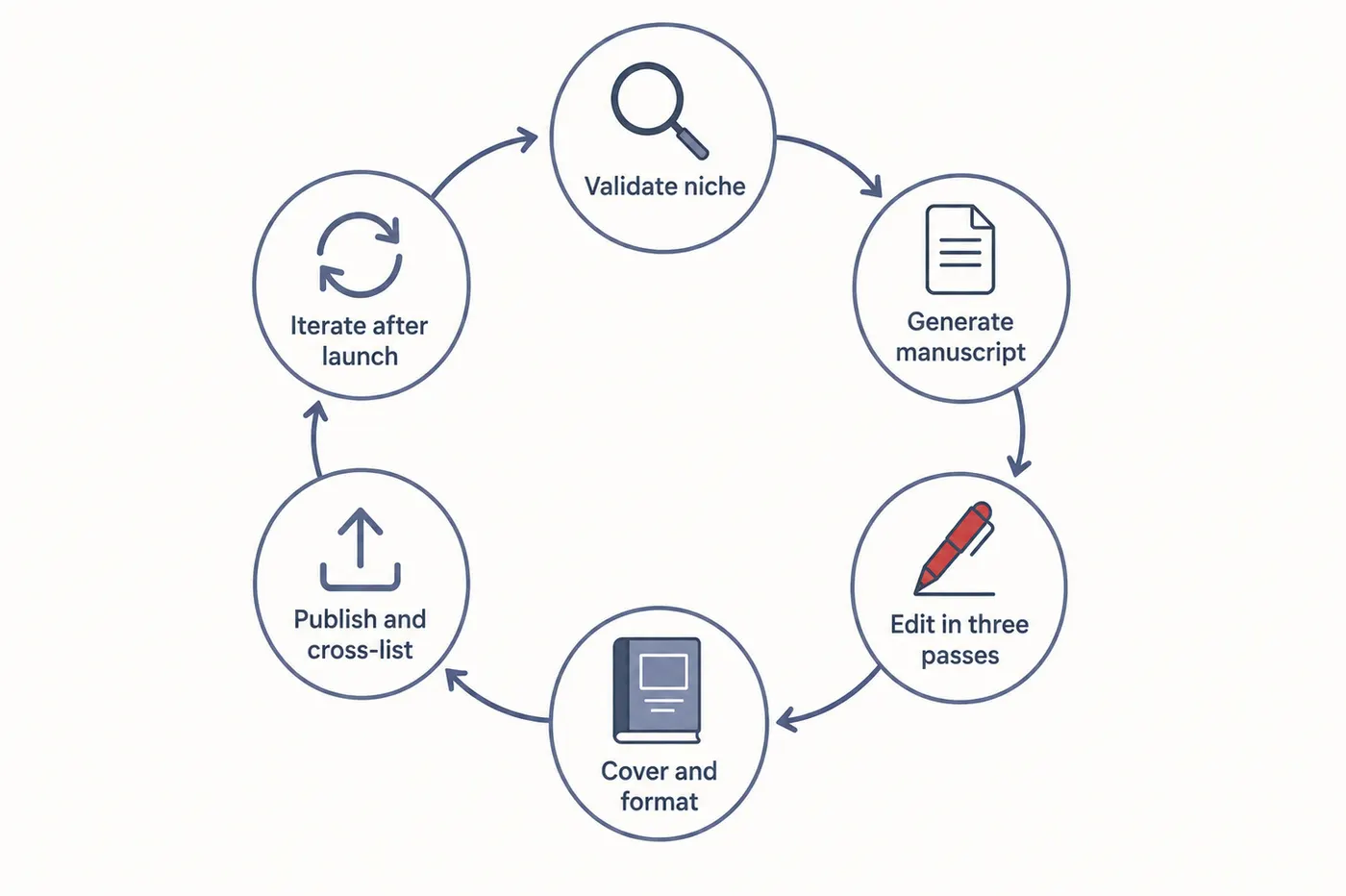
Most creators fail at self-publishing because they treat each book as a standalone project. That creates repeated friction: new research process, new writing process, new launch process, and inconsistent quality. Related reading: why most people struggle to finish an ebook covers how pre-writing friction kills momentum before the draft starts, and our wider piece on AI integration across the publishing stack shows how each stage chains together.
The cost of that is not obvious on book one. It shows up on book two, when nothing you learned the first time is written down anywhere and you rebuild the same decisions from scratch: which niche, which structure, which format, which price, which launch sequence. Authors who publish consistently are almost never faster writers. They are people who turned those decisions into defaults once and stopped re-litigating them, so the only genuinely new work in each book is the subject matter itself. That is the difference between publishing a book and having a publishing process.
The better model is a reusable workflow:
- Standardized inputs: Same research checklist, audience profile, and positioning template
- Standardized production: Same blueprint selection, outline review, and editing pass
- Standardized distribution: Same KDP metadata framework, same listing structure for other channels
- Standardized feedback loop: Update covers, keywords, and descriptions based on performance
When this is systemized, each new title is faster and stronger than the last. That is where compound growth happens in self-publishing.
| Model | Time to Publish | Quality Consistency | Scalability |
|---|---|---|---|
| One-off manual writing | 4-16 weeks | Unpredictable | Low |
| AI-first publishing workflow | 1-3 days | High (with editing standards) | High |
Niche Validation: What to Publish First
Before you generate a single chapter, validate demand. The goal is to publish into active buying intent, not just interesting topics.
Use this quick validation stack:
- Amazon search: Check autocomplete suggestions and top listings in your niche
- Review mining: Read 3-star reviews to identify unmet needs you can solve
- Query match: Prioritize topics close to high-intent keywords like "kindle self publishing" and "how to self publish a book on amazon"
- Offer angle: Position by outcome, not topic (for example: "30-day launch playbook" vs "publishing tips")
Need niche ideas first? Use 500+ ebook ideas by niche and our best ebook niches research to choose a profitable angle.
Fast Validation Framework
Step 1: Pick one audience segment
Example: first-time non-fiction authors, coaches, creators selling digital products, teachers building study guides.
Step 2: Define one urgent outcome
Example: publish in 7 days, launch on KDP correctly, sell first 50 copies, avoid policy mistakes.
Step 3: Package one practical method
Example: checklist + templates + screenshots + exact prompts for each stage.
Turn one idea into a finished book workflow
Describe your niche and audience once. Inkfluence AI generates outline, chapters, cover options, and export-ready files in one place.
Start BuildingGenerate the Manuscript with AI (Without Generic Output)
The biggest mistake with AI writing is giving weak prompts and accepting the first output. The fix is structured generation with constraints.
What to Specify Before Generation
- Audience profile: who reads this and what level they are at
- Promise: what concrete result they will get
- Tone rules: direct, practical, no filler, no hype
- Chapter intent: what each chapter must accomplish
- Proof elements: examples, checklists, case patterns, templates
In Inkfluence AI, use the blueprint that matches your format (guide, playbook, workbook, fiction, cookbook, lead magnet). Blueprint alignment alone improves output quality because chapter flow is pre-structured for the end goal.
Production Timeline (Realistic)
| Stage | Time | Owner |
|---|---|---|
| Prompt brief + blueprint selection | 10-20 min | You |
| Outline generation + edits | 10-15 min | AI + You |
| Full draft generation | 5-20 min | AI |
| Editorial pass | 60-180 min | You |
| Cover + metadata package | 30-60 min | AI + You |
Edit for Authority, Trust, and Conversion
Speed is what AI gives you; credibility is what editing gives you, and a manuscript that skips the second step reads exactly like one that skipped it. The tell is rarely a factual error. It is the absence of specifics: no named framework, no worked example, no moment where the author clearly knows something the reader does not. Buyers notice that within a page or two, and it is the single most common reason an otherwise competent AI-assisted book fails to convert. Working through the book editor in deliberate passes rather than one general read is what fixes it, because each pass is looking for a different kind of problem.
Use a three-pass edit:
- Pass 1: Accuracy. Verify claims, numbers, policies, and process steps.
- Pass 2: Voice. Rewrite high-importance sections in your voice and add specific examples.
- Pass 3: Conversion. Strengthen outcomes, checklists, and call-to-action moments.
If time is short, weight the passes by what actually drives a purchase decision. The introduction and the chapter summaries do most of the selling, because that is what a reader samples before buying and what the book description is drawn from. The checklists and the final implementation plan do most of the retaining, because that is what makes someone finish the book and recommend it. The middle chapters matter, but they are rarely where a sale is won or lost, so edit them last rather than first.
Editorial rule for AI books
Every chapter should include at least one specific framework, one practical example, and one execution checklist. This is what separates publishable books from generic AI drafts.
Cover, Formatting, and Export Setup
Presentation affects clicks before the reader evaluates the text. You need clean formatting and a cover that reads clearly at thumbnail size.
Cover Checklist
- Title readable on mobile thumbnail
- Single visual concept (no clutter)
- Subtitle communicates an outcome
- Color contrast that stands out in category pages
Manuscript Export Checklist
- Consistent heading hierarchy
- Clean table of contents
- No broken lists or duplicated sections
- Export version for Kindle publishing (EPUB or DOCX)
- Optional channel-specific versions for Gumroad and Etsy
If you publish in multiple channels, keep one master manuscript and generate channel variants from that source. This avoids version drift.
Amazon KDP Upload: Exact Publishing Flow
For high-intent search terms like "amazon kdp publishing" and "how to self publish a book on amazon," execution details matter. Use this order:
- Create or access your KDP account
- Enter title, subtitle, series info, and contributor details
- Write a keyword-optimized description
- Choose categories and backend keywords
- Upload manuscript and cover
- Run Kindle previewer checks
- Set pricing and royalty option
- Publish and monitor review status
For policy details on AI content declaration, use the current Amazon KDP AI disclosure guide before you publish.
| KDP Field | What Good Looks Like | Common Failure |
|---|---|---|
| Title + subtitle | Clear problem and outcome | Vague title with no buyer intent |
| Description | Benefit-first, skimmable, structured | Generic paragraph blocks |
| Keywords | Long-tail, intent-aligned phrases | Single broad keywords only |
| Categories | Specific, relevant, competitive gap | Oversaturated broad categories |
Cross-Listing on Gumroad and Etsy
After KDP is live, cross-listing gives additional distribution and reduces platform dependency.
Gumroad
- Use a sales-page style description focused on outcomes
- Add preview pages to reduce purchase friction
- Use email capture and follow-up for repeat sales
Etsy
- Lead with keyword-rich listing titles
- Use all available tags with specific buyer phrases
- Add clear listing visuals: cover, interior preview, what-is-included card
Read our full platform guide here: How to Sell Ebooks on Etsy and Gumroad in 2026.
Publish once, distribute everywhere
Use one production workflow for KDP, Gumroad, and Etsy instead of rebuilding each listing from scratch.
Build Your Publishing WorkflowPricing and Offer Architecture
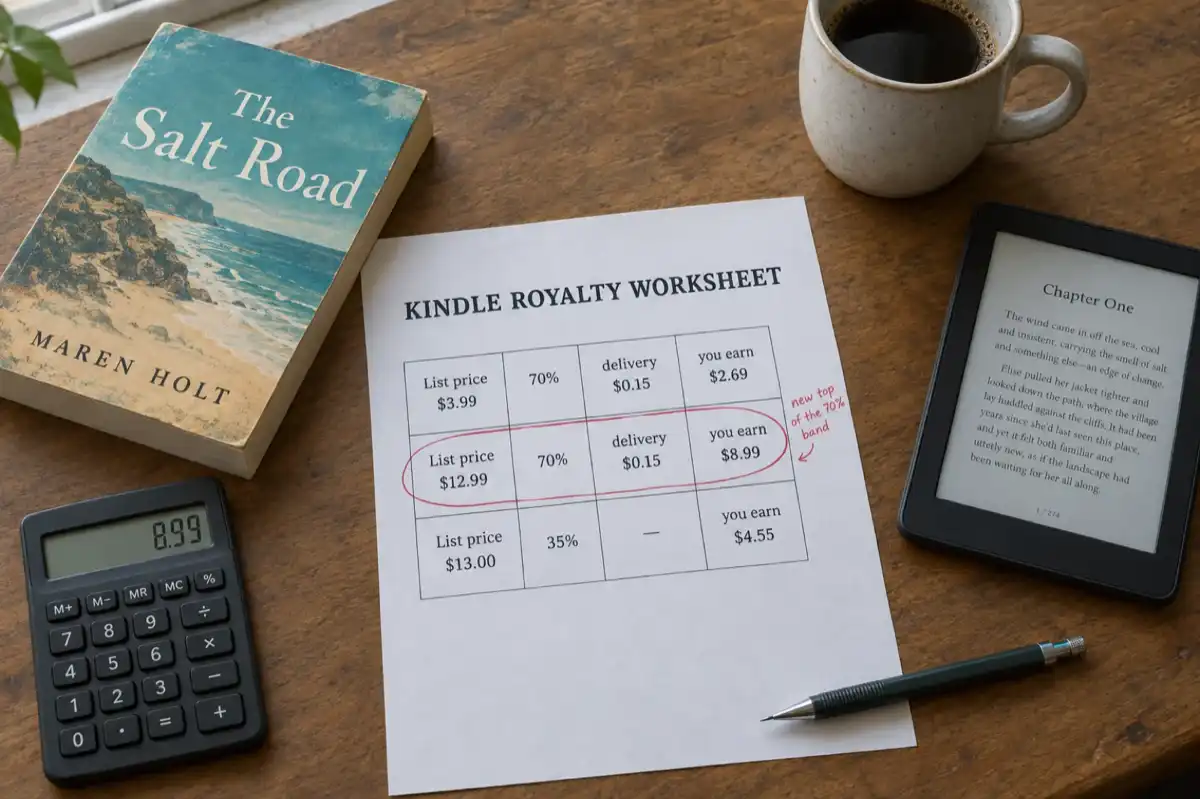
Pricing should reflect transformation value, not just page count. Price is also the one decision that is genuinely reversible, which is why it is worth testing rather than agonising over. What is not reversible is the royalty band you land in: on Amazon the jump between the 35% and 70% tiers happens at a fixed price point, so a book priced just under it earns half as much per sale as the same book priced just over. Check what each price actually pays with the royalty calculator before you decide, and remember that selling the same file direct through Gumroad changes the maths entirely.
| Offer Type | Recommended Range | Best Channel |
|---|---|---|
| Short tactical guide | $4.99-$9.99 | KDP, Etsy |
| Full framework book | $9.99-$19.99 | KDP, Gumroad |
| Workbook / template companion | $7-$15 | Etsy, Gumroad |
| Bundle (book + resources) | $19-$49 | Gumroad |
Start with one core book and one companion asset (checklist, templates, workbook). This increases perceived value and conversion while preserving a simple production flow.
Metadata and SEO That Improves Discoverability
Most self-published books underperform because metadata is treated as an afterthought. It should be treated as part of the product.
Metadata Stack to Standardize
- Primary keyword: one core query with strong intent
- Secondary variants: long-tail phrases around the same intent
- Description structure: pain point, promise, proof, CTA
- Category selection: where relevance and ranking potential intersect
For KDP-specific optimization, use the KDP SEO checklist. For search-level strategy across your site and blog ecosystem, see ebook SEO.
14-Day Launch Plan for Your First 100 Sales
Days 1-3: Final QA and platform setup
Finalize manuscript, cover, metadata, and listings across selected channels.
Days 4-6: Publish + distribution setup
Go live on KDP, then publish on Gumroad and Etsy with channel-specific descriptions and visuals.
Days 7-10: Content promotion sprint
Ship value content tied to your book topic: posts, short videos, and email sequences that link to your listing.
Days 11-14: Optimization pass
Review CTR, conversion, and feedback. Update title positioning, description hooks, and listing images where needed.
8 Mistakes That Kill AI-Published Books
1. Publishing unedited AI drafts
Speed without editorial standards leads to weak retention and poor reviews. The fix is not a longer edit, it is a targeted one: run the three passes above and accept that the introduction and chapter summaries deserve more of your attention than the middle of the book, because that is what buyers sample.
2. Choosing topics with no clear buyer intent
Interesting does not equal market demand. Validate before writing by checking whether anyone is already searching for the outcome, not the subject. Our niche breakdown and the low-competition guide both start from demand rather than enthusiasm.
3. Weak subtitle and unclear promise
If the outcome is not obvious, conversion drops immediately. A subtitle should finish the sentence "after reading this you will be able to...". If it cannot, it is a description of the contents rather than a promise, and the description generator is a faster way to find the phrasing than staring at it.
4. Poor cover readability on mobile
Most discovery starts on small screens, so thumbnail clarity is non-negotiable. The practical test is to shrink your cover to roughly 200 pixels wide and check the title is still readable at a glance. If it is not, the problem is almost always too many words or too little contrast, both fixable in the cover generator.
5. Skipping metadata optimization
Great content cannot compensate for invisible listings. Categories and keywords decide who ever sees the book, and they are the cheapest thing to get right because you can change them after publishing. Start with the category guide rather than guessing.
6. Pricing based on page count only
Price should map to transformation value and use-case urgency, not length. The trap specific to Amazon is that royalty rate changes at a fixed price point, so a book priced just below it earns half as much per sale as the same book just above. Check the bands in the royalty calculator before deciding.
7. Relying on one platform forever
Cross-listing improves resilience and increases reach from the same asset, and it costs you one upload rather than another book. Gumroad keeps far more of each sale and gives you the customer relationship; Etsy rewards practical, use-it-daily formats. Neither should reuse your Amazon listing copy verbatim.
8. No post-launch iteration cycle
Winning books are improved after launch: title, metadata, cover and positioning all get iterated. Give it a fixed review point, roughly thirty days in, and change one variable at a time so you can tell what moved. The launch checklist covers the follow-up window most authors skip entirely.
Scaling Past Book One: Templates and Batch Production
The workflow above describes one book. The compounding returns come from running it repeatedly, and the difference between publishing two books a year and publishing ten is almost never writing speed. It is how many decisions you re-make each time.
Treat every structural decision as reusable. A how-to guide's chapter flow (hook, context, steps, common mistakes, next actions), your export settings, your cover brief format, your KDP metadata checklist: each of these only needs to be designed once. From the second book onward you are filling proven structures with new material, which keeps your creative attention on the content itself.
Batching is the other lever. Validating three niches in one session, then generating three drafts in one week, beats running the full pipeline start-to-finish three separate times, because each stage uses a different mode of thinking and the context-switching is where time disappears. Inside Inkfluence this maps naturally to the tooling: the same brief format seeds each book, and outlines and chapters generate in sequence while you edit the previous book.
Templates structure the format, not the substance. Two how-to guides built on the same chapter skeleton read nothing alike if the material is different, and readers only ever see one of them. What they protect you from is the blank-page tax: re-deciding solved problems on every new project.
Build your publishing system, not just one book
Use AI to accelerate drafting, keep quality with editorial standards, and launch across channels with repeatable metadata and offer frameworks.
Create Your Next BookBlueprints Beat Templates: The Generation Workflow, Step by Step
Template tools help with layout once the content is done. A blueprint workflow helps you finish the content itself. Inkfluence supports blueprint types like lead magnets, playbooks, study guides, workbooks, and technical docs. The structure changes based on the outcome you choose.
If your goal is a high-converting lead magnet, the workflow creates a tight, action-first guide. If your goal is a study guide, the outline prioritizes clarity, sequencing, and retention. The structure is not cosmetic. It is the reason the draft reads like a finished book.
The practical sequence that follows from this: pick the blueprint that matches your book type, spend your effort on the outline (it is the highest-leverage 15 minutes in the whole workflow), generate, then edit as a focused pass rather than a rewrite. The most common mistakes that slow creators down are all workflow mistakes rather than writing mistakes: starting to generate before the outline is right, treating the first draft as the final draft, and leaving export formatting to the end instead of choosing the destination (PDF for direct sales, EPUB for stores) up front.
More Resources
- How to Write a Book with AI in 2026
- How to Self-Publish on Amazon KDP
- How to Sell Ebooks on Etsy and Gumroad
- Amazon KDP AI Disclosure Policy
- How to Publish AI-Generated Books on KDP
- Best AI Ebook Cover Generators (2026)
- AI Book Cover Generator Tool
- KDP SEO Checklist
- Ebook SEO Guide
- How to Ensure AI Book Content Is Original
Frequently Asked Questions
Can AI write a publishable book in 2026?
Yes, AI can produce a strong full draft quickly. Publishable quality comes from how well you define the brief, edit for accuracy and voice, and package the final product with clear metadata and positioning.
What is the best workflow for Kindle self-publishing?
The best workflow is: niche validation, AI-assisted outline and draft creation, editorial pass, cover and formatting, metadata optimization, then KDP upload and post-launch iteration.
How long does it take to self-publish with AI?
You can produce and publish a high-quality short non-fiction title within 1 to 3 days if you use a structured workflow and keep editing standards high.
Do I need to disclose AI usage on Amazon KDP?
Yes. Follow Amazon KDP's current disclosure requirements for AI-assisted content when submitting your title.
Should I publish only on Amazon KDP?
KDP should usually be your first channel, but cross-listing on Gumroad and Etsy can increase reach and reduce single-platform risk.
What format should I upload to KDP?
KDP supports EPUB and DOCX for ebooks. Choose the export format that keeps your chapter structure, table of contents, and layout stable in preview checks.
How do I choose good KDP keywords?
Use intent-focused phrases that mirror what buyers search, then map those phrases to your title, subtitle, description, and backend keyword fields without stuffing.
What makes AI-published books fail most often?
The biggest reasons are unedited drafts, weak positioning, poor cover clarity, and missing metadata optimization.
Can this workflow work for fiction too?
Yes. The same system works for fiction, but you should spend more time on voice consistency, scene quality, and character continuity in editorial passes.
How many books should I publish to see meaningful revenue?
Most creators see stronger results once they have a small catalog (3 to 10 titles) aligned around a consistent audience and offer ecosystem.

Founder, Inkfluence AI
Sam is the founder of Inkfluence AI. He built the platform to make book creation accessible to everyone - from first-time authors to seasoned publishers.
Helpful links
Ready to Create Your Own Ebook?
Start writing with AI-powered tools, professional templates, and multi-format export.
Get Started FreeRelated Articles
 Self-Publishing
 KDP Royalties 2026: The 70% Band Now Runs to $12.99
Since 7 July 2026 Amazon KDP pays 70% on Kindle ebooks priced from $2.99 to $12.99, up from $9.99. What the change means for your price, how the delivery charge and the $13 cliff work, and what paperbacks, hardcovers and Kindle Unlimited pay, with worked examples.
 Self-Publishing
 How to Publish a Poetry Book on Kindle in 2026: The Complete Indie Poet Guide
Poetry collections sell well on KDP when they are formatted properly. Most indie poets get tripped up on the same five things: stanza spacing collapses on reflow, long lines break unintentionally, the cover does not signal poetry, the description reads like fiction back-cover copy, and the categories miss the readers. Here is the complete workflow.
 Self-Publishing
 The Real Cost of Publishing a Book in 2026: A Transparent Breakdown for Indie Authors
Industry estimates put the cost of self-publishing one book at $2,940 to $5,660. The honest answer is that almost none of that is mandatory. Here is what every line item actually costs in 2026, citation-checked, with three realistic budget paths and the AI-native shortcut that collapses most of the stack into one flat subscription.
Get ebook tips in your inbox
Join creators getting weekly strategies for writing, marketing, and selling ebooks.