
The 9 Best Ebook Creators in 2026: AI, Formatting, and Design Tools Compared
Not every "ebook creator" does the same job. We compare the 9 best tools of 2026 across three categories: AI generators that write the book, formatting tools that typeset it, and design tools that make it beautiful, with verified pricing for each.
Quick Answer
The best ebook creator in 2026 depends on which of three jobs you need done. If you want the book written, formatted, and exported in one place, Inkfluence AI is the strongest all-in-one option (free tier, then $9.99/month). If you have a finished manuscript and only need professional typesetting, Atticus ($147 one-time) and Vellum ($199.99, Mac only) lead. If you are designing a visual lead magnet, Canva (free, Pro $15/month) is the default. Kindle Create and Calibre remain the best genuinely free utilities for Amazon formatting and format conversion.
"Ebook creator" is one label stretched across three different kinds of software, and picking the wrong kind wastes more time than picking the wrong brand. Some tools write the book for you. Some take a manuscript you already wrote and typeset it beautifully. Some are graphic design apps that happen to export PDFs. This guide compares the 9 best across all three categories, so you can pick by the job, not the marketing.
A note on how we compare: Inkfluence AI is our own product, and we say so wherever it appears. Every price below was checked against the vendor's published pricing in August 2026, and the sources are listed at the end. Where a competitor is simply better for a job, we say that too, because a recommendation you cannot trust is worth nothing.
Updated August 2026. Pricing verified against vendor sites at publication.
See also: Best AI ebook generators - Best AI tools for creating ebooks - How to create an ebook, step by step
The three kinds of ebook creator (pick your type first)
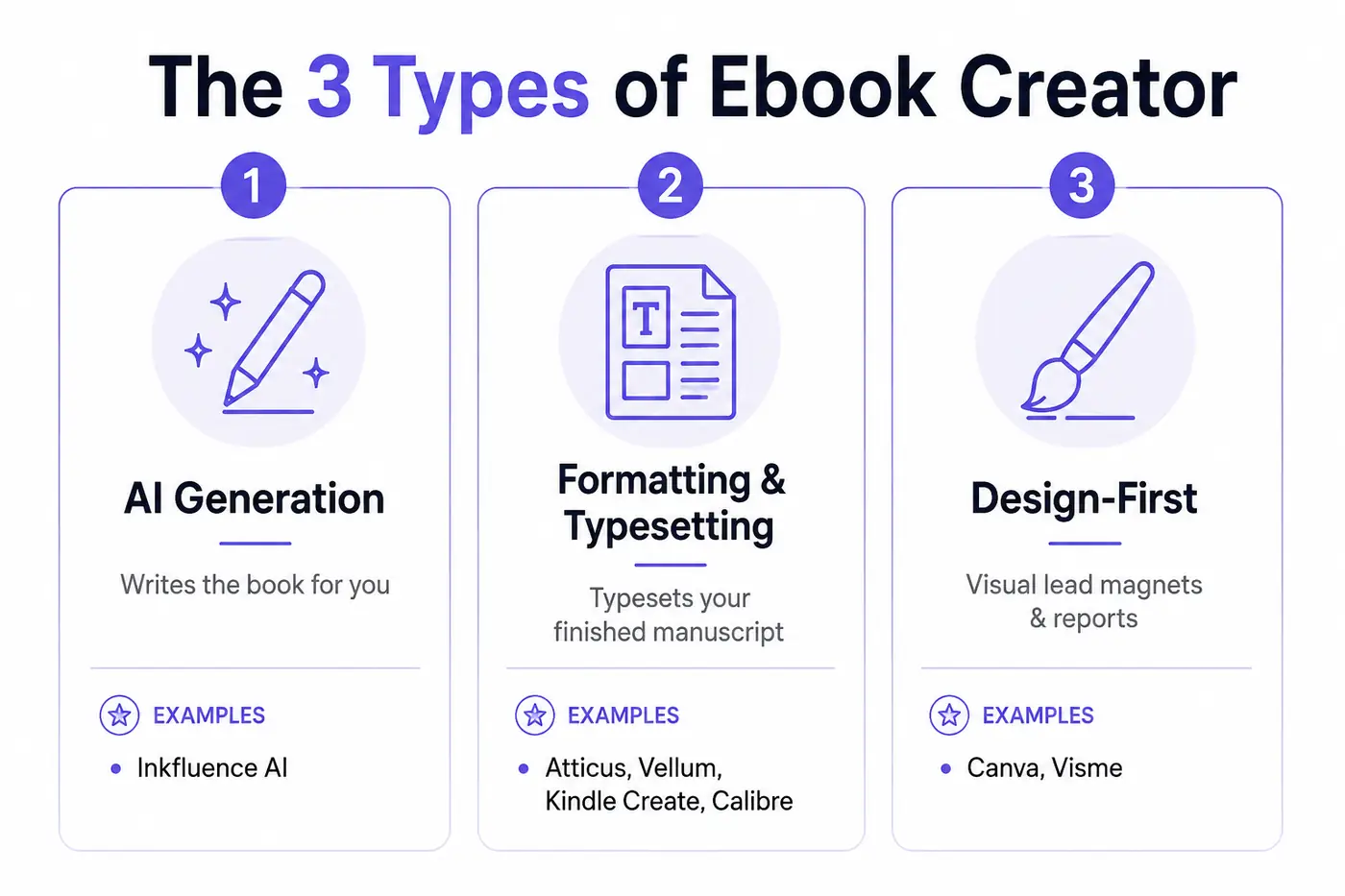
Before any tool comparison makes sense, decide which job you are hiring software for:
- AI generation platforms write the content itself: outline, chapters, cover, and export, from a description of the book you want. Best when you have expertise or an idea but not a manuscript. This is what Inkfluence AI does.
- Formatting and typesetting tools assume the manuscript is finished and turn it into a professional EPUB and print-ready PDF: chapter styling, front matter, page numbering, trim sizes. Atticus, Vellum, Kindle Create, and Calibre live here; our best book formatting software guide compares 13 of them.
- Design-first tools treat an ebook as a visual document: drag-and-drop layouts, brand colours, image-heavy pages. Ideal for short lead magnets and reports, painful for a 40,000-word book. Canva and Visme lead this category.
Most disappointing reviews of ebook software trace back to a category mismatch: someone trying to lay out a novel in a design tool, or expecting a typesetting app to write chapters. Match the type to the job and every tool below gets dramatically better.
Quick comparison: 9 ebook creators at a glance
| Tool | Type | Best For | Exports | Free Option | Price |
|---|---|---|---|---|---|
| Inkfluence AI | AI generation | Idea to finished book in one tool | PDF, EPUB, DOCX | Yes | Free / $9.99+ per month |
| Atticus | Formatting | Cross-platform typesetting for indie authors | PDF, EPUB, DOCX | No | $147 one-time |
| Vellum | Formatting | Beautiful print and ebook layouts (Mac) | EPUB, print PDF | Preview only | $199.99 / $249.99 one-time |
| Canva | Design-first | Visual lead magnets and short guides | Yes | Free / Pro $15 per month | |
| Kindle Create | Formatting | Amazon KDP interiors, zero budget | KPF (Amazon only) | Yes | Free |
| Designrr | Repurposing | Turning blogs and podcasts into ebooks | PDF, EPUB | Trial only | From $29 per month |
| Visme | Design-first | Branded business documents and flipbooks | PDF, HTML5 | Limited | From $12.25 per month (annual) |
| Calibre | Conversion | Format conversion and EPUB editing | EPUB, MOBI, PDF, AZW3 | Yes | Free (open source) |
| Google Docs | Writing baseline | Drafting and collaboration, simple EPUB | EPUB, PDF, DOCX | Yes | Free |
Jump to: Inkfluence AI · Atticus · Vellum · Canva · Kindle Create · Designrr · Visme · Calibre · Google Docs
1. Inkfluence AI: best all-in-one ebook creator
Full disclosure: Inkfluence AI is our product. It is also the only tool on this list that covers the entire pipeline: you describe the book, it generates a structured outline you can edit and reorder, writes the chapters to match, and exports a formatted PDF, EPUB, and DOCX with a designed cover. Across more than 80,000 books created on the platform, the most common path is a non-fiction guide or lead magnet that goes from idea to exported file in a single sitting.
- 33 book types, each with its own structure: how-to guides, novels, cookbooks with ingredient lists, workbooks with exercises, devotionals, children's books, and more.
- A real editor after generation: rewrite any paragraph, regenerate single chapters, add your own sections, and design the cover in the same project.
- Audiobook narration built in: convert the finished book with the audiobook generator, choosing from 49 AI voices across 14 languages.
- Native writing in around 30 languages, not translated afterwards.
Pricing: the free tier includes 5 chapters plus 5 more each month with PDF export (EPUB and DOCX come with a paid plan or credit pack). Creator is $9.99 per month for 35 chapters a month; Premium is $19.99 per month with unlimited chapters. Credit packs cover one-off projects without a subscription.
Honest limits: if your manuscript is already written and polished, you only need the import and formatting half of the product, and a dedicated typesetter like Atticus may fit a print-perfectionist workflow better. Inkfluence is strongest when the writing itself is part of the job.
2. Atticus: best manuscript formatter for most authors
Atticus, built by the Kindlepreneur team, is the tool we recommend most often to authors who arrive with a finished manuscript. It is a writing and formatting app that runs on Windows, Mac, Linux, and Chromebook, and produces clean EPUBs and print-ready PDFs with professional chapter themes, front matter, and trim-size control.
Pricing: $147 one-time, with no per-book fees or export limits and lifetime updates.
Honest limits: there is no AI generation of any kind; it formats what you bring. Reviewers in 2026 still note occasional bugs relative to Vellum's polish, which is the trade for being cross-platform and cheaper.
3. Vellum: the gold standard for layout polish (Mac only)
Vellum has held its reputation for the most beautiful automated book layouts for nearly a decade. Drop in a manuscript and it produces store-ready EPUBs and gorgeous print PDFs with almost no learning curve. The catch has never changed: it is Mac only.
Pricing: $199.99 one-time for unlimited ebooks, $249.99 for ebooks plus paperback formatting. The app is free to download and preview; you pay when you export.
Honest limits: no Windows version, no AI, and the highest price on this list. For authors publishing a series on a Mac, it earns its cost; for a single lead magnet it is overkill.
4. Canva: best design-first creator for lead magnets
Canva is where most short, visual ebooks get made in 2026, and for good reason: thousands of ebook templates, a drag-and-drop editor everyone already knows, and a free tier that genuinely works. For a 10 to 25 page lead magnet with brand colours and imagery, it is the fastest route to something beautiful.
Pricing: the free tier covers most lead-magnet work; Canva Pro is $15 per month (cheaper billed annually) and unlocks the full template and asset library.
Honest limits: PDF export only for practical purposes, no real EPUB pipeline, and long-form text handling gets painful past a few dozen pages. Its AI text features help with headlines and short passages rather than writing a book. Pair it with a writing tool, or use a dedicated lead magnet generator when the words matter as much as the design.
5. Kindle Create: best free tool for KDP interiors
Amazon's own formatting app takes a DOCX manuscript and produces a Kindle-ready interior with themes, drop caps, and image support. If your entire publishing plan is "put it on Amazon", it is free and reliable.
Pricing: free.
Honest limits: the output is Amazon's KPF format, usable only on KDP. You cannot take the result to Apple Books, Kobo, or direct sales, so most authors outgrow it the moment they publish anywhere else. Our guide to ebook export and publishing formats covers when KPF is enough and when you need real EPUB.
6. Designrr: best for repurposing existing content
Designrr's pitch is specific: it converts content you already have, blog posts, podcasts, videos, and PDFs, into ebooks and lead magnets. The importers are genuinely good, and for content marketers sitting on years of posts it can pay for itself quickly.
Pricing: from $29 per month (Standard), with Pro at $39 and higher tiers adding transcription and agency features. A trial is offered rather than a free tier.
Honest limits: it repurposes rather than writes, so a book from scratch still needs the words to come from somewhere. Layout control sits between Canva's freedom and a typesetter's rigour.
7. Visme: best for branded business documents
Visme is a design platform in Canva's category with a stronger lean toward business collateral: branded reports, interactive flipbooks, and documents with embedded charts and data. Teams producing gated B2B content tend to prefer its brand-kit discipline.
Pricing: a limited free plan, with paid plans from $12.25 per person per month billed annually.
Honest limits: the same long-form ceiling as every design-first tool, and EPUB is not the point; think interactive PDF and web documents instead.
8. Calibre: best free conversion and EPUB surgery
Calibre is the open-source Swiss Army knife of ebook management: convert between EPUB, MOBI, AZW3, and PDF, edit an EPUB's internals directly, and manage a library of thousands of files. Twenty years on it remains essential infrastructure for self-publishers.
Pricing: free and open source.
Honest limits: it neither writes nor designs; its conversions are functional rather than beautiful, and the interface shows its age. Use it as the utility knife beside your main creator, not instead of one.
9. Google Docs: the honest free baseline
Google Docs deserves its place because it is where most first drafts actually happen: free, collaborative, and since 2023 able to export EPUB directly. With Gemini features attached it offers paragraph-level AI assistance. Our guide on how to make an ebook for free walks through this route and the other free ones step by step.
Pricing: free; Gemini features ride on Google One AI plans.
Honest limits: the EPUB export is basic, print PDF control is minimal, and there is no book-level structure help. It is a fine starting point that almost every serious project graduates from, usually into one of the tools above. Our walkthrough on how to make an ebook shows the full path from a Docs draft to a published file.
What our own data says about ebook creation in 2026
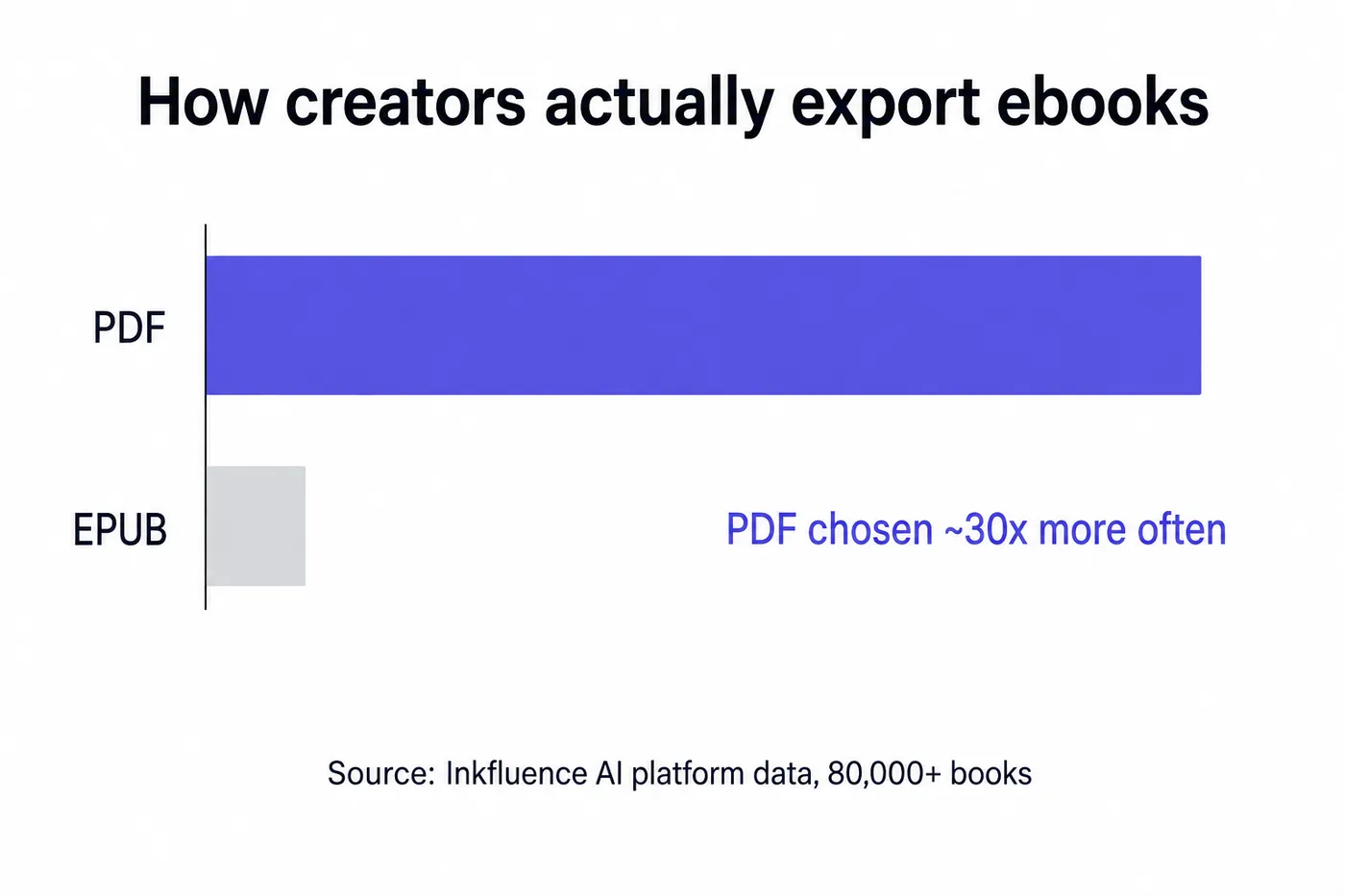
Because we run one of these platforms, we can add something the other lists cannot: production data. Across the more than 80,000 books created on Inkfluence AI, our export study found PDF chosen roughly 30 times more often than EPUB at export time. Creators overwhelmingly make documents meant to be sent, sold, and downloaded directly, not just listed in ebook stores. That is worth remembering when a tool's marketing centres on store distribution: for most working creators, a clean PDF pipeline matters more, and EPUB is the second format, not the first.
How to choose in 60 seconds
- You have an idea, not a manuscript: use an AI generation platform. Inkfluence AI free tier first; upgrade if the sample chapters earn it.
- You have a finished manuscript, publishing wide: Atticus on any OS, Vellum if you are on a Mac and want the last 5% of polish.
- Amazon only, zero budget: Kindle Create.
- Short visual lead magnet: Canva free, or Visme for stricter brand control. Write the content first, and consider a free ebook creator for the words.
- A blog's worth of content to repurpose: Designrr.
- Format conversion or EPUB fixes: Calibre, always free.
Frequently Asked Questions
What is the best free ebook creator?
For AI-written books, Inkfluence AI's free tier (5 chapters plus 5 more monthly, with PDF export; EPUB needs a paid plan or credit pack). For formatting a finished manuscript, Kindle Create (Amazon only) and Calibre (conversion) are genuinely free. Canva's free tier leads for visual lead magnets.
Can an ebook creator write the book for me?
Only the AI generation category can. Inkfluence AI generates the outline and full chapters from your description, which you then edit. Formatting tools like Atticus and Vellum, and design tools like Canva, require the manuscript to exist first.
What is the difference between an ebook creator and an ebook maker?
Nothing consistent; vendors use creator, maker, generator, and builder interchangeably. What matters is the category: AI generation, typesetting, or design. We break down the naming mess in our writer vs generator vs creator vs maker guide.
Which ebook creator is best for Amazon KDP?
Kindle Create if Amazon is your only channel. Atticus if you also publish wide, since its EPUB works everywhere and its print PDFs meet KDP specs. Inkfluence AI exports KDP-ready PDFs and standard EPUBs from generated books.
Do I need EPUB or is PDF enough?
PDF is enough for direct sales, lead magnets, and print-on-demand. You need EPUB for ebook stores like Apple Books and Kobo, and for reflowable Kindle uploads. In our platform data, PDF is exported roughly 30 times more often than EPUB.
What does Vellum cost, and is it worth it?
$199.99 one-time for unlimited ebooks, $249.99 including paperback layouts, Mac only. For series authors who value print polish it earns the price; for a first ebook it rarely does.
Is Atticus a one-time purchase?
Yes, $147 once, including updates, with no per-book or export fees. That is its core advantage over subscription tools when all you need is formatting.
Can Canva make a real ebook?
Canva makes excellent short, visual PDFs: lead magnets, guides, and workbooks up to a few dozen pages. It is the wrong tool for long text-heavy books and does not produce store-grade EPUB.
What is the best ebook creator for lead magnets?
If the design is the hard part, Canva. If the content is the hard part, generate it with a lead magnet generator and export a designed PDF directly; you can always restyle in Canva afterwards.
How much does it cost to create an ebook in 2026?
From nothing at all (Google Docs draft, Kindle Create formatting) to a few hundred dollars in software. Typical stacks: Inkfluence AI at $9.99 per month for generation and export, or a one-time $147 Atticus for formatting-only workflows. Cover design and editing are separate costs regardless of tool.
Can I create an ebook on a phone or tablet?
Canva's mobile apps handle design work well. Inkfluence AI runs in the browser and as an iOS app for generating and editing on the go. Desktop remains more comfortable for long-form editing and print layout in every tool we compared.
Do AI-generated ebooks need to be disclosed on Amazon KDP?
KDP requires you to declare AI-generated content during publishing setup, while AI-assisted content (you wrote it, AI helped edit) does not require disclosure. Our KDP guide covers the policy in detail.
Sources
- Atticus, pricing and feature list
- Vellum, license pricing
- Designrr, pricing and packages
- Canva, plans and pricing
- Visme, plans and pricing
- Amazon KDP, Kindle Create documentation
- Inkfluence AI export study, first-party data across 87,000+ books
Start with the type, then the tool
The 2026 ebook stack has matured to the point where the honest answer is usually a combination: an AI platform or word processor for the words, a typesetter or design app for the package. If you want to feel the difference between the categories before spending anything, the free tiers of Inkfluence AI, Canva, and Kindle Create cost you an afternoon and nothing else.
Related reading:

Founder, Inkfluence AI
Sam is the founder of Inkfluence AI. He built the platform to make book creation accessible to everyone - from first-time authors to seasoned publishers.
Helpful links
Ready to Create Your Own Ebook?
Start writing with AI-powered tools, professional templates, and multi-format export.
Get Started FreeRelated Articles
 Publishing
 Do You Need an ISBN? Free vs Bought, Cost by Country, and Which Formats Need One (2026)
When a self-published book needs an ISBN and when it does not, what one costs in the US, UK, Canada, Australia, New Zealand, India, Germany, Italy and France (checked at each agency on 13 October 2026), free ISBNs from KDP, IngramSpark and Draft2Digital, and a picker that tells you how many you need.
 Publishing
 IngramSpark AI Policy (2026): What It Accepts, the Setup Question and the "Assisted By" Credit
IngramSpark accepts AI-drafted books with significant human editing and the "Assisted By - Generative AI" credit, and refuses works created solely with generative AI. Its exact wording, covers and translations, how it differs from KDP, a checker for your book, and an editing workflow.
 Publishing
 IngramSpark vs KDP (2026): Fees, Print Quality, Distribution, and Whether to Use Both
IngramSpark vs Amazon KDP compared on 2026 fees, print cost per copy for real trim sizes, earnings per sale, distribution, paper and binding options, and file specs, with a per-copy earnings calculator and the setup for using both with one ISBN.
Get ebook tips in your inbox
Join creators getting weekly strategies for writing, marketing, and selling ebooks.