
By Sam May, Founder of Inkfluence AI
Inkfluence AI vs AIWriteBook
Two AI tools that take an idea to a finished, KDP-ready book. This is an honest, up-to-date comparison, grounded in data from 100,000+ books created on Inkfluence AI, so you can choose with facts instead of marketing.
Quick Answer
Inkfluence AI and AIWriteBook both generate a complete, publishable book from an idea, with outline, chapters, cover, and export. Inkfluence AI (from $9.99/mo, plus a free tier) generates server-side so books keep writing after you close the tab, gives unlimited chapters on Premium instead of metering credits, imports manuscripts for free, and exports audiobooks encoded to broadcast specification. AIWriteBook (from $20/mo, credit-metered on every plan including its AppSumo lifetime tiers) adds a discrete proofreading pass, a writing-style sample input, reference-file uploads, and explicit-content generation. For writing and publishing a book, Inkfluence AI is the better choice for most authors: the more complete and lower-cost pipeline, with the KDP package, audiobooks in 49 voices and translation into 59 languages from $9.99 a month. AIWriteBook fits if its Book Editor pass, a voice per character, print files for printers other than KDP, or adult fiction is your top priority.
AIWriteBook facts checked on its pricing, feature and roadmap pages on 4 October 2026.
Inkfluence AI today: the facts
Some comparison pages still describe an older Inkfluence AI. This is what it does as of 4 October 2026.
- Web app plus iOS app. Inkfluence AI is web-first at inkfluenceai.com, with a native iOS app for iPhone and iPad.
- 49 narration voices in 14 languages. Audiobooks are included on Creator (15 chapters a month) and Premium (30).
- Amazon KDP package. One download with a print-ready interior PDF, a full-wrap cover sized to the spine, the front cover and a Kindle EPUB. PDF, EPUB and DOCX are separate exports too.
- Document import. Bring a draft as DOCX, DOC, PDF, EPUB, TXT or Markdown; chapters are detected automatically.
- Translation into 59 languages. Translate a finished book: 15 books a month on Creator, 40 on Premium.
- Story bible and characters for fiction. Every novel keeps a story bible plus a running record of who knows what and what has happened, checked before each chapter is written.
- One writing model on every plan. Free, Creator and Premium books are written by the same model; nothing is held back for the top tier.
- Sell from the app. List a finished book on Etsy or Gumroad, alongside the KDP package for Amazon.
Plans: free (5 chapters plus 5 more every month, PDF export), Creator $9.99 a month or $89 a year, Premium $19.99 a month or $179 a year with unlimited chapters. EPUB, DOCX and the KDP package need any paid plan or chapter credits.
The Quick Verdict
These two overlap more than most tools in this space. The decision comes down to price, how you like to work, and whether you need a few specific features.
Choose Inkfluence AI if you:
- Want unlimited chapters without watching a credit meter
- Want the lower price ($9.99/mo vs $20/mo to start)
- Plan to publish an audiobook to Google Play Books or Kobo
- Want to import a draft for free and keep writing it
- Want a native iOS app alongside the web app
Choose AIWriteBook if you:
- Want an editorial letter and accept-or-reject line edits across the manuscript
- Want to paste a writing-style sample as your single top priority
- Are writing explicit adult fiction and want that supported directly
- Want a different narrator voice for each character, or print files for IngramSpark and Lulu
- Want to upload reference files for the AI to draw on (first file free)
What 80,000 Books Tell Us About AI Book Writing
Most comparison pages repeat marketing claims. This one is informed by what authors actually do on Inkfluence AI, across more than 80,000 finished books. Here is what the data shows, and why it shapes the comparison below.
87,000+
books created on the platform
33
book-type blueprints, fiction and non-fiction
30+
languages generated natively; ~1 in 6 books is non-English
~41%
of finished books are exported for publishing
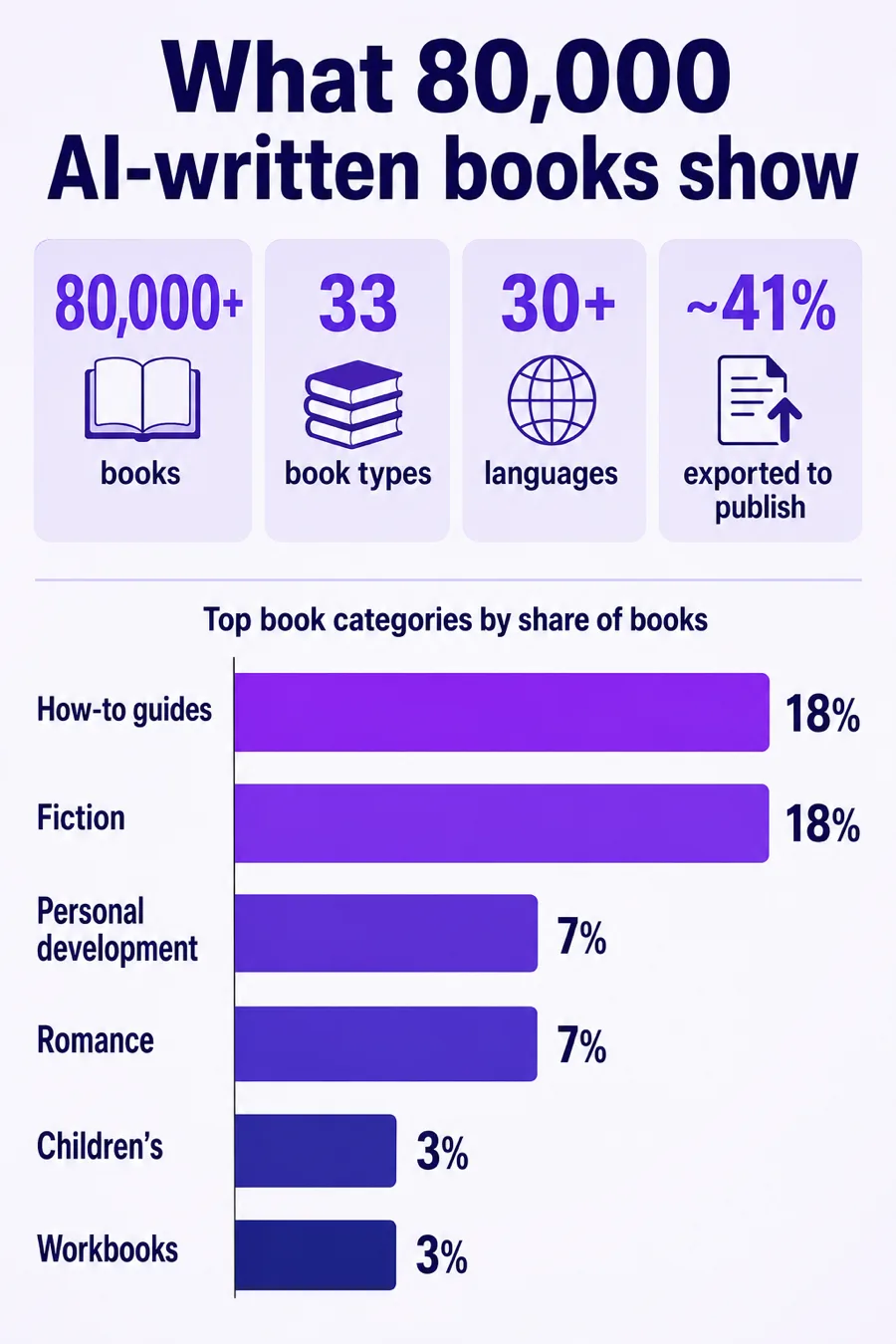
The single most useful thing this data reveals is that AI book writing is not just novels. On Inkfluence AI, the two largest categories are practical how-to guides and fiction, each around 18% of all books, followed by personal development, romance, children's books, workbooks, study guides, recipe books, and course companions. That non-fiction weight matters when you compare tools: a platform tuned only for fiction leaves most of these authors underserved. Inkfluence AI runs 33 distinct book-type blueprints, so a business guide, a devotional, a cookbook, and a romance novel each get structure suited to their form rather than one generic template.
The data also sets realistic expectations for length: chapter norms differ sharply by book type (our published chapter-length data breaks down the medians by genre). Knowing these norms is why Inkfluence AI sizes chapters by book type automatically instead of asking you to guess a word count for every chapter.
Finally, roughly 41% of finished books are exported, PDF is the most common format, and authors have connected the platform to real storefronts, with well over a thousand books pushed to Gumroad and hundreds listed on Etsy. In other words, these are books meant to be published and sold, which is exactly why the export and audiobook differences later on this page are the ones that matter most.
Figures are first-party data from Inkfluence AI, current as of August 2026. You are welcome to cite them with a link to this page.
How Each One Makes a Book
Both take you from idea to export. Two steps in the middle work very differently, and both affect real authors.
Inkfluence AI
- 1Idea or imported draft (import is free)
- 2Outline + story bible
- 3Chapters generate server-side - close the tab, it keeps going
- 4Unlimited chapters on Premium - no per-chapter meter
- 5Cover, edit, format
- 6Export PDF / EPUB / DOCX + ACX-spec audiobook
AIWriteBook
- 1Idea or imported draft (first DOCX import free, then credits)
- 2Outline + character graph
- 3Chapters generate while you wait in the app
- 4Credits per chapter (15 standard, 30 top model), per edit, per image, per audio
- 5Cover, Book Editor pass, format (Pro and up)
- 6Export PDF / EPUB / DOCX, print files, M4B audio (no published audio spec)
Why server-side generation matters: a full book can take a while to write chapter by chapter. When generation runs on the server, you can start a book, close your laptop, and come back to finished chapters. When it runs from the browser tab, that tab has to stay open and connected for the whole run. For a short lead magnet the difference is small; for a full-length novel it is the difference between a background task and babysitting a browser.
Pricing and the Credit Question
Inkfluence AI is the lower-cost option at every tier, and its Premium plan removes the per-chapter credit meter entirely. This is the difference most authors feel day to day, so it is worth understanding clearly.
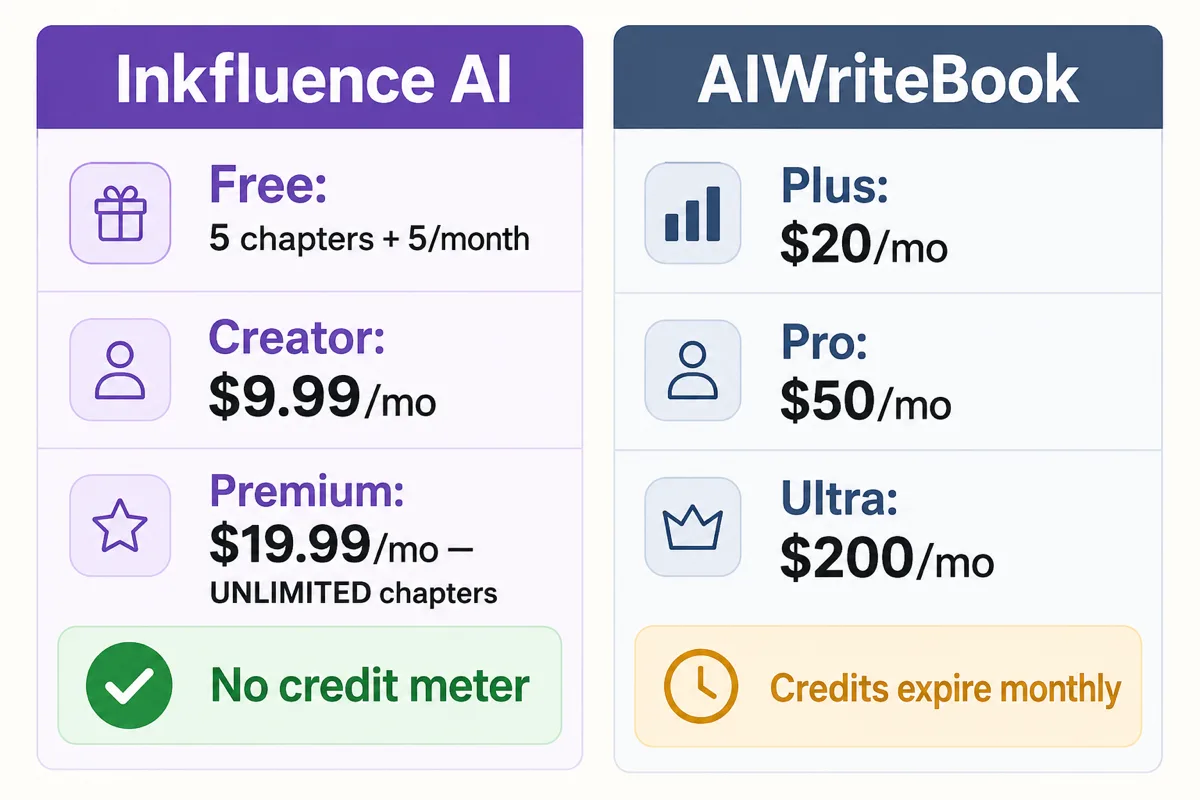
| Plan level | Inkfluence AI | AIWriteBook |
|---|---|---|
| Free | 5 chapters + 5/month, PDF export | 100 credits/month (about 12 pages by its own estimate), watermarked export |
| Entry paid | $9.99/mo Creator | $20/mo Plus (~$12/mo billed yearly) |
| Full-feature | $19.99/mo Premium, unlimited chapters | $50/mo Pro (~$30/mo billed yearly), credit-metered |
| Top tier | Premium covers it | $200/mo Ultra |
| Extra credits | Optional top-ups: 15 for $9.99, 25 for $12.99, 50 for $24.99 | Monthly allowance per plan; unused credits expire |
| Chapter model | Frontier model, automatic | Pick per chapter: 15 credits standard, 30 top model |
How credit metering adds up
On a credit-metered tool, nearly every action spends from a monthly balance that resets and expires. AIWriteBook publishes its rates, so this is not speculation. As of August 2026: each chapter costs 15 credits on its standard model or 30 on its top model, so writing the whole book on the better model doubles the chapter bill. Editing costs 7 credits per 1,000 words (a beta price, half the regular 15). AI outline edits cost 3 credits per chapter. Each AI image is 15 credits. Translating a book costs a 30-credit base plus 15 credits per chapter. Importing an existing draft costs 10 credits per chapter after your first book, and reference files cost 10 credits each after the first free one. Continuing a series charges 50 credits per previous book it reads in, up to 5.
Run those numbers on a real project and the shape becomes clear: a rewrite, a re-import, or a translation mid-project can cost more than you have left for the month, and because unused credits expire, you end up rationing: writing fewer drafts, editing less, testing fewer ideas.
Inkfluence AI Premium removes that calculation for the core act of writing: chapters are unlimited, importing an existing manuscript is free, and there is no per-action credit metering on core writing. Credits exist only as optional top-ups for pay-as-you-go users (15 for $9.99, 25 for $12.99, 50 for $24.99), not as a meter every subscriber lives under. You write and rewrite as much as a book needs, then export. For authors who publish more than one book a year, or who iterate heavily, that structure is usually the bigger long-term saving, on top of the lower sticker price.
The lifetime deal, read closely
AIWriteBook also sells lifetime access through AppSumo, and the structure is worth understanding before buying. Each lifetime tier carries a monthly credit meter: Tier 1 at $79 includes 500 credits per month, scaling up to Tier 4 at $519 with 5,000 credits per month. Lifetime access, in other words, means a monthly allowance for life, not unlimited usage; every chapter, edit, image, import, and translation still draws from a balance that resets each month at the rates above.
The export terms are the detail most buyers miss. In August 2026 AIWriteBook's own pricing described standard PDF export as "free with a watermark, or clean on the Pro plan" and on "AppSumo Tier 3 and above". That meant Tier 1 and Tier 2 lifetime buyers got watermarked standard PDF exports on a product they paid for outright; the current pricing page no longer states the watermark rule, so check it before buying. Both tools brand free exports, so the real question is what the cheapest route to a clean file costs: on Inkfluence AI that is any paid tier from $9.99 a month, or a one-off credit purchase.
Audiobooks: The Clearest Gap
If you plan to sell an audiobook, this is the single biggest difference between the two tools, and it comes down to whether the file meets professional encoding standards.
| Audiobook capability | Inkfluence AI | AIWriteBook |
|---|---|---|
| AI narration | Yes, 49 narrator voices across 14 languages | Yes, 25 voices, a voice per character, Pro and Ultra only |
| ACX-spec audio encoding | Yes, per chapter, retailer-ready | Not published |
| Cost model | Included allowance | Credit-metered narration |
| Ready for Google Play Books and Kobo | Yes, with AI disclosure | Not published |
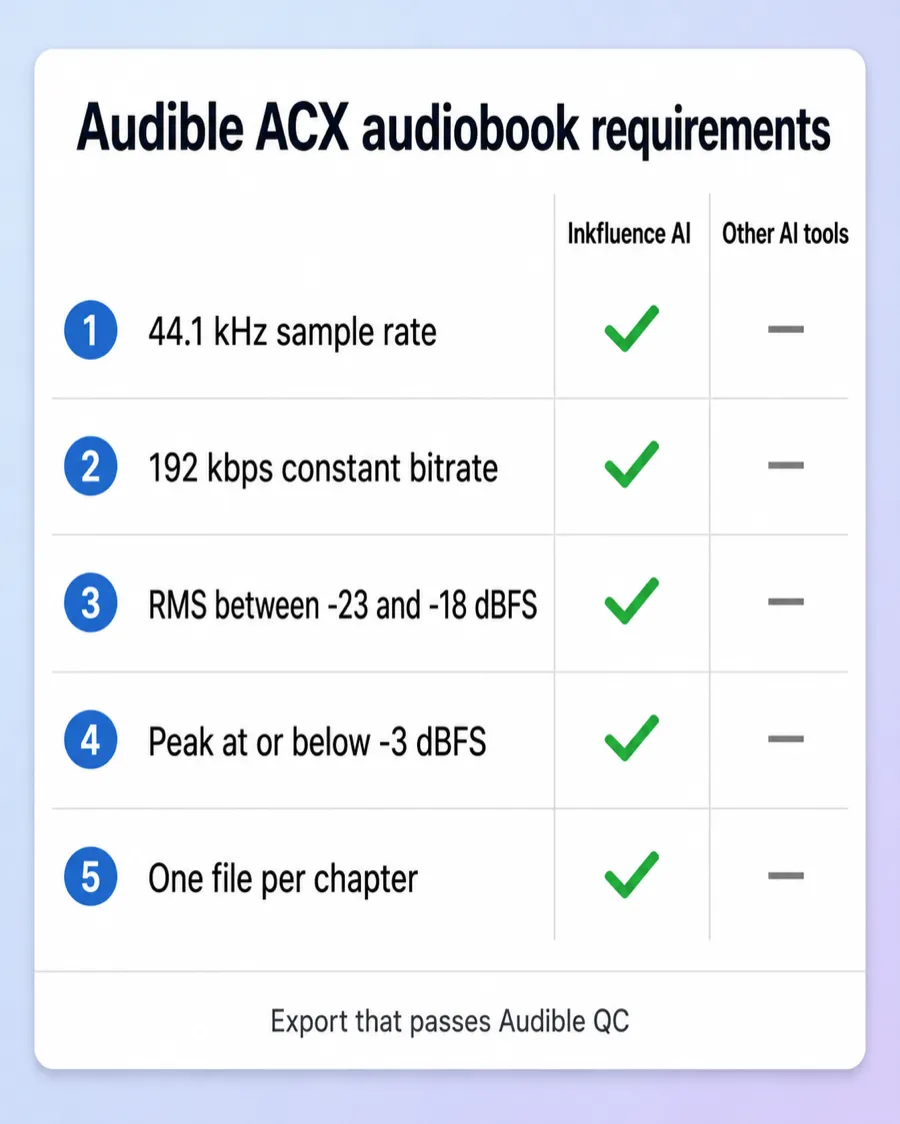
The ACX audio specification is the reference standard for audiobook encoding, and most retailers expect the same quality bar. Every file must be 44.1 kHz, encoded at 192 kbps constant bitrate, sit between -23 dBFS and -18 dBFS RMS with peaks no higher than -3 dBFS, and be delivered as one file per chapter under two hours each. One important caveat that applies to every AI tool including ours: Audible and ACX require human narration and do not accept AI voices from outside tools, so AI-narrated audiobooks go to Google Play Books or Kobo instead, each with an AI-narration disclosure. You can read the current requirements in the ACX audio submission requirements.
Inkfluence AI exports audio that already meets that encoding checklist, per chapter, so the files are ready for the retailers that do accept AI narration without a separate audio-engineering step. Many AI narration tools produce audio that sounds fine for a website or a personal listen but is not encoded to spec, which means extra tooling and re-encoding before a retailer will take it. We could not find a published spec export on AIWriteBook public pages as of August 2026. Full detail on our side is on the AI audiobook generator page.
Bottom line: if the goal is a properly encoded audiobook you can list for sale, Inkfluence AI produces it directly, with no separate audio-engineering step.
Export and Publishing
Both tools export PDF, EPUB, and DOCX, and both can produce a KDP-ready ebook. Inkfluence AI goes further on the parts that matter for actually selling a book. It produces a print-ready interior PDF with proper trim sizes and gutter margins for KDP paperback, plus a full wraparound cover PDF with back cover, spine, and front in one file, the spine width calculated from your exact page count and paper type (AIWriteBook added wrap covers and print interiors for five printers on its Pro plan on 20 September 2026; Inkfluence puts the wrap, interior, front cover and Kindle EPUB in one KDP download from $9.99 a month), publishes a finished book to Gumroad or Etsy in one step, shares it to a public Showcase page, and exports ACX-spec audio, so one project can cover ebook, print, and audio without leaving the tool.
This is not theoretical. Across the Inkfluence corpus, about 41% of finished books are exported, PDF is the dominant format, and authors have pushed well over a thousand books to Gumroad and hundreds of listings to Etsy directly. Amazon's royalty structure is why the export quality matters: KDP pays a 70% royalty on ebooks priced between $2.99 and $12.99 and 35% outside that band, per the KDP royalty documentation, so a clean, correctly formatted file is the difference between a listing that converts and one that gets returned. For a full walkthrough, see our guide on self-publishing on Amazon KDP and the KDP Select vs wide distribution breakdown.
Languages: Native Generation vs Translated Pages
Both platforms work in many languages, but there is a distinction worth understanding. On Inkfluence AI, roughly one in six books is generated in a non-English language, natively, with the model writing in that language from the outset; a finished book can also be translated into any of 59 languages. It is a genuinely multilingual writing tool, not an English tool with a translation bolted on.
If you write for readers in German, Spanish, French, Portuguese, or other markets, the practical test is simple: generate a chapter in your target language and read it as a native speaker would. Native-quality prose, correct idiom, and market-appropriate references are what separate a book that sells abroad from one that reads as translated. Inkfluence AI is built to generate in-language from the first word.
What Each One Does Better
No tool wins on everything. Here is an honest split, so you can weigh it against what you actually need.
Inkfluence AI is stronger on
- Price: half the entry cost, unlimited chapters on Premium
- Reliability: server-side generation survives a closed tab
- Audiobooks: 49 voices in 14 languages, included from Creator, broadcast-spec export
- Free manuscript import, not charged per chapter
- KDP package (interior, full-wrap cover, Kindle EPUB) + one-click Gumroad, Etsy, and Showcase publishing
- A native iOS app alongside the web app, and voice dictation
- Scale: 100,000+ books created across 33 book types
AIWriteBook is stronger on
- A Book Editor pass: editorial letter, then line edits you accept or reject
- A paste-a-sample writing-style input
- Explicit adult fiction, supported openly
- A voice per character in audiobooks, print files for five printers, and a KDP Chrome extension
- Reference-file uploads to ground a book (first file free, then 10 credits each)
- A public product roadmap you can follow and vote on
We list these honestly. If one of them is your single most important need, AIWriteBook may be the better pick for you.
Judge the quality yourself
Inkfluence AI's free plan gives you 5 chapters plus 5 more every month, no credit card, and a full PDF export to read. Write a real chapter and see how it sounds.
Start Your Book FreeFeature-by-Feature Comparison
Rows checked against each platform's current product, last on 4 October 2026. Where AIWriteBook leads, we say so.
| Feature | Inkfluence AI | AIWriteBook | Notes |
|---|---|---|---|
| Full Book Generation | Yes | Yes | Both generate complete books from a premise: outline, chapters, formatting |
| Server-Side Generation | Yes | No | Inkfluence generates on its own servers, so a book keeps writing if you close the tab or lock your phone |
| Unlimited Chapters (paid) | Yes | No | Inkfluence Premium has no per-chapter credit meter. AIWriteBook charges credits per chapter on every plan, including its lifetime tiers |
| Free Manuscript Import | Yes | No | Inkfluence imports DOCX, DOC, PDF, EPUB, TXT and Markdown free with automatic chapter detection. AIWriteBook made the first DOCX import free on 15 Sep 2026; after that, Plus and up spend 3 credits per chapter outline and 5 per chapter of text (checked 4 Oct 2026) |
| Broadcast-Spec Audiobook Export | Yes | Partial | Inkfluence exports per-chapter audio encoded to the ACX audio specification (44.1 kHz, 192 kbps CBR, loudness targets). AIWriteBook exports MP3, ZIP or M4B with chapter markers; its pages do not publish an encoding spec (checked 4 Oct 2026) |
| AI Audiobook Narration | Yes | Yes | Both offer AI narration. Inkfluence: 49 voices in 14 languages, included on Creator (15 chapters a month) and Premium (30). AIWriteBook: 25 voices, Pro and Ultra only, metered at 1 credit per 12.5 characters |
| Multi-Voice Casting per Character | No | Yes | AIWriteBook casts a different voice per character automatically. Inkfluence narrates a book in the voice you choose |
| Print-Ready Interior PDF (KDP paperback) | Yes | Yes | Both. Inkfluence: print-ready interior PDF with trim sizes and gutter margins in its KDP package. AIWriteBook (since 20 Sep 2026, Pro and up): PDF/X-1a interiors with five themes and preflight checks |
| Print Files for Other Printers | Partial | Yes | AIWriteBook lists print files for KDP, IngramSpark, Lulu, Draft2Digital and BookVault. Inkfluence builds its print package to the Amazon KDP spec |
| One-Click Publish to Gumroad / Etsy / Showcase | Yes | No | Inkfluence publishes a finished book to Gumroad or Etsy in one step, or to a shareable public Showcase page |
| Native Multi-Language Generation | Yes | Yes | Inkfluence writes books in your chosen language and translates a finished book into any of 59 languages (15 books a month on Creator, 40 on Premium). AIWriteBook translation is on Pro and up, 30 credits plus 15 per chapter |
| Story Bible & Character Continuity | Yes | Yes | Both track characters and continuity. Every Inkfluence novel keeps a story bible plus a running record of who knows what and what has happened, and checks each chapter plan against it before writing |
| 33 Book Types (fiction + non-fiction) | Yes | Partial | Inkfluence has 33 book-type blueprints across fiction and non-fiction |
| AI Cover Design | Yes | Yes | Both generate book covers |
| Full KDP wrap cover PDF (back + spine + front) | Yes | No | Both since 20 Sep 2026. Inkfluence calculates spine width from your page count and paper type and puts the wrap in the same KDP download as the interior, front cover and Kindle EPUB. AIWriteBook builds a wrap cover to the spine on Pro and up |
| KDP Upload Helper | No | Yes | AIWriteBook's Chrome extension (28 Sep 2026) fills KDP's Details, Content and Pricing pages. Inkfluence's KDP package includes a READ ME with the upload steps |
| Native iOS App | Yes | No | Inkfluence is web-first with a native iOS app. We could not find an AIWriteBook mobile app as of 4 Oct 2026 |
| Voice Dictation | Yes | No | Inkfluence lets you dictate ideas and content by voice |
| Automatic Best-Model Routing | Yes | No | Inkfluence routes every book to a frontier model automatically. AIWriteBook asks you to pick a model per chapter: 15 credits per chapter on its standard model, 30 on its top model |
| Unbranded Export on the Cheapest Paid Tier | Yes | No | Both tools brand free exports. As of August 2026 AIWriteBook needed Pro, Ultra, or AppSumo Tier 3 and above for a clean PDF; Inkfluence removes branding on any paid tier from $9.99 a month, and for one-off credit purchasers |
| Whole-Manuscript Editing Pass | Partial | Yes | AIWriteBook Book Editor: an editorial letter, then line edits and proofreading you accept or reject one by one, 15 credits per 1,000 words. Inkfluence: a whole-book editorial review from the assistant on Creator and Premium, and Proofread on any selected passage |
| Writing-Style Sample Input | Partial | Yes | AIWriteBook lets you paste a style sample. Inkfluence steers voice through tone and style controls in the brief |
| Reference File Uploads | No | Yes | AIWriteBook lets you attach reference files to ground a book: the first file is free, then 10 credits per file |
| Public Product Roadmap | Partial | Yes | AIWriteBook publishes a roadmap you can vote on. Inkfluence publishes a roadmap page of shipped and coming work, without voting |
| Explicit / Adult Content Generation | No | Yes | AIWriteBook markets uncensored explicit fiction. Inkfluence does not target that segment |
| Per-Chapter Word-Count Targeting | Partial | Yes | AIWriteBook lets you set a word target per chapter. Inkfluence sizes chapters by book type and blueprint |
| Free Plan (no credit card) | Yes | Yes | Inkfluence: 5 chapters + 5 more monthly. AIWriteBook: 100 monthly credits, which its own pricing page estimates at about 12 pages |
| Entry Paid Price | Yes | No | Inkfluence Creator is $9.99/mo or $89/yr. AIWriteBook Plus is $20/mo, Pro $50/mo, Ultra $200/mo ($12/$30/$120 a month billed yearly), plus a one-time pack of 250 credits for $20 (checked 4 Oct 2026). Formatting, wrap covers, audiobooks and translation sit on Pro and up |
| First-Party Scale | Yes | Partial | Authors have created 100,000+ books on Inkfluence across 30+ languages |
Switching to Inkfluence AI
If you have a book in progress somewhere else, you do not have to start over. Inkfluence AI imports DOCX, DOC, PDF, EPUB, TXT and Markdown files for free, detects your chapters automatically, and drops them into the editor so you can keep writing, restructure, generate new chapters, add a cover, and export. There is no per-chapter import charge, so bringing in a long draft does not cost you a month of credits.
- 1Start free - no credit card, 5 chapters plus 5 more every month.
- 2Import your draft as DOCX or EPUB; chapters are detected automatically, free of charge.
- 3Finish and polish - generate missing chapters, edit in your voice, add a cover.
- 4Export and publish - KDP-ready PDF and EPUB, print-ready paperback interior, Gumroad in one click, and an ACX-spec audiobook.
Frequently Asked Questions
What is the main difference between Inkfluence AI and AIWriteBook?
Both turn an idea into a complete, KDP-ready book with outline, chapters, cover, and export. The practical differences: Inkfluence AI runs generation server-side so your book keeps writing after you close the tab, gives unlimited chapters on Premium instead of metering every action against credits, imports your manuscript for free, and exports audiobooks encoded to broadcast specification. AIWriteBook adds a Book Editor pass, multi-voice audiobook casting, print files for five printers, a KDP Chrome extension, a writing-style sample input, and explicit-content generation. Inkfluence AI starts at $9.99/mo; AIWriteBook starts at $20/mo, and its formatting and audiobooks need the $50 Pro plan.
Is AIWriteBook better than Inkfluence AI?
They overlap heavily, so it depends on what you need. AIWriteBook is a fit if you specifically want its Book Editor pass, a voice per character, or explicit adult fiction. Inkfluence AI is the stronger fit for most authors: it is roughly half the entry price ($9.99 vs $20/mo), removes per-chapter credit anxiety on Premium, imports manuscripts for free, has an iOS app, includes audiobooks with 49 voices from Creator, and puts the KDP print package, translation into 59 languages and Etsy/Gumroad selling on plans that cost less than AIWriteBook's Pro. Authors have created 100,000+ books on Inkfluence AI.
Does Inkfluence AI support manuscript import?
Yes. Inkfluence AI imports DOCX, DOC, PDF, EPUB, TXT and Markdown files and detects chapters automatically, at no extra cost. You can bring a half-finished draft and continue writing it in the editor. AIWriteBook also imports manuscripts; its first DOCX import is free, then imports are charged in credits, so bringing in a long draft spends part of your monthly allowance before you have written anything new.
Does Inkfluence AI write in languages other than English?
Yes. Inkfluence AI writes books in your chosen language and can translate a finished book into any of 59 languages (15 books a month on Creator, 40 on Premium). About one in six books created on the platform is in a non-English language. It is not an English-only tool with translated marketing pages.
How do the audiobooks compare?
Both platforms generate AI-narrated audiobooks. AIWriteBook (Pro and Ultra only, credit-metered) has 25 voices, casts a voice per character automatically, and exports MP3, ZIP or M4B with chapter markers. Inkfluence AI offers 49 narrator voices across 14 languages, included on Creator (15 chapters a month) and Premium (30), and exports per-chapter audiobook files encoded to the ACX audio specification (44.1 kHz sample rate, 192 kbps constant bitrate, RMS between -23 and -18 dBFS, peak at or below -3 dBFS, one file per chapter), which is the professional standard retailers expect. Worth knowing before you plan a release: Audible and ACX require human narration and do not accept AI voices from outside tools, but AI-narrated audiobooks can be published on Google Play Books and Kobo, each with an AI-narration disclosure. AIWriteBook's pages do not publish an encoding spec (checked 4 October 2026).
Which is cheaper, Inkfluence AI or AIWriteBook?
Inkfluence AI. Its Creator plan is $9.99/mo and Premium is $19.99/mo with unlimited chapters and no per-action credit metering on core writing; credits exist only as optional top-ups (15 for $9.99, 25 for $12.99, 50 for $24.99). AIWriteBook's plans are Plus at $20/mo, Pro at $50/mo, and Ultra at $200/mo ($12, $30 and $120 a month on yearly billing), plus a one-time pack of 250 credits for $20, and every plan meters usage in credits (checked 4 October 2026). Both have a free tier with no credit card. In August 2026 AIWriteBook's pricing described its free exports as watermarked, with a clean PDF on its Pro or Ultra plan, or AppSumo Tier 3 and above.
What is 'credit anxiety' and does Inkfluence AI have it?
On credit-metered tools, most actions subtract from a monthly balance, so you end up rationing your own creativity. AIWriteBook's published rates as of August 2026: 15 credits per chapter on its standard model or 30 on its top model, 7 credits per 1,000 words of editing (a beta price, half the regular 15), 3 credits per chapter for AI outline edits, 15 credits per AI image, 30 credits plus 15 per chapter for translation, 10 credits per imported chapter after your first book, and 10 credits per reference file after the first free one. Inkfluence AI's Premium plan gives unlimited chapters and free manuscript import, so you are not watching a meter while you write.
Does Inkfluence AI gate its best AI model behind the top plan?
No. Every book on Inkfluence AI, including on the free plan, is generated by a frontier model automatically, with no model selection required. AIWriteBook asks you to choose a model per chapter and charges a different credit price for each: 15 credits per chapter on its standard model versus 30 on its top model, so writing the whole book on the better model costs exactly twice as many credits.
Does AIWriteBook's lifetime deal include unlimited usage?
No. AIWriteBook's AppSumo lifetime tiers each carry a monthly credit meter: Tier 1 at $79 gives 500 credits per month, rising to Tier 4 at $519 for 5,000 credits per month. It is a lifetime deal with a monthly meter, so chapters, edits, images, imports, and translations still draw down a balance that resets each month. In August 2026, watermark-free PDF export also required Tier 3 or above, which meant Tier 1 and Tier 2 lifetime buyers got watermarked standard PDF exports; AIWriteBook's pricing then described standard PDF export as free with a watermark, or clean on the Pro plan and AppSumo Tier 3 and above. Inkfluence AI's Premium subscription is $19.99/mo with unlimited chapters and clean exports on every paid plan.
What does AIWriteBook charge credits for?
As of August 2026, AIWriteBook's published credit prices include: 15 credits per chapter on its standard model (30 on its top model), 7 credits per 1,000 words of editing (a beta rate, half the regular 15), 3 credits per chapter for AI outline edits, 15 credits per AI image, 30 credits base plus 15 per chapter for translation, 10 credits per imported chapter after your first book, 10 credits per reference file after the first free one, and 50 credits per previous book (up to 5) when continuing a series. On Inkfluence AI, chapter writing is unlimited on Premium and manuscript import is free; credits are only an optional top-up for pay-as-you-go users.
Does Inkfluence AI have a mobile app?
Yes. Inkfluence AI is web-first and has a native iOS app, so you can write on an iPhone or iPad and pick up the same books on the web. We could not find a mobile app for AIWriteBook as of 4 October 2026.
Which is better for publishing on Amazon KDP?
Both now make KDP print files. Since 20 September 2026 AIWriteBook's Pro plan builds print interiors and wrap covers for KDP, IngramSpark, Lulu, Draft2Digital and BookVault, and a Chrome extension fills KDP's forms. Inkfluence AI's KDP package puts a print-ready interior PDF, a full-wrap cover with the spine width calculated from your page count, the front cover and a Kindle EPUB in one download, from $9.99 a month, and the same project gives you an audiobook in 49 voices, translation into 59 languages and one-click selling on Gumroad and Etsy. For finishing and publishing a book in one place at the lower price, Inkfluence AI is the better choice.
Can I use my own writing voice with Inkfluence AI?
Inkfluence AI steers voice through tone and style controls in the book brief, and lets you edit and regenerate any chapter to match your voice. AIWriteBook offers a style-sample input where you paste a passage of your writing for the model to imitate. If matching an existing writing sample is your single most important requirement, that input is a point in AIWriteBook's favor; for most authors, Inkfluence AI's tone controls plus chapter-level editing cover it. Either way, expect to edit AI output before publishing - that is true of every AI writing tool.
What kinds of books do people actually create with these tools?
On Inkfluence AI, the two largest categories are practical how-to guides and fiction, each roughly 18% of all books, followed by personal development, romance, children's books, workbooks, study guides, and recipe books. The platform supports 33 book-type blueprints in total, spanning fiction and non-fiction, so it is not fiction-only. AIWriteBook is also general-purpose but leans into fiction and openly markets explicit adult fiction as a segment.
Is my book reliable if my internet drops or I close the browser?
On Inkfluence AI, generation runs on the server, so a book continues writing even if you close the tab, lose connection, or lock your phone; you come back and the chapters are there. On tools that drive generation from the browser tab, keeping that tab open for the length of a full generation is part of the workflow. For a long book this is a real practical difference.
Do I own the books I create?
With Inkfluence AI you own your content and download real files - PDF, EPUB, DOCX, and audio - that you can back up and publish anywhere: Amazon KDP, Apple Books, Kobo, Gumroad, or your own website. You are never locked to the platform. Check each tool's current terms for the exact ownership language before you publish commercially.
Which platform is more established?
Inkfluence AI is the larger and more broadly used platform: authors have created 100,000+ books on it across 30+ languages, and about 41% of finished books are exported for publishing. Both tools are actively developed. Inkfluence AI is web-first with a native iOS app.
Sources and Methodology
Inkfluence AI figures (book counts, category mix, chapter lengths, export rate, language mix) are first-party platform data current as of August 2026. Feature and pricing details for both tools reflect each platform's publicly available information at the time of writing; product features change, so verify current specifics on each vendor's own site before purchasing.
- ACX audio submission requirements (Audible)
- Amazon KDP ebook royalty documentation
- What people write with AI (Inkfluence AI first-party data study)
Keep Comparing
Inkfluence AI vs ProseEngine
Scored revision studio vs finish-and-publish platform
Inkfluence AI vs Chapter
One-time $97 for two books, or a free plan and $89 a year
ProseEngine Alternatives
Plan gates, pricing and five tools ranked
AIWriteBook Alternatives
What to switch to, and how the credit costs compare
Best AI Book Generators (2026)
Our ranked breakdown of the top AI book tools
AI Book Writer
Write a full book from a single idea
AI Audiobook Generator
Turn any book into an ACX-spec audiobook
Best Free AI Book Writing Tools
Which tools are genuinely free to use
Inkfluence AI vs Sudowrite
Book generation vs prose-assist writing
AI Ebook Generator
From idea to publishable ebook
Write your book, keep every chapter
Unlimited chapters on Premium, free manuscript import, print-ready paperback export, and broadcast-spec audiobooks - from $9.99/mo, with a free plan to start.
Try Inkfluence AI Free