
AI Email Course
Generator
Create complete email courses with daily lessons, homework assignments,
and next-lesson teasers that keep subscribers engaged.
5-section lesson structure · Built-in learning arc · Under 1 hour · Free plan available
By Sam May, Founder of Inkfluence AI · Updated September 2026
Quick Answer
An AI email course generator creates complete drip email courses with structured daily lessons, homework assignments, and next-lesson teasers. Inkfluence AI has a dedicated email-course blueprint that structures each lesson with five sections: Today's Focus (subject-line hook + recap), Today's Lesson (scannable teaching), See It in Action (templates and swipe files), Your Homework (action items with time estimates), and Tomorrow's Preview (curiosity gap teaser). Built for course creators, coaches, SaaS marketers, and anyone building email sequences. Free plan includes 5 lessons. Paid plans from $9.99/month. Copy lessons directly into your email platform or export the full course as PDF.
5
Sections per lesson
5-30
Lessons per course
<1hr
Full course generation
Free
5 lessons included
What Is an AI Email Course Generator?
An AI email course generator creates complete drip email sequences structured as daily lessons. Instead of writing each email separately and trying to maintain a consistent learning arc, you describe the topic and audience and the AI produces a full course with structured lessons, homework, and engagement hooks.
Inkfluence AI has a dedicated email-course blueprint that treats each chapter as a daily lesson. Each lesson follows five sections: a subject-line hook that drives opens, scannable teaching content with bullets and short paragraphs, a real-world example or swipe file, 1-3 homework action items with time estimates, and a next-lesson teaser with a curiosity gap. The blueprint enforces inbox-friendly formatting - no walls of text, no formal blog-post tone.
The AI builds a learning arc across all lessons: foundations first, then skills, then advanced application. Each lesson references what came before and teasers what comes next. After generation, edit in the built-in editor, then copy into your email platform (Mailchimp, ConvertKit, Beehiiv, ActiveCampaign) or export as PDF for a bonus resource. Use it for free lead magnets, paid courses, onboarding sequences, or challenge formats. The same platform that powers this tool is the AI ebook maker behind Inkfluence AI, so you can turn any email course into a downloadable ebook with one extra export step.
The 5-Section Email-Course Blueprint
Every lesson follows this structure. Designed for inbox readability, subscriber engagement, and progressive learning.
Today's Focus
Opens each lesson with a subject-line style hook that drives opens. Day 1 welcomes readers and sets expectations. Day 2+ recaps the previous lesson in one sentence before hooking the new topic.
Today's Lesson
Teaches the main concept in short, scannable paragraphs (2-3 sentences each). Uses bullet points for key ideas. Inbox-friendly formatting - no walls of text.
See It in Action
Shares a mini case study, template, script, or swipe file readers can use immediately. Turns abstract concepts into concrete, copy-paste-ready resources.
Your Homework
1-3 bullet-point action items, each under 20 words. Includes a time estimate ('Takes 10 minutes'). Transforms passive readers into active participants.
Tomorrow's Preview
Teases the next lesson with a curiosity gap. Recaps today's key takeaway and makes subscribers want to open the next email.
Forbidden patterns: long paragraphs, missing homework, no next-lesson teaser, formal blog-post tone, walls of text without bullet points.
Built-in Email Course Features
Every feature is part of the dedicated email-course blueprint - structured for drip sequences from the ground up.
10 Email Course Types
Describe any course type and the AI adapts the lesson structure to match your format and goal.
Welcome Sequences
PopularSubscriber onboarding, brand story, and product introduction emails that convert new signups into customers
Mini-Courses (5-7 Days)
PopularSkill-focused free courses that work as lead magnets and build authority in your niche
Onboarding Sequences
SaaS and product onboarding courses that guide new users to their first success with your tool
Challenge Sequences
Trending21-day or 30-day challenge formats that build habits: meditation, fitness, writing, productivity
Product Education Courses
Teach customers how to get more value from your product with progressive skill-building lessons
Webinar Follow-Up Sequences
Convert webinar attendees with email sequences that reinforce key points and drive your offer
Conversion Nurture Sequences
Middle-of-funnel email courses that warm leads and position your paid offer as the logical next step
Free Course Lead Magnets
TrendingFree email courses offered in exchange for email addresses. The most effective lead magnet format for 2026
Customer Retention Courses
Post-purchase email sequences that reduce churn, teach advanced features, and build loyalty
Coaching Program Previews
Sample your coaching methodology through a free mini-course to attract high-ticket clients
Ready to create your email course?
Free plan includes 5 lessons, PDF export, and cover design. No credit card required.
Start Writing FreeHow the AI Email Course Generator Works
From course topic to ready-to-send email sequence in four steps.
Describe Your Email Course
Provide the topic, target audience, and number of days. Are you building a 5-day SEO course for freelancers or a 21-day meditation challenge? The more specific the outcome, the more focused each lesson.
Review the Lesson Outline
Inkfluence AI generates an outline where each lesson teaches a different concept. The outline follows a learning arc: foundations first, then skills, then advanced application. Reorder or rename lessons in the outline editor.
Draft with the Email-Course Blueprint
Each lesson is drafted with five sections: Today's Focus (hook + recap), Today's Lesson (teaching), See It in Action (example), Your Homework (action items), and Tomorrow's Preview (teaser). The AI maintains context between all lessons.
Edit, Export, and Send
Edit each lesson in the built-in editor. Copy into your email platform (Mailchimp, ConvertKit, Beehiiv, etc.) and set the drip schedule. Export the full course as PDF for a bonus resource. Generate a cover for your course landing page.
How to Create an Email Course: The 5-Day Structure That Works
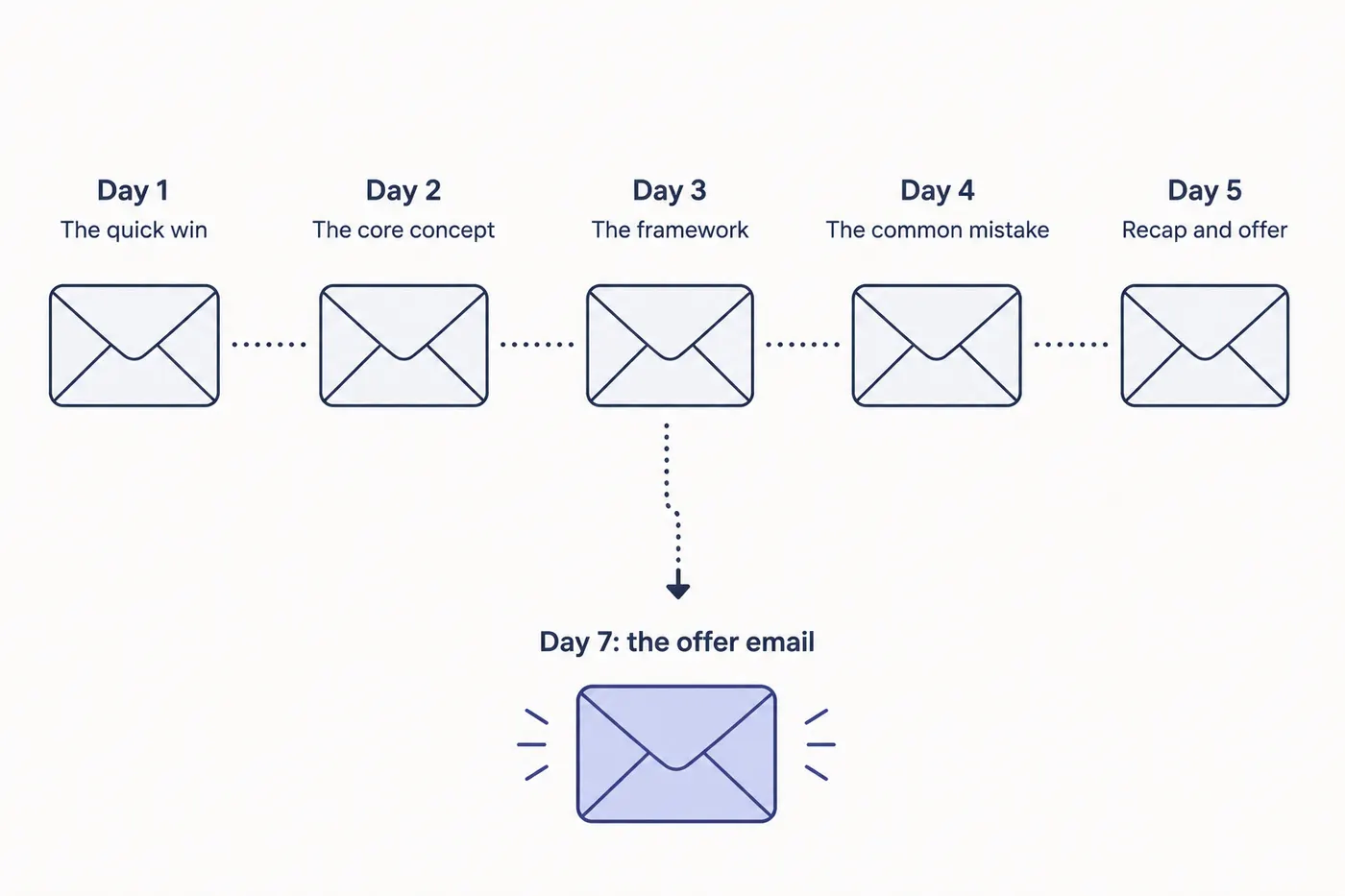
A free 5-day email course is the highest-converting lead-magnet format in 2026. Use this proven day-by-day arc as your outline, then let the generator write each lesson in full.
Day 1: The promise and the quick win
Welcome them, state the specific outcome they will reach by Day 5, and deliver one small win immediately so they open Day 2. End with a teaser.
Day 2: The core concept
Teach the single most important idea behind the outcome. One concept, one example, one action step. Do not overload.
Day 3: The method or framework
Give them the repeatable process. This is the meatiest lesson: a named framework they can apply again and again, with a worked example.
Day 4: The common mistake
Show the trap most people fall into and how to avoid it. This builds trust and positions you as the expert who has seen it go wrong.
Day 5: The recap and the next step
Summarise the arc, celebrate their progress, and make the offer: the paid course, coaching, or product that is the logical next step after the free win.
Course-style content is a real category, not a niche
The course format is one of the most-created content types on the platform: authors have built more than 2,000 course-companion books on Inkfluence AI, structured teaching content designed to be delivered lesson by lesson. Whether you deliver it as a daily email sequence or a downloadable companion, the winning shape is the same: one teaching point per lesson, an action step, and a teaser that pulls the reader forward.
How Do You Actually Send an Email Course?
Writing the lessons is half the job. Delivery is what turns them into a list.
You send an email course as an automated sequence, not as broadcasts. In your email platform this is usually called an automation, a drip, or a workflow: someone joins a list, and the platform sends lesson one immediately, then the rest on a fixed delay. Every mainstream provider supports this on a free or entry tier, so the tool is rarely the constraint. The work is having five finished lessons ready to paste in, which is the part the generator above handles.
The cadence that works best for a five-lesson course is one lesson per day for five consecutive days. Daily feels intense written down, but it matches the reason people signed up: they want the outcome now, not in a fortnight. Spacing lessons two or three days apart gives attention time to decay and reliably drops completion. If your subject genuinely needs practice between lessons, such as a fitness or habit course, every other day is the sensible exception.
Keep each lesson between 300 and 600 words. Long enough to teach one real thing, short enough to read on a phone between meetings. If a lesson runs past 800 words you almost certainly have two lessons, and splitting it will improve both. Subject lines should name the outcome rather than the day number, because "Day 3 of 5" tells a reader nothing about whether to open it.
The ending is where most courses lose their value. When lesson five lands, the sequence stops and the subscriber sits in your list with no further contact until you happen to send something. Decide in advance what happens next: a single offer email two days after the final lesson, then a move onto your regular newsletter. If your course exists to sell something, that transition is the whole point of building it, and it is worth planning before you write lesson one. Our guide to lead magnets that actually convert covers the offer step in more detail, and the opt-in sequence guide covers what to send after the course ends.
One practical note on format. An email course and a downloadable companion are not competing choices; the strongest funnels use both. Deliver the lessons by email for the daily habit, and offer the same material as a downloadable lead magnet for people who would rather read it in one sitting. Coaches in particular tend to see better results from the pairing, which we cover in using lead magnets to book clients. If the course grows past five lessons and starts to look like a curriculum, the AI course creator is the better starting point.
Inkfluence AI vs ChatGPT for Email Courses
ChatGPT can write individual emails. Inkfluence AI creates coherent email courses with a learning arc.
| Feature | Inkfluence AI | ChatGPT |
|---|---|---|
| Email-course blueprint | ✓ 5-section structure | ✗ No blueprints |
| Learning arc across lessons | ✓ Sequential drafting | ✗ No memory |
| Homework assignments | ✓ Auto-generated | Only if prompted |
| Next-lesson teasers | ✓ Curiosity gaps | ✗ Not automated |
| Subject-line hooks | ✓ Every lesson | Separate request |
| Built-in editor | ✓ | ✗ |
| Cover designer | ✓ Basic + AI | ✗ |
| PDF / EPUB export | ✓ One click | ✗ Copy-paste |
Email Course Prompt Templates
Copy, paste, and adjust. Include the topic, audience, number of days, and the outcome you want subscribers to achieve.
Free Lead Magnet Course
"Create a 7-day email course teaching beginners how to start a profitable blog, with one lesson per day and an action step in each email"
Upsell Funnel Course
"Write a 5-day email course on personal finance basics for millennials, designed as a free lead magnet with a paid course upsell"
AI Skills Mini-Course
"Create a 10-day email course teaching small business owners how to use AI tools to save 10 hours per week"
Challenge Format
"Write a 21-day email challenge helping readers build a daily meditation practice, with progressive difficulty"
Consulting Funnel
"Create a 5-day email course introducing freelancers to productised services, designed to promote a consulting offer"
Who Uses the AI Email Course Generator?
Anyone who needs to teach, nurture, or convert through email sequences.
Course Creators
Free email courses as lead magnets for paid programs. The learning arc format mirrors course structure, so subscribers experience your teaching style before buying.
SaaS Marketers
Onboarding sequences that guide new users to their first success. Product education courses that reduce churn. Free courses that demonstrate how your tool solves problems.
Coaches
Preview your coaching methodology with a free mini-course. Build trust and demonstrate results before the sales conversation. The homework format mirrors coaching homework.
Consultants
Create nurture sequences that position your consulting offer as the logical next step. Teach enough to demonstrate expertise while leaving the implementation to your paid engagement.
Newsletter Operators
Convert subscribers from passive readers to active learners. Email courses have higher engagement and lower unsubscribe rates than regular newsletters.
Digital Product Sellers
Pre-sell digital products through educational sequences. Free courses that solve a small version of the problem, then position your product as the complete solution.
How to Create an Email Course with AI in 2026
1. Pick one specific outcome
The best email courses promise a single, measurable result. Not "learn marketing" but "get your first 100 email subscribers in 7 days." The specificity makes each lesson focused and the homework actionable. Subscribers know exactly what they will achieve.
2. Choose the right length
5 days for simple lead magnets and skill introductions. 7 days for the sweet spot between depth and completion rate. 10-14 days for comprehensive skill-building. 21-30 days for habit and challenge formats. Longer is not better - match the length to the complexity of the outcome.
3. Front-load value in Day 1
Day 1 determines whether subscribers open Day 2. Deliver a quick win immediately: a template, a framework, or a small result they can see today. The AI generates strong Day 1 content by default, but review it and make sure the first homework assignment delivers a tangible result.
4. Edit for your voice and platform
The AI generates scannable, inbox-friendly content. Edit each lesson to match your brand voice and add personal stories or client examples. Then copy into your email platform and set the drip schedule. Most creators use 1 email per day, sent at the same time each morning.
5. Bundle the course as a bonus PDF
Export the full course as a PDF from Inkfluence AI. Offer it as a bonus download on the final day ("Here's the entire course in one PDF for reference"). This increases perceived value and gives subscribers a reason to stay on your list for the next offer.
Best Email Course Niches in 2026
AI Skills Mini-Courses
Teach specific AI tools and workflows. Massive demand from professionals learning to use AI in their roles. Updated frequently as tools evolve.
Health and Wellness Challenges
21-day meditation, nutrition reset, or fitness challenges. High engagement, natural progression, and strong upsell to coaching or products.
Passive Income Tutorials
Step-by-step income stream setup: print on demand, digital products, affiliate marketing. Each lesson builds one piece of the system.
Productivity Systems
Teach a complete productivity framework over 5-7 days: time blocking, task management, energy management, and weekly reviews.
Creative Skill-Building
Writing, design, photography, music production. Daily creative exercises with progressive difficulty. Strong community engagement potential.
Personal Brand Building
7-day courses on building a professional online presence: positioning, content pillars, platform strategy, and audience growth fundamentals.
Create Your Email Course Today
A dedicated email-course blueprint, built for exactly this format. Start free - describe your topic, generate lessons, and have a ready-to-send course in under an hour.
Start Writing FreeFrequently Asked Questions
What's the difference between an email course and an ebook?
How many days should an email course be?
Can I edit individual emails?
How do I use this with Mailchimp or ConvertKit?
Can I include assignments?
Is the AI email course generator free?
Can I use this for a paid course?
How is this different from using ChatGPT to write emails?
What makes a good email course topic?
Can I generate a welcome sequence instead of a teaching course?
Does it write subject lines?
What is the best AI for creating email courses in 2026?
Related Tools
Lead Magnet Generator
Short-form guides and checklists for list building
AI Ebook Generator
Full-length ebooks for all topics
AI Playbook Generator
Step-by-step strategy playbooks
AI Book Writer
All genres - full platform overview
AI Documentation Generator
Technical docs and knowledge bases
AI Audiobook Generator
Turn your book into audio for Audible
Related Reading
Guides for email course creators and list builders