
Ebook Launch Checklist (2026): The 30-Day Plan That Sells
A practical ebook launch checklist for 2026. Follow a 30-day plan covering pre-launch, launch week, and post-launch momentum with clear, realistic steps.
Quick Answer
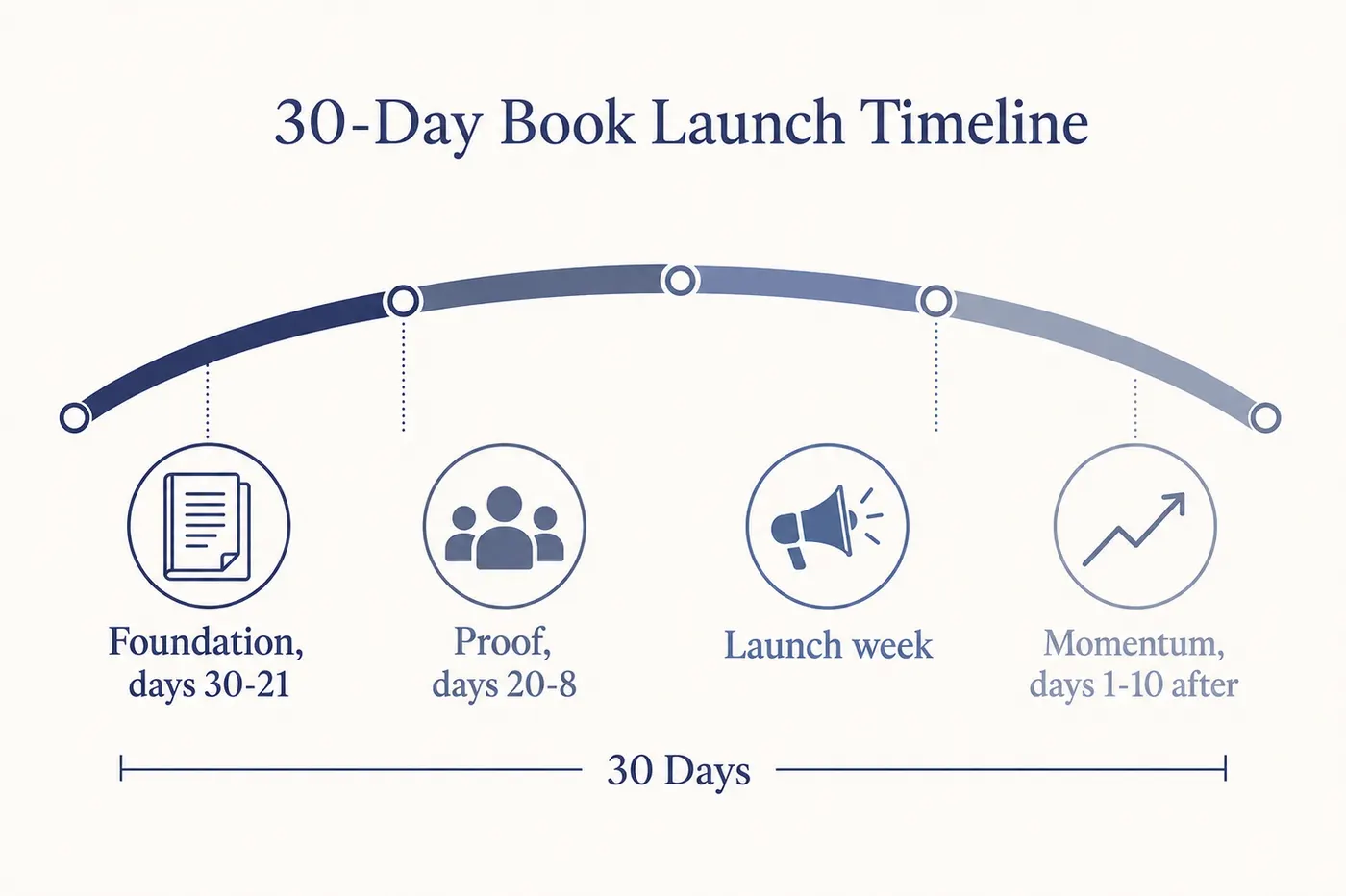
A successful ebook launch follows a 30-day arc: foundation (days 30-21), proof and visibility (days 20-8), launch week, and post-launch momentum. The key is warming your audience before launch day rather than relying on a single announcement. Start by creating your ebook with an AI ebook generator, then follow this phased checklist to maximise sales.
If you are looking for an ebook launch checklist that does more than list thirty random tasks, this 2026 update is built for how launches actually work today. It is a 30-day arc with clear phases: foundation, proof, launch, and momentum. If you still need the book itself, start with the AI Ebook Generator and export a clean PDF or EPUB for distribution.
Most ebook launches stall for a simple reason: the timing is backwards. Creators wait until launch day to talk about the book, then hope a single announcement can carry the entire week. A better launch is a series of small, deliberate signals that warm the audience first, build trust next, and then make purchase feel obvious. That is the real checklist.
Why the 30-day plan still works in 2026
Thirty days is long enough to build anticipation without losing relevance. It gives you room to polish the manuscript, line up proof, and create the simple assets that remove friction on launch week. It is also short enough that you do not spend months talking about a book that is not ready. In other words, it is the balance between credibility and urgency.
Think of the timeline as a narrative. The first act establishes the promise and shows your preparation. The second act proves the promise is real. The third act delivers the offer at the right moment. The final act keeps the story alive after launch so the book keeps selling.
The 30-day arc (foundation, proof, launch, momentum)
Here is the whole arc as an actual checklist. Work down it in order; each phase assumes the one before it is done.
| Window | What you finish | Why it matters |
|---|---|---|
| Day 30-26 | Manuscript locked, title and subtitle final, description drafted | Everything downstream quotes these words. Changing them later means redoing the rest. |
| Day 25-21 | Cover tested at thumbnail size, landing page live, author bio written | Most buyers see the cover at 200px before they see anything else. |
| Day 20-14 | Early readers have the draft, excerpt chosen, first testimonials collected | Proof gathered now is what launch week actually sells on. |
| Day 13-8 | Final files exported, categories and keywords chosen, price set against the royalty bands | Price and category decide your royalty rate, not just your positioning. |
| Day 7-1 | Listing uploaded and previewed, email sequence written, launch posts drafted | Writing copy during launch week is how launches slip. |
| Launch week | One narrative across email, social and listing; the same promise everywhere | Consistency converts better than novelty across channels. |
| Day 1-10 after | Reader wins shared, objections answered, page updated with real proof | The follow-up window is where most launches quietly stop earning. |
Days 30 to 21: foundation
This is where you finalize the manuscript, lock the title, and make sure the core promise is crystal clear. The cover needs to read at thumbnail size, and the description needs to explain the transformation in one sentence. Your landing page should exist even if it is simple. People need a place to land and a reason to care.
In this phase, you also establish what you are not going to do. A launch that tries to be everything to everyone never lands. Narrow the audience, narrow the promise, and keep the output focused. If you are drafting late, this is also where a tool like Inkfluence helps. Create the draft, refine the structure, and export a clean file without wrestling with layout.
Days 20 to 8: proof and visibility
Proof beats hype. This window is about getting early readers, collecting feedback, and generating small but credible signals that the book is worth attention. A short excerpt, a few early testimonials, or a behind the scenes breakdown of what readers will learn does more than a generic announcement. If you are still deciding what the book should be, pick a topic with proven demand before committing thirty days to promoting it. Use this period to show the work, not just announce it.
What you are really building here is trust. If readers see that the book solves a real problem and is already helping people, the launch week offer feels like the natural next step. This phase is also a good time to tune the positioning. If early readers consistently highlight a specific outcome, make that the headline of your launch week messaging.
Launch week: one narrative across channels
Launch week should feel cohesive. Your email, social posts, and partner mentions should all tell the same story: what the ebook does, who it is for, and what happens when someone reads it. The goal is not to be loud everywhere. The goal is to be consistent everywhere. If you are publishing on Amazon KDP, make sure your metadata, categories and description match the narrative you are using off platform. Selling direct as well? Gumroad and Etsy each need their own listing copy rather than a copy-paste of the Amazon one.
Remember that launch week is not a single day. It is a short sequence. If you have a list, use it thoughtfully. A short series with a clear value message works better than daily blasts. If you are using social, focus on clarity and repetition, not novelty. People do not see everything you post.
Days 1 to 10 after launch: momentum
The day after launch is when most creators stop. That is a mistake. Keep momentum by sharing reader wins, answering common questions, and updating your sales page with real proof. This is also when you can run a light follow up email to people who clicked but did not buy. Momentum is not a spike; it is a gentle slope, and it is the part a longer-term marketing plan is built to carry once the launch window closes.
Post launch is where you learn what actually resonates. Which description lines were repeated back to you. Which objections stopped buyers. Which format people asked for. That insight becomes the foundation for your next iteration, whether you update the same book or build a follow up.
The launch assets that do the heavy lifting
You do not need a dozen complicated assets. You need a sharp cover, a clear description, a simple landing page, a short email sequence, and a few posts that highlight the transformation. If you have those five elements ready before launch week, you are ahead of most creators. Everything else is optional polish.
When in doubt, prioritize clarity over creativity. A plain page with a direct promise beats a beautiful page that hides the point. A short email that tells readers what they will gain beats a long email that tries to sound clever. The checklist is not about volume. It is about removing friction at each step.
Amazon KDP notes (if you are launching there)
If Amazon is part of your plan, treat it like a storefront, not a dumping ground. Make sure the subtitle reads like a benefit, not a keyword list. Choose categories that match reader intent, and decide early whether you are going exclusive with KDP Select or wide. Keep the description focused on outcomes. If you used AI to draft, follow Amazon's AI disclosure rules and make sure the final manuscript is edited in your voice.
Do not let KDP settings drift away from your marketing. Your external messaging and your Amazon listing should mirror each other. If they do not, readers will bounce. Consistency is more important than cleverness.
How the launch changes depending on where you sell
Most launch checklists assume Amazon. In practice the same book launched on Amazon, on your own store, and on a marketplace needs three different plans, because the discovery mechanics are not the same. Amazon has internal search and category ranking, so your metadata does the marketing for you once the listing gains traction. A direct store has no discovery at all, so every visitor has to come from you. A marketplace sits in between: there is search, but browsing behaviour skews heavily toward format and price rather than author.
On Amazon, the launch is mostly front-loaded into the listing. Subtitle, categories and keywords determine who ever sees the book, and the Select versus wide decision determines whether you can promote it anywhere else at the same time. Price interacts with royalty bands rather than being a pure positioning choice, which is why it is worth checking what each price point actually pays before you settle on one.
Selling direct through Gumroad inverts that. Nobody browses their way to your book, so the launch is entirely about the sequence you run to your own audience, and the payoff is that you keep far more of each sale and own the customer relationship. The checklist above still applies, but the proof phase matters more, because a direct buyer has no reviews or bestseller badge to reassure them.
Etsy rewards a different shape of product entirely. Workbooks, planners and printables do better there than long-form prose, and the listing images carry more weight than the description. If your book is a practical, use-it-daily format, it is worth a separate listing rather than a copy of your Amazon one.
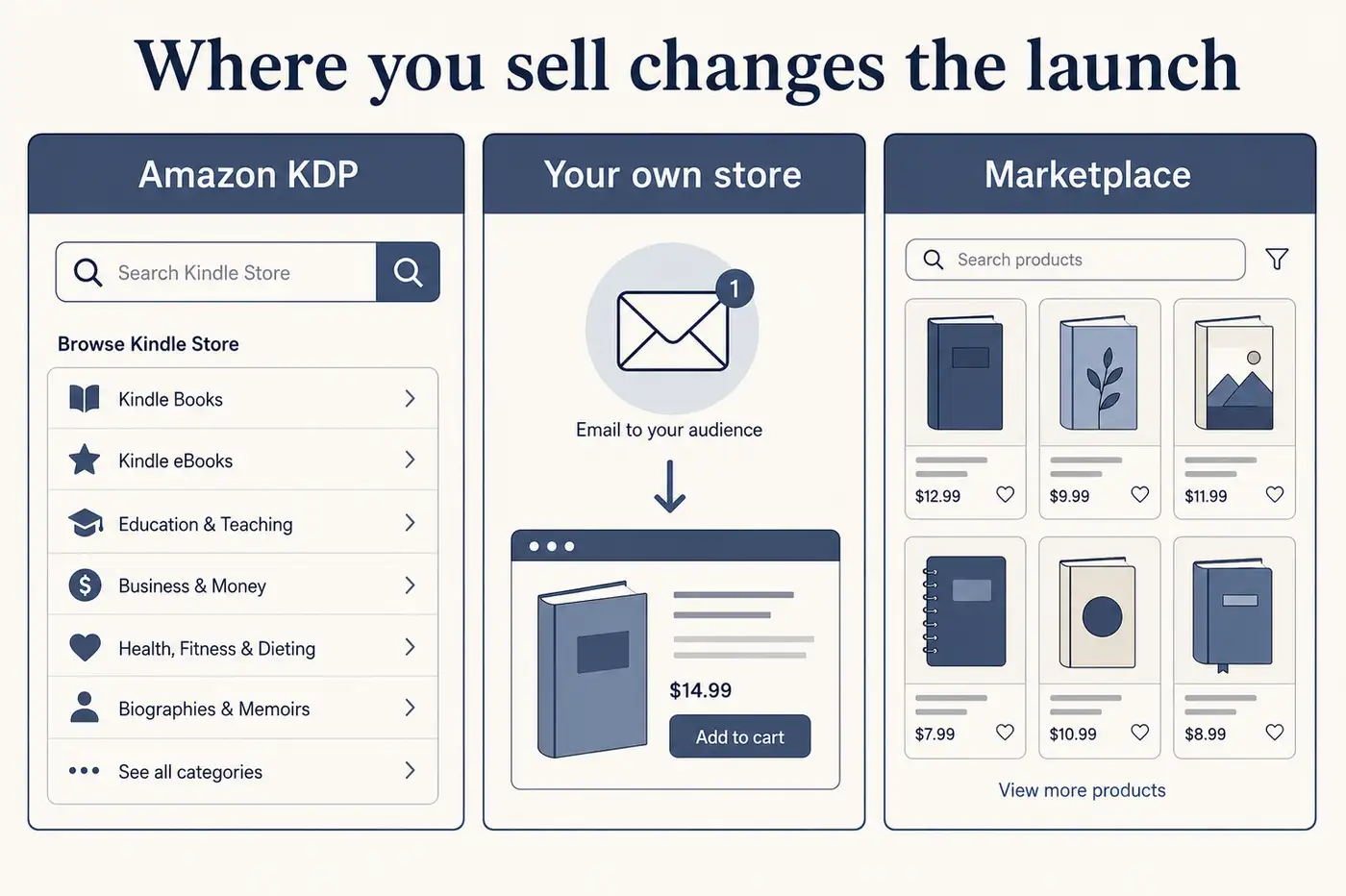
The practical takeaway is to pick your primary channel before day 30, not during launch week. The checklist stays the same; the emphasis shifts.
Common mistakes that stall launches
The biggest mistake is waiting for a perfect manuscript before starting any promotion. The second is announcing the launch without any proof. The third is treating launch day as a single event instead of a short sequence. If you avoid those three issues, your odds improve dramatically.
Another common mistake is changing the promise mid launch. If you see low conversion, do not rewrite everything. Fix the clarity and keep the narrative consistent. The launch succeeds when the message is the same everywhere people encounter it.
A simple case style walkthrough
Imagine a creator launching a short guide for busy consultants. In the foundation phase, they tightened the promise to one sentence, built a plain landing page, and got the cover right at thumbnail size. In the proof phase, they sent an early draft to a small group, collected two clear testimonials, and shared a short excerpt. In launch week, they repeated the same outcome across email and social, and kept the call to action consistent. Post launch, they added the testimonials to the landing page and followed up with readers who clicked but did not purchase. The result was not a viral spike. It was a clean, steady launch with predictable follow on sales.
Quick reality check
You do not need a massive audience to launch successfully. You need a clear promise, a consistent narrative, and a short window where you show up with it.
If you are still building the ebook itself, Inkfluence can help you draft and export quickly. Start with AI ebook generation, then format the final file with the PDF ebook maker.
FAQ: Ebook Launch Checklist (2026)
How far in advance should I plan an ebook launch?
Thirty days is the sweet spot for most creators. It gives you enough time to finish the book, prepare assets, and warm up your list without losing momentum.
What should I focus on first?
Start with the core promise and the cover. If those are not clear, nothing else matters. Then make sure the landing page and description are aligned to that promise.
How many emails should I send?
A small sequence works best. Plan a short series with one announcement, one value based email, one launch day email, and a follow up. Focus on clarity, not volume.
What if I am launching on Amazon KDP?
Prioritize metadata and readability. Make sure your categories, subtitle, and description all point to the same reader outcome. Use an edited manuscript and follow disclosure rules for AI assisted content.
Can I launch with a small audience?
Yes. A smaller audience can still produce strong results if the promise is specific, the offer is clear, and the timing is focused.

Founder, Inkfluence AI
Sam is the founder of Inkfluence AI. He built the platform to make book creation accessible to everyone - from first-time authors to seasoned publishers.
Helpful links
Ready to Create Your Own Ebook?
Start writing with AI-powered tools, professional templates, and multi-format export.
Get Started FreeRelated Articles
 Marketing
 Trending Ebook Topics for 2026: 10 Niches With Real Buyer Demand
We tracked 40+ emerging ebook topics against Google Trends, Amazon BSR, and Reddit engagement over six months. Here are the 10 trending ebook niches for 2026 that show real buyer momentum, not hype.
 Marketing
 Ebook Marketing Strategy 2026: The Complete Guide to Selling More Books
Learn proven ebook marketing strategies for 2026. From pre-launch planning to Amazon KDP optimization, email funnels, and paid ads. Step-by-step guide for authors.
 Marketing
 Lead Magnet Creator (2026): Build a PDF Opt-In That Converts in Minutes
People searching for a lead magnet creator want speed, structure, and a PDF that feels worth the trade. This guide shows how to build a focused opt-in in minutes without sacrificing conversion.
Get ebook tips in your inbox
Join creators getting weekly strategies for writing, marketing, and selling ebooks.